



Quick Summary
- COBOL dates to 1959 and still runs payments, policies, and benefits, so modernization means changing how the software runs while keeping exactly what it does.
- Four signals say it is time: the maintainers are retiring, every new integration needs custom middleware, auditors are flagging issues, and the business waits on changes the system cannot deliver.
- Seven strategies exist, from retain and rehost through refactor and rewrite to encapsulation behind an API, and a large estate normally uses several of them at once.
- Score each system on criticality, code tangle, compliance load, maintainer availability, change frequency, and data complexity, where 6-9 points to rehosting, 10-13 to refactoring, and 14-18 to a staged rewrite.
- AI reads undocumented code and drafts tests well, but it cannot guarantee behavioural equivalence, and a single rounding difference in a payments system reaches customers.
COBOL modernization is the process of updating legacy COBOL systems that still run banks, insurers, and government agencies, so they cost less, carry less risk, and preserve the business logic they have executed for decades.
If you own one of these systems, you have to move critical code without breaking the processes it quietly holds together.
The engineers who wrote COBOL are retiring, every new integration needs custom middleware, and a single bad cutover can take down payments or claims.
We wrote this guide to show you how to deal with it and provide the engineering view, drawn from our work modernizing legacy systems for large enterprises.
You will see the seven modernization strategies compared side by side, including AI migration, a no-downtime approach built on incremental delivery, the main tool categories, what raises project costs, and how to evaluate a partner for COBOL modernization.
By the end, you will know which strategy fits your system, what to ask a vendor, and how to plan a migration without a production outage.
What Is COBOL Modernization?
We gave a short answer in the intro. Most people who deal with COBOL already know that much, so the useful question is not what the word means, but what actually changes when you modernize and how much of the system it touches. Let’s break it down.
COBOL modernization is the work of updating a legacy COBOL application to run on more modern technology while keeping the exact business behavior it already produces. That can mean newer infrastructure, a modern language like Java or C#, connected APIs, or a mix of these.
In practice, it usually touches four things:
- The code: moved to a modern language or wrapped in an API.
- The infrastructure: moved off the mainframe to the cloud.
- The data: moved into modern databases.
- The integrations: opened up so other systems can connect.
The meaning of COBOL modernization is that you change how the software runs and how it gets maintained, but you keep what it does for the business.
Think of the plumbing and wiring hidden behind the walls of a building. You never see it, but the lights, water, and heating all work on it. COBOL sits in the same spot inside a core banking system or an insurer. You do not see it, but everything depends on it.
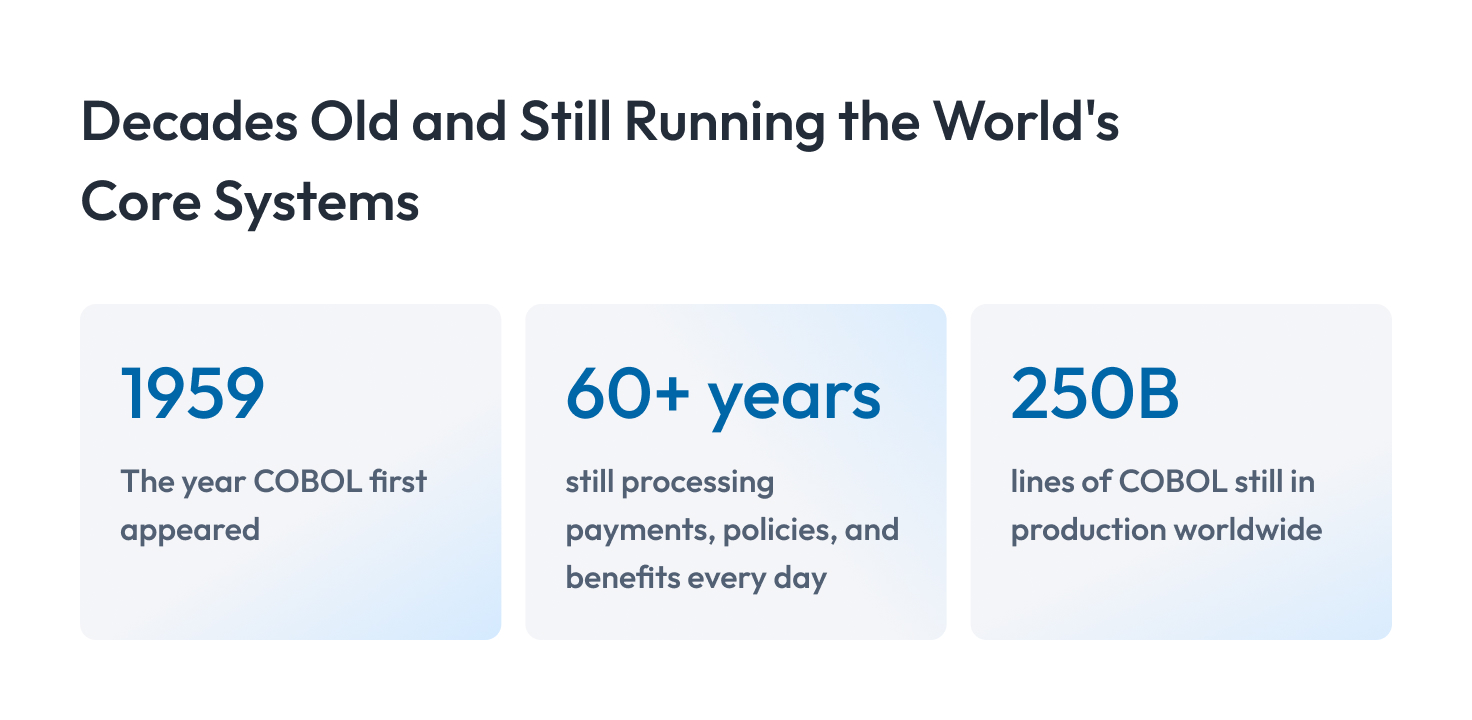
One thing that is worth mentioning is that COBOL is old. It first appeared in 1959, and the systems built on it still run payments, insurance policies, and government benefits every day.
In most cases, they do this reliably.
But leaving it alone also has a cost. Each year it gets harder to hire COBOL developers, harder to connect the system to modern tools, and slower to change when the business needs something new. Doing nothing with it feels safe, but it limits what you can do.
Should You Modernize COBOL? Retain vs. Modernize
That limit is where this decision starts. The question is whether keeping your COBOL still costs less than changing it.
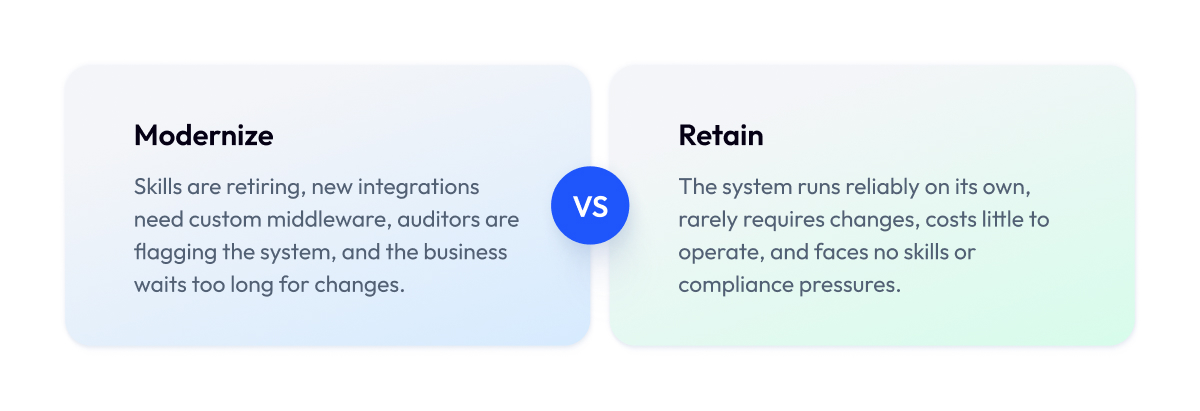
Modernize COBOL when the people who understand it are retiring, when new integrations keep needing custom middleware, or when compliance is getting harder to meet. If the system is stable, isolated, and cheap to run, keeping it is a reasonable choice.
Four signals usually mean it is time to move:
- The engineers who maintain the code are close to retirement, and no one is replacing them.
- Every new connection to the system needs expensive custom middleware.
- Auditors and regulators are flagging issues with the system, and fixes are slow.
- The business keeps waiting on changes the system cannot deliver fast enough.
If none of these apply, you can retain the system with a plan. A COBOL application that runs reliably, stands mostly on its own, and rarely needs changes does not have to move just because it is old.
The point is to decide on purpose. Keeping COBOL is a fine call when you have weighed it and chosen it, instead of drifting into it because touching the system felt too risky.
Why Modernize COBOL? The Main Drivers
We just covered when to modernize. Here is what pushes most teams to do it.
Three pressures come up again and again:
- A shrinking pool of COBOL skills.
- The rising cost and risk of running the system.
- The trouble of integrating and staying compliant.
Usually more than one is in play at the same time.
1. The skills shortage
Every year the pool of engineers who can safely change the system gets smaller, and the ones who remain cost more. When institutional knowledge walks out the door, a system that once felt stable becomes a system nobody fully understands.
2. Cost and risk
Mainframe licensing, specialized hardware, and scarce expertise make COBOL expensive to keep running. The risk grows alongside the cost. Undocumented business logic, thin test coverage, and a handful of people who understand the code mean a single change can go wrong in ways that are hard to predict and slow to fix.
3. Integration and compliance
Modern software connects through APIs. COBOL systems usually do not, so every new integration requires custom middleware, adding cost and fragility. Compliance gets harder too, since older systems are slower to adapt to new data, privacy, and reporting rules that regulated industries like insurance face constantly.
Any one of these is a reason to look at modernization. Together, they are the reason COBOL modernization remains near the top of the roadmap for banks and insurers.
COBOL Modernization Strategies: The 7 R’s Compared
Once you have decided to move, the next question is how. There are seven common COBOL modernization strategies, and they differ mainly in how much you change and how much you gain.
The seven options are
- Retain.
- Rehost.
- Replatform.
- Refactor.
- Rewrite.
- Replace.
- Encapsulate.
Each one trades speed and safety against how modern the result is.
Rehosting is the fastest and lowest-risk, but it keeps the old code.
Rewriting gives the most modern result and costs the most.
Most enterprises use several of these at once, choosing a different approach for each system.
Here is how the seven approaches compare:
| Strategy | Cost | Risk | Effort | Business Logic | Best For |
| Retain | Low | Low | Minimal | Fully preserved | Stable, isolated, rarely changing systems |
| Rehost | Low | Low | Low | Fully preserved | Fast infrastructure cost cuts, code unchanged |
| Replatform | Medium | Low to medium | Medium | Mostly preserved | Small tweaks for a new runtime or database |
| Refactor | Medium to high | Medium | High | Preserved, restructured | Better maintainability without a full rewrite |
| Rewrite | High | High | Very high | Rebuilt from logic | Modern language, long-term flexibility |
| Replace | Varies | Medium to high | Medium to high | Replaced by product | A commercial product covers the function |
| Encapsulate | Low | Low | Low | Fully preserved | Exposing COBOL through APIs, deferring change |
Here is what each strategy means in plain terms.
Retain. You keep the system as it is and decide not to change it. This fits stable, isolated systems that run reliably and rarely need updates. The cost is that every problem you are avoiding stays in place.
Rehost. You move the COBOL as-is to cheaper infrastructure, often the cloud, without changing the code. It is fast and low-risk and can cut hosting costs quickly. You still have the same old code to maintain afterward.
Replatform. You make small changes so the system runs on a new runtime or database, for example moving off the mainframe or swapping the data store. You get some modern benefits for moderate effort. It stops short of improving the code itself.
Refactor. You restructure the COBOL to make it cleaner and easier to maintain while keeping the same language and behavior. Maintainability improves, and the logic stays intact. It takes engineering effort and does not move you to a modern language.
Rewrite. You rebuild the system from its business logic using a modern language such as Java or C#. You get the most modern, flexible result. It is the most expensive and highest-risk path, so it needs careful execution.
Replace. You retire the COBOL and adopt a commercial product that already does the job. This works when your process is standard instead of a competitive advantage. The trade-off is between fitting your operation to the product and the other way around.
Encapsulate. You wrap the COBOL behind an API so modern systems can use it without touching the underlying code. It is quick, low-risk, and buys time. The old system stays where it is, delaying change instead of resolving it.
There is no single right answer, and that is the point.
A large program almost never picks one strategy. You might encapsulate a stable module behind an API, rehost another to cut mainframe costs, and rewrite the one part of the system the business needs to change often.
Matching the approach to each system is where good legacy modernization work happens.
The Zoolatech COBOL Modernization Decision Matrix
The strategies above outline your options. This tells you how to pick, using a simple score.
The Zoolatech COBOL Modernization Decision Matrix rates your system on six traits. You give each trait a score from 1 to 3, add them up, and the total points lead you to a starting approach. The idea is to turn a vague “it depends” into a number you can act on.
How to use it. Score each of the six traits below from 1 to 3, then add the six numbers together. Your total lands between 6 and 18.
| System Trait | 1 Point | 2 Points | 3 Points |
| How critical is it? | Downtime is annoying | Downtime hurts | Downtime stops the business |
| How messy is the code? | Organized, easy to follow | Some tangled parts | Nobody fully understands it |
| How much compliance? | Few rules apply | Some audits and reporting | Heavily regulated |
| Who can maintain it? | Several engineers can | One or two people can | The experts are leaving |
| How often does it change? | Almost never | A few times a year | Constantly |
| How complex is the data? | Small and simple | Medium-sized | Huge and interconnected |
Now match your total to the band below:
| Your Total | What It Points To |
| 6 to 9 | Keep the code, move it to cheaper hosting or wrap it in an API |
| 10 to 13 | Refactor the key parts, wrap the rest, use AI to read the code |
| 14 to 18 | Rewrite step by step with AI help, run old and new side by side |
Here is the matrix in action.
Take a payments module where downtime stops the business, the code is a tangle nobody fully understands, it is heavily regulated, and the last experts are leaving. It changes a few times a year and sits on interconnected data.
That totals 17, near the top, which points to a step-by-step rewrite with AI help and a long parallel run before cutover.
A stable internal reporting system usually scores the other way. Downtime is only annoying, the code is organized, few rules apply, a couple of people still know it, it almost never changes, and the data is small.
That totals 7, which suggests simply moving it to cheaper hosting or wrapping it in an API instead of a costly rewrite.
We built the matrix on the same principles behind our wider modernization work.
For Credible, legacy modernization and infrastructure optimization cut operating costs by 50% and brought onboarding down from days to minutes.
For MasterControl, we ran a multi-year modernization program with no production interruption.
Score your own system honestly against the six traits, and you will have a defensible starting point for the conversation, plus a clear sense of whether you are looking at a quick rehost or a multi-year rewrite before you spend a dollar.
AI-Assisted COBOL Migration: What It Can and Can’t Do
The matrix keeps pointing to one option: AI help. Here is what that actually buys you, and where it stops.
AI-assisted COBOL migration speeds up parts of the work. It is good at reading undocumented code, generating tests, and drafting refactors. It does not run the whole migration on its own. Architecture, data migration, behavioral validation, and governance still sit around it and still need people.
Where AI helps
The biggest win is understanding code nobody documented. Feed a large language model a pile of COBOL, and it can explain what a program does, trace the logic, and surface the business rules buried inside. That alone can turn weeks of discovery into days.
AI is also useful for generating test cases for the old system, drafting a first-pass refactor, and providing a starting point for a COBOL-to-Java or C# migration. Using AI for COBOL modernization is most effective for narrow tasks where a human checks the output.
Where AI fails
AI does not guarantee behavioral equivalence, and behavioral equivalence is the whole game. A generated Java method that looks correct can round a number differently or handle an edge case the old code handled silently. In a payments or claims system, that is a defect that reaches customers.
Two other limits matter. LLMs are not always deterministic, so the same prompt can produce different code on two runs. And they hallucinate, filling gaps with plausible logic that was never in the original. Neither is acceptable in a system of record without human validation on top.
How to Modernize COBOL Without Downtime
The safest way to modernize a COBOL system is to change it gradually, one capability at a time. This is the approach we use with our clients on live systems where an outage is not acceptable. We move through the system piece by piece, prove each new part works exactly like the old one, and only then retire what it replaces.
The full process runs in four steps.
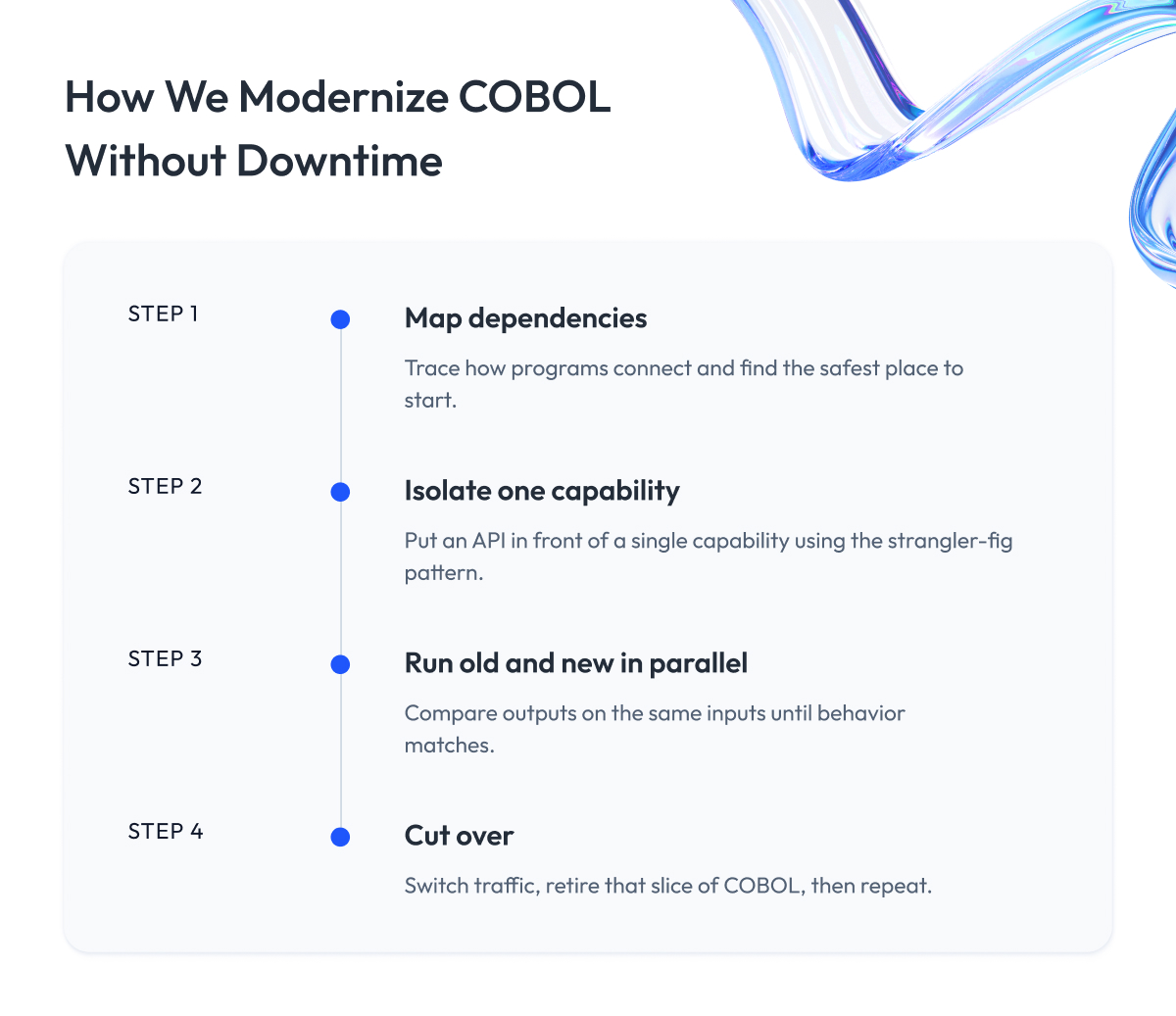
Step 1 – We assess and map dependencies
Before we move anything, we build a picture of how the system fits together, mapping which programs call which, where the data lives, and which business processes depend on them.
Much of this knowledge has usually been lost over the years, so we use AI analysis to trace calls through code that no one has documented in a long time. The result is a dependency map showing what can be moved safely and in what order.
Step 2 – We carve out one capability with the strangler-fig pattern
The strangler-fig pattern takes its name from a vine that grows around a tree and slowly takes its place.
The idea is the same here, because we build the new system around the old one piece by piece.
We put an API in front of a single capability and route its traffic to a new implementation behind that interface, while the rest of the system carries on unchanged. This lets the old and new systems run together for as long as the migration needs, without forcing an early commitment.
Step 3 – We run in parallel and check behavioral equivalence
For every capability we carve out, we run the old and new versions side by side on the same inputs and compare their outputs.
This comparison protects the business because behavioral equivalence means the new code returns the same results as the original, including the edge cases the old system handled quietly for years.
We treat a capability as ready only once its output consistently matches, and until then it remains in testing.
Step 4 – We cut over and evolve
Once a new capability has matched the old one long enough for us to trust it, we switch its traffic across and retire that slice of COBOL, then move on to the next capability and repeat the same loop.
Because the work advances one piece at a time, any issue that arises is limited to a single capability instead of the whole platform, and there is never a single day when the entire system has to work at once.
Migrating COBOL to Java or C#
Most rewrites target Java or C#, since both offer libraries, available talent, and enterprise support that COBOL no longer provides.
The mistake many teams make is translating COBOL line for line, which produces Java or C# that still behaves like COBOL and stays just as hard to maintain.
We prefer to rebuild each capability from its underlying business rules, applying the same GraphQL and Java patterns we would use for any modern service.
The data deserves equal attention because moving records from older stores such as VSAM or DB2 into a modern database is a large project in itself, and running it through controlled database migrations helps prevent it from becoming the weak point of the whole effort.
Running the resulting services on cloud infrastructure is usually where the savings from leaving the mainframe finally show up.
COBOL Modernization Tools & Software
COBOL modernization tools fall into four groups:
- Refactoring and transpilers.
- Rehosting platforms.
- AI code assistants.
- Testing and validation.
The best COBOL modernization tools and platforms for you depend on the strategy you picked earlier, since no single COBOL migration tool fits every system.
Each group maps to a different part of the work.
Refactoring tools and transpilers change or convert the code.
Rehosting platforms move it to new infrastructure.
AI assistants help you read and draft.
Testing tools confirm the result behaves the same way. Here is how the categories line up.
| Tool Category | What It Does | Fits Which Strategy |
| Refactoring and transpilers | Convert COBOL to Java or C# | Refactor, rewrite |
| Rehosting platforms | Move code to modern infrastructure | Rehost, replatform |
| AI code assistants | Read code, draft tests and refactors | Any, during analysis |
| Testing and validation | Compare old and new behavior | Every strategy, at cutover |
A few names come up often and are listed here for market context.
Rocket Software and OpenText, formerly Micro Focus, offer rehosting and refactoring platforms.
TSRI and various deterministic transpilers automate COBOL to Java or C# conversion with repeatable output.
IBM watsonx Code Assistant applies AI to mainframe code.
Tools such as vFunction, CAST, Moderne, and Swimm focus on understanding, documenting, or restructuring large codebases.
Each one handles a slice of the work, and the results still depend on the architecture, data migration, and validation around them.
Picking software is a step that follows your strategy, so choose the strategy first and let it tell you which category of COBOL modernization solutions you actually need.
How to Choose a COBOL Modernization Partner
Choosing a partner is one of the most important decisions in the whole project, and it deserves extra caution. Very few companies on the market genuinely understand COBOL and can modernize it to a high standard, so the pool of vendors who can do this well is much smaller than the number who will say yes to the work.
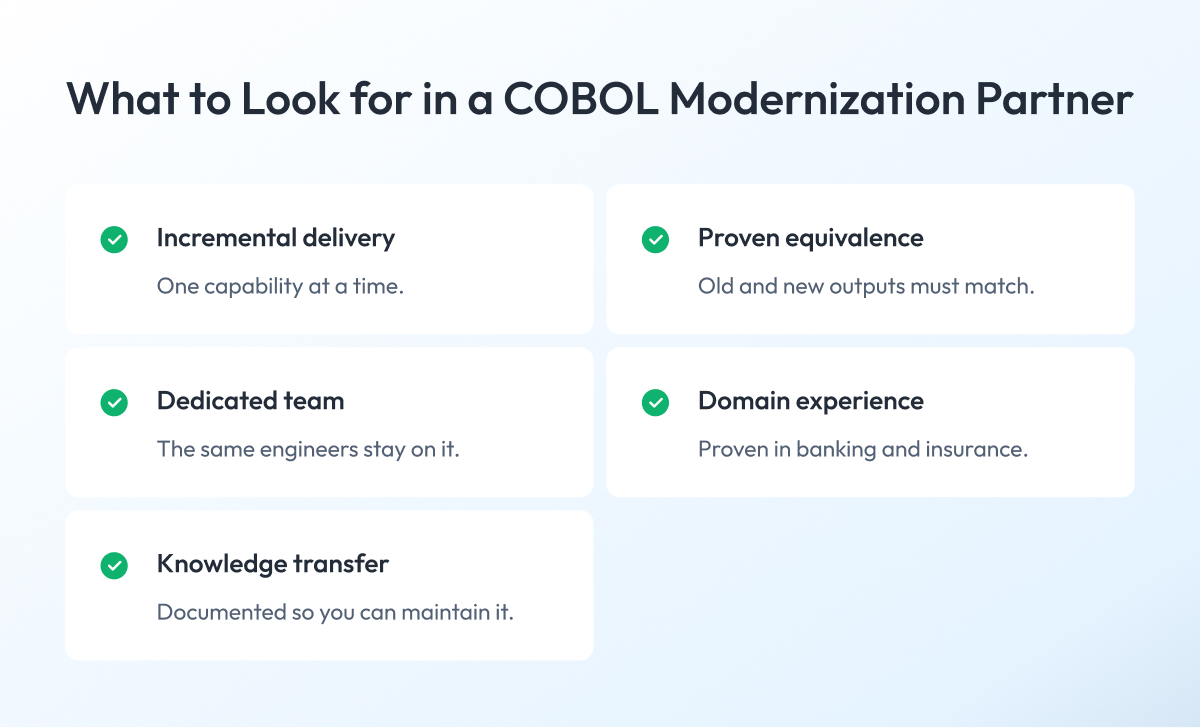
When you evaluate COBOL modernization companies, judge them on how they actually deliver. The three things that separate a safe partner from a risky one are incremental delivery, behavioral-equivalence validation, and dedicated teams that stay on your project through to the end.
Use this checklist when you compare COBOL migration services:
- Incremental delivery. They move one capability at a time and can show you a cutover plan for each step.
- Behavioral-equivalence validation. They run old and new in parallel and prove the outputs match before switching anything over.
- Dedicated, non-rotating team. The engineers who learn your system stay on it, so the knowledge stays with the project.
- Domain experience. They have worked in regulated environments such as banking and insurance and understand both compliance and code.
- Single ownership. One team owns architecture, delivery, and validation, so responsibility never falls through a gap.
- Knowledge transfer. They document as they go and hand the system back in a state your own people can maintain.
This is the model we run at Zoolatech. Our team includes senior COBOL engineers who stay with clients for years, which is why 98% of our clients keep working with us.
Every engagement comes with a dedicated delivery manager, a live risk register, and a formal quality checkpoint before anything reaches production. You can see the pattern across our financial services work, where the same discipline applies whether the system is COBOL or a newer platform being modernized.
Cost, Risk & Why COBOL Projects Fail
Most COBOL projects that fail do so for the same three reasons: a big-bang cutover, business logic nobody knew was there, and the loss of people who understood the system.
Cost works the same way. There is no single price for COBOL modernization, because the number depends on your system. A small rehost can run in the low six figures, while a full rewrite of a core platform can reach the millions of dollars. The main COBOL migration cost factors that move the figure up or down are fairly predictable.
| Cost Factor | Pushes Cost Up When |
| System size | Millions of lines, many programs |
| Code coupling | Everything depends on everything |
| Data complexity | Large, tangled, poorly documented data |
| Compliance load | Heavy audit and reporting requirements |
| Strategy chosen | Full rewrite over a simple rehost |
| Skills availability | Few people understand the system |
The failures usually trace back to the same roots.
A big-bang cutover puts the entire system at risk on a single day, with no fallback when something breaks.
Undiscovered business logic, the undocumented rules buried in decades-old code, surfaces only after go-live, when it is expensive to fix.
And when the last engineers who understood the system leave before the knowledge is captured, the team is left modernizing code it does not fully understand.
The incremental approach described earlier in this guide is intended to remove these risks. Moving one capability at a time limits the blast radius, parallel runs catch hidden logic before cutover, and AI analysis recovers knowledge that was never written down.
The demand behind all this is large and growing, with the legacy modernization market estimated at around $29.4 billion in 2026, which is also why so many vendors now offer the service and why careful selection matters.
Getting security right during the move is part of the job too, something we cover in our guide to enterprise application security.
Final Word
Choosing how to modernize COBOL is a slow, careful decision, and that is the right way to treat it. You are weighing strategies, scoring your systems, comparing vendors, and asking hard questions about validation and rollback before anyone writes a line of code.
That work pays off. A migration planned this way protects the payments, policies, and benefits your COBOL quietly runs every day, and it turns a system people are afraid to touch into one your team can actually change.
The cost of rushing is steep. A big-bang cutover or a poorly chosen partner can burn a seven-figure budget and leave you with a half-modernized system that is harder to run than the one you started with.
So use this guide as a starting point and keep going. Score your systems against the matrix, shortlist partners who can prove behavioral equivalence, and validate their approach before you commit. The goal is a COBOL modernization plan you can defend to your board and your engineers alike.
When you are ready to pressure-test that plan, we are here to help. We will review your systems, walk through the trade-offs, and show you what a realistic, no-downtime path looks like before development begins.
Questions You May Have
What is COBOL modernization?
COBOL modernization updates a legacy COBOL system to run on modern technology, such as new infrastructure, a modern language, or APIs, and keeps the exact business behavior the system already produces.
Should we modernize or keep COBOL?
Modernize when your COBOL skills are retiring, new integrations keep needing custom middleware, or compliance is slipping, and keep the system when it runs reliably on its own and costs little to maintain.
What are the COBOL modernization strategies, the seven R's?
The seven COBOL modernization strategies are retain, rehost, replatform, refactor, rewrite, replace, and encapsulate, and each one trades speed and cost against how modern the result becomes.
Can AI migrate COBOL automatically?
No, AI speeds up code analysis, test generation, and refactoring, but it cannot guarantee behavioral equivalence, so your engineers still own the architecture, data migration, and validation.
Why is COBOL modernization in the news?
COBOL modernization keeps making the news because IBM, Anthropic, and others now show how large language models and tools like Claude Code can read and migrate legacy mainframe code.
How do you modernize COBOL without downtime?
You map the dependencies, carve out one capability at a time behind an API, run the old and new versions in parallel, and cut over only after the behavior matches.
How do you migrate COBOL to Java or C#?
You rebuild each capability from its underlying business rules rather than translating line for line, then you validate the new code against the original before you cut over.
Can COBOL be migrated to .NET, Oracle, or SQL databases?
Yes, teams regularly move COBOL to .NET alongside C#, and they migrate the data from older stores such as VSAM or DB2 into modern SQL and Oracle databases in the same project.
How much does COBOL modernization cost?
COBOL modernization cost depends on system size, code coupling, data complexity, and the strategy you choose, and it ranges from the low six figures for a rehost to several million dollars for a full core rewrite.
How do we choose a COBOL modernization partner?
Judge a COBOL modernization partner on incremental delivery, behavioral-equivalence validation, and dedicated non-rotating teams, because few vendors understand COBOL well enough to modernize it safely.
Which COBOL modernization services, consultants, and companies are the best?
The best COBOL modernization services and consultants prove incremental delivery and behavioral equivalence on regulated systems, which counts far more than the size or name of the company.
What tools and platforms are used for COBOL modernization?
COBOL modernization tools and platforms include refactoring transpilers, rehosting platforms from vendors such as Rocket Software and OpenText, AI assistants like IBM watsonx Code Assistant, and testing tools that check behavior.