



Quick Summary
- The U.S. Food and Drug Administration (FDA) uses 21 CFR Part 11 to decide when electronic records and signatures count as trustworthy, reliable, and generally equivalent to paper.
- Section 11.10(e) requires secure, computer-generated, time-stamped audit trails for entries and actions that create, modify, or delete records, without obscuring earlier values.
- Part 11 itself does not require a reason for each change, while FDA’s Good Laboratory Practice rule does, and FDA guidance, EU Annex 11, and UK guidance recommend one.
- FDA does not certify software for Part 11 or review it in advance. It checks systems during inspections, and the regulated company stays responsible for compliance.
- In FDA’s fiscal year 2025 drug inspection data, the 211.68(b) observation “Computer control of master formula records” was cited 87 times, and no citation references Part 11.
Supporting 21 CFR Part 11 compliance means building software that drug and medical device makers can trust to keep their records. These are the records that U.S. Food and Drug Administration (FDA) rules require, such as equipment cleaning logs, production batch records, lab results, and quality approvals. The product must maintain a secure history of every change, show who made each change and when, and make electronic signatures as reliable as handwritten ones.
This is important because FDA checks these records during inspections. If a record can change without leaving a trace, FDA cannot rely on it, and your customer is the one who answers for it.
That is why customers ask you about FDA 21 CFR Part 11, often before they sign a contract. The questions sound simple, but the answers are hard to find. The rule was written in 1997, and FDA has explained it in several documents since. With so many sources, it is easy to confuse what your product must do with what is only a recommendation.
Many software companies come to us with this problem, so we wrote this guide. It draws on our own engineering work, including the digital logbooks Zoolatech engineers built with MasterControl.
We walk through the rule step by step. You will see what your product must record, what regulators recommend on top of that, and which tasks stay with your customer.
By the end, you will know what to build into your product and what to say when customers ask about Part 11.
What Is 21 CFR Part 11?
Part 11 of Title 21 of the Code of Federal Regulations (CFR) is an FDA regulation that sets the criteria for electronic records and electronic signatures to be considered trustworthy, reliable, and generally equivalent to paper records and handwritten signatures. Title 21 is the section of federal regulations that covers food and drugs.
Think of a paper logbook on a factory floor. An operator writes an entry, signs it, and fixes a mistake with a single line so the old value stays readable. Part 11 asks software to give inspectors the same kind of proof.
Many people believe FDA stopped enforcing Part 11 in 2003. That year, FDA published guidance on the scope and application of Part 11 and said it would not enforce some of its requirements, including system validation, audit trails, record storage, and record copies, as explained in that document. The same guidance confirms that FDA 21 CFR Part 11 remains in effect.
Records also still have to meet the predicate rules. These are the FDA regulations that require a record in the first place. For example, drug manufacturing rules require a log of cleaning, maintenance, and use for each major piece of equipment.
In its 2024 guidance on electronic systems in clinical investigations, FDA said it still applies the same “narrow and practical interpretation” of Part 11. In practice, the records stay mandatory, and FDA cites the predicate rules when a record falls short, as the inspection data later in this article shows.
Does Part 11 apply to your product?
It applies when your customers use the product to create, change, store, retrieve, or send records that FDA rules require. A digital equipment logbook that replaces the paper logs drug makers must keep is a typical case.
There is a narrow exception. If a customer prints records from the system, the printouts meet the predicate rules, and the team relies on paper for regulated work, FDA generally does not treat that as using electronic records instead of paper.
Each customer makes this call for each record type, so you cannot settle it once for all of them. To support 21 CFR Part 11 compliance across all your customers, we recommend building for the strictest case and letting each customer turn on the controls its rules require. If your customers make medical devices, the FAQ at the end of this article covers them.
What Are the 21 CFR Part 11 Audit Trail Requirements?
The 21 CFR Part 11 audit trail requirements fit into one short clause, Section 11.10(e). It calls for the “use of secure, computer-generated, time-stamped audit trails to independently record the date and time of operator entries and actions that create, modify, or delete electronic records. Record changes shall not obscure previously recorded information.”
For your product, the clause sets four rules:
- The system automatically writes an entry whenever a user creates, changes, or deletes a record.
- Each entry shows the date and time of the action.
- A change never hides the earlier value.
- You keep the audit trail at least as long as the record and make it available to FDA inspectors.
The clause does not say which fields an entry should contain. FDA filled that gap later.
In its 2024 guidance on electronic systems in clinical investigations, FDA says audit trail components must include:
- The date and time the data element or information was entered or modified.
- The individual making the change (e.g., user ID and user role).
- The old value and the new value.
FDA wrote this guidance for clinical trials, and it is FDA’s most recent wording on what an audit trail entry should contain.. We recommend using it as the baseline for any regulated product.
Many teams also ask whether each change needs a reason.
The answer depends on your customer’s rules:
- Part 11: It does not require a reason. When FDA issued the rule in 1997, it explained that the rules for each record type already require a reason where needed.
- FDA’s Good Laboratory Practice (GLP) rule: It requires a reason for every change to automated data in nonclinical lab studies.
- Other guidance: FDA’s 2024 guidance, EU Good Manufacturing Practice (GMP) Annex 11, and the UK Medicines and Healthcare products Regulatory Agency (MHRA) recommend recording a reason.
These rules apply even under FDA’s 2003 enforcement policy from the previous section. That policy covers only the Part 11 clause, and the predicate rules and FDA’s later guidance continue to expect audit trails for regulated records.
The table below shows which fields an audit trail entry should have and where each requirement comes from. Each row is one part of an entry.
The columns read from left to right:
- What Part 11 requires: The legal minimum.
- What FDA guidance adds: FDA’s recommendations, which are not binding.
- What other rules add: Stricter requirements from other sources, such as FDA’s GLP rule for lab studies and guidance from EU and UK regulators, including the Pharmaceutical Inspection Co-operation Scheme (PIC/S), a group of drug inspectorates.
- Our recommendation: Build one product that fits all of them.
| Part of the Entry | What Part 11 Requires | What FDA Guidance Adds | What Other Rules Add | Our Recommendation |
| When | Date and time of each action | Clock changes by admins only, time zone shown | MHRA: time zone where applicable | Server sets the time, users see their time zone |
| Who | Actions tied to a unique user | User ID and role of the person | No extra detail | Personal accounts only, role saved with each entry |
| What changed | Old values stay visible | Old value and new value | GLP: original entry stays visible | Old and new value for each field |
| Why | Not required | Reason for change, if applicable | Required by GLP, expected by Annex 11 and MHRA | Configurable per record type, on by default for GLP and EU |
| Protection | Secure, written by the system itself | Nobody can edit or disable it | PIC/S and MHRA: always on, admin changes logged | No customer setting turns it off |
| Retention | As long as the record, open to FDA | Searchable and sortable, PDF only as fallback | Annex 11: convertible to a readable form | Kept and exported together with the record |
| What to capture | Creating, changing, and deleting records | Deliberate actions, not every keystroke | No extra detail | Saves, edits, deletions, status changes |
Most entries in the FDA column come from the 2024 guidance for clinical trials. The last column reflects our engineering experience and carries no regulatory weight.
To use the table, start with your customers. A lab working under GLP or a manufacturer selling in the EU needs a reason for every change, and other customers may not. We recommend building everything in the last column and letting each customer switch parts on or off per record type.
How customers review audit trails, and what the product should make easy
An audit trail helps only when someone reads it. FDA compares this review to checking cross-outs in a paper record, so whoever reviews a record should also review the audit trail that captures changes to it.
Where the rules set no schedule, FDA says to choose how often to review based on process knowledge and risk. EU GMP Annex 11 expects regular review, and MHRA says the review does not need to cover every system activity, such as log-ins.
In practice, this gets hard quickly. In an article for Pharmaceutical Engineering, the journal of the International Society for Pharmaceutical Engineering (ISPE), practitioners write that some audit trail modules produce thousands of entries per month, which makes meaningful manual review impossible. They point to exception reports and risk-based sampling instead.
Your product can make this work much lighter.
To make review practical, we recommend these features:
- Changes to a record shown right next to the record under review.
- Filters for corrections, deletions, and overrides.
- A way for reviewers to mark what they have already checked.
The review itself stays your customer’s procedure. The product makes it practical but cannot do it for them.
21 CFR Part 11 Requirements for Records and Signatures: What the Product Builds and What the Customer Owns
Do you remember our discussion about audit trails? An audit trail is the secure history of every change to a record, showing who made the change, when, and what the old value was. It covers only one piece of Part 11.
The rest of the 21 CFR Part 11 requirements deal with questions about a record:
- Can an inspector get a copy?
- Can only the right people change it?
- Does a signature prove who signed it?
That is exactly what customers want to find out when they send you a list of 21 CFR Part 11 software requirements. Let’s sort out who does what, so you know what to build and what to leave to them.
Think of it like renting an office. The landlord installs the locks and the fire alarms. The tenant decides who gets a key and runs the fire drills.
FDA sees it the same way. In its 2024 guidance, FDA says a company can use outside software providers, including cloud services, but it remains responsible for its 21 CFR Part 11 electronic records. You are the landlord, and your customer is the tenant.
Here is how the split looks in practice. Imagine a digital equipment logbook where operators record each machine cleaning. Each row of the table shows one thing Part 11 asks for: what your product does, and what your customer does with the logbook.
| What Part 11 Asks For | What Your Product Does | What Your Customer Does |
| Proof the system works (§11.10(a)) | Test evidence and change notes for every release | Tests the logbook in its own processes |
| Copies for inspectors (§11.10(b)) | Exports entries with their history and signatures | Hands copies to the inspector |
| Records kept safe over time (§11.10(c)) | Old entries stay readable after upgrades | Decides how long to keep entries |
| Only the right people get in (§11.10(d) and (g)) | Checks permissions at log-in and at each action | Decides who gets which role |
| Steps in the right order and valid input sources (§11.10(f) and (h)) | Blocks approval before cleaning is logged, checks input sources where needed | Decides which steps and input sources need checks |
| Trained people (§11.10(i) and (j)) | Training records for your developers and support team | Trains operators, sets rules for signature accountability |
| Controlled documentation (§11.10(k)) | Versioned manuals with change history | Controls which manual version staff use |
The middle column is our recommendation, based on FDA’s position that your customer stays responsible. Agree on the exact split in writing with each customer. The FAQ at the end explains what that agreement should cover.
The first row confuses people the most, so let me explain it.
This step is called validation, and it means proving that the system does its job in your customer’s own process. Your release tests show that the logbook works in general. Your customer still has to confirm it works for their machines and cleaning steps.
FDA makes the same point in its data integrity guidance. A tested production platform does not prove that each record it generates has the right calculations, so the customer validates its own workflows. Your test evidence saves your customer a lot of this work, and our article on computer software assurance for software vendors shows how to produce it.
Electronic signature requirements
A signature in software has to carry the same weight as a pen signature on paper. The 21 CFR Part 11 electronic signature requirements explain how to meet that standard.
Back to the logbook. When a supervisor approves a cleaning entry, your product needs to do the following:
- Show the supervisor’s printed name, the date and time, and what the signature means, such as approval or review. These details appear on screen and in every printout.
- Keep the signature locked to that entry, so nobody can copy it onto another record.
- Make sure the signature belongs to the supervisor alone and never passes to anyone else.
- Ask for at least two pieces of identification, such as a user ID and a password, unless the signature uses biometrics like a fingerprint.
- Let your customer require password updates from time to time. The rule does not set how often.
One step belongs to your customer alone. Before its people sign electronically, the company sends FDA a letter certifying that these signatures are intended to be as legally binding as handwritten ones.
Here is one more tip from our experience.
Tie each signature to the exact version of the entry it approved. If someone edits the entry later, everyone can see that the signed version changed.
Is a SaaS product an open or a closed system?
Whether software as a service (SaaS) counts as a 21 CFR Part 11 open system depends on who controls access.
If the people responsible for the records decide who gets in, Part 11 calls the system closed. If someone else controls access, the system is open, and Part 11 requires extra protections, such as encryption and digital signatures, as needed.
Here is where it gets tricky. FDA has not said which type a cloud product is. Experts disagree too, and two answers from ECA Academy, a European training organization for pharma compliance, point in opposite directions. FDA’s 2024 guidance recommends a risk assessment for every electronic system instead.
For you, the safe path is to support both readings:
- Let your customer’s administrators control access to their own workspace.
- Document which data your support staff can reach and when.
- Offer encryption and digital signatures for customers who treat the product as open.
How Electronic Record Problems Show Up in FDA Inspections
Many software teams believe FDA barely enforces Part 11. FDA relaxed its approach in 2003, and Part 11 rarely appears in inspection reports. So it seems safe to treat audit trails, access rights, and signatures as a low priority.
Here is what actually happens. FDA finds the same problems and records them under a different rule. Imagine an operator at a drug plant changes a production record without permission, and the system keeps no trace of it. The inspector cites Section 211.68(b) of the drug manufacturing rules, which says only authorized people may change records kept in computer systems. The problem is the same one Part 11 describes. Only the rule number on the report is different.
FDA’s own data shows how often this happens. Each year, FDA publishes the problems its inspectors recorded on Form FDA 483, the list a company receives at the end of an inspection. In the fiscal year 2025 (FY2025) data for drug makers:
- The 21 CFR 211.68(b) observation “Computer control of master formula records” was cited 87 times.
- That made it the sixth most frequent of 316 drug citation types.
- No citation in the whole file references Part 11.
Zero Part 11 citations show how FDA labels its findings. The problems are there, filed under other rule numbers.
A tax audit works the same way. The tax office never fines you because your accounting software fails to keep an edit history. It fines you for a wrong report. The report went wrong because the software let someone change the numbers without a trace.
This is where the problem reaches you. When records in your product can change silently, your customer receives an FDA finding. Then your customer comes to you and asks why your system allowed it. You either rush to fix the product, or the customer moves to a vendor whose product can show who changed what and when.
In serious cases, FDA sends a warning letter, its formal notice that a company must fix violations. In an April 2026 warning letter to a drug manufacturer, FDA asked the company to review its computer and data policies “with special emphasis on audit trails, prohibiting data deletion, and appropriate modifications of results.” FDA also cited the company for having no written procedure to review audit trails.
The takeaway for you is simple. FDA rarely names Part 11 in its findings, but inspectors still check the controls behind 21 CFR Part 11 compliance, and your customer answers for any gap.
How we counted. We took these figures from FDA’s FY2025 Inspection Observations spreadsheet:
- Drugs sheet, inspections that ended between October 1, 2024, and September 30, 2025.
- 713 Form FDA 483s issued from FDA’s system, excluding manually prepared ones.
- Figures count citations, and one 483 can carry several.
- The 87 covers one of five citation types FDA lists under 211.68(b).
How to Design Audit-Ready Records into a Regulated SaaS Product
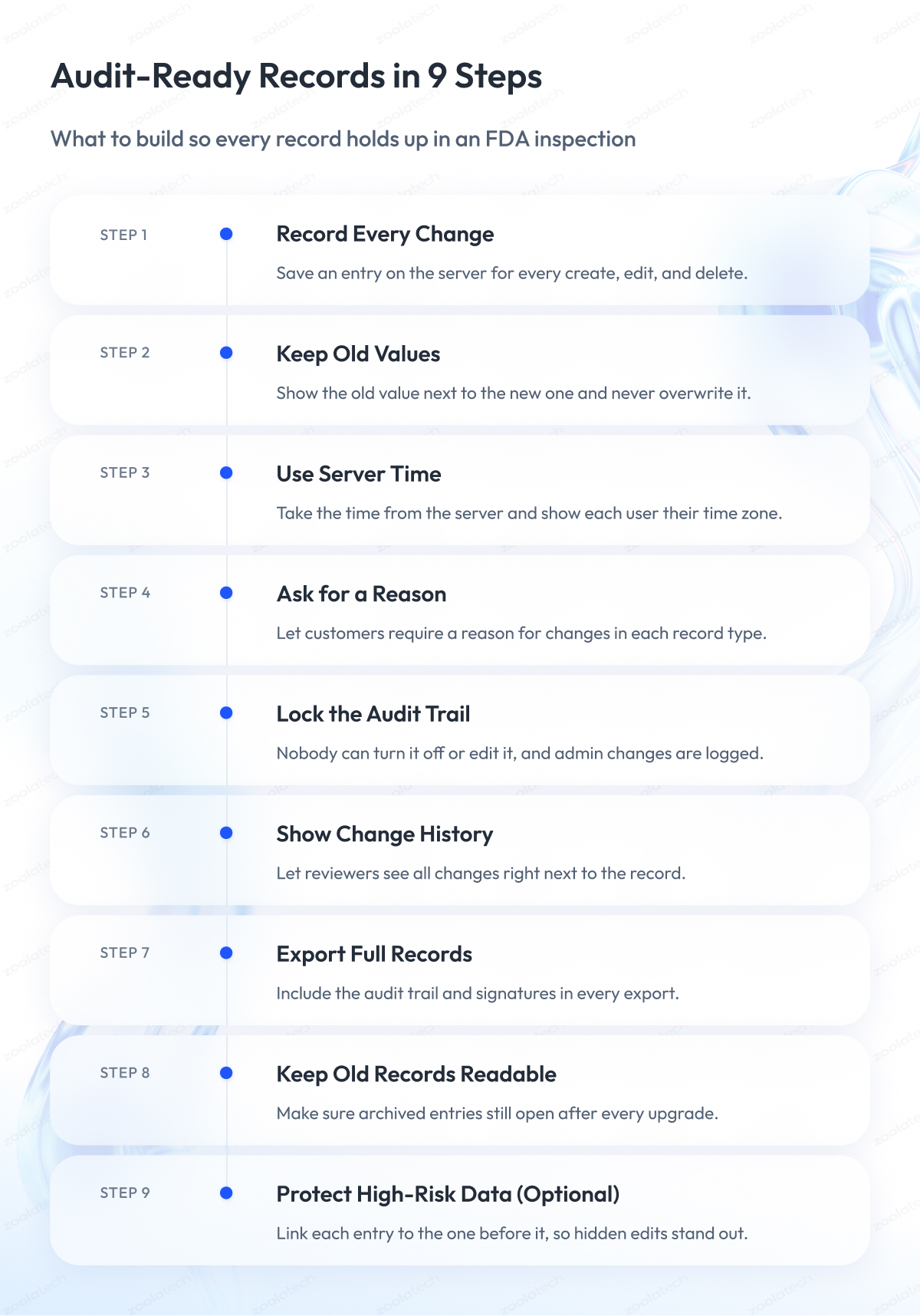
So how do you build a product that leaves your customers no gaps to explain? Treat the audit trail as part of each record. Your product should capture every change on the server, keep old and new values, protect the history from being switched off, and give reviewers and inspectors searchable views and complete exports.
Remember the last column of the audit trail table? Here is how to turn it into work your team can plan, step by step. If you are building a regulated SaaS product, these are the practices we recommend, using the equipment logbook as our example.
Step 1 – Record every change automatically
Your audit trail is only as reliable as the code that writes it. To make sure no change slips through:
- Write the audit entry on the server, never in the browser or mobile app.
- Save the entry and the record change in one database transaction, so both succeed or fail together.
- Send every create, edit, and delete through this one path, including imports and admin tools.
Step 2 – Keep the old value next to the new one
Your customer needs to show an inspector what an entry looked like before every change. Store the old and new value for each field, and save every correction as a new version with the original still visible. Never erase an entry from the database. Mark it as deleted and keep its history.
Step 3 – Take the time from the server
If your users work in different countries, their device clocks will disagree with each other. Take every timestamp from your server, store it in one standard time zone, and show each user their local time with a zone label. Let only administrators change the server time, and log every change they make.
Step 4 – Let customers require a reason for changes
Some customers must record why each change happened, and others don’t have to. Add a reason field that each customer can make required per record type, and turn it on by default for records under GLP or EU GMP rules. A short list of common reasons plus free text helps operators fill it in quickly.
Step 5 – Make sure nobody can turn off the audit trail
Your customer’s administrators should never be able to hide changes, and neither should your own team. Here is what to do:
- Remove any setting that turns the audit trail off.
- Block edits and deletions of audit entries for every role, including your support staff.
- Log every change to audit settings as its own entry.
Treat these rules as part of your wider enterprise application security design.
Step 6 – Show the change history next to each record
Your customer’s reviewers check records every day, so make the audit trail part of that routine. Let them open the change history from the entry with one click, highlight changes made after an entry was approved, and save who reviewed the history and when.
Step 7 – Export full records for inspectors
When an inspector asks for a record, your customer needs a complete copy quickly. Make sure every export:
- Includes the record, its audit trail, and its signature details.
- Comes in a readable format for people and an electronic format for other systems.
- Keeps the audit trail searchable and sortable, with PDF only as a fallback.
Step 8 – Keep old records readable after updates
Your customer may need a logbook entry from years ago, long after you changed the database behind it. Tie audit trail retention to each record’s retention period, test that archived entries open correctly after every upgrade, and move audit trails together with their records during migrations. Our guide to healthcare software modernization covers how to move records without losing their history.
Step 9 – Protect high-risk data from hidden edits (optional)
For your most sensitive data, you can make tampering visible even to someone with direct database access. Give each audit entry a digital fingerprint of the entry before it, so any edit breaks the chain, and run a regular check that the chain is intact. A June 2026 ISPE iSpeak post by a software company founder argues for this approach and notes that Part 11 does not explicitly require it.
One warning before you build. Logging every click creates noise that your customer’s reviewers cannot use, and FDA says recording every keystroke is unnecessary. Treat these steps as a starting point, and expect each customer’s risk assessment to narrow them or add to them.
Releases and validation in a SaaS product
Every release you ship changes the system your customer validated. Say you push a security patch on Friday. For your customer, that patch touches a validated system, and they need to assess it before it reaches their logbook entries.
FDA’s 2024 guidance says changes to electronic systems, including software upgrades and security patches, should be evaluated and validated based on risk, and every change should be documented. To make that work easier for your customers, send a release package with each update:
- A short summary of what changed and which regulated features it affects.
- Test evidence for those changes.
- Known issues.
Give customers time to review the package before the release reaches their validated workflows, and agree on the notice period in your written agreement. If your customers make medical devices, FDA’s computer software assurance (CSA) guidance, issued February 3, 2026, describes a risk-based way to do this testing. For an example of automated testing in a regulated product, see our MasterControl validation automation case study.
Moving customers off paper
Many of your customers still keep some records on paper, like the cleaning logbook on the factory floor. FDA holds paper and electronic records to the same rules for keeping and reviewing them. PIC/S goes further, discourages mixed paper and electronic setups, and asks companies to replace them whenever possible.
So when a customer moves to your product, plan the switch so the old paper history stays easy to find. The same applies when old records live in an outdated system, which is where legacy system modernization comes into the plan. The next section shows how this worked in one of our projects.
Case Study: Replacing Paper Logbooks with an Audit-Ready Cloud System
MasterControl builds quality, manufacturing, and compliance software for life sciences and other regulated industries. A team of 3 Zoolatech experts worked inside MasterControl’s product team to build a cloud logbook platform with audit trails, role-based approvals, exception review, and exports for very large logbooks. The goal was to let manufacturers replace paper logbooks completely.
The challenge
Manufacturing teams at MasterControl’s customers kept handwritten paper logbooks. When an audit came, someone had to search through the books by hand. Every handwritten entry also risked human error and gaps in traceability under FDA rules.
What we built
We started by mapping FDA audit requirements and compliance needs together with MasterControl. From there, our engineers built:
- A logbook platform with a template builder, audit trails, and role-based approvals.
- Exception capture and quick review for corrections, quality events, and overrides.
- Editing by several users at once, with searchable active and archived records.
- A custom export and PDF service designed for oversized logbooks.
- Translation support in exports for English, Spanish, French, and other languages.
The results
- The platform fully replaced paper logbooks with an audit-ready cloud system.
- Inspections became faster through validation on demand, exception tracking, and a complete history.
- Global regulatory teams received audit records in several languages.
We did not track these changes in numbers, so the results describe what changed without exact figures.
What the case shows for your product
This project puts several steps from this article into practice. Role-based approvals work as the authority checks Part 11 describes. Exception review helps reviewers focus on corrections and overrides first. Exports give customers the copies inspectors ask for.
If you build an electronic logbook for pharma or other regulated manufacturing, these features are a good place to start. Our engineers also supported MasterControl’s MES rebuild, building advanced production records with reporting tools and compliance-grade audit logs. You can read the full story in our MasterControl digital logbooks case study.
21 CFR Part 11 Compliance Checklist for Software Vendors
Before a customer sends you their next supplier questionnaire, run your product through this 21 CFR Part 11 checklist. It helps you find gaps early, while they are still cheap to fix. Keep in mind that it cannot prove 21 CFR Part 11 compliance, because each customer decides how Part 11 applies to its records and validates the system for its own use.
Here is how to use it. The checklist has two tables. The first covers the controls inside your product, and the second covers the evidence your customers will ask you for. Each row is a yes-or-no question, and the second column shows which rule or guidance it comes from. Every “no” becomes a backlog item or a question for your customer. Run the list again after every major release.
Product controls
| Check | Source |
| Does every create, edit, and delete get a dated entry? | §11.10(e) |
| Do edits keep the old value next to the new one? | §11.10(e) |
| Does every entry store the user ID and role? | FDA 2024 guidance |
| Do time stamps show a time zone or one standard time? | FDA 2024 guidance, our recommendation |
| Can customers require a reason for change per record type? | GLP rule, EU GMP Annex 11 |
| Is the audit trail impossible for customers to disable or edit? | FDA 2024 guidance, PIC/S, MHRA |
| Are admin changes to audit settings logged? | PIC/S, MHRA |
| Is the audit trail searchable, sortable, and exported with the record? | §11.10(b), FDA 2024 guidance |
| Are permissions checked at signing, approving, and other actions? | §11.10(d) and (g) |
| Does the workflow enforce step order where the process needs it? | §11.10(f) |
| Do signatures show name, date, time, and meaning on screen and exports? | §11.50 |
| Is each signature locked to its record? | §11.70 |
| Do signatures use at least two components, such as ID and password? | §11.200 |
| Can customers set periodic password checks? | §11.300 |
| Do records and audit trails stay readable for the full retention period? | §11.10(c) |
Evidence your customers will ask for
A good product is only half of a supplier assessment. Your customer’s validation team also needs documents showing how you build, test, and support the system, because they file them as part of their own records. This table lists the ones they ask for most often.
| Check | Source |
| Do release notes show impact on regulated features and test evidence? | FDA 2024 guidance |
| Can you describe audit trail behavior and settings for customer validation? | PIC/S guidance |
| Do you keep training records for your developers and support staff? | §11.10(i) |
| Do you offer a written agreement that covers the service? | FDA 2024 guidance |
Final Word
Supporting 21 CFR Part 11 compliance takes a lot of careful work. You have to read the rule, separate FDA guidance from other regulators’ advice, and turn all of it into features your team can build and test.
This work pays off. When your product treats the audit trail as part of every record, your customers walk into inspections with answers ready. When it falls short, they spend days digging through logs and paper binders, and their first call is to you.
If you have read this far, you already know the main rules. Take the checklist above, run it against your product with your engineering and quality leads, and turn every “no” into a backlog item. Leave your customers only the decisions that belong to them, such as validation, training, and who gets access.
If you want help with the next step, Zoolatech is ready to talk through your product and the questions your customers ask. We work with healthcare and life sciences companies on this kind of regulated software every day.
If you are still exploring, start with our MasterControl digital logbooks case study or browse more healthcare and life sciences case studies.
Questions You May Have
Does 21 CFR Part 11 apply to medical devices?
Generally, yes, when device makers keep records required by FDA’s device rules in electronic form. FDA’s 2026 computer software assurance guidance says that if a manufacturer keeps a document required under Part 820 in electronic form, Part 11 generally applies. Part 820 is now the Quality Management System Regulation (QMSR), which took effect on February 2, 2026.
Is there a 21 CFR Part 11 certification for software?
No. FDA does not certify electronic signature systems or review any system for Part 11 in advance. It evaluates systems during inspections. Amazon Web Services (AWS) states that cloud providers have no good practice (GxP) certification, and Microsoft states the same for Part 11. A product sold as 21 CFR Part 11 compliant software can only support your customer’s compliance.
What should an agreement with a SaaS provider cover for Part 11?
It should describe how the service meets your customer’s requirements, including audit trails. FDA recommends a written agreement, such as a master service agreement with a service level or quality agreement. Among the points to check, FDA lists the provider’s ability to deliver secure audit trails that record the date and time of each user action and data change.
How is 21 CFR Part 11 different from EU Annex 11?
Part 11 is a U.S. regulation on electronic records and signatures, and Annex 11 is the EU guideline on computerized systems in drug manufacturing. In a 21 CFR Part 11 vs. EU Annex 11 comparison, Annex 11 asks for a documented reason for changes to GMP data and regular audit trail review. As of October 2026, the 2011 version applies.
Is ALCOA+ a 21 CFR Part 11 requirement?
No. FDA’s data integrity guidance uses ALCOA, which stands for attributable, legible, contemporaneous, original or a true copy, and accurate. PIC/S adds complete, consistent, enduring, and available, which makes ALCOA+. Part 11 itself uses neither term, so treat ALCOA data integrity as guidance that sits alongside your 21 CFR Part 11 data integrity controls.
Does 21 CFR Part 11 require multi-factor authentication?
No. For electronic signatures that don’t use biometrics, Part 11 requires at least two distinct identification components, such as a user ID and a password. The rule does not mention multi-factor authentication (MFA). MFA can still strengthen security, so you can offer it as a setting your customers can turn on when their policies require it.
How long must a 21 CFR Part 11 audit trail be kept?
At least as long as the record it describes. Section 11.10(e) ties the audit trail to the record’s retention, and the predicate rule for that record sets the period itself. During that whole time, the 21 CFR Part 11 audit trail must stay available for FDA to review and copy, including after upgrades and migrations.
Does an audit trail have to record every log-in and page view?
No. FDA’s 2024 guidance says recording every keystroke is unnecessary and asks the audit trail to capture deliberate actions that create, change, or delete records. MHRA also says audit trail review does not need to cover log-ins and keystrokes. Keep log-ins and page views in a separate security log, unless your customer’s risk assessment asks for more.