



Quick Summary
- Modernization covers four parts you own: code, system connections, infrastructure, and user experience. The EHR stays out of scope because its vendor controls the code.
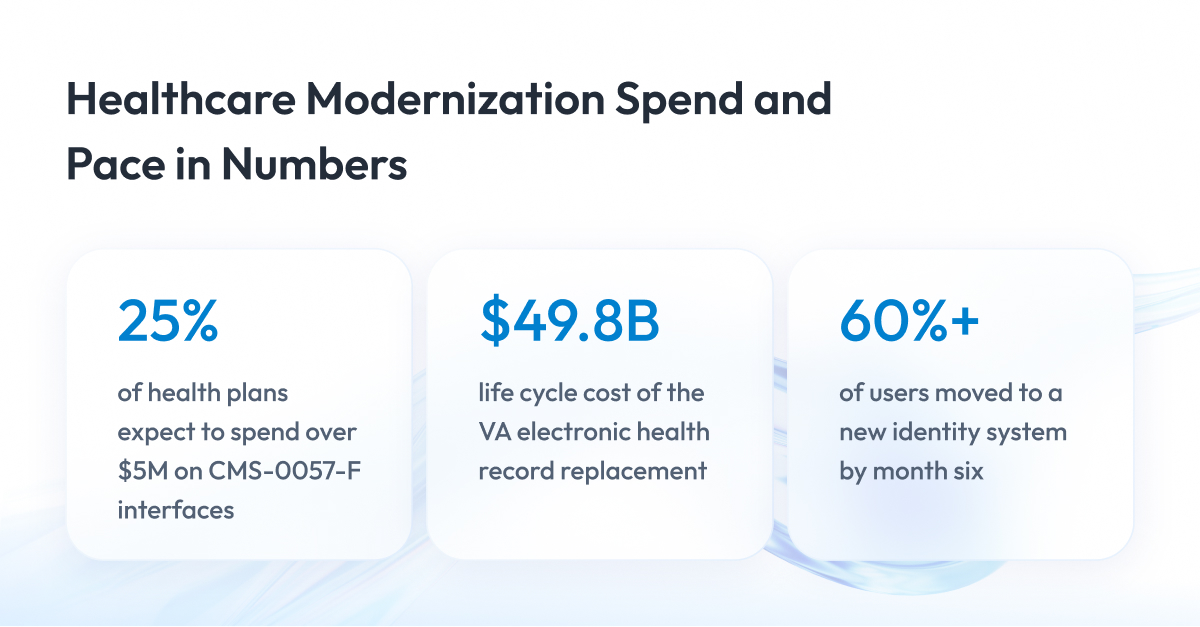
- Budget $1 million to $5 million for the CMS-0057-F interfaces, the most common health plan estimate (WEDI). The share expected to exceed $5 million grew to 25%.
- Run the Five-Gate Check on each system before you pick an approach. Its five questions cover core ownership, downtime risk, validation, deadlines, and data retention.
- Start with the interface that has the nearest deadline. Health plans already owe 72-hour urgent decisions and must ship FHIR interfaces by January 1, 2027.
- Migrate only active data and send historical records to a read-only archive. Medicare requires hospitals to keep records for at least five years.
Healthcare software modernization means moving clinical, payer, and regulated software off aging code and infrastructure without taking it out of service. In the US, it is also how organizations meet dated rules such as CMS-0057-F, the prior authorization rule from the Centers for Medicare & Medicaid Services (CMS).
With enterprise clients, we often see teams choose a modernization approach before checking who owns the core system and which regulatory deadlines they must meet.
That is why we created this guide.
This article helps you check those limits before you commit to a healthcare modernization approach. You get the Five-Gate Check, a test of five questions that shows which paths each system still allows, plus a roadmap for where to begin, regulatory dates by payer type, and public cost data.
By the end of this article, you will know how to modernize your healthcare software without stopping care: where to start, what it costs, how long it takes, and which deadlines apply to you.
What Healthcare IT Modernization Covers (and What It Doesn’t)
Healthcare IT modernization covers the software a healthcare organization builds and runs on its own: custom apps, the connections between systems, the servers behind them, and the screens staff use every day. It does not cover replacing the main patient record system or rebuilding old systems kept only for their records. Let’s look at each side in more detail.
What it covers
Modernization work falls into four parts, the same ones you find in any legacy system modernization project. The table below shows each part, what usually changes, and a typical hospital example.
| Part | What Changes | Hospital Example |
| Code | Outdated languages and frameworks rewritten or updated | Custom app for patient referrals |
| Connections between systems | Fragile direct links replaced with managed interfaces | Lab results sent to patient charts |
| Infrastructure | Old servers and operating systems upgraded or moved | Hospital data center moved to the cloud |
| User experience | Screens and workflows redesigned for doctors and nurses | Patient portal or clinician dashboard |
What it doesn’t cover
The major thing healthcare IT modernization doesn’t cover is the electronic health record (EHR). This is the main system hospitals use to store patient charts, orders, and test results. Hospitals buy it from a few large companies, such as Epic or Oracle Health, and only those companies can change its code.
According to the federal data brief on hospital EHR adoption, three EHR developers served four in five US hospitals in 2024. So healthcare software modernization in a hospital focuses on everything connected to the EHR, and replacing the EHR itself is a separate, much bigger project.
One more thing healthcare modernization doesn’t cover is old systems kept only for their records. Think of a lab system retired years ago that still holds results the hospital must keep by law. Moving that data into a read-only archive, where staff can look records up but not change them, usually costs less than rebuilding the system. We explain this choice in the data section.
Before you choose which part to modernize first, let’s look at the federal deadlines in the next section, where you can check which ones apply to your organization in 2026 and 2027.
The Regulatory Clock Behind Healthcare Modernization
In the US, federal regulators set fixed dates by which healthcare organizations must change how their software works. If a system isn’t ready by its date, the organization risks enforcement action from the regulator.
For healthcare IT modernization in 2026, these dates decide the order of work. A system tied to a federal deadline has to be ready on time, even if another system is older or frustrates staff more.
Right now, the most important rule is CMS-0057-F. The Centers for Medicare & Medicaid Services (CMS), the federal agency that runs Medicare and Medicaid, issued it in 2024 for health plans. The rule requires plans to do two things:
- Answer prior authorization requests faster. Prior authorization is the approval a health plan gives before it pays for a treatment or test.
- Share patient data through new standard interfaces. These interfaces use Fast Healthcare Interoperability Resources (FHIR), a common format for health data, so patients, doctors, and other plans can automatically access records.
Let’s look at each requirement.
Since January 1, 2026, plans covered by the rule must decide within 72 hours for urgent requests and 7 calendar days for standard ones, according to the CMS fact sheet on the final rule. Plans sold on the federal marketplace, HealthCare.gov, are exempt from these timeframes.
The new interfaces take longer to build, so they have later deadlines. Through them, plans must share claims, patient records, and prior authorization status on request. CMS estimates the rule will save about $15 billion over ten years.
Which CMS-0057-F dates apply to you
The deadlines depend on the type of plan. Medicaid and the Children’s Health Insurance Program (CHIP) come in two forms:
- Fee-for-service programs. The state pays doctors and hospitals directly.
- Managed care plans. Private insurers run coverage under contracts with the state.
Find your plan type in the first column to see your dates.
| Plan Type | 72-Hour and 7-Day Decision Rule | FHIR Interfaces Due |
| Medicare Advantage plans | Applies since Jan 1, 2026 | By Jan 1, 2027 |
| State Medicaid and CHIP fee-for-service programs | Applies since Jan 1, 2026 | By Jan 1, 2027 |
| Medicaid and CHIP managed care plans | Applies since 2026 | First contract year starting on or after Jan 1, 2027 |
| Plans sold on the federal marketplace | Exempt | First plan year starting on or after Jan 1, 2027 |
Other federal dates to track
A few more dates matter, depending on what you build. One of them is an update to the security rule under the Health Insurance Portability and Accountability Act (HIPAA), which is still a proposal.
| Date | Rule | Who It Affects | What Changes |
| Sep 1, 2023 | Information blocking penalties | Health IT developers and data exchange networks | Fines up to $1M per violation for blocking data sharing |
| Jan 6, 2025 | HIPAA Security Rule update (proposed) | Healthcare organizations and their technology partners | Stricter security controls, still a proposal in Sep 2026 |
| Feb 2, 2026 | FDA Quality Management System Regulation | Medical device manufacturers | Updated rules for production and quality records |
| Mar 31, 2026 | CMS-0057-F | Health plans covered by the rule | First public report on prior authorization metrics |
Dates checked in September 2026. Before you act on them, confirm the details for your organization with your legal and compliance team.
Security risk from shared services
Old software is easier to attack because it often runs without current security fixes. In healthcare, a successful attack also costs more than in any other industry. According to the IBM Cost of a Data Breach Report 2026, healthcare had the highest average breach cost of any industry, at $6.64 million.
The risk grows when many organizations depend on the same outside company. For example, most hospitals and clinics don’t send insurance claims to health plans themselves. They send them through claims processing companies, which check the claims, pass them to the right plan, and route payments back.
Change Healthcare is one of the largest of these companies. In February 2024, attackers broke into its systems, and providers across the country had trouble sending claims and getting paid. The breach affected about 192.7 million people, according to HHS guidance on the Change Healthcare incident.
For modernization, the lesson is practical. Map which outside services each system depends on, and plan a backup path for the critical ones, such as a second processing partner.
Software that stops getting security updates
Technology companies set deadlines too, and they push healthcare infrastructure modernization as hard as regulators do. Microsoft ended support for Windows 10 on October 14, 2025. Organizations that still run it can buy extended security updates for up to three years.
Licensing can change as well. In March 2025, NextGen moved new versions of Mirth Connect, an integration engine many hospitals use to move data between systems, to a commercial license only. When you modernize interfaces, check the license terms of every tool they depend on.
Now that you know the dates, the next section shows which systems healthcare organizations usually modernize and where each segment gets stuck.
Legacy Systems in Healthcare: What Each Type of Organization Modernizes
What counts as a legacy system in healthcare? It is any system your teams still rely on every day that runs on outdated code, old connections between systems, or infrastructure that no longer gets security updates.
Which systems these are depends on the kind of organization. Healthcare has four main types, and healthcare legacy system modernization looks different in each one. The table below shows, for each type, which systems usually get modernized, which ones stay in place, and the main limit that shapes the work.
| Organization Type | Usually Modernized | Usually Left in Place | Main Limit |
| Hospitals and health systems | Interface engines, lab systems, imaging archives, patient portals | EHR bought from a large company | Downtime can affect patient care |
| Health plans | Member portals, provider data, new FHIR interfaces | Core claims system, rebuilt later in parts | Fixed CMS deadlines |
| Drug and device manufacturers | Quality and production software | Validated processes without a revalidation plan | Every change needs proof it still works |
| Healthtech and software companies | Large platforms built ten or more years ago | Customer integrations during the move | Customers depend on the platform daily |
Let’s look at what this means for each type.
Hospitals and health systems
In IT modernization for healthcare facilities, hospitals keep their EHR and modernize the systems around it. The first target is usually the interface engine, the software that moves data between the EHR, the lab, imaging, and billing. Common examples include Cloverleaf, Rhapsody, and Mirth Connect.
Lab systems, imaging archives, and patient portals come next. Doctors and nurses use these systems around the clock, so every switch has to happen without stopping care. Most healthcare software development work in hospitals happens in this layer around the EHR.
Health plans
At a health plan, claims, enrollment, and billing all run on one core system. In many plans, that system is decades old and runs on a mainframe in an old programming language called COBOL. This is why payer modernization starts or stalls with the core system.
Most plans first add new interfaces on top of the core to meet CMS dates, then rebuild the core piece by piece. This is the most common pattern in legacy system modernization for healthcare payers, and it follows the same logic as mainframe modernization in banking and insurance.
Drug and device manufacturers
Manufacturers run two kinds of software that matter here:
- Quality management systems (QMS). They track procedures, deviations, and audits.
- Manufacturing execution systems (MES). They record every step of production.
Under the FDA Quality Management System Regulation, device makers must show that their quality processes work as intended. This proof is called validation. Every change to these systems, including modernization, must come with evidence that the system still works correctly.
Healthtech and software companies
Companies that sell software to hospitals or manufacturers often run one large platform built ten or more years ago. Their customers use it every day and may need to recheck their own processes after big changes.
The safest path moves customers to the new platform in small groups, starting with those who carry the least risk.
Each of these situations limits your options differently. In the next section, we turn these limits into five questions you can ask about any system before you choose how to modernize it.
The Five-Gate Check: Five Questions to Ask Before You Modernize a System
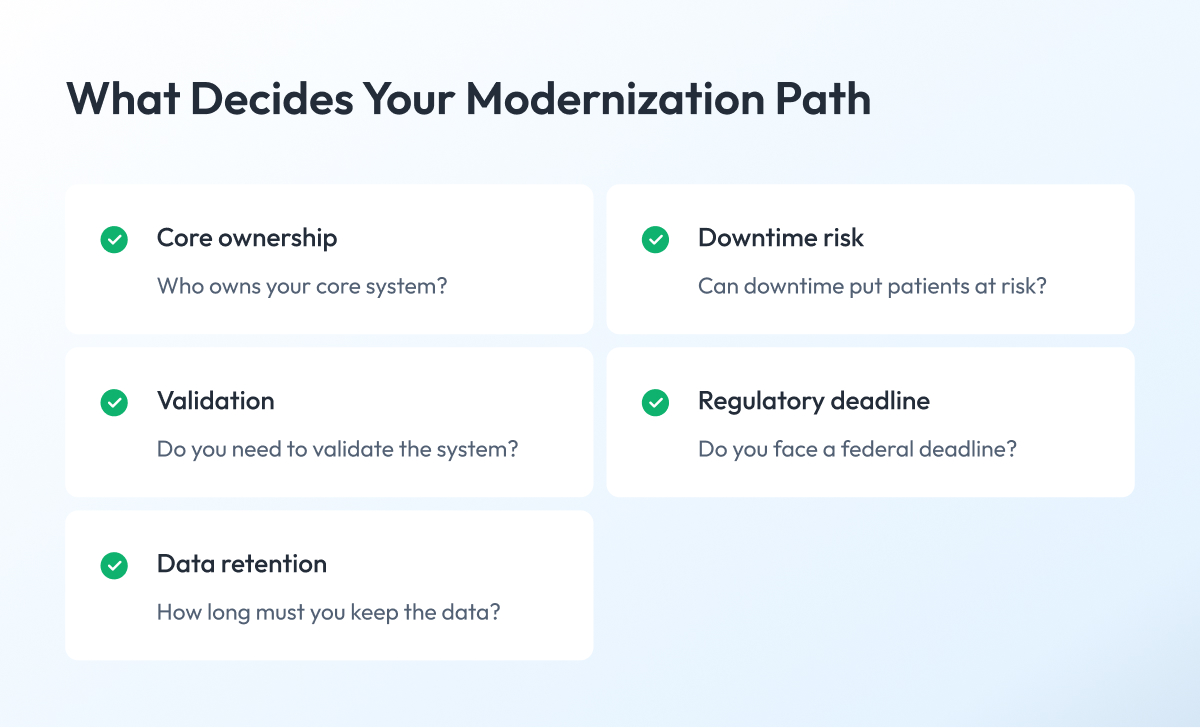
The Five-Gate Check is a set of five questions you ask about each system before you choose how to modernize it. The answers rule out approaches that won’t work and show what you’ll need to prepare.
Teams usually start by picking an approach. The common options are:
- Rehosting. You move the system as it is to new servers or to the cloud.
- Refactoring. You improve the code without changing what the system does.
- Rebuilding. You write the system again from scratch.
In healthcare, a core system owned by another company, a validated system, or a fixed CMS date can rule out an approach before anyone looks at the code. The Five-Gate Check catches these limits first, so it is the starting point for any healthcare software modernization project.
Use it one system at a time. For each gate, answer yes or no, then note what a yes requires and what you need to prepare.
Gate 1 – Who owns your core system?
Look at the system at the center of the work and check who owns its code.
- A company such as Epic owns it. You can’t change its code, so you build around it through its standard FHIR interface. Federal certification criteria for health IT require certified EHRs to offer one.
- A software company owns your claims platform. You work through the interfaces CMS-0057-F requires and any others the company provides.
- Your organization owns the code. Every approach stays open.
What to prepare: a list of the interfaces the owner provides and what each one can do.
Gate 2 – Can downtime put your patients at risk?
Think about what happens to patient care if the system stops for an hour. If your doctors or nurses lose access to orders, results, or referrals, the answer is yes.
A yes changes how you switch over:
- Run the old and new systems side by side until the new one proves itself. This is called a parallel run.
- Write downtime procedures so your staff knows how to keep working if the system stops.
- Agree on switchover windows with your clinical leaders.
What to prepare: a downtime procedure your staff has rehearsed and exit criteria for the parallel run.
Gate 3 – Do you or your customers need to validate the system?
Check if the system records production or quality data for drug or device manufacturers. If it does, the FDA rules from the previous section apply, and electronic records may also fall under 21 CFR Part 11, the FDA rules for electronic records and signatures.
The duty to validate sits with the manufacturer. If you sell software to manufacturers, you ship the proof they need with every release. Plan for it from the start and automate test runs, so each release avoids weeks of manual checks.
What to prepare: validation records for each release, in a format your customers’ auditors accept.
Gate 4 – Do you face a regulatory deadline?
Check if a federal date applies to the system, such as a CMS-0057-F interface deadline or a certification requirement.
If yes, the deadline sets the order of work. Build the required interface first, then modernize the system behind it.
What to prepare: test results showing the interface meets the required standard, completed before the date.
Gate 5 – How long must you keep the data?
Find out how long you must keep the data the system holds. Patient records often must be kept longer than any single system lasts. Patient data also stays protected in every copy, including test environments.
If the data must outlive the system, plan the archive before you switch anything off. Decide early how you’ll remove personal details from test data.
What to prepare: a retention schedule for each type of data, an archive access plan, and a record of how you anonymized test data.
Illustrative example: a hospital referral app
Imagine a hospital built its own patient referral app years ago. The app reads patient data from the EHR and sends orders through HL7 version 2, an older messaging standard hospitals use to pass orders and results between systems. The table shows how the app passes through each gate.
| Gate | Answer for the Referral App | What It Means |
| Core ownership | A large company owns the EHR, the hospital owns the app | Rebuild the app, read EHR data through FHIR |
| Downtime risk | Yes, delayed referrals delay care | Parallel run and rehearsed downtime procedure |
| Validation | No FDA validation applies | No revalidation work |
| Regulatory deadline | No CMS date applies | The team sets its own pace |
| Data lifetime | Referral history must be kept | Archive history before switching off the old app |
So the team rebuilds the app piece by piece, runs the old and new versions side by side with a downtime plan, and archives the referral history before switching off the old app. Engineers call this gradual replacement the strangler pattern.
Once you know which approaches remain open, you can choose one for each system. The next section shows how.
Healthcare Application Modernization: Choosing an Approach for Each System
You choose the approach for each system based on who owns it and what your Five-Gate Check answers show. If another company owns the core system, you modernize the software around it. If you own the code, every approach is open, and the gates narrow the list.
In healthcare software modernization, the choice matters because each approach has its own cost, risk, and timeline. If you pick one that your limits rule out, you usually find out halfway through the project, when changing course costs the most.
In the previous section, we covered rehosting, refactoring, and rebuilding. Healthcare teams often use four more approaches:
- Modernize around the core. You leave the core system as it is and update the apps and connections around it.
- Replatform. You move the system to a newer, supported platform with small changes, such as a new version of an interface engine.
- Wrap with new interfaces. You add modern interfaces on top of an old system, so other systems can reach its data while the inside stays unchanged for now.
- Replace gradually. You build new parts one at a time and move work to them step by step, until you can switch the old system off.
In application modernization for healthcare, you will usually use different approaches for different systems. A plan for legacy system modernization usually covers several systems at once, each on its own path.
The table below shows the approach that usually fits each common system type in healthcare application modernization, and which gate drives that choice.
| System Type | Approach That Usually Fits | Gate That Drives It |
| EHR bought from a large company | Modernize around the core | Gate 1, core ownership |
| Custom apps connected to the EHR | Replace gradually, reading EHR data through FHIR | Gates 1 and 2, ownership and downtime |
| Interface engine | Replatform, especially after license changes | Gate 2, downtime risk |
| Health plan core claims system | Wrap with FHIR interfaces, then rebuild in modules | Gate 4, regulatory deadline |
| Quality and production software for manufacturers | Rebuild with a validation plan for customers | Gate 3, validation |
| Large platform at a healthtech company | Replace gradually, moving customers in small groups | Gates 2 and 3, downtime and validation |
Once you have an approach for each system, you need to decide which one to start with. The next section gives you a roadmap for that.
Where to Start: A Roadmap for Healthcare Legacy Software Modernization
With enterprise clients in healthcare and life sciences, we start with the system that has a fixed deadline and data the team already understands. In most organizations, that is an interface or the layer that connects systems.
We start there because in healthcare systems modernization, the order of work decides how much risk you take on. Clients often want to begin with the system their staff complains about most. Those systems are usually the most tangled, and an early delay there can push deadline work past its date.
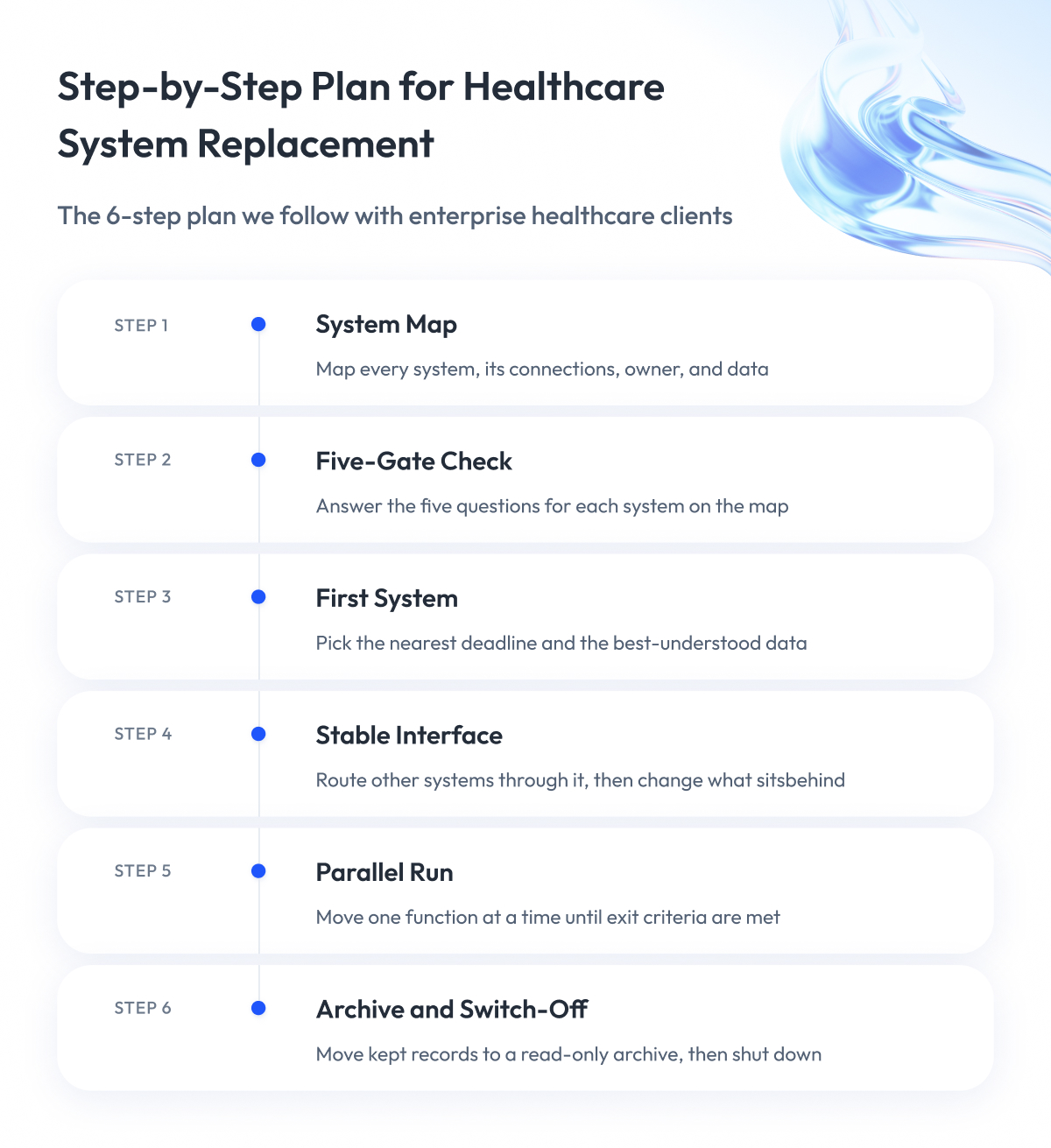
As a rule, we put interfaces with deadlines first, clinical system switchovers second, and full platform rebuilds last. The six steps below show how we turn that rule into a plan for healthcare legacy software modernization.
Step 1 – Map your systems and connections
We map every system together with your team, including what it connects to, who owns it, and what data it holds. This map shows where a change in one system can break another.
Step 2 – Run the Five-Gate Check on each system
We answer the five questions for every system on the map. Then we record what each yes requires and what your team needs to prepare.
Step 3 – Choose the first system
We pick the system with the nearest deadline and the best understood data. A small early win also builds trust in the healthcare software modernization program among clinical and business leaders.
Step 4 – Put a stable interface in front of it
Other systems connect to this interface instead of the old system. This lets us change what sits behind it without breaking anything that depends on it.
Step 5 – Move functions behind the interface with a parallel run
We move one function at a time to the new system. The old and new versions run side by side until the new one meets exit criteria we agree on with you in advance.
Step 6 – Archive and switch off the old system
We move the records you must keep into a read-only archive. Then we shut the old system down, so you stop paying to run two systems.
Who you need on the team
On every healthcare project, we make sure the team includes four roles that general software projects often skip:
- Clinical informaticist. A specialist in clinical informatics, a recognized medical subspecialty, who translates between doctors and engineers.
- Integration engineer. This person builds and tests the connections between systems.
- Validation or quality assurance lead. You need this role when Gate 3 applies, to produce the proof manufacturers and auditors expect.
- Privacy and security officer. This person makes sure patient data stays protected at every step, including in test environments.
Some of these roles sit on your side and some on ours. We also plan the human side early. Together with you, we choose clinical champions, doctors or nurses who try the new system first and help their colleagues, and we schedule training before the switchover.
A roadmap tells you the order of work. The next question every leader asks is how much it will cost and how long it will take, and the next section answers it.
Healthcare Software Modernization Cost and Timeline
The cost of healthcare software modernization depends on what each system connects to, how much data it holds, and how much proof regulators expect. A single system usually takes months to modernize because parallel runs and validation add time to every switchover.
The most useful public cost figures come from health plans building the CMS-0057-F interfaces. In a February 2026 survey by the Workgroup for Electronic Data Interchange (WEDI), an industry group for electronic health data, the most common estimate for that work was $1 million to $5 million. The share of organizations expecting to spend more than $5 million grew from 15% to 25% in four months.
Most other price ranges online come from software companies’ blogs and rarely explain how they were calculated. The most reliable way to estimate your budget is to count your own cost factors. Let’s go through them step by step.
What increases the cost
Most of the budget comes from six factors. The table shows why each one raises the cost and what to measure before you estimate.
| Factor | Why It Raises Cost | What to Measure |
| Number of interfaces | Each needs mapping, testing, and its own switchover | Interfaces and message types per system |
| Data volume and retention | More records mean longer migration and archive work | Data size by type and required retention years |
| Validation scope | Regulated functions need documented proof for every release | Validated functions and customers who audit them |
| Parallel run length | You pay to run and staff two systems | Weeks needed to meet exit criteria |
| Deadline pressure | Short timelines require larger teams working in parallel | Months left before the regulatory date |
| Team experience | Healthcare integration skills shorten every step | Engineers with HL7, FHIR, and validation experience |
What the largest public example shows
The biggest public healthcare IT program in the US shows how costs grow when the core system itself is replaced. In 2022, the Institute for Defense Analyses estimated the full life cycle cost of the electronic health record replacement at the Department of Veterans Affairs (VA) at $49.8 billion, according to a Government Accountability Office (GAO) report on the VA program.
That figure covers 13 years of implementation and 15 years of support across a national network of hospitals. It marks the upper end of the scale. Projects that modernize the systems around an EHR sit far lower on it.
How long healthcare software modernization takes
In our regulated projects, timelines run in months. Two examples from our work with MasterControl, a quality and manufacturing software company for life sciences, show the pace:
- Identity migration. We moved about 20% of users to a new identity system in the first 90 days, starting with lower-risk groups, and more than 60% by month six. The identity migration covered millions of accounts with zero disruption, and three engineers delivered it.
- Manufacturing platform rebuild. We rebuilt a manufacturing execution system that was nearly a decade old in phases, from architecture through implementation, historical data migration, and hardening.
The pace depends mostly on Gates 2 and 3. Downtime risk stretches the parallel run, and validation adds work to every release.
Cost and timing also depend on how safely you can switch systems over while care continues. The next section shows how we do that.
How to Modernize Healthcare Software Without Stopping Patient Care
Many clients who come to us share the same worry. They fear that during healthcare software modernization, patients and clinicians will lose access to critical resources, such as lab results, medical orders, or patient records.
We address this by replacing a system in small pieces while the old version keeps working. Each piece goes live only after it proves itself in a parallel run.
Switching everything on one date puts every function at risk at once. If one part fails, doctors and nurses can lose the whole system. Small steps keep any failure small and easy to undo.
Engineers call this approach the strangler fig pattern, named after a vine that slowly grows around a tree until it replaces it. In healthcare system modernization and migration, it rests on three practices.
1. Put a stable interface in front of the old system
First, we place a stable interface between the old system and everything that talks to it. Other systems send their requests to this interface, and for now it passes them on to the old system.
Behind the interface, we move functions to the new system one by one. The systems on the other side never notice the switch, because their connection stays the same. This is the core of healthcare interface modernization.
2. Let HL7 version 2 and FHIR work side by side
Most hospital systems still exchange data in HL7 version 2, the older messaging standard we mentioned earlier. HL7 International, the organization behind both standards, describes it as the most widely implemented healthcare data standard in the world.
New interfaces, including the ones CMS-0057-F requires, use FHIR. Replacing every HL7 version 2 connection at once would put care at risk, so we let both formats run side by side. A translation layer converts messages between them, and teams move each connection to FHIR when it is ready.
3. Agree on exit criteria and rollback triggers before the parallel run
During a parallel run, the old and new systems process the same work, and the team compares the results. Before it starts, we agree with the client on two lists:
- Exit criteria. These are the conditions the new system must meet before the old one is switched off, such as matching results for an agreed number of weeks and approval from clinical leaders.
- Rollback triggers. These are the events that send work back to the old system right away, such as a missing lab result or an order that fails to reach the right department.
Writing both lists down in advance keeps the decision calm and objective when pressure is high. In the identity migration we described above, we also moved lower-risk user groups first, so any issue would affect the fewest people.
Every switchover also moves data. The next section explains what to migrate, what to archive, and how to prove nothing was lost.
Healthcare Data Modernization: What to Migrate and What to Archive
Healthcare data modernization starts with deciding which data moves to the new system and which stays behind in an archive. In data platform modernization for healthcare, this decision shapes the project’s cost, timeline, and risk.
In data modernization in healthcare, moving everything is the most expensive option. Old records you keep only for legal reasons rarely need the speed and features of a new system. Let’s look at the three steps we follow with clients.
1. Decide what to migrate and what to archive
First, find out how long you must keep each type of data. Retention periods come from Medicare rules and state laws. For hospitals, Medicare requires medical records to be kept for at least five years, and many states require longer, especially for children’s records.
Then we sort the data with the client into two groups:
- Active data. Staff use these records in daily work. They move to the new system.
- Historical data. These are records kept only to meet retention rules. They go into a read-only archive, where staff can find records but can’t change them.
This decision alone can make the migration much smaller.
2. Protect patient data in test environments
Teams need realistic data to test the new system. Copying patient records into a test environment is risky, because that data stays protected under the Health Insurance Portability and Accountability Act (HIPAA) in every copy.
Before any test use, we remove or replace personal details. This process is called de-identification, and HIPAA accepts two methods:
- Safe Harbor. You remove 18 types of identifiers, such as names, addresses, and dates linked to a person.
- Expert Determination. A qualified expert confirms that the risk of identifying anyone is very small.
For practical techniques, see the guidance on de-identifying data from the National Institute of Standards and Technology (NIST).
3. Prove the data arrived intact
After the move, you need proof that every record arrived complete and correct. We use three checks:
- Record counts match in the old and new systems.
- Automated comparisons confirm that field values match for every record or for a large sample.
- Clinicians review a sample of records in the new system and confirm they look right.
In our work with MasterControl, we migrated historical records and production data from a legacy manufacturing system to the new platform and kept the audit trails FDA rules require. If your data also feeds reports and analytics, our guide on how to rebuild a data pipeline covers that side of the work.
Patient data must also stay protected while it moves. The next section explains how to stay compliant during the migration.
How to Stay Compliant While You Modernize Healthcare Software
Your compliance duties keep running during a migration. Every company that handles patient data for you, including your cloud provider and your development partner, must sign a business associate agreement (BAA) with you.
A BAA is a contract required by the Health Insurance Portability and Accountability Act (HIPAA). In it, the partner commits to protecting patient data and to reporting any breach. According to the Department of Health and Human Services (HHS), this applies even to a cloud provider that only stores encrypted data and never holds the key.
Beyond the BAA, each type of organization has its own duties. Let’s go through them one by one.
1. Every organization that handles patient data
Cloud providers offer HIPAA-eligible services under a signed BAA. HHS does not certify any cloud service or software for HIPAA, so after a move to the cloud, the compliance work stays with you and your provider.
Hospitals and health plans may also ask their technology partners for SOC 2 or HITRUST reports. These independent security audits are often requested during procurement, although no law requires them. For the technical side of a cloud move, see our guide to application migration to the cloud.
2. Health plans
Health plans must build the CMS-0057-F interfaces on FHIR Release 4.0.1, the version US certification rules require. They must also publish their prior authorization metrics every year.
During modernization, keep test results that show each interface meets the required standard. Regulators and partners may ask for them.
3. Software used by drug and device manufacturers
In February 2026, the FDA reissued its Computer Software Assurance (CSA) guidance for production and quality system software. It lets device manufacturers focus testing on the functions with the highest risk to product quality and patients. The duty to validate stays in place.
For drug makers, the matching industry reference is GAMP 5 from the International Society for Pharmaceutical Engineering (ISPE), together with 21 CFR Part 11 for electronic records. During a migration, the audit trail, the log of who changed what and when, must continue without gaps from the old system to the new one.
What each rule asks you to show
The table sums up what you need to show for each rule during a migration.
| Rule | Who It Applies To | What You Need to Show |
| HIPAA Security Rule | Everyone handling patient data | Risk analysis and a BAA with each partner |
| HIPAA de-identification rule | Teams using patient data in testing | Record of the de-identification method used |
| CMS-0057-F | Health plans covered by the rule | Interface test results and yearly prior authorization metrics |
| FDA quality rules and CSA guidance | Device manufacturers and their software vendors | Risk-based testing records for each release |
| 21 CFR Part 11 | Manufacturers using electronic records | Audit trail that continues across the migration |
| Record retention rules | Hospitals and other providers | Procedure for finding records in the archive |
Once your systems run on modern platforms and your data is in order, you can start using AI safely. The next section explains what modernization has to deliver first.
How Modernization Prepares Your Healthcare Systems for AI
An AI tool can only use data it can reach through a secure, managed interface. So the first step in any healthcare AI plan is the integration and data work we described in the previous sections.
Imagine you want an AI assistant that summarizes a patient’s history for a doctor before a visit. It needs lab results, notes, and medications from several systems. If that data sits in an old system without a modern interface, the assistant can’t reach it safely, and nobody can trace what it read.
Before you add AI, your systems need three things:
- Managed interfaces. AI tools connect through interfaces that control who can see which data.
- Mapped data. You know where each type of data lives and what each field means.
- Audit trails. Every access to patient data is logged, including access by AI tools.
Where AI helps during modernization
AI also speeds up healthcare software modernization itself. In our experience, AI in healthcare legacy modernization is most useful for two tasks:
- Reading old code. AI tools explain what decades-old code does, which speeds up mapping the system.
- Generating tests. AI drafts test cases that engineers then review and extend.
Generated code still needs careful review. In Veracode’s 2025 study of AI-generated code, the code introduced security flaws in 45% of test cases. In a validated system, AI-generated code goes through the same change control and testing as any other change.
We follow the same rule in our own work. With MasterControl, we took AI-assisted configuration for a manufacturing platform from a proof of concept into the product, with people reviewing the AI’s suggestions.
Even with the right plan, modernization programs can still go wrong. The next section covers the most common reasons and how to avoid them.
The Most Common Healthcare Modernization Mistakes and How to Avoid Them
When healthcare modernization programs fail, the cause is usually data or people. The code itself is the easier part.
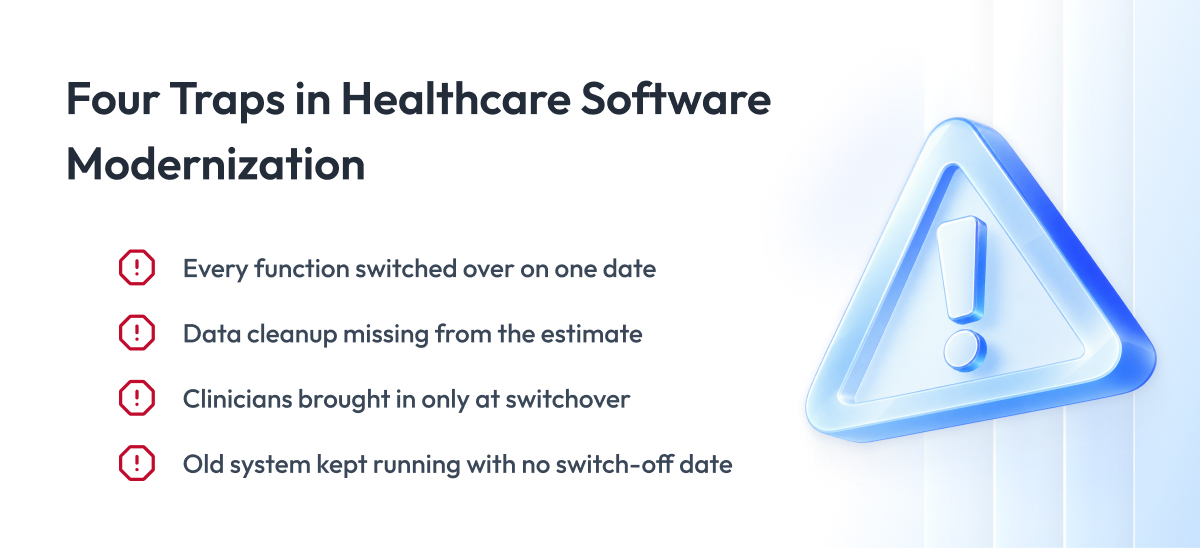
In client projects and in public programs, we see the same four mistakes again and again. Here they are, with what to do instead.
1. Replacing everything at once
A big rewrite that switches every function on one date puts the whole system at risk. If one part breaks, doctors and nurses lose everything at once, and rolling back is slow and painful.
What to do instead: move one function at a time behind a stable interface, as we described earlier.
2. Underestimating the data work
Old systems hold years of records in formats nobody fully documented. Teams often find duplicates, missing fields, and hidden business rules only after the migration starts.
Connecting data across systems is hard even for mature organizations. In a 2025 survey of more than 600,000 clinicians by KLAS Research, a healthcare IT research firm, only 44% said their systems integrate well with external data sources.
What to do instead: study the data before you estimate the project, and plan time for cleanup.
3. Leaving clinicians out
Doctors and nurses find workarounds for a system they don’t trust, no matter how well it is built. A 2026 KLAS report covering more than 121,000 clinicians found that accessible training and a voice in EHR decisions both improve how clinicians experience their systems.
What to do instead: involve clinical champions from the start and train staff before the switchover.
4. Never switch off the old system
When the old system stays on “just in case,” you keep paying for two systems and protecting two sets of patient data. Staff also split their work between them, which slows everyone down.
What to do instead: set a date for switching off the old system and agree on an archive plan before the migration starts.
These lessons come from practice. The next section shows what this approach looks like in our own projects.
Examples from Our Healthcare and Life Sciences Projects
Below are four projects from our work in regulated healthcare and life sciences. Three are for MasterControl, which builds quality and manufacturing software for FDA-regulated drug and device makers. One is for Ontada, an oncology technology business.
Rebuilding a manufacturing platform that was nearly a decade old
MasterControl’s manufacturing execution system (MES) was nearly a decade old. We rebuilt the MES in phases, from architecture and implementation to historical data migration and hardening.
The new platform keeps FDA-compliant workflows with extended audit trails. In regulated industries, healthcare platform modernization must keep every step audit-ready, including records moved from the old system.
Cutting validation from weeks to minutes
Every change to MasterControl’s software needs validation proof for its customers. We built automated validation that cut validation cycles from weeks to minutes.
Every workflow run now produces a standardized, audit-ready report. Updates and configuration changes ship without lengthy revalidation gates.
Moving millions of users to a new identity system
We moved millions of user accounts to a new identity system with zero disruption, starting with lower-risk user groups. You can see the pace of this migration in the timeline section above.
Redesigning an oncology platform
For Ontada, part of McKesson, we redesigned a platform for clinicians around oncology teams’ daily workflows, with accessibility built in from the start.
Two of these projects, the validation automation and the identity migration, were each delivered by a team of three engineers. When a project needs more people, we grow the team through team extension.
Final Word
If you’ve read this far, you already know that healthcare software modernization takes more planning than most software projects. You have to map every system, check each one against five gates, meet federal dates, and keep patient care running the whole time.
But this work pays off.
A careful plan saves months of rework and protects you from missed CMS deadlines and failed audits. It also lets doctors and nurses keep working while their systems change in the background. In healthcare, a rushed switchover costs far more than the time it would have taken to plan it.
Start with one step. Run the Five-Gate Check on your most critical systems, and choose the first one by its deadline and the state of its data.
If you want a partner for that step, our architects can run the Five-Gate Check with you and help you scope the healthcare software modernization services your plan needs.
Questions You May Have
What is healthcare IT modernization?
Healthcare IT modernization is the work of updating the software, system connections, infrastructure, and screens a healthcare organization runs on its own, with the core EHR and archived systems kept outside its scope.
What are legacy systems in healthcare?
Legacy systems in healthcare are systems your teams use every day that run on outdated code or unsupported infrastructure, such as old interface engines or mainframe claims systems, and healthcare legacy system modernization moves them to modern platforms without stopping care.
Can we modernize without replacing our EHR?
Yes, most hospitals modernize the apps, interfaces, and infrastructure around their EHR and connect to it through the standard FHIR interface that certified EHRs must offer.
How do you choose an approach for application modernization in healthcare?
You choose it system by system, based on who owns the core system and on your Five-Gate Check answers about downtime, validation, deadlines, and data retention.
What is the Five-Gate Check?
The Five-Gate Check is a set of five questions about core ownership, downtime risk, validation, regulatory deadlines, and data retention that shows which modernization approaches each system still allows.
Why does the modernization of healthcare software matter in 2026?
Fixed federal dates, such as the January 1, 2027 deadline for new CMS interfaces at many health plans, together with the highest breach costs of any industry and expiring software support, set the order of work for 2026.
How much does healthcare software modernization cost?
The cost depends on the number of interfaces, data volume, validation scope, parallel run length, and deadline pressure, and health plans most often estimate $1 million to $5 million for the CMS-0057-F interfaces alone.
How long does healthcare software modernization take?
A single system usually takes months, and in our identity migration for MasterControl, we moved about 20% of users in the first 90 days and more than 60% by month six.
Does moving to the cloud make us HIPAA compliant?
No, when healthcare infrastructure modernization moves systems to the cloud, compliance stays with you and your provider, who must sign a business associate agreement (BAA) and offer HIPAA-eligible services.
Which FHIR version do US regulations require?
US certification rules require FHIR Release 4.0.1, and health plans build the CMS-0057-F interfaces on the same version.