



Quick Summary
- Every composable architecture is headless, but not every headless implementation is composable, and confusing the two is what leaves retailers a year into wiring five vendors together.
- Headless splits the storefront from the backend, while composable breaks the backend itself into capabilities you buy separately and connect yourself.
- Diagnose the bottleneck first, since headless fixes a slow or dated storefront and composable fixes a backend that cannot do what marketing keeps asking for.
- Lock-in does not disappear, it changes owner, moving from the platform vendor to the connecting code your team writes and nobody else supports.
- Timing separates them: headless ships inside a quarter and then queues behind the platform roadmap, while composable shows customers nothing for a year and moves fast afterwards.
If you are comparing composable commerce vs headless, you want to know the difference between them and which one fits your business. Here is the short version.
Every composable commerce architecture is headless, but not every headless implementation is composable.
Headless splits the storefront from the commerce backend. Composable breaks the backend itself into separate capabilities you assemble through APIs.
Most teams use the two words interchangeably, and that habit shows up on an invoice. Retailers implement composable commerce because their storefront feels slow, and a year later they are still wiring five vendors together while pages load exactly as slowly as before, because the backend was never the problem.
That is why we wrote this guide, based on the ecommerce architectures we build and run for clients.
It explains what each one is, compares them on vendor lock-in, cost, speed, and team size, and shows where MACH and API-first fit. It also covers the situations where each one wins, what composable actually costs, and how to move from headless to composable without rebuilding everything.
By the end, you will know which approach wins in your case: headless, composable, or a hybrid. And you will be able to defend that choice with the cost and scale numbers your board wants.
What Is Headless Commerce in One Minute
Headless commerce is an architecture where your storefront runs as its own application and talks to your commerce platform through APIs. The platform keeps doing everything it always did, handling catalog, pricing, cart, and orders, while the storefront becomes a separate piece of software that your team owns and releases on its own schedule.
Engineers call this a decoupled architecture, and the decoupling is the whole point.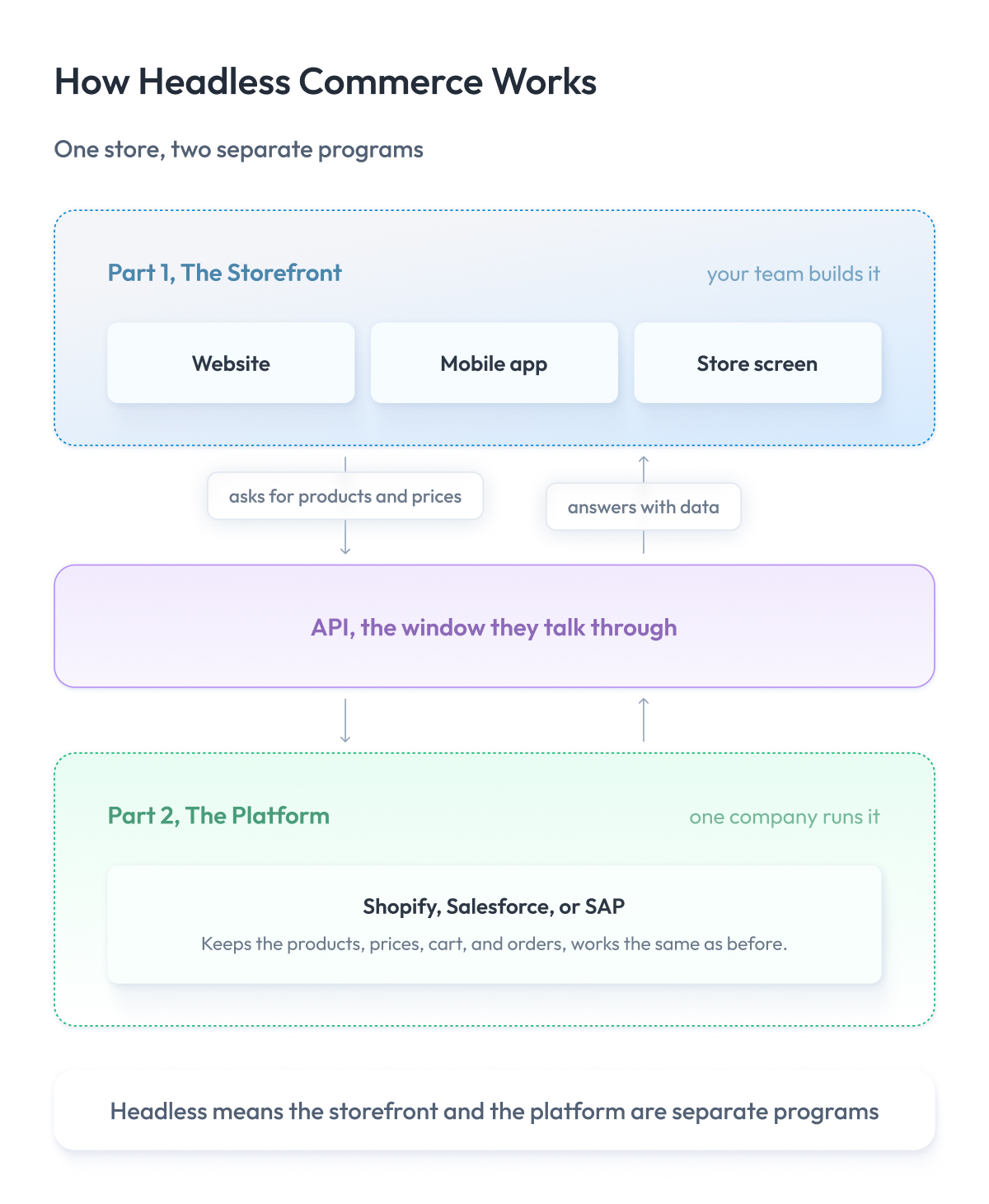
Right now, your storefront most likely belongs to your platform. If you run on Shopify, Salesforce, or SAP, the store pages are built by those platforms; they look the way those platforms let them, and they change when those platforms decide to change them.
Going headless means you build the storefront yourself, and the platform stops deciding what your customers see and instead just responds to data requests.
What changes when you go headless
- Your frontend team ships a new page without waiting on a backend release.
- You pick your own headless tech stack, React, Vue, or a native mobile app.
- One platform feeds your website, your app, in-store screens, and a marketplace listing at the same time.
- Page speed becomes something your team can fix, instead of a ticket you file with your platform.
So headless commerce makes sense when your platform is doing its job, and the storefront is what holds you back. If your orders go through and your prices are correct, but your pages are slow, and your store looks dated, headless hands your team the code to fix it.
What Is Composable Commerce in One Minute
Composable commerce is an architecture in which you buy each part of your backend from a different company and connect them yourself via APIs. Search comes from one, product data from another, checkout from a third, and your team owns the code that holds them together.
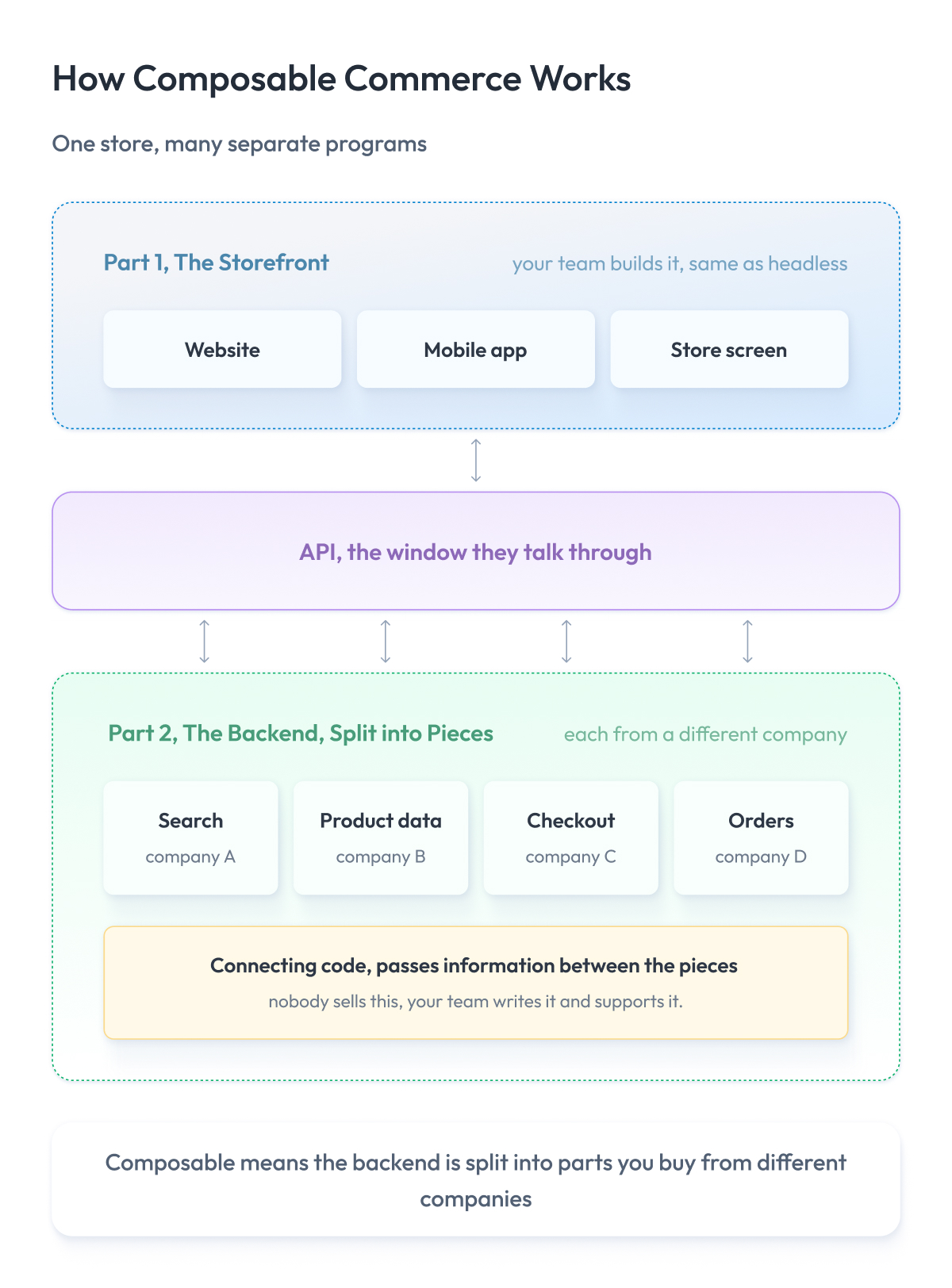
Right now, you probably buy the entire backend as a single package. Shopify or Salesforce hands you catalog, search, promotions, checkout, and orders together, and when one of those parts is weak, you wait for the company that sold it to you to improve it.
Composable means you stop buying the package and start buying the parts, so the backend turns into a modular architecture and a weak search becomes something you replace instead of something you argue about.
What changes when you go composable
- You replace one part without rebuilding the rest, so weak search becomes a service that does nothing but search, and the rest of the backend stays as it is.
- Each part scales independently, so a traffic spike in search does not force you to scale checkout with it.
- You pick the best option for every capability instead of taking whatever came in the package.
- Each contract renews separately, so you negotiate one part at a time.
Composable commerce makes sense when the backend is what holds you back, and you have the people to own the wiring. If your search is bad, your promotions engine cannot do what marketing asks, and you have spent two years on a roadmap that never arrives, composable commerce offers the way out.
If your backend works and only the storefront is slow, this is an expensive way to fix the wrong thing, and our full breakdown of composable commerce covers what it takes to run.
Headless vs Composable Commerce: The Head-to-Head
Now that both words mean something specific, you can put them next to each other. The composable vs headless commerce comparison below runs through the nine criteria that decide these projects, starting with where each approach cuts your system apart and ending with who is responsible when it breaks.
1. Scope of decoupling
The first difference is the number of zones your store is split into.
With headless, you have two zones, a front and a back. With composable, you have many more.
The back is the platform you already have, the same monolithic architecture traditional commerce always ran on, and in headless it stays one zone, exactly as it is today. The two talk over an API.
Composable breaks the back apart. Search, product data, checkout, and orders each become their own zones, bought from different companies, and your team connects them.
Headless, two zones
- + You rebuild the storefront on your own schedule without touching anything behind it.
- + One connection to maintain and one company to call when it breaks.
- − The back stays one product, so a weak search or a weak promotions engine stays weak.
Composable, many zones
- + You replace any single zone without touching the others.
- + Each zone ships and scales on its own.
- − Every zone adds a contract, a bill, and connecting code your team owns.
So the number of zones should match the number of teams you have. One split works when your frontend team is the one that needs to move faster. Six splits with one team means six contracts and the same delivery speed you had before.
2. Flexibility
The second difference is what you can change after you build.
Headless frees up how your store looks. Composable frees up what your store can do.
With headless, your team owns the design, the technology, and the layout of every page. The company you buy from still writes the rules behind those pages, so it decides how prices work, what a promotion can do, and how a customer moves through checkout.
With composable, you take those rules too. If the promotions engine cannot do what your marketing team keeps asking for, you drop it and buy one that can.
Headless, you change how the store looks
- + Your team builds any design it wants, in any technology it picks.
- + New pages and layouts go live in days.
- − The platform keeps writing the rules behind those pages.
Composable, you change what the store does
- + You swap out any part that cannot do the job.
- + You stop waiting for one company to build the feature you need.
- − Every change takes months, because swapping a program costs more than editing a page.
So look at what fills your backlog. If most of it is design and speed, headless covers it. If most of it is things your platform simply will not do, headless won’t change anything for you.
3. Vendor lock-in
The third difference is how hard it is to walk away from the company you buy from.
Headless leaves your lock-in exactly where it was. Composable spreads it across several companies and moves part of it into your own code.
With headless, you own the storefront and the same company still owns everything behind it. It holds your catalog, your promotions, and your orders, sets the renewal price, and decides what gets built next.
With composable, you can drop any one company in a quarter. In exchange, your team writes the code that holds the parts together, and that code becomes the thing you cannot leave, because nobody sells it and nobody supports it.
Headless, you keep the same lock-in you had
- + You renegotiate nothing, and your contract stays exactly as it is.
- − One company still sets your renewal price and your roadmap.
- − Leaving that company still means rebuilding the whole back.
Composable, you spread the lock-in around
- + You swap any single company without touching the others.
- + Renewals arrive one at a time, so no single negotiation decides your year.
- − Your connecting code turns into its own lock-in, and it stays yours forever.
Lock-in never disappears here, it changes owner. With headless, it sits with your platform company. With composable, it sits with your team.
4. Cost and TCO
The fourth difference is what you pay and when you pay it.
Headless costs you one rebuild and leaves your bills where they were. Composable costs more at the start and pays back at volume.
With headless, you fund a storefront build once, then you pay for hosting and the frontend team who keep it running. Your platform license stays untouched, so next year’s bill looks like last year’s plus the people.
With composable, one license turns into several, the build runs for quarters instead of weeks, and you keep paying the team on the connecting code long after launch.
Headless, you can forecast the cost
- + One project cost, then the same platform bill you already know.
- + Easy to budget, because only one line on it changed.
- − Platform fees climb with your revenue, and you have little room to argue.
Composable, the cost moves to your payroll
- + You pay per part, so you stop funding parts you never use.
- + Above a certain volume, the total drops below a single enterprise license.
- − Integration work never ends, and no vendor puts it on a quote.
Sales decks compare license fees. The number that decides this row is your engineering payroll, and it lands almost entirely on the composable side. We break the numbers down further in the cost section below.
5. Complexity
The fifth difference is how hard your own system has to work to understand when something goes wrong.
With headless, you have two places to look. With composable, you have one place per zone.
With headless, orders stop, and the fault sits either in your storefront or in the platform. One of two. One support contract covers everything behind the API, so you know who to call before you know what broke.
In a composable system, checkout fails, and the payment company points at the order service, the order company points at the payment call, and your connecting code sits between them, so nobody points there at all.
Headless, you look in two places
- + In headless systems, the fault sits in one of two places, and you find it fast.
- + One support contract covers everything behind the API.
- − You cannot fix anything behind the API yourself, so you wait.
Composable, you look in as many places as you have parts
- + Each zone stays small enough for one team to hold in its head.
- − Finding which zone broke takes monitoring across all of them, and you build that yourself.
- − Support splits across companies, so none of them owns the whole failure.
Complexity charges you on your worst day rather than your average one. Take how long your last outage took to diagnose, then multiply that by the number of places you would have had to look.
6. Time to market
The sixth difference is how soon your customers see something new.
Headless ships fast at the start and slows down later. Composable ships nothing for a year and stays fast afterward.
With headless, the storefront rebuild takes a quarter, and your first release lands early. After that, anything that needs the backend to change still queues behind the company that sold you the platform.
With composable, your team spends the first year connecting the parts and your customers see none of it. Once that year ends, every team releases its own zone without asking anyone.
Headless, you ship fast now and slowly later
- + Your first release lands inside a quarter.
- + Frontend changes go live daily from then on.
- − Anything that needs a backend change waits on the platform’s roadmap.
Composable, you ship slowly now and fast later
- + After the build, teams release without coordinating with each other.
- + You buy a missing capability instead of waiting for someone to build it.
- − The first year produces nothing your customers can see.
Ask how long your board will fund a program with nothing on screen, because that answer settles this row more often than the architecture does.
7. Team and skills
The seventh difference is who you have to hire before either approach works.
Headless asks for frontend engineers. Composable asks for people who own integrations and the companies behind them.
With headless, you need engineers who can build and run a website in production, which covers hosting, uptime, and page speed. The market has plenty of them, and you can hire one this month.
With composable, you need engineers who write the connecting code, own the API agreements, and manage four companies at once. Most retail engineering teams have nobody doing that job today.
Headless, you hire people who already exist
- + The skills stay common and cost what frontend costs.
- + Your platform team keeps doing the job it already does.
- − Somebody now owns a website in production, uptime included.
Composable, you build a capability you do not have
- + Your team stops administering a platform and starts owning the architecture.
- − You need two or three integration engineers before the first zone goes live.
- − Those people take months to find and cost more to keep.
Companies notice this row last. The architecture decision doubles as a hiring decision, and the people cost more than the licenses you were comparing in the first place.
8. Scalability
The eighth difference is what happens on the day traffic triples.
Headless helps the traffic that browses. Composable helps the traffic that browses and the traffic that buys.
With headless, your team owns the storefront code, so you cache pages and serve them from servers near the customer. A rush of browsing never reaches the platform. Carts, checkout, and orders still land on the same single backend they always did.
With composable, the buying side splits too. Checkout scales on its own, search scales on its own, and one of them getting busy never forces you to grow the other. This is the same thinking behind splitting a backend into separate services, applied to software you buy instead of software you build.
Headless, your browsing traffic scales
- + Pages come from a cache, so a rush of visitors costs you almost nothing.
- + Your storefront grows without touching the platform underneath.
- − Everything that writes still hits one backend, so checkout sets your ceiling.
Composable, your browsing and buying traffic both scale
- + You size and pay for each zone on its own.
- + A spike in search never makes you pay for checkout capacity.
- − You now size, tune, and pay for several systems instead of one.
Look at where your last traffic problem actually landed. Slow pages are a browsing problem, and the headless approach fixes them. A checkout queue is a buying problem, and only splitting the back will move it.
9. Control
The ninth difference is who decides and who answers for it.
Headless gives you control of the customer experience, meaning everything your customers see. Composable gives you control of what your store does, plus the responsibility for keeping it up.
With headless, your team owns the design, the performance, and the release schedule of the storefront. Behind the API, you file a ticket and wait like everybody else on that platform.
With composable, you choose every part of the back and change any of them whenever you want. You also own the connecting code between those parts, and nobody else will fix it.
Headless, you control what customers see
- + Design, speed, and release timing of the storefront belong to your team.
- − Everything behind the API moves at the platform’s pace.
- − Your position at renewal stays exactly what it was.
Composable, you control what the store does
- + You choose every part and replace any of them.
- + Nothing on your roadmap waits for one company’s plans.
- − Every failure in the middle belongs to you to find and fix.
Control and responsibility arrive together. Composable hands you both, and the second one shows up on your on-call rota.
Composable Commerce vs Headless Comparison Table
| Criterion | Headless | Composable |
| Scope of decoupling | Two zones, front and back | One zone per part you buy |
| Flexibility | How the store looks | What the store does |
| Vendor lock-in | Unchanged, one company behind the API | Spread across companies, concentrated in your code |
| Cost and TCO | One rebuild, same licence bill | Several licences plus permanent integration payroll |
| Complexity | Two places to look | One place per zone, monitoring you build |
| Time to market | Fast first release, slow after | Nothing for a year, fast after |
| Team and skills | Frontend engineers you can hire now | Integration owners, you have to build up |
| Scalability | Browsing scales, buying hits one backend | Browsing and buying both scale |
| Control | The pages customers see | The whole back, and the on-call for it |
A pattern runs through every composable vs headless ecommerce comparison, and this table is no exception. Headless wins wherever you need speed and a small team. Composable wins wherever you need a higher ceiling and can pay for it. Which of those you are short of today is what the next section works out.
Where MACH and API-First Fit
Once you start shopping, every vendor page lists MACH and API-first as extra options alongside headless and composable.
They sit on a different level. Headless and composable describe the architecture you end up running. MACH and API-first describe the software you buy to get there.
MACH architecture is a checklist with four items, and a product either passes or fails.
The four things a MACH product has to do
- Microservices. It runs as small services, each doing one job, so one part changes without disturbing the rest.
- API-first. It exposes every function it has through an API, including the ones its own screens use.
- Cloud-native. The company runs it and scales it, and you never patch a server.
- Headless. It draws no pages, so you can put any front end on it.
Look at the last item. Headless sits inside MACH as one of its four boxes, which means every MACH product is headless by definition.
That is the connection to everything above. Headless and composable both require software that renders no pages and exposes every function via an API. MACH is the industry label for exactly that kind of software.
The two words then map onto your two options directly. Buy one MACH product, put your own storefront on it, and you have a headless architecture. Buy four MACH products, one per capability, connect them, and you have a composable one. Same class of software, different number of suppliers.
API-first earns its own note because it is the letter that makes the other three worth having. A product can draw no pages and still keep half its functions behind screens your code cannot reach, and then your team has nothing to build against. Headless without API-first gives you a storefront you cannot finish.
| Term | What it is | What it applies to |
| Headless | Software that draws no pages | One product |
| API-first | Every function available through an API | One product |
| MACH | Four principles, including the two above | One product |
| Composable | A stack assembled from several such products | Your whole architecture |
MACH certification tells you a vendor’s product can serve as a part in a composable commerce stack.
Buy every capability from one MACH-certified company, and you end up with a headless architecture with a single supplier, which suits plenty of retailers but still leaves you short on composability.
Vendors advertise composable commerce platforms, but nobody sells you the architecture itself. You assemble one, and MACH is the label that tells you which parts will fit together.
What You Actually Mean When You Say Headless or Composable
Both words usually reach you as a request. Somebody on your team, a consultant, or a board member back from a conference tells you the company needs to go headless, or needs composable. The word arrives as an answer, and the question it answers stays unsaid.
Almost every time, that word picked up a problem along the way, and the problem is the part worth discussing.
Here is what we hear in the first meeting and what turns out to sit underneath it.
| What your team says | What usually sits underneath | What actually fixes it |
| We need to go headless | Pages load slowly | Caching and image work on your current platform |
| We need to go headless | Design wants pages the platform cannot render | Headless |
| We need to go headless | Engineers want to work in React | A hiring conversation |
| We need composable | Search returns poor results | Replace search, keep the rest |
| We need composable | The renewal quote jumped this year | A negotiation, or one part moved out |
| We need composable | The roadmap never ships what you need | Composable |
Two of those rows lead to a rebuild for something you could fix in six weeks on the platform you already own. One of them turns out to be about hiring. Three of them are the case they claim to be.
Finding out which one you have takes three questions, and none of them mention architecture.
- Ask what breaks today, and who notices. If nobody outside engineering can name the pain, you are looking at a preference.
- Ask when it started. A problem that arrived with last quarter’s traffic has a different cause than one you have carried for four years.
- Ask what it costs per month. Slow pages cost conversion, weak search costs basket size, a missing feature costs a launch date. If nobody can put a number on it, the number is small.
Run those three questions before anyone opens a vendor deck. The word your team brought you names a solution. The hour you spend finding the problem it’s attached to is the cheapest hour in the whole program.
Which Wins and When: The Verdict by Scenario
You ran the three questions, and you know what breaks. Below is the headless vs composable answer for seven situations we meet most often. One winner each, and the reason in a line.
1. A store under a few million in revenue
Verdict: stay on the suite.
At that volume, the suite is the cheapest ecommerce solution you will ever run, because the platform bill buys engineering you would otherwise hire. Composable adds four contracts and the people to connect them. Neither pays back yet, and both pull engineers away from the work that actually grows the store.
2. A redesign your platform cannot render
Verdict: headless wins.
Your backend does its job, your design does not fit the templates, and your team needs the storefront code in its own hands. A headless solution takes one quarter of the work, and one API, and your platform contract stays exactly where it is. We took this route on a decoupled UI architecture for a retail client.
3. A multi-brand or multi-region enterprise
Verdict: composable wins.
Five brands across nine countries means five sets of promotion rules, nine tax regimes, and a different checkout in half of them. One platform hands you one set of rules and an exception process for everything else. Composable lets each brand own the parts it needs and share the rest of the ecommerce ecosystem.
4. One weak capability and everything else fine
Verdict: a hybrid wins.
Search returns poor results, and nothing else is broken. Pull search out, point it at your catalog, and leave the platform running the rest. You get the part you needed without funding a program you did not. We have done exactly this kind of work on an event-driven loyalty engine, where one capability was moved out, and the rest stayed put.
5. A small engineering team
Verdict: stay on the suite.
Both approaches shift work from your platform company’s payroll to yours. If you have ten engineers and all ten are busy, your headcount sets the ceiling long before your architecture does.
6. High volume with heavy customization
Verdict: composable wins.
By this point, you have filed the tickets, heard that it’s on the roadmap, and built the workaround anyway. The platform’s ceiling arrived before your growth did, and composable is how you stop asking permission. The same logic drove a microservices-based architecture we built when one system could no longer carry the load.
7. A tight deadline and a fixed budget
Verdict: headless wins.
A quarter to ship and a number you cannot exceed rules composable out on timing alone. Headless lands inside the quarter, uses engineers you can hire now, and leaves your license untouched.
| Your situation | Winner | Why |
| Store under a few million in revenue | Stay on the suite | Neither split pays for the team it needs |
| Redesign your platform cannot render | Headless | Storefront code moves to your team, backend untouched |
| Multi-brand or multi-region enterprise | Composable | Each brand needs rules one platform will not bend |
| One weak capability, everything else fine | Hybrid | Replace that part, keep the platform underneath |
| Small engineering team | Stay on the suite | Both approaches move work onto your payroll |
| High volume with heavy customization | Composable | The platform ceiling arrives before your growth does |
| Tight deadline and fixed budget | Headless | Ships in a quarter, licence untouched |
Three of those seven rows end without a rebuild. That is the honest distribution, and it matches what we see. Most retailers who open the conversation asking for composable leave with one of the other answers.
What Headless and Composable Actually Cost
Start with the arithmetic nobody puts in a deck.
Composable includes headless. You cannot split the backend across four companies and keep a storefront welded to one of them, so every composable program pays the headless bill first and adds the backend work on top. The question was never which one is cheaper.
| Cost line | Headless | Composable |
| Commerce licence | Same as today | $40K to $300K a year, order-based |
| Other licences | None new | Search, CMS, checkout, each on its own contract |
| Build | $100K to $600K | $200K to $1M, averaging $2.6M at enterprise scale |
| Time to live | 12 to 20 weeks | 24 to 40 weeks, often longer |
| Team you add | 2 to 4 frontend engineers | Integration engineers on top of those |
| Where it ends | At launch | It does not |
Two numbers in that table deserve a second look, because they break most business cases.
The license is the small part. Across replatforming projects, the platform license accounts for 20 to 40 percent of the total, and implementation, integration, data migration, and QA take the other 60 to 80 percent.
Both sides of your comparison spend most of their money on work, and the license line is the one both vendors want you to look at.
The frontend costs the same either way. A headless storefront runs 1.5 to 2.5 times as long as a themed build and adds 2 to 4 months; it lands in both columns because composable requires it. A properly scoped headless build on Shopify starts around €100K to €150K and reaches €200K to €600K for enterprise scope, over five to eight months.
Where to put the money
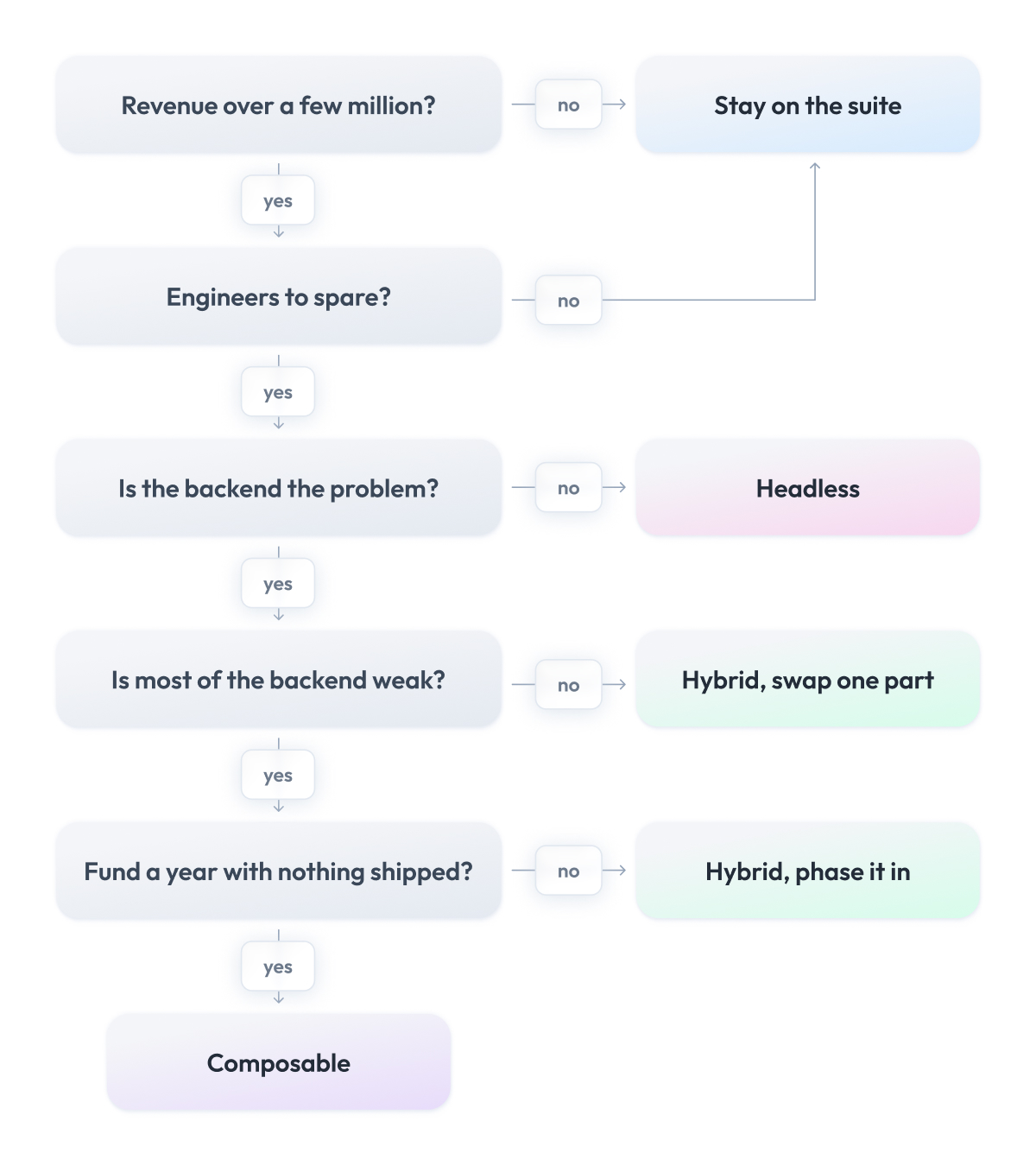
Under roughly $20M in sales, spend it on the platform you have. Neither split pays back. Better theme, image work, and caching cost a fraction of a rebuild and move the same numbers.
$20M and up, with the storefront as the problem, buy headless. $100K to $600K, live in a quarter, license untouched, and you can still go composable later without having to redo the frontend.
$20M and up, on GMV-linked pricing, with three or more ecommerce capabilities your platform cannot do, buy composable. The license escalation alone funds it, and you were going to pay the headless bill anyway.
Anywhere in between, move one part. Pull out the single capability that hurts, leave the rest, and let the invoice tell you whether the next one is worth it.
Headless CMS vs Composable CMS
Your store holds two kinds of content. Products live in the commerce platform. Everything else, like the homepage banners, the category copy, the campaign pages, the guides, and the words around the products, lives in a CMS, your content management system. That is the part your marketing team wants to change on a Tuesday afternoon without having to book an engineer.
Most commerce platforms ship a CMS, and most of those are thin. Marketing asks for a campaign page, the platform offers a text box, and the page turns into a developer ticket. So the content layer is usually the first piece a retailer pulls from the platform, which is why you encounter this pair of words before any of the others.
A headless CMS is one product that does that job properly. It holds your content, draws no pages, and hands everything to your storefront over an API. Contentful and Strapi work this way. You buy it, connect it once, and content stops being a ticket.
A composable CMS describes a stack rather than a product. You keep a headless CMS for text and structure, then add a separate service for images and video, another for personalization, and another for search across your content. Each one does a single job well, and your team joins them up.
| Question | Headless CMS | Composable CMS |
| What you buy | One product | Several products |
| Where content lives | All of it in one place | Split across specialists |
| Who joins it up | The company you bought it from | Your team |
| What it fixes | A platform CMS too thin to use | One content job outgrowing the others |
| Contracts | One | One per service |
Choose a headless CMS when content is one job. Your marketing team needs pages they can edit, your storefront needs to read them, and nobody has asked for anything past that. This covers most retailers, and it costs one contract.
Choose a composable CMS when one of those jobs outgrows the rest. Video that needs its own delivery and encoding. Personalization across hundreds of segments. Search that has to cover both articles and products. At that point, a single CMS starts doing three jobs badly, and splitting them costs less than fighting it.
How to Move From Headless to Composable Without a Big-Bang
You do not have to rebuild anything. In headless ecommerce, your storefront already talks to the backend through APIs, so you can swap out what stands behind any one of those APIs while the rest of the platform keeps working. That is the whole trick, and it means the composable approach can arrive one piece at a time instead of as a rebuild.
The move looks like this.
Say you run headless commerce already and your platform’s search is weak. You buy a dedicated search service, load your catalog into it, and connect it to your storefront next to the old search.
For a while, both run in parallel. Some of your visitors get the new search, the rest get the old one, and you compare the results. When the new one proves itself, you switch everyone over and turn the platform’s search off. The commerce experience your customers see never changes, and nothing else in the store was touched.
Then you repeat it with the next piece, or you stop. Each swap stands on its own, and step by step you turn the entire commerce stack into modular parts you picked yourself.
Start with product data, search, or checkout. On most platforms, these three already sit behind their own APIs, so they come out easiest, and each one pays back in a number you can point to.
Wherever you stop along the way, you land in one of three stages.
| Stage | What runs where | You are here if |
| Headless | Your storefront, one platform behind it | Frontend is yours, backend untouched |
| Selectively composable | One or two pieces swapped out | Search or checkout moved, rest stays |
| Fully composable | Every piece from a specialist | The platform is gone |
Selectively composable commerce is often where retailers stay for years, and that is a fine place to be. You keep what works, you replace what does not, and every step is one you chose with the results of the last one in hand.
Common Mistakes Teams Make With Composable and Headless
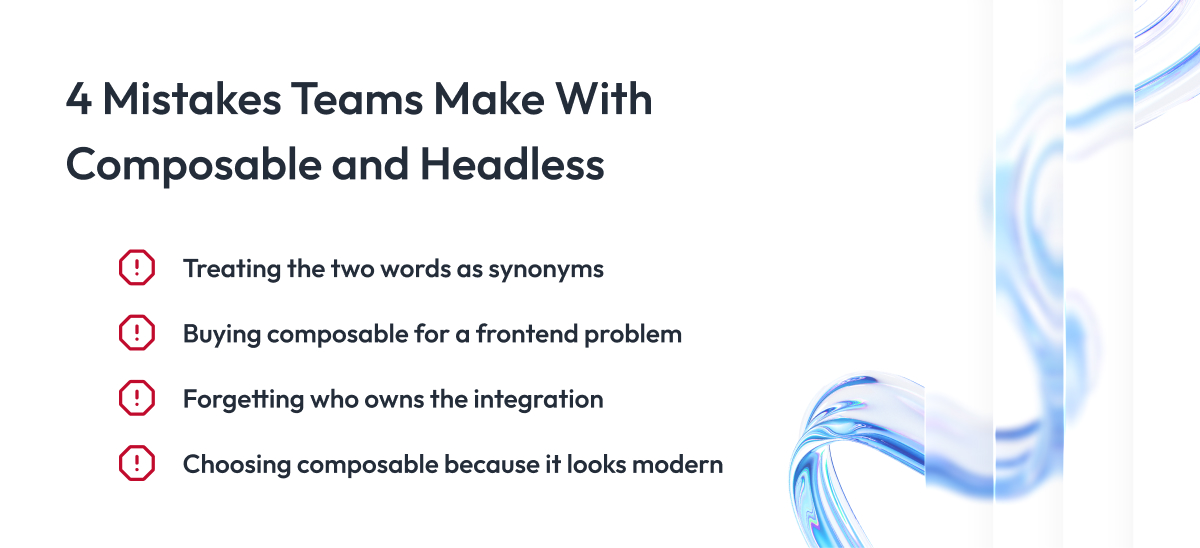
Working with retail clients, we see the same four mistakes most often. Here is each one, what it leads to, and how to avoid it.
1. Using the two words as if they mean the same thing
Companies often confuse the two terms and ask for composable when what they need is headless, or the other way around. Because of that, the project gets planned and priced for the wrong amount of work.
To avoid this, write down which parts of the backend you are replacing and which you are keeping before you talk to anyone.
2. Buying composable for a frontend problem
The store works slowly, and the company decides to fix it by going composable. But composable replaces the backend, and page speed lives in the storefront. So the company spends a year and a big budget, and the pages load exactly as slowly as before.
To avoid this, first check which part is actually causing the problem. If the pages are slow, that is a storefront problem, and headless fixes it. If the store cannot do something, that is a backend problem, and composable fixes it.
3. Underestimating who owns the integration
Implementing composable means the parts have to talk to each other. Search needs the catalog, checkout needs to tell the order system what was sold. The code that passes this information between them cannot be bought, so your team writes it and supports it.
Companies plan the licenses and forget about this, and after launch, two or three engineers work on it full-time without being in the budget. To avoid this, add them to the cost from day one.
4. Going composable because it looks modern
Companies choose composable because commerce technology analysts and conferences talk about it, without a specific problem behind the decision. They get the costs and no return. To avoid this, name the problem and the monthly cost before starting.
Below roughly $20M in annual sales, composable usually does not pay back.
Final Word
Choosing between composable commerce vs headless takes less work than it looks, because the comparison was never the hard part. The hard part is naming the problem honestly, putting a monthly cost on it, and admitting when the answer is to change nothing.
Getting it right buys you more than a faster site. The right size of change ships sooner, requires fewer new hires, and leaves budget for the next problem. The wrong size runs for a year and returns you to where you started, minus the year.
Take the choice one step at a time. Name what breaks, price what it costs you, and pick the smallest change that moves that number. If the number points at the storefront, go headless. If it points at the backend, move one part and count the result before moving the next.
Our commerce engineering team does this work with retailers every week, from locating the constraint to running the first swap. If you want a second pair of eyes on your stack before anything gets signed, we are easy to reach.
Questions You May Have
What is the difference between composable commerce and headless commerce?
Headless commerce separates only the storefront from the backend, and composable commerce goes further by splitting the backend itself into separate parts you buy from different companies and connect through APIs.
Is every headless setup composable, and vice versa?
Every composable commerce architecture is headless, but not every headless implementation is composable, because going headless leaves the backend as one product from one company.
Composable vs headless vs MACH, how do they relate?
Headless describes one cut between storefront and backend, composable describes a backend assembled from several vendors, and MACH architecture is the certification standard for products that fit into either.
Which is better for a small or mid-size store vs an enterprise?
A small or mid-size store is usually better off staying on its suite or going headless at most, and composable starts paying back for enterprises above roughly $20M in sales with capabilities their platform cannot deliver.
Is composable more expensive than headless?
Yes, composable always costs more upfront, since it includes the full headless build plus several licenses and a permanent integration team, and it only comes out cheaper at high volume over several years.
What is the difference between a headless CMS and a composable CMS?
A headless CMS is a content product served via an API; a composable CMS is a stack of content services, and most retailers only need the first.
Can you move from headless to composable gradually?
Yes, and gradual is the recommended path, because your storefront already talks to the backend through APIs, so you can replace one capability at a time as the rest of the platform keeps working.
How do you decide which one you actually need?
Locate the problem first, because a storefront problem such as slow pages needs the headless approach, a backend problem such as weak commerce functionality needs composable, and a problem nobody can price needs neither.
What are the main benefits of headless commerce?
The main benefits of headless commerce are frontend releases that skip the platform’s schedule, free choice of storefront technology, one ecommerce system feeding every sales channel, and page speed your own team controls.
When should a retailer go beyond headless?
Go beyond headless once the backend itself blocks you, meaning your composable commerce approach starts with the one capability whose monthly cost exceeds the cost of replacing it.
What should you look for when choosing a headless commerce platform?
When choosing a headless commerce solution, check that every function is available through the API and not only through the platform’s own screens, since headless without full API coverage leaves your storefront unfinished.
Do monolithic commerce platforms still make sense?
Yes, a monolithic commerce platform remains the cheapest ecommerce solution below roughly $20M in annual sales, because one bill covers engineering you would otherwise hire.