



Quick Summary
- Composable commerce assembles a store from independent capabilities connected by APIs, where composable is the strategy, headless is one choice inside it, and MACH is the rulebook that makes it work.
- The glue is the hidden cost: six providers create 15 or more connection points, and teams can spend a third of engineering time keeping them alive instead of building features.
- Order coordination is where it breaks in production, because reserving stock, charging the card, awarding points, and confirming happen automatically in a suite and become your responsibility across separate tools.
- Most companies belong at stage two, having handed one or two jobs such as search or the CMS to specialists while everything else stays on the suite.
- Adopt one capability at a time behind a strangler pattern, and settle who owns orchestration before the fourth capability arrives, since retrofitting it later is where the expensive messes begin.
Composable commerce is a way to build an online store from separate building blocks instead of one all-in-one system. You pick a best-of-breed commerce tool for each job, connect the pieces via APIs, and they run as one storefront.
Think of it like building with Lego instead of buying a pre-made toy. You get to choose every piece, but you also have to fit them together and keep them from falling apart.
Most guides on this topic skip the parts that actually decide whether composable commerce works for you. They explain the upside but stay quiet about what it costs to run and compare it to only one alternative at a time.
This guide covers what they leave out.
You’ll get a straight definition, the architecture behind packaged business capabilities (PBCs), and one table that separates composable from headless, MACH, and the traditional monolith. We walk through the benefits, the trade-offs, and how to adopt composable commerce one capability at a time.
By the end, you’ll know whether composable commerce fits your business, when an all-in-one suite is the smarter call, and how to start without a risky rebuild.
What Is Composable Commerce?
In the intro, we used the Lego picture to get the idea across fast. Now let’s slow down and look at what composable commerce is under the hood.
The main idea of composable commerce is that you build your store from independent business capabilities instead of buying one all-in-one platform. Each capability is chosen for a single job and connects to the others through APIs.
Those independent capabilities are called packaged business capabilities, or PBCs. A PBC is a ready-made block that covers one business function and runs on its own. You can add one, remove one, or replace one without touching the rest of the store.
- Common PBCs in an online store include:
- Product search and merchandising.
- Shopping cart and checkout.
- Payments.
- Loyalty and promotions.
- Content management (the headless CMS behind your pages).
- Order management.
A capability counts as composable when it checks a few boxes:
- It does one job and does it independently.
- It connects through APIs, so other parts can talk to it.
- It can be swapped for a different provider without a full rebuild.
Here’s a way to picture the difference. A traditional platform is like a phone where the camera, battery, and screen are sealed inside, so you take what you’re given. Composable commerce lets you pop out the camera and drop in a better one whenever you want.
The composable commerce definition came from industry analysts at Gartner, who introduced it to describe this shift toward modular, API-connected commerce.
In software development, “composables” can also mean a coding feature in frontend frameworks like Vue. That’s a different thing entirely.
In this guide, composable commerce always refers to the business approach of building a store from independent, connected capabilities.
How Composable Commerce Works: The Architecture
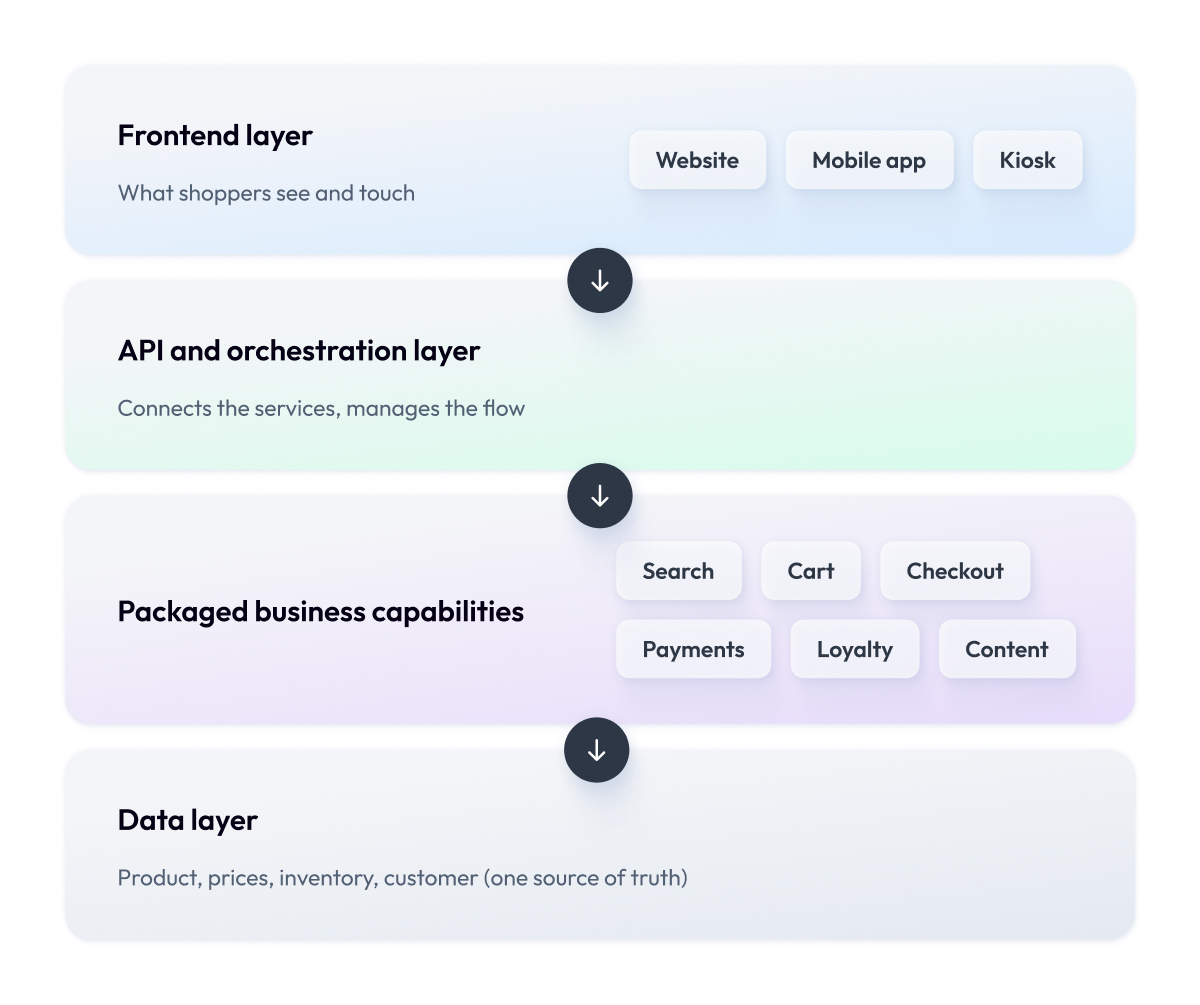
A composable store is built in layers. Each layer has its own job, and they stack on top of each other from the back end to what the shopper sees. There are four to know.
The packaged business capability (PBC) layer
This is the bottom layer, where all your capabilities live. Search, cart, checkout, payments, loyalty, and content each run as their own service. None of them depends on the others to function, so if you replace your search tool, checkout keeps running as normal.
Think of these as the individual workers, each an expert at one task.
The API and orchestration layer
Your capabilities need a way to communicate with each other, and that’s what this layer provides.
APIs are the messengers that pass information between services, so the cart knows the price and checkout knows what’s in the cart.
Orchestration sits above the messengers and manages the flow. It decides what happens in what order when a shopper clicks “buy.”
This layer is the coordination that turns a pile of separate tools into one working store.
Getting it right is usually where an experienced software development partner earns their keep.
The frontend layer
This is the part shoppers actually see and touch, like your website, mobile app, or in-store kiosk. In a composable setup, the frontend is separated from the back end, an approach known as headless.
Headless commerce covers only that split. Because a headless architecture decouples the two, you can redesign your storefront or launch a new channel without rebuilding the machinery underneath. A headless CMS usually lives here and feeds content to every screen.
The data layer
Underneath everything sits your data: products, prices, inventory, and customer records. In a composable store, this data must remain consistent across services, so the number a shopper sees in search matches what they see at checkout.
Keeping that single source of truth in sync is the quietest but most important aspect of composable commerce architecture.
Put these four layers together, and you get the modular architecture in full. Independent capabilities at the bottom, APIs and orchestration connecting them, a flexible frontend on top, and data flowing through all of it.
Composable vs Headless vs MACH vs Monolith: What’s the Difference
The architecture makes more sense once you can place it against the alternatives. This is also where a lot of confusion starts.
We talk to companies all the time who say they want composable commerce, when what they actually need is a headless frontend. Or they think MACH and composable are two competing choices, when one is really a set of principles behind the other.
The composable commerce vs headless question comes up in almost every one of those conversations. These terms get thrown around as if they’re interchangeable, and picking the wrong one can send a project down an expensive path that solves the wrong problem.
So let’s slow down and separate them. Here’s the simplest way to hold all four in your head at once.
| Term | What It Actually Is | The One-Line Version |
| Composable | A strategy for building commerce from independent capabilities | You assemble your store from parts you choose |
| Headless | Separating the frontend from the backend | Your storefront and your engine are decoupled |
| MACH | Four technical principles that make composable possible | The rulebook the parts follow |
| Monolith/suite | One all-in-one platform from a single vendor | You buy the whole store as one package |
The key thing to understand is that these aren’t four options on the same menu. They sit at different levels and have different prices.
Composable is the business strategy: the decision to build from independent pieces.
Headless is one architectural choice you can make inside that strategy, and it only covers the split between what shoppers see and the systems behind it. You can be headless without being fully composable.
MACH is the set of principles that make composable practical. The letters stand for microservices, API-first, cloud-native, and headless.
When a vendor calls a capability “MACH-based,” they mean it follows those four rules, so it plays nicely with everything else you compose.
And the monolith is the thing all of this is reacting against. It’s the traditional suite where a single vendor provides search, cart, checkout, and content in a single package.
In summary, composable is the strategy, headless is one choice within it, and MACH is what makes it possible. Once that clicks, most of the marketing noise around modern commerce falls away.
For a broader view of how these decisions shape your tech stack, our overview of choosing a technology stack for ecommerce is a good next stop.
The Benefits: When Composable Commerce Pays Off
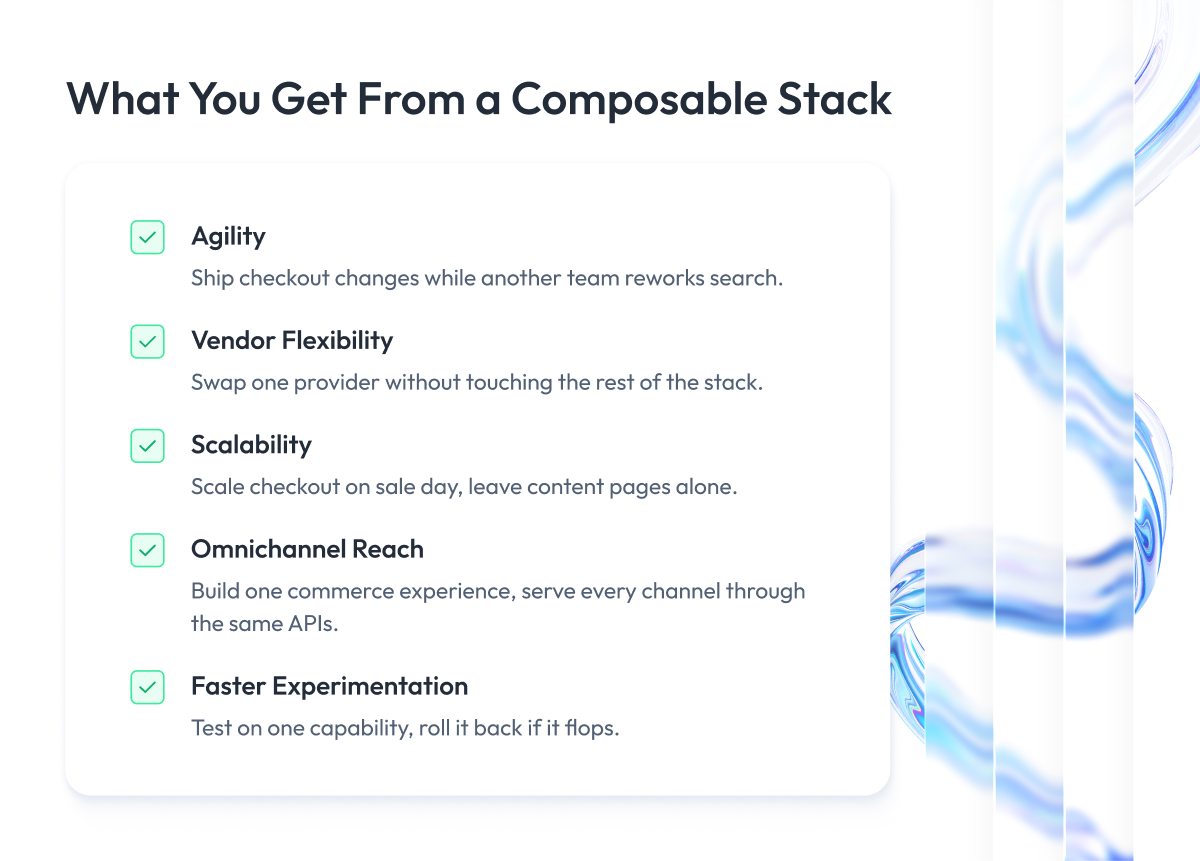
So why do so many digital commerce teams move in this direction? Here are the benefits that enable the business to do so, drawn from what enterprise teams gain in practice.
1. Agility
Composable commerce shortens the distance between an idea and a live feature.
When your capabilities are separate services, a team can ship a change to checkout while another team reworks search, and neither waits on a shared release train.
For a large retailer, that can turn a quarterly release cycle into a weekly one. This speed is the reason why agility shows up first on almost every list of the benefits of composable commerce.
2. Vendor flexibility
With a single suite, you’re tied to one vendor’s roadmap, pricing, and pace of improvement.
Composable commerce spreads that risk. If your payment provider raises fees or your search tool falls behind, you can move that capability to a stronger option while keeping the rest.
3. Scalability
Traffic rarely spikes evenly across a store. On a big sale day, checkout and inventory get hammered while your content pages sit quiet.
Composable commerce enables you to scale capabilities on their own under pressure, so you pay for capacity where you need it. This is a major reason scalability in composable commerce is a common driver for high-volume ecommerce businesses.
4. Omnichannel reach
Shoppers move between your website, your app, a marketplace, and in-store screens, and they expect the same cart and prices everywhere.
Because composable capabilities serve every channel through the same APIs, you build one commerce experience, and it appears across all of them.
Composable commerce omnichannel setups make it far easier to add a new channel later without rebuilding your commerce logic.
5. Faster experimentation
Trying a new personalization engine or a different checkout flow in a monolithic architecture usually means a risky change to the whole platform.
In a composable store, you can run that experiment on one capability, measure it, and roll it back if it flops. Composable commerce helps businesses lower the cost of being wrong, which is exactly what encourages teams to test more and find what works better.
We’ve built exactly this kind of capability separation in production. For a large US fashion retailer, our team delivered an event-driven loyalty engine as a single capability running on microservices and Kafka.
It cut new-promotion launch time from weeks to hours and drove a $28M annual contribution margin without disrupting the rest of the store.
The Trade-Offs and the Composable Fatigue Nobody Mentions
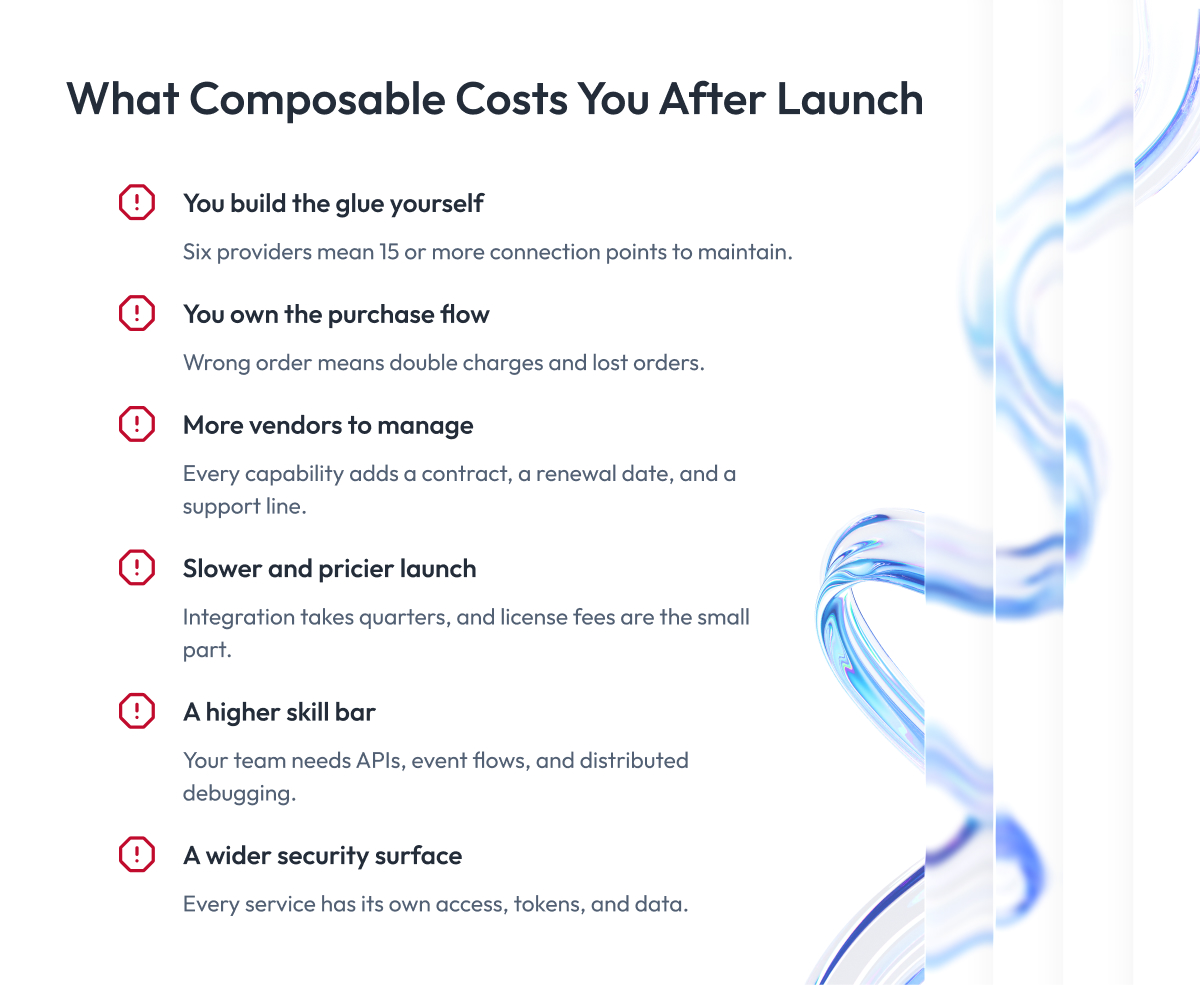
This is the part we want to be straight with you about, because it’s where composable projects actually get hard.
A composable architecture is something you assemble, and assembly has a cost. Here’s what that cost looks like in practice.
1. You have to build and maintain the glue yourself
Every capability you add has to be connected to the others, and that connecting code is yours to build and fix. Composable systems built from six providers aren’t six things to run. There are 15 or more connection points between them, and any of them can break when a vendor ships an update.
Teams often spend a third of their engineering time just keeping these connections alive instead of building new features. This endless upkeep is what people call composable fatigue.
The cost: engineering time, drained continuously.
2. You have to make the purchase steps work together
When someone buys something, a lot has to happen in the right order behind the scenes. The item gets reserved so no one else grabs it, the card gets charged, loyalty points get added, and a confirmation email goes out.
In a ready-made platform, all of that already works together out of the box. In a composable store, each of those steps is a separate tool, and it’s on you to make them talk to each other in the correct order.
If your team doesn’t get that coordination right, things go wrong at the worst time, usually on your busiest sales day. A shopper might be charged twice or pay for an order that never goes through. That’s lost money and lost trust.
The cost: getting this wrong hits revenue and customer trust directly.
3. You have to manage a lot more vendors
One capability from six providers means six contracts, six renewal dates, and six support lines to chase. When something breaks at night, your first task is just figuring out whose problem it even is.
Going composable doesn’t remove vendor lock-in. It spreads it across more suppliers, and keeping track of all of them becomes a standing job for your team.
The cost: more suppliers to manage, all the time.
4. It costs more and takes longer to launch
A composable build usually costs more upfront and launches more slowly than switching on a suite, because you’re integrating tools instead of configuring a single one.
This kind of replatforming is measured in quarters, and the timeline grows with every capability you replace and every messy data source you have to clean up. Rushing a composable commerce migration is one of the more expensive mistakes here.
The cost: more money and time before you go live.
5. It requires a stronger engineering team
The adoption of composable commerce asks more of your people. They need to be comfortable with APIs, event-driven flows, and problems that hide across many services at once. A team used to running one platform can stall when a bug is suddenly somewhere across a dozen tools, and that’s no knock on them. It’s a genuinely different skill.
This is a gap we fill often. Maybe composable commerce is right for your business, but you don’t have the team to build and run it. In that case, we bring in the engineers who own the delivery end-to-end, so you get the setup without staffing up first.
The cost: higher skill bar, or outside help.
6. There’s more to keep secure
A single platform has one front door to lock. A composable stack has many. Each service has its own access, its own tokens, its own slice of data, so there are simply more places to protect and more places where a mistake could leak customer information.
Keeping logins and permissions consistent across every capability takes a lot of effort. That’s why smart teams treat ecommerce security as day-one design work on a composable project, before the store is live.
The cost: a wider security surface to defend.
When an all-in-one suite is the better call
We’ve told plenty of companies to stay on their suite, and it was the right advice.
Here’s the kind of business we mean. You sell fairly standard products, your team is lean, and your money comes from the products themselves.
Your digital experience just needs to work. Put a composable stack under that business, and you’ve bought yourself a lot of integration work to solve a problem you don’t have. A one-size-fits-all suite already covers your specific business needs, and it gets you further, faster, for less.
So before you commit, ask one blunt question.
Will the flexibility actually earn back what it costs to run? Plenty of mid-market stores move toward composable commerce, spend a fortune wiring it together, and never use the flexibility they paid for. Don’t be one of them.
Should You Go Composable? A Decision Framework
By now you can see what composable commerce gives you, and what it takes to run. So the question isn’t “is composable good?” It’s “is it right for us, right now?”
This section gives you a way to answer that instead of guessing.
Before you adopt a composable model, drop the idea that there are only two choices. There are three. You can go composable, stay on an all-in-one suite, or take a hybrid path where you keep a suite as your base and compose just the one or two capabilities that set you apart. For many companies, that middle road is the sensible one.
Five factors decide which path fits. Here’s how they line up.
| Factor | Go Composable | Stay on a Suite | Go Hybrid |
| Your traffic | High and spiky | Steady and predictable | Growing unevenly |
| What gives you an edge | Your online experience | Your products | One standout feature |
| Your engineering team | Strong, handles complexity | Small or platform-focused | Capable but stretched thin |
| Your budget | Can spend more upfront | Watching every cost | Spend only where it counts |
| How fast you need results | Can wait a few months | Need to launch soon | Want quick wins first |
Read across your own situation. If most of your answers sit in the left column, composable commerce will earn its keep. If they sit in the middle, a modern suite is the cheaper and safer call. If they’re split, hybrid lets you get the flexibility exactly where it matters.
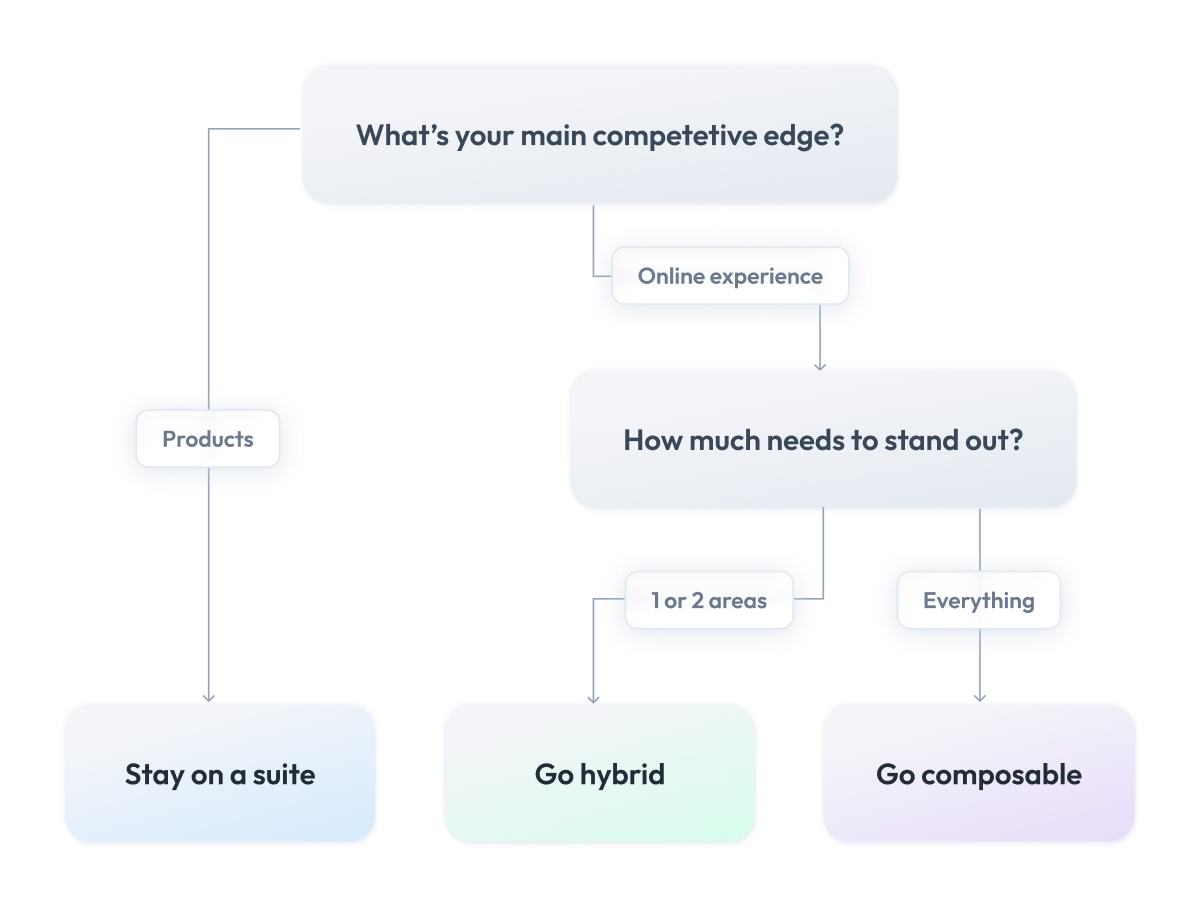
One honest note from doing this with clients.
Very few businesses land cleanly in one column, because unique business needs rarely fit a template, and that’s fine. The framework is there to make the tradeoffs visible, so you can choose with your eyes open. If you want a second set of eyes on where you fall, our team does this kind of ecommerce architecture consulting before any code gets written.
The takeaway worth keeping: composable is a means to an end. Pick the path that matches your scale, your team, and where you actually compete, and the technology decision gets a lot easier.
The Composable Commerce Readiness and Maturity Model
The decision framework tells you where you want to go. This next part tells you where you’re starting from, because almost nobody decides to migrate to composable commerce and gets there in one move.
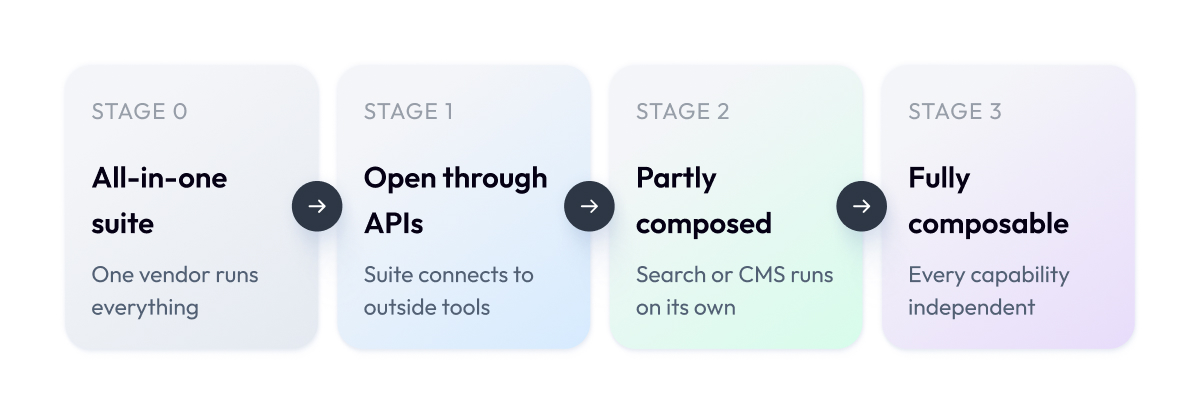
Businesses embracing composable commerce travel through four stages. Find yours before you plan anything.
Stage 0 – You run an all-in-one suite
Catalog, cart, checkout, content, all from one vendor. It works. Plenty of companies stay here for years and make very good money doing it.
Stage 1 – Your suite is open through APIs
Still one platform, but now it talks to the outside world. Maybe you’ve built your own frontend, or plugged in a tool or two from elsewhere. Nothing’s been replaced yet. What matters at this stage is quieter than it looks: your team has proven it can integrate things without breaking the store. That skill is the price of admission for everything after this.
Stage 2 – You’ve composed a capability or two
You’ve taken one or two jobs away from the suite and given them to specialists. Search usually goes first, or a headless CMS. Everything else still runs where it always did.
This is where most composable commerce companies actually live, and for many of them, it’s the right place to stop. You got the flexibility where you needed it and skipped the bill for the rest.
Stage 3 – You’re fully composable
Your core capabilities each run as their own service, wired together by orchestration you own. Full flexibility, full weight on your shoulders. Few businesses need to get here. If you do, get here on purpose, with the team to run it.
So when do you move up? When your current setup is blocking something the business actually needs, and you’ve got the people to handle what’s next. Short of that, staying put is a perfectly good answer.
How to Adopt Composable Commerce Incrementally
We’ve implemented composable architecture for clients regularly, and composable commerce for B2B marketplaces and retailers moving off a platform that’s holding them back is the bulk of it. Over those projects, the approach has settled into a sequence we now use by default, because it’s the one that keeps the business running while the architecture changes underneath it.
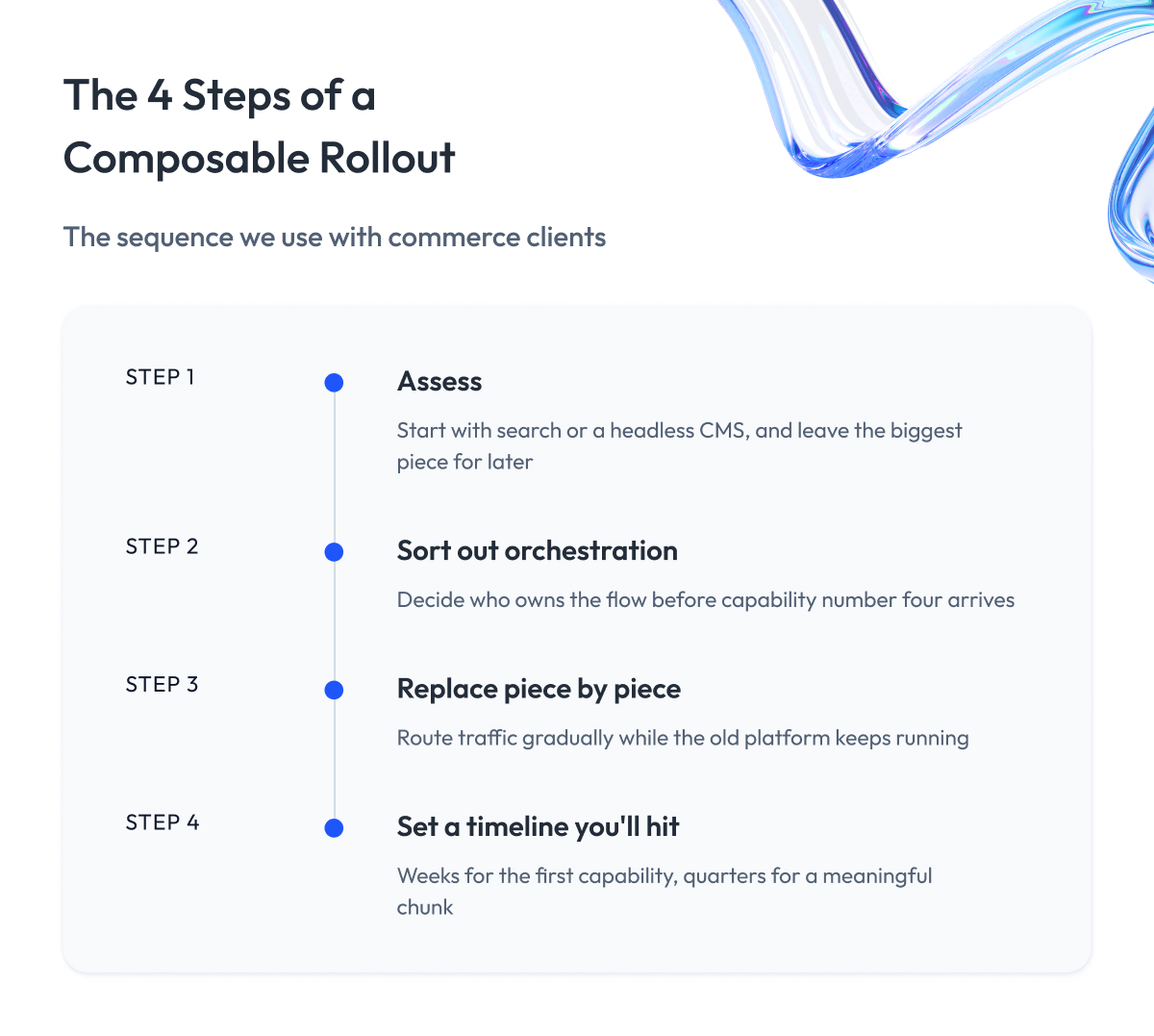
The short version is that we replace one capability, prove it works, then compose further. The projects that go badly are the ones that try to rebuild everything at once and discover halfway through that the old store still has to keep taking orders.
Here’s how that composable approach usually goes, step by step.
Step 1 – Pick one capability that hurts
Start with the capability that’s actively costing you something, and leave the biggest piece for later. Usually that’s search, because bad search loses sales every day and a specialist tool beats a suite’s built-in search almost immediately. A headless CMS is another common first move, especially when the marketing team is stuck waiting on developers to publish anything.
Going first with one capability means your team learns how integration really behaves while the stakes are still low.
Step 2 – Sort out orchestration before you add more
Once you have two or three services talking to each other, decide who owns the flow between them and where that logic lives. Do this before capability number four arrives. Retrofitting orchestration onto a stack that’s already sprawling is genuinely painful, and most of the integration mess we get called in to fix started with this exact step being skipped.
Step 3 – Replace piece by piece, keep the store running
Leave the old platform in place and route traffic to the new capability gradually, one function at a time. Engineers call this the strangler pattern, and the name fits. The new system grows around the old one until the old one has nothing left to do. Your shoppers never notice a switch, because there isn’t one.
This is also how you keep a rollback option. If the new search underperforms, you route back, and nobody outside the team knows it happened.
Step 4 – Set a timeline you’ll actually hit
Plan in quarters and measure in capabilities shipped. A first capability can go live in weeks. A meaningful chunk of the store usually takes a few quarters, and full composability takes longer than anyone promises you at the start.
We ran this playbook during a B2B marketplace migration for a US client transitioning from a legacy architecture built on PHP onto Salesforce Commerce Cloud, then built a custom shipping tracker, punch-out procurement integrations, and automated accounting.
We didn’t wait for the migration to finish before delivering value. The first accounting upgrade went live in two weeks, the shipping tracker in another two. The first accounting upgrade shipped in two weeks. A self-service payment feature went from prototype to live in four days.
Delivery ran 5x faster than the incumbent vendor’s estimates.
Composable Commerce Platforms and How to Evaluate Them
When you go shopping for composable commerce technology, you’ll run into three kinds of vendors.
The first kind is the traditional platform that opened itself up:
- Salesforce Commerce Cloud.
- SAP Commerce Cloud.
- Adobe Commerce.
- Shopify Plus.
You get a full store out of the box, plus APIs to plug other tools into it, which makes this the most common entry point for teams choosing their first composable commerce platform.
The second kind is built for composability from the start:
- Commercetools.
- Elastic Path.
They give you a commerce engine and let you bring everything else yourself.
The third kind does only one job:
- Algolia for search.
- Contentful for content.
- Stripe for payments.
Each one is excellent at its thing and knows nothing about the rest of your commerce ecosystem, so a full composable commerce solution usually means combining several of them.
The table below puts them side by side so you can see which one your situation points to, and what you’d be signing up for with each. Find the row that matches how you plan to build, then read across to see where it typically goes wrong.
| Type | Examples | Best For | Main Risk |
| Open suite | Salesforce, SAP, Adobe, Shopify Plus | One base, flexibility where needed | Only parts open to APIs |
| Composable-first | commercetools, Elastic Path | Full control over every piece | You build the rest yourself |
| Single-capability tool | Algolia, Contentful, Stripe | Fixing one weak spot fast | Vendors pile up quickly |
Any of the three can be the right choice, depending on your situation.
Almost every vendor in all three groups now calls itself composable, because the word sells. A platform can open up one piece of an otherwise closed system and still put the label on its homepage.
Marketing won’t tell you the difference, and guessing wrong costs you money. If the platform locks you out exactly where you need it open, you’ll find out a year in, after you’ve signed the contracts and your team has built everything around it.
So the skill worth having is knowing what to check. Let’s go through it.
What to actually check before you sign
Commerce tech demos all look great, so push on five things.
- How open it is. Ask what share of the platform you can reach by API, and get the answer in writing. Partial API coverage is where composable projects stall.
- Whether you can really swap things out. Some platforms let you replace the frontend and nothing else. Ask which capabilities you can move to another provider, and what that would take.
- The full cost, glue included. The license for composable commerce software is the visible part. Integration, orchestration, and ongoing maintenance usually cost more than the license.
- What already connects. A vendor with an open ecosystem of mature connectors to your ERP and payment stack saves your team months of custom work.
- What leaving costs. Ask how you’d get your data and customers out. The answer tells you how confident they are.
Your platform choice is maybe a third of the outcome. The rest comes down to how well someone integrates, orchestrates, and maintains the pieces after the contracts are signed. That integration and orchestration work is where composable commerce services earn their money, and it’s what our software engineering and application services teams do for commerce clients every day, whichever platform they picked.
Composable Commerce, Omnichannel, and the AI Era
Your store never stops having to connect to new things. First, it was a website, then a mobile app, then a marketplace, then in-store screens. Now it’s AI tools. New technologies show up every couple of years, and each time you have to integrate them into your pricing, catalog, and checkout.
Composable commerce makes each of those connections cheap. Every capability already runs behind an API, so a new tool can pull your prices, personalize what a shopper sees, and push an order through checkout as soon as you connect it. On a closed platform, you either wait for your vendor to support the new thing or pay someone to build a workaround.
Two things happening right now show what that buys you.
- Omnichannel. Your customer browses on the web, buys in the app, and returns the item in store. Every channel uses the same checkout and the same pricing service, so they always agree with each other. When you add a channel later, you build the screen and connect it, and the store underneath stays as it is.
- AI personalization. Recommendation and personalization tools that shape the customer experience live on your data. If that data flows through APIs, the tools can reach it, and you spend your time tuning the model. If it’s locked inside a platform, you spend the project fighting for access instead. This is why ecommerce personalization work tends to move faster on a composable stack.
And one that’s arriving now. AI agents are starting to buy things for people. An agent goes straight to your APIs, because it has no interest in how your storefront looks. Stores that already run their capabilities as services can serve those agents today, without anyone having planned for it.
None of this happens by itself. Someone has to design the APIs, wire the tools in, and make sure the whole thing holds up when your traffic spikes. That’s the work we do for commerce clients.
Composable Commerce Cheat Sheet
Everything above in one screen. Copy it into a doc, send it to whoever asks you what composable commerce is, or keep it open while you sit through vendor calls.
| Question | Short Answer |
| What is composable commerce? | Store built from independent capabilities connected by APIs |
| What’s a PBC? | Packaged business capability: one function, running on its own |
| Composable vs headless? | Composable is the strategy, headless is one choice inside it |
| What’s MACH? | Microservices, API-first, cloud-native, headless: the four principles |
| Biggest benefit? | Change or add one capability without touching the rest |
| Biggest cost? | You own the integration work forever |
| Who should skip it? | Standard store, small team, products are your edge |
| Where to start? | One capability that’s costing you money, usually search |
| How long? | First capability in weeks, meaningful change in quarters |
| What decides success? | Orchestration ownership, decided before you add capability four |
Five rules worth remembering when you’re choosing.
- Composable is a means to an end, so start from the business problem rather than the architecture.
- Hybrid is a legitimate answer, and it’s where most companies land.
- The license fee is the small number, and integration and maintenance are the big ones.
- Every vendor says composable, so ask what share of the platform is open by API.
- Replace one capability, prove it works, then compose further.
Final Word
If you’ve read this far, you already know composable commerce isn’t a yes or no question. The work is in figuring out where your business actually sits, and that takes auditing what your current platform blocks, being honest about what your team can run, and pricing the integration work nobody put in the proposal.
That effort pays for itself. The companies that get burned by composable commerce are almost always the ones that skipped this part and bought the architecture first.
Run yourself through the decision framework, find your stage in the maturity model, and pick the one capability that’s costing you the most right now. If composable turns out to be right for you, start there and prove it before you go further.
If you want a second opinion before you commit, we’re happy to look at your setup and tell you honestly what we’d do. We build ecommerce systems for companies on all three paths, and we’ve talked plenty of them out of composable when it wasn’t the right call.
Questions You May Have
What is composable commerce?
Composable commerce is an approach where you build your store from independent business capabilities, each chosen for one job and connected through APIs, instead of buying one all-in-one platform.
What are packaged business capabilities (PBCs)?
Packaged business capabilities are ready-made blocks that each cover a single business function, such as search, cart, checkout, payments, or content management, and run independently of one another.
How is composable different from headless commerce and MACH?
Composable is the overall strategy. Headless commerce is one choice inside it that separates your storefront from your backend, and MACH is the set of four principles (microservices, API-first, cloud-native, headless) that makes a composable architecture practical.
What are the benefits and the honest downsides of composable commerce?
The benefits of composable commerce are agility, vendor flexibility, and scaling capabilities on their own, and the downsides are the integration glue you maintain forever, more vendors to manage, and a higher engineering skill bar.
How much does composable commerce cost and how long does it take?
Composable commerce pricing scales with how many capabilities you replace, with license fees usually smaller than integration and maintenance, and timelines run weeks for a first capability and quarters for a meaningful chunk of the store.
When is an all-in-one platform the better choice?
An all-in-one platform wins when you sell fairly standard products, run a lean team, and make your money from the products themselves rather than from your digital experience.
How do you migrate to composable commerce without a big-bang rebuild?
You migrate to composable commerce one capability at a time using the strangler pattern, routing traffic to each new service gradually while the old platform keeps running until it has nothing left to do.
Which composable commerce platforms lead the market?
Analysts typically name commercetools, Salesforce, Adobe, and SAP among the composable commerce companies leading the market, though the right leader in composable commerce for you depends on which capabilities you plan to replace.
How does composable commerce work?
A composable commerce architecture works in four layers: independent capabilities at the bottom, an API and orchestration layer connecting them, a headless frontend on top, and your data flowing through all of it.
What are some examples of composable commerce?
A typical example of composable commerce is a retailer running its core store on Shopify Plus with Algolia handling search, Contentful managing content, and Stripe processing payments, all connected through APIs.
What are the requirements for adopting composable commerce?
Composable commerce requirements come down to engineers comfortable with APIs and microservices, a platform that exposes most of its functions, and one clear owner for orchestration.
How is composable commerce different from traditional commerce?
Composable commerce vs traditional commerce comes down to ownership: a monolithic platform gives you everything from one vendor as a package, while a composable stack lets you pick and replace each capability yourself.
Is composable commerce a good fit for B2B?
Composable commerce for B2B works well when you need custom pricing, procurement workflows, and ERP integrations that a standard platform handles poorly, which is why B2B marketplaces are common adopters.
Why is composable commerce important for D2C and B2C brands?
Composable commerce for D2C and B2C brands matters when your online experience is what sets you apart, since it lets you improve the customer journey on one capability at a time without touching the rest of the store.
What role does AI play in composable commerce?
Integrating AI in composable commerce is easier because your product, pricing, and behavioral data already move through APIs, so personalization engines and shopping agents can reach them without custom extraction work.
What are the main composable commerce trends right now?
The main composable commerce trends are hybrid adoption over full rebuilds, growing scrutiny of total cost, and stores preparing their APIs for AI agents that buy on a customer’s behalf.
Do you need an agency or partner to implement composable commerce?
Most teams bring in composable commerce services or a build partner for the integration and orchestration work, since that is where projects stall rather than on the platform choice itself.
What is the best composable commerce software for a first project?
The best composable commerce solution for a first project is usually a single capability specialist such as search or a headless CMS, added alongside your existing platform rather than replacing it.