



Quick Summary
- Every workflow reduces to trigger, condition, and action, and the difference at scale is real: one rebuild took order and invoice processing from 21,000 to 150,000 events per hour.
- Four questions predict the return: is the task repetitive, does it touch several systems, is it triggered by a clear event, and is it high volume with low complexity.
- One rule of thumb settles most cases: if a task touches three systems and runs every day, automate it.
- The cost hides inside salaries you already pay, so four minutes per order across 2,000 monthly orders is roughly $40,000 a year at $25 an hour.
- Start with no-code and move to custom only when a specific tool hits a specific wall, since building custom before you need it burns budget on engineering you could have rented.
eCommerce automation moves repetitive tasks, such as order processing, inventory updates, product listing, and customer notifications, from people to software.
When done well, it reduces labor hours and error rates at the same time, allowing you to grow order volume without increasing headcount at the same pace.
The hard part is knowing which workflows are worth it. Most guides list a dozen tasks you could automate, vendors promise savings they never quantify, and experienced operators will tell you that much of what gets sold as “AI automation” changes nothing on the P&L.
This guide takes the opposite approach. We break down the cost math behind automation, walk through eight workflow blueprints with the highest returns, compare no-code tools with custom builds, separate rule-based logic from AI agents, and name the things you should leave manual.
By the end, you will know which workflows to automate first, what each one saves, and when your store outgrows off-the-shelf tools, so you can build an automation roadmap grounded in numbers instead of vendor promises.
What Is eCommerce Automation and How Does It Work?
Before we get into cost math and workflow blueprints, let’s define the term, so we’re working from the same idea of what automation actually is.
eCommerce automation is software that carries an operational task from start to finish across every system it touches, without a person moving the work along.
Order processing, inventory syncing, product listing, customer notifications: each becomes a workflow that the software owns end-to-end.
The test for whether something is truly automated is simple. If a dashboard flags low stock and waits for someone to place the order, that is reporting. If the system raises the purchase order itself, that is automation.
Almost every eCommerce automation, from a single Shopify rule to a custom event-driven pipeline, runs on the same three-part logic:
- Trigger: the event that starts the workflow, such as a placed order, a stock level crossing a threshold, or an incoming return request.
- Condition: the rules the system checks before it acts, such as whether payment cleared, whether the fraud score is acceptable, or whether the item is available at a given warehouse.
- Action: the step the system executes, such as creating a fulfillment task, updating stock across channels, or sending the order confirmation.
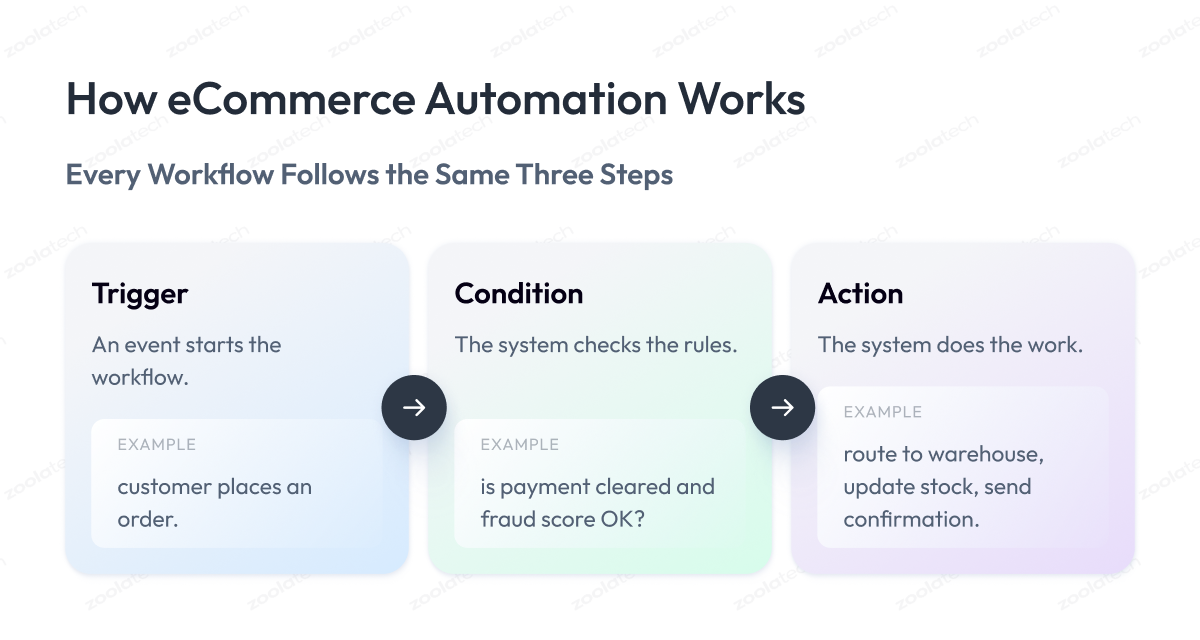
A workflow every ecommerce store runs daily shows the pattern. A customer checks out, which triggers the flow. The system confirms payment and screens the order for fraud signals. It then routes the order to the appropriate warehouse, adjusts inventory levels, and sends a confirmation with tracking information.
That difference compounds at scale. When we rebuilt order and invoice event processing for Nordstrom, throughput rose sevenfold, from roughly 21,000 to 150,000 events per hour, the kind of load no manual process absorbs. The engineering behind that jump is the subject of much of this guide, and it starts with the same trigger-condition-action chain you just read.
Every workflow ahead, however sophisticated, is a variation on those three steps.
What’s Worth Automating: Four Criteria That Predict ROI
By now you can picture dozens of tasks in your store that a workflow could handle. That is the trap. Try to automate everything at once, and you burn engineering hours protecting processes that barely affected your costs.
Automation helps most when you aim it well, so before you use automation on anything, ask yourself four questions about each task.
Together they predict how much a given automation will pay back, so you can rank your list and start with the workflows that return the most.
1. Is it repetitive?
The more often a task runs, the more each second you save gets multiplied. A workflow that shaves thirty seconds off an order confirmation matters when you handle two thousand orders a day and barely registers when you handle ten. High frequency is the strongest single signal of a good return because the savings stack up every time the task fires.
2. Does it touch multiple systems?
The tasks worth the most force a person to move data between tools that do not sync on their own, like your store, warehouse, accounting software, and carrier. Every manual copy-paste is slow and introduces errors that cost money to fix downstream. A yes here means you remove both the labor and the error correction, which returns far more than automating a task stuck inside one tool.
3. Is it triggered by a clear event?
A strong candidate starts at a moment you can name exactly: an order is placed, a payment fails, stock drops below ten units. A precise trigger keeps the automation running reliably without babysitting, which is what protects the savings over time. If you cannot point to the exact event, the logic stays fuzzy, the workflow misfires, and the constant supervision erases its own return.
4. Is it high volume and low complexity?
The best tasks to automate are the ones you do hundreds of times a day and that require almost no thought. They are cheap to set up and a pain to keep doing by hand, so you get your money back fast. Rare tasks, or ones that need a real decision, are a different story. They save less, cost more to automate safely, and are better left to your team until you reach the AI stage we cover later.
Here is a simple rule of thumb that ties the four together: if a task touches three systems and runs every day, automate it. Go down your task list and answer these four questions for each one. The tasks that score high are your best first bets, and that is exactly where your rollout should start.
The Ops-Cost Case: How Much Money eCommerce Automation Can Save You
Every task in your store has a hidden price tag. Someone’s time. And that price is easy to miss, because it hides inside salaries you already pay. A person spends four minutes processing an order; you think it costs nothing. Multiply those four minutes by two thousand orders a month, and you are paying for a full-time job you never posted.
Automation attacks that cost from two directions at once. Automated processes save time by removing labor hours, and they cut the human error those hours produce.
The labor side is easy to picture. Take one task, count how long it takes a person, multiply by how often it runs, and multiply again by what an hour of that person’s time costs you. That number is what the task drains every year before you automate it.
Here is a simple example to show the math. The numbers are illustrative, not a benchmark, so plug in your own.
| Task | Manual Time | Monthly Volume | Yearly Cost at $25/hr | After Automation |
| Order processing | 4 min each | 2,000 orders | ~$40,000 | Near zero |
| Inventory sync | 3 hr weekly | Weekly | ~$3,900 | Near zero |
| Product listing | 15 min each | 300 new SKUs | ~$22,500 | ~80% saved |
| Support replies | 6 min each | 1,500 tickets | ~$37,500 | ~40% deflected |
The second saving is quieter but often bigger: errors. A wrong shipping address means a reshipped package and a refund. A stock count that is off means you sell an item you cannot deliver, then eat the cancellation and the angry review.
A person moving numbers between screens all day will get some of them wrong. Fewer errors also lift your conversion rate, since customers who get accurate stock and delivery information are likelier to buy again.
The gap widens as you grow. At ten orders a day, a person keeps up fine. At ten thousand, the manual approach breaks down, and your only options are to keep hiring or remove the manual step.
Automation lets your order volume climb without your headcount climbing at the same rate, which is the whole point of scaling an online business.
Add the two savings together, and the picture changes how you plan. You stop asking “can we afford to automate this?” and start asking “how much is it costing us not to?”
High-ROI eCommerce Automation Workflows: 8 Blueprints
Knowing what a task costs is half the picture. The other half is seeing exactly how the automation runs, step by step, so you can judge what it takes to build and what it gives back.
Below are eight automation examples that pay back fastest for most online stores, the automated workflows and automated systems that remove the most manual work.
Each one follows the trigger-condition-action pattern from earlier and lists the systems it connects to and the specific way it saves you money. Think of them as starting templates. The logic stays the same whether you build it in a no-code tool or a custom pipeline.
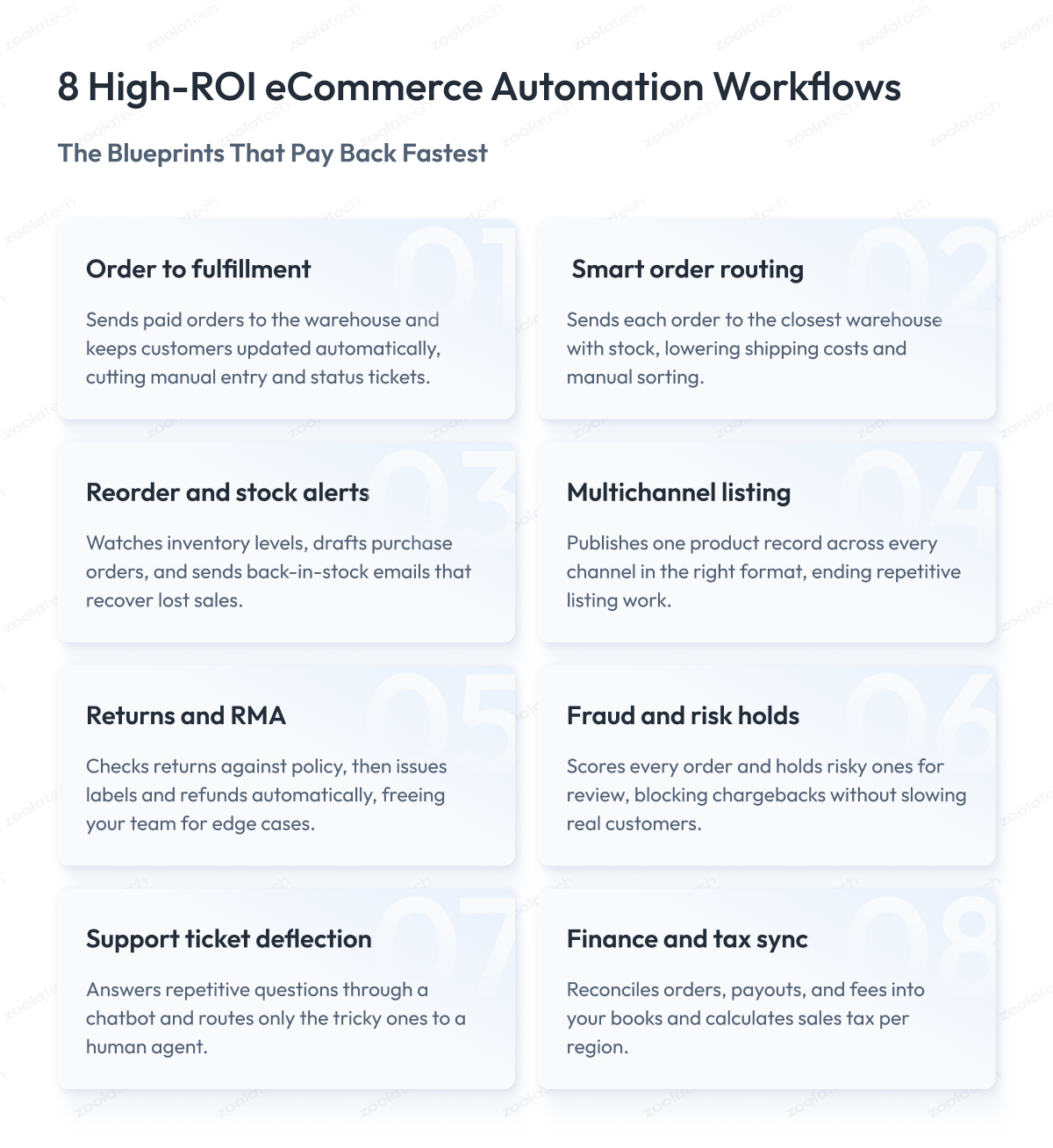
1. Order to fulfillment with status notifications
The moment a customer pays, this workflow takes over. It confirms the payment, sends the order to your warehouse or 3PL, and fires off an automated email confirmation. Then it keeps the customer posted at every step: shipped, out for delivery, delivered, by email or SMS. The saving comes from two places.
Nobody keys orders in by hand, and your support inbox stops filling up with “where is my order?” messages because people already know. This is the backbone of a solid order management system for eCommerce and the starting point of most ecommerce fulfillment automation.
- Trigger: order placed and paid.
- Systems touched: store, payment gateway, warehouse or 3PL, email and SMS tools.
- Saves: manual order entry plus a large share of “where is my order” tickets.
2. Order routing to the right warehouse or 3PL
If you ship from more than one location, this one decides where each order goes. It reads the customer’s address, checks which warehouse has the item and sits closest, and sends the order there automatically.
You get faster deliveries, lower shipping bills, and no staff member manually sorting orders by region every morning. Tightening this exact routing logic is what let us enable same-day pickup for a major retailer.
- Trigger: new paid order needing fulfillment.
- Systems touched: order management, inventory, 3PL or warehouse systems. This is ecommerce fulfillment automation at its most direct.
- Saves: shipping cost from smarter routing and hours of manual sorting.
3. Reorder, replenishment, and stock alerts
This workflow watches your stock levels around the clock. When an item drops below the point you set, it drafts a purchase order to the supplier or flags it for approval. It also handles both sides of the alert: a low-stock warning to your team, and a back-in-stock email to shoppers who asked to be notified.
The same trigger logic can personalize follow-ups, so a shopper who eyed a sold-out item gets a targeted note the moment it returns.
- Trigger: inventory level crosses a set threshold.
- Systems touched: inventory management, supplier or purchasing system, email tool.
- Saves: stockouts, rushed reorders, and lost back-in-stock sales.
4. Product data to multichannel listing
Selling on your own store plus Amazon, eBay, or a marketplace means the same product has to go live in several places, each with its own format. This workflow takes one product record, cleans up the details, and publishes it across all channels in the correct layout.
Add a new SKU once, and it appears across every channel, instead of a person retyping the same listing four times. Managing catalog data at this scale is central to how we streamlined merchandising on a unified platform.
- Trigger: new or updated product record.
- Systems touched: product catalog or PIM, store, marketplace APIs.
- Saves: hours of repetitive listing work and copy-paste mistakes across channels.
5. Returns and RMA handling
Returns eat time because each one has several steps. This workflow lets the customer file a request, checks it against your policy, approves the ones that qualify, and generates the return label and refund on its own. Your team only steps in on the edge cases that need a human look, and customers get a faster answer.
- Trigger: customer submits a return request.
- Systems touched: store, returns platform, payment system, email tool.
- Saves: manual review time on routine returns and faster refund turnaround.
6. Fraud and risk holds
Some orders should not ship the second they come in. This workflow scores each order for fraud signals like an odd billing-shipping mismatch or a suspiciously large first-time order, and quietly holds the risky ones for review while the safe majority sail straight through.
You block bad orders before they cost you a chargeback, without slowing down genuine customers. We rebuilt exactly this kind of screening when we modernized payment fraud management for a leading retailer.
- Trigger: new order placed.
- Systems touched: store, fraud-scoring tool, order management.
- Saves: chargeback losses and manual review of every single order.
7. Customer service ticket deflection
A big chunk of support questions are the same handful asked over and over: order status, return policy, sizing. This workflow answers those automatically through a chatbot or auto-reply, pulling the real order details when needed, and passes anything genuinely tricky to a human agent. Retailers can also connect these workflows with a customer engagement tool to keep conversations consistent across channels while ensuring customers receive timely updates and personalized responses. Your team stops repeating itself, every ecommerce customer gets a faster answer, and agents spend their time on the questions that actually need a person.
- Trigger: incoming customer message or ticket.
- Systems touched: helpdesk, store, order data, chatbot or AI assistant.
- Saves: agent hours on repetitive questions and faster response times.
8. Finance reconciliation and tax
Money data has to match across your store, payment processor, and accounting software, and doing that by hand is slow and easy to get wrong. This workflow automatically syncs orders, payouts, and fees into your books and handles sales tax automation for ecommerce by calculating the right amount for each region you sell in. Your accountant gets numbers that already line up, and tax stops being a manual scramble.
- Trigger: completed order or payout.
- Systems touched: store, payment processor, accounting software (such as QuickBooks or Xero), tax engine.
- Saves: bookkeeping hours, reconciliation errors, and tax miscalculations.
The pattern across all eight is the same. Pick a task that runs constantly, connect the systems it lives between, and let a trigger start the chain. Start with the two or three that match your biggest headaches, and you will feel the difference in both hours and error rates within the first month.
What to Automate by Area
The blueprints above cover the workflows with the fastest payback, but they do not cover every corner of a store. Use the map below to spot the areas you have left manual.
| Area | What Automation Handles | Where to Go Deeper |
| Operations | Order processing, fulfillment, routing, inventory sync | Blueprints 1, 2, 3 |
| Catalog and product data | Feed ingest, enrichment, multichannel listing | Blueprint 4 |
| Customer experience | Order updates, stock alerts, ticket deflection | Blueprints 3, 7 |
| Pricing and promotions | Rule-based repricing, scheduled sale start and stop | Covered here |
| Finance and tax | Reconciliation, payouts, sales tax at checkout | Blueprint 8 |
| Data and reporting | Scheduled reports, unified error dashboards | Data and analytics work |
| Marketing | Email and SMS flows, cart recovery, segmentation | Separate marketing guide |
Pricing and promotions automation adjusts prices according to the rules you set and schedules sales to start and stop on their own, so a promo never runs a day too long.
On the data side, the highest-value build is a unified error dashboard: one screen that flags failed orders, sync errors, and stuck payments the moment they happen, which is the core of our data and analytics work.
Ecommerce marketing automation is a large field of its own. For more advanced customer engagement workflows, a B2B email marketing agency can help businesses design personalized campaigns, audience segmentation, and automated messaging across multiple channels. Email marketing automation runs the email and SMS side of the business, from abandoned cart recovery to full marketing campaigns, and a dedicated platform like the Klaviyo ecommerce automation platform or Omnisend ecommerce marketing automation handles the segmentation behind them.
Because ecommerce marketing automation follows a different logic than the ops workflows in this guide, it earns its own guide, so here we only mark where it sits.
Weigh each area by how much manual work it drains today, and start where that number is highest.
When to Use No-Code Tools and When to Build Custom
So far we have looked at what to automate. Now let’s move on to the technical side and look at how automation is actually built. There are two broad ways to do it, and each comes with its own strengths and trade-offs. Understanding both is what lets you spend your budget in the right place.
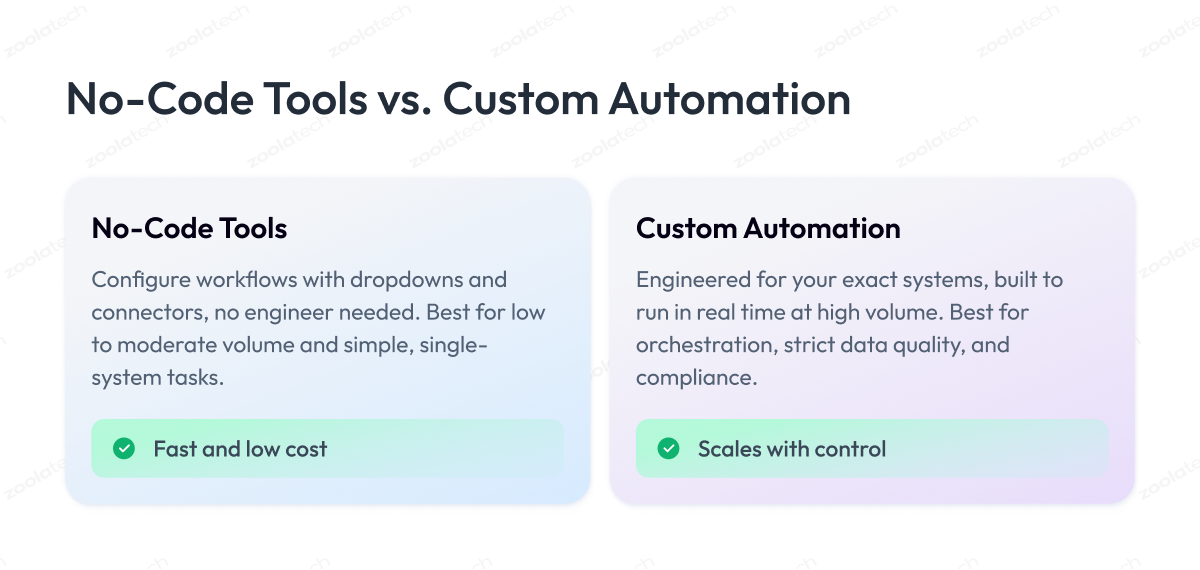
You either configure it in a no-code tool using dropdowns and toggles, or you have engineers design and code a custom system. Most stores end up using both. The skill is knowing which job belongs where, because putting a task on the wrong side of that line is how budgets get wasted.
Let’s take each approach in turn, starting with the one most stores should try first.
No-code tools: fast, cheap, and limited
The most popular eCommerce automation software sits in this no-code category. Platforms like Shopify Flow, Zapier, Make, and n8n let you build a workflow without an engineer. You pick a trigger, set your conditions, and connect the apps you already use, all through a visual editor.
Their strength is speed and cost. A workflow like “when an order is tagged VIP, send it to a priority queue” takes minutes to set up and a few dollars a month to run. For most stores, an ecommerce automation platform of this kind covers the bulk of everyday work, so you should reach for one before writing any code.
The weakness shows up as you scale. No-code tools slow down at high volume, struggle when one workflow has to coordinate many systems at once, and give you little visibility when something breaks overnight, and you need to trace what happened.
They also bill per task, so a workflow that fires hundreds of thousands of times a month can become surprisingly expensive.
Custom automation: more effort, more control
Custom automation is built by engineers to fit your exact systems. It costs more upfront and takes weeks or months to ship, so it is the wrong choice for a simple task a no-code tool already handles.
Its strength is everything no-code cannot do. When you need to process events in real time, integrate automation deep into a dozen back-end systems at once, enforce data quality across them, or meet compliance rules a generic tool cannot satisfy, a custom build is the only option that holds up.
This is the kind of custom application and integration engineering we do for enterprises whose order volume outgrew their off-the-shelf setup. The payoff is a lower cost per transaction and control you cannot rent in a subscription.
How to choose between them
The decision comes down to a few factors. The table below shows which way each one points.
| Factor | Use No-Code Tools | Build Custom |
| Order volume | Low to moderate | High, hundreds of thousands monthly |
| Systems in one workflow | One or two | Many, orchestrated together |
| Timing | Minutes or hours acceptable | Real-time processing required |
| Data quality needs | Basic | Strict validation across systems |
| Compliance | Standard | Regulated data or audit trails |
| Setup speed | Same day | Weeks to months |
A practical rule ties it together: start no-code, and move to custom only when a specific tool hits a specific wall. Building custom automation before you need it is a common way to burn budget on engineering you could have rented for twenty dollars a month. Let the pain point justify the build.
Rule-Based vs AI Automation in 2026
We have treated automation as one thing, but there are two engines under the hood, and they behave very differently. One follows rules you write. The other makes judgment calls you would once have needed a person for. Knowing the difference tells you where AI agents for ecommerce automation actually earn their keep and where they are expensive hype.
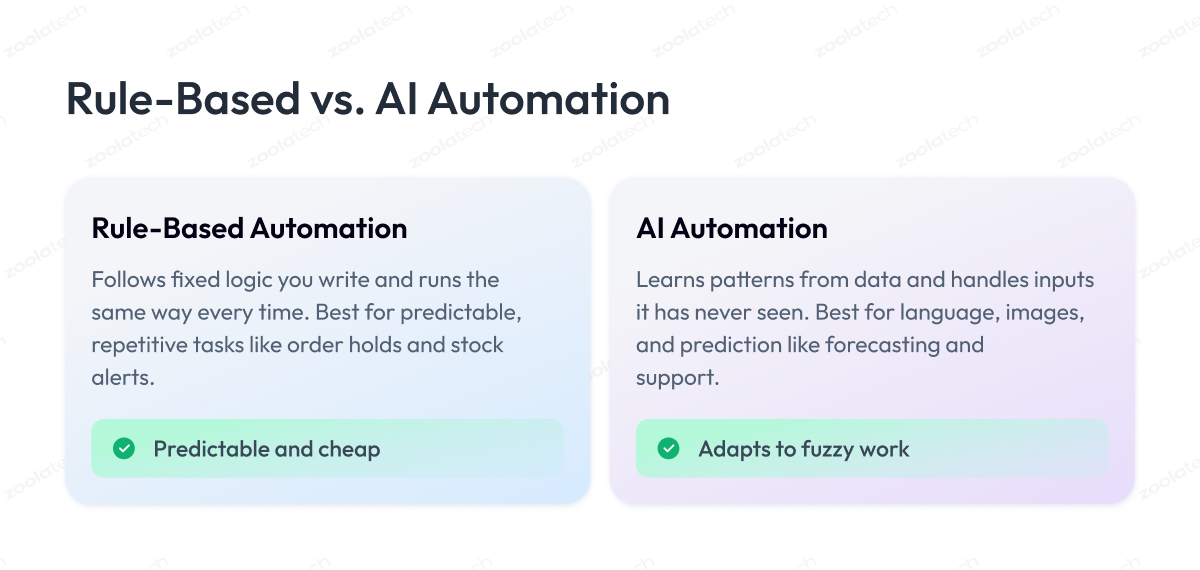
Rule-based automation does exactly what you tell it. You write the logic, such as “if order over $500 and first-time buyer, hold for review,” and it follows that logic the same way every time. It is predictable, cheap to run, and easy to trace when something goes wrong.
The limit is that it only handles situations you planned for. Give it something your rules did not anticipate, and it either stops or does the wrong thing.
AI automation learns patterns from data and makes decisions on inputs it has never seen before. That is what lets it read a messy supplier invoice, answer a customer question phrased in a way no one predicted, or forecast next month’s demand from years of sales history. It handles the fuzzy, high-variation work that fixed rules cannot.
For most of 2024 and 2025, AI in eCommerce was mostly a demo. In 2026, three areas are where it changes the cost math for good.
Customer service that resolves questions on its own
Older chatbots followed a script and frustrated everyone who hit its edge. Modern AI assistants read the customer’s question, retrieve their order details, and resolve the issue without human intervention. This is the work behind our AI virtual assistant for shopping, which handles routine questions end to end so agents only see the cases that truly need a person.
Demand forecasting that cuts dead stock
Guessing how much to reorder ties up cash in stock that will not sell and loses sales on stock you run out of. AI forecasting uses your sales history, seasonality, and trends to predict demand for each product, so you order closer to what you will actually sell. The same models read customer behavior to personalize product recommendations, surfacing the items a shopper is most likely to buy without anyone hand-picking them.
Document and data processing
Supplier invoices, product spec sheets, and returns paperwork arrive in a hundred formats. AI reads them, pulls the fields you need, and files them, taking on a slow manual job that rule-based tools never handled well. This kind of AI-driven back-office work sits at the center of the AI automation solutions we build for enterprise operations.
Here is the honest take for 2026. Rules still run the majority of your workflows, and they should, because most store tasks are predictable and rules are cheaper and safer for them. Add AI where the work involves language, images, or prediction, and walk away from any vendor selling you AI agents for ecommerce automation on a job a simple rule already does well.
| Aspect | Rule-Based Automation | AI Automation |
| How it decides | Fixed logic you write | Patterns learned from data |
| Best for | Predictable, repetitive tasks | Language, images, prediction |
| Cost to run | Low | Higher, model and compute |
| Traceability | Easy to audit | Harder to explain |
| Handles surprises | Fails on unplanned cases | Adapts to new inputs |
eCommerce Automation Tools: How to Choose the Right One
We have covered how automation gets built and where AI fits. The next practical question is which tools to actually use. The market is crowded, and every vendor claims to do everything, so it helps to sort the options into a few honest categories and match each to the job it does best.
Most eCommerce automation tools fall into four groups, and no single ecommerce automation platform covers them all. You will likely use more than one, since each group solves a different slice of the problem.
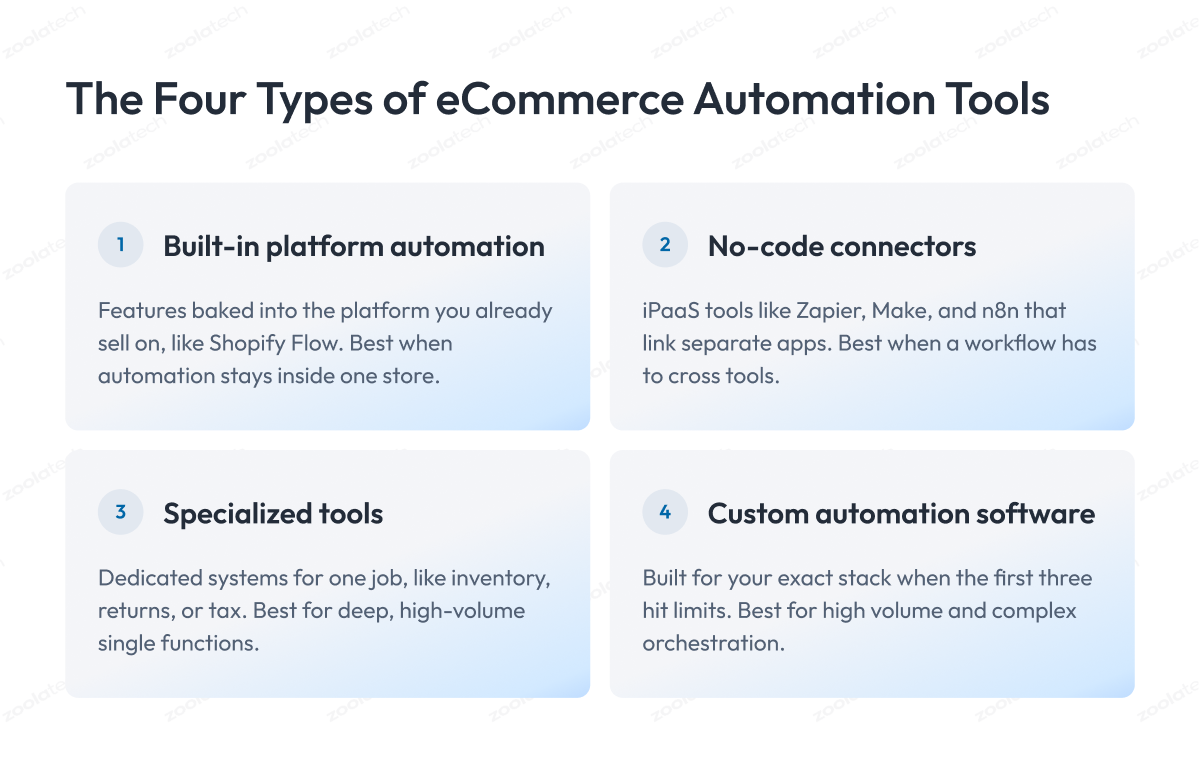
The first group is built-in automation. The built-in automation capabilities of Shopify Flow, Adobe Commerce, and similar platforms come baked into the store you already sell on. They are the fastest starting point because there is nothing to connect. If your automation lives entirely inside your store, look here before paying for anything else.
The second group is no-code connectors, the iPaaS category. Zapier, Make, and n8n specialize in linking apps that do not talk to each other on their own. Reach for these when a workflow has to cross tools, like pushing an order into your accounting software or a shipping app.
The third group is specialized tools that go deep on one job. A dedicated inventory management system, a returns platform, or a tax engine will always outperform a general connector inside its niche. You trade breadth for depth, which is worth it for the workflows that carry your highest volume.
The fourth group is custom eCommerce automation software, built for your exact stack when the first three hit their limits. This is the engineering work we take on through custom application development, and it becomes the right call at the volume and complexity thresholds from the last section.
Here is how the four compare on the factors that decide which to use.
| Tool Type | Best For | Setup Effort | Typical Cost |
| Built-in platform automation | Workflows inside one store | Very low | Included or low add-on |
| No-code connectors (iPaaS) | Linking separate apps | Low | Per-task subscription |
| Specialized tools | Deep single-function jobs | Medium | Per-tool subscription |
| Custom automation software | High volume, complex orchestration | High | Engineering investment |
One caution on picking tools. Choose based on the scenario in front of you, never on the brand with the loudest marketing. A store doing five hundred orders a month and one doing five hundred thousand need completely different setups, and the cheaper built-in option often beats the tool everyone talks about. Start with what your platform already gives you, add a connector when a workflow crosses systems, and only graduate to custom software when volume or complexity forces the move.
How to Measure Ops-Cost Reduction
If you cannot measure what an automation saved, you cannot tell a good build from a budget waste, and every ecommerce site that scales needs that number to decide what to automate next. Here is how to put a number on it.
Start by writing down the baseline before you automate anything. For the task you are about to hand to software, record three things: how long it takes a person, how often it runs, and how often it goes wrong. Without this snapshot, you will have nothing to compare against later, and “it feels faster” is not a number you can take to your CFO.
Once the automation is live, the core saving follows a simple formula.
Annual saving = (hours saved per run × runs per year × loaded hourly cost) + error costs avoided
Loaded hourly cost means the full cost of an employee’s time. Add benefits, taxes, and overhead, which usually run 25 to 40 percent above base pay. A worker paid $20 an hour actually costs you closer to $26.
Error costs are the second half, and people forget them. A single wrong shipment can cost you the reshipping fee, the refund, the support time, and sometimes the customer for good. Multiply the average cost of one error by how many the automation prevents each year, and add it to the labor saving.
Then check the payback period, which tells you how fast the build pays for itself.
Payback period (months) = total build and setup cost ÷ monthly saving
A no-code workflow that costs a few hundred dollars to set up and saves a thousand a month pays back in weeks. A custom build costing $80,000 that saves $15,000 a month pays back in about five to six months, after which the saving is pure gain.
A word on honest expectations. Automation rarely takes a task to zero cost, because someone still monitors it, handles exceptions, and maintains it. Aim to cut the labor on a well-chosen task by a large share rather than all of it, and treat any vendor promising total elimination with suspicion. This kind of measurement discipline is part of the data and analytics work we build for operations teams who want their savings tracked.
| Metric | What to Record | Why It Matters |
| Time per run | Minutes a person spends | Base of labor savings |
| Run frequency | Runs per day, week, month | Multiplies the saving |
| Error rate | Share of runs with mistakes | Drives error-cost savings |
| Loaded hourly cost | Wage plus overhead | Turns hours into dollars |
| Payback period | Build cost over monthly saving | Shows when it pays off |
What You Should Not Automate
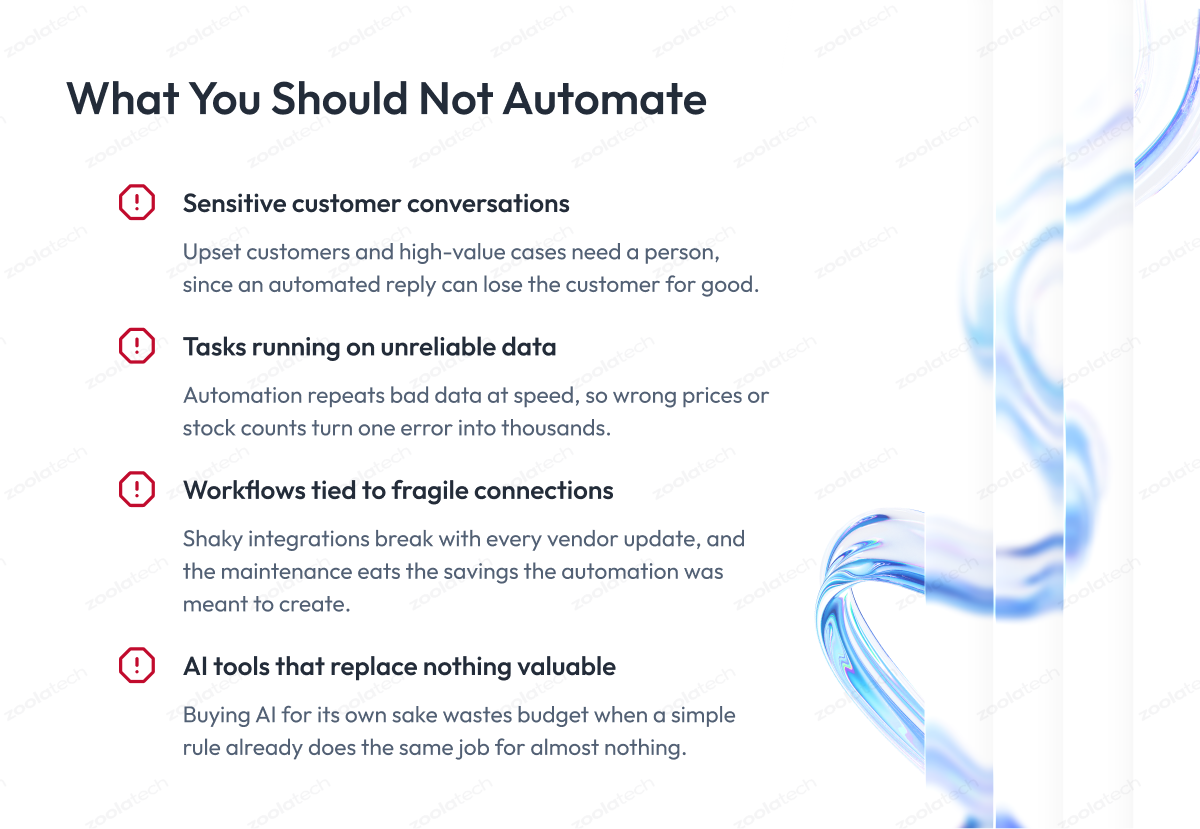
We have written this whole guide on what to automate. The skill that separates a store that saves money from one that wastes it is knowing where to stop. Automating the wrong task can cost you more than the manual work ever did, so here are the places to keep a human in the loop.
Sensitive customer conversations
The rule here is simple. Do not let a bot handle the conversations where a customer is upset or a lot of money is on the line.
A chatbot is great for routine questions like “where is my order?” or “what is your return policy?” Those are safe to automate. But when a customer writes in angry because a birthday gift arrived broken, an automated reply makes it worse, and you can lose that customer for good.
So automate the everyday, low-emotion questions, and send anything sensitive or high-value straight to a real person on your team. A slow human answer beats a fast robotic one every time.
Tasks running on unreliable data
Do not automate a task when the underlying data is wrong.
If your prices are wrong or your stock counts do not match what is actually on the shelf, automation repeats that mistake on every single order before anyone catches it. By hand, a person might notice something looks off. Software will not.
So fix the data first, then automate on top of it. A line worth remembering: automate what is repeatable and reversible, and keep judgment calls human.
Workflows tied to fragile connections
Do not automate a workflow that depends on a shaky connection between two systems.
If the link relies on a fragile workaround that breaks every time a vendor updates their app, you will spend more time fixing the automation than it ever saved you. The maintenance quietly eats the whole return.
So automate the stable connections you can trust. Leave the flaky ones as a manual step until the connection underneath is solid enough to rely on.
AI tools that replace nothing valuable
Do not buy an AI tool just because it is AI. Buy it only when it replaces a task that actually costs you money today.
A lot of what gets sold as “AI automation” sounds impressive and changes nothing on your bottom line. An AI model that writes product descriptions is a good example, since a simple template often does the same job for almost nothing.
So before you buy any AI tool, ask one question: what task does this replace, and what is that task costing me right now? If the honest answer is “not much,” skip it.
Here is the contrast that should guide every call.
| Ask About the Task | Automate It | Keep It Manual |
| How often does it run? | Many times a day | Once in a while |
| Does it need judgment? | Follows fixed rules | Needs human read |
| Is the data behind it reliable? | Accurate and structured | Messy or outdated |
| Is the connection stable? | Well-supported integration | Fragile workaround |
| What happens if it errors? | Cheap and reversible | Costly or hard to undo |
How to Get Started: A Phased Rollout
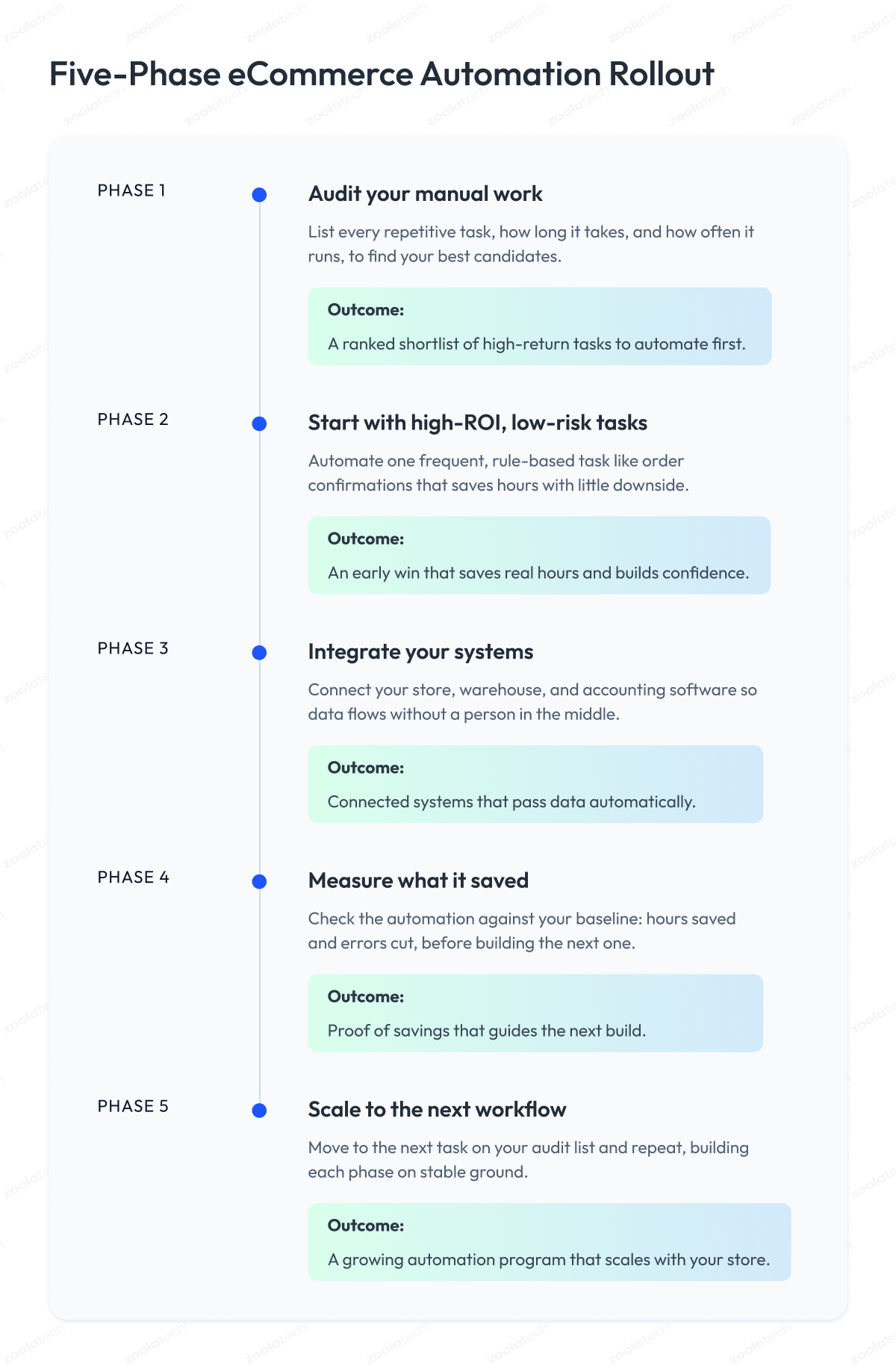
Knowing what to automate is one thing. Actually rolling it out without breaking your store is another. A sound automation strategy goes in phases, proving each step works before you build the next, so implementing automation never outruns your ability to control it. Here is the order we use with the enterprises we work with.
1. Audit your manual work
Spend a week writing down every repetitive task your team does, how long it takes, and how often it runs. This is the same baseline from the measurement section, and it doubles as your shopping list. You cannot automate what you have not mapped, and the audit almost always surfaces time sinks that nobody realized existed.
2. Start with high-ROI, low-risk tasks
Pick your first automation from the tasks that run often, follow simple rules, and cause little damage if they misfire. Order confirmations and shipping notifications are ideal first candidates. You want an early win that builds confidence and saves hours, without betting the business on an untested workflow.
3. Integrate your systems
Most automation only works if your tools can talk to each other. Connect your store, warehouse, and accounting software so data flows between them without a person in the middle. This is often where stores hit their first wall, and it is the point where our application and integration engineering tends to earn its keep.
4. Measure what it saved
Before you build the next workflow, check the last one against the baseline from step one. Did it save the hours you expected? Are errors down? This keeps you honest and tells you whether to double down or fix what you built. Guessing at results is how automation budgets quietly leak.
5. Scale to the next workflow
With one automation proven and measured, move to the next task on your audit list, and repeat. Each phase builds on stable ground beneath it, so your automation processes grow the same way your wider ecommerce strategy does, one solid step at a time.
Final Word
If you have read this far, you already know that eCommerce automation is less of a shopping trip and more of a discipline. Running an ecommerce business is demanding, and the hard part of automation was never finding tasks to automate. It is deciding which ones pay back, building them so they hold up, and knowing when to keep a human in the loop.
That work is worth doing. Automation allows your team to buy back hours for the decisions that actually grow the business, and good automation can help that payoff repeat every day, at any volume.
Get it wrong, though, and the cost is real. Automating a broken process just makes bad outcomes happen faster, and chasing hype tools drains a budget you could have spent on the two or three workflows that move your numbers.
So start small and start where it hurts. Pick one high-volume, rule-friendly task from your audit, build it, measure what it saved, and let that result fund the next one. Momentum beats ambition here.
When you reach the point where off-the-shelf tools can no longer keep up, and you need automation engineered for your systems and scale, we are ready to help.
Our engineers can review your operations, map where automation delivers the most value, and build the workflows that get you there. You can talk to our team whenever you want a second set of eyes on your automation roadmap.
Questions You May Have
What is eCommerce automation?
eCommerce automation is software that runs repetitive store tasks like order processing, inventory syncing, and customer notifications from start to finish, without a person moving the work between systems.
What tasks can you automate in an eCommerce business?
You can automate any repetitive, rule-based task, most commonly order fulfillment, inventory reordering, product listing across channels, returns, fraud checks, customer service replies, and finance reconciliation.
How much does automation actually cut operating costs?
It varies by task and volume, but automating a high-frequency workflow usually removes most of the labor hours it consumed plus the cost of the errors it caused, which you can size with the savings formula earlier in this guide.
What is ecommerce marketing automation?
Ecommerce marketing automation runs customer-facing email automation and SMS campaigns like cart recovery and segmentation, and marketing automation tools for ecommerce such as Klaviyo trigger them from live shopper behavior.
What is the difference between rule-based automation and AI?
Rule-based automation follows fixed logic you write and suits predictable tasks, while AI learns from data and handles fuzzy work like demand forecasting, natural-language support, and reading unstructured documents.
What are the best eCommerce automation tools?
The best tool depends on the job, since built-in platform features suit single-store workflows, no-code connectors like Zapier or Make link separate apps, specialized tools go deep on one function, and custom software fits high-volume or complex needs.
What should you not automate?
Keep humans on sensitive customer conversations, high-stakes judgment calls, workflows built on unreliable data, and any task where an AI tool replaces work that costs you almost nothing today.
What are the best marketing automation tools for ecommerce?
The best marketing automation for ecommerce depends on your stack, but an ecommerce marketing automation platform like Klaviyo or Omnisend covers most email, SMS, and segmentation needs, while larger stores often add ecommerce marketing automation tools built for their volume.
When is it worth hiring ecommerce automation services?
Hiring ecommerce automation services makes sense once your order volume or system complexity outgrows no-code tools and you need custom builds engineered for your stack.
What is the difference between ecommerce automation and ecommerce marketing automation?
Ecommerce automation covers operational workflows such as orders, inventory, and fulfillment, while ecommerce marketing automation handles customer-facing email and SMS campaigns, such as cart recovery and segmentation.
When should you move from no-code tools to custom automation?
Move to custom automation when a no-code tool hits a specific wall, usually high-order volume, real-time processing, orchestration across many systems, strict data quality, or compliance rules an off-the-shelf platform cannot meet.
How do you automate product data and listings across channels?
You connect a central product record or PIM to each sales channel through a workflow that automatically formats and publishes every listing, so one update pushes to your store and every marketplace at once.