







Quick Summary
- A legacy system migration without downtime moves functions, data, and users to a new platform while people keep logging in and working with their data.
- In MasterControl’s migration, about 20% of users moved within the first 90 days, and more than 60% by six months.
- Each pattern moves one layer: routing for traffic, dual writes or change data capture for data, and canary waves for users.
- The step-by-step plan covers six steps, from mapping what has to move to switching off the old system, with a check for each one.
- Rollback gets much harder once legacy tables and sync processes are removed, so mark that point before the first wave.
A legacy system migration without downtime moves a system’s functions, data, and users to a new platform in a series of reversible steps instead of one big switch.
The old and new versions run side by side, data stays in sync between them, and users move over in small waves, so the legacy platform remains your way back until the new one is validated. How close you get to zero downtime depends on what you are moving, since some migrations might still need a pause in writes, or some downtime, before the final switch.
Moving in reversible steps is important for systems that serve people around the clock, such as payments or login, where a maintenance weekend would stop the business.
The standard migration patterns are well documented, but choosing the right one for each layer, ordering them, and planning the way back if a wave fails is where the work gets hard.
That is why we wrote this guide around a working example, MasterControl’s move to a new login platform, where a joint MasterControl and Zoolatech team moved millions of user accounts in waves.
Beyond that case, we define what “without downtime” means for your system, compare switching everything at once with a phased migration, and put patterns for traffic, data, users, and interfaces into one table. Then we walk through six steps with a check for each one and show where rollback stops being cheap.
By the end of this article, you will have a plan to move your system with minimal downtime and a rule for deciding when each wave is ready to go ahead.
What Does “Without Downtime” Mean in a Legacy System Migration?
In a legacy system migration, “without downtime” means your users do not notice the move. People keep logging in and working with their data, other systems keep getting the information they need, and no records or saved links go missing.
The catch is that each part of the system has its own limit. Without written limits, business leaders may expect “zero” when the engineering team has planned a short pause. If this mismatch surfaces only on the night of the final switch, it is too late to change the plan.
That is why we recommend that the engineering team and the system’s business owners agree on downtime for each part before anyone picks a pattern. The table below is a simple starting point for that conversation and for business continuity during migration.
| Part of the System | What Users Lose If It Stops | What to Settle With the Business |
| Login | Access to the product | Can login pause at all? |
| Viewing data | Records and reports they need | How old can the data be? |
| Changing data | Orders and edits in progress | How long can saving pause? |
| Integrations | Data sent to other systems | Which data can wait in a queue? |
| Old links | Saved pages and shared links | Which links must keep working? |
Some systems cannot reach true zero, and it is better to say so early. For example, your migration tool may not support the old database, or the system may have no way to save new data in the old and new versions at once. DataStax’s documentation notes that if a database doesn’t meet its migration tool’s requirements, you may need some downtime to finish the move.
Switching All at Once vs Phased Migration: Which Legacy System Migration Strategy Avoids Downtime?
For a system that cannot stop, the legacy system migration strategy that best avoids downtime is a phased migration. You move one part or one group of users at a time, each step runs under live traffic, and you can roll it back if something goes wrong.
Switching everything at once still has its place. It can be the better choice when the system is small and simple to replace whole, or when you need to retire the old system quickly. The table compares both options, so you can check which column describes your system.
| Criterion | Switching All at Once | Phased Migration |
| Best fit | Small system, simple to replace whole | System that serves users around the clock |
| Also fits when | Old system must be retired quickly | Defects should reach only a few users |
| If a defect slips through | Every user feels it at once | Users moved so far feel it |
| Extra cost | Higher stakes on a single switch | Temporary code, two systems running |
A phased migration works when these conditions are true:
- You can catch requests on their way to the old system and send some of them to the new one.
- You can change the legacy code, or the system has another way in, such as its database.
- Data can stay in sync between the old and new versions.
- The business accepts the cost of running two systems for a while.
The first two conditions come from Microsoft’s guidance on the strangler fig pattern, a common way to replace a system piece by piece. It says this approach may not work when you can’t intercept requests or when you can’t get into the old system. In that case, the options include switching everything at once or finding another place for the old and new systems to connect.
If data cannot stay in sync and the business accepts no pause, neither option fits cleanly. In that case, plan a window when writes pause or a downtime window, and agree on its length with the business in advance.
The extra cost comes from temporary code that lets both systems work together until you remove it at the end. Martin Fowler argues that the lower risk and earlier value of this approach are worth it.
Choosing a migration strategy comes after a bigger decision about the system itself. If you are still deciding whether to modernize, replace, or retire a legacy system, start there. If your target is the cloud, our article on application migration to the cloud covers the paths specific to it.
Once a phased migration fits your system, the next step is choosing a pattern for each layer.
Comparison of Migration Patterns for Zero Downtime
Migration patterns are the tools that move your system to the new platform piece by piece. Each one handles a single layer, such as traffic, data or users, so a migration without downtime can combine several of them. Below, we compare patterns so you can pick one for each layer and see its limits before you commit.
Each pattern moves one layer of your system:
- Strangler fig moves functions one at a time behind a routing layer.
- Dual writes move data by saving every change to both databases.
- Change data capture (CDC) moves data by copying new changes from the old database.
- Canary waves move users in small groups, starting with a few.
- Expand and contract moves interfaces by running old and new versions side by side.
The table shows what each pattern moves, what must be true before you use it, how you roll it back, and what it leaves unsolved. You can bring it to your architecture review as a checklist.
| Pattern | What It Moves | What Must Be True | How You Roll Back | What It Does Not Solve |
| Strangler fig with a routing layer | Functions, replaced gradually behind the routing layer | Interceptable requests, plus changeable code or database access | Back to legacy database while its tables and sync remain | Routing layer can become a failure point or bottleneck |
| Parallel run | Reads, run on both stores and compared | In Stripe’s sequence, stores synced by dual writes and backfill | – | – |
| Dual writes with backfill | Data, written to both stores before reads and writes move | With DataStax’s proxy, every request must succeed on both databases | DataStax: stop or abandon anytime before the final switch | Extra database load, Stripe ramped duplication up gradually |
| Change data capture | Ongoing changes copied after the initial full load | Source database configured to expose its changes | – | AWS DMS: no latency guarantee, delays can reach several minutes or longer |
| Blue-green deployment | All requests, switched at once to the new environment | Two production environments, as identical as possible | Switch the router back to the previous environment | Data written on the new side still needs handling |
| Canary release and migration waves | A change for a small group before everyone | A control group to compare against | Stop the wave when errors drift from the control | Defect impact still grows with exposed traffic |
| Expand and contract | Interface changes, split into expand, migrate and contract phases | – | Clients move and get tested gradually, lowering risk | Two versions to support, might leave you worse off if never finished |
| Pause in writes before the switch | – | – | – | Writes stop for a while before the switch |
| User accounts in batches | Accounts moved in batches with validation steps (MasterControl) | Bridge to old provider’s multifactor login in early waves | – | A shrinking group still on the old provider |
| User accounts at login | An account, when its user logs in or resets a password | Login flows that pass the password to the trigger | – | Amazon Cognito skips passwordless logins |
A dash in a cell means the sources we used say nothing specific about that point. Treat it as an open question for your team to check, because the pattern may still have limits or a way back that depend on your system.
We built the table from each pattern’s primary description on Martin Fowler’s site, Microsoft’s Azure Architecture Center, AWS Prescriptive Guidance, and Google’s Site Reliability Engineering (SRE) Workbook. Some cells come from Stripe’s engineering blog, vendor documentation for a specific mechanism, or the MasterControl case. We checked all sources on October 27, 2026.
In practice, you combine patterns layer by layer. For example, a routing layer moves traffic, dual writes keep data in sync, and waves move users.
How to Migrate a Legacy System Without Downtime, Step by Step
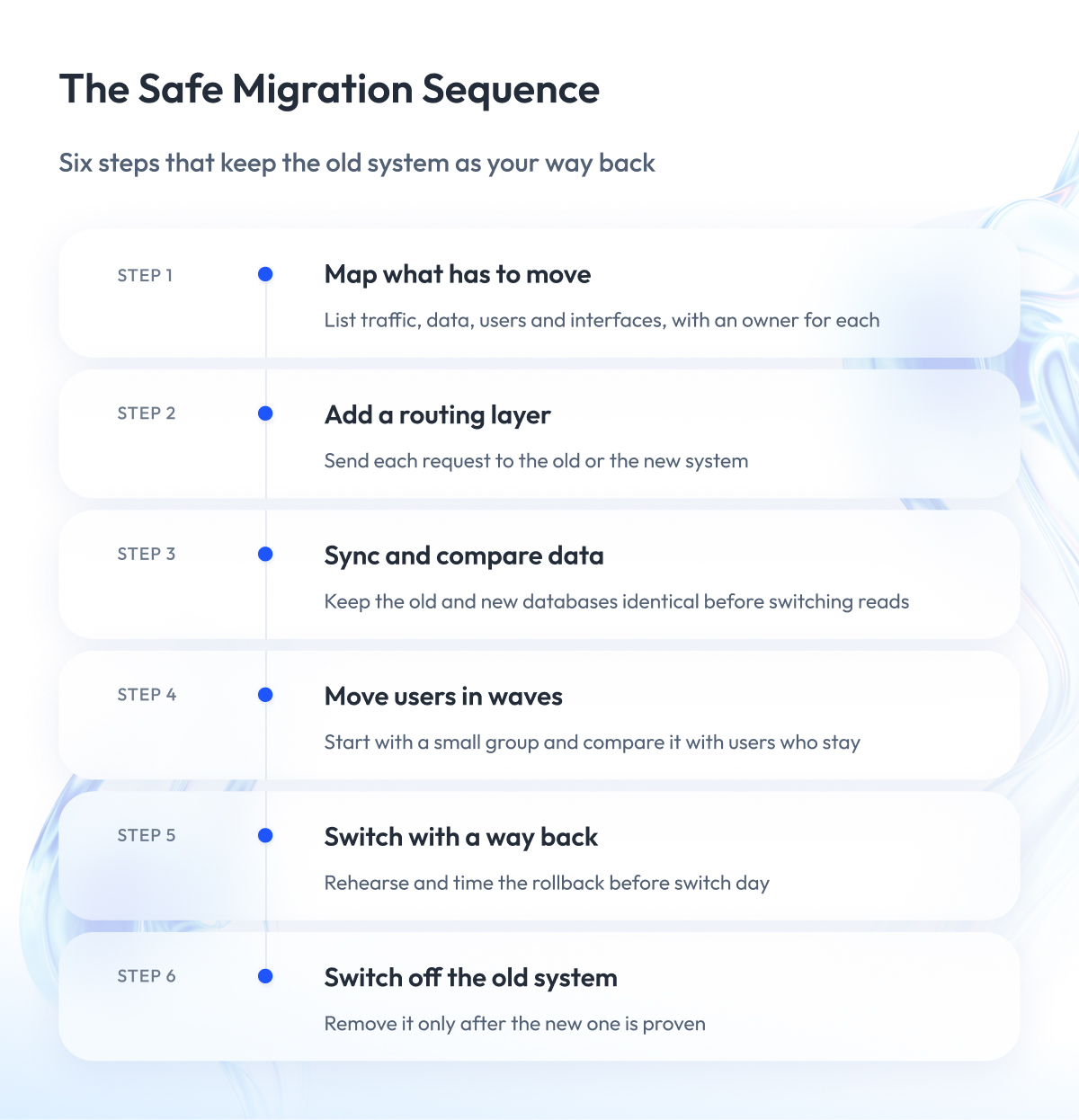
To migrate a legacy system without downtime, you follow six steps in a fixed order, from mapping what has to move to switching off the old system. The order matters because it keeps the old system as your way back until the very end.
Each step has a result to aim for and a check that tells you the step is done. These checks are our recommendations, so adjust them to your system.
Step 1 – Map what has to move
A migration can break on something nobody listed, such as a nightly job that still writes to the old database after the switch. That is why the first step is a full inventory of what has to move.
List everything the system touches, layer by layer:
- Traffic: request paths and integrations.
- Data: databases and the jobs that write to them.
- Users: accounts, sessions, and login flows.
- Interfaces: application programming interfaces (APIs) and file formats other systems use.
Include the services and databases that the old and new systems will share during the move, because Microsoft’s guidance advises planning how to handle them. If your product works in a regulated industry, also list the change history and electronic signatures that must keep working while two systems run.
If your legacy system runs on a mainframe, our guide to mainframe modernization covers what is specific to it.
Result: an inventory of everything that has to move, grouped by layer.
Done when: every item has an owner, a target, a pattern from the table above, and a place in the wave order.
Step 2 – Put a routing layer in front of the old system
A routing layer, also called a “facade” or “proxy”, lets you move traffic gradually instead of all at once. It receives every request and sends each function, page, or user group to the old or the new system.
This layer needs a place to catch requests, as described in the strategy section above. AWS Prescriptive Guidance warns that it can become a single point of failure or slow the system down, so we recommend running more than one copy and testing it under heavy load before the first wave.
Old links also carry traffic. When we modernized search for Global Auto Auctions, we redirected more than 100 legacy search URLs to the new search pages, and existing navigation kept working.
Result: every request passes through a routing layer you control.
Done when: in a test environment, you can switch a route to the new system and back with no errors users would see.
Step 3 – Keep data in sync and prove it matches
Zero downtime data migration works only if the old and new databases hold the same data while traffic moves between them. If they drift apart, a user moved to the new system can open an order and find it missing.
Teams usually keep data in sync in one of two ways:
- Dual writes, where the application saves each change twice, in the old and the new database, and a backfill copies older records.
- Change data capture, where a tool copies new changes from the old database after a first full copy.
Stripe’s engineering team describes a four-step version of dual writes for large migrations:
- Write every change to the old and new stores.
- Move reads to the new store.
- Move writes to the new store only.
- Remove the old data.
Each method has limits. Dual writes add load to the production database, so Stripe gradually increased the share of duplicated data while monitoring its metrics. AWS documents that change data capture in its Database Migration Service has no latency guarantee and that delays can grow to several minutes or longer, so measure the lag and agree how much delay your users can accept.
Before you switch reads, prove that the data matches. Stripe did this by reading the same data from each store and comparing the results, and a parallel run like this is a practical way to check your legacy system data migration.
The goal is that nothing gets lost along the way. When Zalando replaced its legacy reminder system with our team, every active reminder kept working through the move.
Result: the two databases match while traffic moves.
Done when: a comparison of old and new data shows no unexplained differences over an agreed period that covers busy dates such as the end of the month.
Step 4 – Move traffic and users in waves with go/no-go checks
If everyone moves at once, any defect reaches everyone. Waves limit that risk, because Google’s SRE Workbook notes that the impact of a defect grows in direct proportion to the traffic exposed to it.
Each wave works like a canary release, a partial deployment that runs for a limited time and gets evaluated before you go further. Keep early waves small and start with lower-risk groups, as MasterControl did.
Before each wave starts, write down the go/no-go check, the rule that decides whether the next wave can begin. Compare the wave with a control group that stays on the old system, because Google’s example treats a canary as bad when its error rate is too far from the control group’s.
We recommend tracking these signals for each wave:
- Error rate, compared with the control group.
- Response time, compared with the control group.
- Data comparison results from Step 3.
- Support tickets from users in the wave.
Rehearse each wave before it reaches production. MasterControl’s rollouts, for example, went through development, test, and production environments in turn.
Result: traffic and users move in waves you can stop at any point.
Done when: the wave has run for the agreed period within its criteria. If it has not, route it back to the old system and fix the cause before the next wave.
Step 5 – Cut over with a rollback plan
The final switch to the new system is the cutover, and it’s where a missing rollback plan hurts most. Write a cutover plan before the switch, so everyone knows who decides and how to go back.
A cutover plan should cover:
- The order of the switches.
- The person who makes the final decision.
- The trigger for rolling back.
- The steps for rolling back.
- The point after which rollback gets expensive.
The last point needs the most attention. In Microsoft’s data example, you can roll back to the legacy database while its tables and sync processes still exist. Once you remove them, rolling back means restoring them and replaying data changes, which significantly increases effort and risk.
DataStax describes the same principle for dual writes, where a migration can be stopped at any point before the final cutover. Martin Fowler adds that switching traffic back to the previous environment is quick, but data written on the new side during that time still needs handling.
It helps to set a target for rollback speed.
In Pandora’s release process, we set up a rollback that redeploys the previous application version in less than 1 minute. This comes from release management, and it shows what a fast rollback can look like.
Whatever cutover strategy you choose, rehearse the rollback and time it before switch day.
Result: a written cutover plan with a rehearsed rollback.
Done when: the rollback has been rehearsed and timed, and the decision to switch is recorded.
Step 6 – Decommission only after the new system is validated
Decommissioning means switching off the old system for good, and it is the one step you cannot easily undo. Microsoft recommends removing legacy objects only after the new system is validated, as a deliberate final step for each part of the system. Remove the temporary routing and sync code at the same time.
Expect a long tail of users who move last. In MasterControl’s migration, all new customers went straight to the new platform by late 2025, while a shrinking minority still used the old provider.
Result: the old system is switched off with nothing depending on it.
Done when: no requests reach the old system for an agreed period, its data is archived under your retention rules, and the system owners sign off.
Of all the layers, users are often the hardest to move this way, and the MasterControl case shows how it works in practice.
Case Study: User Migration in Waves at MasterControl
User migration is often the hardest layer to move, because a single mistake can lock people out of their work. MasterControl’s move to ADAPT ID, its custom identity provider, shows how the waves from Step 4 work for login.
If you are planning a zero-downtime authentication migration strategy, the case shows what to plan for:
- Account waves, starting with lower-risk groups.
- A bridge to the old provider’s multifactor authentication.
- A migration utility with validation steps.
Challenge
MasterControl needed to move millions of user accounts to ADAPT ID, which now handles their login. One reason for the move was that the new platform removed limits on how many login requests could go through under heavy load. The accounts had to move while people kept logging in every day.
What we did
A joint MasterControl and Zoolatech team, formed in early 2024, defined the migration strategy and governance.
To move users safely, the joint team:
- Built an automated migration utility with validation steps to check data accuracy.
- Kept a connection to the old provider’s multifactor authentication (MFA) during early waves.
- Rolled out changes in phases across development, test, and production environments.
- Gave support teams detailed documentation, training sessions, and live help during early migrations.
Result
- About 20% of users moved within the first 90 days of the migration, starting with lower-risk groups.
- More than 60% had moved by the six-month mark, covering multiple regions.
- By late 2025, all new customers went straight into ADAPT ID, and the old provider’s use shrank to a minority.
- Millions of users moved with no access issues and a steady login flow.
The new platform’s core services included single sign-on (SSO), electronic signature validation, and user management.
Batch migration or migration at login?
MasterControl moved accounts in batches, but there is another way. The table compares the two approaches so you can choose the one that fits your users.
| Question | Batch Migration | Migration at Login |
| Who sets the pace | Your team, batch by batch | Each user, at their next login |
| Example | MasterControl’s migration utility with validation steps | Amazon Cognito’s migrate user trigger |
| Known gap | Long tail of users on the old provider | Cognito skips the trigger for passwordless logins |
With batch migration, you choose the schedule and can review each batch before the next. Migration at login moves an account when its user logs in with a password or resets it, which suits users who log in often. Whichever approach you choose, plan for the users who move last.
Final Word
A legacy system migration without downtime takes patience. You map every dependency, run two systems side by side, and move users in small waves, sometimes for months.
That effort pays off. Until the old system is removed, each step stays small enough to check and roll back. A defect in the new system reaches the users moved so far instead of your whole customer base at once. A rushed switch can lock people out, lose records, or force a rollback after you’ve already removed the old system.
Before the first wave, write down where rollback stops being cheap and which signals decide whether each wave goes ahead. If you are still choosing the overall approach, start with our legacy system modernization guide.
When you are ready to plan the move, we are happy to discuss your system and the path that fits it.
Questions You May Have
Is legacy system migration the same as legacy modernization?
Legacy system migration is often one step within legacy modernization. Migration moves a system’s functions, data, and users to a new platform, while modernization changes how the system is built. For cloud moves, AWS Prescriptive Guidance lists seven strategies, known as the 7 Rs, which range from retiring an application to refactoring it.
How long does a legacy system migration take?
The timeline depends on how many systems, integrations, and users you move. It also depends on how long you keep the old and new versions running side by side. Plan the waves first and leave room for a long tail of users who move last. In MasterControl’s case, a shrinking minority still used the old provider in late 2025.
What drives the cost of a migration without downtime?
The extra cost comes from the period when two systems run at once. You pay for a second environment, temporary code that routes and syncs data between the systems, tools that compare data, and testing for every wave. Martin Fowler argues that the lower risk and earlier value of a gradual approach outweigh that cost.
How do you change a database schema or an API without downtime?
Use expand and contract, also called “parallel change.” You add the new structure next to the old one, move clients over while the old one still works, and then remove it. Because clients move and get tested gradually, the change carries less risk. For a zero-downtime database migration of the data itself, follow Step 3 above.
Is zero downtime migration a product or a practice?
It is both. Oracle uses Zero Downtime Migration as the name of a product for online and offline database migrations. In this article, zero downtime migration means moving a system while it keeps serving users, using patterns that fit each layer from the comparison table above.
What are common legacy system migration challenges?
Common challenges include hidden dependencies, data that drifts between the old and new systems, and users who move last. A routing layer can also become a single point of failure, and rolling back gets much harder once you remove legacy tables. Mapping every layer first and checking each wave lowers these risks.
What is the difference between blue-green deployment and a canary release?
Blue-green deployment switches all users to a new environment at once, and a canary release moves a small group of users first. Blue-green gives you a quick rollback because you can switch the router back to the previous environment, but data written on the new side still needs handling. A canary release limits a defect to the users in the wave.
What is a staged cutover?
A staged cutover moves traffic and users to the new system in planned waves. Each wave runs for an agreed period and passes a go/no-go check before the next one starts. This lets you migrate incrementally with less risk of disrupting operations, because a defect in the new system reaches the users moved so far instead of everyone at once.
What is a parallel run migration?
A parallel run migration reads the same data from the old and new systems and compares the results before you switch reads. It shows whether the new database matches the old one under live traffic. Stripe used this check in its large online migrations before moving reads to the new store.