








Quick Summary
- A cloud MES is a manufacturing execution system hosted on cloud servers, either by moving the existing system as-is or rebuilding it as cloud-native services.
- AWS guidance calls refactoring the most complex migration strategy, and rehosting moves an application to the cloud without changes.
- MasterControl’s legacy MES was nearly a decade old and tightly coupled, and its rebuild went through 5 phases, from redesign to hardening.
- For drug makers, FDA data integrity guidance says data should be kept for the full retention period, along with all associated metadata.
- A rebuild makes sense when the monolith already holds back product delivery, and AWS notes that microservice architectures tend to be operationally complex.
A cloud MES is a manufacturing execution system (MES) that you host on cloud infrastructure instead of servers in your own data center. Your MES is the software that guides and records production on the plant floor, such as work orders, batch records, equipment status, and quality checks.
When you move an MES to the cloud, you can take one of two very different paths. You can host your existing MES in the cloud without changing it, or you can rebuild it as a cloud-native MES made of small, independent services.
Choosing the right path is important because one takes far more work than the other. Hosting changes where your MES lives, and a rebuild changes how your team builds it. Amazon Web Services (AWS) guidance calls this rebuild the most complex migration strategy.
You usually face this choice when your legacy MES starts to slow the business down. The answer is hard to find because vendors call every path “cloud MES” and rarely tell you how much of your system has to change.
That is why we wrote this guide. You can see the difference best in practice, so we show it on our engagement with MasterControl. MasterControl’s MES was nearly a decade old, and Zoolatech engineers worked on the program that rebuilt it as a cloud-native platform.
Besides that case, we compare four ways to move your MES and explain what your regulated production records must keep when they go into a new system.
By the end, you will know whether your servers or your architecture holds you back, and which path fits your MES.
What Is a Cloud MES? Hosted, Cloud-Native, or SaaS
A cloud MES can be your current system hosted on cloud servers, an MES rebuilt as a cloud-native platform, or a software as a service (SaaS) product that a vendor hosts and updates for you. Together with keeping your MES on your own servers, that makes four options.
Three of them put your MES in the cloud, and each changes a different amount of your system. Compare them on the same questions before you pick a path.
AWS guidance uses four terms for these options:
- Rehost, also called “lift and shift,” moves the application to the cloud without any changes.
- Replatform moves it with some optimization, for example to lower costs or use cloud capabilities.
- Refactor changes the architecture so the application can take full advantage of cloud-native features.
- Repurchase replaces the application with a different product, such as a cloud-based MES that a vendor sells as SaaS.
We recommend a simple rule of choice:
- Keep the MES on-premises when it still fits your processes, and the servers cause no trouble.
- Host it in the cloud when the servers are the problem.
- Rebuild it as a cloud-native MES when the architecture is the problem.
- Replace it with a SaaS product when you operate a plant and a product fits your processes.
The table compares the four options, starting from the cloud MES vs. on-premise baseline in the first row. Read each row from left to right, and use the label in brackets to see whether a point comes from AWS guidance, a vendor, or our own reading.
In the table, a monolith means one large application where all parts are tightly linked, so a change in one part affects the rest.
| Option | What Changes | Choose It When | What You Take On |
| Keep the MES on premises | Nothing, MES stays on your own servers (our reading) | System fits processes, servers cause no limits (our reading) | Server upkeep, patching, and hardware replacement (our reading) |
| Host the existing MES in the cloud (rehost or replatform) | Same application on cloud servers, little or no change (AWS guidance) | Goal is retiring servers, architecture still fits (our reading) | Same monolith with its coupling and limits (our reading) |
| Rebuild it as a cloud-native MES (refactor) | Modular MES built from microservices (AWS guidance) | Monolith already slows delivery or customer requests (AWS guidance) | Most complex migration strategy, harder day-to-day operations (AWS guidance) |
| Replace it with a SaaS MES (repurchase) | Different product replaces your application (AWS guidance) | You operate a plant, product fits your processes (our reading) | Implementation scope that cloud delivery doesn’t shrink (vendor view) |
If your company sells an MES, the last row describes a choice your customers make. Your own product moves to the cloud through one of the first three rows. The vendor view in that row comes from the overall equipment effectiveness (OEE) software vendor TEEPTRAK, which argues that cloud delivery does not change the implementation scope.
The rebuild and the replacement also mean moving your historical records into a new system, and we cover that step later in this guide.
The Cloud Native Computing Foundation (CNCF) defines cloud native as loosely coupled systems, which means each part can change or grow without breaking the others.
Teams usually get there with microservices. A microservice is a small service that handles one job, and your team can update it without touching other parts of the system.
AWS also notes that choosing between a monolithic MES and a modern one requires a thorough analysis of your organizational capabilities, budget, timeline expectations, and business priorities. For the full set of 7 strategies AWS describes, see our guide to cloud migration strategies.
Case Study: Why MasterControl’s Legacy MES Hit Its Limits
MasterControl is a software vendor whose MES platform is mission-critical for pharmaceutical, biotech, and healthcare manufacturers. Its legacy MES hit its limits because its tightly coupled design slowed under heavy workloads and made it hard to adapt to new customer requirements.
Challenge
The MES was nearly a decade old, and all its parts depended on each other. As a result, the system had limited scalability, and performance declined as workloads grew.
It also could not easily adapt to new manufacturing workflows or client-specific requirements, and its user interface was nearly nine years old. In our reading, moving the same system to cloud servers would have kept these problems, because they came from the design.
What we did
Zoolatech engineers worked on MasterControl’s program to rebuild the MES as a cloud-native microservices platform. The program redesigned the system, built new core modules, migrated historical records, and finished with a hardening phase. We walk through each phase in the next section.
Result
- The platform handles heavy workloads. The old MES slowed down as workloads grew. Now cloud-native microservices and AWS infrastructure support global manufacturing workloads.
- Users work faster. The old interface made workflows cumbersome. A modern React-based interface improved efficiency for diverse life sciences clients.
- The product adapts to new needs. The old system struggled with new workflows. The program delivered a no-code builder for flexible data capture and routing rules.
- Regulated customers get stronger records. The new MES has U.S. Food and Drug Administration (FDA) compliant workflows with extended audit trails, plus expanded activity logging and event tracking.
- The customer base can grow. The platform retains existing enterprise clients and opens doors to smaller and mid-market manufacturers through flexible workflows.
Your MES may need the same kind of rebuild if you see these signals:
- Performance drops when workloads grow.
- Small changes affect the whole system.
- The interface slows your users down.
If only the servers are the problem, hosting may be enough.
MES Cloud Migration Phase by Phase: Inside the MasterControl Rebuild
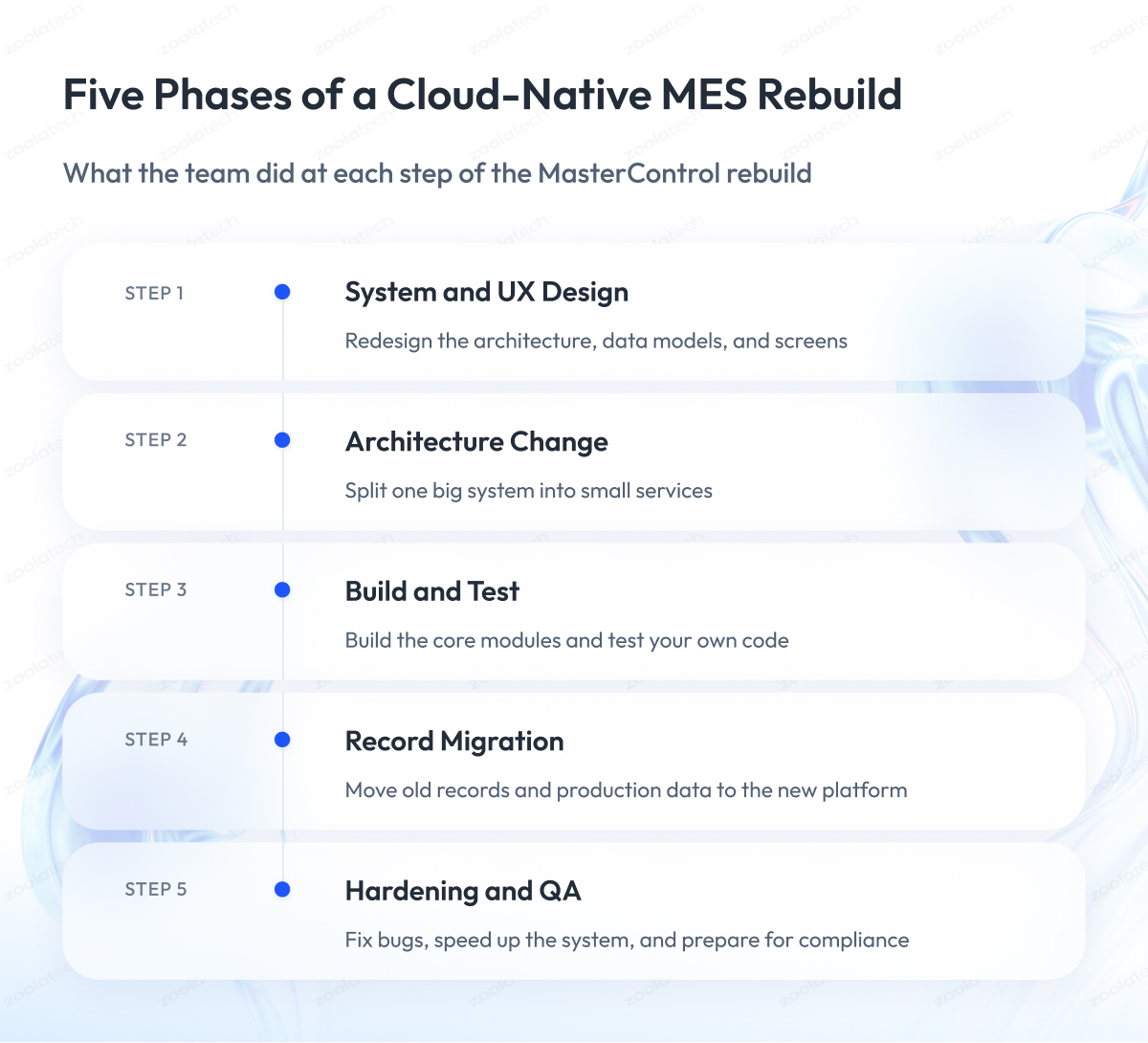
Our engineers worked with MasterControl’s team through 5 phases of the cloud-native MES rebuild. We go through each phase here because together they show how much work a rebuild involves beyond moving servers. You can also read the full case study on how we rebuilt MasterControl’s MES.
Phase 1 – System and UX design
The rebuild started with design. Working with MasterControl’s team, our engineers redesigned the system architecture, database models, and user interface. The new design addressed the legacy MES’s pain points, such as tightly linked parts and an interface that was nearly nine years old.
This new cloud MES architecture became the base for the next phases.
Phase 2 – Moving from a monolith to microservices
In the second phase, the joint team moved the MES from monolithic services to microservices. Now each part of the MES runs as a separate service, so the team can change or scale it independently. This addressed the coupling that limited scalability in the old platform.
Phase 3 – Building and testing the core modules
With the new architecture in place, our engineers and MasterControl’s developers built the core MES modules in Java and React. The tech stack also includes Spring Boot, JavaScript, AWS, Kubernetes, and Postgres.
The same developers tested their own code, so testing was part of development from the start.
Phase 4 – Moving historical records
Next, the joint team migrated historical records and production data from the legacy CMX system to the new platform. This way, customers keep their production history in the new MES. We explain what such records must keep in a separate section below.
Phase 5 – Hardening and QA
The rebuild ended with an intensive hardening phase to stabilize the product before release. Our engineers worked with MasterControl’s team on bug fixing, performance improvements, and compliance readiness. The next section shows the risks of this phase and how the team handled them.
We recommend giving record migration and hardening their own phases and owners. If you treat them as the last days of development, they get only the time that is left.
This kind of rebuild is a different job from deploying an MES at a plant. AWS notes that deploying an MES at a manufacturing site can take several months to years because an MES usually needs extensive customization and configuration.
If your MES has reached that point, our team can help you plan your path through legacy system modernization.
Rebuild Risks and How the Team Handled Them
The MasterControl rebuild faced three main risks, and the joint team had a specific response to each one. You may face the same risks in your own rebuild, so the table also shows what we recommend taking from each case.
Read each row from left to right. The first three columns come from our MasterControl case study, and the last column is our recommendation for your program.
| Risk | What Happened | What the Team Did | What to Take from It |
| Scope growth | Longer timelines, risk of quality trade-offs | Adjusted schedules, kept quality benchmarks through testing and phased releases | Agree up front which changes move dates, which checks stay fixed |
| Regulatory constraints | Little flexibility to cut corners | Developers owned both implementation and testing | Decide with your quality team who tests regulated workflows |
| Hardening fatigue | Long bug-fixing cycles strained morale and efficiency | Structured hardening phases with defined goals, rotated tasks to reduce burnout | Hardening split into phases, each with its own goal |
Moving Regulated Production Records: What Has to Survive the Migration
When regulated production records move into a new MES, each record has to keep its value and meaning, the details that explain it, and the history of its changes. The new system also needs validation before it holds those records. This is our reading of FDA and EU texts, and below we show which text says what.
Two terms come up in every rule here. Metadata is the data about a record, such as who entered it, when, and in which production step. An audit trail is the secure, time-stamped history of every change to that record.
Which records the rules cover
The U.S. rule on electronic records is 21 CFR Part 11. It applies to electronic records that you create, modify, keep, or send under FDA records requirements, so it covers only the records that FDA rules require.
FDA’s September 2003 guidance on Part 11 scope says FDA intends to exercise enforcement discretion on specific Part 11 requirements for validation and audit trails. The predicate rules still apply. These are the underlying FDA rules that require the record in the first place, such as the drug current good manufacturing practice (CGMP) rules.
So the guidance narrows how FDA enforces Part 11, and the predicate rules keep their own requirements.
What to check before cutover
Cutover is the moment you switch users from the old system to the new one. The table lists what has to survive the move, what we recommend checking before cutover, and which text sets the rule. Use the middle column as a starting checklist with your quality team.
| What Has to Survive | What to Check Before Cutover (Our Recommendation) | Source and Scope |
| Each record’s value and meaning | Migrated records match the source for every record type | EU GMP Annex 11, section 4.8 (EU rule) |
| Metadata that reconstructs the activity | Who did what, when, in which step, still linked | FDA data integrity guidance, December 2018 (drug CGMP) |
| The audit trail history | Old entries carried over or readable and linked to records | 21 CFR 11.10(e), closed systems, within FDA enforcement policy |
| Who may change records | Roles and permissions mapped and tested before go-live | 21 CFR 211.68(b) for drugs, 21 CFR 11.10(d) |
| Complete batch records | Every batch record complete after migration | 21 CFR 211.188 (drug CGMP) |
| A validated new system | Validation evidence ready before system holds regulated records | 21 CFR 11.10(a), GAMP 5 on supplier documentation |
What each source says:
- EU GMP Annex 11 says that when data move to another format or system, validation should include checks that the data are not altered in value or meaning. This is an EU rule, so it matters most if your customers supply the EU market.
- FDA’s data integrity guidance for drug CGMP says you should keep data for the record’s retention period, along with all associated metadata. It also says the relationships between data and metadata should be preserved securely and in a traceable way.
- For closed systems, Part 11 calls for secure, time-stamped audit trails, limited system access, and validation. A closed system is one in which the people responsible for the records control access.
- Drug CGMP rules allow only authorized personnel to change master production and control records. They also require complete production and control records for each batch.
- The International Society for Pharmaceutical Engineering (ISPE) GAMP 5 guide encourages regulated companies to use supplier knowledge and documentation where possible. If you sell an MES, your validation evidence can help your customers validate their own setup.
Which FDA text applies to your MES
The right FDA text depends on what your customers make. FDA’s computer software assurance (CSA) guidance from February 2026 covers software used in medical device production or the quality management system. For drug manufacturing, the drug CGMP rules and the data integrity guidance are the U.S. references.
When your customers make medical devices
FDA’s CSA guidance gives an MES example for devices with an approved premarket approval (PMA) application or humanitarian device exemption (HDE). Changes to an MES that manages workflow, tracks progress, records data, and sets alerts are generally submitted in annual reports.
An MES that automatically controls critical production parameters, such as temperature, pressure, or process time, is different. Such a change may affect the device’s safety or effectiveness, and if so, it requires 30 days’ notice.
We recommend mapping which MES functions touch critical parameters before you migrate, because your customers will need to classify the change. For the wider picture under the new Quality Management System Regulation (QMSR), see what QMSR means for MES vendors.
When a Cloud-Native Rebuild Is Not Worth It
A cloud-native rebuild is not worth it when your servers are the problem and the architecture still works for you. In that case, a rebuild spends a large budget on a problem that a simpler path can solve. The checks below help you see which path fits your MES.
When your servers are the only problem
Hosting is enough when your MES still fits your processes, and your goal is to stop maintaining your own servers. In our reading, rehosting or replatforming moves the system with far less work than a rebuild.
When a product on the market already fits your plant
For a manufacturer, a SaaS MES fits better when a product on the market matches your processes. Tulip, which sells a cloud MES, calls migrating to a next-generation cloud-based MES a low-risk, low-cost way to stay competitive.
That claim is about adopting a SaaS product like Tulip’s. It says nothing about the cost of rebuilding your own MES.
When your MES design holds the product back
A rebuild pays off when the monolith already slows product delivery or customer requests, as it did at MasterControl. Your team also needs to be ready to operate many services, because AWS cautions that microservice-based architectures tend to be operationally complex.
AWS also does not recommend refactoring for large migrations, because it means modernizing the application during the move. AWS writes this about migrating many applications at once, so for a single product, read it as a signal of cost and complexity.
Software author Martin Fowler made a similar point back in 2015. His guideline is not to consider microservices unless a system is too complex to manage as a monolith, because microservices bring their own complexity.
When the trouble is in your processes
Sometimes the trouble lies in the implementation scope or in the processes, and moving the MES will not change that. The OEE software vendor TEEPTRAK makes the same point and argues that cloud delivery does not change the implementation scope. In that case, we recommend fixing the processes first and choosing a path after that.
For a wider decision framework, see our guide on when to modernize, replace, or retire a legacy system.
Final Word
Choosing how to move your MES to the cloud takes time. You need to look at how your system behaves under load, how hard it is to change, and what your customers keep asking for.
This work is worth it. A cloud MES migration combines two decisions. The first is where you host your MES, and the second is whether its architecture changes.
If you rebuild when hosting would do, you spend a large budget on the wrong problem. If you only host a system whose design holds you back, the same limits follow you to the cloud.
Make the second decision from evidence in your own system, such as slowdowns under load and changes that touch everything. If you choose a rebuild, give record migration and hardening their own phases from the start.
If you want to talk it through, our team is ready to discuss your MES and help you find the path that fits your product.
Questions You May Have
Is a cloud MES secure enough for FDA-regulated records?
It depends on the controls around the records. For closed systems, Part 11 lists controls such as limiting system access to authorized individuals, time-stamped audit trails, and validation, within FDA’s enforcement policy. Ask your quality team which controls apply to your setup. FDA states that it does not certify electronic systems used for electronic signatures, so treat any “FDA-certified” claim with caution.
What happens to an MES in the cloud if the plant loses its internet connection?
It depends on how the product is designed. Tulip, which sells a cloud MES, says its apps work locally at the edge, so work continues if the connection drops. SYMESTIC, which also sells a cloud MES, says edge computing buffers data locally. Ask your vendor or your architects what keeps working at the plant and what waits for the cloud.
How long does an MES cloud migration take?
It depends on what you move. AWS writes that deploying an MES at a manufacturing site can range from several months to years. For a SaaS MES implementation, Tulip says a rollout that starts with a handful of critical workflows can be live in a couple of months. Rebuilding an MES product is a different job with its own phases.
Do you have to move the whole MES at once?
Not necessarily. AWS suggests that manufacturers can adopt a gradual approach to reduce the challenges of an all-in-one MES deployment. In the MasterControl rebuild, phased releases helped the team maintain quality benchmarks as the scope grew. Plan the order of the move with your quality team, because every regulated workflow needs testing.
Is MES the same as ERP?
No, a manufacturing execution system and enterprise resource planning (ERP) software work at different levels. In the ISA-95 model, Level 3 covers MES and other systems that manage manufacturing operations. Level 4 covers business activities, and ISA places ERP systems there. The MES manages the shop floor, and the ERP manages the company.
What is the difference between a hosted MES and a cloud-native MES?
A hosted MES is your existing system moved to cloud servers, and a cloud-native MES is rebuilt to use the cloud fully. Hosting keeps the same architecture with its limits. A cloud-native MES is made of loosely coupled services, so the team can change or scale each part independently. AWS calls the rebuild the most complex migration strategy.
What is a monolithic MES?
A monolithic MES is one large application where all parts are tightly linked. A change in one part can affect the whole system, and heavy workloads can slow everything down. Hosting it in the cloud keeps that design. Before the rebuild, MasterControl’s MES had a tightly coupled architecture that limited scalability and slowed performance under heavy workloads.
What are the main cloud MES benefits?
The main cloud MES benefits depend on the path you choose. Hosting moves server upkeep off your team. A cloud-native rebuild can also change what the product can do. After the MasterControl rebuild, cloud-native microservices and AWS infrastructure support global manufacturing workloads, and the platform opens doors to smaller and mid-market manufacturers through flexible workflows.
Is every cloud MES a SaaS MES?
No, software as a service (SaaS) is only one type of cloud MES. A cloud MES can also be your existing system hosted on cloud servers or an MES you rebuild as a cloud-native platform. A SaaS MES is a product that a vendor hosts and updates for you, and it fits best when a product on the market matches your processes.