



Quick Summary
- Gateway, processor, and acquirer are three separate roles that providers sell as one product, and the distinction matters the moment you negotiate fees or debug a failed settlement.
- Model payments as a state machine from day one, since authorized, captured, voided, and refunded each carry their own failure and timeout paths.
- The integration mode fixes three things at once, checkout control, PCI scope, and the cost of changing later, and the closer card data gets to your servers the more of each you take on.
- PCI scope tracks the mode directly, from SAQ A for a hosted page or iframe, through SAQ A-EP for client-side tokenization, to the full SAQ D standard for server-to-server.
- Most reliability incidents start at webhooks, so verify every signature, queue before processing, and expect duplicates, because gateways resend whenever your server answers slowly.
Payment gateway integration is the process of connecting an application or website to a payment gateway to securely authorize and capture digital payments.
On paper, the task takes an afternoon to pick a provider, grab API keys, and follow the quickstart. Then production traffic arrives, and the harder problems surface. You have to know where card data flows, how much PCI compliance work you have signed up for, and what happens to the customer’s money when a payment notification gets lost.
Most integration problems trace back to one root cause. Teams pick a pattern by default, without weighing how it shapes checkout UX, compliance scope, and reliability.
We wrote this guide to help you make that choice deliberately. This article walks through the integration patterns and which one fits your product, the PCI scope each pattern carries, the step-by-step integration process, and the choice between integrating a provider and building custom.
By the end, you will be able to choose your pattern, understand the compliance scope it entails, and design an integration that holds up in production.
What Is a Payment Gateway (and How It Works)?
The introduction gave you the one-line definition, and for a working understanding, it needs unpacking. A payment gateway is a service that captures a customer’s payment details at checkout, encrypts them, and passes them to the banking system for authorization.
In plain terms, it is the online equivalent of the card terminal at a store counter. It reads the card, talks to the banks, and reports back whether the money is coming.
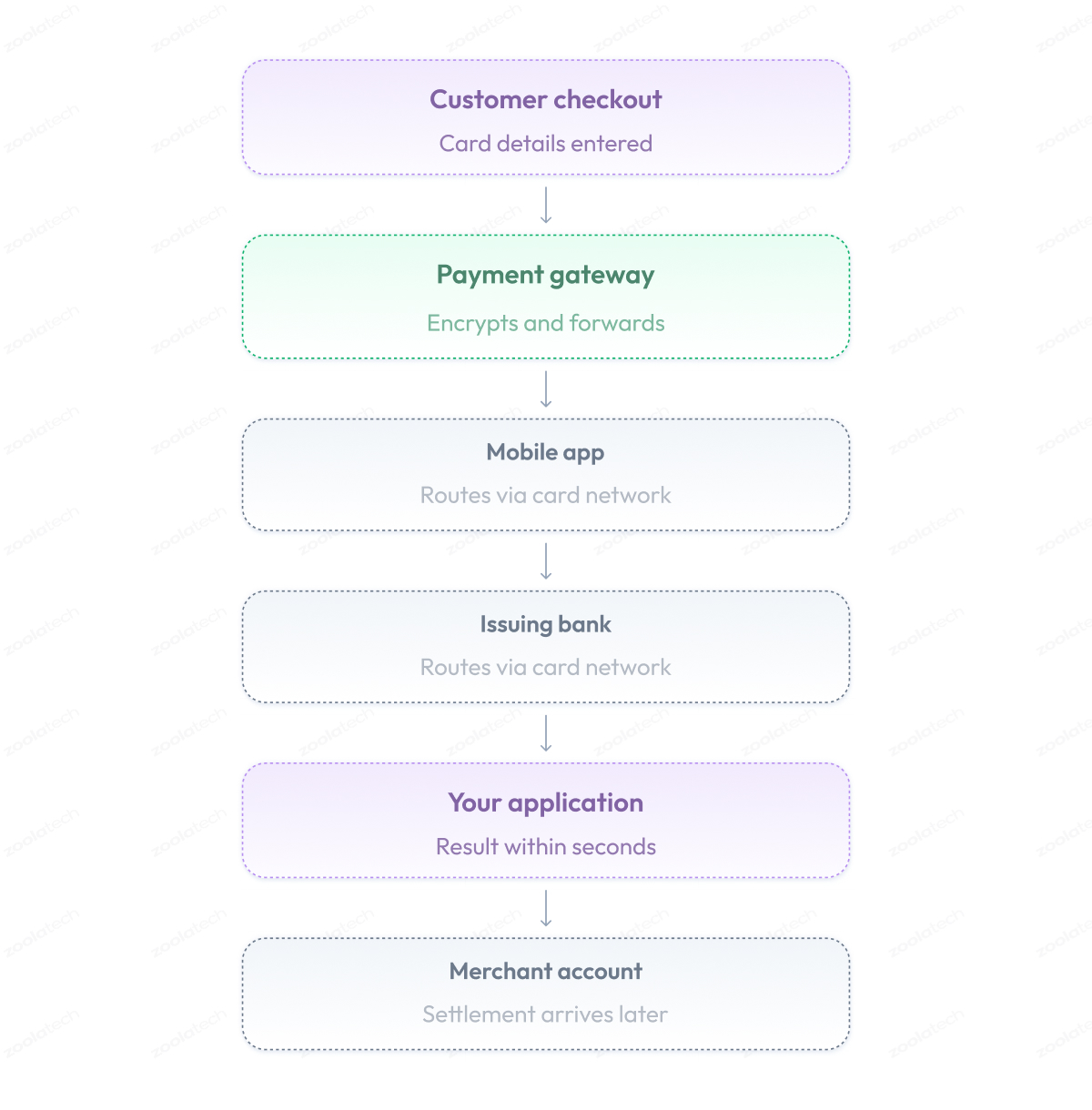
Here is how a payment gateway works and what happens between the moment a customer clicks Pay and the confirmation screen.
- The customer enters card details on your checkout page or a hosted payment form.
- The gateway encrypts the data and forwards it to a payment processor.
- The processor routes the request through the card network to the customer’s bank.
- The issuing bank runs balance and fraud checks, then approves or declines.
- The decision travels back through the same chain to your application, usually within seconds.
- Approved funds reach your merchant account later, in a batch process called settlement.
Gateway vs processor vs acquirer
The flow above involves several players, and their names often cause confusion.
Gateway, processor, and acquirer sound interchangeable, especially since providers like Stripe or Adyen sell all three as a single product with a single dashboard and contract.
They remain three different roles, and the difference starts to matter the moment you negotiate fees, debug a failed settlement, or design a multi-provider setup.
Fees split differently across the roles, errors originate at different points in the chain, and in some markets you contract each role separately. Knowing who does what tells you where to look and what to ask for.
| Role | Core Job | Closest Analogy |
| Payment gateway | Captures, encrypts, transmits payment data | Card terminal for the internet |
| Payment processor | Moves transactions between banks and card networks | Courier between banks |
| Acquirer | Holds merchant account, receives settled funds | Your business bank in the chain |
The payment lifecycle and states
One more thing worth understanding before any integration work is how a payment lives over time. Every gateway API is built around payment states, so the operations you call, the webhooks you receive, and the errors you handle all map directly to them.
The key idea is that money moves in two separate moments. The bank first puts the amount on hold, and collecting it is a second, independent step. A hotel works the same way, holding a deposit on your card at check-in and charging it only if needed.
For an online store, the life of a payment looks like this.
- The customer pays at checkout, and the bank reserves the amount on their card. The money is on hold but still theirs. This state is called authorized.
- From here, one of two things happens. The store ships the order and collects the reserved money, which is a capture. Or the order gets canceled, the store releases the hold, and the money unfreezes, which is a void.
- A captured payment has one more possible turn. If the customer returns the product, the store refunds the money, in full or in part. That is a refund.
Any transition between these states can succeed, fail, or time out on its own, and the best practices later in this guide exist to handle that.
Model your payment as a state machine from day one, and the rest of the integration becomes far easier to reason about.
What Is Payment Gateway Integration?
Now that the gateway itself is familiar, we can define the work this article is about.
Payment gateway integration is the process of connecting your application to a payment gateway so it can accept and manage payments, from collecting card details at checkout to handling authorizations, captures, refunds, and payment notifications in your backend.
In practice, the integration lives in three places:
- On the client side, your checkout page or mobile app collects payment details or hands that job to the gateway.
- On the server side, your backend calls the gateway API, reacts to its webhooks, and keeps order and payment data in sync.
- And on the gateway side, you configure accounts, keys, and payment methods in the provider’s dashboard.
Before writing any code, you need to make two decisions that will shape the entire integration.
The first is the integration mode, which defines where card data and the checkout UI live. That choice drives your user experience and your PCI DSS scope.
The second is the architectural pattern, which defines how your code and services handle money movement. That choice drives reliability, provider flexibility, and the pain of changing the integration later.
We will go through two groups in detail.
Payment Gateway Integration Patterns (Integration Modes)
When people talk about payment gateway integration patterns, they usually mean integration modes. An integration mode is the way the payment form reaches your customer, and the route card data takes to the gateway.
Every mode answers two practical questions:
- Who shows the payment form, you or the gateway?
- And whose servers does the card number touch?
The answers matter more than they look, because the mode you pick quietly fixes three things about your product:
- Checkout control. How much of the payment experience you design yourself, and checkout is where conversion is won or lost.
- PCI DSS scope. How much compliance paperwork and security engineering your team owns, from a short annual questionnaire to a full audit.
- Cost of change. How hard it is to switch later, because moving card data flows after launch means reworking checkout, backend, and compliance at once.
One trade-off runs through every mode. The closer card data gets to your servers, the more control you gain and the more compliance you carry.
The main types of payment gateway integration are:
- Hosted payment page (redirect).
- Embedded iframe (drop-in).
- Client-side tokenization.
- Server-to-server (direct API).
- Payment orchestration, which combines multiple gateways into a single layer.
- Tokenization and vaulting, a building block for repeat payments that works on top of any mode.
Here is each one in detail.
Hosted payment page (redirect)
In this mode, the customer clicks Pay, and your site redirects them to a payment page hosted by the gateway. They enter card details there and come back to you with the result. Card data never touches your systems, so you qualify for the shortest compliance checklist, SAQ A, and the whole integration often takes days.
The price you pay is control over the experience. The payment page carries the provider’s design, and your customization is usually limited to a logo and colors, while the redirect itself adds a step where some customers drop off. This mode fits an MVP, a small team without security engineers, or any product where checkout polish can wait.
Embedded iframe (drop-in)
Here the payment form appears inside your checkout page, so the customer stays on your site. Technically, though, the form loads in a frame served by the gateway, which means card details still travel straight to the provider. You design everything around the form, and the form itself remains the gateway’s territory.
Because your systems still never handle card data, you keep the same short SAQ A checklist in the standard setup. Most drop-in components from major providers work this way, making this mode the default choice for teams that want a solid checkout without owning card data.
Client-side tokenization (fields on your page)
In this mode, you build the payment fields into your own page using the gateway’s JavaScript library. When the customer submits the form, the library sends card details from the browser directly to the gateway and returns a token, a random identifier that stands in for the card. Your server then works with tokens only and never sees the card number.
This gives you near-full control over how checkout looks and behaves, which is why conversion-focused teams choose it. In exchange, your compliance work grows to a longer questionnaire, SAQ A-EP, because your page now delivers the code that touches card data, and protecting that page becomes part of your duty.
Server-to-server (direct API)
This is the mode with maximum control. Your checkout sends card details to your backend, which then passes them to the payment gateway API. Every screen, every request, and every retry is yours to design, which is why large retailers and payment companies use it.
The same setup also carries the full weight of PCI DSS. You land in SAQ D territory, meaning the complete standard with hundreds of requirements, network segmentation, scans, and audits. Unless you have a dedicated security function and a concrete reason, such as custom card flows or your own vault, this mode costs more than it returns.
Payment orchestration (multi-gateway)
Everything above assumed one gateway. Multiple payment gateway integration, usually called payment orchestration, adds an extra layer between your application and several gateways simultaneously. That layer routes each transaction to the best provider, retries a declined payment through another one, and fails over when a provider goes down.
Companies reach for it when a single gateway becomes a bottleneck, typically to achieve international coverage, higher authorization rates, or greater resilience. You can buy an orchestration platform or build the layer yourself, and we cover the architectural side of that choice in the next section.
Tokenization and vaulting (paying again later)
Tokenization and vaulting work on top of any of the modes above. If you want to charge a returning customer without asking for the card again, someone has to store that card. A vault stores card data in the gateway’s secure storage and provides a token you can charge later. Subscriptions, one-click checkout, and card-on-file all stand on vaulting.
Keep the vault on the gateway’s side unless you have an unusual reason to own it. Storing raw card numbers yourself instantly puts you in the heaviest compliance category and creates the kind of risk that sinks companies.
Which mode fits you
| Mode | Card Data Touches | PCI Level | Checkout Control | Best For |
| Hosted redirect | Gateway only | SAQ A | Low | MVPs, small teams |
| Embedded iframe | Gateway only | SAQ A | Medium | Most products |
| Client-side tokenization | Browser to gateway | SAQ A-EP | High | Conversion-critical checkouts |
| Server-to-server | Your servers | SAQ D | Full | Enterprises with security teams |
| Orchestration | Depends on modes used | Varies | High | Multi-gateway, international |
| Tokenization and vaulting | Gateway vault | Keeps current level | Not applicable | Subscriptions, repeat payments |
Every step of card data that travels to your servers buys you control and costs you compliance. Start from the lightest mode that supports your checkout requirements, and move down the table only when a requirement forces you to.
Architectural Patterns for Reliable Payments
The integration mode from the previous section decides where card data goes. The second decision is about your own code, meaning how your backend is organized so that payments stay correct when things go wrong.
These internal designs are called architectural patterns, and they matter because payments fail in ways ordinary features do not. A network timeout during checkout can leave you unsure whether the customer paid, a duplicate request can charge someone twice, and a lost notification can leave a paid order unshipped.
The patterns below are proven answers to exactly these situations. You do not need all of them on day one, and each one solves a specific problem you will recognize.
Gateway abstraction (adapter layer)
A gateway adapter works like a travel power adapter. Your laptop has one plug, sockets differ from country to country, and the adapter in between makes them fit. In code, your system says simple things like “charge this customer” or “refund this payment,” and the adapter translates them into the format your specific gateway understands.
When you switch to a cheaper provider or add a second one for a new country, you rewrite only the adapter. Without it, gateway requests are spread all over your code, and every switch means finding and rewriting each one.
Event-driven processing (working from webhooks)
A webhook is a message the gateway sends to your server when something happens to a payment, such as a successful charge, a settled refund, or a dispute. Many of these events happen minutes or days after checkout, so webhooks are your main source of payment status.
Handle them the way a busy kitchen handles orders. The waiter pins tickets on the rail, and cooks work through them in turn. Your server saves each webhook to a queue and processes them from there, which protects you when messages arrive late, are sent twice, or arrive out of order. All three happen in production regularly.
Transactional outbox and idempotency (exactly one charge)
These two techniques together guarantee that a customer is charged exactly once. Idempotency covers double charges. Every payment request carries a unique key that works like a coat check ticket, and showing the same ticket twice gets you the same coat, never a second one.
When a retried request reaches the gateway, it recognizes the key and returns the previous result instead of charging again. The transactional outbox covers the opposite failure, a lost payment command. Your system saves the order and the payment command in a single database operation, like an original with its carbon copy, and a separate process then sends the commands from there.
Saga (keeping order and payment in agreement)
An order is a chain of steps, such as reserving stock, charging the customer, and creating a shipment. A saga manages the chain like a travel agent manages a trip. If the hotel falls through, the agent also cancels the flights, instead of leaving you with tickets to a city where you have nowhere to stay.
When an order step fails, the saga undoes the completed ones, releasing the stock and refunding the charge. Order and money always agree, and no customer ends up charged without a shipment.
Anti-corruption layer (protecting your model)
Each provider describes payments in its own vocabulary of statuses and objects, and that vocabulary shifts over the years. An anti-corruption layer works like an interpreter at talks, letting each side speak its own language and translating at the border.
In code, it is one place that converts provider terms into yours. When the provider renames a status or restructures a response, you update that one place instead of the whole codebase.
These patterns usually appear together. In our work on a multi-region POS payments platform, the combination of abstraction, queues, and idempotency kept transactions flowing through regional outages.
How to Integrate a Payment Gateway: Step by Step
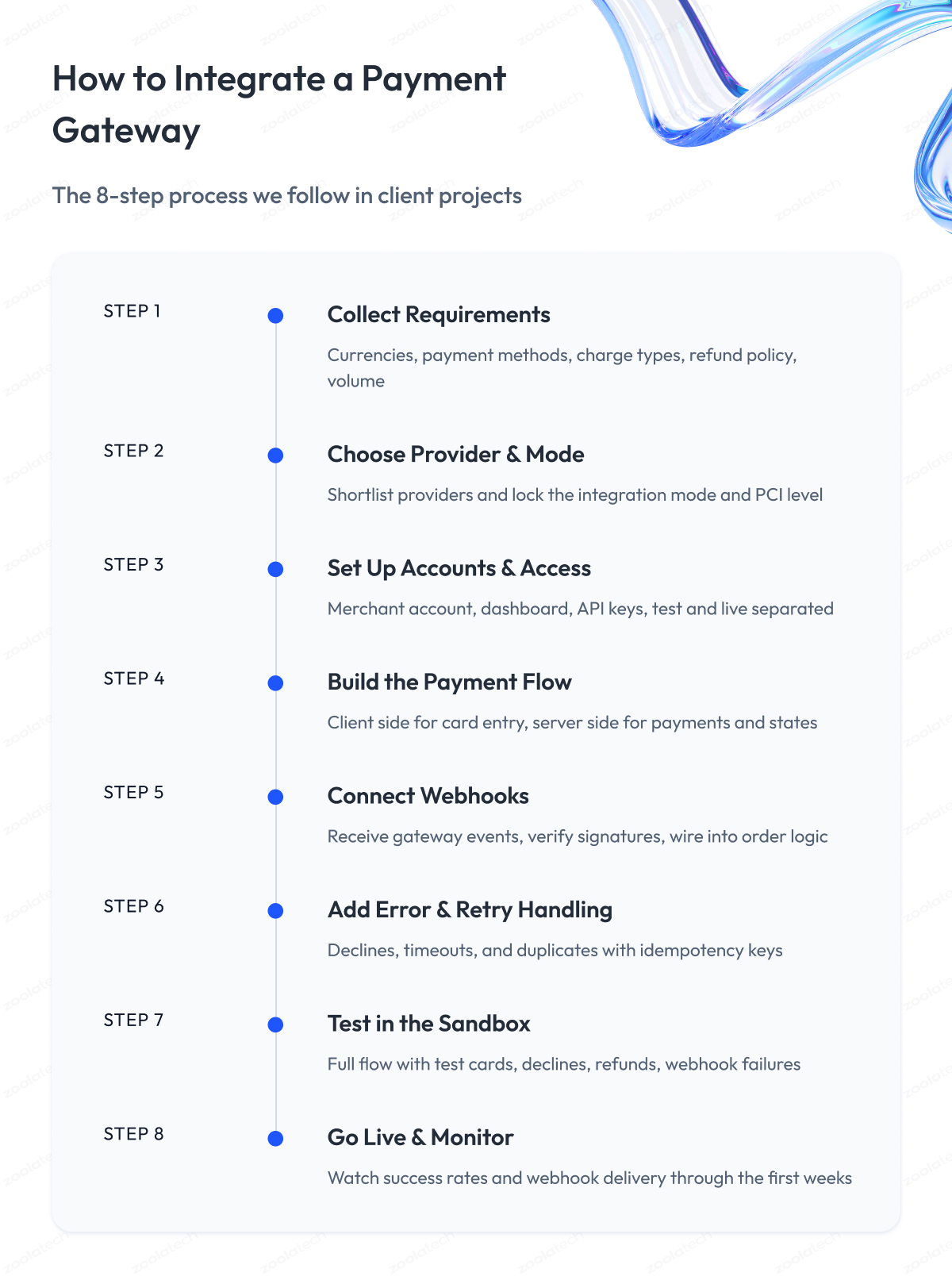
The payment gateway integration process below is how we work in client projects, from ecommerce platforms to fintech products.
The order of steps remains remarkably stable across projects of very different sizes, so you can use it as a checklist for how to integrate a payment gateway into a website or an app.
Step 1 – We collect payment requirements
Before touching any provider, we write down what the business actually needs. Currencies and countries, payment methods, one-time or recurring charges, refund policy, and expected volume. This list quietly decides half of the later steps.
Step 2 – We choose the provider and the integration mode
With the requirements on the table, we shortlist providers that meet them and select the integration mode from the section above. At this point, the team knows its compliance level and how much of the checkout it will own.
Step 3 – We set up accounts and access
The client registers a merchant account, and we configure the gateway dashboard, collect API keys, and separate test keys from live ones from day one. Mixed-up keys are a surprisingly common source of incidents.
Step 4 – We build the payment flow
This is the main coding phase. We implement the client side, where the customer enters card details, and the server side, which creates payments, confirms results, and stores payment states. Where the card data travels between them depends entirely on the mode chosen in step 2.
Step 5 – We connect webhooks
We set up the endpoint that receives gateway messages, verifies their signatures, and wires the events into the order logic, so a successful charge marks the order as paid and a failed one releases it.
Step 6 – We add error and retry handling
Declined cards, timeouts, and duplicate requests get explicit handling, with idempotency keys on every charge. The patterns from the previous section do the heavy lifting here.
Step 7 – We test in the sandbox
Every gateway provides a test environment and test cards for typical scenarios, including declines and 3-D Secure checks. We run the full flow there, including refunds and webhook failures, and only then request production access.
Step 8 – We go live and monitor
After launch, we watch payment success rates and webhook delivery closely for the first weeks. Payment bugs love to hide in the gap between “works in sandbox” and “works with banks.”
Server-side vs client-side: where card data flows
One question decides more than any other during step 4, and it is where card details physically travel.
In a client-side setup, the card goes from the customer’s browser straight to the gateway, and your server sees only tokens.
In a server-side setup, the card passes through your backend first, which gives you full control but also the heaviest compliance burden.
For most teams, the client-side route is the sensible default, and the browser-to-gateway path is exactly what the iframe and tokenization modes from earlier provide. Move card data through your own servers only when a requirement leaves no other way, and budget the security work honestly if you do.
Payment Integration Best Practices
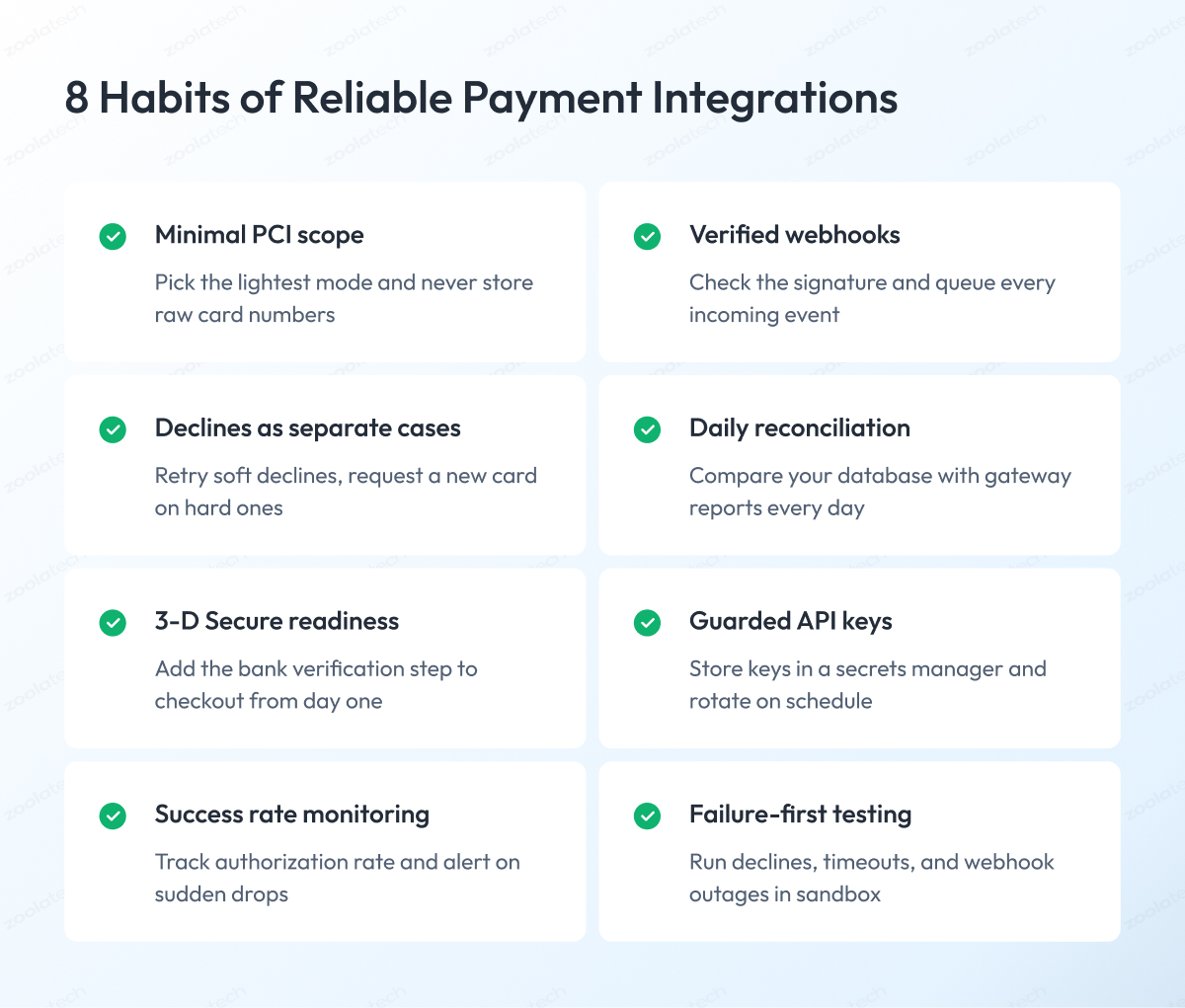
Over dozens of client projects, we have seen the same integration mistakes repeat across companies of every size, and the same habits reliably prevent them.
This section collects those habits into a list of payment gateway integration best practices, from compliance and security to testing.
Keep your PCI scope as small as possible
Treat compliance scope as something you design, and design it before writing code. The integration mode determines which version of the PCI questionnaire you complete, so the distinction between a light checklist and a full audit is made at that point.
Choose the mode with the smallest scope your requirements allow, never store raw card numbers, and use the gateway’s vault for repeat payments. Here is how the modes from earlier map to compliance levels.
| Integration Mode | PCI Questionnaire | What It Means in Practice |
| Hosted redirect | SAQ A | Short checklist, days of work |
| Embedded iframe | SAQ A | Short checklist, days of work |
| Client-side tokenization | SAQ A-EP | Longer checklist plus frontend security duties |
| Server-to-server | SAQ D | Full standard, audits, dedicated security work |
Verify and queue every webhook
Webhook handling is where most reliability incidents start in our experience. Verify the signature on every incoming message because an unverified endpoint allows anyone to mark orders as paid.
Save the message to a queue before processing, respond to the gateway quickly, and design handlers to handle the same event arriving twice. Gateways resend messages when your server responds slowly, so duplicates are part of normal operation.
Treat declines as separate cases
A decline due to insufficient funds, an expired card, and a suspected fraud block are three different situations that deserve three different reactions. Retry soft declines like temporary holds, ask the customer for another card on hard declines, and never retry blindly, because repeated attempts on a blocked card hurt your standing with banks.
Timeouts deserve the most respect. After a timeout, you do not know whether the charge happened, so check the payment status with the gateway before doing anything else.
Reconcile your records with the gateway daily
Reconciliation means comparing your database with the gateway’s transaction reports and investigating every mismatch. Run it as an automated daily job. It catches the quiet failures nothing else catches, like a webhook that never arrived or a refund recorded on one side only.
Match refunds and chargebacks too, and give every refund an idempotency key, just like charges.
Prepare for 3-D Secure and fraud checks early
If you sell in Europe or the UK, banks will require an extra customer verification step called 3-D Secure for most card payments, which is known as SCA under regulations.
Build your checkout with this step in mind from the start, because adding a redirect to the bank’s confirmation screen into a finished flow is painful. Add basic fraud rules on top, such as velocity limits and mismatch checks, and use your gateway’s built-in fraud tools before buying separate ones, the same layered approach we applied when modernizing payment fraud management systems for a leading retailer.
Our enterprise application security guide covers the wider security program these checks belong to.
Guard your API keys like passwords to your bank account
Store keys in a secrets manager, never in code or config files that are pushed to a repository. Keep test and live keys strictly apart, give each system component the minimum access it needs, and rotate keys on a schedule and after every departure from the team.
A leaked live key means someone can move money on your behalf.
Monitor payment success rate and alert on drops
The single most telling payment metric is the share of attempted charges that succeed, usually called authorization rate or success rate.
Track it per gateway, per country, and per payment method, and set alerts on sudden drops, because a broken bank connection or an expired certificate shows up there first.
Keep card numbers and personal data out of logs, and make every payment traceable end-to-end through its identifiers.
Test the failures
The happy path proves itself in the first hour of sandbox work, and the failures are what keep you up at night. Test declined cards, timeouts, duplicate submissions, webhook outages, and refund flows using the gateway’s test cards and scenarios.
For subscriptions, use test clocks to fast-forward billing cycles instead of waiting a month.
Run a full user acceptance round in the sandbox before requesting production access, and keep the whole suite runnable for every release, as we do in our QA and test automation practice.
Common Payment Gateway Integration Scenarios
The patterns and practices above cover any integration. On top of them, certain business models add their own payment challenges, and we meet four of them in client work more often than all others combined. Here is what each one looks like in practice.
Recurring and subscription billing
Think of a streaming service or any product with a monthly plan. The customer enters their card once, and after that the system charges them monthly without the customer being present. This stands on the vault from the modes section. The card sits in the gateway’s storage, and your system charges the saved token on schedule.
The everyday problem with subscriptions is that these charges fail all the time because cards expire and balances run dry. So you need a follow-up routine.
Retry in a few days, email the customer, ask them to update the card. Most gateways offer ready-made subscription tools with these retries built in, and they are worth using before building your own billing system.
Marketplaces and split payments
Picture a platform like Etsy, where a buyer pays once, and the money ends up in several pockets. The seller gets their part, and the platform keeps its commission. A regular shop integration cannot do this, so providers offer special marketplace programs. Each seller passes the provider’s identity check, and after that every payment splits automatically.
When choosing a gateway for a marketplace, compare the program terms first, meaning how sellers get verified, when they receive payouts, and who answers for problem payments. These terms differ between providers far more than fees do.
Alternative payment methods
In many countries, customers expect to pay with the wallet on their phone, like Apple Pay or Google Pay, split the purchase into installments through services like Klarna, or pay straight from their bank account. If the method a customer trusts is missing at checkout, some of them simply leave.
This is where the adapter from the architecture section pays off again, since a new method becomes another translation within it. Start with the one or two methods your market actually uses. In our ecommerce payment gateway integration guide, we cover how to choose payment methods in more detail.
Mobile and international payments
Mobile payment gateway integration changes only the customer-facing half of payments. The server logic stays the same, but instead of a payment form, the app shows the native payment sheet, the familiar screen where the phone confirms the purchase by face or fingerprint.
Apple and Google also have store policies that determine when you must sell through in-app purchases rather than your gateway, so check them before building.
International payment gateway integration introduces multi-currency pricing, local payment methods, and local rules, such as the extra bank confirmation that European banks require. A common move here is a second gateway with better coverage in the new region, and the adapter and orchestration patterns exist precisely for that moment.
How to Choose a Payment Gateway and Compare Providers
To choose a payment gateway, compare candidates against your payment requirements from step 1 of the integration process, and weigh eight criteria in practice:
- Payment methods and countries. The gateway must support the cards, wallets, and local methods your customers use, in every market you sell to.
- Fees. Look past the headline rate at the full picture, including fees for refunds, chargebacks, currency conversion, and payouts.
- Developer experience. Good documentation, predictable APIs, and reliable webhooks shorten the integration by weeks. A test account shows this faster than any comparison page.
- Integration modes. Check that the gateway supports the mode you picked, whether that is a hosted page, embedded fields, or a direct API.
- Compliance support. The gateway should let you stay in the lightest PCI category your mode allows, with vaulting and 3-D Secure handled on its side.
- Reliability. Ask about uptime history and status transparency. For your customers, gateway downtime and your downtime are the same thing.
- Subscription and marketplace features. If the scenarios from the previous section apply to you, built-in support beats custom development.
- Account stability. Read how the provider treats your industry. Some businesses, from travel to gaming, get classified as high risk and face holds or sudden account closures.
The market itself is easier to navigate than it looks, because a handful of providers cover most use cases. Here is a neutral snapshot of the ones we meet most often in client work.
| Provider | Strong Side | Typical Fit |
| Stripe | Developer experience, product breadth | SaaS, subscriptions, platforms |
| PayPal / Braintree | Buyer trust, wallet reach | Consumer ecommerce |
| Adyen | International coverage, enterprise features | Large retailers, global brands |
| Worldpay | Enterprise processing scale | Established enterprises |
| Square | Unified online and in-person payments | Retail with physical stores |
| Checkout.com | International cards, flexible APIs | Fintechs, cross-border business |
| Authorize.net | Longevity, wide compatibility | US small and mid-size business |
Developer surveys consistently show Stripe and PayPal leading adoption by a wide margin, with platform-tied options like Shopify Payments close behind.
Popularity is a signal of maturity and community support, and your own criteria still decide. A gateway that everyone praises but that lacks your key market or business model is the wrong gateway for you.
Cost and integration effort
Payment gateway integration costs have two parts: fees and build.
On fees, providers price per transaction, usually a percentage plus a fixed amount, and enterprises with volume can negotiate rates based on the actual card costs instead of a flat blend.
On the build, a hosted or iframe integration typically takes days to a couple of weeks, tokenized custom checkouts take several weeks, and orchestration or marketplace setups run into months.
The multiplier for all these numbers is the reliability engineering in this guide, and skipping it shifts the cost from the build phase to production incidents.
Build a Custom Payment Gateway or Integrate an Existing One?
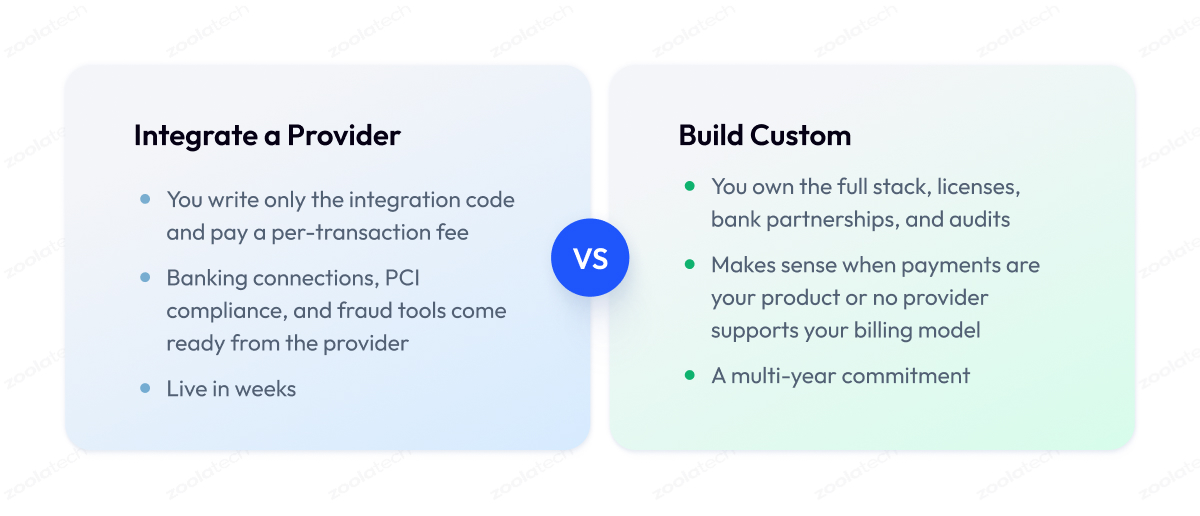
At some point, most companies handling high payment volumes ask whether they should keep integrating with providers or build something of their own. The honest answer has three levels, and the right one depends on how unusual your payment needs are.
For most products, integrating with an existing provider is a good call. You get banking connections, compliance, and fraud tools that took the provider years to build, for a per-transaction fee. Rebuilding this yourself means entering the payments business, with licenses, bank partnerships, and audits, and that is a company-defining decision rather than an engineering task.
The middle level is building your own abstraction or orchestration layer on top of existing providers. This is where the adapter and orchestration patterns from earlier become a product decision. The layer is worth building when you work in several regions with different gateways, when declined payments cost you enough that routing and retries pay for themselves, or when you want the freedom to renegotiate fees and swap providers without a rewrite.
Building custom payment infrastructure makes sense for a narrow group. Companies whose product is payments, platforms with billing models no provider supports, and businesses in regulated niches where off-the-shelf programs do not fit.
| Approach | When It Fits | What You Own |
| Integrate a provider | Standard checkout and billing needs | Integration code only |
| Build an abstraction layer | Multiple gateways, regions, fee leverage | Routing, retries, provider independence |
| Build custom infrastructure | Payments as the product, unsupported models | Full stack, compliance, bank relations |
Most of the payment gateway integration services we deliver at Zoolatech live on the first two levels. We integrate with providers, design PCI-compliant architectures, and build the abstraction and orchestration layers that keep clients independent of any single gateway.
This work is part of our payment software engineering practice, and it draws on the same engineering approach as our broader custom software development services. If you are weighing these three levels for your own product, that conversation is exactly where our team is useful.
Platform and Language Specific Integration
A frequent question after all the theory is what the integration looks like on a specific stack, say a Shopify store or a Java backend. The short answer is that the concepts in this guide stay the same everywhere, and only the entry point changes.
On ecommerce platforms like Shopify, WooCommerce, Magento, or BigCommerce, you rarely integrate a gateway from scratch. Payments start with an official plugin or app from the provider, and custom development begins where the plugin’s checkout limits stop.
For custom applications, gateways ship official SDKs for the major languages, including Java, PHP, .NET, Python, and Node.js.
An SDK is a ready-made library that wraps the same API concepts we covered, from payment creation to webhooks, so you write less boilerplate.
The practical advice is use the official plugin or SDK as the starting point, and apply the patterns from this guide around it, because a plugin handles the happy path and leaves reliability, reconciliation, and scenario-specific logic to you.
We publish separate hands-on guides for specific platforms and languages, and this article gives you the foundation they all share.
Final Word
Getting payment gateway integration right takes more thought than the quickstart guides suggest. You have to weigh integration modes against your compliance appetite, design your backend around failures that will happen, and pick a provider that fits your markets instead of the loudest brand.
That work pays for itself many times over, because every one of these decisions protects something the business depends on, from checkout conversion and customer trust to the team’s freedom to change providers later.
Skipping it costs money later. Customers abandon a clumsy checkout, double charges destroy trust, compliance work shows up unplanned, and switching providers turns into a months-long project. All of this is far cheaper to prevent at the design stage than to fix in production.
If you take one action after reading, make it this. Write down your payment requirements, pick the lightest integration mode that covers them, and put idempotency, webhook verification, and reconciliation into the first version instead of the backlog.
And if you want an experienced team by your side for that work, we are ready to review your product, talk through your integration and architecture choices, and help you build payments you can stop worrying about.
Questions You May Have
What is payment gateway integration?
Payment gateway integration is the process of connecting an application or website to a payment gateway to securely accept, authorize, and manage digital payments.
What are the main types of payment gateway integration?
The main types are hosted payment pages, embedded iframes, client-side tokenization, server-to-server API integration, and payment orchestration, with tokenization and vaulting working on top of any of them.
What is the difference between hosted and API integration?
A hosted payment gateway collects card details on the provider’s page, which keeps your compliance minimal, and API integration collects them in your own checkout, which adds control together with security duties.
Where should card data go, client-side or server-side?
In most integrations, card data should travel directly from the customer’s browser to the gateway, passing through your own servers only when a strict requirement demands it, since that path carries the heaviest PCI scope.
How does integration affect PCI DSS scope?
The integration mode decides your PCI DSS scope, meaning hosted and iframe modes qualify for the short SAQ A questionnaire, client-side tokenization requires SAQ A-EP, and server-to-server puts you under the full SAQ D standard.
How much does payment gateway integration cost and how long does it take?
The cost consists of per-transaction fees plus the build itself, which ranges from a few days for a hosted setup to several weeks for a tokenized custom checkout and up to months for orchestration or marketplace projects.
How do I make webhooks and payment retries reliable?
Verify the signature of every webhook, process messages through a queue that tolerates duplicates and reordering, and attach an idempotency key to every charge so a retry can never bill a customer twice.
Should I integrate an existing gateway or build a custom one?
Integrate an existing provider unless payments are your product or no provider supports your billing model, and add an abstraction layer when you need several gateways or independence from a single provider.
How do I choose a payment gateway integration company?
Look for a payment gateway integration company with production payment projects behind it, ask how it handles PCI scope, webhooks, and reconciliation, and check references from businesses similar to yours.
What skills should payment gateway integration developers have?
Payment gateway integration developers need solid backend and API engineering experience plus a working grasp of PCI DSS, idempotency, webhook processing, and payment lifecycle states.
What makes payment gateway integration secure?
Secure payment gateway integration keeps card data away from your servers, verifies webhook signatures, stores API keys in a secrets manager, and adds 3-D Secure and fraud checks where regulations or risk require them.
What is the best payment gateway for integrations?
The best payment gateway for integrations is the one that covers your markets, payment methods, and business model, so run candidates through the eight criteria in this guide instead of picking by popularity.