

Quick Summary
- The mainframe survives because nothing matches it on the hardest jobs, processing tens of thousands of transactions a second with downtime measured in minutes per year.
- Three paths differ by where workloads run: modernizing in place is lowest risk but capped, a full cloud move has the highest ceiling and the highest risk, and hybrid splits the difference workload by workload.
- Six approaches carry the work, from encapsulating behind APIs and rehosting through refactoring, rearchitecting, and replacing with SaaS, and real programmes mix several of them.
- Roughly 60% of cloud migrations fail to deliver the value expected, usually because a system is lifted unchanged and the same inefficiency then arrives on a metered bill.
- Do not sell the project on cost savings, since spend rises first; justify it on speed and reduced risk, and extract the buried business logic before any rewrite touches it.
Mainframe modernization can restore an enterprise’s ability to change its most critical systems quickly, and that is the primary reason companies take it on.
The hard part is deciding what to actually do. Vendors push you to leave the mainframe, product pages sell a single tool, and modernization is sold as a way to cut costs, even though it usually raises them at first.
Meanwhile, the systems you are touching run core operations, and the business rules inside them are written in COBOL, a programming language from the 1960s that fewer engineers still understand.
One wrong move can take down something the company cannot afford to lose. So most teams stall, unsure whether to modernize in place, move to the cloud, or leave things alone.
That is why we wrote this guide.
We explain what mainframe modernization means, when to modernize in place vs. move to the cloud or go hybrid, the main approaches and their trade-offs, the risks and how to reduce them, and what it actually costs.
By the end, you will know what to modernize on your own mainframe, how to modernize it, and whether the effort is worth it.
What Is Mainframe Modernization?
The fastest way to understand mainframe modernization is to hold it next to the ordinary kind.
Regular software modernization means updating an everyday system to make it work better today. That could be a website, a mobile app, a cloud service, or an aging business application. The goal is to take software that has fallen behind and bring it back up to standard.
Mainframe modernization is the same job, applied to one very specific machine. Here are a few key facts about that machine, and why it makes the work harder.
- The platform is unusual. A mainframe, most often an IBM Z running the z/OS operating system, is a giant central computer built for enormous transaction volumes and near-perfect uptime. Regular modernization deals with the familiar servers and cloud setups that most engineers already work with.
- The technology is old and rare. Mainframes run on COBOL and similar tools from the 1960s and 70s. Finding people who can safely touch it gets harder and more expensive each year.
- The stakes are higher. If a normal app goes down for an hour, you recover. If a bank’s core system stops, it makes the news.
- The business rules are buried. Decades of logic sit within that old code, often with no documentation and no single person who remembers it all. Pulling that logic out without losing any of it is a huge task, and one that everyday projects almost never deal with.
Mainframe modernization is like renovating a hospital that can never close its doors, whose original blueprints were lost forty years ago, and which was built with materials only a handful of retiring specialists still know how to handle.
Also, people often mix up the terminology in mainframe modernization, so it’s worth checking these three key terms to avoid paying rewrite prices for what needed only a migration.
Modernization is the umbrella word for making a system fit modern needs.
Migration means moving the system to a different environment, such as the cloud or newer hardware, without necessarily changing how it works.
A rewrite means rebuilding the application from scratch in a newer programming language.
| Term | What It Means | Typical Change | Main Risk |
| Modernization | Umbrella effort to fit modern needs | UI updates through full cloud moves | Scope creep without a defined goal |
| Migration | Moving the system to a new place | New hardware or cloud, same core logic | Hidden dependencies surface mid-move |
| Rewrite | Rebuilding the app from scratch | New language, new architecture | Losing business rules buried in old code |
So that is what mainframe modernization is, and how it differs from simply moving or rebuilding a system.
Now comes the part most people really want to understand. What do you actually get out of mainframe modernization, and why is it worth the effort?
What You Actually Get from Mainframe Modernization as a Tech Leader
Look at mainframe modernization the way you would look at any serious investment. You put money and effort in now, and in return you get a core system that keeps the company competitive for the next decade instead of holding it back. For a CTO, CIO, or VP of Engineering, you are buying the company’s ability to keep moving.
Companies approaching a modernization of this scale typically treat the executive hire as carefully as the architecture decision itself, and specialized executive search in technology has become the default channel for sourcing a sponsor with shipped modernization experience.
Here are the mainframe modernization benefits our clients most often name after a successful modernization.
- We can move fast again. Replacing rigid decades-old code with modular components removes the bottleneck that slowed every change. Teams can then launch products, adjust loan terms, or connect partners in days instead of months.
- We have easy access to your own data. Exposing mainframe data through modern APIs frees information that was trapped inside old programs. Your applications, analytics, and partners can then access data that was previously unavailable to them.
- We stop depending on a handful of people. Moving business logic from COBOL to mainstream languages removes dependence on a shrinking pool of veteran specialists. The system can then be maintained by engineers who are widely available today.
- Our security and compliance get easier. Shifting the workload onto a platform with current patching, monitoring, and audit tooling brings it up to modern security standards. Fixing vulnerabilities and proving compliance to regulators then takes far less effort.
- The money adds up. Retiring aging hardware and costly legacy licenses lowers the long-term cost of running the system. These savings reduce costs only after the upfront spend on the project, migration, and parallel run, so the payoff builds over the following years.
- Our employees don’t leave. When a company invests in modernizing its core and adopting current technology, engineers read it as a sign that the business is stable and thinking about staying and continuing to build with the company.
As a technology leader, if your modernization goes well, you become the person who unblocked the business and can prove it. Your reputation goes up, because the whole company can see that long-standing problems are finally getting solved.
That kind of visible win is what earns recognition, and often the bonus that comes with it. You also get to say you had a hand in moving the company toward modern technology and setting its course for the years ahead, instead of managing decline.
Moreover, a success here becomes a standout moment in your career and an experience you carry into every role after it.
If you want a partner you can trust on a project like this, or if you want to discuss the mainframe modernization process, our COBOL engineers are glad to look into your setup and walk you through it.
Why the Mainframe Still Runs the World in 2026
It is fair to ask why a technology from the 1960s still sits at the center of global business in 2026. The honest answer is that for the most demanding jobs, nothing else matches it. Here is what keeps the mainframe in place.
- A single mainframe can process tens of thousands of transactions a second without slowing down. For a bank clearing card payments across an entire country, that throughput is the whole game.
- Mainframes are engineered for uptime measured in minutes of downtime per year. For systems that cannot fail, like payments, trading, and benefits, that reliability outweighs any newer convenience.
- The world’s largest banks, insurers, airlines, and government agencies still run their core systems on mainframes, from Wall Street to the major banks of Europe and Asia. These are the institutions that move money and records for billions of people.
- IBM ships a new modern mainframe every couple of years, which is the behavior of a platform with a future.
- A legacy mainframe system holds decades of business logic that no one fully documented, so ripping it out can cost more than it saves. Most enterprises keep it running and modernize around it.
That last point is what really keeps the mainframe alive, and it leads straight into the decision the rest of this guide is built around: how much of your system should stay on the mainframe, and how much should move.
The First Big Decision: Modernize in Place, Cloud, or Hybrid?
To answer how much of your system should stay and how much should move, you first need to see the three paths mainframe modernization can take. They differ mostly in where your workloads run, and this is the first of the modernization decisions that shapes everything after it.
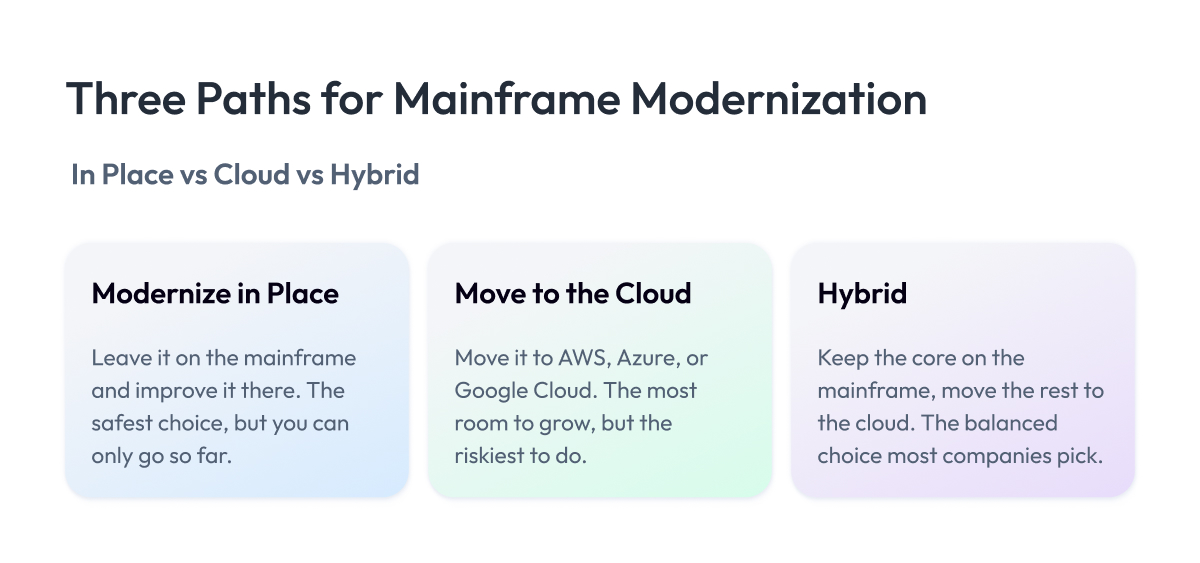
Modernize in place. You keep your existing mainframe and improve the system there by restructuring the code, adding modern interfaces, and connecting it to newer applications. The main upside is low risk, since your most critical workloads never leave the hardware that has run them reliably for decades. The main downside is a ceiling on how far you can go, because you stay bound to the mainframe platform and its costs.
Move to the cloud. This path relocates some or all of your mainframe applications and data to a provider such as AWS, Azure, or Google Cloud. The main upside is the biggest long-term gain in flexibility and cost, with room to scale on demand. The main downside is the highest risk, since you are shifting business-critical workloads onto a very different foundation.
Go hybrid. You move the workloads that gain from the cloud, such as customer-facing apps and analytics, and keep the ones that run best on the mainframe right where they are. The main upside is balance, with the mainframe staying the system of record for core transactions and your non-mainframe systems in the cloud handling what needs to scale fast. The main downside is the added complexity, since you now have to run and integrate two environments at once.
Choosing between them comes down to a handful of factors.
- How critical is the workload.
- How sensitive is it to delay.
- Where its data lives.
- What regulators require.
- What it will cost.
- Do you have the skills to run it.
The table below compares the three paths on the things that decide the call.
| Factor | Modernize in Place | Move to Cloud | Hybrid |
| Best for | Core workloads that must not move | Apps needing scale and speed | Mixed portfolios, most enterprises |
| Risk level | Lowest, system stays put | Highest, new foundation | Balanced across workloads |
| Cost pattern | Steady, hardware stays | High upfront, lower later | Phased spend over time |
| Compliance fit | Strong, data stays on-premise | Depends on provider and region | Sensitive data kept on mainframe |
| Speed of change | Improved, still platform-bound | Highest once migrated | High where it matters |
In-place mainframe modernization keeps you safe but capped; cloud offers the most room but carries the most risk; and hybrid spreads the difference across your workloads.
Most enterprises decide on a workload-by-workload basis, and to do that well, you first need to know the specific ways a mainframe workload can be modernized. Those are the approaches we look at next.
The Main Approaches to Mainframe Modernization, and How They Differ
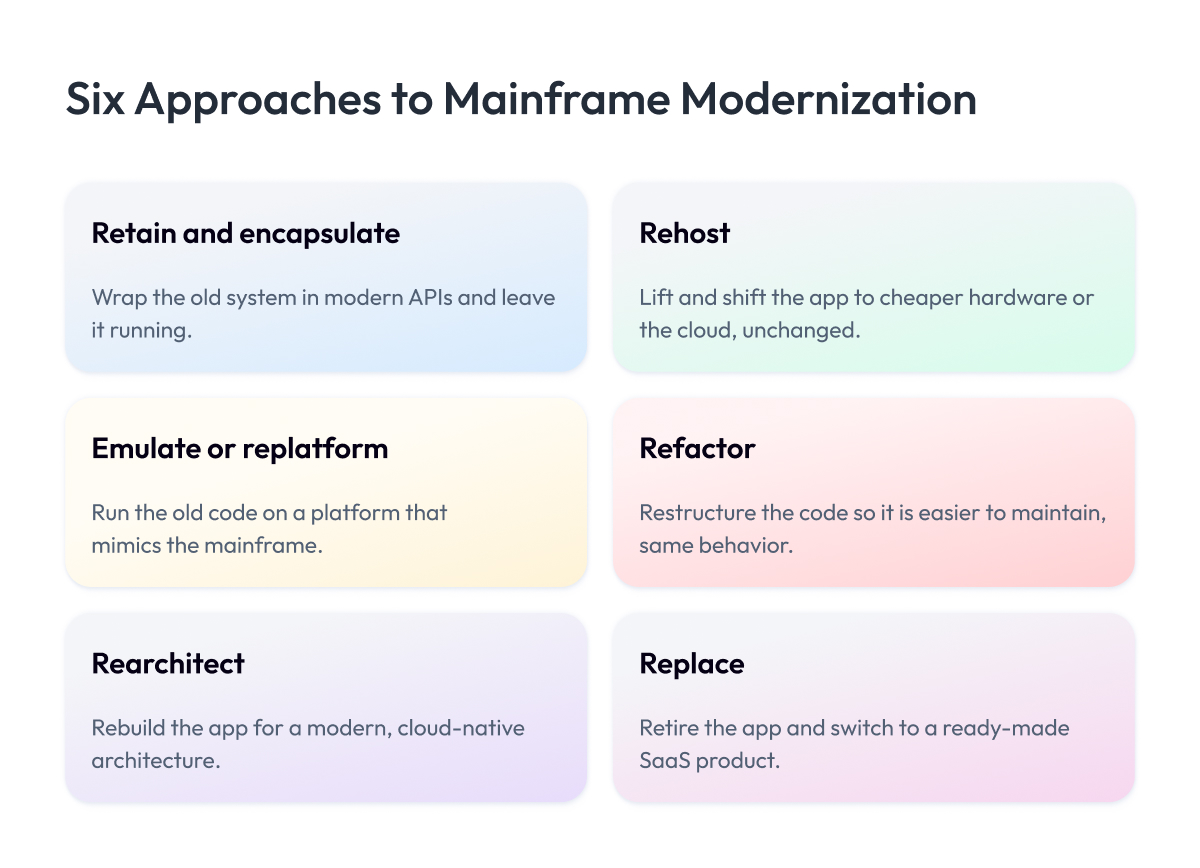
The three paths from the last section decide where your workloads run. The six approaches here are the mainframe modernization techniques that get them there, and each one either keeps the system in place, moves it to the cloud, or fits into a hybrid mix.
Here is each approach, with its main upside and its main downside.
1. Retain and encapsulate
You leave the mainframe program running as is and wrap a modern interface around it, typically via APIs, so newer applications can talk to it. Tools like z/OS Connect make this work without touching the underlying code.
The main upside is low risk, because you change nothing inside the system that already works. The main downside is that the core remains unmodernized, so the old code and the skills problem are still lurking underneath.
2. Rehost
When you rehost, you take a mainframe application off the platform and run it as-is on the cloud or cheaper hardware, without changing how it works. People often call this “lift and shift.”
The main upside is speed and lower costs, since you move faster and avoid expensive mainframe licenses. The main downside is that all the old baggage comes with you, so a messy system stays messy on a new platform.
3. Emulate or replatform
You put your existing mainframe applications onto a new platform that mimics the mainframe environment, so the old code keeps running with only minor changes. It sits between rehosting and a full rewrite.
The main upside is that you get off mainframe hardware and keep your existing logic mostly intact. The main downside is your dependence on the emulation layer, which can become a long-term constraint and cost.
4. Refactor
You restructure the existing code without changing what it does, often doing COBOL modernization on the code itself to make it easier to maintain. Same behavior, better structure.
The main upside is a more maintainable system that keeps its proven business logic. The main downside is the effort, because reworking decades of code is slow and still leaves you stuck with an aging language.
5. Rearchitect
You redesign the application around a cloud-native architecture, typically breaking a large monolith into smaller services and moving from COBOL to a language like Java. It is a big change in how the system is built.
The main upside is a modern, flexible system your teams can build on for years. The main downside is high cost and risk, because you are rebuilding critical logic and can lose rules buried in the old code if you are careless.
6. Replace
You retire the legacy application on the mainframe entirely and switch to a ready-made product, usually a modern SaaS platform, instead of building your own again. You buy the capability rather than maintaining it.
The main upside is that you shed the legacy system completely and let a vendor handle upkeep. The main downside is a loss of control, because off-the-shelf software rarely fits exactly how your business works, and moving decades of data into it is hard.
Most real programs mix these across paths. You might encapsulate one workload in place, move another to the cloud, and rearchitect the one that returns the most to the business. That mix of modernization patterns is what hybrid looks like in practice. The table below sums up the trade-offs at a glance.
| Approach | Path | Main Upside | Main Downside |
| Retain and encapsulate | In place | Very low risk | Core stays un-modernized |
| Rehost | Cloud or on-premise | Fast, lower cost | Old problems move too |
| Emulate or replatform | Cloud or on-premise | Off hardware, logic intact | Depends on emulation layer |
| Refactor | In place | Keeps proven logic, maintainable | Slow, still aging language |
| Rearchitect | Cloud | Modern, flexible system | High cost and risk |
| Replace | Cloud (SaaS) | Sheds legacy entirely | Poor fit, hard data migration |
The pattern across all six is a trade-off between risk and reward.
Encapsulate and refactor keep you safe but leave the old core in place.
Rearchitect and replace give you a genuinely modern system for a much higher price and risk.
Rehost and emulate sit in the middle, getting you off the hardware fast without fixing what is inside.
How to Choose the Right Approach for Each Workload
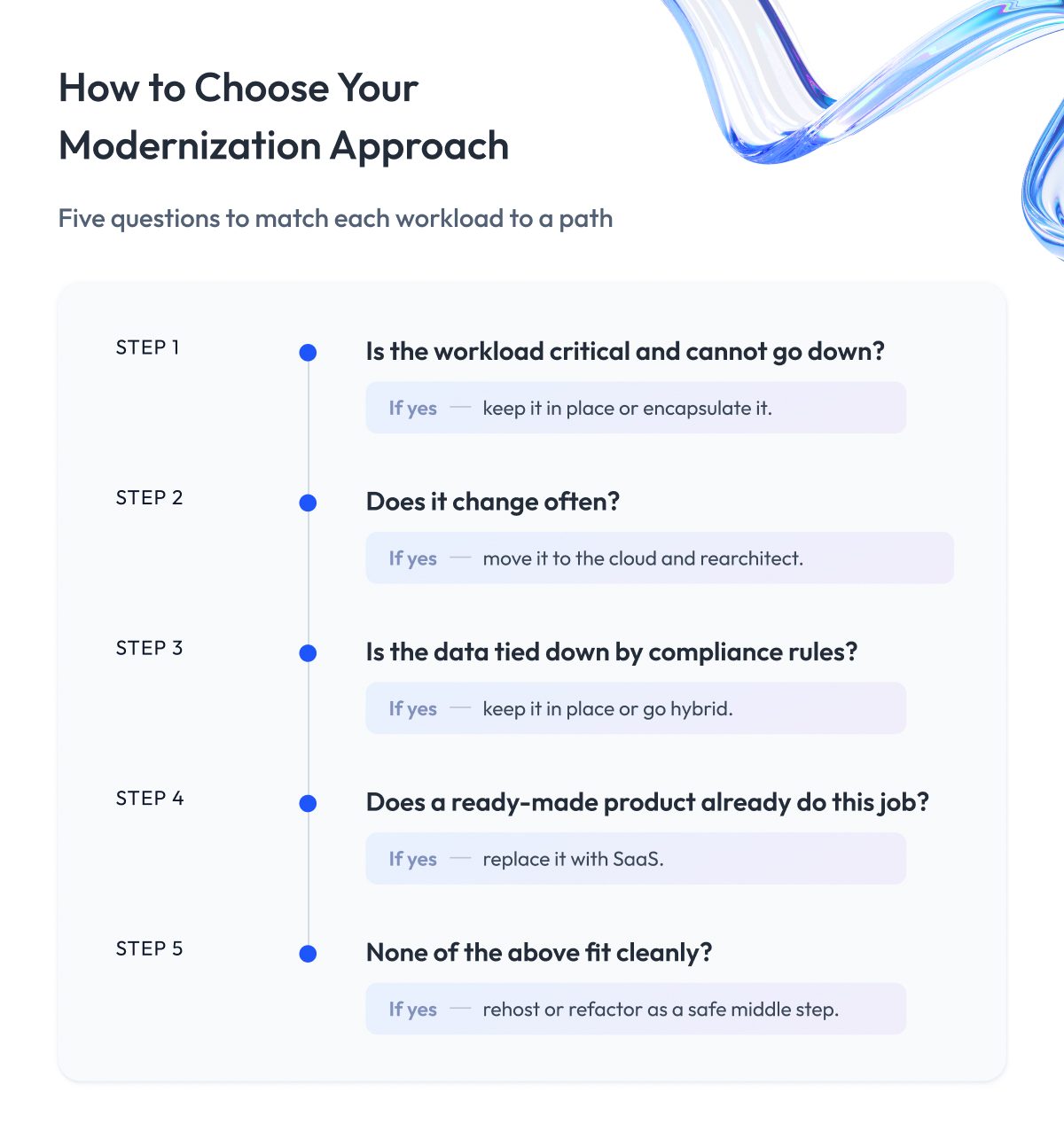
The trick to picking the right mainframe modernization approach is to ask a brief series of questions about each workload and let the answers guide you.
First, how critical is the workload, and can it tolerate any downtime? If it runs core transactions that cannot stop, like payment clearing, you lean toward keeping it in place or encapsulating it, because the risk of moving it is hard to justify.
Second, does it need to change often? A workload that the business wants to update constantly, like a customer-facing feature, gains the most from moving to the cloud and rearchitecting, where change is cheap and fast.
Third, where does its data live, and what do regulators allow? If the data is bound by residency or compliance rules that are easier to meet on-premise, that pushes you toward in-place or hybrid, with the sensitive data staying on the mainframe.
Fourth, is there a product that already does this job? If a mature SaaS platform covers the function, replacing beats rebuilding, as long as you can move the data and accept the fit.
The decision picture below walks through these questions in order and lands each workload on a recommended approach.
Example:
Take a bank with three workloads. Its payment engine is critical and stable, so it stays on the mainframe, encapsulated behind APIs.
Its mobile banking backend changes constantly, so it moves to the cloud and gets rearchitected into services. Its internal reporting tool is outdated and generic, so it will be replaced with a SaaS analytics product. One system, three different answers, each defensible, and that per-workload logic is what a genuine mainframe transformation looks like.
This workload-by-workload method is the core of our approach to legacy system modernization for enterprises, because it keeps risk contained within the pieces that can absorb it and leaves the untouchable core alone.
The one caution: a decision tree doesn’t point you to a final verdict but gives a strong default. A senior architect should still sanity-check each call against cost, timeline, and the skills you have on hand.
That check is where the hardest risks surface, and those risks are what the next section is about.
Mainframe Modernization Risks, and How to Mitigate Them
We touched on some of these risks in earlier sections, but they deserve their own breakdown, because these are exactly the fears that stop many companies from starting a modernization at all.
These are the mainframe modernization challenges that come up most, and how to keep each one in check.
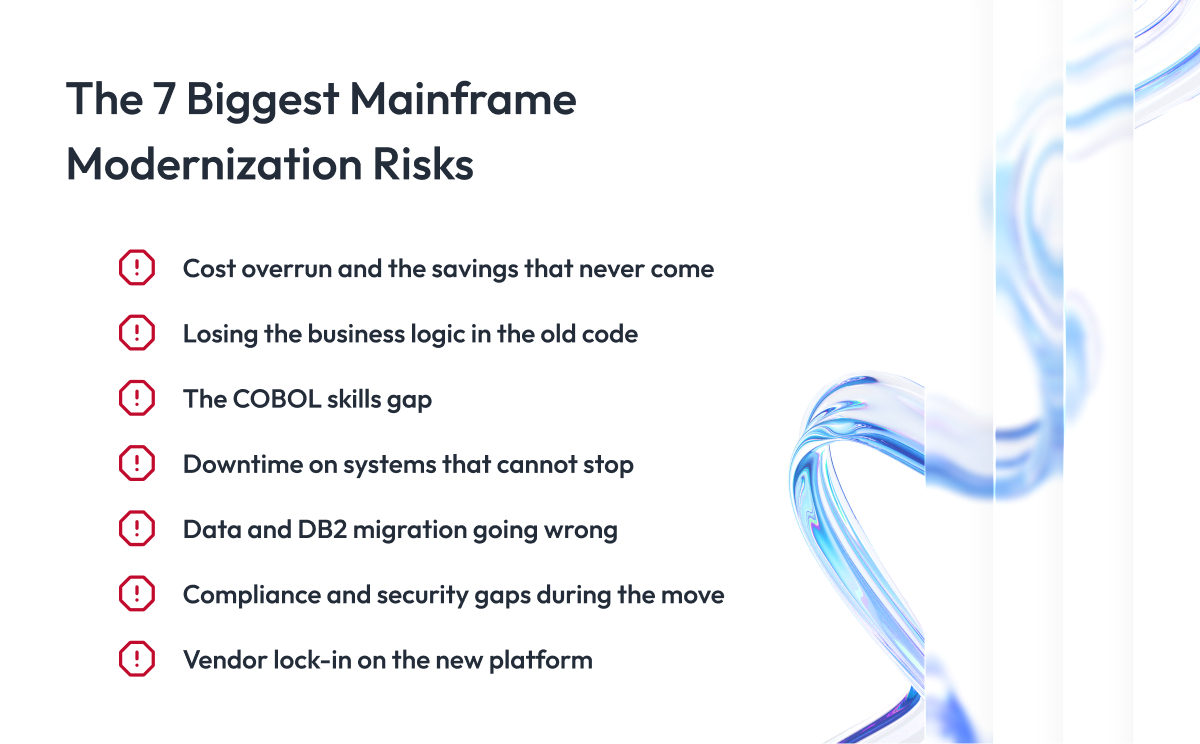
1. Cost overrun and the savings that never come
You spend far more than planned, and the promised savings never show up. It happens when the project is sold on cost-cutting alone.
How to mitigate: justify the project on the basis of speed and lower risk, treat cost savings as a later bonus, and budget for an overrun from day one.
2. Losing the business logic in the old code
Decades of rules sit inside COBOL that nobody fully remembers, and a rewrite can quietly drop some of them. You find out when a customer gets charged wrong.
How to mitigate: extract and document that logic first, then run the old and new systems side by side until they match every time.
3. The COBOL skills gap
The people who understand the system are retiring, and the team doing the move may not know why the code works as it does.
How to mitigate: pair your veteran mainframe engineers with modern developers early, while that knowledge is still in-house.
4. Downtime on systems that cannot stop
Your core runs day and night, and a few minutes of unplanned downtime can cost millions or breach an SLA.
How to mitigate: move in small steps, run old and new in parallel, and keep a tested rollback ready at every stage.
5. Data and DB2 migration going wrong
Moving decades of records off DB2 risks losing or scrambling data that everything downstream depends on.
How to mitigate: validate at every step, match totals against the source, and keep the mainframe as the system of record until the new store is proven.
6. Compliance and security gaps during the move
A workload caught between platforms can expose data or fall outside the rules, which is serious in banking, insurance, and healthcare.
How to mitigate: bring security and compliance people in on day one and treat every regulation as a fixed line the design cannot cross.
7. Vendor lock-in on the new platform
Going all-in on one cloud or one tool can trap you in costs and limits you cannot escape later.
How to mitigate: favor open standards and portable design, so moving again stays possible without another full rebuild.
What decides the outcome is facing those risks before the work starts. If any of these risks is what makes you hesitate, that is worth a conversation.
Tell us which ones worry you, and we will walk you through how we bring each one down to a minimum. It is the same legacy modernization process we run for banks and insurers that cannot afford a wrong move.
Up to now we have stayed at the strategy level: which path to take, which approach fits, and what can go wrong. For the workloads you decide to move off the mainframe, the next question gets concrete.
Where do they actually go? For most enterprises, the first answer they reach for is the cloud.
The Cloud Path: AWS, Azure, and Google Cloud for Your Mainframe
The three big cloud providers offer services built specifically for mainframe application modernization, each able to take your workloads off the platform. AWS has Mainframe Modernization, Azure runs its own mainframe modernization tooling built around the Microsoft stack, and
Google Cloud offers Dual Run.
Each one can automate a chunk of the heavy lifting, like moving mainframe data and applications, refactoring code, or replicating data while the old system keeps running.
That is the promise. You move a workload onto modern, elastic infrastructure, pay for what you use, and scale on demand instead of buying another mainframe.
Moving to the cloud pays off for the right workloads, and it disappoints for the wrong ones.
Roughly 60% of cloud migrations fail to deliver the value companies expected, usually because teams lift a system into the cloud without rethinking how it runs, and then keep paying for the same inefficiency on a metered bill.
Cloud wins when a workload needs to scale up and down, changes often, or feeds customer-facing apps and analytics. It struggles when a workload runs predictable core transactions that the mainframe already handles cheaply per transaction at that volume.
The table below compares the three providers on what actually matters when you choose one.
| Provider | Service | Best Fit | Watch For |
| AWS | Mainframe Modernization | Automated refactor and replatform | Vendor lock-in on AWS tooling |
| Azure | Mainframe migration tooling | Shops already on Microsoft stack | Fewer purpose-built mainframe tools |
| Google Cloud | Dual Run | Parallel-run validation of results | Smaller mainframe track record |
None of this makes cloud the automatic answer. For workloads bound by data residency, tight latency, or steady core transactions, keeping them in place or running in a hybrid environment often beats a full move.
We help modernize your mainframe applications workload by workload and run the cloud migration itself, so the pieces that move to the cloud actually deliver the value the migration promised.
Once you know where a workload will run, the hard engineering question is how to move it without losing what makes it valuable. That comes down to protecting the business logic and the data inside it.
Protecting the Business Logic and Data Inside Your Mainframe
Deciding to move a workload without losing what makes it valuable is the harder engineering job, and it lives in two places: the business logic and the data.
The business logic is the set of rules your company runs on, written into COBOL over decades. Much of it exists nowhere else, undocumented, understood by fewer people each year. Lose a piece of it in a migration, and you find out when a customer gets billed wrong.
So you protect it in a specific order.
- First you extract and document the rules from the old code, so you can see what the system actually does.
- Then you write characterization tests, which capture the current behavior exactly as it is, right or wrong, so you have a baseline to check against.
- Then you build the new version and run the same tests, proving it produces identical answers before anything goes live.
The data needs the same care. Move decades of records to a new home carelessly, and some go missing, some get scrambled, and the numbers stop adding up. Every report and business process that relies on that data then quietly goes wrong.
So you move it carefully.
- Check the data at each step, count what left the old system, and confirm the same amount arrived in the new one.
- Keep the mainframe as the official copy until the new system has proven it holds everything correctly.
A Phased Mainframe Modernization Roadmap
Now that you understand the risks and weak points, let’s look at how the process works in practice, based on how we run it with clients at Zoolatech.
We split the modernization into five stages instead of attempting one big switch. Each stage keeps the system running and gives everyone a chance to catch problems early, before they reach anything critical.
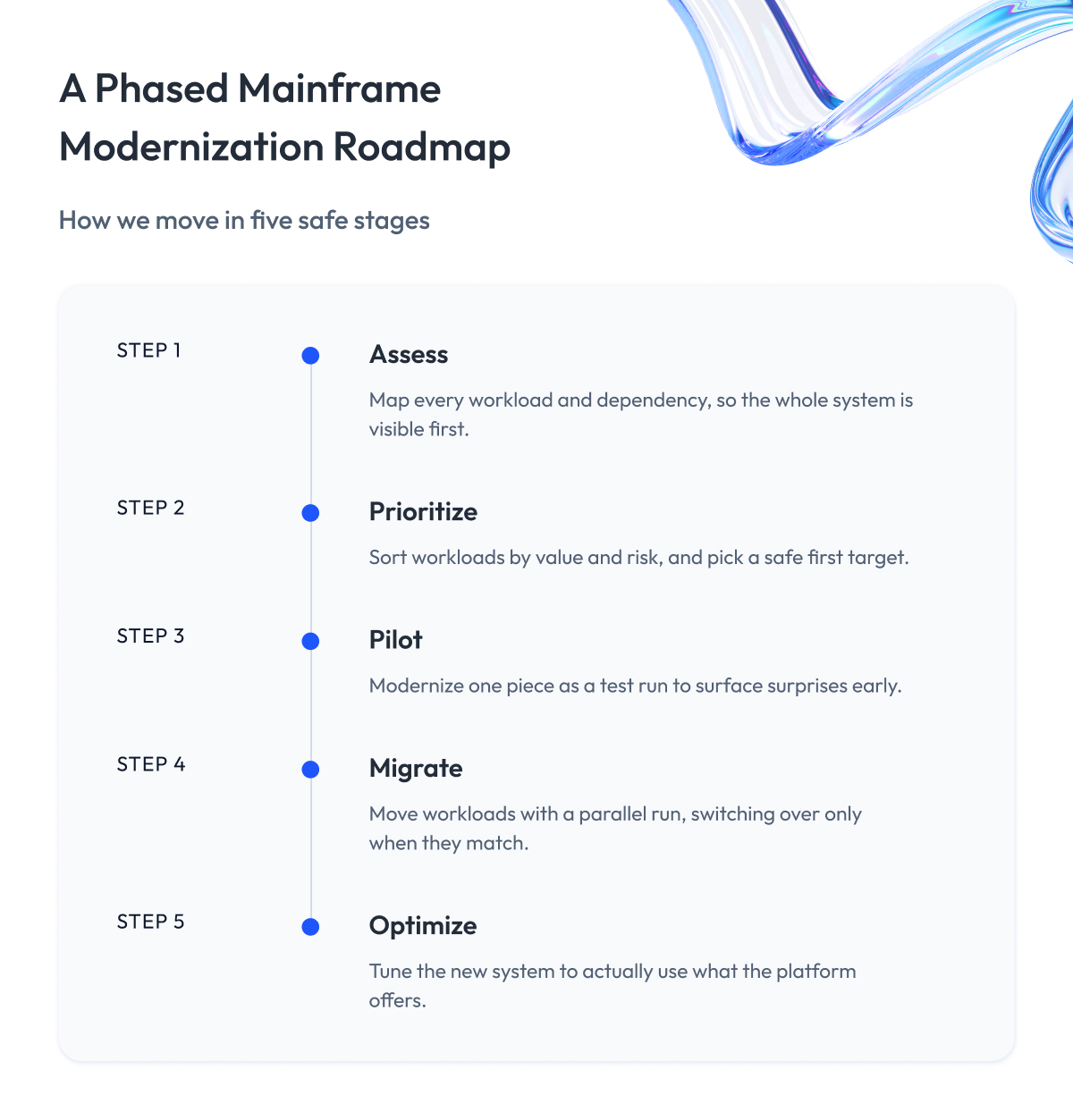
Step 1 – Assess
We start by mapping what the client actually has. Together we go through every workload, every dependency, and how critical each piece is to the business, so the whole system is visible before anyone commits to a plan.
Step 2 – Prioritize
We sort the workloads with the client against their modernization goals and risk, then agree on where to begin. We usually pick a first target that matters enough to prove the approach and stays safe enough that a stumble will not hurt the business.
Step 3 – Pilot
We modernize that first piece as a test run. This small, contained pilot shows the client what works, surfaces surprises early, and gives the team an early win before we touch anything critical.
Step 4 – Migrate with a parallel run
We move the workloads and run the old and new systems side by side, comparing their output until the new one matches every time. Only then do we switch over, one piece at a time, keeping a way to roll back at every step.
Step 5 – Optimize
Once a workload runs on its new home, we tune it with the client to actually use what the new platform offers, rather than leaving the old design on new infrastructure. This is the stage where the cost savings and speed finally show up.
Working in phases means the client never bets the business on a single cutover. This incremental modernization keeps every step small enough to control, lets us learn as we go, and keeps the system live the entire time.
This roadmap is the backbone of our modernization journey for enterprises, and we adapt the five stages to each client’s systems and risk tolerance.
With a plan in place, the next thing every leader wants to pin down is the money. What modernization actually costs, and when it starts to pay back.
Cost, ROI, and the Savings Myth
Many companies come to us with the same question. Is mainframe modernization a good investment, and what return will we get over time?
Here is the straight answer. Yes, it can be a strong investment, as long as you go in for the right reasons.
The trap is thinking of it as a way to save money.
When you go in expecting a smaller bill, you get disappointed. The spending comes first.
You pay for the work, the move, and the testing long before any savings appear. And if saving money was the whole point, the project feels like a letdown even when it went well.
This is the savings myth, and it is the single biggest reason good modernization projects get judged as failures.
The bigger return comes from what the modern system lets you do.
- You can change and launch things in days instead of months.
- You stop depending on a few people who are about to retire.
- You lower the chance of a painful outage.
Those things quietly make and protect a lot of money over the years.
So think of it the way you would think of buying a better building for your business. You spend upfront, and the payoff shows up as everything you can do faster, safer, and without fear that the old place will fall apart on you.
Lately, the tools have made this much cheaper and faster to pull off, and that deserves its own section.
Tools and AI in Mainframe Modernization
You do not need to know these tools by heart, but knowing they exist changes how you think about the whole project. They are the reason modernization today is faster, cheaper, and less scary than it was even a few years ago.
AI is the biggest part of that shift. Work that used to take a team of specialists months, like reading and rewriting old code, now moves in a fraction of the time. That single change has turned modernization initiatives that once looked too big and too expensive into something a company can realistically take on.
We share these tools so you can spot when a partner is using the right ones, and so a project that once sounded impossibly big starts to feel doable.
Here is what each tool does:
AI that translates old code
The biggest change is AI that reads old COBOL and rewrites it in a modern language like Java. Think of it as a translator who is fluent in a rare old dialect that almost no one speaks anymore. It can turn a huge, ancient document into something today’s team can read in a fraction of the time it would take a human.
The catch is the same as with any translator. It can get the words right and still miss the meaning. If a rule was worded oddly in the original, the AI can translate it into something that looks fine but behaves differently.
So you use AI to do the bulk of the work fast, then have experienced engineers check that the logic still does exactly what it did before.
Emulation tools
Emulation tools let old mainframe programs run on new, cheaper machines without being rewritten.
Picture an app on your laptop that lets you play old game-console games. The original game never changed, and the emulator just tricks it into thinking it is on the old console.
Emulation does the same for business software, so you can get off the expensive hardware while the program keeps running as is.
Connectors like z/OS Connect
Connectors open a door between the old mainframe and modern apps.
Imagine an old building with no entrance that today’s visitors can use. A connector adds that modern doorway, so your mobile app or website can reach the mainframe and pull the data it needs, without anyone rebuilding the old building itself.
Modern development and DevOps tools
For years, changing mainframe software meant slow, manual, error-prone steps. Modern development tools bring the mainframe the same conveniences that other software has had for a decade, such as automated testing and faster, safer ways to deploy changes.
It is the difference between building a car by hand and building it on a modern assembly line: the same product, far fewer mistakes, and greater speed.
Used together, these mainframe modernization solutions take much of the cost and risk out of the work. Choosing what to modernize and how to do it still takes experience, and that is exactly what you want in a partner.
Which brings us to the last big question. How do you pick the right partner to do mainframe modernization?
How to Choose a Mainframe Modernization Partner
The right partner matters more here than in most projects, because a mainframe runs what your business cannot afford to break. The one you want has two things that rarely go together: engineers who still know COBOL, and a track record of modernizations like yours.
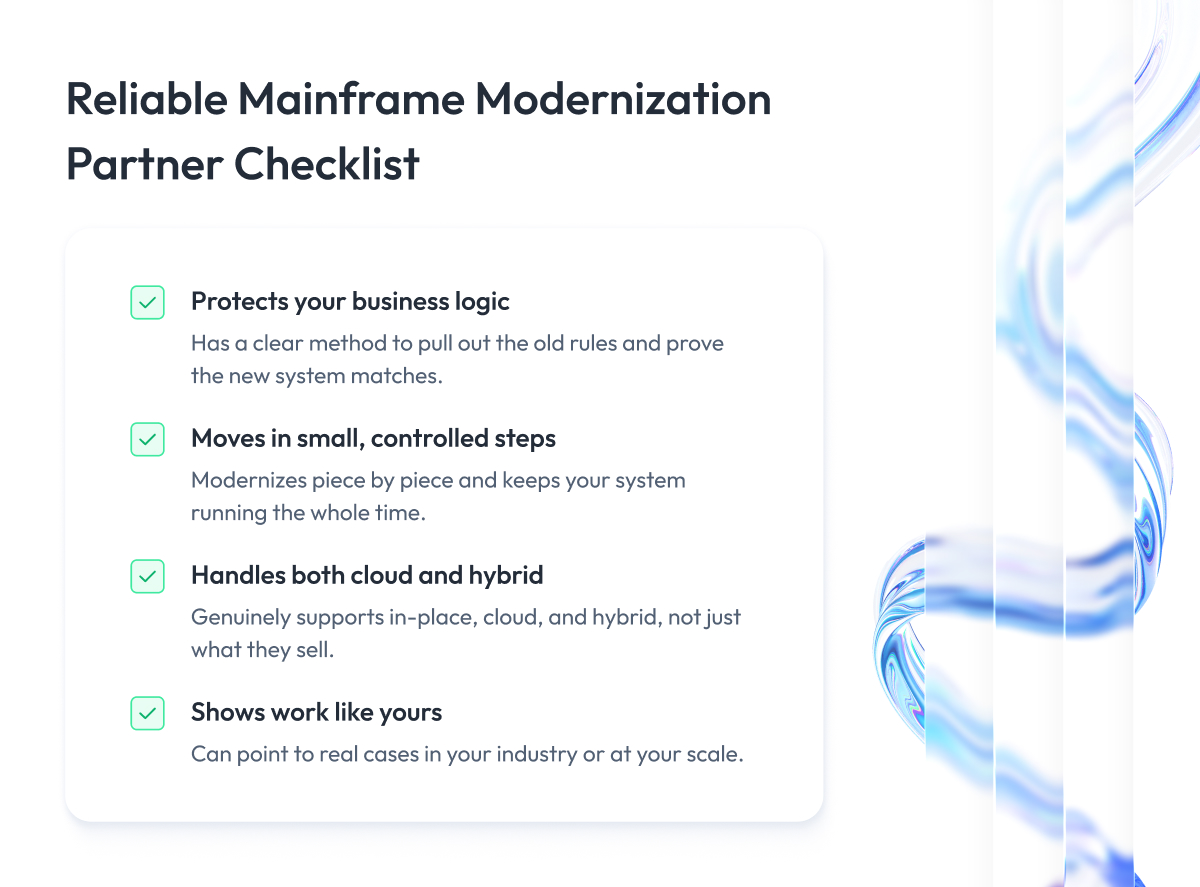
Most mainframe modernization companies will claim all of this, so here is the checklist to evaluate any provider:
1. They can prove they protect your business logic
Ask exactly how they pull the rules out of your old code and confirm the new system behaves the same. A serious partner follows proven best practices for this, with testing and parallel runs. A vague answer here is the biggest warning sign there is.
2. They move in small, controlled steps
A good partner lowers risk by modernizing piece by piece and keeping your system running the whole time. Anyone promising to swap everything at once is either inexperienced or not being honest, since safe modernization efforts proceed in stages.
3. They handle cloud and hybrid
Your answer may be cloud, may be hybrid, may be staying partly in place. You want a partner who genuinely supports all three, so their advice fits your system instead of whatever they happen to sell.
4. They can show work like yours
Ask for cases where they modernized systems close to yours, in your industry or at your scale. References and track record tell you far more than any sales deck.
We built our own mainframe modernization services around exactly these criteria, and we are glad to be measured against every one of them.
Run any shortlist through this checklist and the right fit tends to stand out fast. Choosing well here decides whether modernization moves your company forward or becomes an expensive lesson.
Final Word
Choosing whether and how to modernize a mainframe is a heavy call, and it is fair that it feels that way. You are weighing cost against risk, speed against stability, and the fear of touching a system that runs the business against the slower fear of letting it age. That takes time, hard questions, and more than one conversation, but it is worth every bit of that effort.
Use the paths, the approaches, the risk matrix, and the cost view in this guide to sort what stays, what moves, and what gets left alone for now. Then pick the partner you trust to do it with, using the checklist above.
When you are ready to pressure-test your own case, our mainframe modernization consulting team is glad to help.
We can look at your systems, walk through the risks specific to you, and show you the safest path to mainframe modernization before you commit to anything.
Questions You May Have
What is mainframe modernization?
Mainframe modernization is the process of updating older but business-critical mainframe applications and data so they meet modern needs, without giving up the reliability that made them worth trusting.
Should you modernize in place or migrate to the cloud?
Decide it per workload: keep critical, stable, tightly regulated systems in place, and migrate the ones that need speed and scale to the cloud, which is why most enterprises end up with a hybrid mix.
What are the main approaches to mainframe modernization?
The six common approaches are retain and encapsulate, rehost, emulate or replatform, refactor, rearchitect, and replace, ranging from a light touch to a full rebuild.
What are the biggest risks of mainframe modernization, and how do you reduce them?
The biggest risks are cost overrun, losing business logic, the COBOL skills gap, downtime, data migration errors, compliance gaps, and vendor lock-in, and you reduce them by moving incrementally, running old and new in parallel, and testing at every step.
Does mainframe modernization actually cut costs?
Not right away, since you spend on the project first and the cost savings from retiring old hardware and licenses only arrive later, so agility and lower risk are the stronger reasons to modernize.
Can AI convert COBOL to Java reliably?
AI and machine learning can accelerate the bulk of the COBOL-to-Java translation, but experienced engineers still have to verify the logic, because the tools can produce code that looks right and behaves differently.
How long does mainframe modernization take?
Most enterprise programs run one to three years, since a safe modernization journey moves in phases with a parallel run rather than one risky switch, though a single workload can be modernized in months.
How do you choose a mainframe modernization partner?
Pick a partner with genuine COBOL and mainframe depth, a proven method for protecting business logic, an incremental low-risk approach, both cloud and hybrid capability, and references from modernization projects like yours.
How does AWS help with mainframe modernization?
Amazon Web Services offers AWS Mainframe Modernization and AWS Transform for mainframe to move your mainframe to cloud environments through automated refactoring and replatforming.
What tools are used in mainframe modernization?
Common mainframe modernization tools include AI code translators, emulation software, connectors like z/OS Connect, and modern DevOps pipelines that bring automated testing and faster releases to the mainframe environment.