



Quick Summary
- A system becomes legacy the moment the cost and risk of running it outweigh what it gives back, which is a business threshold rather than a question of age.
- Assess before deciding: list every system with its cost and owner, map its hidden connections, score value against risk, then give each one a first-draft decision.
- Score each system 1 to 5 on business value and technical health, and the quadrant sets the default: rebuild high-value systems in poor health, replace low-value ones, and leave the rest alone.
- Two rules override the matrix, since a heavily coupled system gets wrapped behind an interface before anything else, and a regulated one gets rebuilt module by module with an audit trail.
- Retain is the option teams forget, because doing nothing on purpose is legitimate for a stable system that would cost more to change than it returns this year.
Legacy system modernization is the process of updating outdated software, platforms, and infrastructure so they support current business goals without a full rebuild.
If you run legacy systems at enterprise scale, you already feel the pressure. Every release takes longer than it should, the people who understand the old code are retiring, and integration or compliance work keeps stalling on decisions made a decade ago.
So we wrote this guide to legacy modernization from the delivery side, grounded in how modernization actually unfolds on enterprise programs. It covers what counts as legacy, the 6 R’s of modernization, a decision matrix for choosing an approach per system, the patterns that de-risk execution, a phased roadmap, and the reasons projects fail.
By the end, you will be able to assess your estate, match each system to the appropriate modernization approach, and sequence the work to deliver value without disrupting the business that depends on it.
What Is Legacy System Modernization?
We gave you a short definition in the intro, but legacy system modernization means more than that one line suggests.
Legacy system modernization is the practice of updating the software, data, and infrastructure a business already depends on so they meet current needs in performance, security, and speed of change, without throwing away the value already built into them.
Application modernization spans everything from moving a legacy application to the cloud, to restructuring old code, to replacing a system outright.
A system becomes legacy the moment the cost and risk of running it start to outweigh what it gives back.
It is also important to separate three words that get used interchangeably, because that confusion is where budgets slip.
Legacy modernization is improving what you already have.
Migration moves an application to a new environment, usually legacy systems to the cloud, while leaving most of the code alone.
A full rewrite throws out the old codebase and rebuilds the application from scratch.
The table sets the trade-offs side by side.
| Term | What It Means | Typical Scope | Main Risk |
| Legacy modernization | Improving legacy systems to meet current needs | Code, data, and infrastructure | Scope creep without a per-system plan |
| Migration | Moving an application to a new environment | Often legacy systems to the cloud | Lift-and-shift hides underlying debt |
| Full rewrite | Rebuilding an application from scratch | New codebase replacing the old system | Business logic loss and cost overruns |
The hard part is matching each system to the right treatment, and that decision is what the rest of this guide walks you through. For the engineering view of how we handle it, see our approach to legacy system modernization.
Reasons to Modernize Now and the Cost of Waiting
Companies rarely wake up one morning and decide to modernize. The pressure builds slowly over months, as a series of small frustrations, from rising costs to overdue infrastructure modernization, start to point in the same direction.
For example, releases that keep slipping, an audit that surfaces questions nobody can answer without scrambling, and a senior engineer walking out with half the system’s knowledge in their head.
No single one of these forces a decision, which is exactly why the problem keeps getting deferred until their combined weight finally makes modernization unavoidable.
If you are reading a guide like this, you probably already feel some of that pressure. You may not have written it down as a business case, but the instinct that something has to change is usually correct. Leaders sense the cost of their legacy systems long before a spreadsheet confirms it.
So the point of this section is to turn that instinct into something you can defend.
Let’s look at the concrete reasons companies decide to modernize, and at what it costs to keep pushing the decision to next year.
1. Speed of change
Old architectures make small changes expensive. A feature that should take a week stretches into a quarter because the code is tightly coupled and no test suite covers it, so every release becomes a manual event.
Companies reach their limit when the business asks for something the market clearly needs, and engineering has to answer that it will take two quarters. Modernization becomes the only way to stop losing opportunities to faster competitors.
2. Security and compliance
Unsupported runtimes stop receiving patches, and auditors increasingly flag systems that cannot meet current data protection or industry regulations.
The exposure grows quietly until an incident or a failed audit makes it urgent. If security is the driver behind your program, our guide to enterprise application security covers how to build it.
3. Cost
Outdated legacy systems often consume a large share of the IT budget just to keep the lights on, which leaves little for anything new.
The tipping point comes when leadership realizes that maintenance is not holding steady but is growing every year, while the return on that spend continues to fall. At some point it becomes cheaper to modernize legacy systems than to keep paying to stand still.
4. Talent
The people who understand your legacy software are retiring or moving on, and new engineers do not want to build a career on technology the market has left behind, which quietly makes legacy software modernization a talent problem as much as a technical one.
The decision to modernize is often made when a single retirement or resignation leaves no one who fully understands a critical system, and the business finally sees how much risk had been resting on one person’s memory.
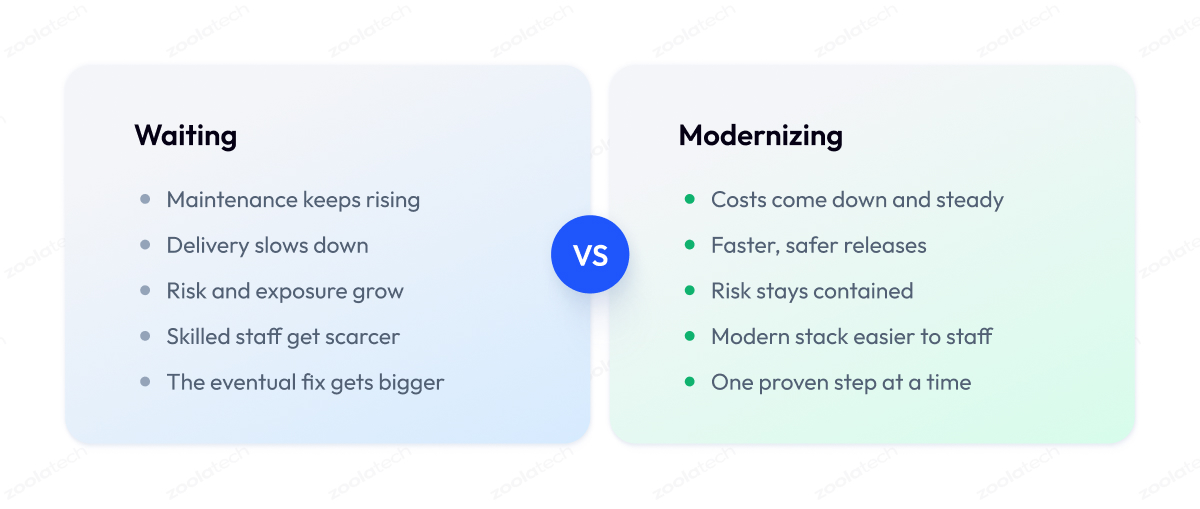
Waiting carries its own price tag, and it is easy to underestimate because nothing breaks on any given day. The trap is that none of these costs stay still. They compound, and they feed one another.
Slower delivery makes the platform harder to staff, thin staffing makes each release riskier, and rising maintenance crowds out the very investment that would break the cycle. Every year of delay makes the eventual modernization bigger and riskier than it needed to be.
The table below sets the cost of waiting against the gain from acting, factor by factor.
| Factor | Cost of Waiting | Gain from Modernizing |
| Maintenance spend | Rises yearly on aging systems | Freed budget for new capability |
| Delivery speed | Small changes take months | Faster, safer releases |
| Security and compliance | Growing audit and breach exposure | Supported, patchable, auditable stack |
| Talent | Shrinking pool of skilled staff | Modern stack easier to hire for |
| Business risk | Outage blast radius widens | Contained, recoverable failures |
The benefits of legacy modernization are concrete and show up as business outcomes that leadership already cares about. Lower run cost, faster time to market, reduced risk, and a platform your team can actually staff.
That business framing is what moves a modernization program from the engineering backlog into the budget.
How to Assess Your Legacy Systems Before Modernizing
Knowing why you need to modernize is the easy part. The harder question is where to start, and the answer is almost never the system that annoys people most. It is the one where risk and value line up.
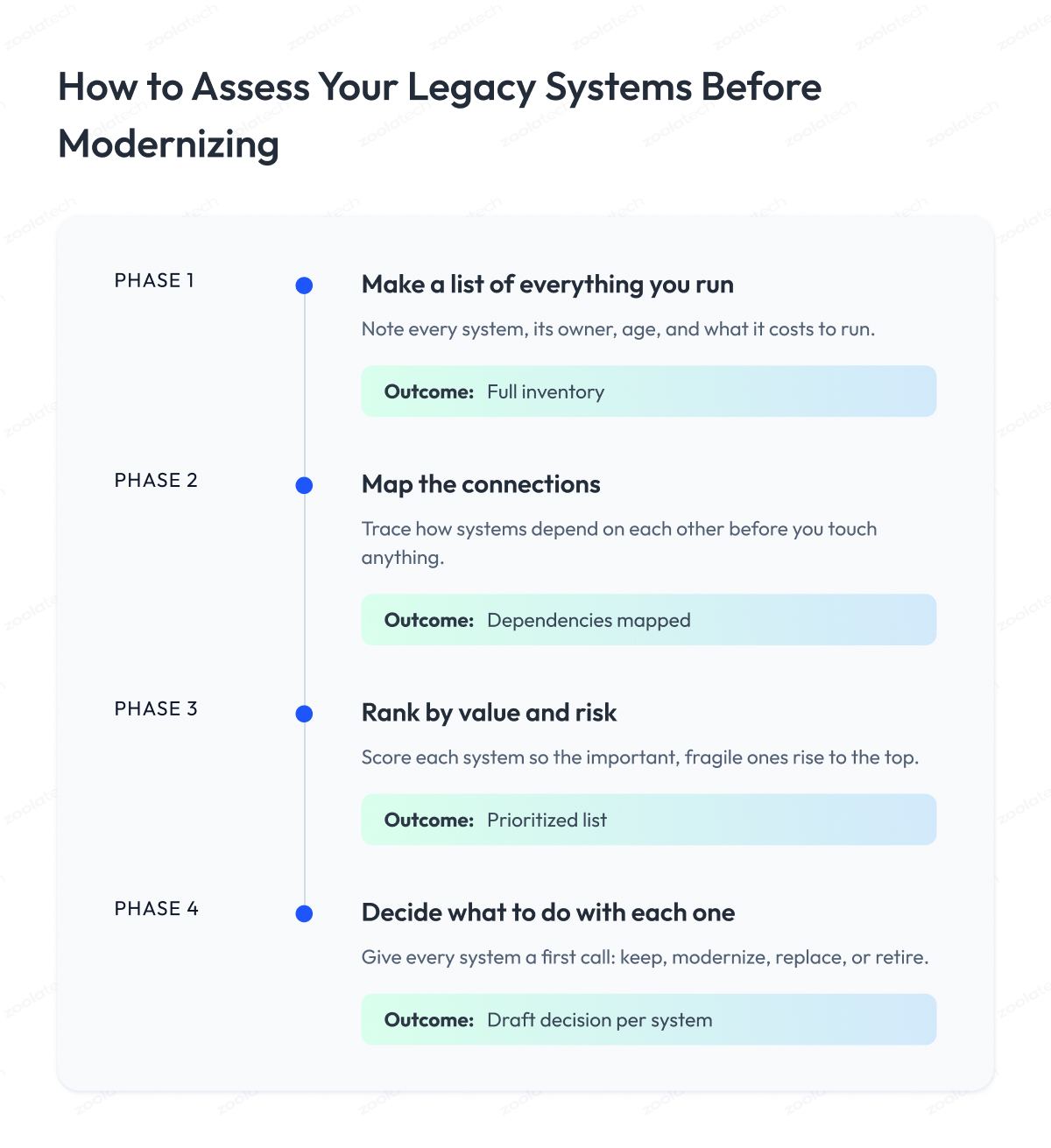
The goal of understanding legacy systems across your estate is a ranked picture of what you run, what it costs, what it is worth, and what it would take to change. Four steps get you there.
1. Make a list of everything you run
Start by writing down every system, application, and tool your business depends on. For each one, note what it does, who relies on it, how old it is, and how much it costs to keep running.
This sounds obvious, but most companies have never seen all their legacy apps in one place, and simply building the list usually reveals a few systems nobody even remembers owning, which is the true starting point of any legacy app modernization effort.
2. Find out what each system is connected to
Next, map out how these systems communicate with each other across your legacy environments. Legacy systems are almost never alone. One old application often quietly feeds data to five others, and changing it can break something three steps away that nobody expected.
The goal here is to find those hidden connections now, on paper, instead of discovering them the hard way in the middle of a project.
3. Rank each system by value and risk
Now score every system on two simple questions:
- How important is it to the business?
- How likely is it to cause a serious problem?
A system that is both important and fragile goes to the top of your list. This ranking is what tells you where to begin, so you fix what matters most before spending effort on what does not.
4. Decide what to do with each one
Finally, give every system a first-draft decision. Keep it as is, modernize it, replace it, or retire it. You are just forming a starting opinion based on what steps one to three told you. That short list of decisions is exactly what informs our choice of approach, which is where we go next.
By the end of these four steps, you will know what you own, how it fits together, what is risky, and what each system needs.
That is enough to stop guessing and start planning. If you would like an experienced team to run this assessment with you, it is one of the first things our software development and modernization teams do at the start of a modernization program.
The 6 R’s of Legacy Modernization: Your Core Approaches
Once your assessment gives each system a first-draft decision, you need a shared language for what “modernize” actually means in each case. The industry settled on one a while ago, borrowed from the cloud migration world and known as the R’s.
Think of the R’s as the building blocks of your modernization strategies, a menu of approaches ordered roughly from least effort and risk to most, and the foundation of most legacy system modernization strategies teams use in practice.
Here is what each one means.
| Approach | What It Means | Effort and Risk | Best For |
| Rehost | Move the app as is to new infrastructure | Low | Quick cloud exit from old data centers |
| Replatform | Move it and make small optimizations | Low to medium | Cloud gains without rewriting code |
| Refactor | Restructure the code, same behavior | Medium | Reducing technical debt in a keeper |
| Rearchitect | Reshape the system’s structure | High | Scaling limits or monolith breakup |
| Rebuild | Rewrite the application from scratch | High | Beyond repair but still needed |
| Replace | Swap it for a commercial product | Medium to high | Non-differentiating, off-the-shelf fits |
| Retain | Keep it, revisit later | Low | Still works, low value in changing now |
Rehost, often called lift-and-shift, moves an application to the cloud or to new servers without changing how it works. It is the fastest way off legacy hardware, though it carries any existing problems along.
Best when you face a hard deadline like a data-center lease ending or end-of-support hardware, and you need out fast without touching the code.
Replatform does the same move but tunes a few things on the way, like swapping a self-managed database for a managed one. You get some modern benefits without the cost of a full rewrite.
Best when a system is basically sound but a couple of components are draining time or money, and small changes during the move pay for themselves quickly.
Refactoring tidies up the internals while keeping behavior identical, and works best on a system you plan to keep for years, where slow, risky changes are the daily tax you want gone.
Rearchitecting changes the shape of the system itself, for example breaking a monolith into smaller services, and earns its cost when one part cannot scale on its own or when separate teams keep colliding in the same codebase.
Rebuilding means writing the application from scratch again and makes sense when the core logic still gives you an edge, but the current version is beyond saving.
Replacing legacy systems drops your custom system for a ready-made product and fits when the function is not something that sets you apart, like payroll or email, and a proven off-the-shelf tool does it better than you ever will.
Retain is the one teams forget. Doing nothing, on purpose, is a legitimate choice for a system that still works and would cost more to change than it is worth this year. Best for stable systems that carry little risk, where your money and attention deliver far more return when applied elsewhere in the estate.
Most real programs use several of these at once across the estate. A single modernization approach almost never fits an entire portfolio, which is why the next step is to choose the right R for each system instead of betting the whole program on one.
Choosing the Right Approach: A Legacy Modernization Decision Matrix
The R’s give you the menu. This section gives you a repeatable method for choosing from it, so the decision comes from a score on paper instead of whoever argues hardest in the room.
The method has three parts. You rate each system on a few traits:
- The ratings point to a default approach.
- Two override rules catch the cases where the default would be dangerous.
Run it the same way for every system, and the whole estate gets ranked by a single consistent logic.
Step 1. Score each system on two axes
For one system at a time, give a score from 1 to 5 on two things.
Business value is how much the system matters to revenue, customers, or operations. A 5 is a system the business cannot run without. A 1 is something nobody would miss next quarter.
Technical health is what shape it is in. A 5 is well-structured, documented, and safe to change. A 1 is fragile, undocumented, and frightening to touch.
Two numbers per system are all you need to start. Most disagreements in the room disappear once people argue about the score instead of the conclusion.
Step 2. Read the score off the matrix
Plot each system by its two scores, and the quadrant tells you the default approach. This is the fast path, and it resolves most of the estate in one pass.
| Business Value | Technical Health | Default Approach |
| High (4-5) | High (4-5) | Retain or replatform |
| High (4-5) | Low (1-3) | Rebuild or rearchitect, done incrementally |
| Low (1-3) | High (4-5) | Rehost, leave it alone |
| Low (1-3) | Low (1-3) | Replace or retire |
The logic is intuitive once you see it. Valuable systems in poor health are where you invest engineering. Low-value systems in poor health are not worth saving, so buy or delete them. Everything else you move or leave with minimal spend.
Step 3. Apply two override rules
The matrix gives a default. Two factors can outrank it, so check both before you commit.
- Coupling override. If a system is wired into many others, do not touch its core directly, whatever the quadrant said. Wrap it behind an interface first, then modernize behind that wall. Tight coupling turns a safe change into a chain reaction.
- Compliance override. If a system is under strict regulation, downgrade any option that hands control to a black box. A regulated core in poor health still points to a rebuild, but an incremental one you can audit at every step, never a big-bang cutover.
A worked example
Take a payments engine. Business value is a 5, the business stops without it. Technical health is a 2, the original team is gone, and changes are risky.
The matrix says rebuild or rearchitect incrementally.
Now the overrides. It is heavily coupled, so you wrap it behind an interface first. It is under financial regulation, so you rebuild it module by module with an audit trail. In three short moves you have a defensible decision, and you wrote down why.
Do this for every system, and you end up with a ranked plan, an approach chosen for each, and a one-line reason for each choice. That last part matters more than it sounds. A year on, when someone asks why a system was rehosted instead of rebuilt, the note is the difference between a strategy and a decision nobody remembers making.
Patterns That De-Risk Modernization
By now you know what to modernize and which approach fits each system. This section covers the specific techniques that let you change a live system without bringing the business down.
When modernizing legacy applications, these five patterns are not competing options to pick from. They are safety techniques that stack together, and the strongest programs use most of them on the same system. Each one removes a specific risk from the work. To make that obvious, every pattern below opens with a one-line summary of what it is, the risk it removes, and when to reach for it.
Strangler fig with an anti-corruption layer
What it is: replacing an old system gradually, one slice at a time.
Removes the risk of: a big-bang cutover failing all at once.
Use it when: the system is large, critical, and cannot go offline.
You put the new system alongside the old one and move a slice of functionality at a time, routing traffic to the new path only after it has been proven. Over months, the new system grows around the old one until the original can be switched off, much like a strangler fig tree grows around its host.
The catch is that your new code can get polluted by the old system’s quirks and bad data models.
An anti-corruption layer is a translation buffer between the two, so the new side speaks its own consistent language and the old system’s messiness stops at the border. Skipping this layer is a common reason a strangler migration slowly turns into the same mess it was meant to replace.
Encapsulation and API facades
What it is: wrapping an old system behind a modern API.
Removes the risk of: touching fragile internals before you are ready.
Use it when: you need to build new things on top of a system you cannot change yet.
New applications talk to that clean interface instead of reaching into the legacy internals. The old system keeps running untouched, and you buy yourself time to modernize it properly later.
Containerization
What it is: packaging an application with everything it needs into one portable unit.
Removes the risk of: it works on one environment and breaks on another.
Use it when: you are rehosting or replatforming and want consistent, repeatable deployments.
For legacy modernization, this makes it far easier to move an old application between environments, deploy it consistently, and scale it, often without changing the application code itself. It is a practical first step toward the cloud.
Microservices decomposition
What it is: breaking a monolith into smaller, independent services.
Removes the risk of: one slow, risky codebase where teams block each other.
Use it when: a monolith is genuinely holding back scale or delivery.
Independent services let teams build, test, and release each part on its own. The payoff is significant, but so is the cost, since distributed systems bring their own system complexity in networking, data, and monitoring.
Decompose along business capabilities, one service at a time, and only where the monolith actually hurts. We covered the deeper tradeoffs in our guide to building scalable web applications.
Parallel run validation
What it is: running the new system beside the old one and comparing outputs.
Removes the risk of: the modernized system quietly behaving differently.
Use it when: correctness matters and you need proof before cutover.
Feed both systems the same inputs and compare the results. When they agree consistently over time, you have evidence the new system behaves correctly instead of a hope that it does.
Parallel running is how you catch the subtle logic differences that unit tests miss, and it is the single most reassuring thing you can show a nervous stakeholder before cutover.
These patterns combine. A typical program wraps a legacy system behind an API, strangles it slice by slice with an anti-corruption layer, containerizes each new service, and runs every module in parallel before switching it on.
Used together, they turn a frightening replacement into a series of reversible steps.
Save the Business Logic First, Then Modernize the Code
The patterns in the last section keep a migration safe. This section protects what they are guarding: the business logic buried inside your legacy system. Even a technically perfect rewrite can quietly break the business if that logic gets lost on the way. Generic guides skip this part, and it is where the hard-won experience actually lives.
So this section shows you the process we use with clients to migrate that logic from the old system to the new one without dropping any of it.
It is a four-step method, and here is what we do at every stage.
Step 1. We extract the logic before touching the code
We read the old system and write down what it does, paying closest attention to the strange branches that look like bugs and usually encode a lesson someone learned the hard way.
What we hand back is a documented list of the true rules, since most of them live in the code while the manuals stay silent.
We treat this step as non-negotiable, because skipping it is the most common way teams lose logic they did not even know they had.
Step 2. We lock that behavior into characterization tests
We take the rules we just documented and turn them into automated tests that record exactly what the old system does today. These tests, sometimes called golden-master tests, become the yardstick for the new system.
When the modernized code produces the same answers as the legacy code across thousands of cases, we have proof the behavior made it across.
We build this safety net before making any changes.
Step 3. We migrate one module at a time
We move a single well-understood piece, check it against its tests, then move the next. Small migrations are easier to reason about and easy to roll back if something looks off. A logic error we catch inside one module costs an afternoon.
The same error, found after a full switchover and tangled with a hundred others, can sink the whole program. Working this way keeps every mistake small and reversible.
Step 4. We run old and new in parallel until the new path is proven
For anything critical, we keep the legacy system running and let it answer alongside the new one on live traffic. We compare their outputs and retire the old system only once the new one has consistently matched it long enough to trust. This final step converts a leap of faith into a switch backed by evidence.
Across all four, we stay patient with the logic and fast with the technology.
You can adopt whatever modern stack you like, as long as the rules that run your business arrive intact. A modernized system that is faster, tidier, and subtly wrong is more dangerous than the legacy one it replaced, because the errors now hide inside code everyone trusts.
A Phased Legacy System Modernization Roadmap
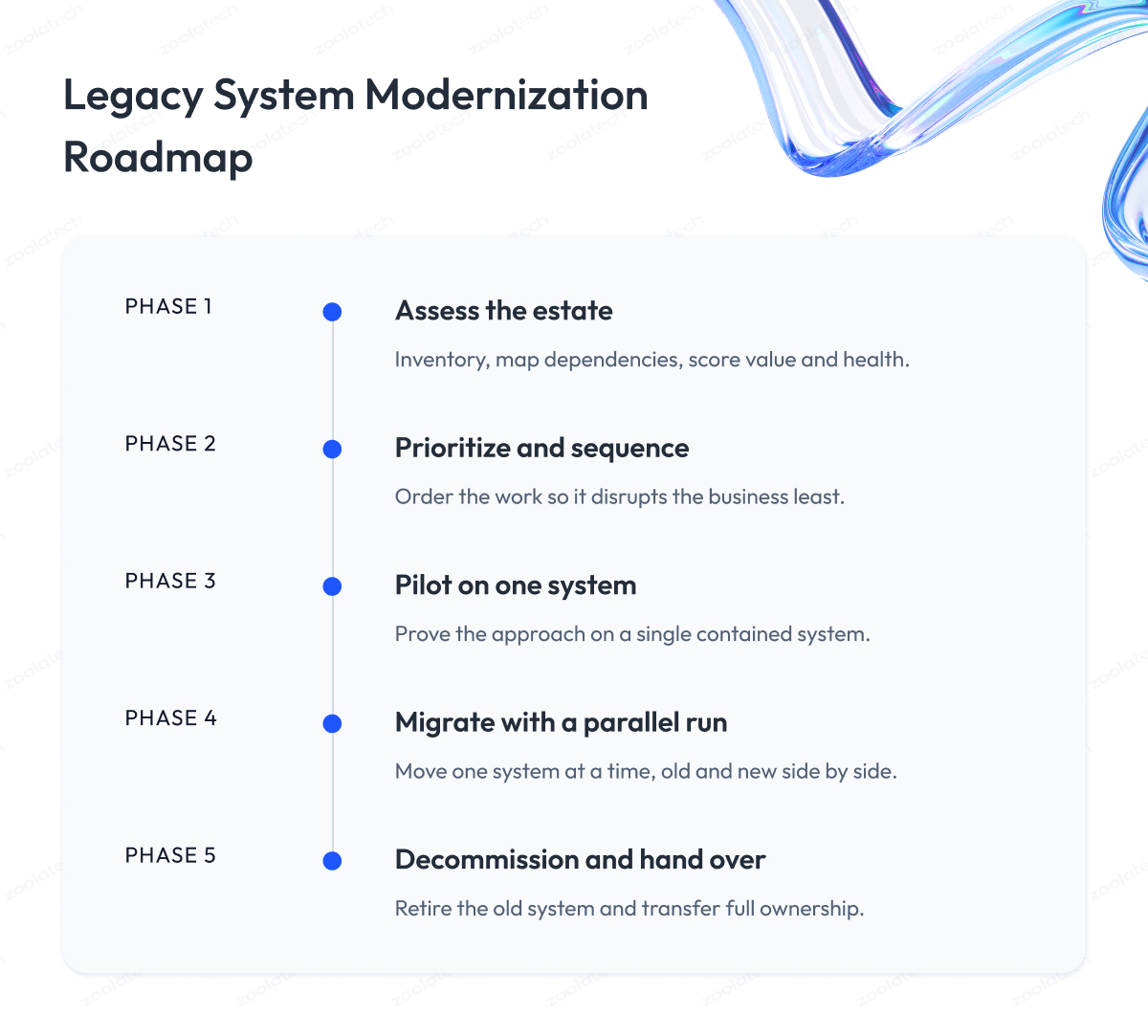
The last section covered how we protect business logic. This one zooms out to the whole program and shows you the roadmap we follow with clients from the first assessment to switching the old system off. It is the same five-phase path on most engagements, and each phase has a clear goal, a defined exit before we move on, and a way to measure progress.
Here is the modernization process we follow, and the legacy system modernization approach we bring to every engagement.
Phase 1. Assess the estate
We start by mapping what you run, using the assessment method from earlier in this guide. We inventory the systems, trace their dependencies, and score each one on business value and technical health.
The goal of this phase is a ranked picture of the estate with a first-draft approach for every system. We treat it as done once you and we agree on which systems come first and why.
Phase 2. Prioritize and sequence the work
We turn that ranked picture into a work order. We sequence systems by where modernization pays off soonest and disrupts least, and we untangle the dependencies so we never modernize something that a still-legacy system quietly relies on.
The output of this phase is a modernization roadmap with priorities, and we consider it complete when the sequence has buy-in from the business and engineering sides.
Phase 3. Pilot on one system
We prove the approach on a single system before betting the program on it. We pick one that is meaningful enough to be a fair test but sufficiently contained to keep the risk low, and then modernize it. This phase exists to surface surprises early, on a small system, where fixing them is cheap. We move on once the pilot is live, stable, and the team has a repeatable playbook from it.
Phase 4. Migrate with a parallel run
We roll the approach out across the estate, migrating legacy systems one at a time, using the patterns from earlier: strangler slices, an anti-corruption layer, and a parallel run for anything critical.
We keep the legacy system running alongside the new one until the outputs consistently match. The goal here is steady progress, and each system exits this phase only when its modern version has earned trust on live traffic.
Data migration gets special care in this phase, and our guide to rebuilding a data pipeline covers how we move data without losing history.
Phase 5. Decommission and hand over
We switch off the old system only after the new one has proven itself, then we clean up the scaffolding, the temporary anti-corruption layers, and the duplicate infrastructure.
We hand over documentation, runbooks, and knowledge so that your team can own the modernized system with confidence. This phase closes when the legacy system is retired, its costs are off the books, and nobody is afraid to touch its replacement.
| Phase | What We Deliver | Exit Criteria |
| 1. Assess | Ranked estate with draft approaches | Agreed priorities and reasons |
| 2. Prioritize | Sequenced modernization roadmap | Business and engineering buy-in |
| 3. Pilot | One system modernized end to end | Pilot live, stable, repeatable |
| 4. Migrate | Systems moved with parallel runs | Modern version trusted in production |
| 5. Decommission | Legacy retired, knowledge handed over | Old system off, costs removed |
The reason we phase it this way is control. At every step you know what is being worked on, what proof it needs to pass, and what it costs to stop or change course. A modernization journey run in phases stays a series of decisions you can steer, long after the excitement of the kickoff has worn off.
Why Modernization Projects Fail and How to De-Risk Them
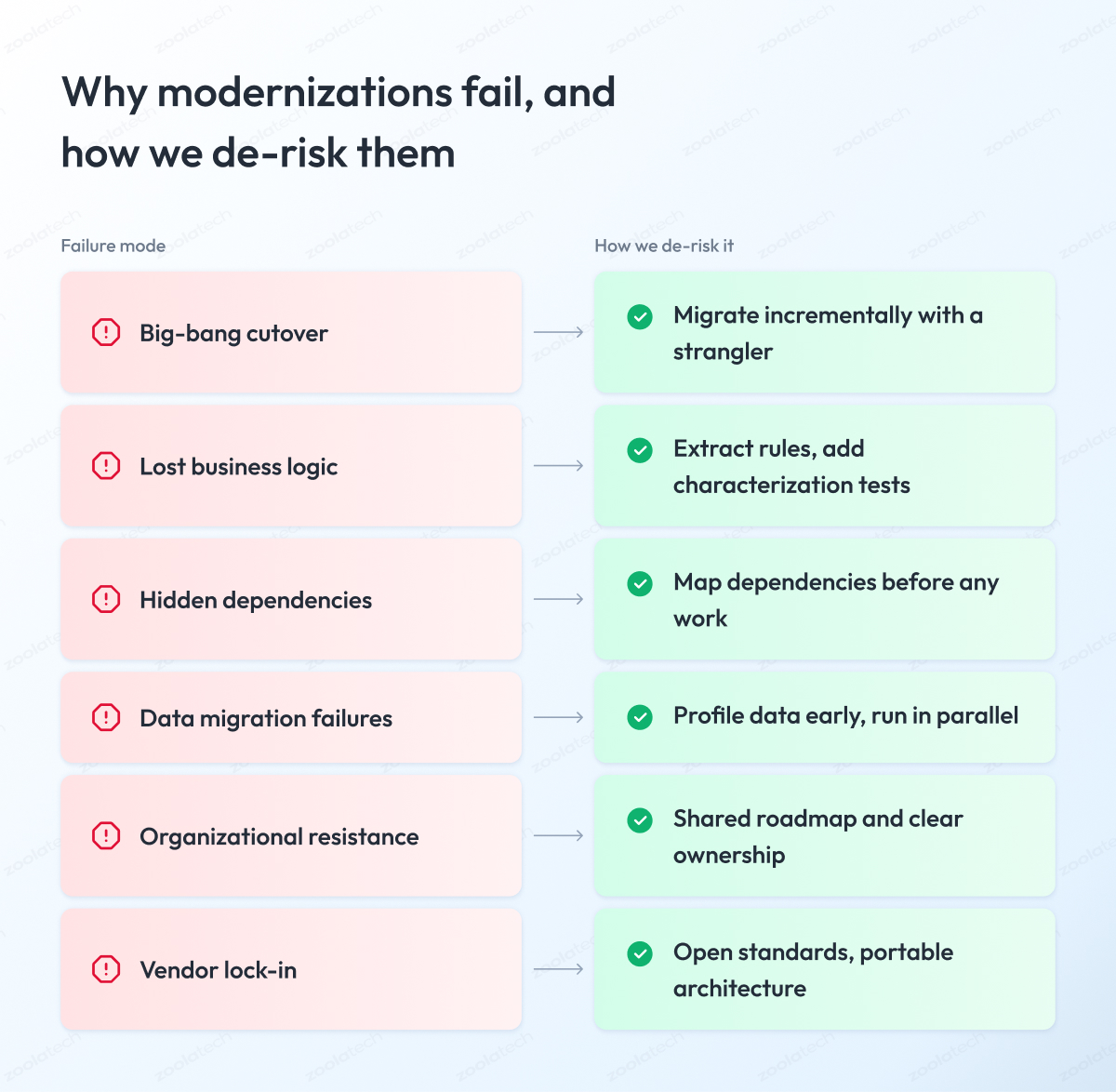
A phased roadmap lowers your risk, but it helps to know exactly what it is protecting you from. The risks of legacy systems are easy to underestimate, and modernization has a rough track record. A large share of legacy modernization projects run over budget, over time, or quietly fail to deliver what was promised.
These modernization challenges are not mysterious. They cluster around the same handful of causes, and every one has a known mitigation.
| Why It Fails | Root Cause | How We De-Risk It |
| Big-bang cutover | Everything changes at once | Incremental strangler migration |
| Lost business logic | Undocumented rules dropped in rewrite | Logic extraction and characterization tests |
| Hidden dependencies | Undocumented links between systems | Dependency mapping before any work |
| Data migration failures | Bad or mismatched legacy data | Early data profiling and parallel runs |
| Organizational resistance | Stakeholders not aligned or informed | Shared roadmap and clear ownership |
| Vendor lock-in | Locked into one platform or partner | Open standards and portable architecture |
Two patterns cause most of the damage.
The first is the big-bang rewrite, where a team rebuilds everything and switches over in one move. Full rewrites are notorious for large cost overruns, and the risk compounds the longer the old and new worlds must remain in sync.
The second is treating modernization as a purely technical project. The systems that fail quietly are usually the ones where the business was never brought along, ownership was unclear, and nobody agreed what success looked like.
We de-risk both by working in small, reversible steps, keeping the business involved at every phase, and proving each change before committing.
Cost, ROI, and Building the Business Case
You have the plan and the approach. Now comes the part where you have to convince leadership to pay for it. This section gives you a simple way to make that case, in language a CFO will nod along to.
Start by fixing the most common mistake. People pitch modernization as a big new expense, as if doing nothing costs nothing. Doing nothing is not free. You are already paying for maintaining your legacy system, and that bill goes up every year.
So the right question changes. Instead of asking how much modernization costs, ask what you are already spending, and whether that number goes up or down if you act. That single reframe wins most budget conversations.
To answer it, add up what each system actually costs to run per year.
Not just the license, but everything: the servers, the maintenance, the support contracts, and the engineering time lost every time a simple change turns into a risky job. That full number is your true yearly cost.
Do the math and one thing usually becomes obvious. The modernized system costs more this year, then less every year after that.
| What You Pay For | Old System | Modernized System |
| Maintenance and support | High and rising | Lower and steadier |
| Servers and hosting | Aging, hard to scale | Scales with demand |
| Making changes | Slow and risky | Faster and safer |
| Risk of failure | Growing every year | Contained |
| Hiring people | Rare, costly skills | Common skills |
Then give leadership two numbers they understand. The first is payback, which is how long until the savings cover the cost of the project. The second is the cost of waiting, which is how much more you will pay for every year you delay, because the old system keeps getting more expensive in the background.
Put it that way, and your modernization strategies stop sounding like a tech splurge to the people holding the budget.
AI, Tools, and Choosing a Modernization Partner
This is the section most readers actually came for. You know what to do, so now the question is who and what helps you do it. We will cover where AI genuinely helps, which tools are worth knowing about, and how to choose a partner without getting sold to.
Where AI genuinely helps
AI is useful in modernization, as long as you are honest about what it is good at. It can read through old code and explain what it does, help document undocumented systems, generate tests that capture current behavior, and suggest refactors a human then reviews. On a large estate, that speed-up is worth a lot.
Where AI still falls short
The trap is believing AI can read your old system and spit out a finished modern one. It cannot, and trusting it to do so is how you lose business logic at scale.
AI does not know which weird edge case is a bug and which one is a rule your business depends on. Treat it as a fast assistant that a skilled engineer checks, and it earns its place. Hand it the whole job unsupervised, and it quietly bakes old mistakes into new code.
If you are weighing AI for other parts of your business too, our overview of conversational AI for business leaders takes the same honest line on where it fits.
Tools worth knowing about
You do not need a huge toolchain. A few categories of modernization solutions cover most needs.
- Integration platforms, sometimes called iPaaS, help you integrate legacy and new systems while you migrate.
- Containerization tools make legacy applications portable.
- Automated testing tools build the safety net.
- Low-code and codeless platforms can speed up rebuilding simple applications, though they are a poor fit for anything complex or performance-critical.
Pick tools that serve the plan, and resist buying a platform in search of a problem.
How to choose a modernization partner
Most enterprises do this work with help, and the partner you pick matters more than any tool. The market is full of firms offering legacy application modernization services, and they are not equally good. Use the checklist below to tell them apart.
| What to Check | What Good Looks Like |
| Track record | Delivered modernizations in your industry |
| Method | Incremental delivery, not big-bang promises |
| Business logic | Extracts and preserves rules before rebuilding |
| Transparency | Clear on risks, trade-offs, and what could go wrong |
| Knowledge transfer | Leaves your team able to own the result |
| References | Named clients who will speak to their work |
The best partners are candid about risk and comfortable working incrementally. Anyone promising a fast, cheap, full rewrite with no mention of business logic or dependencies is describing the exact project that tends to fail.
We built our legacy system modernization services around the opposite approach, and you can see how we frame that work on our legacy modernization page.
Industry Considerations for Legacy Modernization
The method in this guide holds across industries, but the constraints change depending on where you operate. What counts as risky, what regulators demand, and what “downtime” costs all shift by sector. Here is a quick read on how modernization priorities differ across a few common ones.
| Industry | Main Constraint | What It Pushes You Toward |
| Finance | Strict regulation, zero tolerance for errors | Incremental change with full audit trails |
| Healthcare | Patient safety and data privacy rules | Careful migration, strong data governance |
| Government | Old systems, procurement and compliance rules | Phased modernization, open standards |
| ERP | Deep integration across the whole business | Careful sequencing, avoid big-bang cutover |
| Hospitality | Constant uptime, seasonal peaks | Modernize without disrupting live bookings |
Finance and healthcare share a theme. Both run mission-critical systems under heavy regulation, so the incremental, logic-preserving approach in this guide is often the only approach an auditor will accept.
Mainframe systems are common in both, and moving legacy systems off them is a specialized effort in its own right, which we cover in our guide to mainframe modernization.
Government and ERP modernization tend to fail for the same reasons: scale and coupling. These are large, deeply connected systems where a big-bang cutover is close to a guaranteed crisis, so phasing the work is less a preference than a requirement.
Hospitality and retail add a different kind of pressure, since the system can rarely go offline, making parallel-run patterns and careful sequencing essential.
The lesson across all of them is the same. The right legacy modernization approach is the one shaped to your industry’s own constraints, so treat these differences as inputs to your plan rather than a generic template applied everywhere.
Final Word
If you have read this far, you already understand the core trade-offs, so you do not need a recap. What you need is a way to start without getting overwhelmed.
Legacy transformation is hard, and it is fair to feel daunted by it. You are being asked to change the systems the business runs on while it keeps running, often with incomplete documentation and the clock ticking on costs and risks. That work takes planning, honest assessment, and the discipline to go slower than a rewrite promises to.
So start small and concrete. Assess your estate, score your systems, and pick one meaningful system to modernize first, using the decision method and the patterns in this guide. Prove the approach on that one, learn from it, and let each success fund the next. A successful legacy system modernization is built one validated step at a time, and rarely in a single heroic leap.
If you want a partner for that first step, we are ready to review your estate with you, talk through the trade-offs, and help you find the safest path forward before any code is written.
Questions You May Have
What is legacy system modernization?
It is the practice of updating outdated software, data, and infrastructure a business depends on so it meets current needs, without throwing away the value already built into it.
What are the 6 R's of modernization?
The R’s of modernization are rehost, replatform, refactor, rearchitect, rebuild, and replace, with retain often added as a seventh for systems you deliberately leave alone.
How do you choose the right approach for a system?
Score each system on business value and technical health, read the default approach off a decision matrix, then adjust for coupling and compliance to reach a tailored modernization decision.
How do you modernize without a full rewrite?
You transform legacy systems incrementally, extracting and preserving business logic, migrating one module at a time, and running old and new in parallel until the new path is proven.
Why do modernization projects fail?
Most legacy modernization initiatives fail from big-bang cutovers, lost business logic, hidden dependencies, or a business that was never brought along, and each risk has a known mitigation.
How long does modernization take and what does it cost?
It varies by scope, but a phased application modernization project should show a credible payback within a defined number of years once you weigh it against the rising cost of doing nothing.
How do you preserve business logic during migration?
Turn legacy software into modern code only after you document its rules as characterization tests, so the modernized system provably behaves the same across thousands of cases.
How do you choose a modernization partner?
Look for a firm with a successful legacy modernization track record in your industry, an incremental method, business-logic preservation, and references who will speak to their work.
What does a good legacy modernization strategy look like?
A good legacy modernization strategy ranks systems by value and risk, then sequences the various modernization approaches so the whole application modernization journey moves one proven step at a time.
What is the key to a successful modernization strategy?
The key to a successful modernization strategy is to consider legacy systems individually and preserve business logic, since key modernization decisions succeed or fail on whether behavior survives the move.