







Quick Summary
- Performance, scalability, and resilience are separate properties: a page loading in two seconds is performance, staying that fast on Black Friday is scalability, and checkout surviving a failed recommendations service is resilience.
- Adobe recorded $257.8 billion in online holiday sales during 2025, with mobile generating 56.4% of it, which is where the load now arrives.
- Five architectural elements carry the weight: clear domain boundaries, stateless services, asynchronous processing, caching with strict invalidation, and observability.
- Microservices adopted too early cost more than they return, so a modular monolith is usually the right starting point and services get extracted only when teams and traffic genuinely diverge.
- Databases fail before application servers, which is why adding infrastructure to a system with poor queries and tight coupling buys nothing.
Application scalability directly affects revenue, uptime, and user experience. For enterprise e-commerce platforms, traffic spikes now come from AI search, mobile commerce, and omnichannel demand.
Adobe reported 257.8 billion dollars in online holiday sales during 2025. Mobile generated 56.4% of that revenue.
Modern web development demands that engineering teams build scalable web application systems that perform predictably under pressure. This includes handling traffic growth, AI workloads, third-party integrations, and real-time customer interactions.
This guide explains how to build a scalable web application for enterprise workloads in 2026, covering architecture, app scaling strategies, and best practices for teams building with scalability in mind.
What Is Application Scalability?
Scalability refers to a system’s ability to support growth without losing performance, reliability, or maintainability. Application scalability is the ability to build applications that absorb increased demand without constant manual intervention.
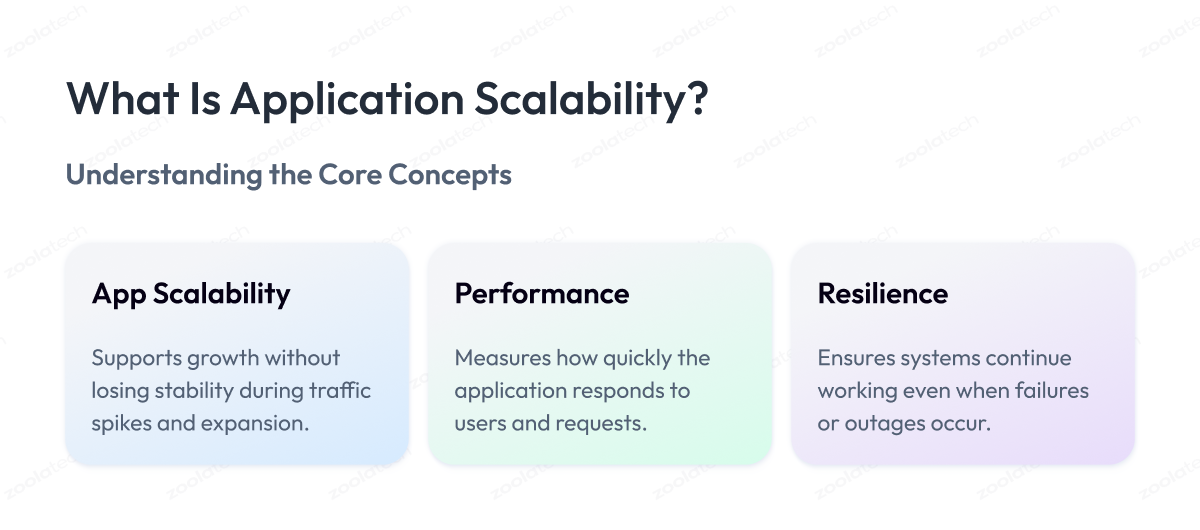
Growth can come from users, transactions, data volume, integrations, AI processing, or geographic expansion. A scalable application is designed to handle a growing user base while keeping the application needs of each workload met.
Modern app scalability affects:
- Page speed during peak traffic
- Checkout reliability
- Mobile app responsiveness
- Infrastructure cost efficiency
- Release stability
- Operational resilience
- Customer retention
Scalability also affects engineering productivity. Fragile systems slow feature delivery and increase operational overhead.
Scalability vs. performance vs. resilience
These concepts are connected but different. Enterprise teams need all 3.
| Concept | Meaning | E-Commerce Example |
| Performance | How fast the system responds | A product page loads in under 2 seconds |
| Scalability | How well performance survives growth | The same page stays fast during Black Friday |
| Resilience | How well the system handles failure | Checkout works when recommendations fail |
| Elasticity | How efficiently resources expand and contract | Cloud capacity scales after a traffic spike |
A fast application is not automatically scalable. Many systems perform well under normal traffic but fail during rapid growth.
Scalable systems are designed for change from the beginning. Ensuring that an application handles both scalability and performance as a unified concern — not in sequence — is what separates stable enterprise platforms from those that fail under load.
Why Web Application Scalability Matters More in 2026
Traffic patterns are less predictable than before. AI referrals, social commerce, live events, and mobile campaigns create sudden demand spikes.
Retailers now compete on digital responsiveness. Slow experiences directly affect conversion and loyalty.
Scalability challenges intensify as the application scales beyond its original design assumptions. Enterprises that do not address them proactively face cascading failures during peak demand.
Scalability now protects:
- Revenue during campaigns
- Customer experience
- Inventory consistency
- Cloud spending efficiency
- Engineering velocity
- Brand reputation
Many enterprise retailers modernize gradually to reduce operational risk. Zoolatech’s legacy modernization services support phased migration strategies.
How to Build Scalable Web Application Architecture
Building a scalable app at enterprise scale requires a scalable architecture built around clear domain boundaries. Each of the following application components should scale, fail, and recover independently.
Designing with scalability in mind from the start avoids the expensive rework that accumulates when an application scales beyond its original software architecture.
| Architecture Element | Purpose | Business Benefit |
| Clear domain boundaries | Separate business functions | Lower operational risk |
| Stateless services | Externalize session state | Safer autoscaling |
| Asynchronous processing | Move work outside requests | Improved responsiveness |
| Caching | Reduce repeated requests | Lower latency |
| Observability | Monitor distributed systems | Faster incident response |
As the application scales, each boundary becomes the primary defense against cascading failures.
Clear system boundaries
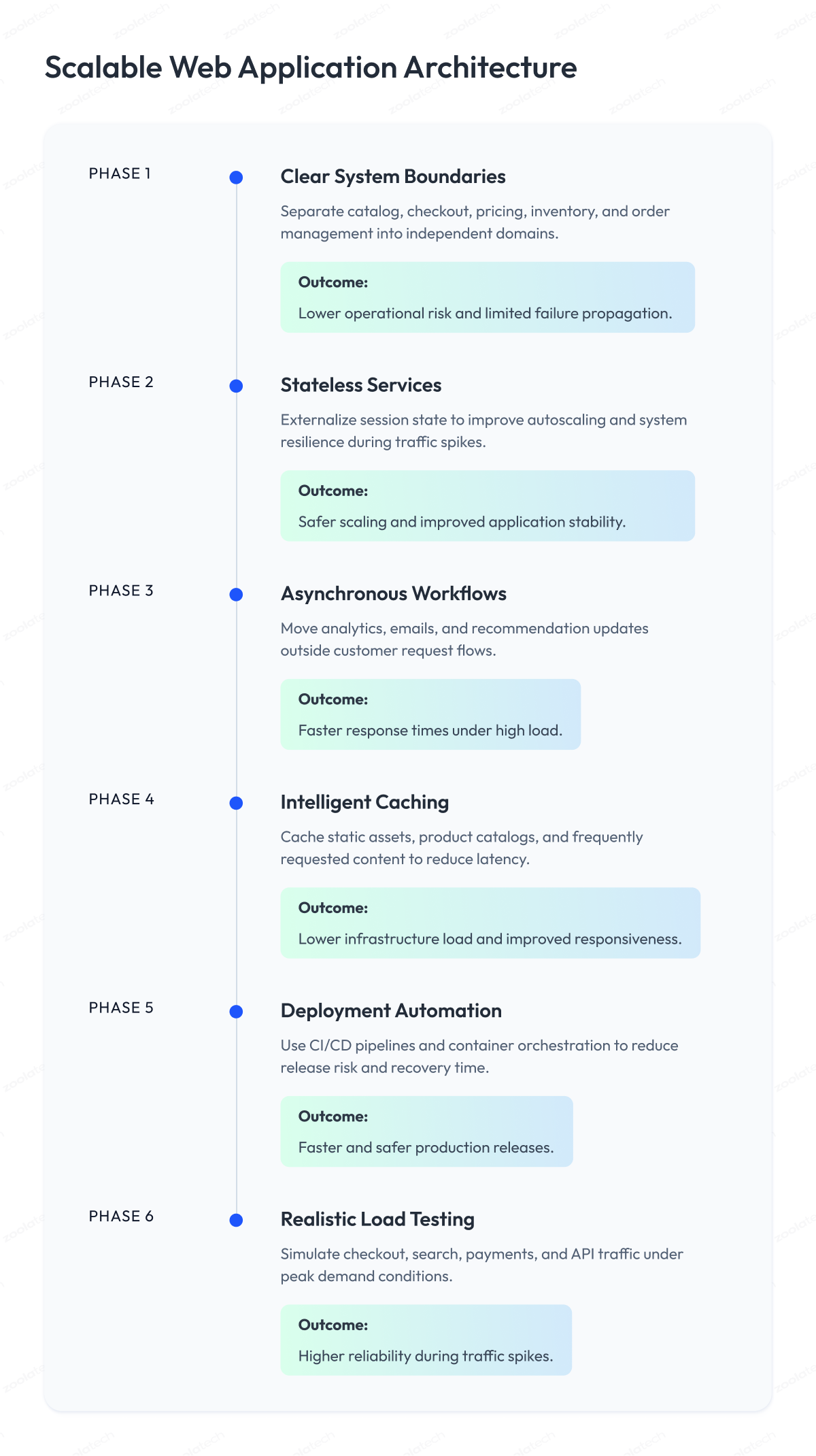
Strong systems separate catalog, cart, pricing, checkout, inventory, and order management as independent services. This limits failure propagation across the entire application.
Stateless services
Stateless services are easier to replicate and autoscale. Sessions should live outside application memory. This improves resilience during scaling events.
Scalable databases
Databases are common performance bottlenecks. Indexing, replicas, partitioning, and query optimization reduce pressure on the data tier and allow the application to handle increased concurrent load.
Asynchronous workflows
Not every task should run inside the customer request flow. Emails, analytics, and recommendation updates can run asynchronously. Queues and event streams improve responsiveness under load.
Intelligent caching
Caching reduces latency and infrastructure load. Product images, static assets, and product catalogs benefit most. Retail systems still need strict cache invalidation policies.
How to Build a Scalable Web App: Step-by-Step
Building a scalable web application starts with realistic planning.
1. Define measurable scalability requirements
Start by defining what the application needs to handle before any architecture decisions are made. Teams should define:
- Concurrent user targets
- Peak requests per second
- Checkout latency thresholds
- Search response expectations
- Cloud cost targets
- Recovery objectives
Without defined scalability requirements, architecture decisions become inconsistent and the application can handle increased load only by accident.
2. Protect critical customer journeys
Checkout, authentication, and payments require stronger resilience than secondary features. Optional systems should fail gracefully.
3. Start with the right application architecture maturity
Startup web application scalability often starts with a modular monolith. This reduces operational complexity. A monolithic application works well at lower scale but creates performance bottlenecks as teams and traffic grow.
A microservices architecture becomes useful when independent services and teams scale at different rates. Teams that build applications with clear ownership from the start scale your app more predictably than those who adopt microservices reactively.
Zoolatech’s software development services help organizations align architecture with business growth stages.
4. Design clear data ownership
Distributed systems fail when data ownership is unclear. Each service should own specific business data and publish predictable events.
5. Automate deployment pipelines
Scalable systems require reliable deployment automation. CI/CD pipelines reduce release risk and improve recovery speed. Kubernetes and container orchestration platforms now support many enterprise deployment strategies.
6. Test realistic traffic scenarios
Load tests should simulate real customer behavior. Search, cart, checkout, payment, and returns should be tested together. Third-party APIs also require stress testing as part of any scalability testing program.
Cloud-Native Scalability
Cloud-native platforms and cloud services from major providers support scalable infrastructure and distributed systems.
| Cloud-Native Component | Role | Impact |
| Containers | Portable runtime environments | Consistent deployments |
| Kubernetes | Service orchestration | Autoscaling support |
| Infrastructure as Code | Automated environments | Lower configuration drift |
| Observability | System visibility | Faster incident resolution |
Modern cloud-native systems often include:
- Containers
- Autoscaling
- Infrastructure as Code
- API gateways
- Centralized observability
Organizations moving from static infrastructure often modernize incrementally. Zoolatech’s cloud development services support enterprise cloud transformation.
AI Application Scalability
AI application scalability introduces new infrastructure challenges. Teams must manage inference latency, vector databases, GPU usage, and model monitoring.
Common AI scaling challenges include:
- High inference latency
- Expensive model execution
- Slow vector search
- Weak monitoring
- Model drift
Retailers increasingly use AI for recommendations, search, pricing, and fraud detection. Zoolatech’s AI and machine learning services support production AI workloads at enterprise scale.
OpenTelemetry is also becoming a standard for AI and distributed observability, being a vendor-neutral solution.
Mobile App Scalability and App Scaling Best Practices
Mobile app scalability directly affects digital revenue growth. Mobile systems need efficient APIs, optimized payloads, and stable backend services. Poor app scaling at the mobile tier is a direct source of user experience degradation during peak demand.
| Mobile Scaling Area | Priority | Business Impact |
| API optimization | High | Faster response times |
| CDN delivery | High | Lower media latency |
| Crash analytics | Medium | Higher stability |
| Feature flags | Medium | Safer releases |
High-scale mobile commerce also requires resilient backend infrastructure. Zoolatech’s mobile app development services support scalable mobile delivery for enterprise products.
Google performance guidance continues to influence frontend optimization practices.
Horizontal Scalability vs. Vertical Scaling
There are 2 core approaches to scaling web applications.
Vertical scaling
Vertical scaling increases the capacity of existing machines. Teams add CPU, memory, storage, or database resources. This model works well for smaller workloads. Eventually, hardware and cost limits appear.
Horizontal scalability
Horizontal scalability adds more servers, nodes, or containers. Traffic is distributed across multiple servers, and each server handles a share of the total load. This model supports higher availability and elasticity, and is the foundation of most enterprise-grade scalable solutions.
| Scaling Type | Best Use Case | Main Limitation |
| Vertical scaling | Simple and early-stage systems | Hardware ceilings |
| Horizontal scalability | Distributed enterprise systems | Operational complexity |
Most enterprise systems combine both approaches.
Scalability Testing and Common Scalability Issues
Scalability testing is how teams validate that an application can handle increased load before performance issues appear in production. Common scalability issues include the following failures that occur when teams skip this step.
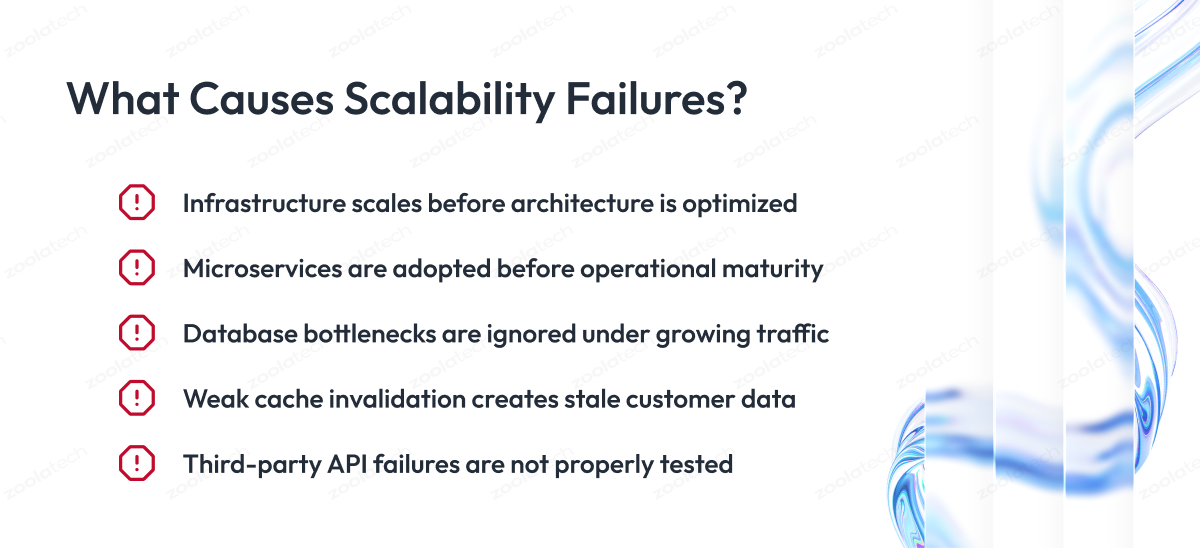
The most common scalability failures come from weak software architecture decisions, database bottlenecks, premature microservices adoption, and poor failure handling under real-world traffic conditions.
Scaling infrastructure before fixing architecture
More servers cannot fix tightly coupled systems or poor database queries.
Adopting microservices too early
Microservices increase operational complexity. Teams need mature ownership and DevOps processes.
Ignoring database performance bottlenecks
Databases often fail before application servers. This is the most frequently overlooked bottleneck when teams scale their application without a formal scalability testing phase.
Weak cache invalidation
Stale inventory and pricing create customer trust issues.
Skipping third-party failure testing
External APIs can throttle or fail during high-demand periods.
OWASP guidance also recommends resilience and dependency visibility for secure scalable applications.
Microservices, Modular Monolith, and MACH
Microservices are not always the first answer. Many products scale effectively with modular monolith application architecture.
| Architecture Model | Best Fit | Main Tradeoff |
| Modular monolith | Early-stage products | Limited independent scaling |
| Microservices | Enterprise-scale systems | Higher operational complexity |
| MACH architecture | Composable commerce | Integration governance |
MACH stands for microservices-based, API-first, cloud-native SaaS, and headless. It is the architecture model that most directly enables highly scalable, composable enterprise platforms.
Zoolatech’s multi-region payment platform case study demonstrates resilient distributed architecture built to scale your application across regions.
Observability for Scalable Web Applications
Monitoring shows when systems fail. Observability explains why.
Distributed systems require application performance visibility across services, APIs, databases, and customer flows to ensure the application remains stable and to improve scalability over time.
A scalable observability strategy includes:
- Latency metrics
- Error tracking
- Distributed tracing
- Structured logs
- Real-user monitoring
Google’s SRE guidance strongly influenced modern observability practices.
Business metrics matter too. Checkout conversion can reveal incidents before infrastructure alerts appear.
FinOps and Cost-Efficient Scalability
Scalability becomes expensive without governance. The FinOps Foundation 2025 report showed increased focus on workload optimization and AI spending management.
Teams should monitor:
- Cost per order
- Cost per search
- Cost per active user
- Cost per recommendation
- Cost per AI inference
Organizations should also optimize autoscaling rules, idle resources, and storage policies to improve performance and ensure optimal performance without runaway infrastructure spend. Cloud cost optimization tools tie those unit metrics back to real spend, so teams can see which orders, searches, or inference calls actually drive the bill.
How to Make a Scalable Web App Future-Ready
Future-ready systems are designed for safe change. Engineering teams that build scalable web apps with long-term scalability strategies and scalable development practices maintain delivery speed as complexity grows.
Engineering teams should focus on:
- Clear domain ownership
- API-first integration
- Cloud-native scalable infrastructure
- Event-driven workflows
- Composable commerce
- Automated testing
- Observability
- Scalable technologies
Scaling applications at enterprise level means choosing the right scalable technologies before growth exposes their absence.
The Zoolatech’s merchandising modernization case study demonstrates how scalable cloud platforms improve operational efficiency across enterprise application development programs.
Conclusion
Building a scalable web application in 2026 requires more than infrastructure capacity. Modern application scalability depends on software architecture, automation, observability, and disciplined engineering.
The strongest organizations treat scalability as a business capability, not a technical afterthought. They build scalable applications by addressing data ownership, deployment safety, and observability before they scale their application under real load.
Zoolatech helps enterprises modernize and scale complex systems through cloud-native engineering, AI delivery, and senior-heavy development teams. To discuss your roadmap, contact Zoolatech.
Questions You May Have
What is application scalability?
Application scalability is the ability to support growth without losing performance or reliability.
What is web application scalability?
Web application scalability means the application can handle increased traffic, requests, and transactions without instability.
How do you build a scalable web application?
Use modular architecture, scalable databases, automated deployment, observability, and realistic scalability testing to build scalable web applications.
What is startup web application scalability?
Startup web application scalability focuses on supporting growth without excessive operational complexity.
Why is mobile app scalability important?
Mobile app scalability protects user experience during traffic spikes and large marketing campaigns.
What makes AI application scalability different?
AI systems introduce inference latency, vector search, GPU usage, and model monitoring challenges that standard web app scaling patterns do not address.
Are microservices required for app scalability?
No — many systems scale successfully using modular monolith architectures with independent services extracted only when truly needed.
What are scalable web application deployment solutions?
They include containers, CI/CD pipelines, autoscaling, feature flags, and rollback automation.