







Quick Summary
- A software project takeover is the transfer of an ongoing software project, including its code, accounts, and knowledge, from the current development partner to a new one.
- The plan lasts 90 days, the period the US federal clause FAR 52.237-3 allows for an outgoing contractor’s transition support on vital services.
- The plan splits the work into 6 phases with deadlines on days 10, 30, 60, and 90. Each phase needs sign-off from a named person on the client’s side.
- The Knowledge Custody Ledger lists each task only the current partner’s engineers can do, and a row closes only when the new team does that task without help.
- Under 17 U.S.C. §101, computer programs are not among the 9 categories of commissioned “work made for hire”, so code a vendor writes usually needs a signed transfer of rights.
A software project takeover is the transfer of an ongoing software project from the current development partner to a new one. The new partner receives the source code, access to all systems, and the knowledge the current partner has built up about the product.
This knowledge is the most important part of the transfer because much of it exists only in the heads of the current partner’s engineers. If they leave before passing it on, the new partner can lose weeks working out how to release an update or fix a failure.
That is why we wrote this guide. It lays out the transfer as a 90-day plan. US federal contracts allow the same period for handing work to a new contractor under clause 52.237-3 of the Federal Acquisition Regulation (FAR).
To protect this knowledge, the plan uses a table we call the Knowledge Custody Ledger. Each row names one task the new partner’s engineers must learn from the current partner’s engineers, for example, releasing an update. You mark a row as done once the new engineers complete that task without help, so the table always shows what knowledge you could still lose.
By the end, you will have a 90-day plan to move your project to a new partner, a list of accounts to take under your control, the ledger template, and a handover checklist. With them, you can change development partners and keep the product available to customers the whole time.
What Is a Software Project Takeover and When Is It the Right Call?
A software project takeover is when a new development partner takes responsibility for a product another partner has been building. People often confuse it with software project handover and vendor transition. Each term has a different owner.
Software project takeover is what the new partner does. Its engineers learn how the product works and start releasing updates.
Software project handover is what the current partner does. Its engineers hand over the code, documents, and their knowledge of the product.
Vendor transition is the full move from one partner to another. It includes the takeover and the handover. It also covers the contract, payments, and the date the current partner leaves the project.
Five roles take part in a vendor transition:
- Current partner. The development company that is leaving the project.
- New partner. The company or in-house team that takes over the project.
- Sponsor. The executive who approves the plan and owns the risk, usually the chief information officer (CIO) or chief operating officer (COO).
- Owner of the result. The engineering leader who decides when the system is stable, usually the vice president (VP) of Engineering.
- Legal and procurement teams. Specialists who review contract terms and code rights.
When a takeover is the right call
A takeover is the right call when the same problems with your current partner keep coming back, and direct talks haven’t fixed them. Delays on their own say little, because they are common across the industry. In a 2024 BCG survey of C-suite executives across 25 industries, nearly half said that more than 30% of their organizations’ technology projects face delays or go over budget.
If you are deciding how to change a software development vendor, these are the usual triggers:
- The partner misses deadlines release after release.
- New releases often break features that worked before.
- The working relationship has broken down, and basic questions take weeks to answer.
- The engineers who know the system are leaving the partner.
A wish to change how the work is organized is a weak reason to switch. The same BCG survey found no link between a company’s delivery method and program success. If the current partner knows the system and delivers on time, changing the process together costs less than a full transfer.
The 90-Day Vendor Transition Plan
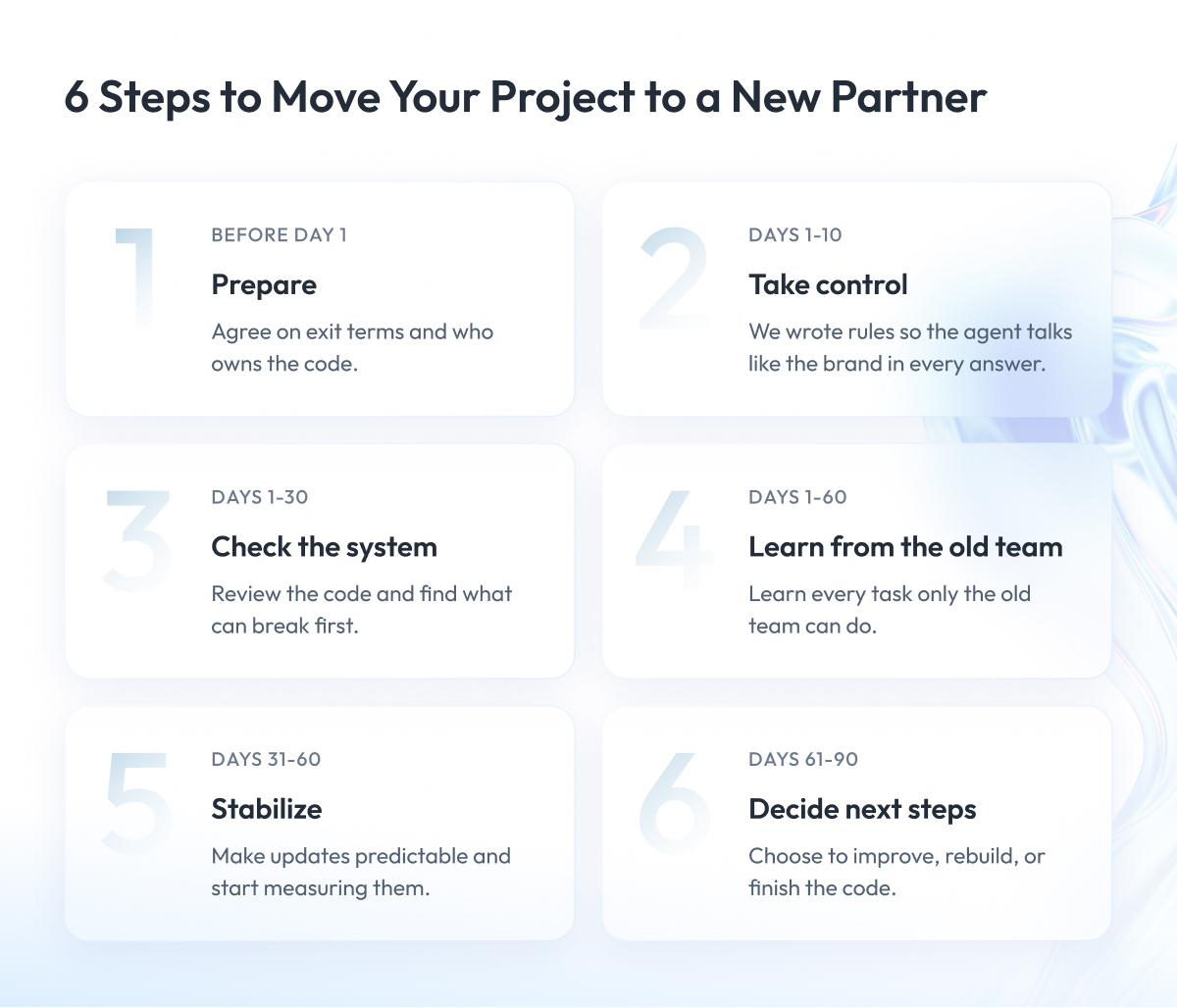
A 90-day vendor transition plan sets the order of work for moving your project from the current partner to the new one. For each step, it names the person on your side who approves it and the check that shows the step is complete.
The plan works as a vendor transition plan template. It splits the 90 days into 6 phases, from contract work before day 1 to the final decision on day 90.
Each row of the table is one phase. The columns show when the phase happens, what it should achieve, which documents it produces, who on your side approves it, and how you know it is complete. You can copy the table into your own project transition plan from one vendor to another and adjust the details.
| Phase | Days | Goal | Key documents | Signs off | Done when |
|---|---|---|---|---|---|
| 0. Prepare | Before day 1 | Agree exit terms and code ownership | Contract review, ownership check, transition charter | Legal, procurement, sponsor (CIO or COO) | Charter signed, paid transition role for current partner agreed |
| 1. Take control | 1-10 | Own every account that can stop the product | Access list, changed passwords and keys | VP of Engineering | Every account in your company’s name, tested by login |
| 2. Assess | 1-30 | Learn what you inherited | Audit report, system map, risk list | VP of Engineering, new partner’s tech lead | Report accepted, top risks have owners |
| 3. Transfer knowledge | 1-60 | Move what only the current partner knows | Knowledge Custody Ledger, shadowing schedule, operating instructions | Both tech leads, VP of Engineering | Every ledger row closed |
| 4. Stabilize | 31-60 | Make releases predictable and measured | Fix list, delivery metrics baseline, first small release | VP of Engineering | New team releases and rolls back without current partner |
| 5. Own | 61-90 | Choose next steps and close the transition | Refactor, rebuild or finish decision, handover acceptance | Sponsor, VP of Engineering, procurement | Takeover approved, current partner’s access and contract closed |
The phases overlap on purpose. For example, the audit and the knowledge transfer start on day 1, because the new team learns the system faster when it reads the code and talks to the current partner’s engineers at the same time.
The day ranges are planning defaults, so adjust them to the size of your system and the terms of your contract. The next sections walk through each phase in order and explain what your team does in it. We start with Phase 0, because every later step depends on what your contract allows.
Before Day 1: Exit Terms, Code Ownership and a Transition Charter
Phase 0 happens before the new team starts work. In this phase, you agree in writing on 3 things:
- What the current partner must do before it leaves the project.
- Who owns the code, accounts, and data.
- Who makes decisions during the transfer.
Without these agreements, every later step depends on the current partner’s goodwill. If the work slows down, you will have no written terms to point to.
Read the exit terms in your contract
Exit terms are the parts of your contract that describe what the current partner must do when the work ends. Check them first, because they decide how much help you can count on during the transfer.
Look for these clauses in your contract:
- Termination assistance. The help the partner owes you after the contract ends.
- Notice period. How far in advance you must tell the partner the contract is ending.
- Transition support. The support the partner provides during the transfer, with its price.
- Return of assets. The return of your data, code, and documentation.
- Knowledge transfer. The partner’s duty to teach the next team how the system works.
US federal contracts offer a useful model for these terms. Under FAR 37.110(c), a contracting officer may add the FAR 52.237-3 Continuity of Services clause to contracts for services the government considers vital.
Under this clause, the outgoing contractor must help the next contractor take over the work for up to 90 days after the contract expires, once the contracting officer requests it in writing. It must also agree on a handover plan with the next contractor in good faith and keep as many of its people on the project as it reasonably can.
Private companies can use the clause as a model for their own agreements. If your contract has no such terms, negotiate a paid transition role for the current partner with fixed dates before you announce the change.
Confirm who owns the code, accounts and data
Paying a partner to write code does not automatically make you its owner under US copyright law. Section 101 of the US Copyright Act (17 U.S.C. §101) treats commissioned work as “work made for hire” only in 9 listed categories, and only with a written agreement that both sides sign. Computer programs are not on that list.
So the code your partner writes usually becomes yours through a signed transfer of rights. Under 17 U.S.C. §204(a), a transfer of copyright, other than by operation of law, is valid only when it is in writing and signed by the rights owner or the owner’s authorized agent.
Ask your legal team to confirm these points:
- The transfer of rights covers every statement of work (SOW), including the earliest ones.
- Your company owns the code repositories, cloud accounts, and domains.
- Your contract gives you back your data in a format your new team can use.
This is not legal advice. Have counsel review your agreements before you act on them.
Write a transition charter with a RACI
A transition charter is a one-page agreement between your team, the current partner, and the new partner. Without it, the current partner gets requests from several people at once and has no way to tell which ones come first.
The charter should cover:
- The scope and dates of the transfer.
- Who makes each type of decision.
- The escalation path for disputes.
- A weekly steering meeting with the sponsor who approved the plan.
- One channel for all requests to the current partner, with response times agreed in writing.
- A responsible, accountable, consulted, informed (RACI) chart for all 3 sides.
A RACI chart shows, for each task, who does the work, who answers for the result, who gives input and who receives updates. With the charter signed, the new team can start taking control of your accounts on day 1.
Days 1-10: Take Control of Access, Repositories and Environments
Phase 1 covers days 1 to 10. In these days, you take ownership of every service your product depends on, such as code storage, cloud servers, the website domain, and the payment system. For example, if the current partner pays for your domain, the domain can expire after the partner leaves and take your website offline.
Each of these services has an account, a login, and an owner. Your company must become the owner of every account, and your team must log in to each one to confirm it works.
The new team will not change any code until this work is complete. Code changes without full access are risky, because the new team cannot fix or roll back a release on its own.
The table below lists these accounts and how to check each one. The first column names the asset, the second shows who should own it, the third gives the test, and the last shows the warning sign of a problem. Go through it row by row and mark each asset once the test passes.
| Asset | Who should own it | How to check | Warning sign |
|---|---|---|---|
| Code repositories | Your company, with admin rights | Download the code with its full history | Code stored in the partner’s or an employee’s account |
| Cloud accounts | Your company, with billing and owner roles | Log in and open the billing page | Account paid by the partner |
| Domains and domain name system (DNS) records | Your company’s registrar account | Log in to the registrar | Domain registered in the partner’s name |
| Build and release pipelines | Your company | Start a pipeline yourself | Builds work only on the partner’s servers |
| Passwords and keys | Your company’s password vault | Change each one after the transfer | Passwords stored in code, chats or shared documents |
| Monitoring and alerts | Your company’s accounts | Trigger a test alert | Alerts reach only the partner’s engineers |
| Third-party services and licenses | Your company | Open each admin console | Licenses registered to the partner |
| Task tracker and documentation | Your company | Export a full backup | Project history kept only in the partner’s tools |
Keep the product working during the switch
Your customers should not notice the partner change. Plan the switch so the current partner can still help if something breaks:
- Change passwords in planned time windows, when the current partner’s engineers are available.
- Keep the current partner on call under the contract until the new team has handled its first production incident.
- Hold risky releases until the new team has mapped the system in phase 2.
Once your company controls every account, the new team can safely study what it has inherited.
Days 1-30: Technical Due Diligence and Codebase Audit
Phase 2 covers days 1 to 30 and starts together with Phase 1, because the new team can read the code before it has full access to your accounts. Without reviewing what you have inherited, the new team cannot tell which parts of the system will break first, and every estimate it gives you is a guess.
Engineers call this review technical due diligence, or a codebase audit. During the audit, the new team reads the code, builds the system from scratch, and checks the servers.
The audit checks these points:
- Build. Your team can build the system from a fresh copy of the code.
- Tests. Automated tests exist and start with every build.
- Libraries. Outside code libraries are up to date, licensed, and free of known security holes.
- Secrets. The code contains no passwords or keys.
- Servers. Scripts can recreate the servers without manual setup.
- Data. The team understands the database structure and its change history.
- Monitoring. Logs and alerts show what happens in production.
- Bugs. The team has a full list of open defects.
- Integrations. The documentation includes every link to an outside service.
By day 30, the audit gives you a system map, a list of risks, and a list of fixes for Phase 4. It also gives you a first view on the main question for day 90, which is to improve the code step by step or rebuild it.
The system map and the risk list
As a rule, during the audit, the new team draws a system map from the code, the server settings, and interviews with the current partner’s engineers.
This diagram shows every service, database, and outside connection in your product, with lines between the pieces that work together. For each piece, it also names the person who knows it best.
Without a system map, a change in one part of the product can break another, and the new team will not see it coming.
The map also shows where knowledge is at risk. For example, if only one of the current partner’s engineers understands the payment system, the new team must learn it from that person before the contract ends.
You record each such case as a row in the Knowledge Custody Ledger. We cover this table in detail in the next phase.
The audit also turns up problems that can hurt the product during the transfer. For example, your domain may expire next month, or nobody on the new team may know how to restore the database from a backup.
The new team writes each such problem into a risk list. For each problem, the list shows how likely it is, how much damage it can do, who is responsible, and what the team will do about it.
Later in this guide, a separate table lists common risks of a vendor transition. You can use it as a starting point for your own list.
Days 1-60: Knowledge Transfer and the Current Partner’s Exit
Phase 3 covers days 1 to 60. In this phase, the new team learns everything about the product that only the current partner’s engineers know, such as how to release an update or fix a failed payment.
This knowledge transfer from an outgoing vendor is the hardest part of the move to control. The knowledge belongs to people who are leaving, and in many teams it rests with just 1 or 2 engineers. When they leave, the knowledge leaves with them.
That is why you plan the transfer as scheduled work with a deadline. You also include it in the current partner’s transition terms, so the partner has a contractual duty to train your new team.
The task gets harder when the current partner leaves little documentation. In that case, the new team writes the missing documents from the working system, the code history, and conversations with the current engineers. By day 60, these documents become one of the transfer’s results.
Shadowing and parallel work
The new team learns from the current engineers in 3 steps. The transition charter from phase 0 sets the dates for each step.
- Shadowing. New engineers watch the current engineers release updates and handle incidents.
- Reverse shadowing. The new team does the work as the current engineers watch and correct it.
- Parallel sprints. Both teams work in the same 2-week sprint for 1 or 2 releases.
The Knowledge Custody Ledger
The Knowledge Custody Ledger is the table we introduced at the start of this guide. Each row is one piece of knowledge the new team must learn. A row closes only when the new team proves it can use that knowledge without help.
The columns show what the knowledge is, who holds it now, how it moves to the new team, what counts as proof, and the deadline. Copy the template below, add rows from your system map, and set your own dates.
| Knowledge item | Who holds it now | How it moves | Proof it moved | Due before |
|---|---|---|---|---|
| Release procedure | Current partner’s lead engineer | Shadowing, then reverse shadowing | New team releases an update alone | Day 45 |
| Production incident history | Current on-call engineers | Recorded session, written summary | New team handles an incident unaided | Day 60 |
| Payment and other critical integrations | Integration owner at current partner | Pairing session, updated diagram | New team changes an integration setting safely | Day 45 |
| Data migration scripts | Current backend engineer | Walkthrough, documented steps | New team completes a test migration | Day 40 |
| Environment settings | Current infrastructure engineer | Written guide, pairing session | New team builds a new environment | Day 30 |
| Open defects and workarounds | Current team lead | Review session, updated bug list | New team fixes a listed defect | Day 50 |
| Supplier and license contacts | Current project manager | Contact list handover | New team reaches each supplier | Day 20 |
We recommend one contract rule for this table. Tie the current partner’s last transition payment to a closed ledger, and remove its access only after the new team has closed every row.
Case studies: knowledge transfer in practice
The 2 projects below show how knowledge moves from one team to another. In the first, we worked next to the client’s existing partner. In the second, we took responsibility for AI agents that other engineers had built.
Case study 1: B2B marketplace on Salesforce Commerce
Challenge. A B2B marketplace migrating to Salesforce Commerce needed to move faster because its existing Salesforce partner struggled to meet timelines.
What we did. We set up a mixed team with 1 Zoolatech engineer, 1 engineer from the existing partner, a quality assurance lead, and a business analyst. Our head of engineering led the team. We started with a full reverse engineering of the partner’s Salesforce setup, so our engineers understood the system before making changes.
Result. Within 2 weeks, we delivered the first accounting system upgrade on this project, with the existing partner’s engineer on our team.
Case study 2: Gusto AI agents
Challenge. The ownership of Gusto’s AI agents passed between engineers, and the platform had to keep working during the change.
What we did. Our engineers learned the existing AI platform and took ownership of key AI agents and the code behind them. Discovery and knowledge transfer formed the first phase of our work.
Result. The knowledge transfer let us keep supporting the platform without disrupting ongoing operations.
Once the ledger shows steady progress, the new team can start stabilizing the system.
Days 31-60: Stabilize Before You Speed Up
Phase 4 covers days 31 to 60. Expect the new team to work slower at first, because it is still learning a system that someone else built. Use this month to stop repeated failures, make releases predictable, and start measuring delivery, so you can see any later gain in speed in the numbers.
Onboard the new team on the inherited codebase
New engineers need a planned start in code they did not write. Without it, they learn by trial and error on a live product.
A good onboarding plan includes:
- A walkthrough of the system map with the current partner’s engineers.
- Pair work with the current engineers until the Knowledge Custody Ledger has no open rows.
- Small first tasks in parts of the code the team already understands.
- A local setup that each engineer builds from the new documentation.
For the people side of onboarding, see our guide on how to onboard offshore (and any other) teams.
Set a baseline with the five DORA metrics
To see if the new team gets faster, you need a starting point. The DevOps Research and Assessment (DORA) program studies software delivery and now tracks 5 metrics, up from its original 4.
The table shows each metric, what it measures, and why your CIO or COO should care about it. Use it to agree with them on which numbers you will report each month.
| Metric | What it shows | Why your CIO or COO cares |
|---|---|---|
| Change lead time | Time from code change to production | How fast fixes reach customers |
| Deployment frequency | How often the team releases | How often customers get improvements |
| Failed deployment recovery time | Time to recover from a failed release | How long customers feel an outage |
| Change fail rate | Share of releases needing urgent fixes | How risky each release is |
| Deployment rework rate | Share of unplanned releases caused by incidents | How much effort goes to repairs |
We recommend taking the first reading from the pipeline history your company now owns. That history covers the current partner’s last months, so your baseline shows where delivery stood before the transfer. Agree with your CIO or COO in advance which metrics may dip during days 31 to 60.
If your pipeline does not record these numbers, the new team adds tracking as part of its DevOps work.
Release one small change you can roll back
The last step of phase 4 is a small change that goes through the full pipeline to production. The new team then rolls it back on purpose as a drill. This proves the new team can release an update and recover from a failure without the previous partner.
With releases under control, you can decide what to do with the code in the last month.
Days 61-90: Refactor, Rebuild or Finish the Stalled Work?
In days 61 to 90, you choose one of 3 paths for the code. Make this choice only after the audit and a month of stable releases, because before that the new team does not know the system well enough.
A rushed decision to rebuild is the most expensive mistake at this stage. Code that is hard for a new team to read is normal after a transfer and does not prove the system needs a rewrite.
The 3 paths are:
- Refactor in place. The new team improves the existing code in small steps, starting with the riskiest parts. This is the default path, because the product keeps working and each step is easy to undo.
- Rebuild. The new team builds a new system as the old one keeps serving customers, then moves users over in planned stages. Choose this path only if a business case shows why step-by-step fixes cannot work.
- Finish the stalled work. This path fits a migration that stopped halfway. The new team lists what has already moved and what still exists in both systems, then stops new features until the 2 systems become one.
If you choose to rebuild, our legacy system modernization services and our legacy modernization strategy framework explain how to plan it.
By day 90, check that the transfer is complete:
- The new team has closed every row in the Knowledge Custody Ledger.
- Your company has removed the current partner’s access to all systems.
- You have a record of the delivery metrics from phase 4.
- Your CIO or COO has approved the plan for the next quarter.
Once you complete all 4 points, the takeover is complete.
Each phase of the plan carries its own risks, and the next section shows how to spot them early.
Vendor Transition Risks and Early Warning Signs
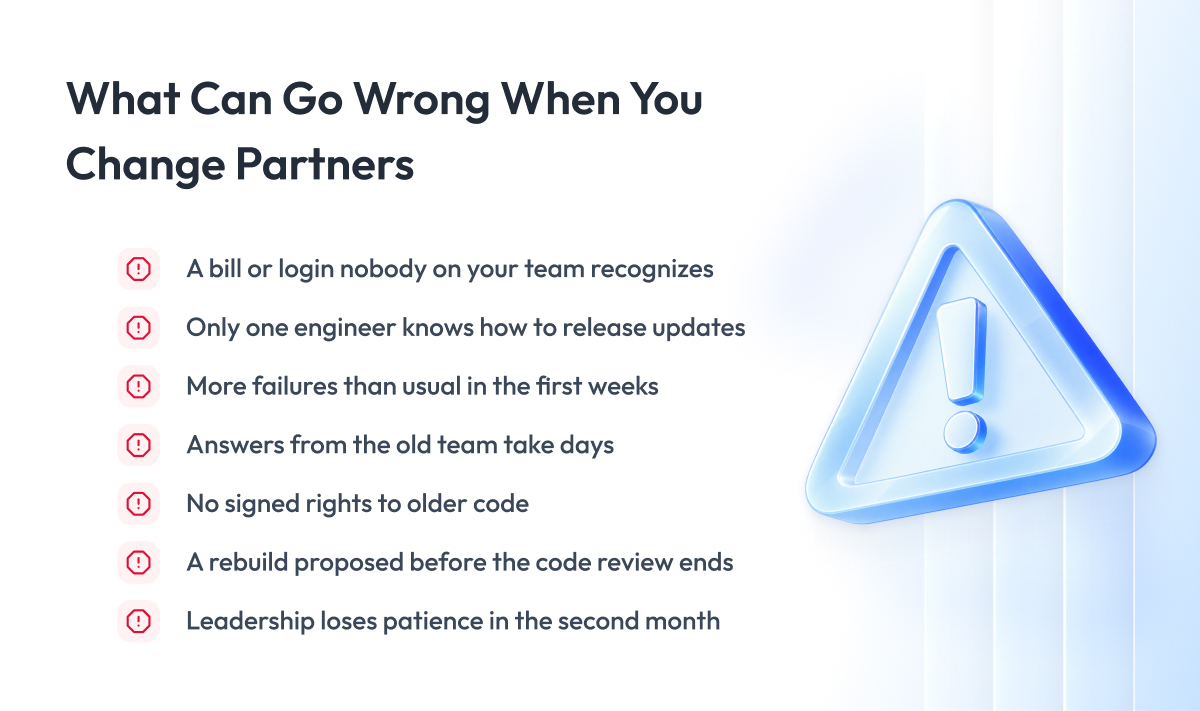
Vendor transition risks usually fall into 4 groups:
- Access to accounts and systems.
- Knowledge held by the current engineers.
- Continuity of service for your customers.
- The contract with the current partner.
If you wait for a risk to appear before planning a response, your team has to improvise under pressure. That is why you agree on the warning signs and the responses before day 1.
The table lists the most common risks. The first column names the risk, the second shows the early sign that it is starting, and the third tells you what to do. Add these rows to your own risk list from phase 2 and assign an owner to each one.
| Risk | Early warning sign | What to do |
|---|---|---|
| Unknown accounts | A bill, alert or login nobody on your team recognizes | Add the account to your list and move it to your company |
| Lost knowledge | Only one engineer at the current partner can release updates | Have your team learn this task before that engineer leaves |
| Product outages | More failures than usual in the first weeks | Keep the current partner on call, pause risky updates |
| Slow help from the current partner | Answers take days, files go missing | Raise the issue with the contacts named in your transition agreement |
| Unclear code ownership | No signed rights transfer for older work | Ask your lawyers to check before you announce the change |
| Rewriting too early | Someone proposes a rebuild before the audit ends | Wait with this decision until day 61 |
| A slow month seen as failure | Leadership pushes back in the second month | Show the starting metrics and the dips you agreed on |
Most of these risks shrink when the current partner hands over everything on time. The checklist in the next section helps you confirm that it has.
Software Project Handover Checklist
A software project handover checklist confirms that the current partner has given your new team everything it needs to build, release, and support the product. Without it, a missing item often shows up only after the current partner’s access ends, when nobody is left to ask.
Mark an item as done only when someone on your side has used it. A file in a shared folder proves nothing until your engineers have opened it and worked with it.
The table works as your project transition checklist for the final sign-off. The first column names what you should receive, the second shows who usually holds it at the current partner, and the third gives a quick test.
| What to receive | Who holds it at the current partner | How to check it |
|---|---|---|
| Source code with full history | Lead engineer | Download it and build the product |
| Build and release scripts | Infrastructure engineer | Release a test update with them |
| Server setup scripts | Infrastructure engineer | Recreate a test server from them |
| Environment settings and password list | Infrastructure engineer | Start the product in a new environment |
| Architecture documents and past decisions | Tech lead | Walk through them with your engineers |
| List of outside connections and their rules | Integration owner | Connect to each outside service from a test setup |
| Database structure, migration scripts and backups | Backend engineer | Restore a backup in a test environment |
| Automated tests and test data | Quality assurance lead | Start the tests and check they pass |
| Operating instructions and on-call steps | On-call engineers | Handle a test incident with them |
| Incident and bug history | Team lead | Find the last 3 major incidents in it |
| Third-party contracts and licenses | Project manager | Log in to each service’s admin console |
| Product backlog and roadmap | Product owner | Review the next 3 months with your product owner |
| Design files | Designer | Open and edit them in your own design tool |
The quality of this handover depends a lot on the new partner you pick. The next section shows how to compare providers before you sign.
How to Compare Software Takeover Providers
To compare software takeover providers, look at how each one plans its first 30 days on your project. An estimate a provider gives before seeing your code is a guess. The first month shows how the provider handles a system it did not build.
Ask every provider these questions about your system:
- Do you audit the system before you give an estimate?
- How would you organize the audit and the knowledge transfer with our current partner?
- What will we receive at the end of the audit?
- Should your engineers join our team through team extension services, or should your team own the work through managed delivery?
- What is your own exit plan if we part ways one day?
- Can you share a current System and Organization Controls (SOC) 2 Type II report or an International Organization for Standardization (ISO) 27001 certificate, with its scope?
The answer to the last question shows how the provider protects your code and data. Ask it of every company on your shortlist, including us.
The question about engagement models deserves extra time. Our comparison of staff augmentation vs managed services explains how each model works in practice. If your switch is part of moving several partners to one, see our guide on IT vendor consolidation.
The answers to these questions show which provider can carry your project through all 90 days. The practices in the next section apply to whichever provider you choose.
Vendor Transition Best Practices
Vendor transition best practices are the rules that apply in every phase, regardless of your system or contract.
Follow these 5 practices from day 0 to day 90:
- Take ownership of every account before the new team changes any code.
- Pay the current partner for its time during the overlap.
- Close every row of the Knowledge Custody Ledger before the current partner leaves.
- Measure delivery before you ask the new team to speed up.
- Decide the future of the code last, after the audit and a month of stable releases.
Final Word
Changing development partners takes effort. You need to read your contract, move dozens of accounts, schedule sessions with engineers who are leaving, and keep the product working for customers the whole time.
But this effort pays off.
A planned software project takeover protects the code and the knowledge your company has already paid for. Without a plan, the current partner’s engineers can take that knowledge with them, and the new team can spend months rebuilding it.
Start with phase 0 this week. Read the exit terms in your contract, check who owns the code, and write a one-page transition charter before you announce the change.
If you are planning a transfer, Zoolatech is ready to discuss your project and suggest the next step.
Questions You May Have
How long does a software project takeover take?
Plan for about 90 days from first access to full ownership. A small system with good documentation and few integrations can move faster. A large system with many integrations, missing documentation, or a slow current partner takes longer, so treat the 90 days as a planning default.
Can a new vendor take over software with no documentation?
Yes, but the transfer takes more time. Start with the knowledge that stops the new team from releasing on its own, such as the release steps, environment settings, and incident history. Book extra sessions with the current partner’s engineers for these topics before their access ends.
What if the outgoing vendor refuses to cooperate?
Send every request through the one channel your transition charter sets up. Missed answers then stay on record when you escalate under the exit terms of your contract. If cooperation fails, the new team works from the code, the accounts you own, and the live system.
Should the new vendor rewrite the software?
Rarely, and never before the audit ends. Ask the new partner what in the audit makes step-by-step improvement impossible. Code that is hard for a new team to read is normal after a transfer and gives no reason for a rewrite on its own.
Will users notice downtime during a vendor transition?
They should not if you plan the switch. Brief your own support team before access changes so they know whom to call. Watch incidents and support tickets closely in the first weeks. Announce any maintenance window the same way you announce a planned release.
What is the difference between a software project takeover and software project rescue?
A takeover changes who owns and delivers the product. Software project rescue focuses on saving a failing project, with or without a new partner. A rescue can end in a takeover when a new team should own the product. A takeover can also follow a contract that ends on schedule.
What should a vendor transition plan checklist include?
A vendor transition plan checklist should cover 4 areas for each phase. These are the owner, the deadline, the person on your side who signs off, and the test that proves the phase is done. Without the test, a phase can look finished when key work is still open.
Is there a vendor transition plan template I can use?
Yes, the phase table in this guide works as a vendor transition plan template. Copy it into your own plan, adjust the day ranges to the size of your system, and add the names of the people who will sign off on each phase.
How do you switch software development vendors without losing your code?
Confirm ownership before you announce the change. Check that a signed transfer of rights covers every statement of work, then move the code repositories, cloud accounts, and domains into your company’s name. Finally, download the full code history and build the product from it to prove nothing is missing.