



Quick Summary
- Real-time inventory sync is a latency budget you set per data type: sub-second for checkout availability, seconds for store stock views, minutes for replenishment.
- A sync that runs every 5 minutes gives a store and the web a 5-minute window to sell the same unit, and push alone still misses 2–3% of transactions.
- Polling, webhooks, and event streaming each fail differently at store-network scale, so the working answer is a hybrid that pushes for speed and reconciles on a schedule for truth.
- Keeping stores selling offline requires a local queue, unique transaction IDs, and a movement ledger, then reconciliation that flags drift above 0.5% against cycle counts.
- A chain of 10 stores on reliable connections rarely needs an event platform, and a scheduled sync with disciplined reconciliation is often the right call.
Real-time inventory sync across a retail store network means every store, the warehouse, and the web storefront agree on stock within a defined latency budget and keep agreeing when a store loses its connection.
In our work with enterprise retailers, we see POS, inventory, and e-commerce stay in sync during a pilot with a dozen stores and drift apart at a few hundred. Stock moves in ways no API reports, a scheduled sync every 5 minutes leaves a 5-minute blind spot on every SKU, and the first sign of trouble is a customer whose online order the store can no longer fulfill.
That is why we wrote this guide from the distributed-systems side.
We start by turning “real-time” into a latency budget you can calculate, compare polling, webhooks, and event streaming at store-network scale, and answer the Kafka question by name. Then we explain how a POS keeps selling offline, how the network heals without losing or double-counting stock, and how to size the architecture to your store count and connectivity.
By the end, you will have a latency budget per data type, an Offline Tolerance Ladder to place your stores on, and a decision matrix for your next architecture review.
What Real-Time Inventory Sync Means (and What It Costs)
Picture a chain with 500 stores, a warehouse, and an online store. All of them need the same answer to one question: how many size 42 sneakers are in the Fifth Avenue store right now. The website uses that number to show “in stock, pick up today,” the warehouse uses it to decide whether to ship more, and the cashier uses it to sell.
The problem is that this number lives in three or four systems at once, and each of them changes it. The POS sells a pair. The website sells the same pair a minute before the POS has told it about the sale. A customer arrives for the pickup, and the sneakers are gone. That is an oversell, and it is the main thing real-time sync exists to prevent.
So real-time inventory sync means that when any system changes the count, every other system learns about it within a latency budget you have set in advance. You set that budget separately for each type of data, because checkout needs a much faster answer than a replenishment report. Every step down in latency costs more infrastructure, more failure modes, and more operational attention.
How fast the count must arrive for each use
| Who Acts on the Count | How Fast It Must Arrive | What Goes Wrong If It Is Late |
| Website checkout (ATP) | Under 1 second | Oversell, cancelled orders, refunds |
| Store associates, pickup shoppers | Seconds | Wrong answers at the shelf |
| Warehouse, replenishment | Minutes | Late trucks, empty shelves |
| Reporting, analytics | Hourly or nightly | Slower decisions |
These four speeds are your latency budgets, and they matter because speed is expensive. Sub-second delivery for everything costs a lot of infrastructure, and 15-minute delivery for everything oversells at checkout. Matching the speed to the use is where the architecture starts.
The oversell blind-spot model
Whatever speed you choose, there is a gap between one update and the next, and most retail integrations still run on 5, 15, or 30-minute intervals. Inside that gap, two systems can sell the same unit, and how dangerous that is depends on how fast the item sells and how much stock covers it.
We model exposure as sync interval multiplied by sales velocity, divided by stock depth. The table applies a 5-minute interval to three SKU profiles.
| SKU Profile | Sales Velocity (All Channels) | Units Sold per 5-Minute Gap | Stock on Hand | Exposure per Gap |
| Promo hero item | 24 per hour | 2 | 4 | 50% |
| Core fast-mover | 6 per hour | 0.5 | 10 | 5% |
| Long-tail item | 1 per day | 0.003 | 5 | Under 0.1% |
The same 5-minute interval is harmless on the long tail and reckless on a promo hero. Put your fastest sync where the exposure is highest, and let the rest run slower. Our work on same-day pickup enablement started from this calculation, because a pickup promise is only as good as the store count behind it.
Why Store Networks Are Harder Than Channel Sync
Syncing inventory across a store network is harder than syncing across sales channels because the count changes in hundreds of physical places at once, over connections you don’t control, and some of those changes never pass through an API at all.
Channel sync is the version most retailers already know. One warehouse, one inventory master, and a few sales channels such as Shopify, Amazon, or Walmart. Every participant is an API in a data center, the connections are reliable, and when one channel goes down, the integration retries and moves on. A store network breaks each of those assumptions.
1. Hundreds of edge locations replace a few APIs
In channel sync, you integrate with four or five endpoints. In a 500-store chain, you integrate with 500 locations, each running its own point of sale (POS) and local database, and each one is a place where the count can change before the center knows. That makes inventory sync an edge computing problem in retail.
The number of things that can fail, and the number of things you have to reconcile, grows with every store you open.
2. Stores sit on connections you do not control
A channel API lives on data-center infrastructure. A store POS lives on a consumer-grade internet line, often shared with the music system, the security cameras, and the manager’s laptop.
At any given moment, a few stores in a large network are offline, and your architecture has to treat that as normal operation.
3. The POS keeps selling when the connection drops
When a channel integration loses connectivity, it queues up and waits. When a POS loses connectivity, customers are still in line, so it keeps selling.
During the outage, stock leaves the store, and the rest of the network has no idea. How the system handles that gap, and how it merges those sales back afterward, is the hardest part of the whole design and gets its own section later.
4. Physical stock moves in ways no API reports
Channel sync only tracks sales and returns. In a store, units are transferred to another location, damaged, stolen, or found two short at a cycle count.
A sales system generates none of those events, so the count drifts from what every system believes until someone reconciles it against the shelf.
5. Load arrives in waves
Every store opens at 9 a.m., runs the same Black Friday promotion, and reconnects after the same regional outage. Sync traffic spikes across the whole network at the same moment, and an integration sized for average load fails at exactly the times that matter most.
These five points explain why channel-sync advice stops working at store-network scale. They determine which sync pattern can carry the load, where Kafka belongs in the design, and why offline behavior deserves its own section.
Our guide to e-commerce integration with POS covers the channel side in more depth. The next section compares the sync patterns themselves.
Sync Architecture Patterns: Polling, Webhooks, and Event Streaming
A sync pattern is the mechanism that makes real-time inventory sync work. It carries a stock change from the system where it happened to every system that needs it. There are three of them.
Polling asks for changes on a schedule, webhooks push each change as it happens, and event streaming writes every change to a durable log that other systems read.
The pattern you pick sets your latency, failure modes, and how much load the integration can handle, so it determines whether the four budgets from the first section are achievable at all.
Most retailers inherit a pattern from whatever their first integration used and never revisit it.
Understanding all three lets you match each data type to the cheapest pattern that meets its budget, and at store-network scale the design that works combines push for speed with scheduled reconciliation for accuracy.
1. Polling
Each system asks the others “anything new?” on a timer, every minute or every 15 minutes. It is simple, predictable, and easy to debug, and it is the pattern most retailers start with.
The cost shows up at scale. Polling every minute across five channels is around 7,200 API calls a day, and about 95% of them come back with no changes. Your latency is never better than the polling interval, so a 15-minute schedule is a 15-minute blind spot on every SKU. Polling still makes sense for low-volume feeds (under about 50 orders a day per channel) and as a backup when push fails.
2. Webhooks and push
The system that makes the change sends it to the others right away. Webhooks cut API traffic by 90 to 95% compared with polling and deliver around 98% of updates within one second, which is fast enough for store stock views and often for checkout.
The danger is silent failure. If the receiving endpoint is down or a message is dropped, the sender usually retries a few times and then gives up, and nobody is told. In one documented case, webhooks failed for three weeks before operations noticed 18% inventory drift.
Even in healthy setups, transient errors quietly lose 2–3% of transactions. Push is fast, and on its own it is never the whole truth.
3. Event streaming
Every change is appended to an ordered, durable log, and each downstream system reads from that log at its own pace. For systems that cannot publish events themselves, change data capture reads the changes straight from their database logs and writes them to the stream.
Kafka is the common choice, and the next section covers where it fits. The log keeps every event, so a consumer that falls behind or goes down catches up later, and you can replay history to rebuild a system.
This is the only pattern that comfortably handles hundreds of stores and the load waves from the previous section, because the log absorbs the spike and consumers drain it. The price is operational. You need a team that can run the platform, monitor consumer lag, and handle schema changes.
How the three combine in practice
Scalable POS data system integrations almost always end up hybrid. Push, through webhooks or a stream, carries the fast tiers of the latency budget. A scheduled reconciliation job compares counts across systems every hour or every night and catches the 2–3% that push missed. Polling stays as a backstop for feeds that have neither.
| Pattern | Latency | Scale Ceiling | Failure Mode | Operational Cost | When to Use |
| Polling | Equals the interval | Low, API quotas | Stale data, wasted calls | Low | Low volume, backup feeds |
| Webhooks | Under 1 second | Medium | Silent loss, no replay | Low to medium | Fast tiers, few integrations |
| Event streaming | Under 1 second | High | Consumer lag, ops complexity | High | Hundreds of stores, many consumers |
| Hybrid | Under 1 second plus scheduled check | High | Reconciliation lag only | Medium to high | Any store network above ~50 stores |
Our retail POS integration work follows this hybrid model by default. The open question is which technology carries the push layer across a store network, and for most large retailers that question is spelled Kafka.
Is Kafka the Right Backbone for POS at Store-Network Scale?
Kafka is an event streaming platform that collects every change from many systems into one ordered, durable log and delivers it to every system that needs it. In retail, that means one stream of stock movements feeds ERP, OMS, e-commerce, and analytics at the same time, with no point-to-point integrations.
For syncing inventory across 500 stores, Kafka is a good fit for the central backbone and a poor fit as the client running inside each store.
This question comes up in almost every POS architecture review we run for retailers, usually as “can Kafka Connect handle 500 stores with intermittent internet?”, and the answer depends on which half of the system you are placing it in.
Why Kafka works well as the central backbone
Kafka works at the center because it does the three things the center needs:
- It applies every stock movement in the order it happened, so a sale and the return of the same unit never get swapped.
- It keeps every movement until each system has read it, so when 300 stores reconnect after an outage and send an afternoon of sales at once, nothing is lost, and the ERP and website catch up over a few minutes.
- It feeds every system from one stream, so you connect a new system once and never build another point-to-point job.
Two decisions you make at the center
The first is partitioning, which decides what stays in order. Partition by store, and every store’s events stay in sequence, which reconciliation needs. Partition by SKU, and every item’s movements stay in sequence across the network, which count derivation needs. Most retail designs key on store plus SKU.
The second is duplicates. Kafka delivers at least once, so the same event can arrive twice. Each POS transaction carries a unique ID, and every consumer ignores an ID it has already applied, a property called idempotency.
We built the event-driven loyalty engine for a large retailer on the same rules, and they apply to inventory without change.
Why Kafka does not belong inside the store
Kafka only works when the sender has a live connection to the Kafka servers. In a store, that connection drops several times a day. The moment it drops, the Kafka client in the store cannot send the sale the cashier just made. It waits for the connection, and the register freezes with customers in line, or it gives up, and the sale is never recorded.
The connection coming back causes a second problem. All 500 stores reconnect at the same moment and send everything they recorded during the outage. That much traffic at once can overload the central Kafka servers, and the whole company goes down, including stores that never lost internet.
The third problem is upkeep. Kafka Connect inside the store means installing and updating Kafka software on a computer in each of 500 locations, and fixing it remotely every time it breaks.
What to run in the store instead
Give the store a simple local queue. The POS saves every sale and stock movement in a table in its own database, and the sale is complete as soon as it is saved there. A small program on the store’s server reads that table and sends the records to the center whenever the connection is up.
When the connection is down, the records wait in the table, and the store keeps selling. When it comes back, the program sends them at a steady pace so 500 stores do not hit the center at once. The center writes the records into Kafka, and from there everything works as described above.
| Concern | Kafka at the Center | Kafka Client in the Store |
| Connection needed | Data center, always on | Store line, drops daily |
| What happens in an outage | Log waits, systems catch up later | Register freezes or sale is lost |
| What happens on reconnect | Log absorbs the burst | 500 stores overload the servers |
| Upkeep | One cluster, one team | Software on computers in 500 stores |
| Verdict | Recommended | Use a local queue plus sync program |
If your team is sizing this layer now, our guide on hiring Kafka developers covers the skills it takes to run it. With the backbone settled, the harder question is what the store does during those daily connection drops, and that is the next section.
Designing for Offline: How a Store Keeps Selling When the Internet Goes Down
Offline design is the set of rules that decide what a store can do on its own when it cannot reach the center, and how its changes merge back when the connection returns. Every store network needs these rules, because the connection will drop, and an offline-first POS is one built to keep selling while it is down.
This part of the architecture decides whether you oversell during outages, whether you lose sales when the queue replays, and how much manual clean-up your store teams do afterward. We cover it in four steps.
1. Decide how much the store can do on its own
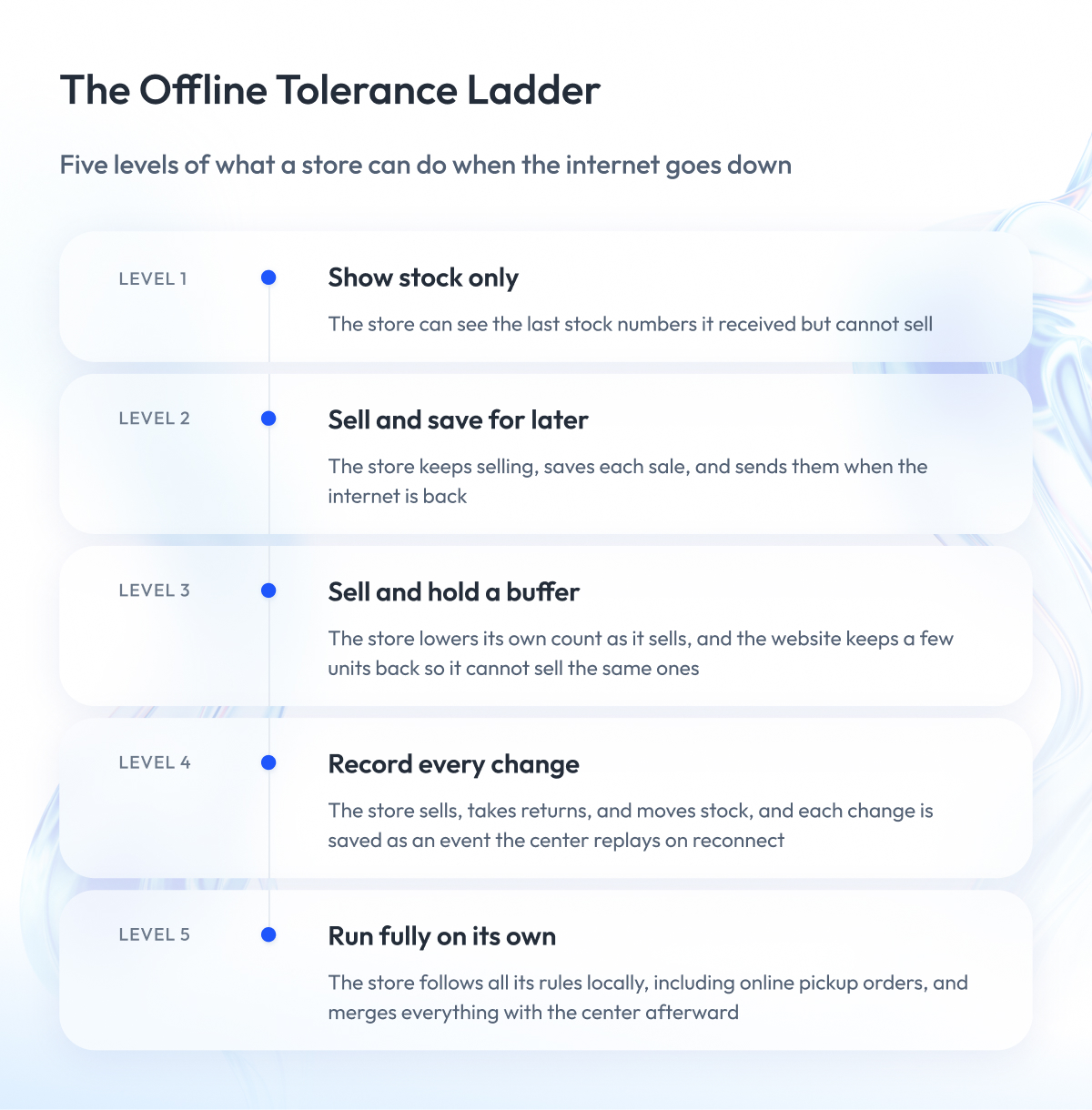
The first decision is how much authority the store has while it is offline. A store that can only show yesterday’s stock is safe and useless. A store that can sell, take pickup orders, and transfer stock on its own is useful and hard to merge back. We describe the options as a five-level ladder, and each retailer picks the level that fits its stores.
| Level | What the Store Can Do Offline | Oversell Risk | Reconciliation on Reconnect | Engineering Cost |
| 1. Read-only cached stock | See last known counts, no sales | None, sales stop | None | Lowest |
| 2. Queued sales | Sell, send sales later, local count unchanged | High, web still sees old count | Replay queue | Low |
| 3. Local decrement with buffer | Sell and lower local count, web keeps a buffer | Medium, limited by buffer | Replay queue, check buffer | Medium |
| 4. Local authority with movement ledger | Sell, return, transfer, adjust, all logged as events | Low | Automatic merge from ledger | Medium to high |
| 5. Full edge autonomy | Run all store rules locally, including pickup orders | Lowest, needs conflict rules | Rule-based merge | Highest |
Most enterprise chains land on level 3 or 4. Level 5 is for stores that lose connectivity for days, such as remote or cruise locations. Levels 1 and 2 are only acceptable where connectivity is good and outages are rare.
2. Save every sale locally and send it later
Whatever level you choose, the mechanics are the same. The POS saves every sale to its own database first, and the sale is complete as soon as it’s saved. A sync program sends the saved records to the center when the connection is up, and holds them when it is down. This is called store-and-forward.
Each record carries a unique transaction ID. When the connection returns and the sync program sends the backlog, some records may arrive twice because of retries. The center checks the ID, applies each record once, and ignores repeats. Without this check, a two-hour outage can double-count two hours of sales.
3. Sync stock movements and let each system derive its own count
The mistake we see most often on reconnect is copying the store’s stock count over the center’s count, or vice versa. Both systems changed the number during the outage, so whichever side copies last wins and the other side’s changes are lost.
The rule that works is to sync the movements themselves. The store sends “sold 2, returned 1, transferred 3 out,” and the center applies those movements to its own count. The center sends the store what happened online, and the store applies that too. Both systems end up with the same number, and every step that led there is on record. When the numbers still disagree, the shelf is the final judge, and a cycle count resets both.
We built our multi-region POS payments platform for a large retailer on this principle, recording every transaction as an event that survives a regional outage.
4. Keep a buffer so an offline store cannot oversell the web
If the website can sell 100% of a store’s stock, one large in-store purchase during an outage oversells the web before the center hears about it. The fix is a buffer. The website sees the store’s count minus a safety stock margin, and that margin covers what the store is likely to sell during an average outage.
Size the buffer per SKU using the blind-spot model from the first section. A promo hero item with four units on hand needs the whole four held back from the web during an outage. A long-tail item needs no buffer at all. Set an alert when a store’s available stock drops to around 15% of its normal level, so someone acts before the count reaches zero and the website goes dark for that item.
This gets the store through the outage. The next section covers what happens every night regardless, because push and store-and-forward together still miss a small share of changes.
Reconciliation, Drift, and Data Integrity
The previous section got the store through an outage. This section is about what happens on every normal day, because even when the internet is fine, the stock numbers in your systems slowly stop matching each other. The three terms in the heading describe that problem and its fix.
Inventory drift is the gap between the number a system shows and the number of units on the shelf. It grows every day from three sources:
- Updates that push silently dropped.
- Physical movements that no system recorded.
- Bugs in the sync logic.
Data integrity is the state where every system shows the same number and that number matches the shelf. Between syncs, the systems disagree for a moment, which engineers call eventual consistency, and the latency budget is how long that moment is allowed to last.
Reconciliation is how you protect it. It is a scheduled job that compares the counts across systems, finds where they disagree, and fixes the difference. Push and store-and-forward keep real-time inventory sync close to the truth, and reconciliation catches the 2–3% of changes they miss before the gap turns into an oversold order.
How reconciliation works
At a set time, a job reads the count for each SKU and location from the inventory master and from each connected system, then lists every mismatch. Small mismatches on slow-moving items are logged and corrected automatically. Larger ones are flagged for a person to check.
In practice, drift above about 0.5% on a SKU or a location is worth investigating, because at that level the cause is usually a broken integration or a physical loss, and it will keep growing. Below that, automatic correction is fine.
The shelf is the final judge
When two systems disagree, and neither can prove it is right, the physical count settles it. Cycle counts, where staff count a section of the store on a rotating schedule, are the only source of truth that does not depend on the sync working.
Feed cycle count results into the same event stream as sales, so a correction is recorded as a movement with a reason, and the systems apply it the same way they apply a sale.
Two more pieces that keep the data trustworthy
The first is a dead-letter queue. When the center receives an event it cannot process, for example, a sale for a SKU it does not recognize, the event goes into a holding queue, and someone is alerted. The event is never dropped. A dead-letter queue that grows past about 10 items is an early sign that an integration has broken.
The second is an audit trail. Every movement, including reconciliation corrections, is stored with its source, its timestamp, and its transaction ID. When a store manager asks why the system shows three units and the shelf has one, the trail shows exactly which events led there.
How often to reconcile
| Data Type | Reconciliation Cadence | Why |
| Store stock counts | Hourly | Catches push losses before they oversell |
| Web-visible availability | Every 15 to 30 minutes | Highest exposure to oversell |
| Warehouse and in-transit stock | Nightly | Changes in batches, low urgency |
| Cycle count corrections | As counted | Physical truth, applied immediately |
| Financial inventory value | Nightly or weekly | Reporting only, no customer impact |
Retailers that run this well see internal discrepancies in the low tens per month and resolve most within an hour, because the audit trail points straight at the cause. Our guide to e-commerce inventory management covers the operational side in more depth.
Reconciliation keeps the numbers honest inside the inventory system. The next section looks at the systems around it, and why connecting them one by one stops working.
Multi-System Integration in Retail: POS to ERP, OMS, E-Commerce, and Labor
Multi-system integration in retail means connecting every system that needs the stock count so a change in one reaches all the others. In a typical retailer, that is the POS, the inventory management system (IMS), the ERP, the order management system (OMS), the warehouse management system (WMS), the e-commerce platform, and labor scheduling.
Connecting them directly creates a separate job for every pair.
Seven systems need 21 connections, and adding one more means up to seven new jobs. We break down that math in our guide to point-to-point integration and its alternatives.. An integration layer replaces that mesh with a hub, and that is what keeps POS data system integrations scalable past a few dozen stores. Every system connects once, publishes its changes in a shared format, and reads what it needs. The event backbone from the Kafka section is that hub.
The second rule is that each number has exactly one owner. Only the owner may change it, and every other system reads a copy.
| System | Owns | Publishes | Reads |
| POS | Store sales and returns | Sale and return events | Stock count, prices |
| IMS | Stock count per location | Count changes | Sales, receipts, transfers |
| WMS | Warehouse stock | Receipts, shipments | Purchase orders, transfers |
| OMS | Online orders, fulfillment choice | Order allocations | Available-to-promise per location |
| ERP | Purchasing and finance | Purchase orders, cost | Sales totals, stock value |
| E-commerce | Online catalog and cart | Online sales | Available-to-promise |
| Labor scheduling | Staff shifts | Shift plans | Sales and fulfillment forecasts |
How to integrate POS with inventory management software
To integrate POS with inventory management software, connect both to the event backbone and let them talk through events, never through each other’s databases. In practice, that takes four steps:
- The POS publishes each sale and return as an event with a transaction ID, store, SKU, and quantity.
- The IMS consumes the event, lowers or raises the count for that location, and publishes the new count.
- The OMS and e-commerce platform read the new count and update availability.
- A reconciliation job compares POS totals with IMS counts on a schedule and flags any gap.
The POS keeps its own local count for offline selling, and the IMS keeps the network-wide count. Neither overwrites the other, which is what makes the offline behavior from earlier possible.
Why labor scheduling belongs on the same backbone
Labor scheduling belongs on the same backbone because staffing needs are driven by the same events as stock: sales, deliveries, and online orders. A retail management system that integrates POS inventory and labor scheduling reads both from one stream.
A store expecting 40 pickup orders tomorrow needs more people at the counter, and a store that just received a large delivery needs more people on the floor. When the scheduling system reads those events as they happen, it plans shifts from today’s data. In a separate nightly export, it plans from yesterday’s data.
Our POS integration services cover this full map. The next section looks at the one system in that table retailers ask about by name: the e-commerce platform.
Commerce-Platform Sync: Synchronization Uptime and Data Integrity for Magento and Others
Syncing with an e-commerce platform such as Magento, Shopify, or commercetools differs from syncing with your own systems in one way. You don’t control the platform, so its API limits, caching, and webhook behavior set the rules, and your sync service has to work around them. In a Magento POS architecture, that means treating the platform as one consumer of the inventory master, never as the master itself.
Four things break most often:
- Rate limits. Every platform caps API calls per minute. A 500-store network pushing every stock change as its own call hits that cap on the first busy morning. Batch changes per SKU and send the latest count, and keep sub-second updates only for the fast tiers of the latency budget.
- Cache and index delays. Most platforms cache product pages and rebuild search indexes on a schedule. Your sync can succeed, and the storefront still shows the old count for minutes. Measure latency at the storefront, where the customer sees it, and trigger cache invalidation for high-velocity SKUs.
- Webhook reliability. Platform webhooks for online orders are the same silent-failure risk described earlier. Reconcile online orders against the platform’s order API every 15 to 30 minutes, and treat a gap as an incident.
- The sync service itself. If it goes down, the platform keeps selling from stale numbers. Give it a synchronization uptime target of at least 99.9%, run it in more than one region, and alert on sync lag before customers notice.
Data integrity here means the count the platform shows and the count the inventory master holds match within the latency budget. A reconciliation job that compares them per SKU, at the cadence from the reconciliation table, is the only way to know that they do.
Our guide to e-commerce integration with ERP covers the platform side in more depth. The next section brings everything together into a choice by network size.
Choosing an Architecture by Network Size and Connectivity
The right architecture for real-time inventory sync depends on two things: how many stores you have and how reliable their connections are. Orders per day, which most sizing guides use, tells you almost nothing about a store network, because a 300-store chain on good fiber and a 40-store chain on rural cellular need different designs even at the same sales volume.
| Network Profile | Connectivity | Sync Pattern | Offline Level | Reconciliation |
| Single store or a few | Any | Polling or platform webhooks | 2 | Nightly |
| 10 to 50 stores | Reliable | Webhooks plus scheduled sync | 2 or 3 | Hourly |
| 10 to 50 stores | Unreliable | Store-and-forward plus webhooks | 3 | Hourly |
| 50 to 200 stores | Reliable | Event backbone, direct producers | 3 | Hourly, web every 30 minutes |
| 50 to 200 stores | Unreliable | Event backbone, store-and-forward | 3 or 4 | Hourly, web every 15 minutes |
| 200 to 1,000+ stores | Any | Event backbone, store-and-forward, gateway | 4 | Hourly, web every 15 minutes |
Two things stand out. First, a 10-store chain with reliable connectivity does not need an event platform. Webhooks and a nightly reconciliation job give it the same accuracy for a fraction of the cost, and the budget is better spent on cycle counts. Second, above about 200 stores the answer stops depending on connectivity, because at that size some stores are always offline, and the architecture has to assume it.
Use the table as a starting point, then adjust for what your stores sell. A fast-fashion chain with promo-driven spikes moves up a row, and a furniture retailer with slow stock can move down one.
Monitoring: SLOs and What to Alert On
Once real-time inventory sync is running, you need a way to know it is broken before a customer does. That takes two things. A target for how fast and how complete the sync should be, and alerts that fire when it falls short.
The target is called an SLO, a service level objective. It is a plain sentence like “95% of store stock changes reach the website within 5 seconds.” Write one for each speed tier from the first section. Then measure the six signals below and alert when they cross the line.
| What to Measure | Alert When | What It Usually Means |
| How long updates take to arrive | Slower than the SLO | The backbone or a consumer is backed up |
| Share of updates delivered | Below 98% | Webhooks or the gateway are failing |
| Updates the center could not process | More than 10 waiting | A broken mapping or an unknown SKU |
| Gap between systems at reconciliation | Above 0.5% | An integration broke or stock was lost |
| Time since a store last checked in | 15 minutes | The store is offline and its queue is growing |
| Oversold orders | Any | The buffer is too small or the sync too slow |
The last-check-in signal deserves attention. A store that has been silent for six hours has six hours of sales waiting to merge, and the website has been selling that store’s stock the whole time. You want to know which stores are dark before their queues come back.
Add one check that no dashboard shows. Jumpmind, a POS vendor, frames it as whether a store associate can act on the number they see. If the app says three units and associates have learned to walk to the shelf anyway, the sync has failed no matter what the metrics say. Our retail data analytics work usually starts by measuring that gap.
Build vs Buy: Where Custom Retail POS and Inventory Management Software Development Fits
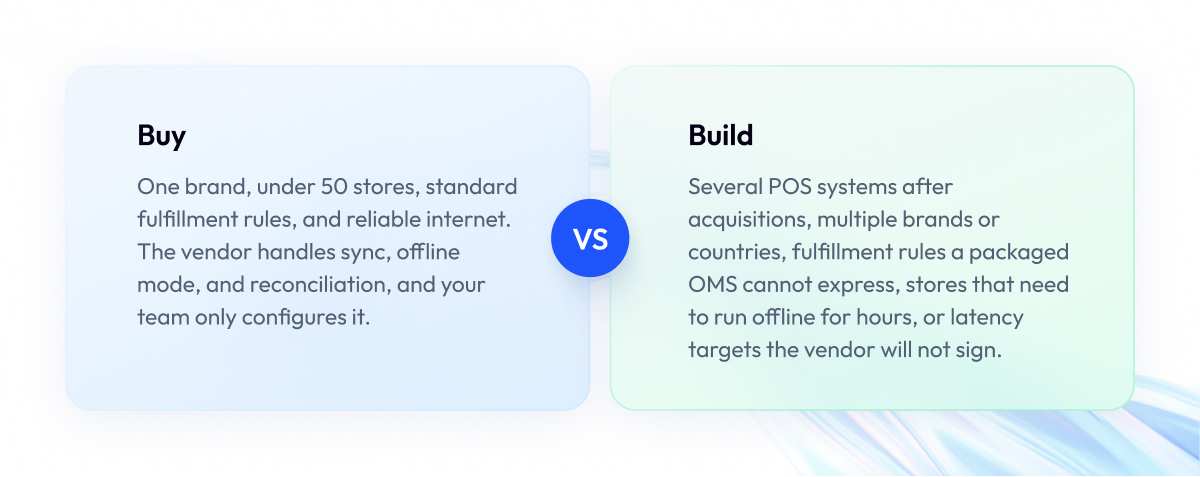
The choice is between a packaged cloud POS with built-in inventory sync and a custom integration layer built around whatever POS you run. The packaged option is right for most chains, and the custom option is right when the packaged sync cannot model your business.
When to buy
Buy when you have one brand, under about 50 stores, standard fulfillment rules, and reliable connectivity. A packaged cloud POS handles sync, offline mode, and reconciliation out of the box, and your work is configuration. Building your own layer here costs more and delivers the same result.
When to build
Build a custom integration layer when one or more of these apply:
- Several POS systems across the estate, often after acquisitions, all feeding one inventory master.
- Multiple banners or countries with different fulfillment, tax, and stock ownership rules.
- Fulfillment logic the packaged OMS cannot express, such as ship-from-store priority by margin.
- Stores with poor connectivity that need level 4 offline behavior, which few packaged products support.
- Latency or compliance targets the vendor will not put in a contract.
Building does not mean replacing the POS. You keep it and build the layer around it: the event backbone, the store-side queue and sync program, the canonical data model, and the reconciliation jobs. That layer is what custom retail POS and inventory management software development means in practice.
We build it for enterprise retailers as part of our custom POS and inventory software development work, from the store agent to the Kafka backbone.
The real-time customer data pipeline we built for Zalando runs on the same event-driven principles at a much larger scale.
Final Word
Designing real-time inventory sync for a store network takes longer than picking a tool. You have to set a latency budget for each kind of data, decide how much each store may do on its own when its internet goes down, and build the reconciliation that catches what push misses.
The effort pays back on the first busy weekend. A network that oversells during outages, double-counts sales on reconnect, and sends managers to recount shelves costs more in canceled orders and lost trust than the integration layer ever did.
Start with the two tables that matter most: the latency tiers and the decision matrix. Place your network in a row, pick the offline level your stores need, and size the buffers with the blind-spot model before you write a line of code.
If you want a second opinion on that design, we are ready to review your POS estate, connectivity profile, and integration targets and help you choose the architecture before the build starts.
Questions You May Have
What is real-time inventory synchronization in retail?
Real-time inventory synchronization is keeping the stock count consistent across POS, inventory, ERP, and e-commerce systems within a latency budget set per data type, from under a second for checkout to hours for reporting.
How often should inventory sync between POS and e-commerce?
Store sales should reach the e-commerce platform within seconds through push, backed by a reconciliation check every 15 to 30 minutes for web-visible availability.
What happens to inventory when a store's internet goes down?
The POS keeps selling from its local count, saves every sale to a local queue, and sends the queue to the center when the connection returns, while a buffer stops the website from selling the same units.
Is Kafka a good choice for POS integration?
Kafka is a good choice for the central backbone that orders and distributes stock events, and a poor choice as a client inside stores with unreliable internet, where a local queue and sync program work better.
How do you prevent overselling between stores and online?
You prevent overselling by pushing store sales within seconds, holding a per-SKU safety stock buffer back from the website, and reconciling counts on a schedule to catch the changes push missed.
How do you integrate POS with inventory management software?
You integrate POS with inventory management software by having the POS publish each sale as an event with a unique ID and the inventory system consume it, update the location count, and publish the new count to every other system.
Webhooks or polling for inventory sync?
Webhooks for anything that affects checkout or store stock views, polling only for low-volume feeds under about 50 orders a day and as a backup when webhooks fail.
How long does it take to build a real-time inventory sync layer?
The timeline depends on how many POS systems you run, how many downstream systems need the count, which offline level your stores require, and whether an event backbone already exists, so a scoping review comes before any estimate.
How do you sync inventory across hundreds of stores?
You sync inventory across hundreds of stores with a local queue in each store, a gateway that feeds an event backbone such as Kafka, and scheduled reconciliation that compares every store’s count with the inventory master.
Is Kafka Connect reliable for POS with intermittent internet?
Kafka Connect is reliable in the data center and unreliable on a store connection that drops daily, so run it at the center and use store-and-forward at the edge.
What does multi-system integration in retail involve?
Multi-system integration in retail involves connecting POS, inventory, ERP, OMS, WMS, e-commerce, and labor scheduling through one integration layer, with each system owning exactly one set of data and reading everything else as a copy.
What is inventory drift and how much is acceptable?
Inventory drift is the gap between a system’s count and the units on the shelf, and drift above about 0.5% on a SKU or location is worth investigating because it usually means a broken integration or a physical loss.