



Quick Summary
- Point-to-point integration links each pair of systems directly through an application programming interface (API) call, a script, a file transfer, or a scheduled job.
- Connections grow with the square of the system count, so 10 systems that all exchange data can need up to 45 links, while a hub needs 10.
- The main alternatives are a hub-and-spoke message broker, an enterprise service bus, an integration platform as a service (iPaaS), and an event stream hub.
- Migration works best in stages, with events for one business area running alongside the old jobs until every reading system has switched over.
- With three or fewer systems that rarely change, direct integration usually costs less because a hub saves no connections and adds a platform to run.
Point-to-point integration means connecting each system directly to every other system it needs data from. Most enterprises start this way because it is quick and cheap. The trouble comes with growth, when ten systems that all exchange data can need up to 45 separate links.
We saw where that leads in one of our Pandora projects. Its systems exchanged data through scheduled transfers, and the connections were often built separately for each market. We replaced them with Pandora’s cloud integration hub, built on Kafka, that shares updates as they happen. It reduced data latency from up to 36 hours to milliseconds.
Teams that grow their integrations this way tend to hit the same problems:
- Tangled direct links that nobody fully maps.
- Data that arrives hours late.
- Integrations that teams are afraid to change.
That is why we wrote this guide.
It covers each of these problems. We start with how point-to-point integration works, so you can see and map the links you have. Then we look at its pros and cons and at the cases where direct links are still the right choice.
Next, we compare the alternatives and provide a step-by-step plan to move to a setup where data arrives the moment it changes. We also show how this move worked on the Pandora project.
By the end of this article, you will know which of your links are worth keeping and how to replace the rest without breaking what works for you.
What Is Point-to-Point Integration?
We gave a short definition in the introduction, but the term needs a closer look. The details explain why teams choose this approach and why it gets harder to manage over time.
Point-to-point integration means no central place manages how data moves between systems. Whenever two systems need to share data, engineers build a separate link just for that pair. Each link knows only those two systems and handles everything on its own:
- Which fields in one system match which fields in the other.
- When the data should move.
- Which passwords or keys it uses to get access.
- What to do if something goes wrong.
Think of an office where every computer is wired straight to every other computer instead of to one network switch. With a handful of machines, the cables are easy to follow. With dozens, nobody can say which cable goes where.
Integrations behave the same way. All the rules live inside the links themselves, so six systems that all exchange data can need up to 15 separate links, each with its own mappings, schedule, and credentials.
How point-to-point integration works
Most direct links are built in one of four ways:
- Direct API calls: One system calls another system’s application programming interface (API) when something happens, such as a new order or a price change.
- Custom scripts: A small program inside one system reads data from another system or writes data into it.
- File transfers: One system exports a data file to a shared server on a schedule, and the receiving system picks it up.
- Scheduled batch jobs: A job collects changes and moves them in bulk every few hours or overnight.
A simplified example shows how this plays out. An enterprise resource planning (ERP) system sends a nightly stock file to the warehouse software and another nightly file to the online store. When the customer relationship management (CRM) platform also needs stock data, someone writes a third job with its own format and schedule.
Each step made sense at the time, but the company now maintains three separate copies of the same stock logic. Our guide on how e-commerce integration with ERP works covers this setup in more detail.
Direct links like these work from day one, so they deserve a fair look before we get to their problems.
Advantages of Point-to-Point Integration
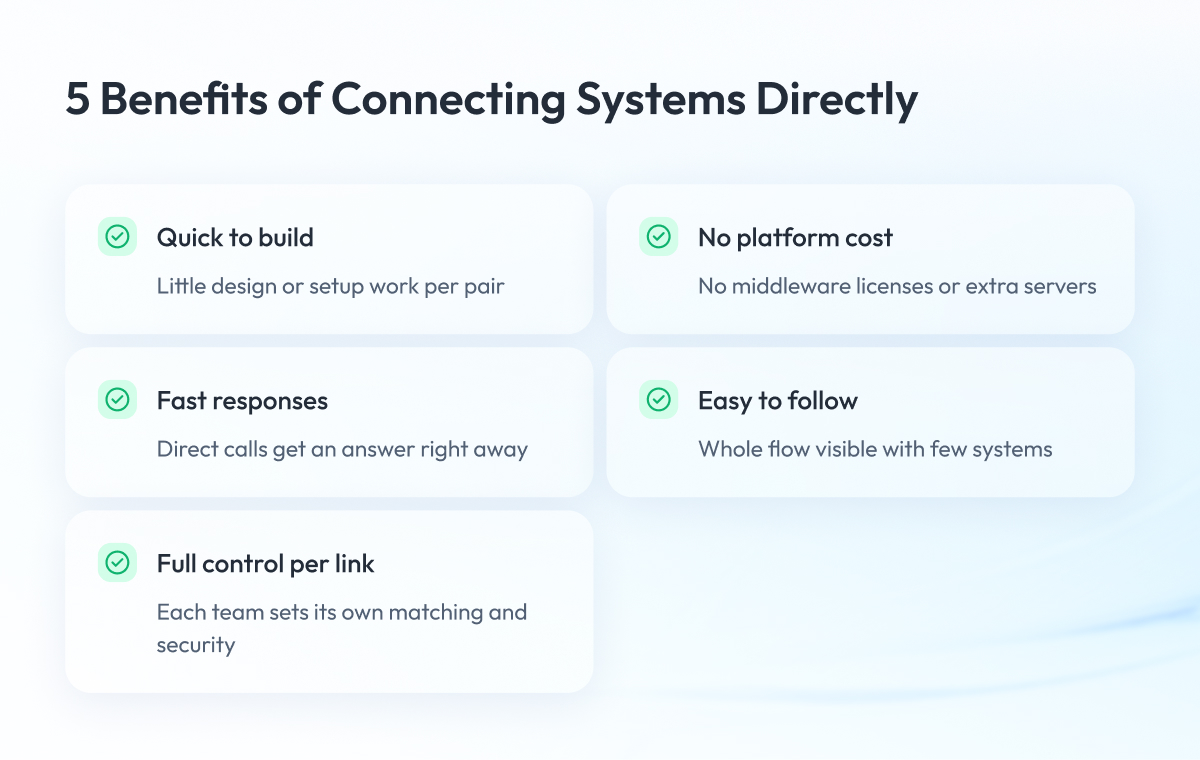
Point-to-point integration is the fastest and cheapest way to connect two systems. You don’t need an extra platform, data takes the shortest path, and one team can build, test, and own the connection from start to finish. With three systems or fewer, a hub doesn’t even reduce the number of connections.
The main benefits of this approach are:
- Quick to build: Connecting a single pair of systems takes little design or setup work.
- No platform cost: You don’t pay for middleware licenses, extra servers, or a team to run a platform.
- Fast responses: When one system calls another directly, it gets an answer right away.
- Easy to understand: While only a few systems are connected, anyone can follow the whole flow.
- Full control per link: Each team decides how data is matched and secured on its own connection.
These strengths explain why almost every enterprise starts with direct links. Costs show up later as the number of systems grows.
Disadvantages of Point-to-Point Integration: Why It Breaks at Scale
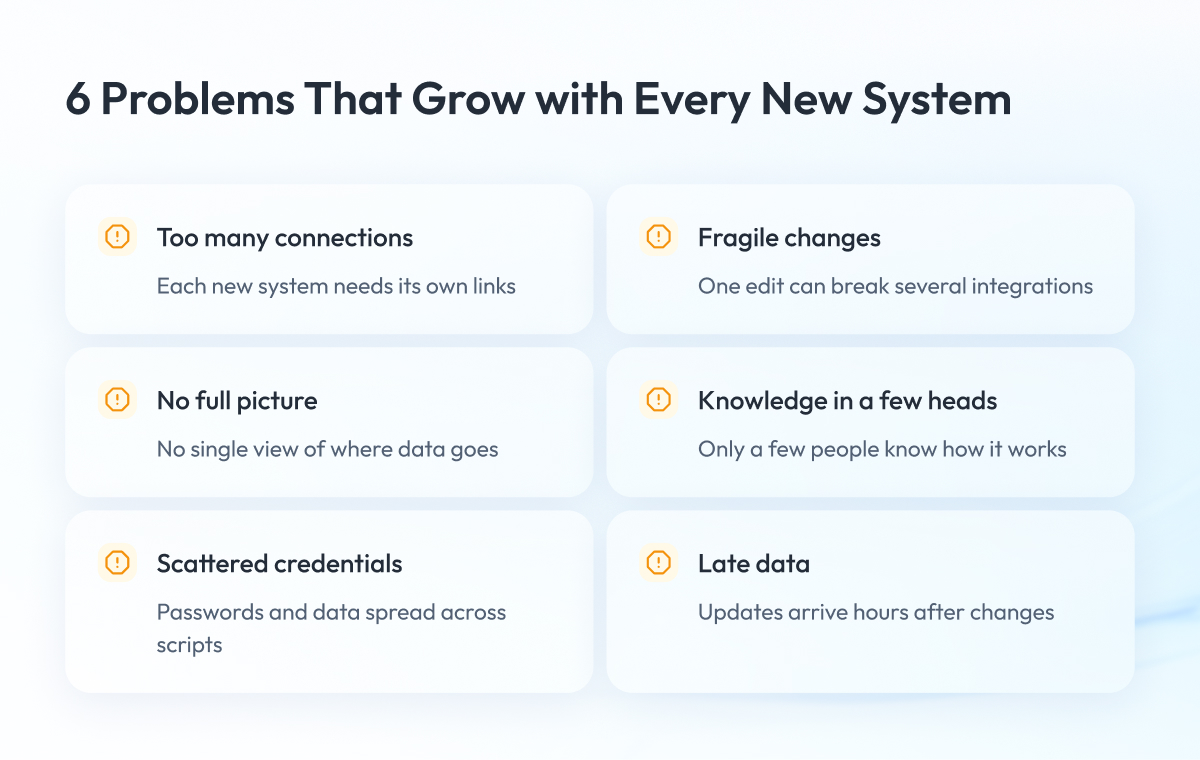
These are the main disadvantages of point-to-point integration:
- Every new system adds more connections.
- One change can break several links at once.
- No one sees the full flow between systems.
- Only a few people understand how the integrations work.
- Passwords and sensitive data end up in many places.
- Information arrives hours late.
Every new system adds more connections
With direct links, each new system may need a connection to every system you already have. The total grows with the square of the number of systems. Ten systems that all exchange data can need up to 45 links, while a hub, a shared layer that each system connects to once, needs only 10.
Well-known sources give the same math. Enterprise Integration Patterns counts 30 one-way translators for six applications without a shared data model and 12 with one. The Large Scale Integration Pattern from the U.S. National Institutes of Health (NIH) shows a hub cutting N×(N−1) connections to N×2.
We used both formulas to build the Point-to-Point Connection Count Table for 2 to 50 systems:
| Systems (n) | Two-Way Links Without a Hub, n(n−1)/2 | Hub Connections, n | One-Way Interfaces Without a Hub, n(n−1) | One-Way Interfaces Through a Hub, 2n | Next System Adds (Direct / Hub) |
| 2 | 1 | 2 | 2 | 4 | Up to 2 / 1 |
| 3 | 3 | 3 | 6 | 6 | Up to 3 / 1 |
| 4 | 6 | 4 | 12 | 8 | Up to 4 / 1 |
| 5 | 10 | 5 | 20 | 10 | Up to 5 / 1 |
| 6 | 15 | 6 | 30 | 12 | Up to 6 / 1 |
| 10 | 45 | 10 | 90 | 20 | Up to 10 / 1 |
| 20 | 190 | 20 | 380 | 40 | Up to 20 / 1 |
| 50 | 1,225 | 50 | 2,450 | 100 | Up to 50 / 1 |
The table assumes every system exchanges data with every other, which is the worst case. Most companies have fewer links, so count your own. The table counts connections only and leaves out platform, license, and running costs.
Each hub connection also needs an adapter, a small piece of code that translates data for the hub, and the hub itself is one more platform to run. We based the calculation on formulas from Enterprise Integration Patterns (Canonical Data Model) and NIH Enterprise Architecture (2006).
At three systems or fewer, a hub saves nothing. Six systems save 9 links, and 20 systems save 170.
Most large companies run far more than 20 systems. A 2026 MuleSoft survey of 1,050 information technology (IT) leaders found that “the number of apps in enterprises grew from 897 to 957 year over year, with only 27% of them integrated together.”
One change can break several links at once
Each link keeps its own copy of the rules for matching data. When someone renames a field or upgrades the ERP system, you have to find, fix, and retest every link that uses that data. Miss one, and a report or an order flow breaks.
This work takes significant engineering time. In the MuleSoft Connectivity Benchmark 2025, a vendor survey, MuleSoft reports “IT teams spending 39% of their time creating custom integrations like automations.”
No one sees the full flow between systems
No single place shows which system sends what data to whom. When something fails, the problem often shows up hours later as a wrong number in a report or a stock count. Your team then has to dig through logs on several servers to find the cause.
Only a few people understand how the integrations work
One engineer usually built each link, often years ago. When that person leaves, the rest of the team has to read the code to understand what the link does. Over time, people avoid touching the integrations because no one is sure what will break.
Passwords and sensitive data end up in many places
Every link keeps its own passwords or access keys and its own copy of the data. Sensitive fields, such as customer details, pass through many files and scripts, so it becomes hard to track who has access to what.
A shared layer lets you protect data in one place. Pandora’s integration hub, for example, replaces sensitive data with tokens through a tokenization service.
Information arrives hours late
Many direct links run on a schedule, often once a night. As a result, your operations, analytics, and artificial intelligence (AI) tools work with yesterday’s data. This delay is often what pushes teams toward real-time data integration.
Pandora faced this problem before the project. Its scheduled links were scattered across systems, leading to slow, inaccurate data and high maintenance costs. The same issue appears between point-of-sale (POS) systems and back-office software, as our guide on integrating a wholesale POS system with ERP explains.
All of these problems get worse as you add systems. In a small, stable setup, most of them never show up, and direct links can be the right choice.
When Point-to-Point Integration Is Enough
Direct links work well when you connect only a few systems, you don’t plan to add more, and the way they share data rarely changes. For example, an ERP system that sends orders to a warehouse system doesn’t need anything in between.
The numbers back this up. Two systems need one direct link but two connections to a hub. Three systems need three connections either way. With three systems or fewer, a hub only adds one more platform to run.
Direct links also make sense in these cases:
- A temporary bridge while you move to a new setup.
- A request that needs an answer right away, such as checking a price or stock level at checkout.
Microsoft’s architecture guide also names simple request-and-response calls as a case where systems that pass updates through a shared hub are a poor fit.
Revisit the decision when your setup changes. If you add a fourth system, launch in a new market, or another team needs the same data, direct links will soon cost more than they save. At that point, it helps to know the alternatives.
Alternatives to Point-to-Point Integration
There are four main alternatives to point-to-point integration:
- Hub-and-spoke message broker: Every application connects to one central broker, which routes and converts data for the rest.
- Enterprise service bus (ESB): One common bus routes, converts, and coordinates messages across the company.
- Integration platform as a service (iPaaS): A vendor’s cloud platform with ready-made connectors, where you configure flows instead of writing code.
- Event stream hub: Each system announces business events, such as “order placed,” in one central stream, and any app that needs them listens in.
A broker, a service bus, and an event stream hub all cut ten systems from up to 45 direct links to 10 connections. With an iPaaS, the count depends on whether flows are built for each pair of systems. The bigger difference is where the integration logic lives and who has to change it.
The table compares all five approaches. Definitions follow the Message Broker pattern, IBM’s description of an ESB, and IBM’s definition of iPaaS.
| Approach | How Systems Connect | Connections for n Systems | Where Logic Lives | Main Risk | Fits When |
| Point-to-point | Each pair linked directly | Up to n(n−1)/2 | Inside every link | Link count grows with each system | Three systems or fewer, little change |
| Hub-and-spoke broker | Each system to one central broker | n | In the broker | Broker becomes a bottleneck | Many systems, one team owns the logic |
| Enterprise service bus | Systems share one bus for routing and conversion | n | In the bus | Bus team becomes a queue for changes | Many older systems, central control |
| iPaaS | Vendor cloud platform with ready connectors | Depends on flow design | In the platform’s flows | Cost and effort per new system depend on flow design and pricing | Mostly cloud apps, configuration over code |
| Event stream hub | Systems publish events to a central stream | n | In the systems and their adapters | Data briefly out of sync, event formats to manage | Many systems needing the same fresh data |
n is the number of systems, with one connection each. Every connection still needs an adapter.
Most guides on this topic come from integration-platform vendors, so we describe iPaaS in general terms. When you evaluate one, ask how it adds a new system that needs existing data and how its pricing grows as you add more.
Broker hub vs event stream hub: what is the difference
A hub-and-spoke broker sits in the middle and does the routing and converting itself. It is easy to manage at first, but every change goes through the broker and its team, and the Message Broker pattern warns that the broker can become a bottleneck.
An event stream hub works differently. Systems that send data don’t need to know who will use it, and a new system can start listening without changing the senders, as Microsoft’s architecture guide explains. Events also stay stored after they are read, so a new system can replay past events to catch up, according to the Apache Kafka documentation.
The logic stays with the systems at each end. The logic stays with the systems at each end. In 2014, James Lewis and Martin Fowler summed up this idea as “smart endpoints and dumb pipes.”
This design has its own trap. In 2017 and 2018, the Thoughtworks Technology Radar put “recreating ESB antipatterns with Kafka” on Hold. Its point was that one central team owning every connection brings the bottleneck back, even on Apache Kafka, a popular platform for this kind of hub.
If an event stream hub fits your needs, the next question is how to move to it without stopping the business.
How to Replace Point-to-Point Integrations Step by Step
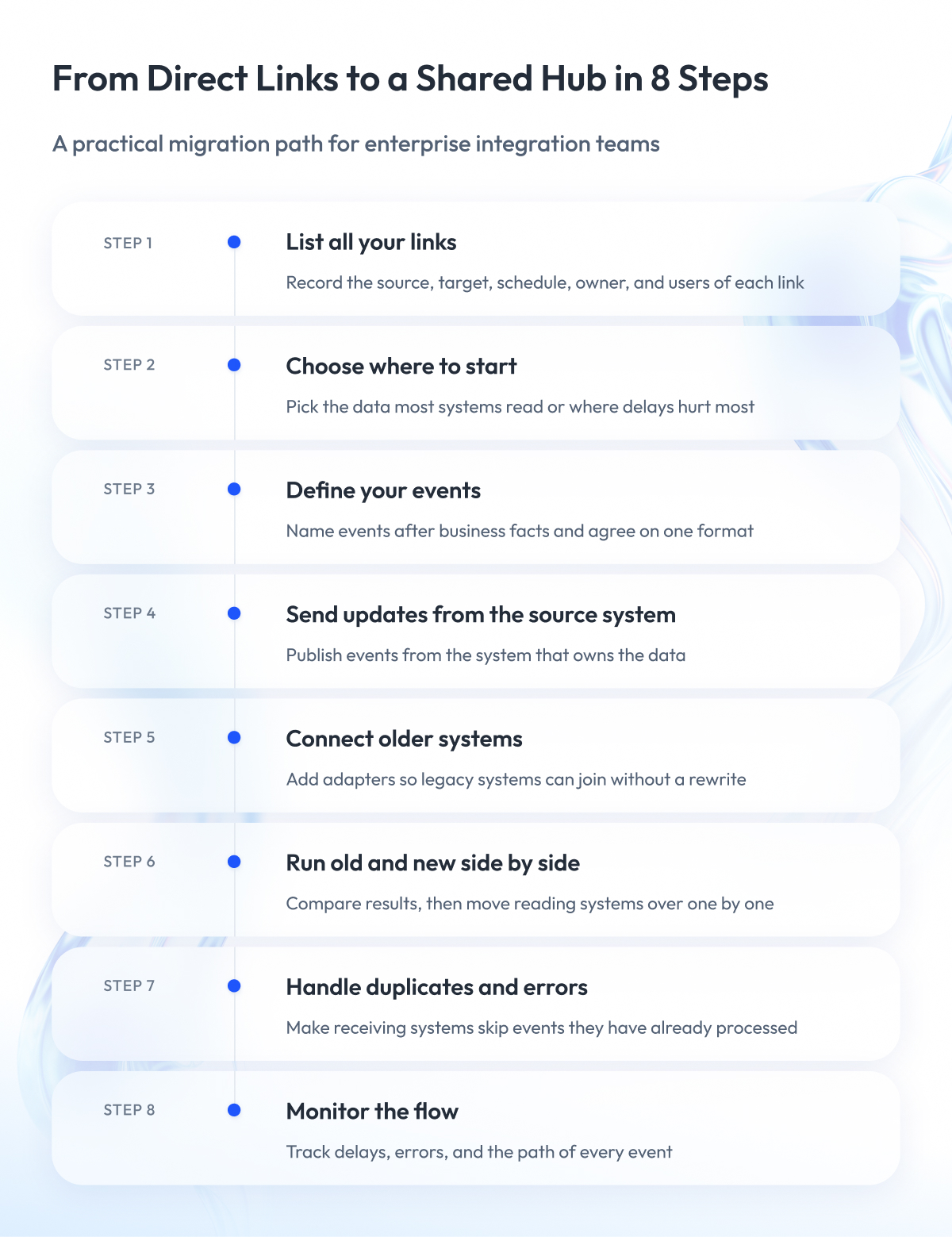
Replace point-to-point integrations one business area at a time, such as orders or stock. For each area, define the events, send them from the system that owns the data, and run them alongside the old scheduled jobs. Then move the systems that read this data over one by one, and switch off each old job once nothing uses it.
Martin Fowler calls this the strangler fig pattern, after a plant that slowly grows around a tree until it replaces it. The new setup grows around the old one until you can turn the old one off.
We built the eight steps below from published patterns and product documentation.
Step 1 – List all your links
For each link, write down where the data comes from, where it goes, when it runs, what it carries, who owns it, and who uses it. Then compare the total with the connection count table.
Most teams find more links than they expected, and some that nobody owns. The list also shows which data has the most readers, which helps with the next step.
Step 2 – Choose where to start
Start with the data that the most systems read or where delays cost the most. Orders, stock, and prices are common examples, but your list from step 1 should make the call.
An area with many readers pays back the effort fastest, because every system you move cuts one more old link.
Step 3 – Define your events
Name each event after something that happened in the business, such as OrderPlaced or StockAdjusted. Keep one shared data format for all systems, as the Canonical Data Model pattern recommends.
Store each format in a schema registry, a catalog that checks every change. Confluent Schema Registry checks backward compatibility by default, so systems on a new version can still read older events. You can document event streams in AsyncAPI, now at release 3.1.0, and use CloudEvents as an optional standard envelope.
The Cloud Native Computing Foundation (CNCF) has treated CloudEvents as a mature project since January 2024.
Step 4 – Send updates from the source system
One option is a transactional outbox, a small table where the system saves the event in the same step as the data change. A relay then publishes the event, and it can sometimes send the same one twice.
The other option is change data capture, which watches the database for changes. Debezium streams each table’s changes in order, and its Outbox Event Router turns outbox rows into business events.
Step 5 – Connect older systems
Older systems often can’t publish events on their own. An anti-corruption layer translates between the old system’s format and the new one, so these systems can join without a rewrite.
Our modernization guide shows how to combine a strangler fig with an anti-corruption layer.
Step 6 – Run old and new side by side
For a while, both paths deliver the same data. Compare the results until they match.
Then move one reading system to events, watch it, and move the next. Turn off each old job only after the last system that used it has moved.
Step 7 – Handle duplicates and errors
Kafka delivers each event at least once by default, so the same event can arrive twice, as Confluent’s guide to delivery semantics explains. Kafka’s exactly-once mode, added in Kafka Improvement Proposal (KIP) 98, covers only writes inside Kafka.
An ERP or warehouse system on the receiving end therefore has to skip events it has already processed. Without this check, one order can be booked twice.
Step 8 – Monitor the flow
Track how far behind each reading system is, how often errors happen, and how to find a single event across systems.
At Pandora, this became the Nexus Management System. It keeps event history and lets the team find and check any single event.
Most of this work falls on your data platform team. Our team builds real-time data pipelines and integrations for companies making this move. If you are comparing partners, our review of legacy software modernization companies lists what to check.
The Pandora project shows how these steps play out at a large scale.
How Pandora Replaced Point-to-Point Integrations with Business Events
Pandora sells products in over 60 countries on 6 continents through more than 7,000 points of sale, and its systems had to share data across all of these markets.
Before the project, much of the data moving between systems couldn’t be reused. Every new point-to-point integration became a long, costly project, and each new market made the setup harder to manage.
We built Nexus, a custom cloud-based integration hub on Apache Kafka. It connects the systems that produce data with the systems that use it.
Our team:
- Replaced the scheduled point-to-point links with reusable business events.
- Added adapters, schema management, duplicate checks, tokenization, monitoring, and site reliability engineering (SRE) practices.
- Connected ERP, CRM, warehouse, transportation, reporting, and other systems.
The results:
- Data latency reduced from up to 36 hours to milliseconds.
- Improved data accuracy and reuse.
- Increased scalability and fault tolerance.
- Created a real-time data foundation for omnichannel operations, analytics, and AI.
This work included several steps from the previous section, including adapters, shared event formats, duplicate checks, and monitoring. You can read the full story on the page about Pandora’s cloud integration hub. Retail teams connecting stores can also look at our POS integration services.
Trade-Offs of an Event Stream Hub
The Pandora results show what an event stream hub can deliver. A hub also has its own costs, so weigh them before you plan a move like this.
In short, the hub swaps a mesh of direct links for one shared platform. You gain apps that don’t depend on each other, a replayable event history, and fresher data.
The costs to plan for:
- Data briefly out of sync: Apps receive a change a moment after it happens, which Microsoft’s architecture guide treats as a deliberate trade-off.
- Order kept only within one slice: Kafka splits each stream into partitions and keeps events in order only inside each one, according to the Kafka 4.3 documentation.
- Harder-to-follow flows: No single program shows the whole path of the data, as Martin Fowler noted in 2017.
- Shared formats as a new tie: Every sender and receiver must agree on what each event means, a point Gregor Hohpe made in 2024. Pandora’s hub keeps these definitions in a Central Schema Registry.
- A possible new bottleneck: When one central component coordinates the flow, Microsoft warns that “the event mediator can become a bottleneck or a reliability concern.”
- A platform to operate: Someone has to run and monitor the servers behind the hub.
Beyond the simple request-and-response calls covered earlier, Microsoft names two more cases where this design fits poorly. One is a process where every system must see the same data at the same moment. The other is a team without experience in distributed systems.
Use the hub where many systems need the same fresh data, and keep direct calls where they still work best.
If you build the hub on Kafka 4.x
Many teams build this kind of hub on Apache Kafka. Kafka 4.0, released in March 2025, is the first major version that runs without ZooKeeper, a separate service that older versions needed to coordinate their servers.
Kafka 3.9 is the last version line that supports ZooKeeper. If your setup still uses it, you have to move to Kafka’s built-in mode, KRaft, before upgrading to 4.x. According to the Kafka upgrade documentation, that move works from version 3.3 or later, with 3.9 recommended.
Kafka 4.x servers and Kafka Connect need Java 17, while client libraries and Kafka Streams need Java 11. Queues for Kafka, also called share groups, became production-ready in version 4.2 in February 2026, after early access in 4.0.
If you run on Microsoft Azure, Azure Event Hubs is a separate Microsoft service with a Kafka-compatible endpoint and one more way to run such a hub. For stores with unreliable connections, see our article on real-time inventory sync across retail store networks.
Final Word
Moving away from point-to-point integration takes time. You have to map every link, get several teams to agree on event formats, and keep the old and new paths running side by side until the numbers match. For a while, it can feel like you are maintaining two setups at once.
But this work is worth it.
Every system you connect directly adds more links to fix, more knowledge locked in a few heads, and more data that reaches the business late. With a shared hub, each new market or app connects once, and every team works with fresh data.
Start with your own count. Keep the direct links that will stay small, pick the business area where late data hurts most, and move it to events while the old jobs still run beside it. One area done well is enough to show the rest of the company that the approach works.
If you want a partner for that first step, our team can help you map your current links, choose where to start, and plan a move that keeps your business running.
Questions You May Have
What is the difference between point-to-point integration and an API?
An API is the interface a system offers to others, while point-to-point integration describes how systems are wired, so a direct API call between two systems is one point-to-point link, and the same API behind a hub can serve many systems without new direct links.
Why is point-to-point integration bad?
It gets costly as you add systems, because links grow with the square of the system count, each change touches several of them, and scheduled jobs leave data hours old, although for three systems or fewer it is often the simplest option.
What is the difference between point-to-point and hub-and-spoke integration?
Point-to-point integration links each pair of systems directly, while hub-and-spoke integration connects every system once to a central hub, so ten systems need up to 45 direct links or 10 hub connections.
Point-to-point integration vs middleware or an ESB: what is the difference?
Middleware sits between systems so they stop calling each other directly, and an enterprise service bus is a type of middleware that handles routing, conversion, and coordination in one shared bus, which can turn the bus into a queue for every change.
What is an integration hub?
An integration hub is a shared layer that every system connects to once through an adapter, and in an event stream hub, systems publish business events that others can subscribe to without any change to the senders.
Is Kafka an event-driven architecture?
Kafka is an event streaming platform, and event-driven architecture is the design style it is often used to build, because Kafka keeps events in a durable log, in order within each partition, and since version 4.0 it runs without ZooKeeper.
When should you use an event stream hub instead of direct links?
Use one when several systems need the same data soon after it changes, new systems keep joining, or you need to replay past events, and keep direct calls for simple request-and-response or for cases where every system must see the same data at the same moment.
What is an example of point-to-point integration?
A typical example is an ERP system that sends a nightly stock file to the warehouse software and a second file to the online store, with a third job added later when the CRM needs the same data.
What does point-to-point integration architecture look like?
In a point-to-point integration architecture, every system has a direct link to each other system it shares data with, so a diagram of six such systems shows up to 15 crossing lines, compared with six lines into one hub.
What is the opposite of point-to-point integration?
The opposite is a shared integration layer, such as a hub-and-spoke broker, an ESB, an iPaaS, or an event stream hub, where each system connects once.
Point-to-point integration vs iPaaS: which should you choose?
Choose point-to-point integration for three or fewer systems that rarely change, and consider an iPaaS when you run many cloud apps and prefer configuring flows over writing code, after checking how it adds new systems and how its pricing scales.
How do you move from batch to real-time integration?
Move one business area at a time by sending events from the system that owns the data, running them alongside the old scheduled jobs, and switching each job off once no system reads it. The same staged approach also applies when you replace an enterprise service bus.