


Quick Summary
- A retail CRM tracks thousands of quick purchases rather than a few long negotiations, so it has to pull data automatically from POS, e-commerce, and loyalty instead of relying on manual entry.
- Nucleus Research puts the return at $8.71 per dollar spent, and Bain finds a 5% retention gain lifts profit by 25-95%.
- Nine features define a complete system, from unified profiles and omnichannel purchase history through clienteling for associates to AI churn scoring.
- CRM, CDP, marketing automation, and clienteling are different jobs, and for most chains under 50 stores a CRM with solid POS and e-commerce integration covers all of them.
- Before paying for AI features, ask whether the model sees your POS and online data or only what was typed into the CRM, since half the picture produces half-useful advice.
A retail CRM is software that pulls customer data from your stores, eCommerce site, and loyalty program into one profile per shopper, so you can personalize offers, keep customers coming back, and grow repeat revenue.
When the system is set up well, it boosts several processes at once:
- Customer data management: one record per shopper replaces separate POS, web, and email lists.
- Marketing and retention: campaigns target people you already know, at a fraction of acquisition cost.
- In-store service: associates see a customer’s purchase history before they say hello.
For retailers, the most difficult part is choosing or building a system that will support and improve the business for years. There are many platforms on the market, and it is hard to know in advance which one will fit your stores, your online shop, and the software you already use.
If the fit is wrong, the CRM will only add work. Your team will end up keeping data in two places, checking it manually, and slowly reverting to the old spreadsheets.
You also need to understand when a ready-made platform is enough and when it makes more sense to build your own system from scratch. Nucleus Research reports a return on a well-run CRM of $8.71 for every dollar spent, so the decision is worth the effort.
This guide explains those two decisions. Also, it covers what a retail CRM is, walks through the most crucial features, compares CRM with customer data platforms, marketing automation, and clienteling, reviews 10 platforms, and shows how to choose by size, channels, and cost.
By the end of this article, you will know which category of tool your business needs, whether to buy, build, or go hybrid, before you partner with a single vendor, and the metrics that prove the system works.
What Is a Retail CRM?
The intro gave you the short version. Now let’s look at the full picture, because the details are what set a retail CRM apart from the many tools that share the same name.
A retail CRM (Customer Relationship Management) system is a database of your customers, along with the tools to work with that data.
For every shopper, it keeps a record of what they bought in the store and online, what they returned, whether they are in your loyalty program, and which emails or messages they opened.
Your marketing team uses this data to group customers and send them relevant offers. Your store staff uses it to see who is standing in front of them and what they bought last time.
In short, CRM in retail turns anonymous receipts into customers you actually know.
The acronym means the same thing across industries, but retail changes what it refers to. In B2B, a CRM tracks a few long negotiations between a salesperson and a company. In retail, it tracks thousands of quick purchases by individual people, most of whom never talk to a salesperson at all.
Retail CRM vs a standard CRM
A standard CRM was built for a sales rep who works on 30 deals over three months and logs every call by hand. A retailer with 40 stores serves that many customers before lunch. Nobody will create a “deal” for a $60 basket, so a retail CRM has to collect data automatically from the systems where sales actually happen.
| Aspect | Standard CRM | Retail CRM |
| Main users | Sales reps, account managers | Marketing, CX teams, store associates |
| Unit of work | Deal or opportunity | Customer profile and purchase history |
| Data sources | Manual entry, email, calendar | POS, eCommerce, loyalty, campaign tools |
| Relationship length | Months per deal | Years of repeat purchases |
| Typical scenarios | Pipeline tracking, forecasting | Segmentation, win-back, loyalty, clienteling |
| Product data | Rarely needed | Central to every recommendation |
A retail CRM needs to know what a customer bought, in what size, at what price, and how often, because that determines the next offer. An omnichannel retail strategy only works when this level of detail lives in one place.
What a retail CRM is not
Vendors often bundle CRM, POS, inventory, and store operations under a single “retail management” label, making it easy to lose track of what you are buying. The simplest way to tell the systems apart is to ask which question each one answers.
| System | Question it answers | Typical owner |
| Retail CRM | Who is this customer and what should we offer next? | Marketing, CX |
| POS | How do we ring up and complete this sale? | Store operations |
| ERP | What do we stock, order, and pay for? | Finance, supply chain |
| Retail management suite | How do we run the store day to day? | Operations |
Let’s take a hospital as an example. The POS is the front desk that checks people in, the ERP is the pharmacy and supply room, and the CRM is the patient file that follows a person from visit to visit.
A CRM can pull data from POS and ERP systems, but if you find yourself managing inventory or purchasing within it, the tool has been stretched beyond its intended purpose.
Now that the boundaries are set, the next question is what this system is actually worth to a retailer.
Why Retailers Need a CRM: Benefits & ROI
The main reason is that it costs far less to sell to a customer you already have than to win a new one, and a CRM is the only tool that shows you who already bought from you, who stopped, and who is about to. All the other benefits of CRM in retail stem from that.
Independent research points the same way. Below are the figures most often cited for CRM in retail, plus one vendor case marked as such.
| Source | Finding | What it means for a retailer |
| Capterra | Up to 27% higher customer retention | Fewer lost shoppers per year |
| Bain & Company | 5% retention gain lifts profit 25–95% | Small retention changes move the bottom line |
| Epsilon | 80% buy more often after personalized experiences | Personalization drives repeat visits |
| Salesforce (vendor case) | Up to 257% ROI reported by retailers | Vendor figure, treat as best case |
Behind those figures are six practical gains you will notice within the first year.
- Personalized offers. You send a running shoe promotion to people who buy running shoes, and skip everyone else. Open rates go up, unsubscribes go down.
- Retention and loyalty. The CRM flags customers who have gone quiet and lets you reach them before they forget you. We built an event-driven loyalty engine for a retailer based on this idea, rewarding customers in the moment instead of weeks later.
- One profile per customer. A shopper who buys online and picks up in store is one person in the system, so you stop sending “welcome” emails to someone who has visited 20 times.
- Better-equipped associates. Staff on the floor see purchase history and preferences on a tablet, so returning customers get a conversation instead of a cold sales pitch.
- Smarter marketing spend. You see which campaigns brought people back and which only cost money, and you shift the budget accordingly.
- More revenue from existing customers. This is the importance of CRM in the retail sector in one line. Repeat buyers spend more per visit and cost almost nothing to reach.
One warning before you get excited.
A CRM only delivers these results when it is connected to your POS (point-of-sale system, the software that processes sales at the checkout) and your online store, and when marketing and store teams actually use it every day.
If data is imported by hand once a month and nobody opens the system, you have bought an expensive spreadsheet. The benefits above are the ceiling, and integration and daily use decide how close you get to it.
To get there, the system needs a specific set of features, which is what we cover next.
Key Features of a Retail CRM
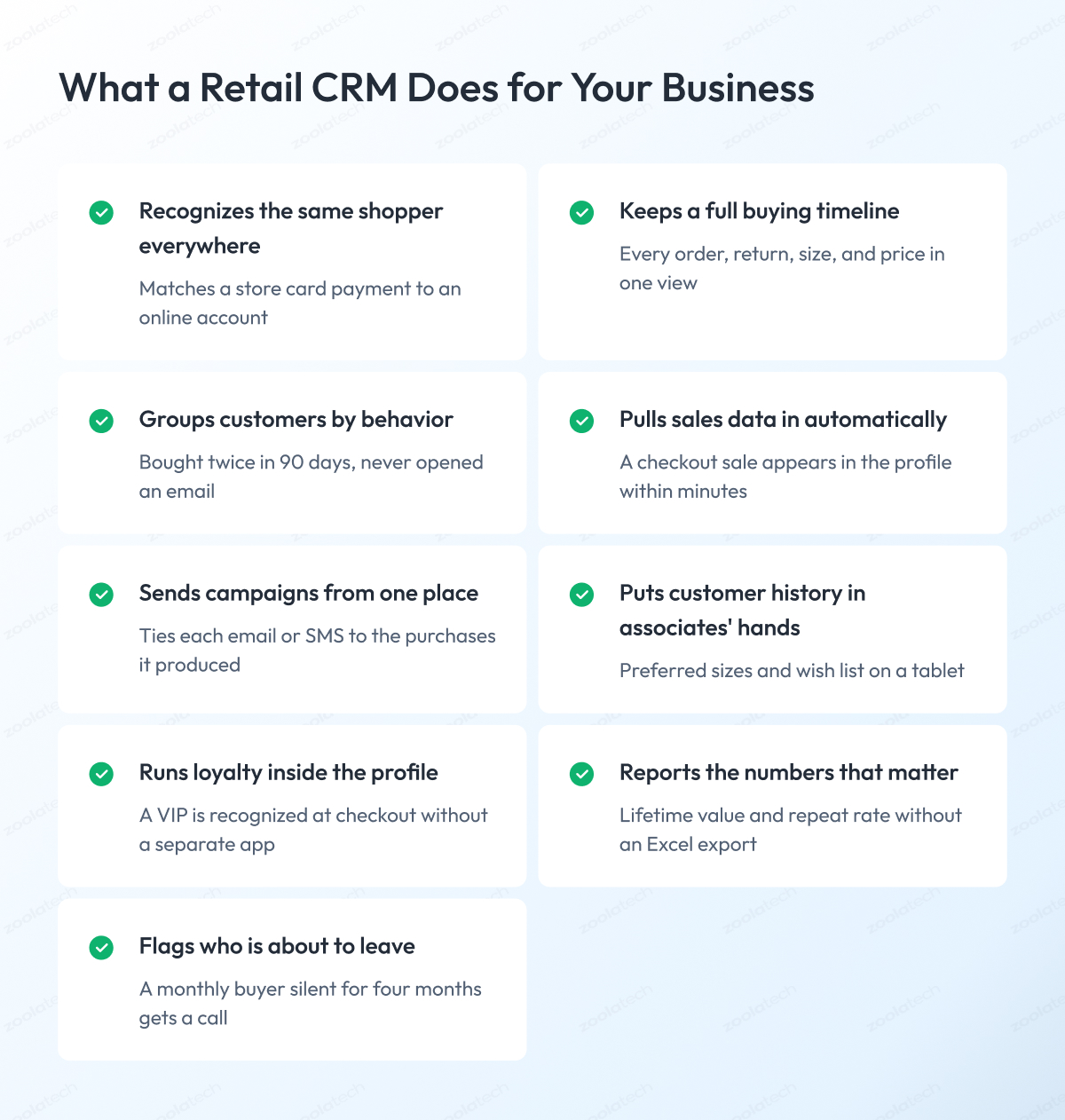
Retail CRM features are fairly standard across systems. Here are the nine you will find in most of them, with a short explanation of what each one does for your business.
1. Unified customer profiles
Retail CRM systems match store purchases, online orders, and loyalty activity to one person, even when the email, phone number, or card differs between visits. As a result, you finally know how much a customer is worth in total and can stop treating regulars like strangers.
2. Omnichannel purchase history
Every purchase, return, and exchange from every channel appears on a single timeline, including product, size, price, and store. Your team sees what a customer actually likes, so offers are based on facts and not guesses.
3. Segmentation and personalization
You group customers by behavior, for example, “bought twice in the last 90 days, spent over $200, never opened an email,” and send each group its own offer. Response rates go up, and fewer people unsubscribe because your emails are relevant to them.
4. POS and eCommerce integration
Sales data flows automatically from your checkout and online store into the CRM, without anyone having to export files. Customer data stays up to date, and your team saves hours of manual work every week. We have a separate guide on how to do eCommerce integration with POS without downtime.
5. Campaign tools
Emails, SMS, and messages via apps like WhatsApp are sent from within the CRM, and the results are tied back to purchases. You see which campaign brought money in, instead of just which one got clicks.
6. Clienteling for store associates
Associates get a simple mobile app that shows a customer’s history, wish list, and preferred sizes, and lets them send a personal message after the visit. Good CRM software for retail treats associates as users, and your sales floor becomes a retention channel, because a customer who is remembered comes back.
7. Loyalty and VIP management
Points, tiers, and rewards are part of the same system as the customer profile. Your best customers are recognized at checkout and in every campaign, and you avoid running a second customer list in a separate loyalty tool.
8. Analytics and reporting
Ready-made reports show lifetime value, repeat purchase rate, retention over time, and revenue per campaign. You can tell whether the CRM is paying off without asking an analyst to build a spreadsheet.
9. AI-powered churn and opportunity detection
The system scores every customer based on the chance they will stop buying and suggests who to contact this week. Your team spends its time on the customers most likely to leave or most likely to buy more, instead of working through the whole list.
Together, these nine features describe a complete retail CRM. The problem is that other tools cover some of the same ground, which is why the next section sorts out CRM, CDP, marketing automation, and clienteling once and for all.
Retail CRM vs CDP vs Marketing Automation vs Clienteling
These four tools get mixed up all the time because they all work with the same customer data. The difference is what each one is for. A retail CRM stores customer profiles and lets your team act on them, while a CDP (customer data platform) only collects data from multiple sources, cleans it, and passes it to other systems.
Here is how the four compare side by side.
| Tool | What it does | Where the data lives | When you need it | Typical tools |
| Retail CRM | Stores profiles, runs segments, campaigns, loyalty | Inside the CRM | Any retailer with repeat customers | Salesforce, HubSpot, Endear |
| CDP (customer data platform) | Collects, cleans, and shares data across systems | Central data layer | Five or more data sources, own data team | Segment, Treasure Data, Bloomreach |
| Marketing automation | Sends triggered emails, SMS, and journeys | Pulled from CRM or eCommerce | Many campaigns, small marketing team | Klaviyo, Braze, Mailchimp |
| Clienteling | Gives associates customer history and messaging | Pulled from CRM or POS | Stores with personal, high-value sales | Endear, Voyado, Salesfloor |
For most chains under 50 stores, a retail CRM with a solid POS and eCommerce integration does the job on its own.
A CDP starts to make sense when data comes from many systems, such as an app, a marketplace, a call center, and physical stores, and you have people to manage it.
At that scale, the single customer profile is often built in the data layer first and then fed to the CRM. We took this approach when we built a real-time customer data pipeline for Zalando, in which customer events from multiple sources had to reach the right systems within seconds.
Marketing automation and clienteling are usually layers on top of the CRM, one for the marketing team and one for the store team. The best unified CRM for retail includes both, so you can avoid buying and connecting three separate products.
The three tool groups retailers compare
Retailers rarely compare “a CRM” with “a CDP.” They compare specific products, which fall into three groups. Each group was originally built for a different kind of business, so each one is strong in some areas and weak in others.
| Group | Examples | Strength for retail | Weakness for retail | Best fit |
| Broad CRM platforms | Salesforce, HubSpot, Zoho | Flexible, many integrations, scales well | Built for sales pipelines, needs setup for stores | Mid-size to large chains with IT support |
| eCommerce marketing tools | Klaviyo, Mailchimp, Omnisend | Excellent email and SMS, quick to launch | Weak store and POS data, no clienteling | Online brands with few stores |
| Retail-specific CRM and clienteling | Endear, Voyado, Salesfloor | Built for stores, associates, and loyalty | Smaller ecosystems, less custom flexibility | Brick-and-mortar chains with personal service |
The right group depends on where most of your revenue comes from.
If it is online, start with the second group. If it is the sales floor, start with the third.
If you need both and have an IT team, the first group gives you the most room to grow, although it takes longer to set up.
Whichever group you choose, AI is now changing what all of them can do, which is the subject of the next section.
How AI Is Changing Retail CRM in 2026
Until recently, a CRM showed you the data and a person decided what to do with it. In 2026, AI inside the CRM does part of that thinking. It suggests who to contact, what to offer, and when, and in some cases it writes the message. Here is what AI in a retail CRM does today.
- Predicts who is about to leave. The system looks at how often a customer used to buy and flags those whose buying pattern has changed before they are gone for good.
- Recommends products for each customer. Based on past purchases and what similar shoppers bought, the CRM picks the products to show in an email or on an associate’s screen.
- Builds segments on its own. Instead of you writing the rules, the AI identifies groups of customers who behave similarly, such as “weekend shoppers who only buy on sale.”
- Handles conversations. Chatbots and messaging assistants answer common questions, book appointments, and record what was said in the customer profile.
- Helps associates write messages. A copilot drafts a follow-up text after a store visit, based on what the customer bought, and the associate only edits and sends it.
- Spots demand early. When many customers in a region start buying the same item, the CRM can alert the merchandising team before the shelf runs out.
The leading AI CRM solutions for retail, including Salesforce, Microsoft Dynamics 365, and HubSpot, ship these features as part of the package.
Before you pay for them, ask one question. Does the AI see your POS and online data, or only what was manually entered into the CRM? A model that only sees half the picture will give you half-useful advice.
That question points to a rule we see confirmed in every project. AI is only as good as the data it’s trained on. If purchases from your stores arrive once a week and customer records are full of duplicates, no AI feature will fix it. Get the integration right first, then add AI.
When retailers come to us for machine learning solutions, the first weeks usually go into the data, and the models come after.
To make all of this less abstract, the next section shows what a retail CRM looks like in daily use.
Retail CRM in Action: Examples & Use Cases
The easiest way to understand what a retail CRM does is to look at everyday situations. Below are six CRM examples in retail that almost every chain runs into, along with the number each one improves.
1. Bringing back customers who stopped buying
A customer used to visit every month and has not bought anything in four months. The CRM notices the gap and sends a short “we miss you” email with a small discount on the brand they usually buy.
Metric it moves: reactivation rate.
2. Helping an associate close a sale in the store
A regular walks into the store, and the associate opens the CRM app on a tablet. She sees that he bought a navy suit last spring and looked at brown shoes online last week. She brings out the shoes in his size, and the visit ends with a sale.
Metrics it moves: conversion rate and average order value.
3. Giving VIP customers early access
A new collection arrives next Thursday. The CRM pulls the top 5% of customers by spend and sends them an invitation to shop it two days before everyone else. They appreciate it, and the best items sell out before the public launch.
Metric it moves: repeat purchase rate among top customers.
4. Turning online browsing into an in-store purchase
A customer adds a coat to her cart online and leaves without paying. The next day, the CRM sends a message saying the coat is in stock at her nearest store and offering the option to reserve it. This is CRM in retail marketing at its most practical.
Metric it moves: cart recovery and store traffic.
5. Reminding customers to buy again
A customer buys a 60-day supply of skincare. Around day 50, the CRM sends a notification with a one-click reorder link. The same idea works for pet food, coffee, and printer ink.
Metric it moves: repeat purchase rate.
6. Removing the “stranger moment” in customer support
A loyal customer calls about a return. Because the CRM shows the agent her full purchase history, she never has to say “I have been shopping with you for six years.” The agent handles the return and offers a store credit on the spot.
Metrics it moves: customer satisfaction and retention.
Each scenario above depends on a single profile with current data from all channels.
We saw this firsthand when building a CRM platform for fashion influencers, where the whole product rested on tracking each relationship in one place, and again during a loyalty experience redesign for a retail client.
If these scenarios match what you want to achieve, the next question is which platform can deliver them.
Best Retail CRM Platforms: Comparison & Top Picks
There is no single best retail CRM for every business. The right choice depends on where you sell, what software you already run, and how much you can spend. The table below compares the 10 retail CRM software platforms retailers shortlist most often. Pricing is shown in tiers because list prices change and rarely reflect what you will pay after integrations and add-ons.
| Platform | Best for | Retail strengths | POS & eCommerce integration | AI features | Pricing tier |
| Salesforce (Retail Cloud) | Large chains with IT teams | Deep customization, loyalty, service, marketing in one | Wide partner ecosystem, custom connectors | Einstein predictions, generative assistants | Enterprise |
| Microsoft Dynamics 365 | Retailers on Microsoft stack | CRM plus commerce and ERP modules | Native to Dynamics Commerce, connectors for others | Copilot across sales and service | Mid to Enterprise |
| HubSpot | Growing brands, marketing-led teams | Easy setup, strong email and automation | Shopify, WooCommerce, POS via apps | Content and lead scoring assistants | SMB to Mid |
| Zoho CRM | Budget-conscious SMB chains | Low cost, flexible workflows | Zoho Commerce, third-party POS apps | Zia predictions and recommendations | SMB to Mid |
| Creatio | Process-heavy retailers | No-code workflows, loyalty automation | Marketplace connectors, custom APIs | AI agents for segmentation | Mid to Enterprise |
| Salesmate | Small teams wanting simplicity | Simple pipelines, built-in messaging | App integrations, limited POS depth | Sales assistant, email writing | SMB |
| Lightspeed | Stores needing POS and CRM together | CRM built into the POS, loyalty included | Native, single system | Basic insights and reporting | SMB to Mid |
| Oracle NetSuite CX | Retailers already on NetSuite ERP | CRM tied to inventory and finance | Native to NetSuite commerce | Predictive analytics in suite | Mid to Enterprise |
| SAP CX | Global enterprises on SAP | Enterprise commerce, service, and marketing | Native to SAP Commerce and S/4HANA | Joule assistant, predictive scoring | Enterprise |
| Endear | Brick-and-mortar chains with associates | Clienteling, associate messaging, loyalty | Shopify, Lightspeed, major POS systems | Message drafting, customer scoring | SMB to Mid |
A short note on the seven platforms that come up most often in retail conversations.
Salesforce Retail Cloud. The most complete option for chains with hundreds of stores and a matching IT team. It can be shaped to almost any process, which also means it takes months to set up. Check who will own the connection with your POS, because the platform does not do it for you.
Microsoft Dynamics 365. A natural fit if your stores already run on Microsoft software. CRM, commerce, and ERP come from a single vendor, so data moves between them with minimal extra work. Expect a higher price if you only need the CRM part.
HubSpot. Popular with brands that started online and are opening stores. Marketing tools are strong and easy to learn. Store data usually arrives through third-party apps, so test the POS connection before you commit.
Zoho CRM. Often the best CRM for retail stores on a tight budget. It covers segmentation, campaigns, and basic loyalty at a fraction of enterprise prices. You will do more setup yourself, and the ecosystem is smaller.
Lightspeed. CRM and POS in one product, so every sale is automatically recorded in the customer profile. Great for single brands with a few stores. Less suitable if you need advanced campaigns or plan to switch POS later.
Endear. Built for the sales floor. Associates can access customer history and message shoppers directly, features that most broad CRMs handle poorly. It works best alongside an eCommerce platform like Shopify and is less of a fit for large enterprise stacks.
Creatio. A no-code platform where your team can build retail workflows without developers. Good for retailers with unusual processes. As with any CRM software for the retail industry that offers flexibility, budget time for configuration.
None of these platforms is wrong. Each one is the right answer for a specific type of retailer, so the next step is to figure out which type you are.
How to Choose the Right Retail CRM
Choosing a CRM for retail stores comes down to six questions. Answer them in order, and most of the platforms on the list above will drop out on their own.
1. Where do you sell, and what software runs it?
List your channels (stores, website, app, marketplaces) and the systems behind them (POS, eCommerce platform, ERP). The CRM must connect to all of them. A platform with no ready connector for your POS is a red flag, no matter how good the demo looks.
2. How does your team work?
If marketing will be the main user, campaign tools and segmentation matter most. If associates will use it on the floor, the mobile app matters more than any report. Ask who will open the CRM every day and pick for them.
3. Do you need AI now?
Most retailers do not, at least not in year one. AI features are a good reason to choose a platform that can grow with you, and a bad reason to pay double today.
4. How will integrations actually work?
Ask the vendor to show a live connection to a POS like yours, with data arriving in the profile. Ask how often data syncs and what happens when a record fails. The answers tell you more than any feature list.
5. What do onboarding and support look like?
A CRM launch takes two to six months. Find out who guides you through it, whether support is included, and how quickly they respond when stores are affected.
6. What does it cost at scale?
Price the system for the size you expect in three years, including every store and every associate who needs a login. Some platforms get expensive fast once you pass a certain number of users.
If you run many locations, add one more check. A retail CRM for multi-location chains needs a single customer profile across all stores, permissions that limit each manager to their own store, and reports that compare locations side by side. Franchise networks should also confirm who owns the customer data in the contract, the franchisor or the franchisee.
Choose by business size
The right platform changes with business size, because the problems change too.
| Business size | What matters most | Typical options |
| SMB (1–10 stores) | Low cost, quick setup, POS built in | Lightspeed, Zoho, HubSpot |
| Mid-market (10–100 stores) | Integrations, segmentation, clienteling | HubSpot, Endear, Creatio, Dynamics 365 |
| Enterprise (100+ stores) | Custom workflows, data governance, global scale | Salesforce, SAP CX, Dynamics 365, custom builds |
For a small chain, the right CRM for a small retail business is usually the one bundled with the POS, because it eliminates the integration problem entirely. At the other end, enterprises often outgrow every package and end up customizing heavily or building parts of the system themselves, which we cover in the next section.
What a retail CRM costs
How much does retail CRM cost? Vendors price it in one of three ways. Per-seat means you pay for each user, which gets expensive when hundreds of associates need access. Per location means a flat fee per store, which suits chains with many staff per store. Usage-based means you pay for the number of customer profiles or messages sent, which favors small lists.
The license is only part of the bill. In most projects, it is less than half.
| Cost item | What it covers | Typical share of total |
| Licenses | Platform subscription per seat, store, or usage | 30–50% |
| Integrations | Connecting POS, eCommerce, ERP, loyalty | 20–30% |
| Data migration | Cleaning and importing existing customer records | 5–10% |
| Customization | Workflows, fields, reports specific to your business | 10–20% |
| Training and support | Onboarding staff, ongoing help | 5–10% |
These shares are based on our project experience and vary by platform and setup. The point is simple. When you compare two platforms, compare the full three-year cost, including integration and customization, and the cheaper license often turns out to be the more expensive system.
Map it to your customer journey
A final check is to walk through the customer journey and confirm the CRM has a feature for every stage.
| Journey stage | What the customer does | CRM feature that helps |
| Awareness | Discovers the brand, signs up | Lead capture, welcome campaigns |
| Purchase | Buys in store or online | POS and eCommerce integration, unified profile |
| Repeat | Comes back, or does not | Segmentation, reminders, win-back campaigns |
| Advocacy | Recommends the brand | Loyalty tiers, VIP access, referral tracking |
If a platform is strong at the first two stages and weak at the last two, it is a sales tool with a CRM label. Retail makes its money at the repeat stage, so that is where the product has to be strongest.
Sometimes the honest answer to all six questions is that no package fits. That is when the build vs buy question comes up.
Build vs Buy: Ready-Made Platform or Custom Retail CRM?
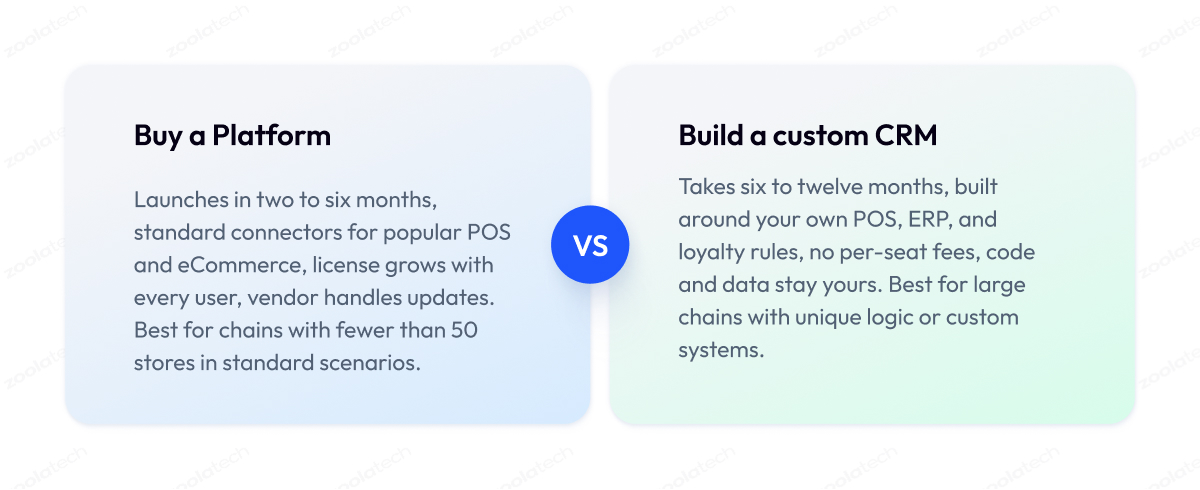
For most retailers with fewer than 50 stores, buying a platform is the better deal. It launches faster, costs less up front, and you do not have to maintain the software yourself.
A custom retail CRM makes sense when your data, systems, or scale are unusual enough that no off-the-shelf package fits without expensive workarounds. Here is how to tell which side you are on.
When to buy
Buy a platform if most of these are true for you:
- Your customer scenarios are standard, such as segmentation, campaigns, loyalty points, and win-back emails.
- You run a popular POS and eCommerce platform that already has ready connectors.
- Your team is small, and nobody will have time to manage custom software.
- You need to launch in two or three months.
- You do not have in-house developers, and you do not plan to hire them.
In this situation, the packages in the comparison table above will cover you well, and the money is better spent on setup and training than on development.
When to build
Consider retail CRM development, or a heavily customized platform, if several of these apply:
- Your business logic is unique. For example, loyalty rules that depend on store, season, and product margin, which no package supports out of the box.
- Your POS or ERP is custom-built or heavily modified, and standard connectors do not work.
- You have hundreds of stores and thousands of associates, and per-seat pricing would cost more per year than a development team.
- You want to avoid vendor lock-in, so that changing a marketing tool or a POS later does not mean rebuilding the customer database.
- Your customer data cannot leave your own infrastructure for legal or contractual reasons.
A full build is a big commitment. CRM implementation for retail at this level usually starts with the data layer and the integrations, and only then adds the screens that people use.
We have described this sequence in detail in our guide on how to build an effective custom CRM for retail stores and eCommerce, and it is the same approach we follow in custom software development projects for retailers.
When to combine both
Most large retailers end up somewhere in the middle. They keep a platform like Salesforce or Dynamics 365 as the core, where customer profiles and campaigns live, and build their own layer around it.
That layer usually includes integrations with POS and ERP systems, a service that corresponds to store and online identities, and modules the platform handles poorly, such as complex loyalty rules or a custom associate app.
The hybrid path gives you the vendor’s stability where the work is standard and your own code where the business is different. It is also easier to make changes later because the custom parts are yours, and the platform can be swapped out if needed.
This is where we usually get involved.
Zoolatech builds and integrates retail software solutions on both sides of this line, from custom CRM platforms built from scratch to extending existing platforms, as we did when enhancing a Salesforce B2B marketplace with custom functionality the standard product did not offer.
The Retail CRM Readiness Matrix
To make the decision easier, we use a simple grid. Find the row that best describes your business, and the last column gives you a starting point.
| Sales channels | Data maturity | Tech team | Recommended path |
| Stores only, 1–10 locations | Data in POS, no central database | None | Buy, POS with built-in CRM |
| Stores and online, under 50 locations | Some integrations, duplicates common | Small IT team | Buy, platform with strong connectors |
| Stores and online, 50–200 locations | Central database, mostly clean | IT team, few developers | Hybrid, platform core plus custom integrations |
| Stores, online, app, marketplaces | Data warehouse, data team in place | In-house developers | Hybrid, custom identity and loyalty layer |
| Any channels, custom POS or ERP | Mature, strict data ownership rules | Engineering organization | Build, or hybrid with heavy customization |
Treat the matrix as a first estimate. A retailer in the third row with very unusual loyalty rules may still need a build, and one in the last row with standard needs may be fine with a platform.
Buy vs build: where the money goes
The last thing to compare is who pays for what over three years. The costs don’t disappear with either option, they just move.
| Cost item | Buy (platform) | Build (custom) |
| Licenses | Ongoing, grows with users | None or minimal |
| Integrations | Connectors plus setup, often extra | Built once, owned by you |
| Customization | Limited by platform, paid per change | Unlimited, paid in development time |
| Maintenance and updates | Included by vendor | Your team or your partner |
| Vendor lock-in risk | High, data lives in their format | Low, data and code are yours |
| Time to launch | 2–6 months | 6–12 months |
Whichever path you take, the next step is the same. The system has to be connected to your stores and your website and brought into constant use, which is where most projects succeed or fail.
Implementing & Integrating a Retail CRM
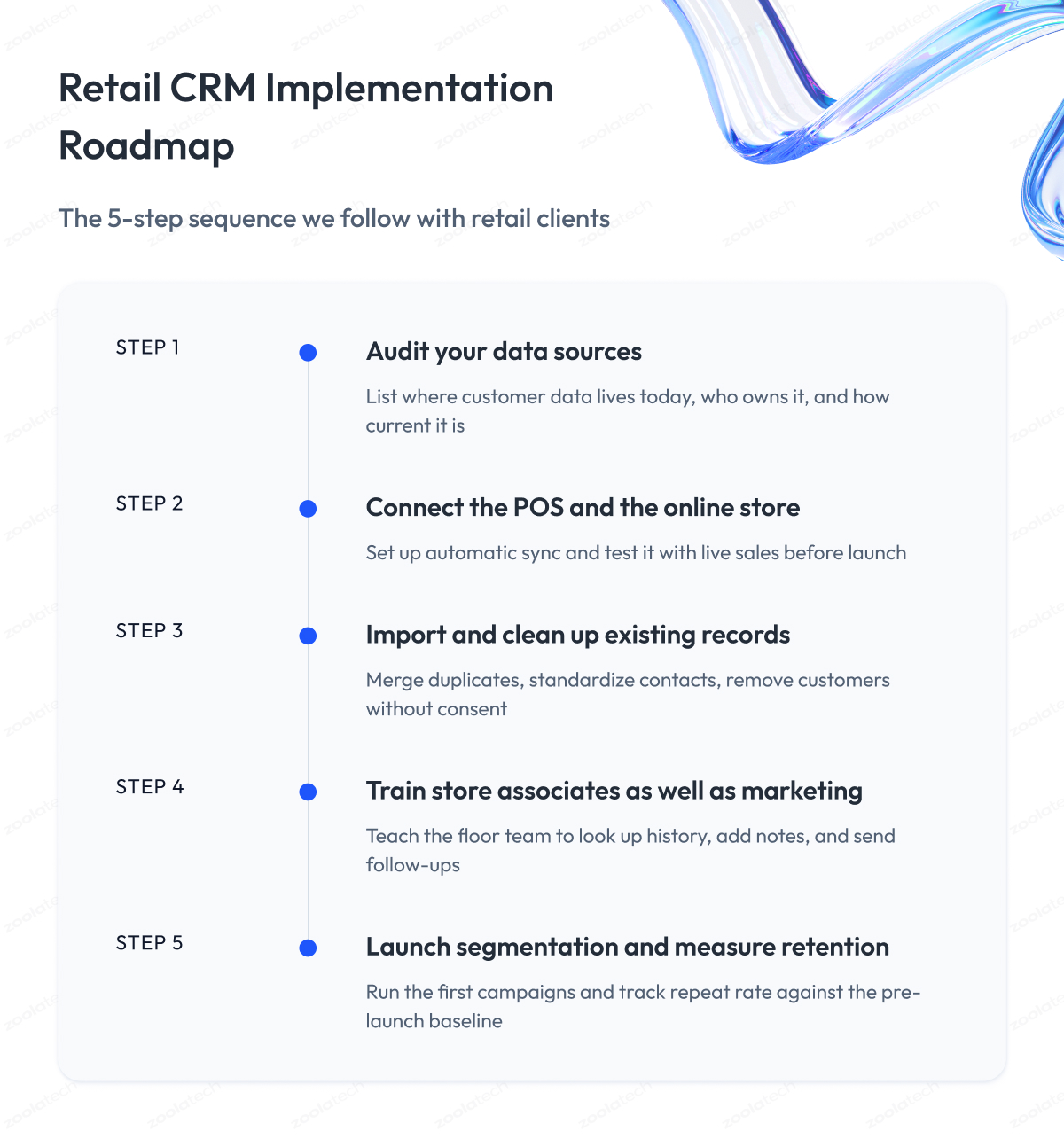
CRM implementation for retail follows the same five steps whether you buy a platform or build one. This is the sequence we use with our retail clients, and in our experience, most problems show up at step 2, when the systems are connected, and at step 4, when people have to start using the result.
Step 1 – Audit your data sources
Before we touch the CRM, we list every place customer data lives today. Usually that means the POS, the online store, the loyalty program, the email tool, and a few spreadsheets nobody wants to admit to. For each source, we note what it holds, how current it is, and who owns it. This map decides everything that follows.
Step 2 – Connect the POS and the online store
Next, we connect the two systems where sales actually happen. The goal is that every purchase, in-store or online, appears in the customer profile within minutes and without anyone exporting a file. We test this with live transactions in a test store before the launch, because a connection that works in the vendor’s demo does not always work with your POS configuration.
Step 3 – Import and clean up existing records
Then we move the customer records you already have into the new system. This is where duplicates, typos, and missing emails come to the surface. We merge records belonging to the same person, standardize phone numbers and addresses, and remove contacts who have not opted in.
Accurate data at this stage saves months of complaints later.
Step 4 – Train store associates as well as marketing
Most CRM projects train the marketing team and stop. We also train store staff, because associates add notes, look up history, and send follow-ups. If the CRM is easy to use on the floor, it fills up with useful data. If it is hard, associates go back to their own notebooks within a week.
Step 5 – Launch segmentation and measure retention
Finally, we set up the first segments and campaigns with the client and agree on the numbers to track from day one, usually repeat purchase rate and retention by cohort. A baseline before launch is the only way to prove later that the CRM made a difference.
The mistakes we see most often are easy to list and hard to avoid:
- Starting with campaigns before the data is connected and checked.
- Choosing a platform before confirming it can talk to your POS.
- Training only in marketing and expecting stores to figure it out.
- Migrating every old record, including 10 years of dead contacts.
- Launching without a baseline, so nobody can show the result.
Integration architecture: how POS, ERP, and ecommerce connect
Step 2 above is where most implementations slow down, so it deserves a closer look. How you connect the systems decides how fresh and how complete your customer data will be, and whether the setup will still work when you add a store, switch ecommerce platforms, or replace the POS in three years. Below are the four approaches we walk clients through when we integrate CRM with POS and the rest of the stack.
| Approach | How it works | When it fits | Trade-off |
| Ready-made connectors | Vendor-built links between popular systems | Standard POS and ecommerce platforms | Limited control, breaks on custom setups |
| iPaaS (integration platform as a service) | Middleware that moves data between many systems | Many systems, small IT team | Monthly cost, another vendor to manage |
| Custom API integration | Your own code connects systems directly | Custom POS or ERP, unusual logic | Needs developers to build and maintain |
| Event-driven integration | Systems publish events, others react instantly | Instant updates, many locations | More complex to design and monitor |
Beyond the approach, two more decisions come up across every project.
The first is timing. Data can move between systems instantly or in batches, for example once a night. A nightly batch is fine for monthly campaigns. It is useless for an associate who wants to see the online order a customer placed this morning. We ask each client which scenarios need instant data and design only those parts, because instant sync costs more to build and run.
The second is identity resolution. This is the process of deciding that a purchase made with a card in a store and an account on the website belong to the same person. We usually build a small matching service for this, because the rules differ for every retailer, and packaged tools tend to either merge too aggressively or miss obvious matches.
Newer AI integration platforms for retail POS and CRM promise to do this matching automatically. They can help, but we still recommend reviewing the rules with your team, because a wrong merge means one customer sees another customer’s purchase history.
For chains with many locations, the POS connection also has to survive network outages and store closures without losing sales data.
We built a multi-region platform for POS payments with exactly this requirement, and the same principles apply to any retail POS integration that feeds a CRM.
Data security, privacy, and compliance
Once the integrations are in place, the CRM becomes the company’s richest single store of customer information, which is why security must be part of the implementation.
A retail CRM holds PII (personally identifiable information), which means names, contact details, purchase history, and sometimes birthdays and addresses. That puts it under GDPR in Europe, CCPA in California, and PCI DSS (the payment card security standard) whenever the POS involves card data. These are the rules we apply on every project:
- Card numbers never enter the CRM. The POS keeps them, and the CRM only receives a token or the last four digits.
- Every customer record carries a consent flag, and campaigns only go to people who said yes.
- Access follows roles and locations. A store manager sees her store’s customers, and a marketing analyst sees segments lacking personal details.
- Every export and every bulk change is logged, so you can answer “who accessed this” when a regulator or a customer asks.
- Deleting a customer on request removes them from the CRM and every connected system, which is only possible if the integrations were designed for it.
Getting these right at the start is far cheaper than fixing them after a breach or an audit. Once the system is live and secure, the last question is how to prove it is working, which brings us to the metrics.
Retail CRM Metrics That Matter
You do not need a dozen dashboards to know whether the CRM is working. Seven numbers cover it, and each should come straight out of the system without an export to Excel.
| Customer lifetime value (LTV) | Total revenue from one customer over time | Rising LTV means better retention or bigger baskets |
| Repeat purchase rate | Share of customers who bought more than once | The core retail number, track it monthly |
| Retention rate | Share of customers still buying after 12 months | Compare cohorts before and after the CRM launch |
| Average order value (AOV) | Revenue per transaction | Shows whether recommendations and upsells work |
| Reactivation rate | Share of inactive customers who came back | Measures win-back campaigns directly |
| Campaign revenue attribution | Sales linked to a specific campaign | Separates campaigns that sell from campaigns that get clicks |
| Associate outreach ROI | Revenue from messages sent by store staff | Proves clienteling pays for the tablets |
A few retail CRM best practices make these numbers useful:
- Record a baseline before the launch. Without it, you will have nothing to compare the new numbers against.
- Look at customers by cohort. Group them by the month of their first purchase, because averages hide what is happening to each group.
- Give each team one number to own. Marketing watches campaign revenue and reactivation, stores watch associate outreach ROI, and finance watches LTV and retention.
- Review the numbers monthly, in one meeting. A metric nobody looks at does not improve.
If the metrics move in the right direction six months after launch, the CRM has done its job. If they don’t, the problem is almost always in the data or daily use, and rarely in the platform itself.
Final Word
Choosing or building a retail CRM takes longer than most teams expect. You will sit through demos, test integrations that break on the first try, and argue over whether to buy, build, or combine the two.
That time is well spent. The system you pick will shape how your business talks to customers for the next five years, and it is hard to replace once it holds all your profiles and campaigns.
A poor fit costs more than the license. It means customer data in two places, associates back on paper, and a second migration in two years. A good fit means every store and every channel work from one picture of the customer, and the numbers in the previous section start to move.
If you have read this far, you do not need a summary. You need to run your business through the Readiness Matrix, answer the six questions in the selection section, and see the POS integration in action before you sign anything.
If you would like a second opinion on any of that, we are ready to review your stack, data, and options, and help you decide on the path before development begins.
Questions You May Have
What is retail CRM?
Retail CRM is software that collects a shopper’s purchases, returns, loyalty activity, and communications from stores and online channels into one profile, so you can personalize offers and keep customers coming back.
What does CRM stand for in retail?
CRM stands for Customer Relationship Management, and in retail it refers to the system that tracks every shopper’s history across stores and online instead of tracking sales deals.
How is a retail CRM different from a regular CRM?
A regular CRM tracks a small number of long sales deals entered by hand, while a retail CRM automatically collects thousands of quick purchases from POS and eCommerce systems and is used by marketing teams and store associates.
What are the main benefits of CRM in retail?
The main benefits of CRM in retail are higher repeat purchase rates, better retention, personalized campaigns, and associates who can see a customer’s history before serving them.
What features should a retail CRM have?
A retail CRM should have unified customer profiles, omnichannel purchase history, segmentation, POS and eCommerce integration, campaign tools, clienteling, loyalty management, reporting, and AI-based churn detection.
What is the difference between a retail CRM, a CDP, and clienteling?
A retail CRM stores profiles and lets your team act on them, a CDP only collects and distributes customer data to other systems, and clienteling is the associate-facing layer that shows customer history on the sales floor.
How much does retail CRM software cost?
Retail CRM software is priced per user, per location, or by usage, and the license usually makes up less than half the total cost once you add integrations, data migration, customization, and training.
Should retailers buy a platform or build a custom retail CRM?
Most retailers with fewer than 50 stores should buy a platform, while chains with custom POS or ERP systems, unique loyalty logic, or thousands of users often save money and gain control by building or heavily customizing their own.
How does a retail CRM integrate with POS and ecommerce?
A retail CRM connects to POS and ecommerce systems through ready-made connectors, an iPaaS middleware layer, or custom APIs, and the connection should deliver each purchase to the customer profile within minutes.
Can I integrate CRM with POS software I already use?
Yes, you can integrate CRM with POS software you already run, as long as the POS exposes its sales data through an API or export, which is the first thing to confirm before choosing a platform.
Which CRM retail platforms suit multi-location chains?
For multi-location chains, CRM retail platforms such as Salesforce, Microsoft Dynamics 365, and Creatio offer store-level permissions, a single profile across all locations, and reports that compare stores side by side.
Is a free CRM enough for a small retail business?
A free CRM can work for a single store with a small customer list, but most small retailers outgrow it as soon as they need POS integration, SMS campaigns, or loyalty features.