







Quick Summary
- A self-hosted LLM is an open-weight model your company hosts in its own data center or cloud account, so prompts, documents, and answers stay under your control.
- Hosting the model on your own servers does not make a system compliant, because 21 CFR Part 11 keeps validation, audit trails, and change control with the company using it.
- A managed model service keeps prompts away from model makers, but the cloud provider still retires versions, for example, 18 months after launch on Azure.
- Your own servers do not guarantee repeatable answers, since in one test the same prompt at temperature 0 gave 80 different answers out of 1,000.
- A 2025 preprint found that owning servers makes sense mainly above 50 million tokens a month or under residency rules, with payback in a few months to 5 years.
A self-hosted large language model (LLM) is an AI model that your company runs on its own servers or in a cloud account it controls. Your team sends prompts and documents to this model, so they stay inside your environment and never reach an outside provider.
Keeping documents inside your environment is important because regulated companies often can’t share them with outside services. These include standard operating procedures, training materials, and quality records.
That is why teams in regulated companies often ask whether to use a self-hosted LLM or a provider’s service. The answer is hard to find, because most guides on self-hosting focus on hardware and setup. Few of them explain that even with your own model, your team still has to test the system, keep records, and check what the AI writes.
So we wrote this article. It draws on our engineering work, including the AI suite Zoolatech engineers co-developed with MasterControl’s team for self-hosted models in a private AWS environment.
We compare four ways to run an LLM, show what U.S. Food and Drug Administration (FDA) and EU documents say, and explain when self-hosting pays off. Then we show how to take a model into production in seven steps.
By the end, you will know if a self-hosted LLM is right for your documents and what your team needs to run it.
What Is a Self-Hosted LLM?
A self-hosted LLM is an AI model that your company downloads, installs, and runs on its own infrastructure. It works like any other software you install on your servers. Your team keeps it running, updates it, and decides when to switch to a new version.
To download a model, you need its weights. Weights are the trained numbers that decide how the model answers, and a model whose weights are published for download is called an open-weight model.
A self-hosted model can run in two places:
- Your own data center. The model runs on your company’s servers, and this setup is called an on-premises LLM.
- Your own cloud account. The model runs in a private network that your company controls at a cloud provider. For example, MasterControl’s AI suite ran inside a private AWS environment.
You may also hear other names for this setup. Teams often call a self-hosted model an internal LLM. Vendors use the term private LLM more loosely, for self-hosted models and for model services that a cloud provider runs for you, so ask which one they mean.
Each open-weight model comes with its own license, and some licenses limit how a company may use the model. We cover this in the section on choosing a model.
Why Regulated Companies Self-Host an LLM
Regulated companies self-host an LLM mainly for LLM data privacy. When your team uses a provider’s AI service, every prompt and attached document goes to the provider’s servers for processing.
In a regulated company, these can be production batch records, quality reports, or clinical study results, and internal rules or contracts often forbid sending them outside. A self-hosted model processes the same documents on your own servers, so they stay inside your environment.
Lower cost can also be a reason, but mostly at very high volumes, as the cost section shows.
These are the reasons that usually lead to a private LLM for enterprise use:
- Data control. LLM privacy concerns are widespread. In 2024, Cisco’s Data Privacy Benchmark Study surveyed 2,600 privacy and security professionals in 12 geographies and found that 27% of organizations had banned generative AI, at least temporarily. In the same vendor survey, 48% of respondents admitted entering company information that is not public into generative AI tools.
- Data residency. Some rules require data to stay in a specific country or region. A 2025 cost study names strict data residency mandates as a reason to run models on your own servers at any volume.
- Version control. A managed model changes on the provider’s schedule. A self-hosted model changes only when your team decides, and this matters when a validated system depends on one specific version.
- Training on your documents. A self-hosted model can be trained further on your company’s documents so it learns your terms and formats. MasterControl’s team trained open-source LLMs further on regulatory data from its industry.
Big companies often make the same choice. In a 2025 survey of 100 enterprise chief information officers (CIOs) by the venture firm a16z, larger companies used open-source models more often. They usually did it to keep models on their own servers for security and compliance, and to train models on their own data.
There is also a middle option. Cloud providers such as Amazon and Microsoft can run a model for you inside their cloud, and this is called a managed model service. For example, AWS states that the companies behind the models in its Amazon Bedrock service cannot see your prompts.
For many documents, this promise is enough. You need a self-hosted LLM for enterprise use in two cases:
- Your rules require documents to stay on your own servers.
- You need to keep the same model version longer than the cloud provider allows.
The next section compares all these options in one table.
Self-Hosted LLM vs API vs Managed Models: Who Controls What
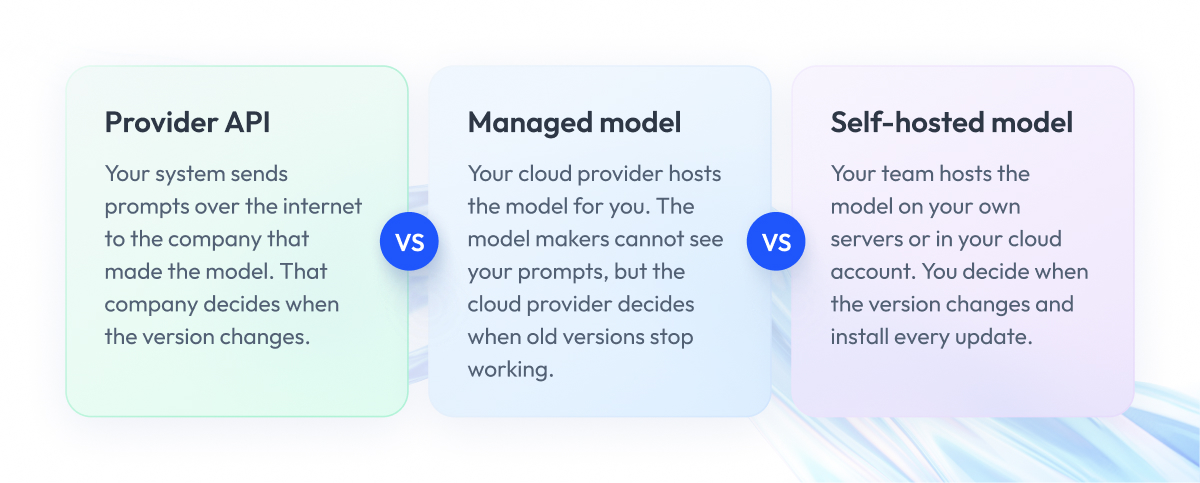
When you compare a self-hosted LLM vs API services, the main difference is who controls your data, the model version, and the software updates. Without this comparison, teams often pick a setup first and only later discover that it doesn’t fit their document rules.
There are four common ways to run an LLM:
- Provider API. Your system sends prompts over the internet to the company that made the model, such as OpenAI.
- Managed model service. Your cloud provider runs the model for you, for example, in Amazon Bedrock or Azure in Microsoft Foundry.
- Self-hosted in your cloud account. Your team runs an open-weight model in a private network inside your cloud account.
- Self-hosted on-premises. Your team runs the model on servers in your own data center.
When people compare a private LLM vs public LLM, they usually mean the provider API against the other three options. The last two options are both self-hosting, and choosing between them is the usual LLM on-premises vs cloud question. Each option further down the list gives your team more control and more work.
The table compares the four options. Each row is a question your security or quality team will ask, and each column answers it for one option, so you can use it when deciding which documents may go where.
| Criterion | Provider API | Managed Model Service | Self-Hosted in Your Cloud | Self-Hosted on Premise |
| Where prompts are processed | Provider’s infrastructure | Cloud provider’s service, any geography for Azure “Global” deployments | Your account, in regions you choose | Your data center |
| Who can see prompts and outputs | Provider, abuse monitoring logs up to 30 days by default | Not model makers, Azure may review samples flagged for abuse | Your team, under the cloud’s shared responsibility terms | Your team |
| Who changes the model version | Provider | Cloud provider, Azure retires models after 18 months | Your team, with locked weights as in our case | Your team |
| Who patches the serving software | Provider | Cloud provider | Your team | Your team, plus the hardware |
| Training on your data | Check the provider’s terms | Check the service’s terms | Yes, as in our case | Yes |
| What your team runs | The integration | Integration, network and access settings | GPUs, serving, monitoring and patching | All of that, plus hardware and facilities |
Cells that cite a vendor summarize its documentation as of October 2026, so check the current terms before you decide. All other cells, including the self-hosted columns, are our reading.
A few vendor details did not fit into the table:
- OpenAI says that since March 1, 2023, it has not used data sent to its API to train its models unless the customer opts in.
- Microsoft says that prompts and outputs in Foundry are not available to OpenAI or other model providers. When abuse indicators appear, automated systems may review a sample by default, and people may review it as needed.
- On Azure, models from some partners follow a 12-month lifecycle, and Microsoft says retirement dates can’t be extended.
A managed model service protects your prompts from the companies that make the models, such as OpenAI. The cloud provider still decides when an old model version stops working. On Azure, for example, a model version retires 18 months after launch.
With self-hosting, your team decides when to change the model version. Your team also installs the software updates and security fixes.
How to choose between the options:
- Start with a managed service.
We recommend testing a managed model service first, against your data classification, meaning the rules that say which documents may go where. Self-host when those rules, a residency rule or the need to keep one validated version make the managed service unsuitable. - When the API wins.
The API is the better choice for non-confidential content, low volumes, and tasks that need the strongest model. One 2025 study found that commercial APIs still hold a slight edge in peak accuracy. - When self-hosting wins.
Self-hosting fits content that may not leave your environment, model versions you must keep longer than the provider allows, and extremely high volumes. - When none of the options fit.
Under EU good manufacturing practice (GMP), the draft Annex 22 says LLMs should not be used in critical GMP applications, meaning tasks with a direct impact on patient safety, product quality, or data integrity. In our reading, hosting does not change that if the draft is adopted as written.
In practice, many teams mix these options and send each document type to a different one. Step 1 of the production guide later in this article shows how to set that up.
Does a Self-Hosted LLM Make You Compliant? What FDA and EU Documents Say
A self-hosted LLM does not make your system compliant. Hosting decides who controls the data and the model version. The duties under FDA and EU rules stay with the company that uses the system, no matter where you host the model.
In the United States, the main rule is 21 CFR Part 11. It applies to electronic records that other FDA rules require companies to keep or submit, such as batch records or quality approvals. For these records, the company using the system must validate it, maintain a secure history of every change, and control changes to the system’s documentation.
The EU’s draft Annex 22 for medicine manufacturing points the same way. It says the regulated company should review the model’s documentation, whether the model is built by its own team or bought from a supplier.
The table below maps the main documents that shape generative AI in regulated industries such as life sciences. Read each row from left to right, from the document’s status to what it means when you host the model, and use it to check which rules apply before your quality team signs off.
| Document | Status | What It Says for an LLM | What It Means for Self-Hosting (Our Reading) |
| 21 CFR Part 11 (FDA regulation) | Regulation | Validation, audit trails, change control of system documentation | Applies wherever the system is hosted |
| FDA draft guidance on AI for drug and biological products (January 2025) | Draft, nonbinding, “Not for Implementation” | Covers AI supporting regulatory decisions, excludes internal operational efficiencies | Internal translation may fall outside scope, record rules still apply |
| FDA guidance on Computer Software Assurance (February 2026) | Final guidance, supersedes the September 24, 2025 version | Testing effort matched to risk, extra rigor where appropriate | Relevant for device production and quality software, drugs by analogy |
| EU GMP draft Annex 22: Artificial Intelligence | Consultation draft, July 2025, closed 7 October 2025 | LLMs outside its scope, not for critical GMP uses | Plan LLMs for noncritical tasks with human review |
| EU AI Act, as amended by the AI Omnibus | Omnibus in force since 27 July 2026 | High-risk deadlines moved to 2 December 2027 and 2 August 2028 | Depends on the use case, regardless of hosting |
The last column shows our reading of these documents. For legal questions, talk to your regulatory or legal team.
What each document means for you:
- 21 CFR Part 11. Part 11 requires you to validate the system, keep audit trails, and control changes. We recommend applying the same change control to each model version.
- FDA draft guidance on AI. The draft covers AI that supports regulatory decisions and leaves out internal work such as drafting documents. In our reading, a translated procedure that becomes a controlled record still falls under your quality rules and Part 11.
- Computer software assurance. FDA’s guidance applies to software in medical device production and quality systems. Our article on computer software assurance for software vendors explains how it works.
- EU draft Annex 22. The draft says “the document does not apply to Generative AI and Large Language Models (LLMs), and such models should not be used in critical GMP applications.” In other GMP tasks, a qualified person stays responsible for every output.
- EU AI Act. Under the AI Act, whether your use counts as high-risk depends on the use case, regardless of where you host the model.
Voluntary frameworks, such as the AI Risk Management Framework from the U.S. National Institute of Standards and Technology, help you organize the risk work, and companies follow them by choice.
This map covers life sciences software under FDA rules and EU GMP. AI inside medical devices, the Health Insurance Portability and Accountability Act (HIPAA), and other regulated sectors such as banking need their own regulatory advice.
Self-Hosted LLM Cost: When It Pays Off and When It Is Not Worth It
A self-hosted LLM pays off mainly when you send a very large number of requests or when rules require your data to stay in one country. Teams often estimate self-hosted LLM cost based on server prices alone and forget the people and checks that come with them. So if you are asking whether self-hosting an LLM is worth it, count the whole bill first.
- What you pay for with a self-hosted model:
- Graphics processing units (GPUs) that you buy for your data center or rent in the cloud.
- Software that connects the model to your applications.
- Engineers who keep the model working and install security fixes.
- Tests and validation after every model change.
- Monitoring and storage for the records the system creates.
A 2025 study by Pan and colleagues compared buying your own servers with paying for an API. The study is a preprint, which means other researchers have not reviewed it. It estimates that your own servers usually start to cost less than an API within a few months for small models, after about 2 years for medium models, and after 5 years for larger ones.
According to the study, owning the servers makes sense mostly for companies that process at least 50 million tokens a month or that must keep data in one country. A token is a small piece of text, about the size of a short word.
The study does not count people and upkeep costs, and its authors say the numbers still need checking on live projects. The answer also depends on API prices, so any self-hosted LLM vs API comparison needs today’s prices.
When self-hosting an LLM is not worth it
- Your volume is low.
If you process fewer than 50 million tokens a month and no rule requires keeping your data in one country, an API or managed service usually costs less. - You need the strongest model.
The same study found that the best commercial models still give slightly more accurate answers. The venture firm Menlo Ventures saw a similar picture in its mid-2025 survey of 150 technical decision makers, where open-source models handled 13% of AI tasks against 19% in its November 2024 report. Menlo explains the drop by the growing quality gap between open and commercial models. - A managed service already meets your rules.
If the cloud provider’s terms match your rules for which documents may go where, self-hosting adds work without extra protection. - No one can maintain it.
With self-hosting, your team installs fixes, watches the model, and tests every change. If no one has time for this, the model quickly falls behind on security updates.
If the numbers point to self-hosting, the next step is choosing the model.
Choosing an Open-Weight Model for Self-Hosting: License, Fit and Hardware
Teams often pick a model from a public ranking and only later find that the license blocks their use or the model handles their documents poorly. Choosing among self-hosted LLM models goes more smoothly when you check things in a fixed order.
Choose an open-weight model in this order:
- License. Check whether your company may use the model commercially at its size.
- Quality on your documents. Test the model on your own documents and languages.
- Hardware. Check which model size your GPUs can serve at the speed you need.
Licenses differ from model to model. For example, Meta’s Llama 4 Community License requires companies with more than 700 million monthly active users in the month before the Llama 4 release to request a separate license from Meta. Use must also follow Meta’s Acceptable Use
Policy, and a product that contains the model must display “Built with Llama.”
Qwen3-8B, on the other hand, comes under the common open-source Apache License 2.0. We use these 2 models only to show how terms differ. Licenses can also change between versions, so check the license of the exact version you deploy with your legal team.
For quality, test candidates on your own documents and languages, because public rankings use different texts. MasterControl’s team developed an LLM evaluation and selection framework for ongoing model comparisons, and step 3 of the production guide below shows how to set up such tests.
Hardware and serving
We recommend sizing the GPUs only after you shortlist models. Measure memory use and response time on your own prompts in a test environment, and choose the hardware from those numbers.
An inference server is the program that receives requests and returns the model’s answers. Common options include vLLM and SGLang, and you can package them in containers that include everything the program needs.
For MasterControl, Zoolatech engineers deployed the models with Kubernetes and Docker in a private AWS environment and optimized GPU sharing.
How to Deploy a Self-Hosted LLM in Production: 7 Steps
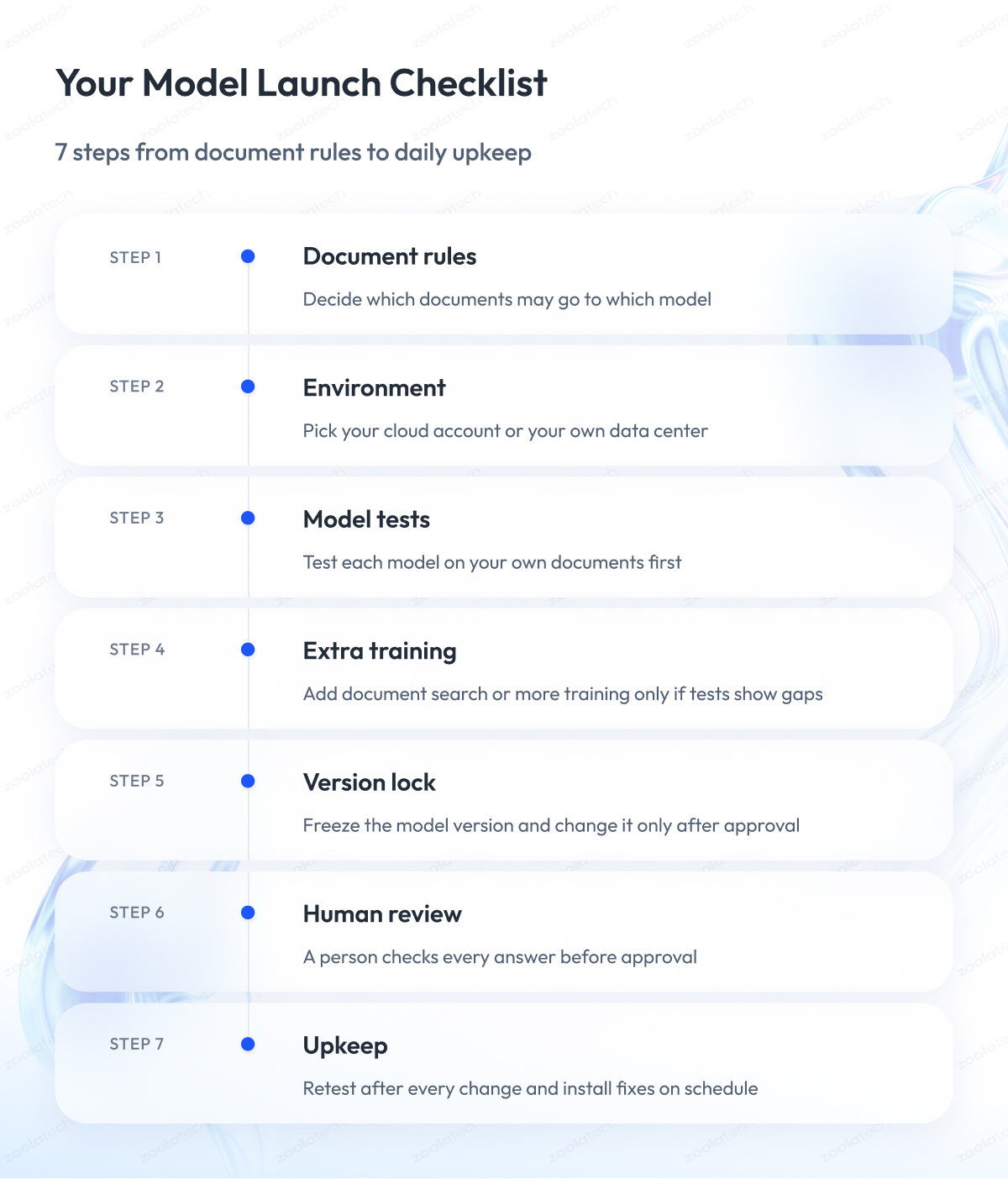
Taking a self-hosted LLM into production for regulated content takes 7 steps, and each step ends with a written check. Without a fixed order, teams often set up the servers first and add version records and human review at the end, when changes cost the most.
When you plan a self-hosted LLM architecture for regulated documents, start with version records, human review, and audit trails, because the server software is much easier to change later.
Step 1: Decide where each type of document may go
Sort your documents into classes and decide for each class whether it goes to a self-hosted model, a managed model service, or no LLM at all. This answers the question security teams ask most often: which tools may handle regulated or confidential content.
Done when: each document class has a written rule for where it may go.
Step 2: Pick the environment
Choose between your cloud account and an on-premises LLM deployment in your own data center. We recommend making the model reachable only from your own systems.
Done when: the network path is documented, and the model cannot reach any address you did not approve.
Step 3: Test candidate models
Write acceptance criteria before testing, meaning the results a model must reach to be accepted. Then test each candidate on your own documents and languages, as the FAQ at the end explains.
Done when: the criteria, the test set, and the results are on record.
Step 4: Adapt the model only if tests show a gap
One option is retrieval-augmented generation (RAG), which finds relevant passages in your documents and gives them to the model with each question. The other is further training on your own data, called “fine-tuning,” which changes the model.
Done when: the adapted model passes the same tests as before.
Step 5: Lock the version
Record the model weights, the server software version, the prompt templates, and settings such as temperature, which controls how much the answers vary. Change any of them only through change control, a process where each change is described, tested, and approved before release.
Part 11 requires change control for system documentation, and we recommend applying it to model versions. MasterControl’s suite followed the same idea with locked-weight, self-hosted models.
Done when: a release record matches the version in production.
Step 6: Put human review before approval
In MasterControl’s suite, human review workflows validate all AI output before approval, a setup often called “human-in-the-loop.” The EU’s draft Annex 22 also expects qualified people to stay responsible for outputs in noncritical GMP tasks.
Done when: no AI output becomes an approved record without a named reviewer.
Step 7: Monitor, log and patch
Keep audit trails for the records the system creates or changes, repeat the fixed test set after every change, and install fixes for the inference server and its libraries. Roll out in phases, with user training, as MasterControl’s team did.
Done when: test runs and patches follow a schedule and are on record.
Security: treat the model server as a system that holds regulated data
Protect the model server the same way as any other system with regulated data. We recommend access control, a separate network, logs of who sent each request, and the same patch process as your other production systems. Our guide to AI data security controls covers the full set.
Model Versions and Reproducible Output Under Change Control
In step 5, you locked the model version under change control. This section explains why that step matters and what it does not solve.
When quality teams plan validation, they usually ask 2 questions:
- Can we keep the model we validated without changes?
- Will the model give the same answer to the same question?
With a self-hosted model, the answer to the first question is yes. The answer to the second one is “not always,” and the parts below explain both.
Managed model versions retire on a schedule
Validation takes time and money. Once your team has tested and approved a model, you want to keep using that exact version.
With a managed model service, the cloud provider decides how long a version stays available. On Azure, for example, Microsoft retires a model version 18 months after launch, and for models from Anthropic, DeepSeek, Fireworks, and Mistral AI the period is 12 months.
After that date, the old version stops answering, and Microsoft says you cannot ask for more time. In our reading, each forced switch to a new model brings a new round of testing and validation.
With a self-hosted model, the version stays the same until your team decides to change it. You plan the next validation when it suits you.
Temperature 0 is not the same as identical output
Temperature is a setting that controls how much a model’s answers vary. At temperature 0, the model should pick its most likely answer every time, so many teams expect the same question to get the same text.
A test by the AI lab Thinking Machines shows that this expectation can fail, even on your own servers with vLLM or SGLang. The researchers asked one model the same question 1,000 times at temperature 0 and got 80 different answers. It was a single test with one model and one setup, but it shows that the problem exists.
The cause is in the server. It processes many requests together, and the size of that group slightly changes the math behind each answer. The researchers fixed this with a special mode called “batch-invariant kernels,” and all 1,000 answers became identical, although the server worked more slowly.
Repeatable answers also matter for EU rules, because the draft Annex 22 covers only models that always give the same answer to the same input. For this reason, it leaves out generative AI and LLMs.
What we recommend:
- Check answers against your acceptance criteria instead of comparing them word for word, and repeat these tests after every change.
- Turn on batch-invariant kernels when identical answers matter more than speed.
- Keep a person reviewing every answer before it becomes an approved record.
Self-Hosted LLM for Translation of Regulated Documents
Regulated companies often need the same procedures and training materials in many languages. Translating them by hand is slow and expensive, and sending them to an outside translation service may break your data rules.
A self-hosted LLM for translation solves the data problem because the documents stay on your own servers. LLM translation still makes mistakes, so it needs controls.
We recommend 2 controls:
- Send each type of document only to a model your rules allow, as in step 1 of the production guide.
- Have a qualified reviewer check every translation before approval.
Researchers agree that machine translation still has gaps. Each year, translation systems are compared at an event called WMT, and its 2024 findings carry the title “The LLM Era Is Here, but MT Is Not Solved Yet.” MT in the title means machine translation.
Professional translators judged the results of that comparison. The texts were general and did not come from life sciences, so you still need to test the model on your own documents.
Models can also make up text that was never in the original. A 2023 study found this happens mainly when models translate out of English and into languages with little training data. Regulated companies often do exactly that when they translate English procedures into many languages.
It also matters who checks the translations. In a 2021 study, professional translators judged translation systems differently from crowd workers and preferred human translations. That is why we recommend that a qualified linguist tests the model for each target language.
MasterControl’s suite follows the same approach. Its document translator translates procedural documents into 16 languages while keeping the data confidential, and human review workflows validate all AI output before approval.
To decide which data your AI systems may use and who approves it, see our guide to data governance for AI systems.
Case Study: MasterControl’s Self-Hosted AI Suite for Documents, Translation and Training
The previous sections described the steps one by one. This case shows how they work together in one project.
Challenge
MasterControl builds quality and manufacturing software for more than 1,100 organizations in regulated industries. The team wanted AI to help with documentation, translation and training, and the documents had to stay confidential.
What we did
Over 2 years, Zoolatech engineers co-developed an AI suite with MasterControl’s team:
- A document summarizer, a document translator, and an exam generator for training.
- Locked-weight, self-hosted models deployed with Kubernetes and Docker inside a private AWS environment, with optimized GPU allocation.
- Open-source LLMs trained further on regulatory data from MasterControl’s field.
- An LLM evaluation and selection framework for continuous benchmarking.
- Human review workflows that validate all AI output before approval, including human-in-the-loop verification in the exam builder.
- A phased rollout with training programs and explainability to drive adoption.
Result
- 1,000+ hours saved annually on documentation and training workflows.
- 35% productivity increase across document management and training cycles.
- 70% faster training exam development.
- 40% reduction in translation costs, covering 16 languages and removing external vendor dependence.
The case record does not say how each figure was measured or what it was compared with. The 35% applies only to document management and training, and the 70% shows how much faster the team creates exams.
The translation and summary tools were still prototypes, so treat the 40% saving as an early result. All numbers describe one project and may differ in other projects.
We bring the same approach to our pharmaceutical software development work for companies that build software for drug makers.
Final Word
Choosing a self-hosted LLM takes effort. You sort your documents, compare hosting options, read regulatory drafts, and plan tests for a model that doesn’t always give the same answer.
This work pays off. A self-hosted LLM gives your company control over its data and over when the model version changes. At the same time, validation, records, and human review remain your work wherever you host the model.
Skipping this planning can force a model switch in the middle of validation or put documents in places your rules don’t allow. Start with step 1 and write down where each type of document may go, and if you are still mapping the rules, our guide to 21 CFR Part 11 audit trail and record requirements is a good next read.
Zoolatech engineers can help you decide which documents go to which option, set up a private environment for the model, and build version control and human review into the system. It is the same work we did together with MasterControl’s team.
Questions You May Have
What is the difference between a private LLM and a public LLM?
A public LLM means a model you reach through a provider’s shared API, while a private LLM keeps your data under your control. It can be a self-hosted model or a managed model service from your cloud provider, with access limited by contract. Because vendors use the term loosely, ask where prompts are processed and who changes the model version.
Can a self-hosted LLM answer questions about our own documents?
Yes, with retrieval-augmented generation (RAG), which finds relevant passages in your document store and passes them to the model with each question. Answers then draw on your documents without retraining. If you host the document index and the model in your environment, the documents stay inside it. Our guide to preparing data for RAG explains what to fix first.
Can you self-host an LLM on AWS?
Yes, hosting an open-weight model in your own AWS account, for example in containers on Kubernetes, counts as self-hosting. MasterControl’s suite used models deployed with Kubernetes and Docker inside a private AWS environment. Amazon Bedrock works differently because it is a managed model service, and AWS states that model providers cannot see your prompts and answers.
How do you compare a self-hosted model with a frontier API model?
Use the same test set, acceptance criteria, and reviewers for both models, and send the API model only documents your rules allow to leave your environment. Score both on your own tasks and languages instead of public rankings. One 2025 study found that commercial APIs hold a slight edge in peak accuracy, so check whether that gap matters for you.
Is self-hosting an LLM worth it for a regulated company?
Self-hosting an LLM is worth it when your documents may not leave your environment, when a rule keeps data in one country, or when you process at least 50 million tokens a month. Below that volume, or when a managed service meets your rules, an API usually costs less, because you avoid paying for GPUs, engineers, and extra validation.
Should you host an LLM on premises or in the cloud?
Both options are self-hosting, and the main difference is who owns the hardware. With an LLM on-premises, your team also maintains the servers and the data center. In your own cloud account, the cloud provider supplies the GPUs under its shared responsibility terms, so choose based on your data rules, your team’s skills, and how fast your needs grow.
Can you use an LLM in regulated industries under EU GMP rules?
Yes, for noncritical tasks with human review, according to the EU’s draft Annex 22. The draft says LLMs should not be used in critical GMP applications, meaning tasks with a direct impact on patient safety, product quality, or data integrity. The document is a consultation draft, so check its status before you plan any use under EU GMP.