



Quick Summary
- Data governance for AI is a set of 9 controls, from decision rights and classification to policy-as-code, that decide which data a model or agent may use and how you prove it.
- Gartner expects over 40% of agentic AI projects to be canceled by the end of 2027, with inadequate risk controls among the main reasons.
- The controls split across 3 workloads: classic ML needs provenance and label governance, RAG needs permissions inside the index, and agents need runtime decision rights.
- EU AI Act Article 10 covers data governance for high-risk systems, with transparency duties from 2 August 2026 and high-risk obligations from 2 December 2027.
- A lighter program is enough when your AI only reads open, non-sensitive data and never acts on its own, while agents and regulated data change that.
This article continues our series on AI-ready data, and today we will talk about data governance for AI.
Data governance for AI is the set of controls that decide which data an AI system may use, under what conditions, and how you prove it afterward. The difficult part is that “afterward” now happens at request time, the moment a model or an agent asks for data, and a policy nobody wired into that moment does nothing.
AI systems use data differently: they train on it, retrieve it, and act on it, often with no human checking each request. The same policy that works for a warehouse fails silently for a vector index or an agent.
In our research, we found that Gartner expects organizations to cancel over 40% of agentic AI projects by the end of 2027, with inadequate risk controls among the reasons.
That is why we wrote this guide.
Here you will read how to keep your AI project out of that 40%: the control set, how it differs from AI governance, and what changes for classic ML, RAG, and agents. Then we map each control to its enforcement point, translate EU AI Act Article 10 and NIST AI RMF into engineering requirements, and cover roles, metrics, and common failure modes.
By the end, you will know which controls each AI workload needs, where to enforce them, and what evidence to keep ready for a regulator.
What Is Data Governance for AI?
The intro gave the short version. Here we want to give you a more detailed answer before we dive into mechanisms.
Data governance for AI is a set of controls, and a control is a check that runs each time an AI system asks for data.
Each control answers one of three questions:
- Which data may the system use? You keep a list of what each model, index, and agent can access, and a named person approves each item. A dataset that is missing from the list stays out of reach.
- Under what conditions? The check looks at who is asking, what they want to do, and how sensitive the data is. The same document can be fine for the finance team’s chatbot and off-limits for the one on your public website.
- How do you prove it? The system logs every read and every action, together with the identity behind it and the rule that allowed it. When an auditor asks why the model saw a record, you show the record, the requester, and the decision.
You also govern more types of data than before. Alongside tables and reports, an AI program covers the following:
| Data Type | What It Is | Why It Needs Governing |
| Training set | Data the model learns from | Contents end up inside the model |
| Embeddings | Numeric copies of documents used for search | Restricted content copied without its permissions |
| Prompts | Text users type into the system | Often contain personal or confidential details |
| Retrieved context | Documents pulled into an answer | Exposes anything the search finds |
| Agent actions | Emails sent, records changed, payments made | Consequences outside the data layer |
The embeddings row shows how this goes wrong in practice. A company builds an internal chatbot and loads every document into it, including HR files. When an employee asks about a colleague’s salary, the search finds the salary table, and the model quotes it, because nobody copied the restriction from the original file to the index.
The next section clears up one more thing before we get to the controls that prevent this: people often confuse data governance for AI with two neighboring terms, AI governance and AI for data governance.
Data Governance for AI vs. AI Governance vs. AI for Data Governance
When people discuss AI and data governance, they usually mean one of three things, and they often use the terms interchangeably in our meetings and calls. So we want you to know the difference and what each one is responsible for.
Data governance for AI governs the data going into an AI system. AI governance governs the model and the decisions it makes. AI for data governance uses AI to do governance work faster.
How the three terms differ
| Term | What It Governs | Example Control | Who Usually Owns It |
| Data governance for AI | Data that models, indexes, and agents consume | Permission check on every retrieval | Head of Data, data stewards |
| AI governance | Models and the decisions they make | Release approval, bias testing, drift monitoring | AI review board, risk and compliance |
| AI for data governance | Governance tasks done by AI tools | Automatic PII detection, lineage discovery | Data platform team |
Data governance for AI decides if a dataset can be used to train a model, if a chatbot can share a document with a user, or if an agent can access a customer record. The answers depend on the data and on who is requesting it.
AI governance asks if the model is accurate enough to ship, if its outputs are biased, who approved the release, and how you monitor it in production. Your company can train a model on perfectly governed data and still face decisions it should never allow.
AI for data governance uses AI to find personal data across a million columns, trace where a table came from, or suggest a classification label. Its output still needs the same human sign-off as any other classification.
Here’s the difference in plain terms: data governance for AI is about choosing and controlling the data that feeds your AI, AI governance is about making sure the AI’s actions and decisions are responsible, and AI for data governance is simply using AI to help keep your data organized and safe.
With the boundaries set, we can look at the controls themselves.
AI Data Governance Framework: The 9 Core Controls
An AI data governance framework comes down to nine controls. Each one is a mechanism with a test attached: you should be able to say what it does and how you would know if it stopped working.
The nine controls of AI data governance:
| # | Control | What It Means | How You Know It Works |
| 1 | Ownership and decision rights | Named person approves each AI use of a dataset | Every AI-consumed dataset has an owner on record |
| 2 | Classification and sensitivity labels | Machine-readable labels on every dataset and document | Systems block access based on labels, without human review |
| 3 | Access control and entitlements | Identity-aware permissions checked at query time | Same question, different users, different answers |
| 4 | Data quality and fitness for purpose | Data tested against the specific AI use case | Quality checks run before training or indexing |
| 5 | Lineage and provenance | Record of where training and context data came from | Any model version traceable to its data version |
| 6 | Consent, purpose limitation, and licensing | Confirmation that data may legally serve this AI purpose | License and consent status stored with the dataset |
| 7 | Retention and deletion | Deletion covers embeddings, caches, and fine-tunes | Deleted record disappears from every derived artifact |
| 8 | Audit and traceability | Log of what was read, by whom, and why | Any answer traceable to its sources and requester |
| 9 | Policy-as-code | Rules written as code that systems execute | Policy change takes effect without a ticket |
A few of these need more than a row to understand.
Decision rights come before access. Before you decide who can read a dataset, decide who can approve an AI system that uses it. In most companies, that is the data owner, with a second approval from security or legal when the data is personal or regulated. Without this, approvals happen in Slack threads, and nobody can reconstruct them later.
Labels have to be machine-readable. A “confidential” tag in a spreadsheet helps a human reviewer and does nothing for a retrieval call. The label needs to live as metadata on the dataset, the document, and every chunk cut from that document, so the search layer can read it and filter on it.
Fitness for purpose is a separate test from quality. A dataset can pass every quality check and still be wrong for the model you are training, because it covers the wrong period, the wrong customers, or the wrong region. We cover why clean data isn’t AI-ready in a separate article, so we won’t repeat the argument here.
Deletion has to reach derived artifacts. When a customer asks you to delete their data, the source row is the easy part. The same data may also sit in an embedding, a cache, a fine-tuned model, and a log of retrieved context. If deletion stops at the source, you have a compliance gap you cannot see.
Policy-as-code makes the rest work. The other eight controls describe rules. This one turns those rules into code that runs when a model or agent requests data. A policy that exists only in a document will be absent at that moment, and the request will go through.
Which of these nine controls matter most depends on what your AI system does with data, and the next section covers that.
What Changes by Workload: ML, RAG, and Agents
The nine controls stay the same across workloads. What changes is where each control sits and what it checks, because a model that learns from data, a system that retrieves it, and an agent that acts on it create different risks. The map below shows the concrete form of each control for each workload.
We call it the AI Data Control Map.
The AI Data Control Map
| Control | Classic ML | RAG | Agents |
| Decision rights | Owner approves dataset for training | Owner approves source for indexing | Owner approves data and actions per agent |
| Classification | Labels on training columns | Labels on documents and chunks | Labels on data and on tools |
| Access control | Training pipeline role | Per-user filter at query time | Scoped tool permissions: read, write, transact |
| Data quality | Representativeness and label accuracy | Source authority and freshness | Context validity before action |
| Lineage | Data version per model version | Chunk-to-source mapping | Full trace of reads and actions |
| Consent and licensing | Right to train on the data | Right to quote the source | Right to act on the data |
| Retention | Training snapshots and fine-tunes | Embeddings and caches | Action logs and context windows |
| Audit | Which data trained which model | Which chunks produced which answer | What the agent read and did |
| Policy-as-code | Checks in the training pipeline | Policy in the retrieval layer | Policy in the agent runtime and tool gateway |
Below, we go through the three workloads one by one. For each, we explain what the system does with your data, which controls you need most, and what goes wrong without them.
1. Classic ML
What the system does with data. A model learns from a training set, and whatever is in that set ends up inside the model. You cannot remove a record after training, so every check here happens before training starts.
Controls you need most:
- Check the source of the training data. Write down where each dataset came from and confirm you are allowed to train on it. If you find out later that a dataset was licensed for analytics only, the model built on it has to go.
- Check the labels. Someone reviews a sample of labels before training. If the labels are wrong, the model learns the mistake and repeats it with full confidence.
- Check who is in the data. Make sure the training set includes the groups the model will make decisions about. If a credit model learns mostly from one region, it will score other regions badly.
- Record which data produced which model. Store the data version next to each model version. When someone asks why the model made a decision, this is the record you open first.
What goes wrong without them. A regulator or a customer asks why the model decided something, and nobody can say what it learned from. That question comes up in every serious ML engineering project, and it is much cheaper to answer if you kept the record from day one.
2. RAG and generative systems
What the system does with data. A RAG system splits your documents into chunks, turns the chunks into embeddings, stores them in a vector index, and pulls the closest matches into the prompt before the model answers. The model quotes whatever the search finds, which is why data governance for generative AI starts with the index.
Controls you need most:
- Copy the permissions onto every chunk. When you split a document into chunks, each chunk keeps the same access rules as the original file. At query time, the search only returns chunks the current user is allowed to see.
- Index only approved and current documents. Decide which sources the system may quote and remove outdated versions. An old policy PDF in the index produces a confident answer that is wrong.
- Show the sources in every answer. The user can check where the answer came from, and you can trace a bad answer back to a bad document.
- Treat prompts and answers as data. Users type personal details into prompts. Store and delete them under the same rules as any other data.
What goes wrong without them. This is the core rule of generative AI data governance: if your entitlements stop at the warehouse, your vector index will answer questions the asker was never allowed to ask. The permission filter at query time is the first thing we set up in generative AI and RAG development projects.
3. Agentic systems
What the system does with data. An agent reads data and then acts on it, and agentic AI data governance has to cover both halves. The same agent that can read a customer record can also update it, send an email about it, or trigger a refund, and each of those carries a different level of risk. Governing an agent means governing two things a model never had: what it may read at runtime, and what it may do with the answer.
Controls you need most:
- Give each tool a permission level. Sort every action the agent can take into read, write, or transact. Reads can be broad, writes get a narrow scope, and transactions such as payments get a limit per action.
- Keep a human in the loop. A person watches what the agent does and steps in when something looks wrong. Nobody approves every step, because that would defeat the agent’s purpose.
- Limit the damage of one session. Cap how many records an agent can change before it stops, and make every action reversible where you can.
- Log reads and actions together. One record shows what the agent read, what it did with it, and when. Two separate logs make the story impossible to reconstruct.
What goes wrong without them. Agentic AI data governance fails when an agent gets broad access before anyone defines what it may do with it. When we built a configurable multi-agent framework for a client, scoping each agent’s data and tool access was the first design decision, ahead of any agent logic.
The map tells you what each control looks like per workload. The next question is when each control runs, and that is where most programs fall short.
Design-Time vs Runtime Governance
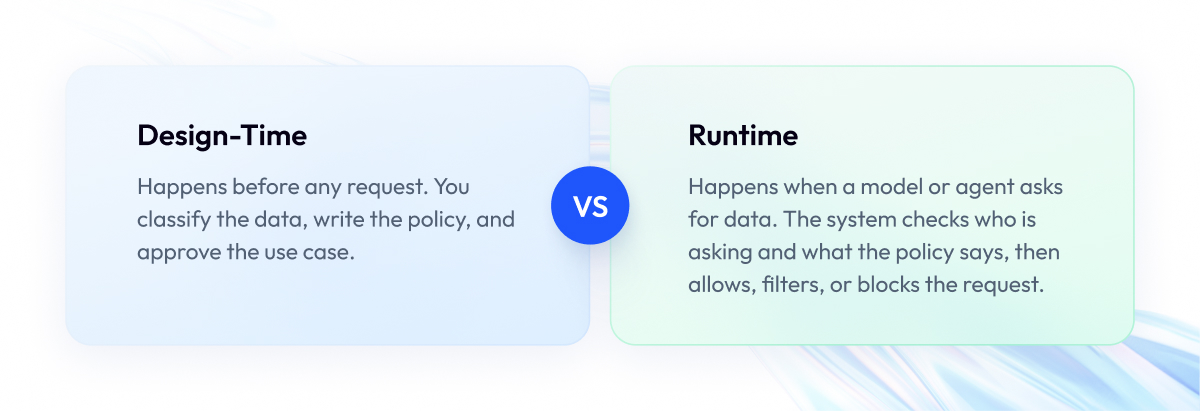
Every control in data governance for AI runs at one of two moments.
- Design-time governance is the work you do before any request. You classify the data, write the policy, and approve the use case.
- Runtime governance is the check that happens when a model or agent asks for data. The system looks at who is asking and what the policy says, then allows, filters, or blocks the request.
You need to understand this split because it decides whether your controls work at all. A control that exists only at design time protects nothing when the AI system reads data.
Here is an example. A support agent uses an AI assistant to look up customer orders. The policy says agents may see only customers from their own region. But the assistant connects to the database under one shared technical account that can read every row. An agent in Germany asks about a customer in Texas, and the assistant shows the record. The rule was written for people, and nobody applied it to the assistant.
Runtime governance closes this gap with three mechanisms:
- Policy. Every request passes through a policy decision point before it reaches the data. The decision point reads the policy as code, checks the labels, and answers yes, no, or “yes, but masked.”
- Identity. The request arrives with the end user’s identity, not the AI system’s service account. If the assistant runs under one shared account with access to everything, the permission check has nothing to check.
- Dynamic. Instead of blocking a whole document, the system removes the chunks or fields the user may not see and returns the rest. The finance analyst sees the salary column; the intern sees the same table without it.
To prove any of this later, log three things:
- The request: who asked, from which system, for what.
- The decision: which policy applied and what it returned.
- The result: which data went back.
Those three records are your audit trail, and most data governance tools for AI pipelines can capture them once you connect the tool to the request path.
The table below shows the moment each control belongs to. Some are design-time only, some runtime only, and several need both.
Where each control is enforced:
| Control | Design-Time | Runtime | Enforcement Point |
| Ownership and decision rights | Yes | No | Approval workflow before access |
| Classification and labels | Yes | Yes | Labels assigned upfront, read on every request |
| Access control | Yes | Yes | Rules defined upfront, checked at query time |
| Data quality and fitness | Yes | No | Checks before training or indexing |
| Lineage and provenance | Yes | Yes | Captured at build, extended on every read |
| Consent and licensing | Yes | No | Verified before the dataset is approved |
| Retention and deletion | Yes | Yes | Schedule set upfront, executed across artifacts |
| Audit and traceability | No | Yes | Logged on every request and action |
| Policy-as-code | Yes | Yes | Written upfront, executed on every request |
Six of the nine controls need a runtime component. Your task is to connect the rules you already wrote to the moment an AI system requests data, starting with access control and the end user’s identity passed through to the data. Regulators expect you to demonstrate exactly this, and the next section covers what they require.
What the EU AI Act and NIST AI RMF Require From Your Data
This section turns three regulatory texts into data requirements. This is not legal advice, and you should confirm article numbers and dates with your legal team before relying on them.
1. EU AI Act
What it is. A European law that sorts AI systems by risk level. The strictest rules apply to high-risk systems, such as those used in hiring, credit scoring, or medical devices.
What it requires from your data. Article 10 of the EU AI Act is titled “Data and data governance,” and it is the part of the law that deals with data governance directly. It applies to the training, validation, and test data of high-risk systems and sets four requirements:
- Relevance and representativeness. The data has to match the people and situations the system will be used on.
- Bias examination. You have to look for bias in the data and document what you found and what you did about it.
- Documentation. You have to record where the data came from, how you collected it, and how you prepared it.
- Error checks. You have to identify gaps and errors in the data and address them.
When it applies. Transparency obligations under Article 50 apply from 2 August 2026. Users must know when they are talking to an AI system, and generated content must be marked. The full set of obligations for high-risk systems listed in Annex III applies from 2 December 2027. If your system is on that list, your training data records need to be in order before that date.
2. NIST AI RMF
What it is. The NIST AI Risk Management Framework is a voluntary US framework for managing AI risk. It carries no legal duties, but auditors and enterprise customers increasingly use it as a checklist.
What it requires from your data. The framework describes four functions, and each of the nine controls from this article lands in one of them:
- Govern: assign roles and set the policies.
- Map: identify the data and the risks connected to it.
- Measure: test the data and the model against the risks you mapped.
- Manage: act on what you measured and keep the evidence.
When it applies. Whenever you choose to adopt it, or whenever a customer or auditor asks you to show alignment with it.
3. GDPR
What it is. The European data protection law that applies to any personal data, including personal data used by AI systems.
What it requires from your data. Two rules affect AI directly. Purpose limitation means data collected for one purpose cannot be used to train a model for a different purpose without a legal basis. The right to erasure covers derived artifacts, so a deleted record must also leave the embeddings, caches, and fine-tuned models built from it.
When it applies. It already does, and it applies alongside the EU AI Act, since the two laws cover different things.
The table below puts the three together. For each requirement, it shows which control covers it and what you need to show an auditor.
| Requirement | Required Control | Evidence You Must Produce |
| EU AI Act Article 10 | Data quality, representativeness, and bias checks | Data documentation and bias test results per model |
| EU AI Act Article 50 | Transparency and output labeling | Proof that users are informed and content is marked |
| EU AI Act Annex III | Full data governance for high-risk systems | Lineage, approvals, and test records per training set |
| NIST AI RMF Govern | Ownership and decision rights | Named owners and approval records |
| NIST AI RMF Map | Classification and lineage | Inventory of AI-consumed data with labels and sources |
| NIST AI RMF Measure | Data quality and audit | Test results and access logs |
| NIST AI RMF Manage | Retention, deletion, and policy-as-code | Deletion records across derived artifacts |
| GDPR purpose limitation | Consent and licensing | Legal basis recorded per dataset and AI purpose |
| GDPR right to erasure | Retention and deletion | Confirmation that embeddings and caches were cleared |
None of these documents ask for a new set of controls. They ask you to prove the nine you already have, and the evidence column is the proof. The next section covers who in your company produces that evidence.
The Operating Model: Roles, Decision Rights, and Workflow
Controls and evidence need people behind them, and in most companies, data and AI governance are split across several teams. This section covers who does what in enterprise AI data governance, how a data request moves through the company, and how to keep it from turning into a ticket queue.
Five roles cover the work. Most companies already have four, and the fifth is new.
Roles in an AI data governance program
| Role | Decides | Does |
| Data owner | Whether an AI system may use their dataset | Approves use cases, signs off on labels |
| Data steward | How the dataset is classified and documented | Maintains labels, lineage, and quality checks |
| Platform and data engineering | How policy is enforced technically | Builds policy-as-code, identity propagation, logging |
| Security and privacy | What the risk rules are | Sets sensitivity tiers, reviews personal data use |
| AI review function | Whether the AI use case is acceptable | Reviews new models, indexes, and agents before launch |
The AI review function is the new one. It sits between the data owners and the engineers and answers a question nobody else owns: should this AI system exist, and with which data? In smaller companies, this is one senior person with a checklist. In larger ones, a small board meets weekly.
With the roles in place, the workflow defines how a data request moves between them. A new AI use case comes in, the right people approve it, the engineers encode the approval as policy, and from then on the runtime check handles every request. Three rules keep this workflow working.
Decision rights come before access. Write down who may say yes to each type of request before any system gets credentials. The data owner approves the data, security approves the sensitivity level, and the AI review function approves the use case. Once those three approvals exist as records, the engineers can encode them as policy.
Exceptions go to humans. Policy should decide most requests without anyone involved. The ones that fall outside the policy, such as an agent asking for a dataset it was never approved for, go to a named person with a deadline to respond. Without a deadline, exceptions pile up, and teams start working around the process.
Approve datasets, never individual requests. If an engineer has to file a ticket every time a model needs a table, the program will be bypassed within a month. The approval covers the dataset, the purpose, and the sensitivity tier, and every request that matches those three goes through automatically.
Once the roles and workflow are in place, the next question is how you know the program works, which the metrics section answers.
Metrics: Proving Data Governance for AI Works
You cannot manage a governance program on trust. This section gives you a scorecard of eight numbers that show whether the controls run, where they fail, and how fast you fix them. All eight come from logs your systems already produce if you set up logging in the runtime section.
AI data governance scorecard
| Metric | What It Tells You | Target |
| 1. Datasets used by AI that have an owner and a label | Whether every dataset has someone responsible and a sensitivity tag | 100% before launch |
| 2. Datasets with full lineage | Whether you can trace each model back to its data | 100% for high-risk systems |
| 3. Retrieval permission test pass rate | Whether the index hides data from people who may not see it | 100% on every index rebuild |
| 4. Access reviews done and issues closed | Whether old permissions get cleaned up | Quarterly, issues closed within 30 days |
| 5. Violations prevented vs detected | Whether controls block bad requests or only report them | Prevented share growing |
| 6. Agent actions with a full record | Whether you can see what each agent read and did | 100% for write and transact actions |
| 7. Time to revoke | How long it takes to cut off access after a decision | Under one hour |
| 8. Deletion completeness | Whether deleted data also left embeddings and caches | 100% |
Metrics 3, 5, and 7 need a closer look, because they are the only ones that show whether the controls run when an AI system asks for data. The other five show whether the design-time work is done.
3. Retrieval permission test. This test checks that your chatbot cannot show a user a document they are not allowed to see. Take a document that only one group may read and add it to the index. Then ask the chatbot about it while logged in as a user outside that group. If the answer contains anything from the document, the test failed.
Run it automatically every time the index is rebuilt. A failure means your permissions did not survive into the index, and every user can potentially read everything.
5. Prevented vs detected. Every violation you find falls into one of two groups. Prevented means the policy check blocked the request before returning data. Detected means you found it in a log afterward, when the data had already left.
Count both groups each month. If most violations are detected, your controls only report and do not block. As you add runtime checks, the prevented share should grow.
7. Time to revoke. When an employee leaves, or a dataset is reclassified, how long until the AI systems stop returning that data? Measure the time from the decision to the moment the index and the agents no longer serve it. If the answer is days, because someone has to rebuild the index by hand, the control exists only on paper. The target is under one hour.
Put all eight numbers on one page and review them monthly. When a number stops improving, it points to the exact control that needs work. The next section covers the ways this goes wrong most often.
Common Failure Modes
Most governance programs fail in one of eight ways. Each one below comes with the symptom you will notice and the fix.
Eight ways AI data governance fails:
| Failure Mode | How You Notice It | Fix |
| 1. Governance theater | Policies exist, nothing enforces them | Turn each policy into a runtime check |
| 2. Catalog without a runtime hook | Catalog says “confidential,” system reads it anyway | Connect labels to the policy decision point |
| 3. Permissions added after the index was built | Index rebuild needed to fix any access issue | Copy entitlements onto chunks at indexing time |
| 4. One-time classification | Labels from last year, data changed since | Reclassify on every schema or source change |
| 5. Blocking everything | Teams build shadow pipelines around governance | Approve datasets and purposes, automate the rest |
| 6. No named owner | Nobody can approve or revoke access | Assign one owner per AI-consumed dataset |
| 7. Governing only training data | Prompts, embeddings, and agent actions unlogged | Extend controls to every data type in scope |
| 8. Deletion stops at the source | Deleted customer still appears in chatbot answers | Delete across embeddings, caches, and fine-tunes |
Two of these cause the most damage.
Blocking everything. This happens when governance rejects most requests or makes every request wait weeks for a ticket, and although it looks strict, it pushes the data out of your control. Engineers who cannot get an answer copy the data into their own environment, build their own index, and launch the feature without telling anyone, so the data ends up outside your control.
The fix is to approve a dataset for a purpose once and let every request that matches that approval go through automatically, keeping the data inside your controls and removing the reason to work around them.
Deletion that stops at the source. When a customer asks you to delete their data, your team removes the row from the database and closes the request, but the chatbot’s index still holds a copy of that data as an embedding and keeps quoting it. Nobody notices, because the database looks correct, and the problem surfaces only when the same customer asks the chatbot about themselves and gets their own data back.
Under GDPR, that deletion never happened, so the fix is to delete from the index, the caches, and any fine-tuned model in the same step as the database.
If you recognize three or more of these in your own program, the next section tells you where to start fixing them.
How to Start Data Governance for AI in Five Steps
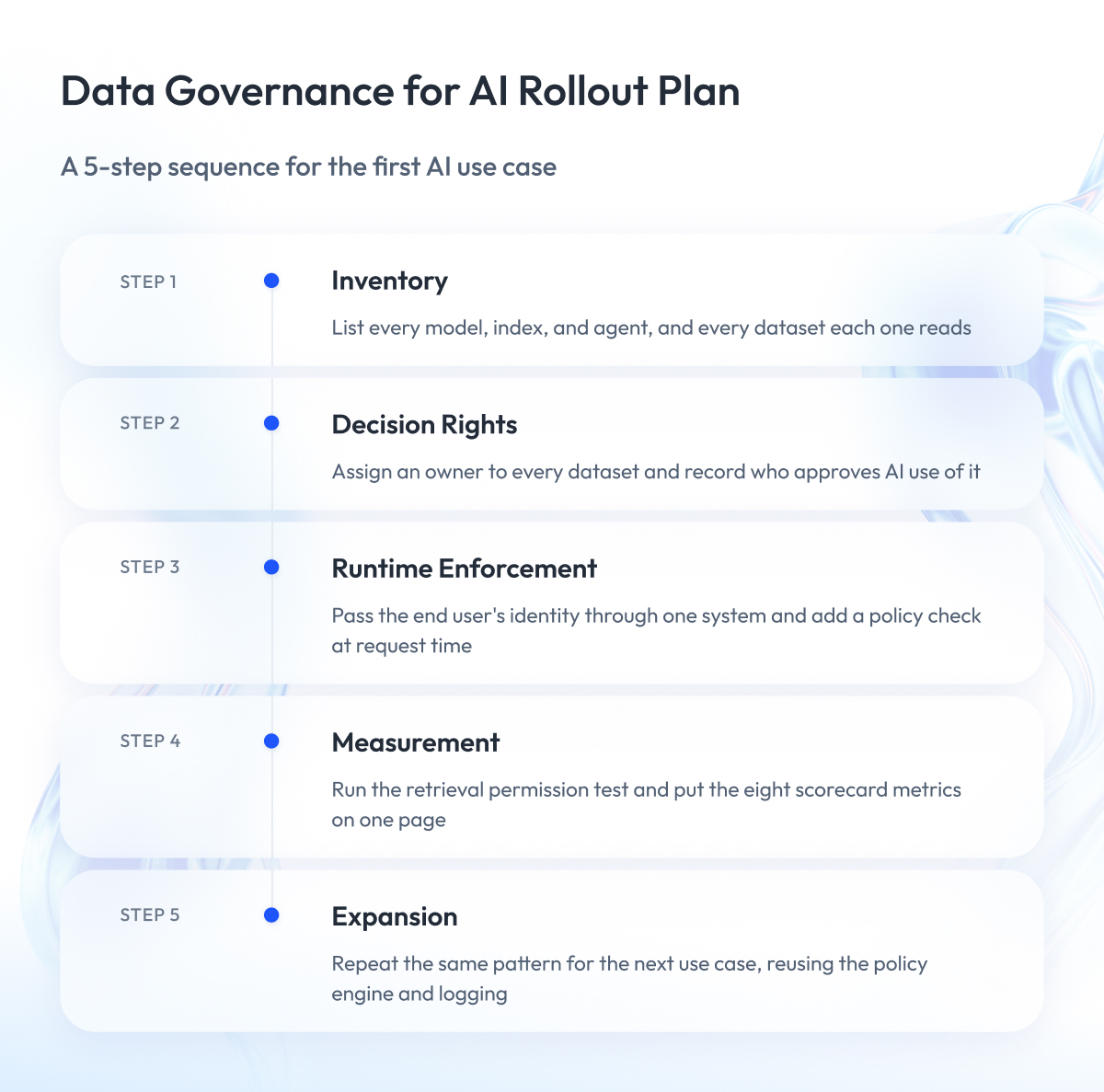
Data governance for AI does not require all nine controls on day one. Start with one AI use case, get the controls working there, and expand. The sequence below follows the AI data governance best practices we apply in client projects, and it takes most teams one to two quarters for the first use case.
- Inventory what AI already touches. List every model, index, and agent in production or in development, and every dataset each one reads. Classify those datasets first, because they are the ones at risk today. Our data readiness assessment gives you a scoring template for this step.
- Fix decision rights. Assign an owner to every dataset on that list and record who approves AI use of it. Until this exists, no other control has anyone to enforce it.
- Enforce at runtime for one use case. Pick the system with the most sensitive data, pass the end user’s identity through it, and add a policy check when it requests data. One working example teaches the team more than a policy document.
- Measure it. Run the retrieval permission test, log prevented and detected violations, and put the scorecard from the metrics section on one page.
- Expand. Take the same pattern to the next use case. Each one goes faster, because the policy engine, the identity flow, and the logging already exist.
For the full sequence of preparing data for AI, from use case selection to pipelines and freshness, go back to our guide on AI-ready data. This article covers the governance step in depth, and the guide covers everything around it.
Security and Privacy in Scope
Governance decides who may use which data. Security makes sure nobody else can. The two overlap, and this article covers only the governance side, so here is the short version of what security has to add on top of the nine controls.
- Encryption. Keep data at rest and in transit encrypted, including the vector index and caches, which teams often leave out because they treat them as temporary.
- PII minimization. Remove or mask personal data before it enters a training set, an index, or a prompt, so there is less to govern and less to lose.
- Secrets. Store API keys and database credentials in a secrets manager, rotate them, and never put them in prompts or config files.
- AI-specific threats. Prompt injection, where an attacker hides instructions inside a document the model reads, and data poisoning, where someone plants bad data in a training set, need defenses beyond access control.
Governance without security leaves the data exposed to outsiders, and security without governance leaves it exposed to insiders and to the AI systems themselves. You need both, owned by two teams that communicate.
Final Word
If you have read this far, you already know the shape of the work. Data governance for AI means going through every model, index, and agent, finding out what data it touches, assigning an owner, and then connecting the rules to the moment the system requests data.
That takes time, and most of it goes into conversations about ownership.
The effort pays off the first time you test it. A chatbot that quotes a restricted document, an agent that changes records it was never approved to touch, or a deletion request that never reached the index costs far more to explain to a customer or regulator than to prevent.
Start with the one AI system that handles your most sensitive data, get the runtime check working there, and measure it. Once one use case runs under the nine controls, the rest follow the same pattern.
If you want a second opinion on where your program stands, we are ready to review your AI data flows with you, show where controls are missing, and help you decide what to build first.
Questions You May Have
What is AI data governance?
AI data governance is the set of controls that decide which data a model, retrieval index, or agent may use, under what conditions, and how you prove it afterward.
How is data governance for AI different from traditional data governance?
It covers more types of data, including embeddings, prompts, and agent actions, and it enforces rules when a system requests data rather than during periodic reviews.
What is the difference between data governance and AI governance?
Data governance governs the data that goes into an AI system, while AI governance governs the model itself, including its accuracy, bias, release approval, and monitoring.
AI governance vs data governance: which one do you need first?
Data governance comes first, because an AI governance review cannot approve a model whose training data has no owner, no classification, and no lineage.
What does AI in data governance mean?
AI in data governance means using AI tools to automate governance tasks such as detecting personal data, tracing lineage, or suggesting classification labels, with a human confirming the result.
What does the EU AI Act require for training data?
Article 10 requires that training, validation, and test data for high-risk systems be relevant, representative, examined for bias, checked for errors, and documented from source to preparation.
How do you govern data for RAG so retrieval respects permissions?
You copy each document’s access rules onto every chunk at indexing time and filter search results by the current user’s identity before the model sees them.
What changes when you deploy AI agents?
You have to govern actions as well as reads, which means giving each tool a permission level, capping what an agent can change in one session, and logging what it read and did as one record.
What are the core components of AI data governance frameworks?
The nine controls are decision rights, classification, access control, data quality, lineage, consent and licensing, retention and deletion, audit, and policy-as-code.
Who owns data governance for AI?
The data owner approves use of a dataset, security sets the sensitivity rules, engineering enforces the policy in code, and an AI review function approves the use case.
Where does data governance in AI projects usually break?
It most often breaks at runtime, when a policy exists in a document or catalog but nothing checks it when the AI system requests data.
Can you use agentic AI for data governance work?
Yes, agents can classify data, trace lineage, and flag policy violations, but their output needs the same human sign-off as any manual classification.