



Quick Summary
- Your documents are RAG-ready when every file passes four checks: readable text, a single current version, clear access rules, and chunks that make sense on their own.
- Start with 200–500 tokens per chunk and 10–20% overlap between neighbors. Keep each chunk to one topic, and adjust the size by document type.
- Every chunk needs four labels: source, date or version, access rights, and document type. These let the system pick the current version and hide restricted chunks.
- To check retrieval, build a test set of 100–300 questions with known answer sources. Aim for recall at 5 above 85% and rerun it after every change.
- Pilots that work on a few dozen documents often degrade at thousands of files. Common causes include duplicate copies, old versions left in the index, and half-visible documents.
This article continues our series on AI-ready data. This time we focus on one narrow but expensive question: preparing data for RAG, so the documents you connect to an AI assistant turn into accurate answers.
In practice, preparing data for RAG means taking your PDFs, wikis, tickets, and policies and cutting them into pieces the system can find and understand when someone asks a question. How well you prepare those pieces matters more than which model you pick.
Here is the problem we keep seeing with enterprise clients.
A RAG pilot works well on a few dozen test documents. Then the team connects it to thousands of company files, and the answers get worse. Nobody prepared most of those files for search. Some are scans with no readable text, some exist in several versions, and many contain tables that lose their meaning when the system pulls out the text.
That is why we wrote this guide. It walks you through the fix, step by step. You will see what your documents need to look like before you start, the six steps of preparing them, the file types that cause the most trouble, how to cut documents into pieces the right way, what extra labels each piece needs, how to test that search works, and the problems that show up only after the pilot.
By the end, you will know how to prepare data for RAG, which documents to fix first, how to split them, and how to check that the system finds the right answer before it reaches your users.
What Makes a Corpus (Your Document Base) RAG-Ready
RAG-ready data is a set of documents that a retrieval system can search reliably. Every file has readable text, exists in one current version, carries a known owner and access rules, and keeps its structure when you split it into chunks.
Engineers call this set of documents a corpus. It covers everything the assistant can draw answers from, so its condition sets the ceiling for answer quality.
In plain terms, a corpus is RAG-ready when the system can do four things with every file:
- Read the text.
- Tell which version is current.
- Know who can see the file.
- Cut the file into pieces that still make sense on their own.
The general rules for preparing data for AI apply here too, but that last point is specific to RAG.
For example, a scanned PDF is a photo of a page. A person reads it easily, but the system reads only text, and a photo contains none. The file sits in your corpus, and the system cannot use a single word from it.
To catch problems like this early, we use the RAG Corpus Readiness Checklist below. It lists seven checks to run on your documents before the first indexing. The first column names the check, the second explains what goes wrong when you skip it, and the third tells you how to run it.
Going through all seven takes about a day for a few thousand files and saves weeks of chasing wrong answers later.
| Check | Why it matters | How to verify |
| Readable text in every file | Scans and images index as empty | Extract text from sample files, compare with pages |
| One current version per document | Old and new versions compete for the same question | Group by title, keep the newest |
| Known owner for each source | Owner fixes errors and approves updates | Map folders and systems to teams |
| Access rules attached to files | Retrieval must respect who can see what | Export permissions together with documents |
| Headings and sections intact | Splitting works better along headings than pages | Open extracted text, check heading order |
| Tables extracted as tables | Flattened tables lose row and column meaning | Compare extracted tables with originals |
| Repeated headers and footers marked | Boilerplate ends up in every chunk | Search extracted text for repeated lines |
Most items on this list fail quietly, which is why the next section walks through the six stages where each of them gets fixed.
The RAG Data Preparation Pipeline: Six Stages
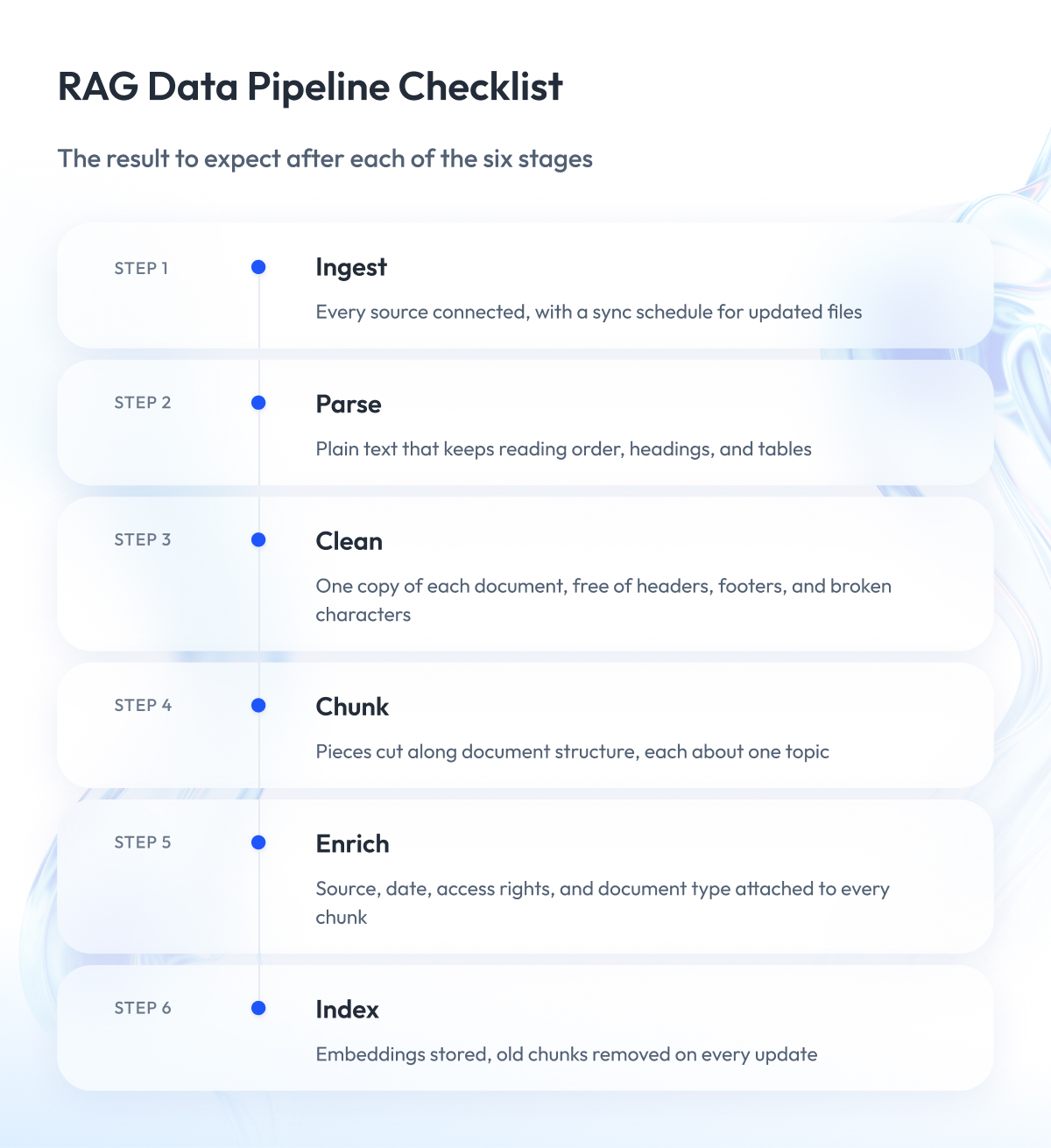
RAG data preparation follows the same six stages in almost every project, no matter what tools you use. What changes from project to project is how much work each stage takes for your documents.
The pipeline runs before any search happens. It takes files from their storage systems and turns them into small pieces stored in a search index (the database the assistant searches when someone asks a question). If one stage does its job poorly, every stage after it inherits the damage.
A simple example to picture it is a library.
You collect the books, read them into text, strip out stamps and library cards, cut the text into index cards, label each card, and file the cards in a catalog.
The table below shows the same six stages for a document base, along with the mistake that most often happens at each one.
| Stage | What it does | What goes wrong here |
| 1. Ingest | Collects files from drives, wikis, and ticketing tools | Sources missing, updated files never resynced |
| 2. Parse | Turns each file into plain text with structure | Scans return nothing, tables lose their layout |
| 3. Clean | Removes headers, footers, duplicates, and broken characters | Boilerplate survives into every chunk |
| 4. Chunk | Splits text into pieces of a set size | Cuts run through sentences, tables, and lists |
| 5. Enrich | Adds labels such as source, date, and access rights | Missing labels block filtering and access checks |
| 6. Index | Converts chunks into searchable form and stores them | Old chunks stay after documents change |
At the last stage, the system converts each chunk into an embedding.
An embedding is a long list of numbers that captures the text’s meaning, so the system can compare a chunk with a question and decide how close they are. We come back to embeddings in the chunking section, because chunk size and embedding model depend on each other.
In our experience, teams spend most of their budget on stages four and six and almost nothing on stages two and three. Chunking and indexing look like the technical core. Parsing and cleaning look like plumbing. Parsing and cleaning are where content disappears, and no amount of tuning later brings it back.
This article covers only the document base itself. For how the pipeline runs, scales, and fails in production, read our guide to AI data pipelines and what breaks them.
Where Preprocessing Silently Drops Content
RAG data preprocessing covers stages two and three: parsing and cleaning. Both stages report success even when they lose half the content, because a parser that returns some text counts as working.
Here is what typically disappears without anyone noticing:
- Text inside images, diagrams, and scanned pages.
- The second column of a two-column page, or the two columns merged line by line.
- Table cells, which come out as a single run of words with no rows.
- Footnotes, captions, and text in headers.
- Numbers and units split apart by a page break.
You only find out about these losses when a user asks a question the document should answer, and the system replies that it has no information.
The check is simple and takes an afternoon. Pick 50 files that represent your corpus, extract the text, and compare it with the original page by page. Count the words in both. If the extracted version loses more than a few percent, look at which of the items above went missing and fix the parser for that file type before you touch chunking.
Unstructured Data: PDFs, Tables, and Everything That Breaks Parsers
Most of the content an enterprise wants to search is unstructured data. It has no fixed fields and arrives as PDFs, Word files, slide decks, emails, and scanned pages. Unstructured data for RAG is where parsing fails most often, because the parser has to guess how a person would read the page, and it guesses wrong in predictable ways.
A parser is the program that turns a file into plain text. A good parser keeps the reading order, the headings, and the tables. A weak parser returns words in the order they appear inside the file, which often differs from the order on the page.
The table below lists the six document types that most often break parsers. For each one, it shows what the parser returns and how to fix it.
| Document type | What the parser returns | What to do |
| Scan without a text layer | Empty text or random characters | Run OCR (text recognition) before parsing |
| Page with two or more columns | Lines from both columns merged | Use a parser that detects columns |
| Table with rows and columns | One long line of words | Extract tables separately, store as rows |
| Header, footer, page number | Same line repeated in every chunk | Find repeated lines, remove before chunking |
| Formula, chart, or diagram | Nothing, or a caption without content | Describe the figure in text with a multimodal model |
| Formatting that carries meaning | Bold labels and indents flattened | Keep headings and lists as markers in the text |
The first row causes the most damage because it fails completely and silently.
OCR (optical character recognition) reads the letters from the image and produces a text layer, so treat it as a required step for any file that started as a scan or a photo.
Financial reports, product specs, and price lists all contain tables, and a flattened table loses the link between a value and its row and column. The system can find the number but cannot tell what it refers to.
For example, when we built our internal AI recruitment platform, resumes arrived as PDFs, Word files, and photos of printed pages, with no two laid out the same way. We used a multimodal model, one that reads each page as an image and as text, to pull out sections, dates, and skills with the structure intact. Processing cost came in under $0.10 per resume.
Fixing parsing for these six document types usually takes a week or two. Skipping it means every chunk downstream inherits the damage, and chunking, which we cover next, has nothing solid to work with.
Chunking Strategy for RAG: There Is No Default
Chunking is stage four of the pipeline. It cuts each document into pieces the system searches and passes to the model as context.
Every RAG framework ships with a default chunk size, usually a few hundred words, and most teams keep it. That default is the most common reason retrieval returns the wrong piece.
There is no universal chunk size. The right size depends on two things that have nothing to do with the model:
- The structure of your documents.
- The shape of the questions people ask.
For example, think of cutting a book into index cards. Cards that are too small hold one sentence each, so the answer to a question ends up spread across five cards. Cards that are too big cover several topics each, so a question matches all of them weakly. A contract clause, a support ticket, and a 40-page manual each need a different card size.
A chunking strategy for RAG has to answer three questions:
- Where does a chunk start and end?
- How much text do neighboring chunks share?
- What happens to tables, lists, and headings when the cut runs through them?
The second question is about overlap. Most strategies let each chunk repeat the last few sentences of the previous one, so a fact that falls on a boundary appears in full in at least one chunk. An overlap of 10 to 20 percent of the chunk size is the usual starting point.
The choice matters more than most teams expect. In Chroma’s evaluation of chunking strategies, the gap between the best and worst strategy on the same documents reached nine percentage points of recall, which means one in eleven relevant pieces went missing purely because of how the text was cut.
Four ways to cut a document into chunks
Every chunking method answers one question: where to make the cut. There are four common answers, and each one works for a different kind of document.
1. Cut every set number of words (fixed-size). The simplest option. The system counts words and cuts when it reaches the limit, whatever is there. It works for unstructured text, such as chat logs. On anything else, it cuts sentences and tables in half.
2. Cut at natural breaks (recursive). The system first tries to cut at paragraph breaks. If a paragraph is too long, it cuts at sentence ends. If a sentence is too long, it cuts between words. This keeps whole paragraphs together whenever possible. LangChain’s recursive text splitter works this way, and most frameworks use it as the default.
3. Cut where the topic changes (semantic). The system reads the text, notices where the subject shifts, and cuts there. It produces chunks that each cover one idea, but their sizes vary a lot, and the extra reading pass makes it slow on large document bases.
4. Cut along the document’s own structure (document-aware). The system uses headings, sections, and pages as cut points. A contract splits by clause, a manual by chapter. This keeps each table next to the paragraph that explains it. It only works if the parser keeps the structure.
The table compares the four methods across the five criteria that matter in production.
| Method | When it works | When it breaks | Tables and lists | Implementation cost |
| Set number of words (fixed-size) | Uniform text, chat logs, transcripts | Cuts through sentences and clauses | Splits them blindly | Lowest, works out of the box |
| Natural breaks (recursive) | Prose with paragraphs, wikis, articles | Long paragraphs, text that lost its breaks | Keeps short ones, splits long ones | Low, default in most frameworks |
| Topic changes (semantic) | Long documents with topic shifts, policies | Uneven chunk sizes, slow on large corpora | Unpredictable, may merge table with prose | Medium, needs an extra embedding pass |
| Document structure (document-aware) | Contracts, manuals, specs with headings | Files with no structure or bad parsing | Keeps them whole inside their section | Medium to high, needs a structure-preserving parser |
Fixed-size is the default in most tutorials, and it fails on exactly the documents enterprises care about.
Document-aware chunking is the first option we reach for. A 2026 study on enterprise documents in oil and gas found that structure-aware chunking produced about 900 chunks where semantic chunking produced more than 10,000 from the same files, with the fastest retrieval of the four methods.
In our work, most enterprise document bases use document-aware chunking for structured files and recursive chunking for everything else, with size tuned per document type.
How chunk size interacts with your embedding model
Before the system can search your chunks, it needs to turn each one into a form it can compare with a question. The embedding model does that job.
The embedding model reads a chunk and produces a short numeric summary of its meaning. When a user asks a question, the system turns the question into the same kind of summary and looks for the chunks whose summaries are closest. This lets it find relevant text without matching exact words.
Two things follow from this, and both depend on chunk size.
First, every embedding model has a reading limit. It can only take in a certain amount of text at once, measured in tokens (a token is roughly three-quarters of a word). OpenAI’s embedding models, for example, read up to 8,191 tokens at once, and many free models read only 512. If a chunk is longer than the limit, the model reads up to the limit and ignores the rest. Nobody gets a warning. The end of the chunk never becomes searchable.
Second, the model produces one summary per chunk, whatever the chunk contains. A chunk about one topic produces a sharp summary. A chunk about five topics produces a blurry average of all five.
For example, imagine a chunk that covers refund rules, shipping times, and warranty terms in one block. A user asks about refunds. The summary of that chunk is one-third about refunds, so it matches the question weakly, and a chunk that is entirely about refunds wins instead. If no such chunk exists, the user gets an incomplete answer.
The opposite extreme has its own problem. A two-sentence chunk matches a question precisely, but it often lacks the surrounding context the model needs to write a full answer.
So the practical rules are:
- Keep every chunk under your embedding model’s reading limit.
- Keep each chunk about one topic, as far as the document structure allows.
- Start with 200 to 500 tokens per chunk, then test with your own questions and adjust per document type.
- We show how to run that test later in the article. First, the labels each chunk needs before you index it.
Metadata Is Not Optional
Metadata is the set of labels attached to each chunk. It records where the text came from, when it was written, and who can see it. Without it, the search index holds thousands of pieces of text with no way to tell them apart.
Stage five of the pipeline adds these labels. Most teams treat it as a nice-to-have and skip it to save time. In production, missing metadata causes more visible failures than any chunking mistake, because it leads to answers built from the wrong version or from documents the user should never see.
For example, a user asks about the current expense policy. The index contains three chunks that match the question equally well, one from each of the last three policy versions. Without a date label, the system picks any of them. With a date label, it filters to the newest one before it searches.
The table shows the four labels every chunk needs and what each one lets the system do.
| Label | What it lets the system do | Example value |
| Source | Show the user where the answer came from | Confluence page, contract ID, ticket number |
| Date or version | Prefer the current document over old ones | Last updated 2026-03-14, version 4.2 |
| Access rights | Hide chunks the user cannot see | Finance team only, all employees |
| Document type | Search only the relevant kind of file | Policy, contract, support ticket |
The first three come from the source system, so the ingest stage must export them with the file. Adding them later means going back to every source.
Access rights deserve the most attention. Vector databases such as Pinecone filter by metadata before ranking results, so a user’s permissions become a filter on every search. Microsoft’s guidance on document-level access control describes the same pattern for Azure AI Search, where each document carries the list of users or groups allowed to read it.
Who is allowed to see which document is a governance question, and we cover the roles and controls behind it in our article on data governance for AI. For this article, the rule is simple. Every chunk carries its access rights from the source, and the system checks them on every search.
Once the labels are in place, you can start measuring whether retrieval works, which is the subject of the next section.
How Do You Know Retrieval Works?
Retrieval is the search step. When a user asks a question, the system searches all the chunks, picks the best matches, and hands them to the model to write the answer. If the search step picks the wrong chunks, the answer is wrong no matter how good the model is.
Most teams judge this step by feel. Someone asks the assistant a few questions, the answers look reasonable, and the pilot ships. Two weeks later, users report wrong answers, and nobody can tell whether chunking, metadata, or the model caused them.
Measuring retrieval fixes this, and it takes less effort than most teams expect. You need two things:
- A test set of questions with the correct source for each one.
- A handful of metrics that you rerun after every change to the pipeline.
Start with the test set. Collect 100 to 300 questions that users ask, from support tickets, search logs, or the people who answer these questions today. For each question, write down which document and which passage contains the answer. That list becomes your ground truth, the standard you measure against.
Then run every question through retrieval and check what comes back. The table shows the four metrics we use, what each one tells you, and where each one can mislead.
| Metric | What it tells you | When it misleads | Starting target |
| Recall at 5 | Correct chunk appears in the top five results | Chunk found but answer split across two chunks | Above 85 percent |
| Precision at 5 | Share of the five results that are relevant | Relevant but redundant chunks inflate the score | Above 60 percent |
| Rank of first hit | How high the first correct chunk appears | One good chunk hides missing context | Average position under 2 |
| Faithfulness | Answer uses only what retrieval returned | Faithful to a wrong or outdated chunk | Above 90 percent |
Recall is the first number to watch. If the correct chunk never appears in the results, nothing downstream can fix the answer. Low recall almost always points back to parsing or chunking.
The first three metrics need only your test set and a script. Faithfulness needs a judge, usually a second model that compares the answer with the retrieved chunks. Frameworks such as Ragas ship these evaluation metrics ready to run.
Rerun the whole set after every change, whether you adjust chunk size, switch the embedding model, or add a new document source. A change that improves answers for one document type often breaks another, and the test set is the only way to see it.
Even with good test-set numbers, some failures show up only in live traffic. The next section covers those.
Failure Modes That Only Appear After the Pilot
The test set from the previous section catches most retrieval problems before launch. It has one limit. It runs on the same few hundred documents and the same few dozen questions the pilot used, so it cannot show what happens when the system meets the whole company.
Production adds three things a pilot never has. Thousands of documents instead of hundreds, users with different access rights, and questions nobody thought to include in the test set. Each of these creates failures of its own.
Over several RAG projects, we have seen five failures repeat under these conditions. We call this set the Retrieval Failure Taxonomy. The table lists each failure, what the user sees, and how to confirm which one you are dealing with.
| Failure | What the user sees | How to diagnose |
| Chunk without context | Answer cites the right document but misses the point | Open the chunk, check if it makes sense alone |
| Duplicate crowd-out | Same text three times, other sources missing | Count identical chunks in the top results |
| Old version next to new | Answer mixes current and outdated rules | Compare dates of the retrieved chunks |
| Half-visible document | Answer built from part of a document | Check access labels on neighboring chunks |
| Aggregation question | Answer covers five documents when fifty apply | Count sources needed versus sources returned |
Each one has a different cause and a different fix.
1. Chunk without context
The search finds the right passage, but the passage refers to something defined two paragraphs earlier, and that part is in another chunk. The fix is to attach the section heading and a short summary of the parent section to every chunk, so each piece explains itself.
2. Duplicate crowd-out
The same policy exists in a shared drive, a wiki, and an email attachment. All three copies match the question, fill the top results, and push out the chunks that would have completed the answer. The fix is to detect duplicates at the ingest stage and keep one copy.
3. Old version next to new
Someone updates a document, and the pipeline indexes the new version without deleting the old chunks. The fix is to delete old chunks on every update and to filter by date when versions collide.
4. Half-visible document
The user can see some chunks of a document but not others, because access labels were set per file in one system and per section in another. The answer comes out incomplete without any warning. The fix is to apply access rules at the document level, so a user sees all of a document or none of it.
5. Aggregation question
The user asks how many contracts renew next quarter. The answer requires reading fifty documents, and retrieval returns the five best matches. No chunking change fixes this. The system needs to recognize the question type and route it to a database query or a summary built at index time.
The last failure also shows why every RAG system needs a way out. For a US construction-tech platform, we built a Slack assistant that searches four separate knowledge stores, and when retrieval returns nothing reliable, it escalates the question to a person. Users trust an assistant that says it does not know far more than one that guesses.
Final Word
Preparing data for RAG takes longer than most teams plan for. You have to check thousands of files for readable text, fix parsing for the formats that break, choose a chunking method per document type, attach the right labels, and build a test set before anyone trusts the numbers.
The effort pays off. A pilot that skips this work looks fine for two weeks and then loses user trust one wrong answer at a time. A pilot that does this work keeps answering correctly as the document base grows, because every new file passes through the same checks.
If you have read this far, you already know where your own pipeline is weakest. Start there. Run the readiness checklist on a sample of your documents, build a test set of 100 questions, and measure before you change anything.
If you would like a second opinion on your setup, our machine learning engineering services team is ready to review your document base, your chunking approach, and your retrieval metrics, and help you find the fastest path from pilot to production.
Questions You May Have
How do you prepare data for RAG?
You collect the documents, extract readable text from each file, remove duplicates and boilerplate, split the text into chunks, attach labels such as source, date, and access rights, and load the result into a search index.
How do you prepare a dataset for RAG?
Start with one document type, run the RAG Corpus Readiness Checklist on a sample of files, fix the parsing problems it finds, and only then chunk and index the full set.
What is RAG-ready data?
RAG-ready data is a set of documents where every file has readable text, one current version, a known owner with access rules, and a structure that survives splitting into chunks.
How do you handle unstructured data for RAG?
Run OCR on scans, use a parser that keeps columns and headings, extract tables as rows rather than text, and remove repeated headers and footers before chunking.
What chunk size should you use for RAG?
Start with 200 to 500 tokens per chunk, keep each chunk about one topic, and adjust the size per document type based on results from your test set.
What is RAG data preprocessing?
RAG data preprocessing is the parsing and cleaning work that turns raw files into structured plain text, and it is the stage where most content quietly disappears.
Do you need metadata for every chunk?
Yes, because without source, date, and access labels, the system cannot prefer the current version of a document or hide chunks from users who should not see them.
How do you know if retrieval is working?
You build a test set of 100 to 300 questions with known correct sources, measure recall and precision, and rerun the measurement after every change to the pipeline.
Why does a RAG pilot get worse in production?
Production adds thousands of unprepared documents, users with different access rights, and questions outside the test set, which exposes duplicates, old versions, and half-visible documents the pilot never touched.