



Quick Summary
- Computer software assurance is FDA’s approach to confirming that production and quality management system software works as intended, with testing matched to risk.
- The current guidance is the February 3, 2026 revision, and the duty to validate this software now comes from ISO 13485 clauses 4.1.6, 7.5.6, and 7.6.
- The guidance’s risk framework comes down to four core steps, from identifying intended use and rating process risk to choosing testing and keeping a right-sized record.
- Manufacturers may start from a software provider’s development practices, test results, and electronic records, and FDA prefers system logs to screenshots.
- CSA keeps validation and Part 11 in place, and providers whose pipelines produce traceable, timestamped evidence make customer validation smaller.
Computer software assurance (CSA) is the approach the U.S. Food and Drug Administration (FDA) recommends for checking that software used in medical device production and quality management works properly. Its core idea is to focus testing on the features where a failure could put patient safety at risk. FDA last revised the guidance on February 3, 2026.
If you build software for medical device manufacturers, every release creates work for your customers. They must validate each new version, so they need validation evidence, records that prove the software was tested and works correctly. Vendors often put this evidence together by hand from test scripts and screenshots, even when their engineers already run automated tests.
We saw this firsthand with MasterControl, a company that builds quality management software. Our team automated its validation process so that every run produces a ready report, which cut validation cycles from weeks to 10–20 minutes. The project focused on test automation, and the same approach can help you produce the evidence CSA asks for.
That is why we wrote this guide.
Here, we show how CSA helps you solve this problem. We explain what the 2026 guidance says and how CSA differs from computer system validation (CSV). Then we show which of your test results and system logs customers can accept as evidence, and how to set up your build and test process so it produces that evidence with every release.
By the end of this article, you will know what evidence CSA lets you give your customers and how to produce it with every release without slowing your team down.
What Is Computer Software Assurance?
We gave a short definition in the introduction. The term covers more than one sentence can hold, so let’s take a closer look.
Computer software assurance is FDA’s approach to confirming that software used in medical device production or quality management works properly when it is first set up and after every change. The guidance is nonbinding, which means FDA recommends this approach and each manufacturer decides how to apply it.
In practice, the FDA CSA guidance lets manufacturers spend more testing effort on some software features and less on others. The amount of effort depends on how much harm a failure could cause.
Imagine two features in the same manufacturing software. The first automatically controls the temperature in a production process, and if it fails, faulty devices could reach patients. The second formats a monthly report, and if it fails, someone has to fix the layout.
Under CSA, the first feature gets careful testing with detailed records. The second needs only a quick check and a short note confirming it works.
Where the guidance stands in 2026
FDA has refined CSA over several years. Here is how it reached its current form:
- 2002: FDA publishes General Principles of Software Validation, its main document on software validation. CSA supplements it and replaces only its Section 6.
- September 2022: FDA releases a draft of the CSA guidance for public comment.
- September 24, 2025: FDA issues the final guidance, titled Computer Software Assurance for Production and Quality System Software.
- February 3, 2026: FDA updates the guidance and renames it Computer Software Assurance for Production and Quality Management System Software.
FDA’s current CSA guidance, revised February 3, 2026, replaced the September 24, 2025 final version and aligned it with the Quality Management System Regulation (QMSR), which took effect on February 2, 2026.
What CSA covers and what it doesn’t
CSA applies only to software connected to making medical devices and managing their quality. That includes the software your customers use in production and in their quality systems, plus the tools that support it, wherever it runs (Sections III and V.A.1 of the guidance).
| Covered by CSA | Not Covered by CSA |
| Software used directly in production or quality management | Software inside a medical device or acting as one |
| Supporting software, including test tools | General business IT, such as email and accounting |
| Installed on site or cloud hosted, including software as a service (SaaS) | Network and backup infrastructure |
If you sell quality or manufacturing software, your product sits in the first row, so your customers will validate it under CSA. If your customers rely on results from your test tools, those tools count as supporting software in the second row.
FDA notes that such software often carries lower risk, so the validation effort can be reduced (Sections V.A.1 and V.A.5). Software built into a medical device follows separate FDA rules, which apply in medical device software development.
Now that you know what CSA covers, let’s look at how it differs from the validation approach your customers have used until now.
CSA vs CSV: What Changed
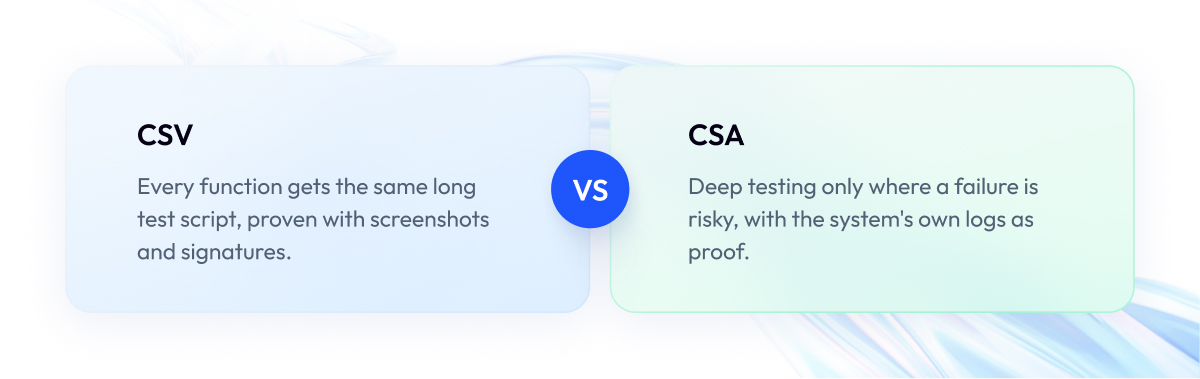
Computer system validation (CSV) is the traditional way manufacturers prove their software works. Computer software assurance is FDA’s newer approach to the same task. Both keep the duty to validate software, and the difference lies in how much testing each feature gets and what counts as proof.
Here is how CSV usually works. For every function in the system, the team writes a detailed test script, a document that lists each step a tester must follow. The tester runs every step, takes a screenshot as proof, and signs the page.
CSV treats every function the same way. A function that controls a production line and a function that changes a font both go through the full process. That turns CSV validation into a mountain of paperwork, and the functions that matter most get no extra attention.
CSA changes two things. First, the amount of testing now depends on risk. Functions that could hurt patients get deep testing, and the rest get lighter checks.
Second, proof can come straight from the software. System logs that record what happened and when can stand in for screenshots and signed paper (Section V.A.6).
The table below shows the CSA vs CSV difference point by point.
| What Changes | CSV | CSA |
| Main goal | Full documentation for audits | Confidence the software works properly |
| What gets checked | The whole system, all at once | Each feature, by what it is used for (V.A.1) |
| How testing works | Same detailed scripts for every function | Deep scripts for risky features, lighter checks elsewhere (V.A.4) |
| What counts as proof | Screenshots and signed paper | System logs and automatic change records (V.A.6) |
| Role of the software provider | Provider audits, often on site | Provider’s own testing as a starting point (V.A.5) |
| After a software update | Full revalidation, often repeated | Check what changed, test by risk (V.A.3) |
| Legal basis for devices | 21 CFR 820.70(i), until February 2, 2026 | ISO 13485 clauses 4.1.6, 7.5.6, 7.6 via QMSR, since February 2, 2026 |
One thing stays the same. Your customers still have to validate their software, and CSA shows them a smarter way to do it.
FDA designed CSA to be the least burdensome way to validate software, and the cost of CSV shows why that matters. In a September 2022 survey by KPMG and KENX of 163 life sciences professionals, 38% said their organization spends at least a quarter of project spend on CSV tasks.
With CSA, effort goes where the risk is, paperwork can shrink, and changes can reach production sooner.
Many companies started the switch years ago. In the same survey, 72% said their CSV policy already allows a risk-based approach, 25% had a CSA program in place, and 37% had one in progress. More recently, Kneat’s 2025 State of Validation survey of more than 300 professionals found that nearly half of respondents are adopting or using CSA processes. Kneat sells validation software, so treat the figure as an estimate.
This can be an opportunity for you if you build software that medical device manufacturers use. Customers who are still switching will value a partner whose proof already fits CSA.
Moving an existing CSV program to CSA
You can move an existing CSV program to CSA in five steps and keep most of what you already have:
- List your software by intended use. Record what each system and feature does in your process (Section V.A.1).
- Rate the process risk. Mark each feature as high process risk or not high (V.A.2).
- Update procedures and templates. Rewrite your validation procedures so they allow unscripted testing and digital records (V.A.4, V.A.6).
- Reuse evidence from software providers. Evaluate providers through your supplier checks and build on their testing (V.A.5).
- Send every change through the risk check. Assess each update against its intended use and risk before deciding how much to test (V.A.3).
So how does FDA CSA work day to day? It runs on a risk framework that FDA sets out in Section V.A of the guidance.
How the CSA Risk Framework Works
FDA’s computer software assurance framework comes down to four core steps. Each step builds on the one before it, so let’s go through them in order:
- Identify the intended use. Write down what each feature does in the customer’s process, for example, “calculates the expiry date printed on a label” (Section V.A.1).
- Decide the risk. Ask one question: if this feature fails, could the result make a device unsafe? (V.A.2)
- Choose the testing. Pick a testing method that matches the answer (V.A.4).
- Keep the record. Save proof of the testing, with as much detail as the risk calls for (V.A.6).
In the guidance itself, Section V.A splits the framework into six parts: intended use, the risk approach, software changes, assurance activities, additional considerations, and the record. The four steps above cover the core, and later sections of this article cover changes and evidence from software providers.
How FDA defines risk
FDA uses only two levels of risk. A feature has high process risk if its failure could cause a quality problem that makes a device unsafe. Every other feature does not have high process risk.
Your customers can still use finer grades inside the second group, such as “moderate” or “low,” and the lighter rules apply to all of them (V.A.2). This check is separate from the device risk analysis that manufacturers run under ISO 14971, the standard for medical device risk management (Section V.A.2).
FDA illustrates the idea with a manufacturing execution system (MES), the software that runs and tracks work on a factory floor. If the MES manages workflow and sends alerts, a failure slows operations and leaves the way the device is made unchanged. That is not high process risk.
If the same MES automatically controls temperature, pressure, or process time, a failure could produce unsafe devices. That is high process risk (V.A.3). For devices approved through premarket approval (PMA) or a humanitarian device exemption (HDE), a change to such a feature may require a 30-day notice to FDA (V.A.3).
How to choose the testing
Once the risk is known, the team picks how to test. FDA describes two families of testing.
Scripted testing follows written test cases with expected results. FDA calls the full version “robust” scripted testing and the shorter version “limited.”
Unscripted testing has no written steps and comes in three forms:
- Scenario testing: a tester walks through a realistic sequence of actions.
- Error guessing: a tester targets places where software often breaks.
- Exploratory testing: a tester designs checks on the fly to meet goals set in advance.
High process risk usually calls for scripted testing and not high process risk for unscripted testing, but FDA says the match is flexible (V.A.4). Unscripted testing can suit a feature with high process risk, and automated scripted tests can be the faster choice for a feature without it.
Each type of testing needs a different amount of planning and a different record:
| Testing Type | What You Plan in Advance | What the Record Holds |
| Scripted, robust | Objectives, detailed test cases, expected results | Full test report, result per case, issues, conclusion |
| Scripted, limited | A few test cases, expected results | Summary of testing, result per case, issues, conclusion |
| Scenario testing | Features to test, no written plan | Summary of features tested, issues, conclusion |
| Error guessing | Failure modes to probe, no written plan | Summary of failure modes tested, issues, conclusion |
| Exploratory testing | Objectives with pass or fail criteria | Summary of objectives tested, issues, conclusion |
Every record also includes the intended use, the risk result, who did the testing, and when (Table 1 of the guidance).
Step 3 also leaves room to reuse testing done by the company that built the software. The next section explains how much of that work your customers can count on.
What Manufacturers Can Reuse from Their Software Provider
Under computer software assurance, FDA lets manufacturers use the testing, development records, and system data of the company that built their software as the starting point for their own checks. For some lower-risk features, that work alone can be enough (Section V.A.5).
Think of it like buying a used car with a full service history. You still inspect the car, but the records show you where to look and what you can skip.
The same logic works here. If your product comes with solid proof of how it was built and tested, your customers can skip repeating that work and focus on what is specific to their own use.
Why customers look closely at this
Checking suppliers is one of the places where manufacturers most often get into trouble with FDA. In FDA’s inspection data for fiscal year 2025, purchasing controls, the rules for how manufacturers choose and check their suppliers, drew 190 of 2,660 device citations. That is more than nine times the 20 citations for software validation in production and quality systems.
How we counted: we went through FDA’s public inspection data for device manufacturers from October 2024 to September 2025 and counted every citation under the purchasing controls rule (21 CFR 820.50) and the software validation rule (21 CFR 820.70(i)). The data covers 791 inspection reports generated by FDA’s system, one report can list several problems, and all these citations predate February 2, 2026, when FDA’s Quality Management System Regulation removed the software validation rule.
So when your customers evaluate your product, they are also protecting themselves during their next inspection. The easier you make that review, the more they will trust you.
What customers can review and what you can provide
FDA lists the kinds of information a manufacturer can use to evaluate a software provider. The depth of that review depends on risk, so a product used in processes with high process risk gets a closer look.
| What Customers Review | Where FDA Says It | What You Can Provide |
| Independent certifications | V.A.5 | SOC reports, ISO certificates |
| Development and testing practices | V.A.5 | Development process documents, quality records, test results |
| Cybersecurity | V.A.5 | Security risk assessment, threat modeling, software bill of materials |
| Data integrity features | V.A.5 | Timestamped change logs, access control, electronic signatures, encryption, archiving |
| Cloud service terms | Appendix A, Example 4 | Agreement on security, privacy, availability, change management, continuity |
Two items in the table may need a quick explanation. A SOC report (System and Organization Controls report) is an independent audit showing that a company has working controls to protect its systems and data. A software bill of materials (SBOM) is a list of every component inside your software, much like the ingredient list on food packaging.
Your customers also have an easier path than a site visit. FDA accepts that auditing a software provider in person may not be feasible or appropriate, and lets manufacturers rely on other information instead (V.A.5).
The final decision about your software always belongs to your customer, and your evidence is an input to that decision.
The more of this evidence your product produces automatically, the less work both sides have to do. That brings us to the process your engineers already use to build and test code.
Automated Validation: Turn Your Existing Tests into Validation Evidence
With automated validation testing, the tests your team already runs become validation evidence for your customers. FDA prefers records that software creates on its own, such as system logs, over screenshots and paper (Section V.A.6).
Here is the idea. Every time an engineer changes the code, an automated system builds the product and runs tests. Engineers call this a build pipeline. For MasterControl, our team built an enterprise test automation framework that runs in GitHub pipelines.
Each test run already produces a result: passed or failed. That result is exactly the kind of proof your customers need.
The problem is that many teams never keep it. Results often disappear when the build system’s retention period ends, and nobody can tell which test checked which feature. The fix is to keep those results and connect each one to a feature.
How to turn test results into evidence
Take one feature as an example: your software prints an expiry date on a product label. Here is what your team would set up for it:
- Describe the feature. Write one plain sentence: “The system prints the correct expiry date on every label.”
- Mark the risk. A wrong expiry date could put patients at risk, so mark this feature as high process risk.
- Connect the test. Link the automated test that checks the date to this feature.
- Save every result. Each time the test runs, save the test tool and its version, the environment, the build number, the timestamp, and whether it passed.
- Protect the results. Store them where nobody can change or delete them.
- Review and approve. Add a digital review and sign-off only where the risk calls for it.
Now, when a customer asks how you know the label feature works, you can pull up every test run for every release.
If your product ships in several editions or configurations, our guide on scaling test automation across product variants shows how to keep this setup manageable.
FDA lists tools that track bugs and link tests to requirements among the factors that reduce extra assurance work (Section V.A.5). It also lists testing done in iterative cycles and continuously throughout the life cycle as a way to reduce effort, which is the closest the guidance comes to describing a build pipeline. The guidance does not mention pipelines by name, so think of this as a practical way to produce the evidence FDA recommends.
Three things to keep in mind
- Your test tools need a quick check too. FDA recommends a light check to confirm the tools themselves work as intended (V.A.5).
- Saved results must be protected. If customers rely on your stored results as proof, FDA’s rules for electronic records, known as Part 11, generally apply (V.B). In practice, you need to track who changed what, control who has access, and support electronic signatures.
- Automated tests miss the unexpected. They check only what someone planned to check, and FDA lists exploratory and other unscripted testing as separate activities (V.A.4). For risky features, people should still explore the software by hand and look for surprises.
Once you have these results, the next step is packaging them for your customers with every release.
The Release Assurance Pack: What to Ship with Every Release
A Release Assurance Pack is the set of evidence you ship with each release so customers can assess the change and count your testing toward their own validation. It mirrors what FDA lists for evaluating software providers and handling SaaS updates.
Every time you release an update, your customers have to decide whether the new version is still safe to use. The pack answers their main questions in one place:
- What changed.
- How you tested it.
- Whether anything is still broken.
Here is what goes into the pack. The third column shows the part of FDA’s guidance each item builds on.
| Part of the Pack | What It Contains | Where FDA Says It | Who Uses It |
| Change summary | List of changes and the features they affect | Appendix A, Example 4 | Customer validation team |
| Feature to test map | Each changed feature linked to its risk, test, and result | V.A.5 | Customer validation team, auditors |
| Automated test report | Test tool and version, build, dates, results, defects | V.A.6, Appendix A, Example 4 | Customer quality team |
| Manual testing notes | Results of manual testing on risky changes | V.A.4 | Customer validation team |
| Security evidence | Updated list of software components, security test results | V.A.5 | Customer security team |
| Configuration notes | Changes to settings customers control and to core code | Appendix A, Example 4 | Customer system administrators |
| Known issues | Open problems, their impact, and workarounds | V.A.6 | Customer validation and support teams |
Here is why the pack saves so much time. Say your release changes only how a report looks. The pack shows this in the first line, so the customer immediately knows that the features controlling production were untouched. They check the report and move on.
Send the same pack with every release, in the same order. Your customers will learn where to look, and each review will take less time than the last.
For products that update automatically in the cloud, the pack matters even more. The next section explains why.
Keeping Customers Validated Through SaaS Updates
A SaaS update often reaches every customer at once, and customers usually cannot postpone it. For a medical device manufacturer, that raises a fair question. Does the software still work the way they approved it?
FDA answers this with an example in its guidance. For every automatic update to the features covered by your service agreement, you give customers a summary of what changed, how you tested it, and what the results were. Your customers then check how the changes affect what they use the software for and test them in proportion to that impact (Appendix A, Example 4).
What you can do to make updates easier
- Warn customers before each update. Agree in your contract how many days in advance customers get notice, so they have time to prepare.
- Show exactly what changed. List the features each update touches. Customers can skip retesting features without high process risk that the update did not touch.
- Give customers a quick test. Share a few simple tests they can run in their own setup to confirm everything still works.
- Keep watching after the update. Track errors after each release so you spot problems before your customers do.
These steps save customers from retesting everything after each update, a point a recent practical guide on SaaS updates also makes.
One case that needs extra care
Some updates change settings that directly control how devices are made, such as temperature or process time. For PMA or HDE devices, your customer may then have to send FDA a 30-day notice before using the update (V.A.3).
Mark these changes at the top of your Release Assurance Pack so customers spot them right away.
Many of these checks still rely on manual testing. The next section shows how to record it so customers can trust it.
How to Document Unscripted and Exploratory Testing
Unscripted testing needs a record too. FDA’s record for exploratory testing holds the following (Section V.A.6):
- The intended use and the risk result.
- High-level goals with pass or fail criteria.
- The issues found and how they were resolved.
- The conclusion, plus who tested and when.
Many software teams test risky features by hand before each release, and that work has value for their customers. If nobody writes it down, customers cannot rely on it and have to repeat the testing themselves.
In unscripted testing, a person checks the software without a written script. The tester sets goals before starting and writes down what happened, and that record turns a manual session into evidence your customers can use.
FDA’s guidance includes a complete example of such a record for a spreadsheet. Here it is as a template you can reuse:
| Field | What to Write | FDA’s Example |
| Feature and version | What you tested | Spreadsheet X, version 1.2 |
| Intended use | What the feature is for | Collecting and graphing quality problem data for monitoring |
| Risk level | High or not high process risk | Not high process risk |
| Test type | Which unscripted method you used | Exploratory testing |
| Goals and results | Each goal with pass or fail | Create, read, update, delete records: all passed except update |
| Issues and fixes | What went wrong, how you fixed it | Text in a number field caused an error; rule added, retest passed |
| Conclusion | Is the feature fit for use | Acceptable for its intended use |
| Tester and date | Who tested, when, approval if needed | Jane Smith, July 9, 2025 |
A 2024 article in ISPE’s Pharmaceutical Engineering notes that assessments of a provider’s quality system, “when in good standing and documented, can potentially be further leveraged.” Record why you ran each unscripted session and what it covered, so your customers can rely on it.
Here is how these ideas look in practice, in a project our team delivered for a quality management software company.
Case Study: Automated Validation for MasterControl
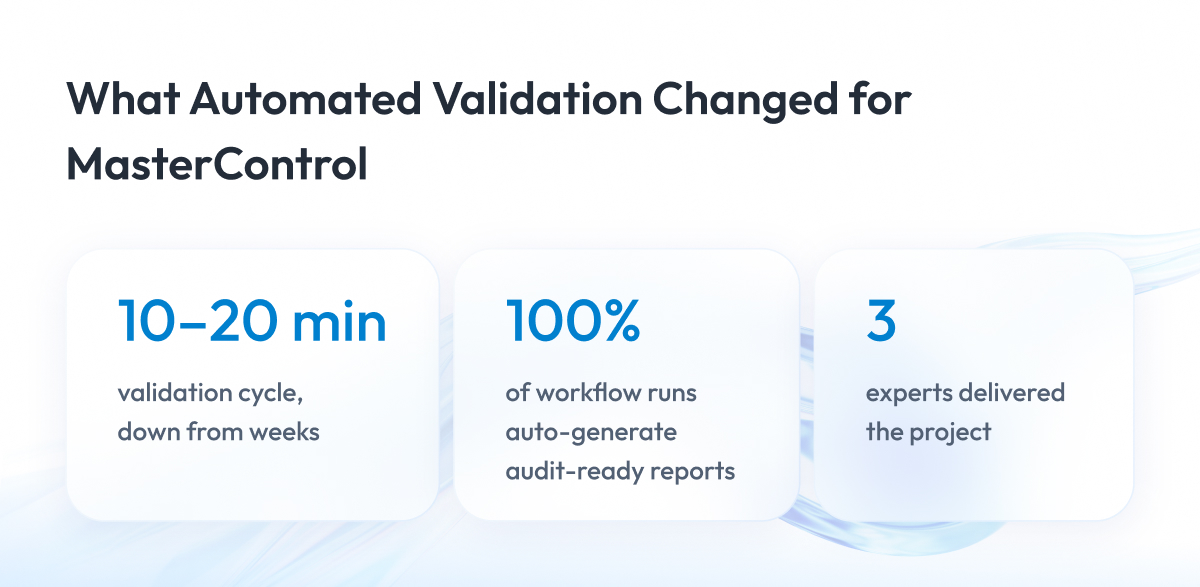
Our work for MasterControl, a quality management software vendor, shows the engineering pattern from this guide in a live product. Automated end-to-end validation runs produce audit-ready reports on every execution, and the results below come straight from the case record.
The challenge
MasterControl builds quality, manufacturing, and compliance software for regulated companies, mainly in life sciences and healthcare. Its customers must validate every update before they use it, so they need proof that MasterControl tested each new version and that it works correctly.
MasterControl stood in the same position as the software companies we wrote this guide for. It needed to answer the question at the heart of this article. How do you give customers reliable validation evidence with every release without slowing releases down?
Producing that evidence took weeks. Testers checked much of it by hand, slowing every release and increasing the risk of human error.
Old and new parts of the platform ran side by side, further complicating validation, a common situation when modernizing healthcare software. The team also had no automated way to produce the reports customers expect as proof of quality.
What we built
Our team built an automated validation framework for MasterControl that covers the legacy and the modern parts of the platform:
- Automated validation runs that execute every step and report success or failure as soon as each run finishes.
- Login and access control through MasterControl’s existing identity service, so the framework follows the same security rules as the platform.
- Support for changing configurations, so the same validation runs work for both existing and new setups.
- Test coverage at every level, from single components to full user flows.
We rolled the framework into production with live validation turned on.
The results
- Validation cycles cut from weeks to 10–20 minutes.
- 100% of workflow runs auto-generate standardized, audit-ready reports.
- Updates and configuration changes ship without lengthy revalidation gates.
- Delivered by a team of 3 experts.
The project follows the same pattern this guide describes. Tests run automatically, save their results, and produce a report customers can use as evidence.
We applied the same idea in a second project for MasterControl, which added no-code quality event workflows with built-in validation. That project delivered automated validation on every process run.
Where Practitioners Still Disagree
The MasterControl project shows automated validation evidence working in a live product. Computer software assurance itself is only a few years old, and four questions remain open: how much manual testing to document, how drug manufacturers apply CSA, how far your evidence can cover fast releases, and how to treat AI features.
Knowing these debates helps you answer the questions your customers’ quality teams will raise.
How much to write down for manual testing. FDA says records need no more evidence than necessary and should still keep enough detail to serve as a baseline for future improvements (Section V.A.6). Teams draw that line in different places, so agree on a record format with your customers early.
Whether CSA applies to drug manufacturers. FDA’s centers for devices and biologics issued CSA for software used in device production and quality systems. Drug manufacturers apply similar ideas through GAMP 5 (Second Edition), an industry guide from the International Society for Pharmaceutical Engineering (ISPE) that they use for GxP validation, meaning the validation of computer systems under good practice rules.
Whether your evidence alone can cover fast release cycles. Some teams want a software provider’s test evidence to cover weekly SaaS releases on its own. FDA says that may be enough only for some lower-risk features (V.A.5), so features with high process risk still need checks on the customer side.
How to treat AI features. FDA’s guidance says its risk framework can apply to artificial intelligence and machine learning tools used in production or quality systems (Section V.A). Europe takes a stricter line, and its draft rules for AI in drug manufacturing, known as Annex 22, keep generative AI and large language models out of critical uses. The final text is still pending.
Final Word
If you have read this far, you already know what computer software assurance expects. Putting it into practice is harder. Your team has to link tests to features, keep results it used to throw away, agree on formats with customers, and change habits it has followed for years.
This effort pays off.
Every week a customer spends validating your update is a week they cannot use it. When your releases arrive with ready evidence, customers can adopt them faster, and their quality teams find fewer reasons to hesitate.
Start small. Pick one feature with high process risk, connect its tests to it, save every result, and send your first Release Assurance Pack with the next release. Then expand to the next feature.
If you want a second pair of eyes, see our QA and test automation services and tell us about your project. We’ll suggest the next step.
Questions You May Have
Is computer software assurance mandatory?
No, computer software assurance is nonbinding FDA guidance, and the duty to validate production and quality software comes from ISO 13485, which FDA’s quality rules now reference.
Does CSA replace computer system validation?
No, CSA keeps the duty to validate software and changes how much testing each feature gets and what counts as proof.
Does CSA apply to software as a medical device?
No, software that is part of a medical device or acts as one falls outside CSA and follows FDA’s separate rules for device software.
Does CSA replace 21 CFR Part 11?
No, FDA’s Part 11 rules for electronic records and signatures would generally apply to records your customers use to show their software is validated (Section V.B).
Can unscripted testing be used for features with high process risk?
Yes, FDA says the match between risk and test type is flexible, so unscripted testing can suit a feature with high process risk (Section V.A.4).
Do we still need installation, operational, and performance qualification (IQ/OQ/PQ)?
Not as a requirement, because FDA’s General Principles of Software Validation (Section 3.1.3) calls IQ/OQ/PQ “one of many legitimate ways” to organize validation at the user site, and the CSA guidance does not use these terms, so teams can keep them where they help.
Is an on site audit of the software provider required?
No, FDA accepts that an in person audit may not be feasible and lets manufacturers rely on SOC reports, ISO certificates, and documentation review instead (Section V.A.5).
What is the FDA CSA guidance?
The FDA CSA guidance is FDA’s nonbinding document, last revised on February 3, 2026, that explains how to confirm that production and quality software works properly with testing matched to risk.
How is CSA different from computer systems validation?
Computer systems validation traditionally applies the same detailed, scripted testing to every function, while CSA matches testing effort to risk and accepts digital records, such as system logs, as proof.
What is automated validation testing?
Automated validation testing turns the automated tests a software team already runs into saved, timestamped results that customers can use as validation evidence.
How does GAMP 5 relate to CSA?
Drug manufacturers apply CSA ideas through GAMP 5 (Second Edition), ISPE’s industry guide for GxP validation, because FDA issued CSA for medical device production and quality software.