







![How To Build E Commerce Website [2025 Guide + AI Innovations]](https://zoolatech.com/wp-content/uploads/2025/11/How-To-Build-E-Commerce-Website-2025-Guide-AI-Innovations.jpg)
Quick Summary
- Global e-commerce is projected past $6.5 trillion in 2026 and more than 20% of total retail, with mobile close to 60% of online purchases.
- The first decision is how much you build versus rent: SaaS launches fastest inside platform limits, open source trades control for owning security and upgrades, and headless gives freedom at the highest operating cost.
- Architecture is the load-bearing wall, covering monolith, headless, or composable plus rendering strategy and an API-first backend, and these are the choices hardest to reverse later.
- Anchor targets to real benchmarks, with average conversion around 2.7% and cart abandonment near 70%, since teams with defined digital KPIs are 2.5x more likely to hit revenue goals.
- Downtime during a peak event can cost $100,000 an hour, which is why automated deployments with tested rollback matter more than manual fixes in production.
eCommerce website development is the process of designing, building, and launching an online store that can sell products or services and process payments online. It covers platform selection, frontend and backend development, payment and security setup, and integrations with systems like CRM, ERP, and inventory, delivered on a SaaS platform, an open-source platform, or a custom headless build.
If you are planning a new website from scratch or rebuilding an old store, the decisions you make up front shape the result for years. Which platform to use, how much to customize, how to handle payments and B2B buyers, and who builds and runs the store each carry trade-offs you cannot easily undo.
We built this guide around those decisions. It walks through the platform and build-vs-buy choice, the architecture behind a scalable store, the eight steps of an actual build, and the parts most guides skip, from B2B commerce and payments to cost and choosing a development partner.
By the end, you will know which eCommerce solution fits your catalog and team, what a 2026-grade build involves, roughly how much it costs, and how to choose a partner with confidence.
Basics of eCommerce Website Development
With the definition in place, the first thing worth understanding is how a store is actually put together.
Two layers do the work.
The frontend is the storefront customers interact with. It covers the catalog, search, product pages, and cart.
The backend runs everything they never see. It handles order processing, inventory, payments, and the integrations that keep it all in sync.
eCommerce website design and development have to serve both, because a storefront that looks polished but stalls at checkout loses the sale anyway.
The core components of eCommerce web development are:
- Product catalog: categories, attributes, images, and descriptions.
- Shopping cart and checkout: stores items and supports guest or registered checkout.
- Order management system (OMS): handles inventory management, purchases, and delivery.
- Payment gateways: secure payment integrations for cards, wallets, and local methods such as Stripe, PayPal, Apple Pay, and Google Pay.
- Integrations: connections to CRM, ERP, and marketing tools for automation.
- Adaptability: responsive web design, mobile-first layouts, PWA support, multi-device, multi-currency.
- Analytics: traffic, funnel, and conversion data to guide growth.
These components are what separate an eCommerce platform from an ordinary website. UX, navigation, and search sit atop operations and technology, ensuring the online shop sells reliably and keeps customers coming back.
Why Begin E-Store Development in 2026?
Knowing how a store is built is one thing. Committing budget to launching an eCommerce store now is another, and 2026 makes the case stronger than in most years.
eCommerce has moved from a growth channel to the backbone of retail. Waiting means giving up compounding gains while omnichannel retail expands and customer expectations keep rising.
The numbers back it up.
Global eCommerce sales are projected to surpass $6.5 trillion in 2026 and account for more than 20% of total retail sales.
Mobile commerce already accounts for close to 60% of online purchases worldwide and continues to climb.
The technology has matured at the same time. Headless commerce architecture and microservices let retailers separate the frontend from the backend, swap modules without replatforming, and scale faster.
Progressive web apps deliver app-like speed without the cost of native apps. AI personalization, once limited to tech giants, is now within reach for mid-sized players.
In 2026, the stores that win tend to share four traits:
- Mobile-first: built for the 60%+ of shoppers buying on phones.
- Composable: API-first systems that stay flexible and avoid vendor lock-in.
- AI-powered: smarter search, recommendation engines, chatbots, and voice commerce.
- Omnichannel-ready: consistent across web, mobile, marketplaces, and physical stores.
Starting now means building your eCommerce business on scalable technology with strong market tailwinds. The longer the wait, the more ground there is to recover in a market that keeps moving ahead.
Custom Build vs SaaS vs Headless: Choosing Your Approach
Once you decide to invest in eCommerce website development, the first big choice happens before any feature or design work. It comes down to how much of the store you build yourself and how much you rent ready-made.
This single decision drives your cost, your launch date, and the limits you will hit two years from now, so it pays to understand the options in plain terms first.
Picture it this way. You can rent a furnished apartment, buy a house and maintain it yourself, or design a custom home from separate parts. Each one gives you a place to live.
They differ in how much freedom you get and how much work you take on. eCommerce platforms work the same way.
Here is how that maps to the three main approaches.
- SaaS platforms (Shopify, BigCommerce): you rent a hosted, maintained platform and configure it. This is the fastest way to launch, with the lowest operational burden and a predictable monthly cost. The trade-off is control, since you work within the platform’s checkout, data model, and extension limits. It fits best when speed to market matters more than deep customization.
- Open-source/self-hosted (Adobe Commerce/Magento, WooCommerce): you own the codebase and the hosting. You gain far more control over data, workflows, and integrations, and in return you own security, scaling, and upgrades. This suits complex catalogs and teams that can support the platform.
- Headless: you separate the storefront from the commerce services behind it and connect best-of-breed components through APIs. You get the most freedom to shape custom experiences, omnichannel, and performance, and it is the most engineering-intensive option to build and run. This suits brands where the customer experience is a competitive edge.
Custom development runs across all three. It is the tailored work you layer on top, including bespoke checkout, pricing engines, integrations, and storefronts that off-the-shelf features cannot express. A custom eCommerce website development effort can sit on a SaaS base or a fully headless stack, depending on how far the standard tools take you.
The table below compares the advantages, disadvantages, and best use case for each approach.
| Approach | Advantages | Disadvantages | Best Use Case |
| SaaS | Fast launch, low maintenance, predictable monthly cost | Limits on checkout, data model, custom logic | Standard catalog, fast launch, small team |
| Open-source / self-hosted | Full control over data, workflows, and integrations | Security, scaling, and upgrades become your cost | Complex catalog, capable engineering team |
| Headless | Maximum flexibility, omnichannel reach, high performance | Highest build and operating complexity | Experience as a differentiator, omnichannel |
For most standard stores, a SaaS platform is the practical starting point. The more your catalog, integrations, or customer experience pull away from the default, the more an open-source or headless build, often supported by a dedicated eCommerce engineering team, starts to pay off.
eCommerce Architecture & Tech Decisions
With an approach chosen, the next step is the architecture and the technical decisions sitting underneath it. This stage matters more than it looks, because architecture is the structure your whole store stands on, and the choices here are the hardest and most expensive to reverse later.
A simple way to think about it: changing colors, copy, or a product page is like repainting a wall. Changing your architecture is like moving a load-bearing wall after the house is built. The first is cheap and routine. The second touches everything. Getting these decisions right early is what keeps eCommerce website design and development flexible instead of fragile.
Three decisions drive most of the long-term cost and flexibility of a build.
1. Monolith, headless, or composable
A monolith keeps the frontend and backend in one system. It is simpler to build and run, and harder to scale or restyle one part without touching the rest. Headless separates the storefront from the commerce services, so each can change on its own schedule. Composable goes further, with independent services for search, cart, payments, CMS, and product data connected through APIs and swapped as needs change. Flexibility and complexity rise together, so match the choice to how often your experience has to change.
2. Rendering: SPA vs server-side
A single-page application (SPA) feels app-like and smooth, but it can hurt SEO and first-load speed if handled carelessly. Server-side rendering or static generation usually wins for storefronts because product and category pages need to load quickly and remain crawlable. Many modern stacks mix the two, with server rendering for discovery pages and client-side interactivity for cart and checkout.
3. API-first integration
A store rarely stands alone. Treating the backend as an API layer lets you connect ERP, CRM, product information, order management, search, and payments cleanly, and lets the storefront, mobile app, and marketplaces share one source of truth. This is the foundation that makes adding a new channel cheap later instead of a second project.
Smaller, standard stores rarely need headless. Brands where the storefront experience, performance, or omnichannel reach is a competitive edge usually do.
The cost of choosing wrong is not the rebuild itself.
It is the year spent fighting an architecture that cannot express what the business needs, which is exactly where experienced custom software development earns its keep.
Guide: How To Build an eCommerce Website
With the approach and architecture settled, the rest is execution. The eCommerce website development process below shows how to create an eCommerce store, turning those decisions into a working storefront.
We split the process this way for a team running a complete build, a new store or a serious replatform, where each phase carries meaningful engineering work. It works as a structured playbook across platforms, so it holds whether you build on SaaS, open-source, or headless. What changes between them is the depth of each step.
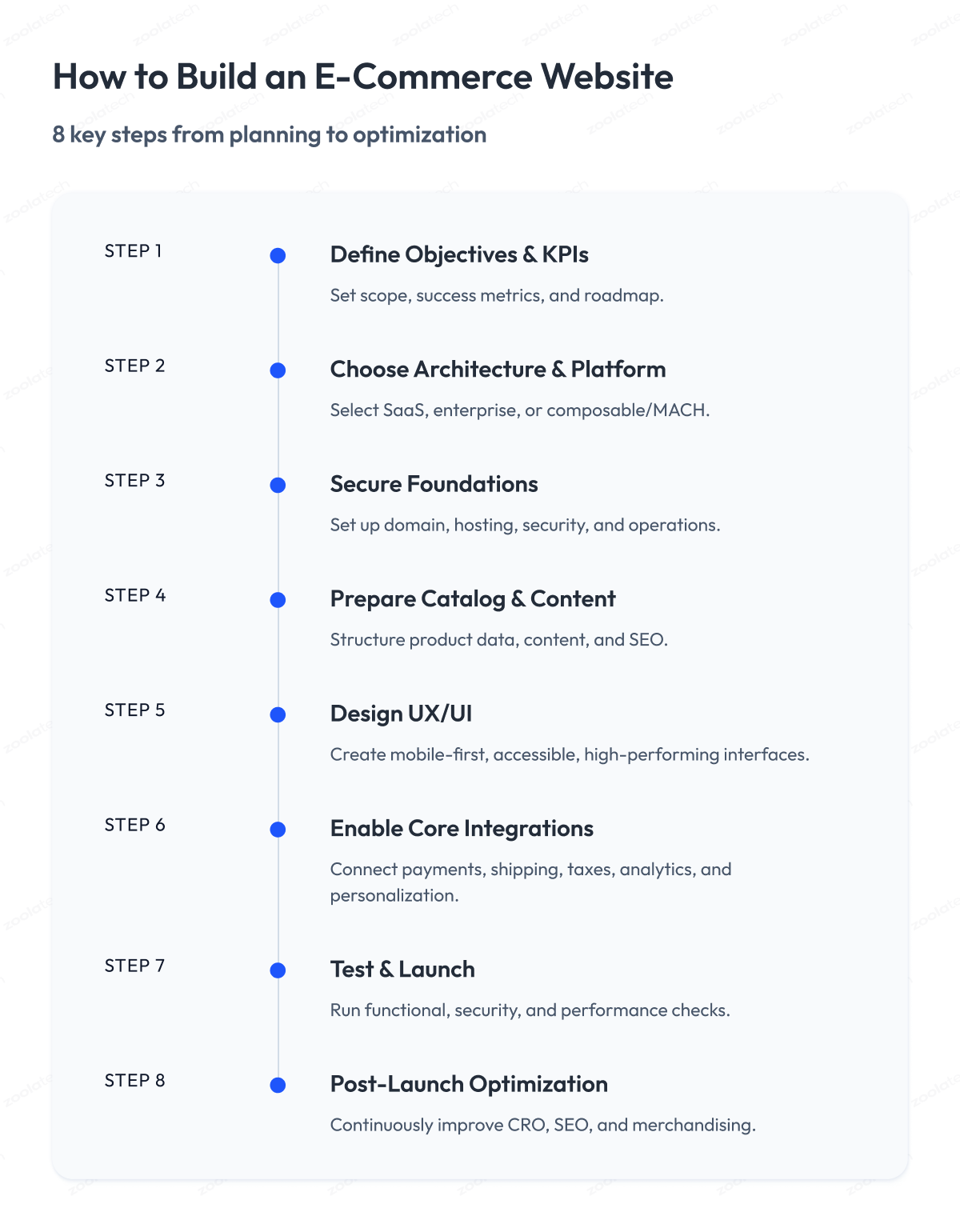
A SaaS store moves through them quickly, while a custom or headless build spends far more effort on architecture, integrations, and testing.
Each step below includes concrete action items, the deliverables it should produce, a pro tip from shipped projects, and where AI now fits into the work.
Step 1: Define objectives, scope, and success metrics
Companies with well-defined digital KPIs are 2.5x more likely to hit revenue goals. Anchor your targets to concrete numbers and external benchmarks so they hold up.
For context, the global eCommerce conversion rate averages about 2.7%, and cart abandonment sits around 70%. Those two figures alone can anchor your initial KPI tree and revenue model.
Action items:
- Write the business case: revenue goals, target margin, payback timeline.
- Map the customer journeys that matter most (browse to checkout, store pickup, returns).
- Define scope: markets, languages, currencies, fulfillment options.
- Set boundaries: budget, launch date, compliance, internal dependencies.
- Benchmark competitors: site speed, checkout flow, and payment options.
Deliverables:
- One-page product requirements document (PRD) covering problem, goals, scope, and KPIs.
- KPI tree (traffic to conversions to revenue).
- Roadmap showing a minimum viable product (MVP) against Phase 2.
Pro tip: Do not overload the MVP with edge cases or nice-to-haves. A strong MVP focuses on the 20% of journeys that deliver 80% of revenue.
Step 2: Choose the right architecture and platform
Choosing the wrong technology stack can lock you into years of expensive rework. Forbes found that retailers adopting composable commerce (modular, API-first, cloud-native, and headless) accelerated innovation by up to 80% compared with those on legacy platforms. The right eCommerce platform depends on speed, flexibility, and long-term scalability. The architecture decisions covered earlier in this guide feed directly into this step.
Action items:
- Compare platform types:
- SaaS eCommerce platforms (Shopify Plus, BigCommerce Enterprise, WordPress and WooCommerce)
- Enterprise frameworks (Adobe Commerce, Magento)
- Composable / MACH (headless commerce, microservice architecture, API-first)
- Check resilience: confirm the platform handles peak events like Black Friday and meets compliance standards.
- Review integration fit: ensure solid connections to ERP, OMS, CRM, payments, and logistics.
- Decide on the frontend: out-of-the-box storefront templates for speed against a custom headless storefront for brand differentiation.
Deliverables:
- Architecture overview showing key systems and integrations.
- Decision matrix comparing shortlisted platforms on time-to-market, flexibility, and total cost of ownership (TCO). A TCO model typically includes licenses, hosting, support, and ongoing engineering effort.
Pro tip: Avoid over-customizing early. The further you tailor a platform away from its native strengths, the harder and costlier upgrades become later.
Step 3: Secure the foundations (domain, hosting, operations)
Reliability and eCommerce security are non-negotiable. Downtime during peak events can cost retailers $100,000 or more per hour in lost revenue. Use SSL/TLS certificates, WAFs, and CDNs, and meet PCI DSS compliance. Protect customer data with strong data protection policies.
Action items:
- Secure your domain and DNS setup: register domains and configure subdomains for production, staging, and testing.
- Enable protection and speed: use SSL/TLS certificates for security, a Web Application Firewall (WAF) for defense, and a Content Delivery Network (CDN) for global performance.
- Define environments: keep development, testing, staging, and production separate.
- Automate deployments: set up deployment pipelines with rollback options to recover quickly when issues arise.
- Plan for resilience: document backup and restore procedures, and set a Recovery Time Objective (RTO) and Recovery Point Objective (RPO) for disaster recovery.
Deliverables:
- An operations runbook covering domain, hosting, security, and backups.
- Monitoring dashboards for uptime, performance, and error tracking.
- An on-call plan with clear ownership for incidents.
Pro tip: Do not rely on manual fixes in production. Automated deployments and tested rollback procedures save hours of firefighting and protect revenue during critical sales windows.
Step 4: Prepare catalog, content, and data
Your product catalog is the backbone of the storefront. When it is messy, incomplete, or inconsistent, customers lose trust and sales slip away.
Research from Baymard shows the average global cart abandonment rate is around 70%, and incomplete product details are among the top contributors. Accurate attributes, correct stock information, and strong product media are essential for conversion.
Action items:
- Define product structure: categories, attributes (size, color, material), and bundles, with consistent naming across all products.
- Set up systems of record: Product Information Management (PIM) for product data, and Digital Asset Management (DAM) for media.
- Model site content: templates for home, category, landing, and product detail pages, plus reusable blocks for campaigns and promotions.
- Cover SEO essentials: structured URL rules, structured data, canonical tags, metadata, and breadcrumb navigation.
- Plan for search and merchandising: organize product listings with synonyms, boosting rules, and badges such as new, sale, and bestseller.
- Prepare migration: clean up legacy data, optimize media, and create a 301 redirect plan to preserve SEO equity.
Deliverables:
- A data dictionary covering attributes and taxonomy.
- Content templates and editorial guidelines.
- Sample product detail page (PDP) and product listing page (PLP) wireframes with enriched content.
- A migration plan with source systems, mappings, and a redirect list.
Pro tip: Do not underestimate data readiness. A polished storefront with poor product information will underperform. Aim for at least 95% of SKUs with complete attributes and optimized images before launch.
Step 5: Design UX/UI for conversions
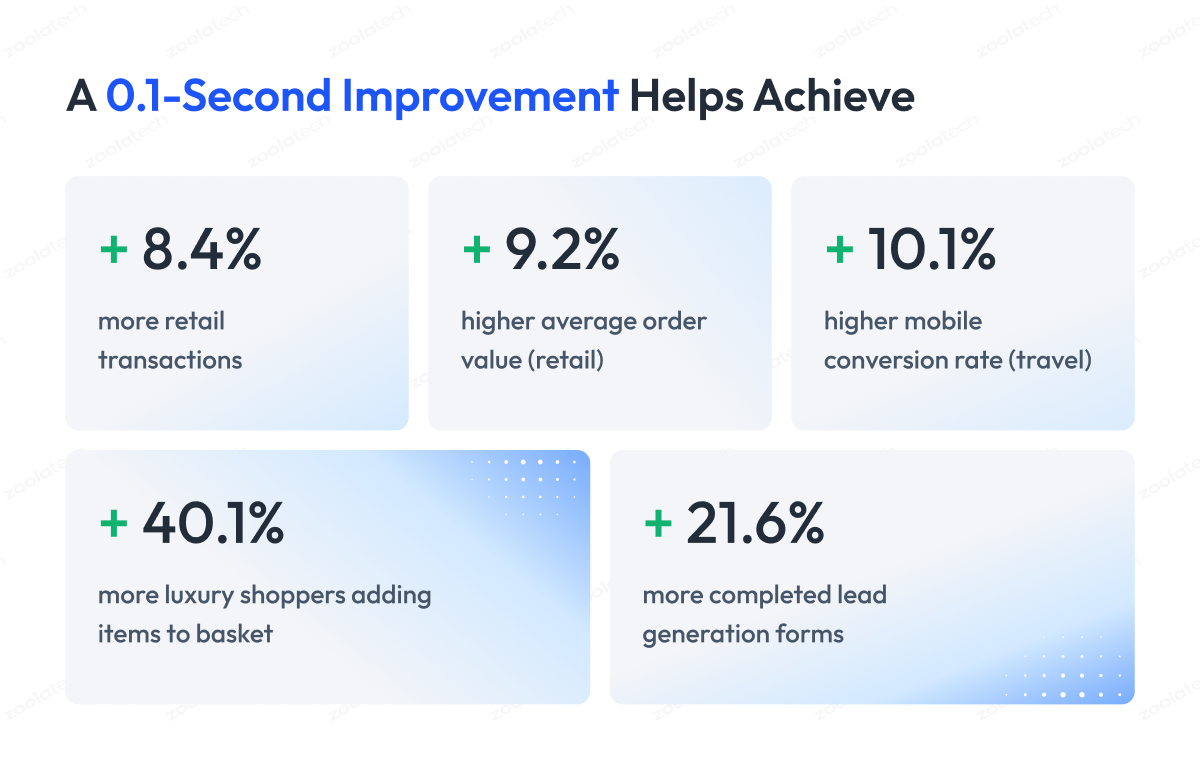
eCommerce web design has a direct line to revenue, and many teams buy design services to get it right. Google found that a one-second improvement in mobile site speed can lift conversion rates by up to 27%.
Action items:
- Design mobile-first: prioritize small screens, since mobile drives most retail traffic.
- Simplify checkout: enable guest checkout, reduce form fields, and add express payment methods like Apple Pay, Google Pay, Stripe, and PayPal.
- Ensure accessibility: follow WCAG 2.2 AA guidelines for contrast, keyboard navigation, and alt text.
- Optimize product pages: high-quality images, zoom, shipping and returns details, and social proof such as ratings and reviews.
- Set performance budgets: keep load times under 2.5 seconds, limit JavaScript bloat, and use optimized formats like WebP and AVIF.
Deliverables:
- Figma prototypes and a UI kit for consistent design across devices.
- A component library with reusable, responsive building blocks.
- Usability test reports from actual customer journeys, especially checkout.
Pro tip: Run a design testing round before launch to confirm the storefront is intuitive and friction-free. In-house sessions or third-party services that recruit test users both work.
Step 6: Enable core features and integrations
A modern eCommerce site is an ecosystem of eCommerce software, with payments, shipping, tax, search, personalization, and analytics working together. Connecting these eCommerce tools effectively improves your teams’ efficiency and gives customers a more trustworthy experience.
Action items:
- Payments: choose providers such as Stripe or Adyen that support multiple payment methods and regional preferences.
- Taxes and compliance: automate calculations with providers like Avalara, and cover GDPR/CCPA data handling.
- Shipping and fulfillment: integrate real-time carrier rates, curbside pickup, and returns management.
- Search and merchandising: configure synonyms, boosting rules, and category-aware results to cut zero-result frustrations.
- Personalization: add product recommendations, recently viewed items, and targeted promotions.
- Analytics: define an event schema (views, add-to-cart, checkout, purchase) and validate end-to-end tracking.
Deliverables:
- Integration architecture: APIs, data flows, and error handling defined.
- Configuration checklist: payments, taxes, shipping, personalization, analytics.
- Test reports: payment success rates, inventory sync, and data accuracy.
Pro tip: Run integration testing before launch to confirm that all core systems communicate under production conditions.
Step 7: Test, secure, and prepare for launch
A reliable launch is the result of systematic testing and strong safeguards. IBM’s report put the average cost of a retail data breach at $4.4 million.
Action items:
- Test end-to-end flows: from product search to checkout and returns, across desktop and mobile, plus accessibility scenarios.
- Load test peak traffic: simulate holiday campaigns or flash sales to confirm stability.
- Secure the storefront: run vulnerability scans, enable bot protection, and schedule a third-party penetration test.
- Prepare SEO checks: validate 301 redirects, sitemaps, and structured data before launch.
- Finalize the go-live runbook: document DNS cutover, rollback steps, and the monitoring thresholds you will watch when you go live.
Deliverables:
- Test reports with pass/fail tied to requirements.
- A security attestation from internal scans or external pen tests.
- A go-live runbook with clear responsibilities and escalation paths.
Pro tip: Run a Game Day exercise before launch. Simulate a payment gateway outage, a CDN issue, or a bad deployment to test how fast the team detects and recovers.
Step 8: Post-launch optimization
Launch day is only the start. The real gains come afterward, as conversion rate optimization (CRO), SEO work, and merchandising refinements compound into a long-term growth engine.
Action items:
- Establish a CRO program: study user behavior, then run structured A/B tests on checkout flows, page layouts, and promotions.
- Iterate SEO continuously: monitor index coverage and search rankings, add fresh content, and improve internal linking and structured data.
- Refine merchandising: automate product recommendations, highlight seasonal items, and balance inventory with margin.
- Run lifecycle marketing: cart recovery emails, replenishment reminders, and loyalty offers.
- Track operational metrics: order accuracy, delivery times, return reasons, and site performance.
Deliverables:
- A 30/60/90-day optimization plan with prioritized experiments.
- Analytics dashboards tracking funnel metrics, repeat purchase rate, and site speed.
- An operational playbook covering release cadence, SLOs, and on-call coverage.
Pro tip: Treat optimization as an always-on process and use third-party testing platforms (Optimizely or alternatives) to scale A/B testing. Continuous improvement keeps your site ahead of shifting customer expectations.
B2B eCommerce Website Development: What’s Different
The eight steps above apply to almost any store, but different types of eCommerce raise different demands. Selling to other businesses, though, adds a layer of requirements that reshapes the build, so B2B deserves its own look.
Start with the easy case. One person visits a store, picks an item, pays by card, and the order is done in a minute. That process is familiar and simple to build for.
B2B works differently.
Picture a restaurant supplier selling to 200 restaurants. A purchasing manager orders 500 units at a price negotiated for that account, on 30-day credit terms, and the order may need a manager’s approval before it goes through.
Each customer can see their own catalog and their own pricing. That involves more people, more rules, and a longer process, and it calls for technical capabilities a simple B2C store never needs.
B2B eCommerce website development differs from B2C by adding company accounts with multiple buyers and roles, customer-specific contract pricing, quotes and net payment terms, approval workflows, fast reordering, and procurement integration such as punchout and deep ERP and CRM connectivity.
The table below shows where the two models pull apart.
| Dimension | B2C | B2B |
| Buyer | >Individual shopper | Organization, multiple roles |
| Pricing | Fixed, public | >Contract, customer-specific tiers |
| Payment | Card, wallet upfront | Net terms, purchase orders |
| Ordering | Single checkout | Quotes, approvals, bulk reorders |
| Integration | Lighter | Deep ERP, CRM, procurement |
Four capabilities carry most of the difference.
- Account structures and roles: company accounts, multiple buyers per account, role-based permissions, and approval workflows for orders above set thresholds.
- Customer-specific pricing and terms: contract pricing, volume tiers, requests for quote (RFQ), and net payment terms, often with catalogs and prices unique to each customer.
- Procurement integration: punchout (cXML/OCI) so buyers shop your catalog from inside their own procurement system, plus ERP and CRM integration that keeps inventory, pricing, and order status in sync.
- Reordering and self-service: fast reordering, saved lists, order history, and self-service account management that cut the support load most B2B operations carry.
This is the kind of work where engineering depth shows. We build and modernize commerce platforms across frontend, backend, and quality engineering, the layers a B2B store leans on once real account hierarchies and integrations are in play.
Payments, Security & Compliance
B2B or B2C, every store eventually handles money and personal data, and that is where the stakes climb. Get the foundations right before launch, because the first serious incident is the most expensive time to learn the lesson.
The core idea is simple. The less card data your own systems ever touch, the less can go wrong and the lighter your compliance load. Most of the work below follows from that one principle.
Any store that processes card payments is subject to PCI DSS. The practical move for most builds is to keep card data off your servers entirely. A tokenizing payment provider replaces the card number with a token, so sensitive data never lands in your systems, and your PCI DSS scope shrinks dramatically.
From there, four areas round out a secure store.
- Gateway and method choice: pick a gateway such as Stripe, Adyen, Braintree, or PayPal based on the markets you sell into, the methods buyers expect (cards, wallets, BNPL, bank transfer), and settlement terms. Local payment methods have a measurable effect on conversion outside the US.
- Fraud prevention: layer address and CVV checks, 3-D Secure, velocity rules, and machine-learning scoring to block fraud without adding friction that costs you good orders.
- Data and privacy: enforce HTTPS everywhere, strong authentication, and hardening of dependencies and infrastructure, and comply with privacy rules such as GDPR and CCPA for customer data.
- Resilience: keep a tested backup-and-restore path so that an incident becomes a recovery.
Payments and security are also where older platforms tend to show their age, since aging code and tight coupling make every fix riskier. Modernizing those systems is steady work for us, and our legacy modernization practice exists precisely for that.
Successful eCommerce Website Checklist
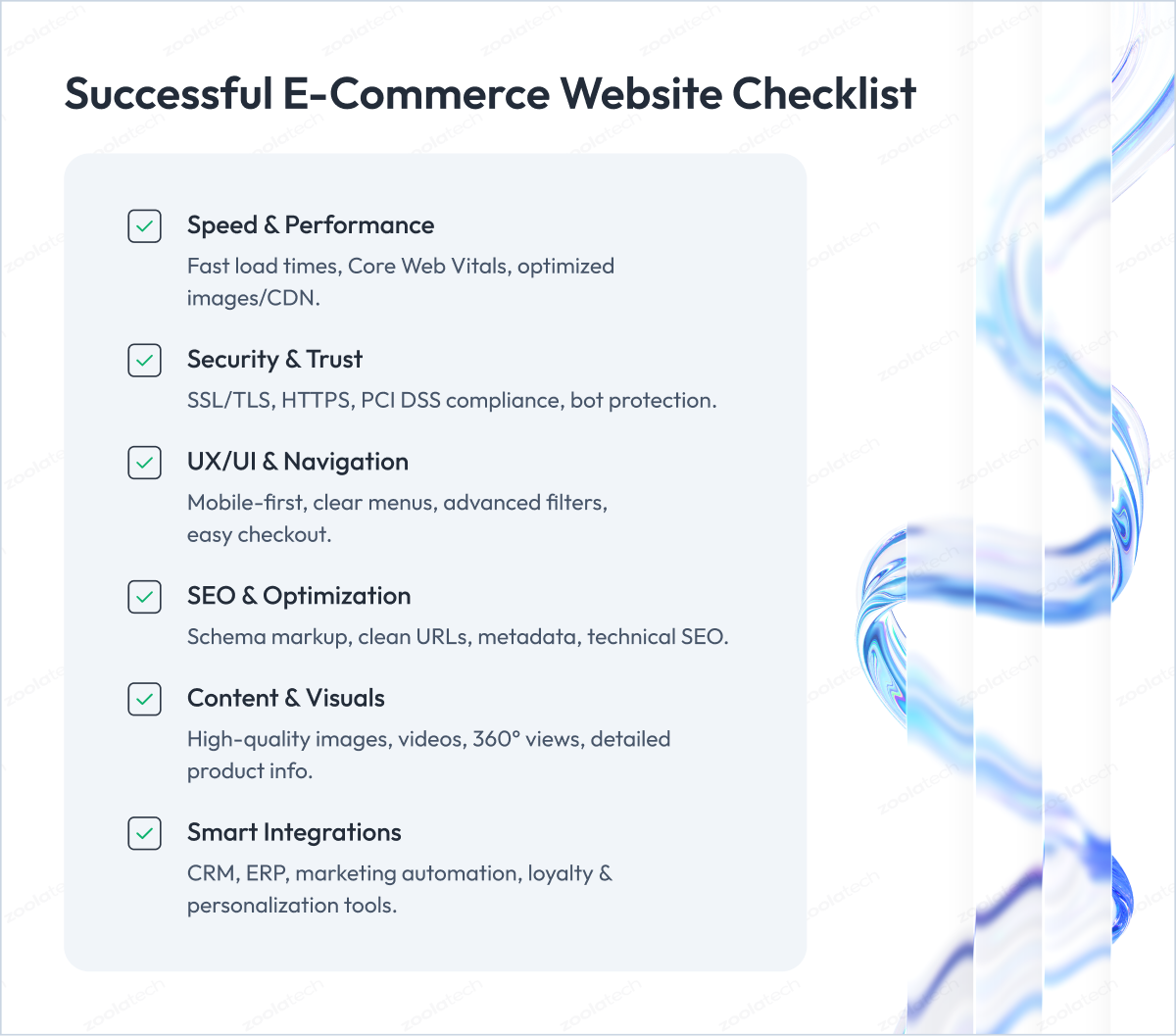
What actually separates a store that performs from one that struggles? These qualities are the ones that show up again and again in stores that sell well in 2026:
- Speed: page load speed and Core Web Vitals.
- Security: SSL/TLS, PCI DSS, data protection.
- UX/UI: design, navigation, search, and filtering.
- SEO: technical SEO and schema markup.
- Integrations: CRM, ERP, email, and social marketing.
Speed and performance
Site speed is critical because it directly correlates with revenue. Google research found that as mobile load time increases from 1 to 5 seconds, the probability of a bounce rises by about 90%. Optimizing Core Web Vitals (LCP, INP, CLS), compressing images, and using CDNs are the baseline for keeping customers on your eCommerce website.
Security
Protection is the foundation of trust. SSL/TLS encryption and full HTTPS are mandatory, and any store taking card payments has to meet PCI DSS. The deeper payment, fraud, and compliance work is covered in the payments and security section above, so treat this as the checklist line confirming it is done.
UI/UX and navigation
A strong user experience starts with straightforward navigation, advanced filtering, and intuitive search that help shoppers find products fast. Faceted navigation, responsive layouts, and low-friction carts lower abandonment and lift satisfaction across devices.
SEO and technical optimization
A well-structured URL scheme, meta tags, schema markup, image optimization, and Core Web Vitals compliance help both search engines and customers move through your site. Technical SEO is what lets visibility scale as the catalog grows.
High-quality content and visuals
Professional product photos, demo videos, and 360-degree views close the gap between online and in-store shopping. Many teams now rely on an AI video generator to produce these demo videos quickly and at scale. Accurate, detailed descriptions reduce returns and build trust, especially in categories like apparel and electronics.
Smart integrations with CRM, ERP, and marketing tools
Linking eCommerce with CRM and ERP systems automates orders, shipping, and inventory updates. Marketing tools for email automation, loyalty, and personalization complete the cycle. API-first and headless platforms keep these integrations scalable as you grow.
AI-Driven eCommerce in 2026
The checklist covers what a strong store needs today. AI is what increasingly separates the best stores from the rest.
Artificial intelligence has moved past the experimental stage in retail. It now works as a core driver of growth and efficiency across the eCommerce website development lifecycle. AI predicts demand, personalizes discovery, defends against fraud, and reshapes how online stores operate and how customers shop.
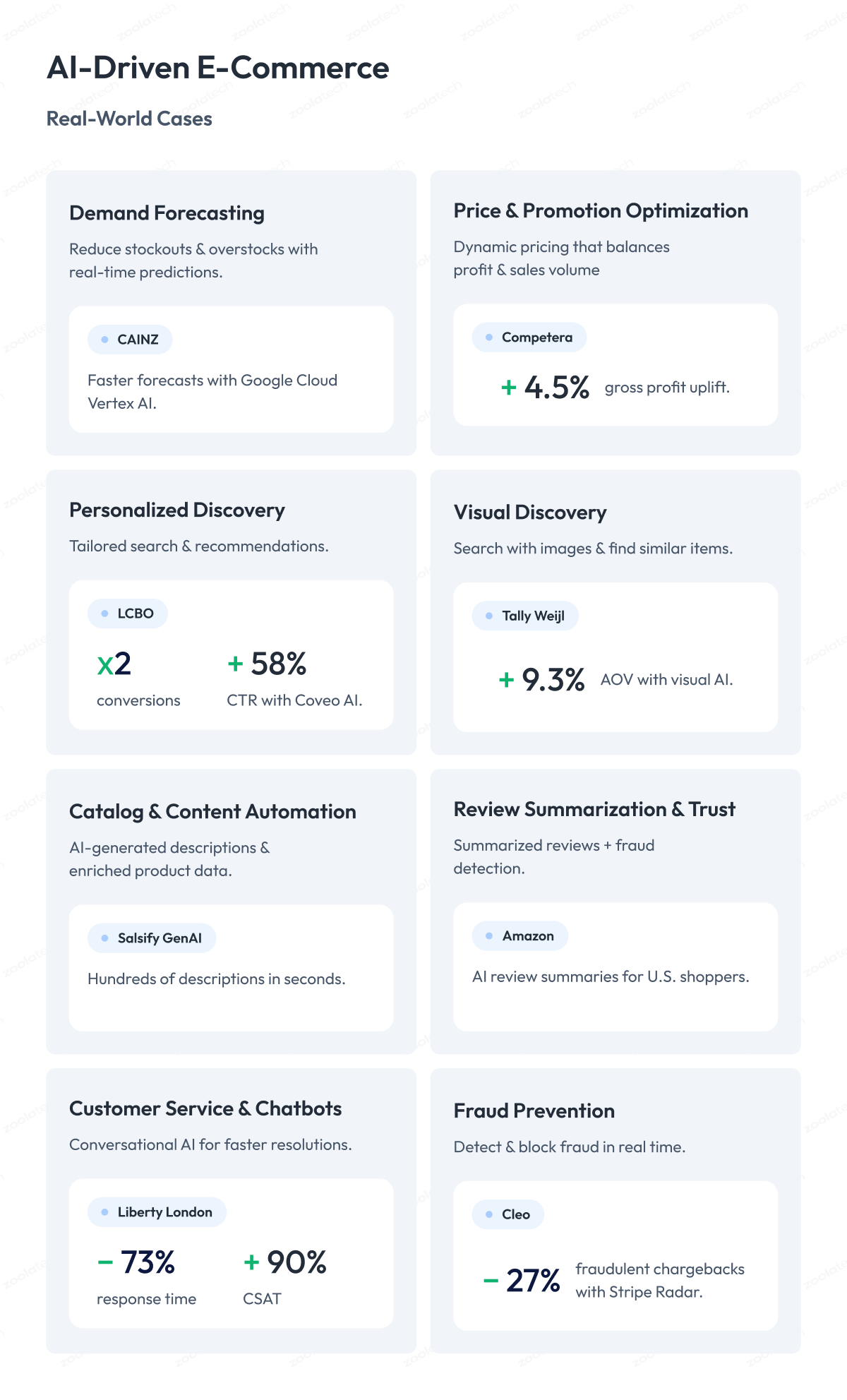
The use cases below show where AI adds value, how it works, and documented examples from retailers already running it in production.
1. Demand forecasting and inventory planning
AI predicts demand at the SKU, store, and regional levels to reduce stockouts, overstocks, and lost sales.
How it works
Machine learning models analyze sales history, seasonality, marketing campaigns, weather, and local events. They retrain on new data to forecast demand and adjust replenishment plans as conditions change.
In practice
The Japanese retailer CAINZ rebuilt its demand forecasting on Google Cloud Vertex AI, reducing data preparation time to about 50 minutes regardless of store count and enabling faster forecast refreshes and better decisions.
2. Price and promotion optimization
AI recommends base prices, markdowns, and promotional strategies that balance profit and sales volume.
How it works
Deep learning models calculate price elasticity by SKU and segment, simulate scenarios, and recommend price changes. Reinforcement learning engines adjust promotions dynamically based on customer response and competitor behavior.
In practice
Competera reported a 4.5% uplift in gross profit for a multi-category electronics retailer through AI-driven pricing.
3. Personalized product discovery
AI improves search results, product recommendations, and browsing tailored to each customer.
How it works
Semantic search understands intent beyond keywords. Recommendation models analyze browsing patterns, purchase history, and in-session behavior to surface relevant items. Real-time ranking systems adjust results dynamically.
In practice
LCBO, a $7B alcohol retailer, reached 2x conversion rates and +58% click-through rates with Coveo AI Search.
4. Visual discovery and similar-item recommendations
AI lets shoppers search with images, find visually similar items, and discover alternatives when products are out of stock.
How it works
Computer vision models generate embeddings (vector representations) of catalog items. These embeddings are compared to user-uploaded photos or out-of-stock products to find the closest matches, then re-ranked by availability, price, or margin.
In practice
Tally Weijl saw a 4.34 boost in conversion and a 9.3% increase in average order value (AOV) after implementing Syte’s visual AI recommendation engine.
5. AI catalog and content management
AI automates the creation, enrichment, and localization of product descriptions, attributes, and media.
How it works
Large language models generate descriptions from structured PIM data. Computer vision extracts attributes from images such as color and material. Natural language processing enables fast localization for multiple markets.
In practice
Salsify launched GenAI for product experience management, generating hundreds of product descriptions in seconds.
6. Review summarization and trust protection
AI condenses thousands of customer reviews into short summaries and detects fake or fraudulent reviews.
How it works
LLMs analyze verified customer reviews to generate pros-and-cons summaries. ML classifiers scan for suspicious review activity, such as sudden spikes or patterns tied to counterfeit sellers.
In practice
Amazon introduced AI-generated review summaries, showing a short synopsis and review themes from verified purchases on product detail pages, starting on mobile for US shoppers.
7. Customer service and conversational commerce
AI handles repetitive customer queries such as order status, returns, and sizing, and assists human agents with summaries and recommendations.
How it works
Conversational AI connects to CRM and order data to automate routine inquiries. Agent-assist tools provide suggested responses and summaries of past interactions for faster resolution.
In practice
Liberty London reached 73% faster first-response times and a 90% CSAT lift after implementing Zendesk AI.
8. Fraud prevention and payment security
AI identifies and blocks fraudulent transactions while approving legitimate ones smoothly.
How it works
ML models analyze device fingerprints, behavior, and transaction history to score each payment as it happens. Risky transactions are flagged for review, and safe ones are approved instantly to protect conversion.
In practice
The fintech app Cleo cut fraudulent chargebacks by 23% using Stripe Radar for Fraud Teams.
Cost, Skills, and Timeline
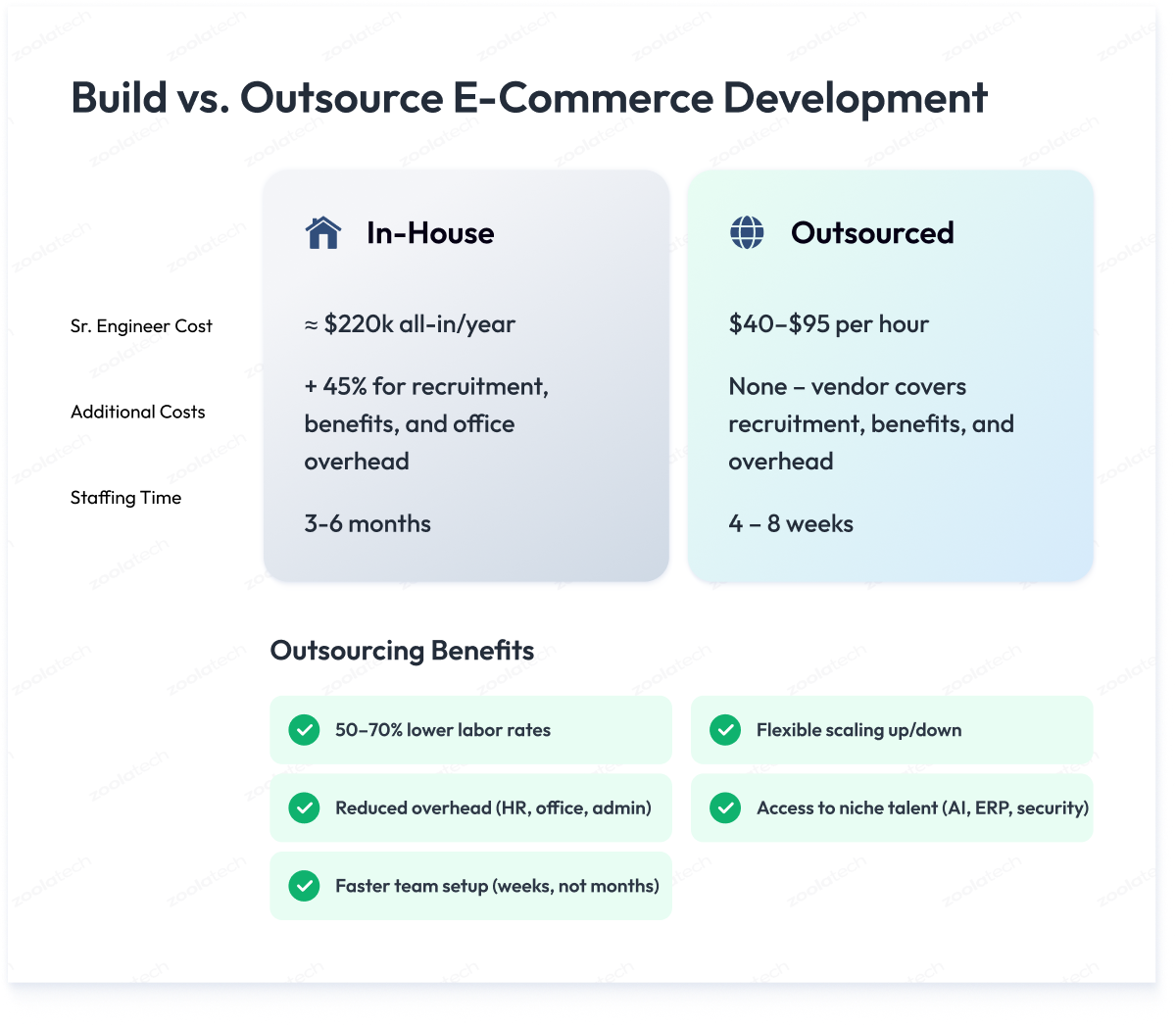
An eCommerce website development project needs a mix of specialized roles and a realistic plan for development costs. Below are the core team composition, the cost comparison between in-house and outsourced teams, and how location shapes pricing.
Core skills and roles for an ecommerce project
| Role / Skill | Key Responsibilities |
| Product manager | KPIs, backlog, and business/UX/engineering alignment |
| Solution architect | Platform selection, integration design, scalability |
| UX/UI designer | Mobile-first interfaces, accessibility, conversion-led flows |
| Front-end engineer | Modern frameworks (React/Next.js), Core Web Vitals |
| Back-end engineer | Catalog, checkout, payment APIs; ERP/OMS/CRM integration |
| Platform engineer | Shopify Plus, Magento, or headless configuration |
| QA automation engineer | Automated tests across devices, browsers, performance |
| DevOps / SRE | Environments, CI/CD pipelines, observability, security |
| Data / analytics engineer | Event schemas, tagging, analytics/CDP/GA4 compliance |
| Security engineer | PCI DSS, encryption, bot defense, vulnerability management |
Cost comparison: in-house vs. outsourced
| Cost Factor | In-House (US/UK) | Outsourced (CEE / LatAm) |
| Senior engineer salary | $130k–$190k base, about $220k all-in | $40–$95/hour, mid-to-senior |
| Recruitment | 20–25% of base salary per hire | Included in vendor fee |
| Benefits & insurance | $12k–$15k per person annually | Included in vendor fee |
| Office & equipment | About $7k–$8k per person annually | Included in vendor fee |
| Overhead (HR, admin) | Adds about 45% on top of salary | Covered by vendor |
| Speed to staff team | 3–6 months for 8–10 hires | 4–8 weeks |
| Flexibility | Hard to scale down quickly | Scale up or down within weeks |
How much does eCommerce website development cost?
eCommerce website development cost usually runs $10,000 to $50,000 for a SaaS build (Shopify, BigCommerce, WooCommerce), $50,000 to $150,000 for a custom mid-size build (Magento or headless), and $150,000 to $250,000 or more for enterprise composable builds with heavy integrations and AI. Team composition and location drive most of the difference.
Many teams cover this gap with eCommerce website development services from an outside partner, which often reduces overhead and speeds up delivery without sacrificing quality.
How outsourcing saves costs
- Lower labor rates: up to 50–70% lower in Poland, Ukraine, Türkiye, and Mexico than in the US or UK.
- Reduced overhead: no benefits, office space, or HR and admin costs, which improves cost efficiency.
- Faster staffing: vendors provide ready-made squads of senior engineers through team extension.
- Scalability: scale up or down without layoffs or recruiting cycles.
- Access to talent: fill niche roles like AI/ML, security, and ERP faster through global networks.
Location matters
- Poland and Romania: 500k+ IT professionals, strong English, EU compatibility.
- Ukraine: 240k+ IT pros, STEM-focused, recognized globally for advanced skills.
- Türkiye: large, growing IT workforce, competitive rates, strong education.
- Mexico and LatAm: time-zone aligned with the US, strong bilingual talent pools.
When to Build In-House vs Hire a Development Partner
Cost naturally leads to the next question. Should your own team build the store, or should you bring in an eCommerce website development company? The answer depends on how core commerce is to your business and what your team can sustain.
Signs you can stay in-house or on SaaS with freelancers
A standard catalog, modest traffic, a handful of integrations, and an experienced developer or a capable SaaS setup on hand. When the store is one channel among several, keeping it simple usually wins.
Signs you have outgrown a DIY setup
Custom checkout or pricing logic your SaaS platform cannot express, deep ERP, CRM, and PIM integrations, high or seasonal traffic spikes, B2B requirements, headless or omnichannel ambitions, or security and compliance work you cannot staff.
At that point, the limiting factor becomes engineering capacity and depth, more than the platform itself. This is the stage where an eCommerce website development company or agency earns its place, and where the choice of eCommerce website development services starts to matter.
How to evaluate a development partner
- Check domain proof first. The strongest eCommerce website development companies show retail and commerce case studies in your model, whether B2C, B2B, or marketplace, with measurable results.
- Test engineering depth across the stack. Probe frontend, backend, QA, DevOps, cloud, and data on a real integration scenario, so you know the build will not stall at the first hard problem.
- Match the engagement model to your need. Pick a dedicated development team, team extension, or managed delivery based on whether you need execution capacity or end-to-end ownership.
- Meet the people who will build it. Talk to the engineers and architects on your account, and check the ratio of senior staff.
- Run a small paid pilot. Scope a short proof-of-value task, such as a payment integration, to see delivery discipline under production conditions before committing.
- Screen for red flags. Walk away from no relevant references, vague scope, and pricing that does not tie to deliverables.
All six steps test the same thing. A partner either has the domain proof and cross-stack engineering to deliver, or the promises stay unproven.
That is the bar we hold ourselves to. We build and modernize commerce systems for retail and eCommerce brands across frontend, backend, QA, cloud, and data, with 300+ engineering projects delivered for global companies and teams in Poland, Ukraine, Mexico, and Türkiye.
For Zalando, our work on personalization and data infrastructure unlocked an additional €4.5M in GMV, the depth those six steps are built to surface.
So use the signals to decide in-house against a partner, and the steps to shortlist. When you want a partner to own the build or to extend your team, our eCommerce website development services start with a review of your goals, catalog, and integration challenges.
Best Practices: 7 Details Stores Often Miss
We could not wrap up without a working list of best practices, because the difference between a store that launches and a store that performs usually comes down to details like these.
The core build is covered above. This list gathers the extras eCommerce development teams tend to underinvest in. Run through it before launch to catch gaps while they are still cheap to fix, and revisit it later when you are deciding what to improve next.
The goal is a store that stays easy to buy from and worth trusting, which is what turns visitors into repeat customers.
1. Shipping rates and transparency
Show shipping costs early, every time. Unexpected extra costs at checkout are the leading reason shoppers abandon a cart, which eMarketer, citing Baymard, put at 48%. Display delivery options and rates before checkout, link your shipping policy on product pages, and if free shipping is off the table, at least kill the surprise.
2. CMS integration
Pick a CMS that lets your team run the store without an eCommerce developer. A content management system centralizes product content, media, and campaigns, so small updates take minutes and never need an engineer. Open-source eCommerce platforms like PrestaShop, OpenCart, and Magento integrate directly into your site.
3. Website design aligned with products
Let your design signal what you sell. A food store benefits from warm, appetite-friendly colors and generous white space, while a gaming or fandom shop can use themed fonts and visuals that say what it is at a glance. Match the look to what your buyer expects, and you earn trust before they read a word.
4. Customer support and contacts
Make it easy to reach you, and hesitant buyers become confident ones. Show a visible contact section with phone, email, and address, and add channels such as live chat, WhatsApp, or Messenger for shoppers who prefer typing to calling. Quick answers rescue sales that doubt would otherwise cost you.
5. Social proof
Let other customers sell for you. Reviews, ratings, and customer photos or videos carry more weight than any marketing copy, so feature review highlights, unboxing videos, or a testimonial carousel near your products. Honest feedback from buyers reassures the ones still deciding.
6. Marketing built into the site
Fold digital marketing into the build from the start. When you plan for social sharing, push notifications, and personalized promotions upfront, you can wire them into the site instead of retrofitting them later. Let your site structure serve your eCommerce marketing campaigns from day one.
7. Support and policy pages
Do not overlook the unglamorous pages, because they remove doubt. Well-written FAQs, shipping details, return policies, privacy and cookie notices, and terms of service help your customers and keep you compliant. These pages quietly build the trust that closes the sale.
Final Word
Building an eCommerce store is a string of decisions that are hard and expensive to reverse. The platform, how much to build versus buy, the architecture, how you handle B2B and payments, and who does the work all shape the result for years. None of them has a single correct answer, since each one depends on your catalog, your traffic, your integrations, and the team you can sustain.
That front-loaded thinking is what pays off later. The stores that scale belong to owners who deliberately made these calls. Reaching for the fastest option instead tends to resurface two peak seasons later as rework and lost sales.
So start with the decisions, in order. Settle your approach, then your architecture, then the build, then a steady habit of optimization, and validate each major choice against your actual constraints before you commit budget.
When you want a second opinion before you start, we are ready to review your goals, catalog your technical challenges in eCommerce website development, and help you map the path forward for your online business.
Questions You May Have
How long does it take to build an eCommerce website?
A SaaS MVP on Shopify or BigCommerce usually launches in 8 to 12 weeks, while a headless or composable build with multiple integrations takes 16 to 24 weeks or more.
What should we budget for beyond the initial build?
Plan for hosting, apps and third-party tools, payment processing fees, support, and ongoing CRO and SEO, since these recurring items shape your true total cost of ownership.
What does the eCommerce website development process look like?
It runs through eight stages: goals, architecture and platform, foundations, catalog and data, UX design, integrations, launch testing, and post-launch optimization.
Which platform should we choose, SaaS or headless?
Choose a SaaS platform for speed and lower operational overhead, and choose headless or composable when you need a complex UX, multiple regions, or deep ERP and OMS integration.
What are the must-have features to launch?
Cover the basic eCommerce essentials such as secure payments, mobile-first design, fast performance, a solid product catalog, search with filtering, and upfront shipping and returns details.
How do we make sure the store scales with growth?
Build on API-first integrations, modular architecture, and cloud hosting, then layer on marketing automation, personalization, and multi-currency support as demand grows.
How do we reduce cart abandonment?
Offer guest checkout, several payment methods, shipping costs shown upfront, and a short two or three step checkout to remove the friction behind most abandonment.
Is it still worth building a custom store when platforms like Shopify exist?
Custom eCommerce website development earns its place when off-the-shelf platforms cannot accommodate your checkout, pricing, integrations, or B2B workflows, while standard catalogs are faster and cheaper with Shopify eCommerce website development and other SaaS platforms.
How is B2B eCommerce website development different from B2C?
B2B adds company accounts with roles, customer-specific contract pricing, quotes and net terms, approval workflows, and procurement integration like punchout and ERP connectivity that a B2C store does not need.
How to compare eCommerce website development companies?
Shortlist on relevant retail and commerce case studies, engineering depth across the full stack, a clear engagement model, and pricing tied to deliverables, then run a small paid pilot.
How do we make an eCommerce site secure and PCI compliant?
Keep card data off your servers with a tokenizing payment provider to shrink PCI DSS scope, then add HTTPS everywhere, 3-D Secure and fraud scoring, infrastructure hardening, and GDPR and CCPA compliance.