


Quick Summary
- Omnichannel means every channel shares the same customer, inventory, and order data, and removing any one of the three fractures the experience back into separate channels.
- About 91% of retail consumers now shop across formats, touching a brand at roughly 11 points before buying, so disconnected channels lose them at the seams.
- Six patterns depend entirely on that shared data: BOPIS, ship-from-store, endless aisle, mobile-to-store, curbside pickup, and cross-channel returns.
- Overnight batch syncs are what break it, so systems have to connect through events, where one sale at the register drops the stock count everywhere in the same second.
- Omnichannel amplifies a business that already works, so fix an underperforming main channel or a missing data foundation first rather than layering new channels on top.
Omnichannel retail is a strategy that connects a retailer’s channels, including the website, mobile app, and physical store, into one continuous customer experience where data and context follow the shopper from one touchpoint to the next.
For most retailers, the difficulty begins the moment they try to make those channels behave as a single system. Imagine that your shop visitors add an item to a cart on their phone, then later open the desktop site and find it empty because the two channels never shared the same view.
The same disconnect shows up in the store, where an associate helping that shopper cannot see the online order sitting in another system, while the inventory count on screen reflects stock levels from hours ago.
Omnichannel commerce done right removes those gaps, and we created this guide to show you how. We start with the fundamentals, covering what omnichannel retail means, how it differs from multichannel, and whether it is worth pursuing for your business right now.
From there, we get into the technology and architecture behind it, a maturity model to place yourself on, and a phased implementation roadmap, drawn from the omnichannel systems we have built for enterprise retailers.
By the end, you will know which stage your company is at, which capability to build next, and what a full omnichannel path looks like for you.
What Is Omnichannel Retail?
We opened with a one-line definition in the introduction, so here is what sits underneath it. Omnichannel retail is an approach in which all of a retailer’s channels, online and physical, share the same customer, order, and inventory data, so a shopper gets a continuous experience no matter where they buy.
The channels are not copies of each other. They are windows into one shared system, and that system is what separates true omnichannel retail from simply running several storefronts at once.
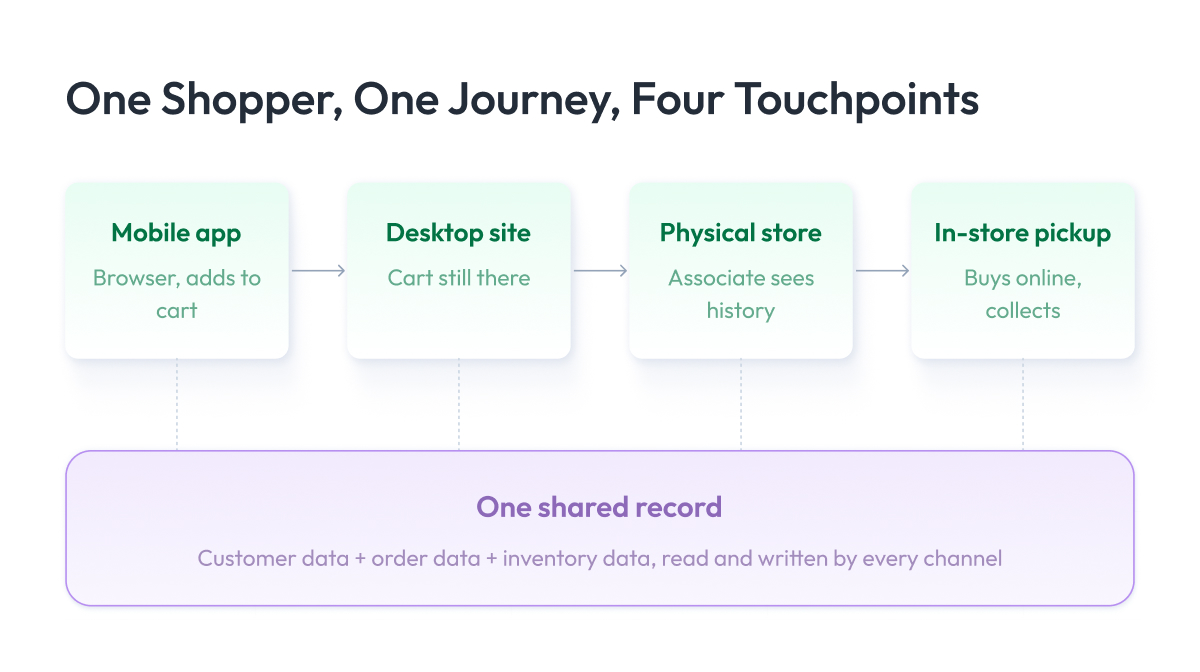
How omnichannel retail works
The mechanism is a shared data layer that every touchpoint connects to. When a customer browses on the mobile app, buys in the physical store, and later requests a return through customer service, each of those actions updates one record that every channel can read.
Three things have to be unified for this to hold together:
- Customer data, which links a person’s identity, history, and preferences across web, app, and store.
- Inventory data, which gives every channel the same live view of what is available and where.
- Order data, which lets any channel see and act on a purchase made through any other.
Remove any one of the three and the experience fractures back into disconnected channels.
The connected phygital journey
Phygital is the term for that blend, where the physical store and the digital channels stop being separate paths and become one.
When a retailer gets it right, a shopper can start on the app, continue in the aisle, and finish at the register without ever repeating themselves or losing their place. That continuity across every touchpoint is the omnichannel retail experience that customers now expect.
Omnichannel vs Multichannel (and Single- and Cross-Channel Retail)
Before spending on new tools, it helps to know which of these models you actually run today, because the gap between them is where most omnichannel budgets get lost. The four terms often get used interchangeably, so lining them up makes the differences concrete and shows how far a business is from a truly connected setup.
Retailers usually pass through four stages of channel maturity:
- Single-channel sells through one place only, such as a retail store or a website.
- Multichannel retail adds more sales channels, but each runs on its own, with separate inventory, data, and teams.
- Cross-channel starts linking a few of those channels, so a customer can buy online and return in-store, though the connection is only partial.
- Omnichannel brings all channels into a single shared view of the customer, the order, and the stock.
Multichannel gives customers more channels, and omnichannel connects those channels around a single customer view.
| Dimension | Multichannel | Omnichannel |
| How channels run | Each on its own | All connected |
| Customer data | Separate per channel | One shared profile |
| Inventory | Different count per channel | One live count |
| Shopping experience | Consistent, not linked | Continues across channels |
| Switching channels | Customer starts over | Cart and history follow along |
Adding an app or a marketplace listing gives you more places to sell, and each new channel that runs on its own adds another silo to reconcile. Physical and digital only start working as one system once they share the same data underneath.
That shared data layer is the whole game, and it is the integration problem the rest of this guide focuses on.
Is omnichannel even worth the effort, and does every retailer need it? We look at that next, after a quick word on why it pays off at all.
Why Omnichannel Retail Matters: Benefits and Numbers
Retailers move to omnichannel because their customers already shop that way, and the businesses that keep up are pulling ahead. Most buyers no longer pick a single channel and stay in it. They research on a phone, compare on a laptop, and finish in a store, treating it all as one brand.
The scale of this shift is what makes it urgent now. About 91% of retail consumers are omnichannel shoppers who engage with retailers across multiple formats, according to Capital One Shopping’s 2026 research. The same data show that shoppers touch a brand at roughly 11 points before they buy, so a business running disconnected channels is losing those buyers at the seams.
So what does a retailer actually get from connecting those channels? The benefits fall into four areas:
- Higher customer loyalty and retention. When the experience carries over from one channel to the next, shoppers have fewer reasons to leave and more reasons to come back, which lifts repeat purchases and long-term customer value.
- More revenue per customer. A shopper who can move freely between app, site, and store tends to buy more often and add more to each order, because nothing in the journey forces them to stop and start over.
- Personalization that converts. A unified view of customer data lets a retailer tailor offers and content that actually land, and strong personalization most often drives a 10 to 15% revenue lift, according to McKinsey.
- Fewer lost sales from inventory gaps. One live view of stock across all channels means fewer items are incorrectly shown as unavailable, so demand converts instead of walking away.
Behind all four sits a single expectation. Salesforce’s research finds 79% of customers expect consistent interactions no matter which part of the business they reach. Retailers that deliver that consistency earn repeat visits and referrals. When it breaks down, customers experience the friction of switching channels and often switch to omnichannel competitors.
But omnichannel is not the right move for every retailer at every moment, and the next section looks at when it pays off and when it does not.
Is Omnichannel Retail Worth It? (And When It Isn’t)
Most guides treat omnichannel as something every retailer should chase. We take a more honest line, as for some businesses it is the wrong thing to build right now, and spending on it too early wastes money that a growing store cannot spare.
Start with the question that matters most: have you gotten everything you can out of your main channel?
Omnichannel tends to amplify a business that already works. It makes a healthy retailer noticeably better, and it rarely turns a weak one around, so the strength of what you have today decides how much you get back.
It is also serious engineering work. Connecting channels means unifying customer data, giving every channel a live view of inventory, and reworking how orders flow, which requires time, budget, and people to keep the systems running afterward.
So omnichannel retail is not the right move for everyone. You are usually better off waiting if:
- Your main channel is underperforming. A slow website or a weak store will return more from a focused fix than from new channels layered on top.
- You do not have a data foundation yet. Without unified customer, order, and inventory data, there is nothing to connect the channels around.
- You are still finding product-market fit. If you are not sure what sells and to whom, get that right before spreading across channels.
For everyone else, the smart path is to start small and connect one channel at a time, which is where strategy comes in.
Omnichannel Retail Examples
Before we get into how to build an omnichannel strategy, it helps to see what it actually looks like in practice.
These retail experiences are patterns you have probably encountered as a shopper yourself, and each one works only because the channels behind them share the same data. They also come with trade-offs, so it is worth knowing what you gain and what you take on with each.
1. Buy online, pick up in store (BOPIS)
BOPIS lets a shopper order on the website or app and collect the item at a nearby store instead of waiting for delivery. For this to work, the website has to show a live view of exactly what that specific store has on its shelves.
For the customer, it is speed without the wait for shipping. They buy from their couch and walk out with the item the same day, which is why so many people now pick collection over delivery. A quick trip to grab one order also tends to turn into a second purchase they were not planning.
- Advantage: You save on shipping and get more people into your stores, where they often make additional purchases.
- Disadvantage: It only works if your stock counts are accurate, and one mistake means a wasted trip for the customer.
2. Ship-from-store
Ship-from-store routes an online order to the nearest store that has the item, and that store ships it directly instead of a central warehouse. It turns your stores into a network of small fulfillment hubs.
The order leaves from the stock closest to the customer, so a package arrives in a day or two instead of a week. For the retailer, it quietly sells through store stock that might otherwise sit on a shelf and get marked down.
- Advantage: You deliver faster and sell store stock that might otherwise go unsold.
- Disadvantage: Your store staff takes on packing and shipping on top of serving shoppers, which strains a busy store.
3. Endless aisle
Endless aisle handles the moment a shopper in a store wants a size or color that is out of stock on the floor. An associate pulls it up on a screen and orders it from the warehouse or another store, shipped straight to the customer’s home.
It saves a sale that would otherwise be lost. The customer leaves with exactly what they wanted on the way, instead of walking out empty-handed, and a smaller store gets to feel like it stocks the full catalog.
- Advantage: You keep sales you would otherwise lose and can carry less stock in each store.
- Disadvantage: It only pays off if your staff actually use the tool, and a clunky system kills it fast.
4. Mobile-to-store
Mobile-to-store connects what a customer does on their phone with what happens when they walk in. They browse and save a few items on a mobile device, then arrive to find an associate who can already see what they were looking at. It runs the other way too, when someone scans a product in-store and buys later from home.
The store visit feels personal because the customer does not have to explain what they want from scratch. The associate picks up right where the shopper left off online and gets them to the right product faster.
- Advantage: Your staff can help and upsell with the right context, which boosts in-store retail sales.
- Disadvantage: It needs connected customer data, and it feels intrusive if you are not upfront about using it.
5. Curbside pickup
Curbside pickup lets a shopper collect an online order without leaving the car. The store checks the order status and receives an alert the moment the customer arrives, usually via an app check-in or a text.
It is a big help for people who cannot easily come inside, like a parent with kids in the back seat. The customer gets their order in under a minute at the curb, which turns a routine pickup into a reason to choose you over a competitor.
- Advantage: It is cheap to add on top of BOPIS and wins over shoppers who would skip a store visit.
- Disadvantage: It depends entirely on timing, and a long wait leaves a worse impression than not offering it.
6. Cross-channel returns
Cross-channel returns allow a customer to return an online purchase to a physical store instead of mailing it. The store and the website have to share one order record, or the return will not match up at the counter.
It removes one of the biggest reasons people hesitate to buy online. When a shopper knows they can easily return an item in person, they buy with more confidence, and the return trip pulls them into the store, where they often buy something else.
- Advantage: You cut return costs and bring customers back into stores, where many buy again.
- Disadvantage: It falls apart unless your online and store systems share one order record.
The table below lines these up so you can see what each one asks of the systems underneath.
| Example | Channels Involved | Capability Required | Payoff for the Shopper |
| Buy online, pick up in store | Web or app to store | Live store inventory | Skip shipping, collect same day |
| Ship-from-store | Web to store network | Order routing by location | Faster delivery |
| Endless aisle | Store to warehouse | Cross-location stock view | Buy out-of-stock items on the spot |
| Mobile-to-store | App to store | Shared customer profile | Associate knows the context |
| Curbside pickup | Web or app to store | Order status and staff alerts | Collect without leaving the car |
| Cross-channel returns | Store and online linked | Unified order records | Return anywhere, no mailing |
What every row shares is a column you cannot see from the storefront: the shared data that connects the channels. That column is the strategy, and it is what we turn to next.
Building an Omnichannel Strategy (Step-by-Step Overview)
Now that you have seen the examples, here is how we put together an omnichannel strategy for our retail clients.
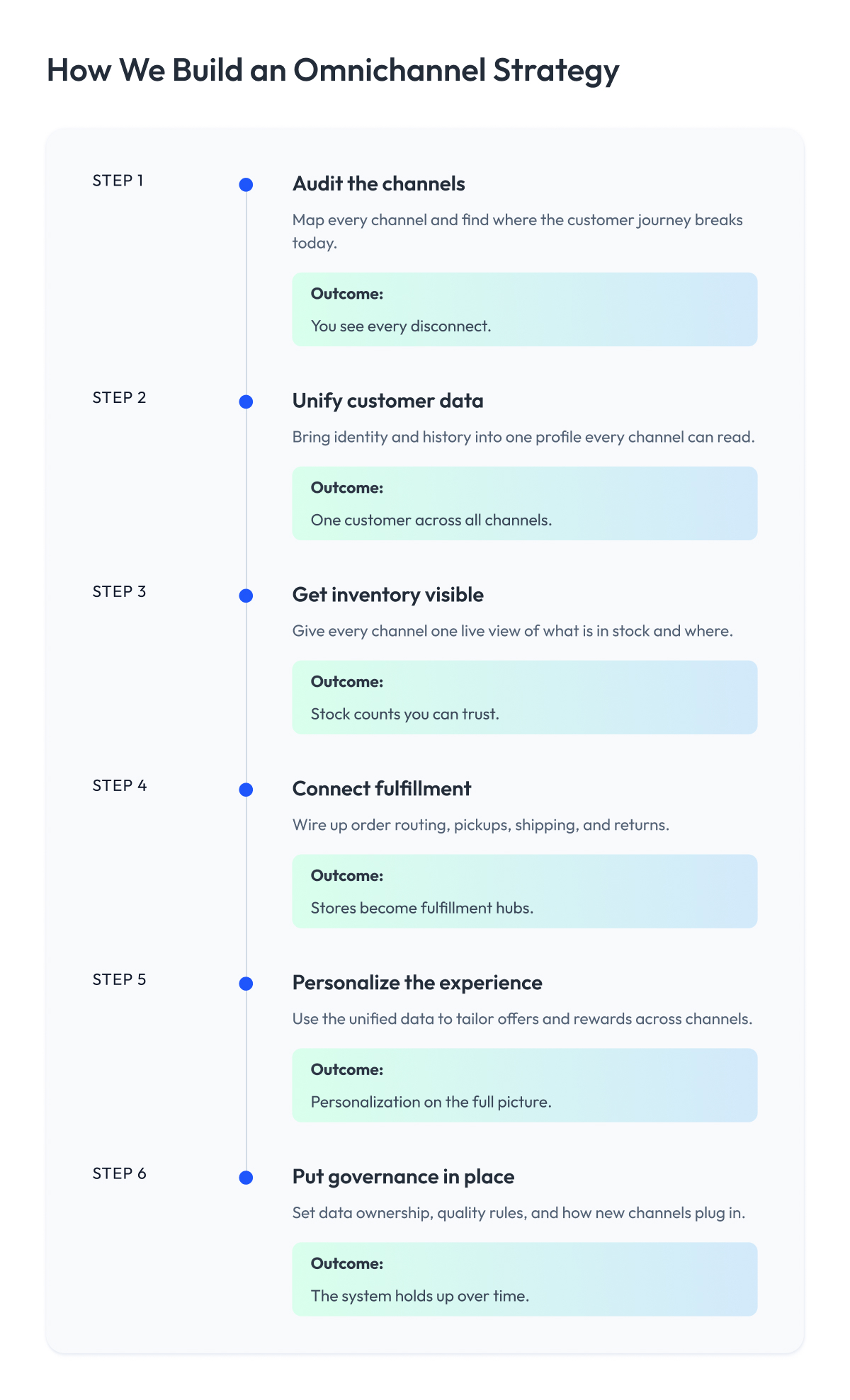
We do not start with channels or apps. We start with the data and the plumbing underneath, then add customer-facing features once that foundation can hold them.
The steps below are the order we tend to follow on engagements:
1. Audit the channels you already have
Before adding anything, we map every channel a retailer runs today and how they connect, or more often, how they do not. This shows where a customer’s journey breaks, whether it is a cart that does not carry over or a store system that cannot see an online order. You cannot fix gaps you have not found, so this step decides where the work actually starts.
2. Unify customer data
Next, we bring customer identity and history into one profile that every channel can read. Until a shopper is the same person across the app, the site, and the store, nothing downstream will feel connected. This is the piece most retailers underestimate, and it is usually where the heaviest lifting happens.
3. Get inventory visible
A connected experience falls apart the moment stock counts are wrong, so we give every channel one live view of what is available and where.
This is what makes BOPIS, ship-from-store, and endless aisle possible in the first place. Without it, those features promise more than the business can actually deliver.
4. Connect fulfillment
With data and inventory in place, we wire up how orders move, deciding which location ships, which store fulfills a pickup, and how a return flows back in. Good routing turns stores into fulfillment hubs instead of bottlenecks, and it is where much of the operational payoff shows up.
5. Personalize the experience
Only once the foundation holds do we layer on personalization, using the unified data to tailor offers, recommendations, and loyalty rewards across channels. When done in this order, personalization draws on a full picture of the customer instead of a single channel’s fragment, so it actually lands.
6. Put governance in place
Finally, we set the rules that keep it all working, covering who owns the data, how quality stays high, and how new channels plug in without breaking the ones already live. This is the unglamorous step that decides whether the system holds up a year later or slowly drifts back into silos.
Each of these steps carries serious depth once you are operating at enterprise scale, with legacy systems and millions of SKUs in the mix.
We break down that build order, the failure modes, and the sequencing in far more detail in our guide to enterprise omnichannel retail strategy. For the software work that spans all six steps, our custom software development and data analytics teams are where most of it is built.
The Technology Behind Omnichannel Retail
We just walked through how we build an omnichannel approach step by step. Now let us open the hood and look at what actually makes it run, because this is the layer most articles skip and the one that decides whether any of it works. We will keep it plain and skip the vendor jargon, because retail technology only helps when you understand what each part is for.
Picture an omnichannel system as an airport control tower. Customers arrive through many gates: the website, the app, the store, a marketplace. The tower is what keeps every gate working from one shared view instead of its own guesswork.
The omnichannel tech stack
Underneath the storefront, a handful of systems each do one job, and together they act as that control tower.
- A customer data platform (CDP) is the shared memory that stitches a shopper’s identity and history into a single profile so every channel recognizes the same person. Tools like Segment or Adobe Real-Time CDP do this job.
- A live inventory service is the single stock count every channel reads from, instead of each keeping its own. Platforms like Fluent Commerce or Manhattan Active handle this.
- An order management system (OMS) is the traffic controller, deciding which location fills each order and how returns flow back in. IBM Sterling and Manhattan Associates are common choices.
- A commerce layer and channel APIs are the gates, letting each storefront talk to the core systems in one language. Headless platforms like commercetools or Shopify’s Storefront API play this role.
- An analytics and AI layer is the radar, reading activity across channels to drive personalization and forecasting. This usually runs on a data platform like Snowflake or Databricks, with a personalization engine such as Dynamic Yield on top.
The mistake we see most often is buying these as five disconnected tools and hoping they cooperate. They only behave like one system when they are designed to share data from the start, which is the difference between a connected retailer and an expensive pile of software.
How the systems stay in sync the moment stock changes
Here is the problem that trips up most retailers. Each system above can be excellent on its own, and the customer experience still breaks if they update on different clocks.
A shopper buys the last blue jacket in the store, but the website only learns about it during tonight’s data sync, so someone orders the same jacket online for pickup and receives a cancellation email in the morning.
The fix is to connect the systems through events rather than overnight batches. An event-streaming platform like Apache Kafka, often run through Confluent, acts as the nervous system of the stack.
The moment a sale happens at the register, it fires a single event that the inventory service, the CDP, and the OMS all hear at once, so the stock count drops everywhere in the same second. An integration layer such as MuleSoft or Boomi handles the translation between systems that were never built to talk to each other.
This event-driven architecture is why many retailers move toward a composable commerce setup, where independent services connect through shared events instead of a single rigid platform.
The order routing itself lives inside the order management system, and the intelligence that sharpens that routing over time comes from the data and analytics layer built on top. Getting the events flowing reliably between them is where most of the payoff and most of the difficulty lives.
The Omnichannel Maturity Model
The technology only pays off when a business is ready to run it, and most retailers are further back than they think. Over the years, we have noticed that companies tend to move through the same five stages on the way to true omnichannel. Placing yourself on this model is the fastest way to see what to build next, instead of chasing a feature you are not ready for.
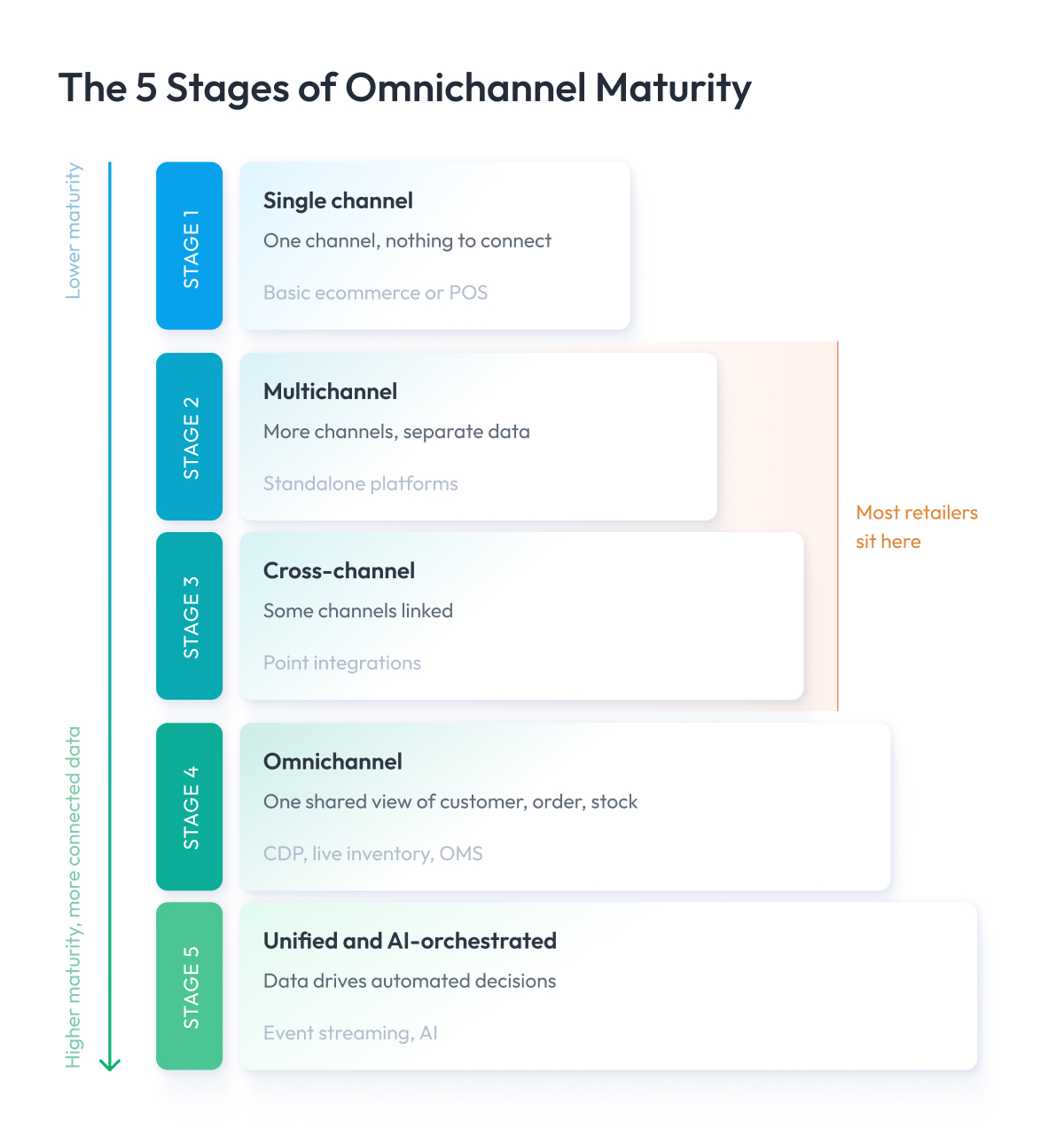
Each stage is defined by one thing above all, namely how connected your customer, order, and inventory data are. The tools matter less than whether the data underneath them is shared.
Stage 1: Single channel
You sell through one place, usually a store or a website. Everything is simple because there is nothing to connect, and this is the right place to be until that single channel is performing well.
Stage 2: Multichannel
You have added an app, a marketplace, a second store, but each runs on its own data and inventory. Customers can reach you in more places, and those places do not know about each other.
Stage 3: Cross-channel
A few channels start sharing data. You can offer online ordering with in-store pickup, or accept online returns at the counter, though the connections are built one at a time and often feel fragile.
Stage 4: Omnichannel
In a unified omnichannel setup, every channel reads from one integrated view of the customer, order, and stock. A shopper makes a seamless transition between the app, the site, and the store without having to repeat themselves, and the experience holds together because the underlying data is unified.
Stage 5: Unified and AI-orchestrated
The connected foundation now feeds intelligence. Real-time data drives personalization, demand forecasting, and automated order routing, so the system does not just stay in sync, it makes decisions on its own. This is where a modern omnichannel operation is heading.
Here is the model at a glance, with what defines each stage and the technology that tends to appear at each stage.
| Stage | Defining Capability | Typical Technology |
| 1. Single channel | One channel, no connections | Basic ecommerce or POS |
| 2. Multichannel | Multiple channels, separate data | Standalone platforms per channel |
| 3. Cross-channel | Some channels linked | Point integrations, partial inventory sync |
| 4. Omnichannel | One shared customer, order, and stock view | CDP, live inventory, OMS |
| 5. Unified and AI-orchestrated | Data drives automated decisions | Event streaming, AI personalization, forecasting |
Most retailers we meet sit at stage 2 or 3, with more channels than connections. The goal is not to leap straight to stage 5, but to move up one stage at a time, getting the data foundation solid before adding the intelligence that rides on it.
How to Implement Omnichannel Retail: A Phased Roadmap
Knowing the six building blocks is the easy part. The hard part is rolling them out on a store that is already trading, without breaking what works today. A big-bang rewrite is how these projects fail, so we sequence the work into phases, with each phase shipping something useful and earning the right to start the next.
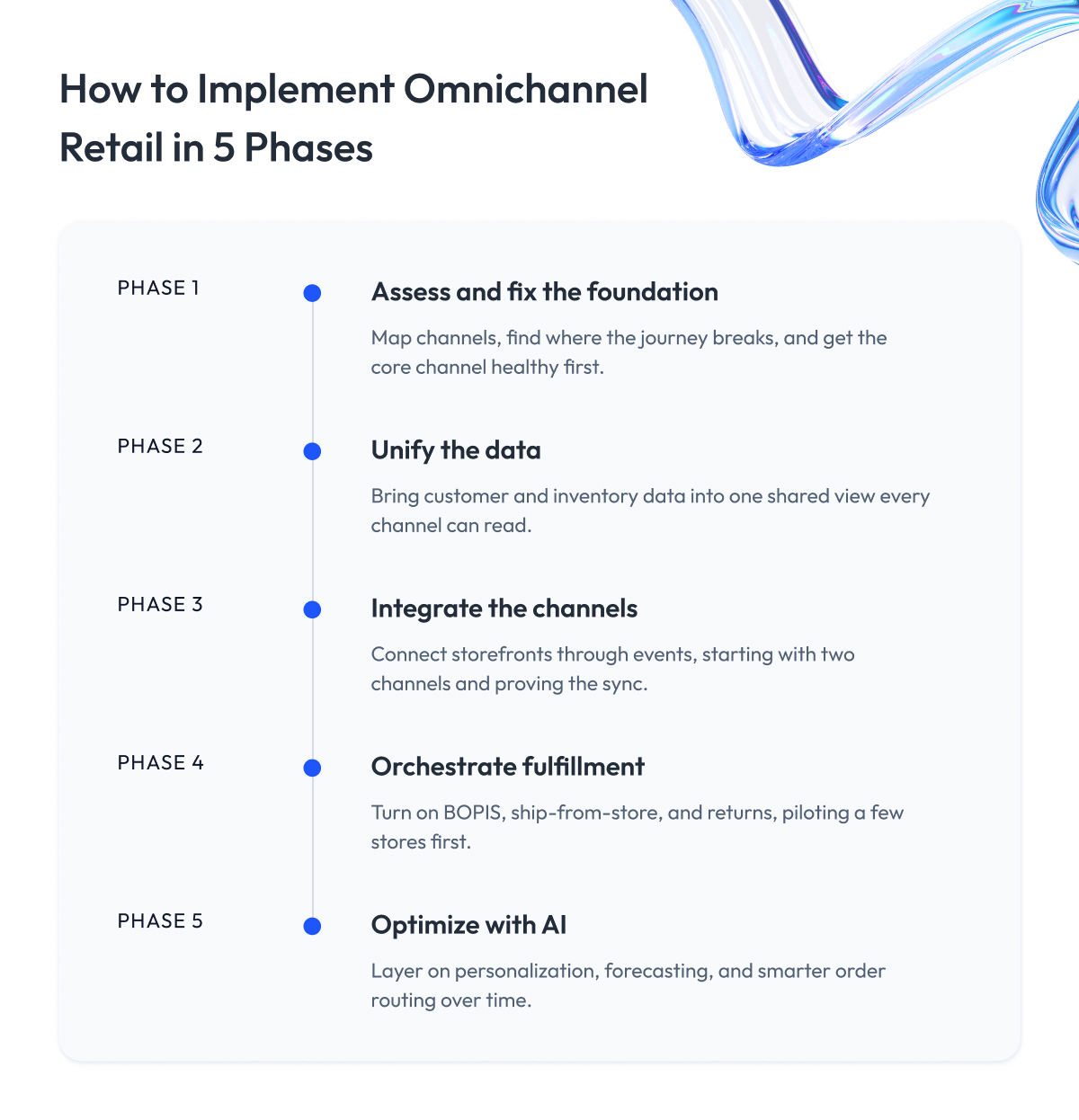
The rule we follow is simple. You do not begin a phase until the previous one is stable in production. Each phase below lists what has to be true before you move on.
Phase 1 – Assess and fix the foundation
Map your channels, find where the customer journey breaks, and get your core channel healthy first. This phase is about knowing what you have and cleaning up the obvious cracks before connecting anything.
Move on when: you have a clear picture of every channel and your primary one is performing.
Phase 2 – Unify the data
Bring customer and inventory data into one shared view. This is the longest and least visible phase, and rushing past it is the most common mistake we see, because everything above it depends on this layer being solid.
Move on when: one profile identifies a customer across channels, and stock counts are accurate to the item.
Phase 3 – Integrate the channels
Connect the storefronts to that shared data via events, so a change in one place appears everywhere at once. Start with two channels, prove the sync holds under load, then add the rest.
Move on when: a sale or return in one channel updates every other channel in seconds.
Phase 4 – Orchestrate fulfillment
Turn on the customer-facing features the foundation now supports, such as BOPIS, ship-from-store, and cross-channel returns. Roll each one out to a handful of stores first, learn, then expand.
Move on when: your first fulfillment feature runs smoothly in a pilot group of stores.
Phase 5 – Optimize with AI
With reliable data flowing, layer on personalization, demand forecasting, and smarter order routing. This phase never really ends, since the models keep improving as more data comes in.
A full enterprise rollout runs longer than most teams expect, often a year or more once legacy systems and many stores are involved. Much of that time goes into connecting existing systems without downtime, which we cover in our guide to smooth ecommerce and POS integration.
Omnichannel Retail Trends for 2026
Knowing how to build omnichannel is only half of it. It also helps to keep up with the latest approaches retailers are using now, so you can adopt the ones that fit your business before your competitors do.
A few key trends are shaping the next couple of years, and most of them reward connected data.
1. Unified commerce replaces stitched channels
For years, retailers built each channel separately and linked them afterward. Unified commerce flips that around, running every channel on one platform and one dataset from the start, so there is nothing to stitch together later.
Nike is a good example. Its app, website, and stores share one view of the customer and the product, so a member’s size, history, and rewards travel with them whether they shop in the SNKRS app or walk into a flagship store. That single core is why a Nike purchase feels the same everywhere, and it is the direction most large retailers are now taking.
2. AI moves from recommendations to decisions
Personalization used to mean a “you might also like” row. Now AI reaches deeper into operations, setting prices, forecasting demand store by store, and choosing which location should fulfill each order on its own.
Amazon is the clearest case: it uses AI to determine pricing and route orders to the nearest stock in ways no team could manage by hand. Walmart does the same across its stores to predict local demand and position inventory before it is needed.
3. Social and live commerce become genuine sales channels
Buying without leaving a social app has moved from novelty to habit, especially for younger shoppers. A product discovered in a feed or a live video can now be bought in a few taps, without ever visiting a website.
TikTok Shop is the obvious example, turning short videos and livestreams into a checkout in a couple of taps, and brands like Sephora have leaned into shoppable live sessions. In a connected setup, a sale made on TikTok has to land in the same order and customer record as one made in-store, or it quietly becomes another silo to reconcile.
4. The physical store turns into a digital touchpoint
Digital retail is reaching into the store itself, and the brick-and-mortar store is becoming a hybrid space instead of a separate channel. App-linked displays, scan-and-go checkout, and staff carrying the same customer view they have online all turn the store into another screen in the journey.
Amazon Go made scan-and-go famous with stores that skip the checkout line entirely, and chains like Sam’s Club now let shoppers scan items on their phone as they walk the aisles. For a shopper, the store stops feeling separate from the app and starts feeling like an extension of it.
5. Promotions and loyalty go cross-channel
A promotion or loyalty reward now has to follow the shopper everywhere, redeemable in the app, on the site, and at the register alike. In omnichannel marketing, offers locked to a single channel feel broken to customers who move between them, which is why retail marketing now has to work across every channel at once.
Starbucks is the standard-bearer here. Its loyalty program tracks stars and offers across the app, the website, and every store, so a customer earns and redeems in one place and picks up in another without a second thought. That consistency is a big part of why the program keeps people coming back.
The thread across all five is the same. The future of retail rewards businesses whose data is already connected, because personalization, AI, and new channels only work when the underlying foundation holds.
Measuring Omnichannel Success
You cannot improve what you are not watching, so a connected retailer needs a few metrics that show whether the channels are truly working as one. Regular sales dashboards miss this because they measure each channel in isolation and hide the gaps between them.
A handful of numbers tell you most of what matters, and each one has a straightforward way to check it.
- Inventory accuracy. The share of stock counts that match reality, which underpins every fulfillment promise. You check it with cycle counts, comparing the system’s records against a physical count of the same items, and track the match rate over time.
- Cross-channel identity match. How often you correctly recognize the same customer across app, site, and store. You measure it in the customer data platform by looking at how many profiles merge into a single identity versus how many remain split as duplicates.
- Omnichannel customer value. What shoppers who use several channels spend compared with single-channel ones. You check it by tagging customers by the channels they use and comparing average spend and repeat rate between the two groups.
- Fulfillment performance. Pickup wait times, BOPIS success rate, and how often an order goes to the right store the first time. You track these in the order management system, which logs the timestamps and routing decision for every order.
- Cost-to-serve. What each order actually costs to fulfill across channels. You calculate it by adding picking, packing, shipping, and returns cost per order, then comparing it against the revenue that order brings in.
Strong omnichannel shows up as accurate stock, recognized customers, and higher spend from the shoppers who move between channels. If those numbers lag, the foundation needs work before any new feature will help. Our guide to building a retail ecommerce dashboard covers how to consolidate these metrics into a single view.
Final Word
The value of omnichannel retail does not come from how many channels you run. It comes from how well the underlying data is connected, and building that connection requires genuine engineering instead of a quick configuration.
The retailers who get it right earn more from every customer, lose fewer sales to bad stock data, and build the kind of consistency that keeps shoppers coming back. The ones who bolt on channels without connecting them end up paying twice, first for the tools and again to untangle the mess later.
So be honest about where you stand. Place yourself on the maturity model, and if your data foundation is not solid, fix that before chasing features like BOPIS or AI personalization. Start with one connected channel, prove it works, then expand from there. That order is what separates an omnichannel program that holds up from one that quietly drifts back into silos.
You do not need a summary of everything above. You need a clear first move, and for most retailers, that move is to get the customer, order, and inventory data into a single shared view.
If you want a partner for that work, we are ready to review your current systems, identify where the channels break down, and map out a realistic path forward.
Our retail engineering team has built these systems for enterprises operating across hundreds of stores, and we are happy to talk it through before you commit to anything.
Questions You May Have
What is omnichannel retail?
Omnichannel retail is a customer-centric strategy that connects a retailer’s stores, website, and app around shared data, giving shoppers one experience across all channels.
Why does understanding omnichannel retail matter now?
Understanding omnichannel retail matters now because most shoppers already move across multiple channels, and retailers that connect those channels keep the customers others lose.
What is the difference between omnichannel and multichannel?
The difference between omnichannel and multichannel comes down to integration, where multichannel runs each channel on its own data and omnichannel connects every channel around a single customer view.
What are some examples of omnichannel retail?
Common examples of omnichannel retail include buy online pick up in store, ship-from-store, endless aisle, curbside pickup, and cross-channel returns.
What are the benefits of omnichannel retail?
The main benefits of omnichannel retail are higher loyalty, more revenue per customer, stronger customer engagement, and fewer lost sales from inventory gaps.
Is omnichannel retail worth it for a smaller retailer?
Yes, a smaller retailer can build a successful omnichannel program by connecting a few channels well, as long as its main channel is healthy and its data is in order.
What technology powers an omnichannel system?
An omnichannel system runs on a customer data platform, a live inventory service, an order management system, channel APIs, and an analytics layer, packaged by many vendors as integrated omnichannel retail solutions.
How does omnichannel retail connect physical and digital channels?
Omnichannel retail connects and integrates physical and digital channels through a shared data layer that every touchpoint reads from and writes to in real time.
How do you implement omnichannel retail, and how long does it take?
You implement omnichannel retail in phases, starting with unified data and adding features step by step, and a full enterprise rollout often takes a year or more.
What is BOPIS in omnichannel retail?
BOPIS, short for buy online pick up in store, lets a shopper order through a website or retail app and collect the item at a nearby store instead of waiting for delivery.
How do you measure omnichannel success?
You measure omnichannel success through inventory accuracy, identity match, and customer value, since the best omnichannel programs track how well the omnichannel customer experience holds across channels.
What is omnichannel marketing?
Omnichannel marketing is a customer experience strategy that keeps promotions, loyalty, and messaging consistent for a shopper across every channel they use.
How can retailers optimize and evolve their omnichannel strategy?
Retailers optimize their omnichannel retail strategy by fixing the data foundation first, then using analytics to evolve their omnichannel strategies one stage at a time.
How is omnichannel reshaping the retail landscape?
Omnichannel is reshaping the retail landscape and the wider world of retail, making connected data the foundation of modern retailing and the future of omnichannel.
Does omnichannel retail work for all products and services?
Omnichannel retail allows businesses across most products and services to connect their channels, though it pays off most in a retail environment with repeat customers and real inventory to manage.
What makes a personalized shopping experience in omnichannel retail?
A personalized shopping experience in omnichannel retail comes from unified customer data that powers personalized experiences and a seamless omnichannel shopping experience across app, site, and store.