



Quick Summary
- A broken AI pipeline gives no signal, because the model keeps running on whatever it receives and the only symptom is a slow decline in results nobody links back to the data.
- Most enterprises run three classes at once: feature pipelines for prediction models, embedding pipelines for document assistants, and training pipelines that preserve the exact dataset each model learned from.
- Micro-batch is the underrated middle option, giving most of streaming’s freshness on the tools and skills you already have, so save true streaming for decisions made while a user waits.
- Apply the rerun test: run the pipeline twice on the same data and expect identical results, since a restart that appends instead of replacing quietly doubles yesterday’s orders.
- Training-serving skew is the most common reason a model that tested well degrades after launch, and one definition per feature, used by both paths, is what prevents it.
This is the next article in our series on AI-ready data, and today we look at AI data pipelines.
An AI data pipeline is the automated path that takes data from the systems where it is created, prepares it, and delivers it to a model in the form it needs, such as features, embeddings, or a training set. It then repeats this on a schedule, so the model always works with the latest data.
The main problem with AI data pipelines is that when something goes wrong, nothing tells you, because a broken pipeline keeps delivering incorrect data and the model keeps working with whatever it receives. From the outside, everything looks healthy. You learn about the problem only when the results become bad enough for someone to notice, and by then the model has been producing wrong answers for weeks.
That is why we decided to give pipelines their own article, focused on how to spot these problems early and how to build pipelines that report them before the business does.
We start with what makes data pipelines for AI different from the BI pipelines you already run. Then we lay out the three classes most teams operate, what keeps a pipeline reproducible, and the six failure modes we see most often in production.
By the end, you will know which of the three pipelines you already have and what to fix first in each of them.
What Is an AI Data Pipeline?
The short definition in the intro gives you the general idea. To work with the term and to see why three different pipelines usually hide behind it, you need the broader version.
An AI data pipeline is the set of automated steps that collects data from source systems, checks and transforms it, turns it into the inputs a model consumes, delivers those inputs to training or inference, and repeats the cycle so the inputs stay current after the model goes live.
An analogy we often use with clients is a water supply. Water reaches your tap through pipes, filters, and meters, already in a form you can use, and nobody has to carry it from the river. A pipeline does the same for data. Sales records, support tickets, product documents, and clickstream events flow in, get filtered and reshaped, and arrive at the model in a form it can read.
One note on the term itself. “AI for data pipelines” also gets used for pipelines that are built or maintained with AI assistance. That is a separate topic, and we come back to it near the end of the article.
Data pipeline vs. ML pipeline vs. AI data pipeline
The term AI data pipeline overlaps with two older ones, and in practice people use all three as synonyms. The overlap matters when you plan who owns what, so here is what each one covers.
Data pipeline is the parent category. It covers any automated movement of data, including the reports your finance team reads every Monday.
ML pipeline is narrower. It takes a prepared training set through model training, evaluation, and deployment.
AI data pipeline covers the full path from raw source data to a live AI application, including the data side of the ML pipeline and the feedback loop after deployment.
| Term | Scope | Main Output |
| Data pipeline | Any automated data movement | Tables and reports for people |
| ML pipeline | Prepared training set to deployed model | Trained and evaluated model |
| AI data pipeline | Raw source data to live AI application | Features, embeddings, training sets, kept current |
With the boundaries drawn, the next question is how an AI data pipeline differs from the pipelines you already run for reporting and analytics.
How AI Data Pipelines Differ from BI Pipelines
Every enterprise already runs BI pipelines, the ones that pull data from CRM, ERP, billing, and sales systems into a warehouse and feed the reports and dashboards people look at every day. On the surface, an AI data pipeline looks the same. Data comes in, gets prepared and reshaped, and lands where someone can use it. The difference lies in four details, and each matters once a model sits at the receiving end.
1. The shape of the data. A BI pipeline works with tables, and everyone agrees on every column before the first row arrives. An AI pipeline often has to take in documents, images, chat logs, and event streams alongside those tables, so it needs to accept data whose structure is decided later, on the way to the model.
2. How often it runs. A BI report that shows yesterday’s numbers is fine for most teams. A model that flags a suspicious payment needs data from the last few minutes, and a document assistant needs the current version of the policy, which may have changed since last month.
3. What comes out at the end. A BI pipeline ends in a report, and a person looks at that report before acting on it. If a number looks wrong, they ask. An AI pipeline ends in the model’s inputs, such as features or embeddings, and no person checks them before the model uses them. So if the data has a problem, the model works with that problem as if nothing happened.
4. How you find out something broke. When a BI pipeline fails, a dashboard goes empty, and someone files a ticket within the hour. When an AI pipeline fails, the model keeps running on whatever data it has, and the only sign is a slow decline in results that nobody links to the pipeline.
| Dimension | BI Pipeline | AI Data Pipeline |
| Data shape | Tables with agreed columns | Tables plus documents, images, event streams |
| Refresh | Daily or hourly schedule | Matched to the decision, minutes to real time |
| Output | Reports people read | Features, embeddings, training sets |
| Consumer | A person who can question numbers | A model that takes inputs as they are |
| When it breaks | Empty dashboard, ticket within the hour | Slow decline in results over weeks |
| How it is tested | Row counts and totals | Freshness, data drift, training-serving checks |
These differences do not mean you need a second data platform. Most enterprises we work with keep their existing BI pipelines and add the paths a model needs on top. The one case where that fails is a pipeline that was unreliable to begin with, and then it is better to
These differences do not mean you need a second data platform. Most enterprises we work with keep their existing BI pipelines and add the paths a model needs on top. The one case where that fails is a pipeline that was unreliable to begin with, and then it is better to rebuild the data pipeline first. Either way, the next section walks through the stages every AI data pipeline goes through.
The Six Stages of an AI Data Pipeline and the Loop That Connects Them
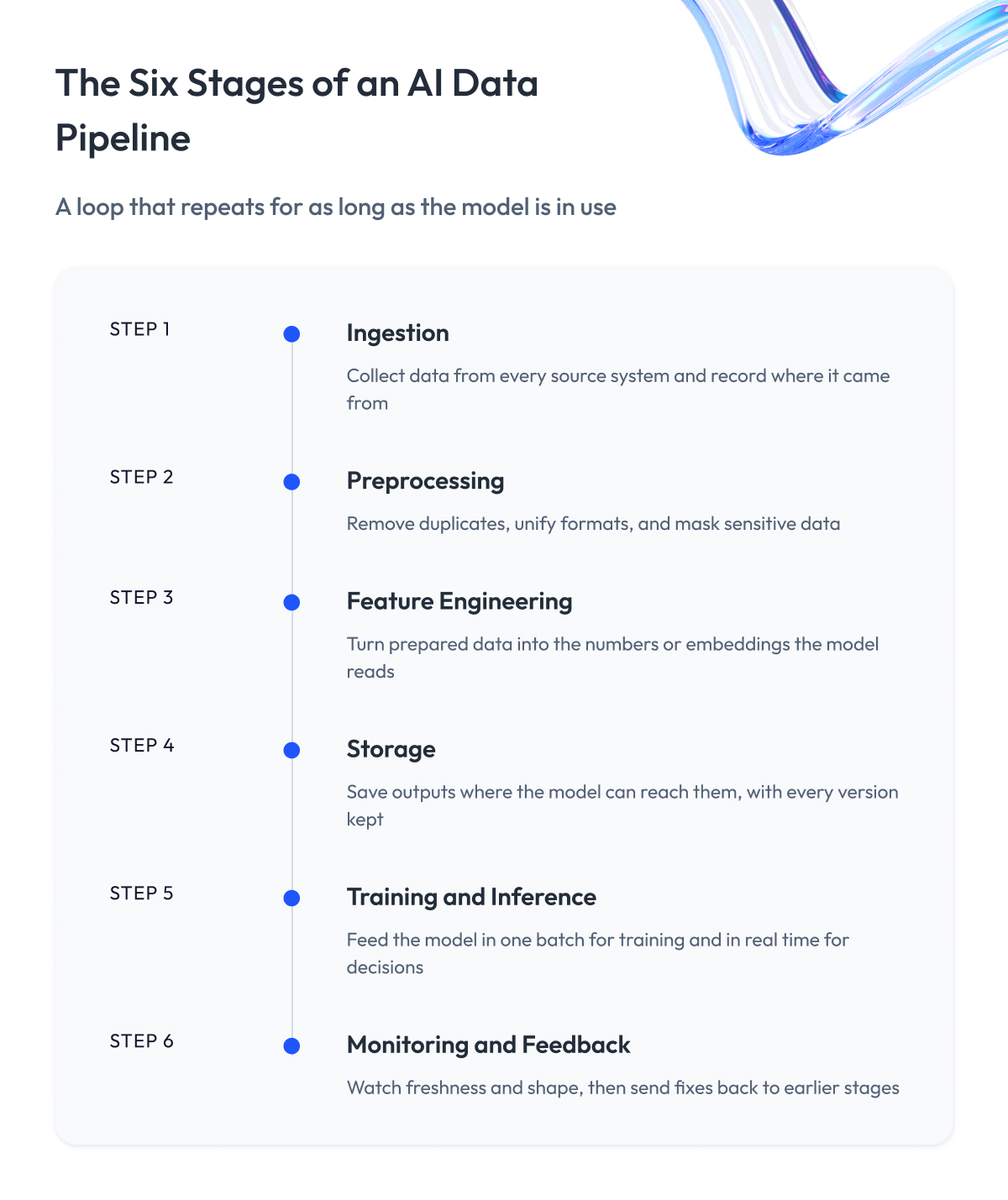
Whatever the use case, AI-ready data pipelines go through the same six stages. The stages themselves look like any pipeline diagram. What makes them AI-specific is that the last stage feeds back into all the others, so the pipeline runs as a loop for as long as the model is in use.
1. Ingestion
The pipeline collects data from the source systems: databases, APIs, file drops, event streams, and document stores. For an AI pipeline, this stage also captures the metadata, such as where each record came from and when, because you cannot debug a model later if nobody knows where its data originated.
In a retail project, this looks like orders arriving from the online store every few seconds, inventory counts from the ERP once an hour, and product descriptions from the content team whenever someone edits them. Three sources, three rhythms, one pipeline that has to handle them all.
2. Preprocessing
Raw data never arrives in one consistent form, so this stage checks it and brings it into one. The pipeline removes duplicates, handles missing values, unifies formats, and classifies and masks sensitive data before anything goes further. This stage decides whether the model learns from one definition of a customer or from three.
A typical catch here is dates. One system stores them as text, another as timestamps in a different time zone, and a third leaves the field empty for older records. If the pipeline does not settle this once, the model learns that some orders were placed at impossible times.
3. Feature engineering
A model cannot work with raw orders, tickets, or documents. It works with numbers that describe them. This stage turns the prepared data into those numbers.
For a prediction model, the numbers are called features. A feature is a single fact about a customer or a product, computed from the raw data, such as “number of purchases in the last 30 days” or “days since the last visit.” The model looks at dozens of these features and makes its prediction from them. For a document assistant, the pipeline does something similar with text. It cuts each document into pieces and converts every piece into a long list of numbers, called an embedding, that captures what the piece is about, so the assistant can later find the right piece by meaning.
Because the pipeline computes every feature, it has to compute it the same way each time. If “last 30 days” is counted from midnight in one run and from the current hour in the next, the same customer gets two different numbers, and the model cannot tell which one is right. The next section covers how this works for each of the three pipeline types.
4. Storage
Outputs go where the model can reach them at the speed it needs: in a warehouse or lakehouse for training sets, a feature store for prediction inputs, and a vector store for embeddings.
One thing to know at this stage is that AI storage keeps versions. A BI warehouse holds the data’s current state. An AI pipeline also has to keep the exact snapshot each model was trained on, so that six months later you can still answer which data produced which model.
5. Training and inference
The model trains on the stored data, and once it goes live, the same pipeline delivers fresh inputs to it for every prediction or answer. Both paths have to see the data in the same form, and we return to what happens when they don’t in the section on training-serving skew.
In practice, these are two different jobs with two different speeds. Training reads months of history in one long batch. Inference reads one customer’s features in milliseconds while they wait for a page to load. The pipeline serves both from the same definitions.
6. Monitoring and feedback
At this stage, the pipeline watches whether the data arrives on time and whether it still looks the way it did when the model was trained. It also tracks whether the model’s results hold up. When something drifts, the signal goes back to the earlier stages: the team fixes a source, recomputes a feature, rebuilds an index, or retrains the model.
Say the share of orders with an empty delivery address jumps from 1% to 15% overnight. A good pipeline raises that as an alert at stage 6. The team traces it to a changed form on the website at stage 1, and the model never sees the bad week of data.
That feedback loop is the reason we say an AI data pipeline is never finished. A practical way to shorten the loop is to move preprocessing closer to the source, so the pipeline checks and shapes data as the source produces it instead of hours later in a central job. This cuts latency and catches broken sources before they reach the model.
Knowing the stages is enough to create AI data pipelines on paper. Teams get into trouble when they discover there are three types of data pipelines for enterprise AI, each with its own rules, and that is what the next section covers.
The Three Classes of AI Data Pipelines: The Zoolatech AI Pipeline Classes Map
There are three main classes of AI data pipelines, and most enterprises end up running all of them.
- The first prepares numbers for prediction models.
- The second prepares documents for assistants that answer questions.
- The third prepares historical data for training.
Each class moves its own kind of data on its own schedule, and each breaks in its own way.
1. Feature pipelines
A feature pipeline feeds prediction models that answer questions like “will this customer leave” or “is this payment fraud.”
Such a model works with a short list of numbers about each customer, called features: purchases this month, days since the last visit, open support tickets. The feature pipeline calculates these numbers from raw data, stores them where the model can read them quickly, and refreshes them on a schedule.
This is the pipeline we build most often in machine learning implementation projects.
2. Embedding pipelines for document assistants
An embedding pipeline feeds document assistants, the AI that answers questions from your own policies, manuals, and contracts.
The assistant cannot read a whole document library for every question, so the pipeline prepares the library in advance. It cuts each document into short pieces, converts every piece into a numeric form called an embedding, and stores the pieces in a database that can search by meaning.
When a question comes in, the assistant pulls the matching pieces and answers from them. Those additions can support downstream business workflows too, where an AI RFP can use structured data from existing systems to help teams evaluate requirements and prepare responses.
This approach is known as RAG. Most generative AI solutions we build today rely on this pipeline.
3. Training pipelines
A training pipeline gives a model the past it learns from. It collects months or years of history, prepares it, and hands it to the model in one large batch.
It runs rarely, only when someone decides to train or retrain a model. It keeps an exact copy of every dataset a model learned from, so you can later explain which data produced which model. And it removes or masks personal data before training, because once a model has learned from that data, there is no way to take it back out. Securing training data is part of this pipeline’s job, and no one else’s.
Here are the three side by side. We use this table with clients to work out which pipeline a problem belongs to, and we call it the AI Pipeline Classes Map.
| Class | What It Moves | When It Runs | How Fresh It Must Be | How It Usually Breaks | What Drives Cost |
| Feature pipeline | Numbers describing customers, products, events | On a schedule, daily to seconds | Matched to the decision speed | Numbers calculated differently before and after launch | Fast infrastructure for real-time numbers |
| Embedding pipeline | Document pieces in searchable form | Whenever a document changes | Current version of every document | Falls behind, assistant answers from old text | Redoing documents after every edit |
| Training pipeline | Full historical datasets | Rarely, when retraining | Complete history, recency optional | Old dataset lost, model cannot be explained | Storing every version of training data |
The “when it runs” column raises the next question. Some pipelines run on a schedule, some run continuously, and choosing between the two is one of the more expensive decisions you will make.
Batch vs. Streaming: How Often Should an AI Data Pipeline Run?
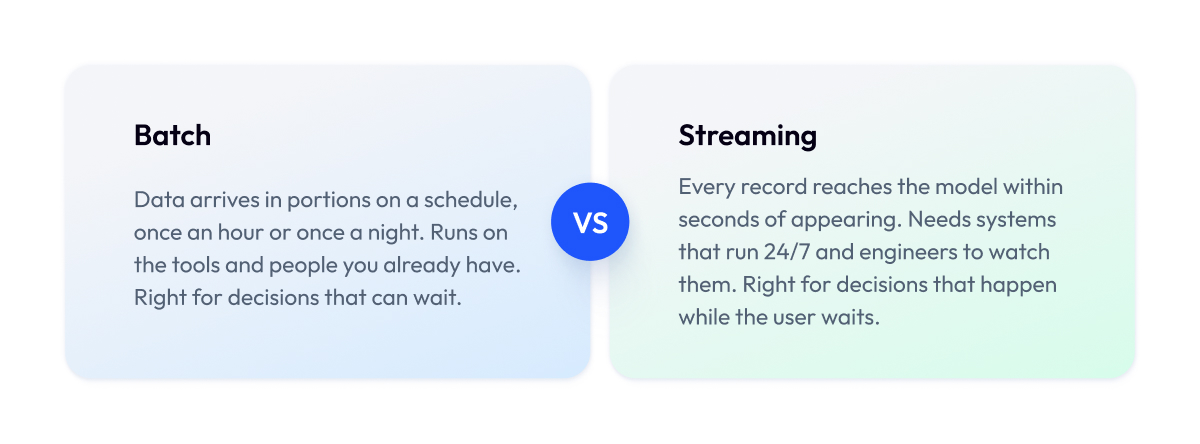
Every pipeline in the Classes Map has a “when it runs” entry, and behind it sits one basic choice. A pipeline can deliver data in portions on a schedule, which is called batch. Or it can deliver data continuously, the moment it appears, which is called streaming.
Batch works like mail. Everything that arrived during the day is collected and delivered once, in the evening. The model gets a fresh package once a day or once an hour and works with it until the next one comes.
Streaming works like a live feed. Each new record reaches the model within seconds, so the model always sees what is happening right now. This is what people mean by real-time data pipelines for AI applications.
The difference in cost is large. A streaming pipeline needs systems that run 24 hours a day, engineers who know how to operate them, and a different way of finding problems, because there is never a moment when a job “finishes” and you can check the result. A batch pipeline runs on the tools and people you already have.
There is also a middle option. If you run a batch pipeline very often, every minute or so, you get most of the freshness of streaming without the streaming infrastructure. This is called micro-batch, and for many AI use cases it is where the search ends. The table sums up how we choose between the three.
| If This Is True | Choose | What It Costs You |
| Decision can wait an hour or more | Batch | Almost nothing, existing tools work |
| Decision needs data from the last few minutes | Micro-batch | Slightly more compute, same tools and skills |
| Decision happens while the user waits | Streaming | 24/7 infrastructure, new skills, harder debugging |
| Team has never run streaming | Micro-batch first | Some latency, much lower risk |
In practice, an enterprise rarely picks just one. Training runs on batch, most features run on micro-batch, and one or two decisions run on streaming. The same goes for real-time data pipelines for AI agents, because an agent that acts on its own needs the current picture before it acts. Once you combine batch and streaming in one system, you have to decide how the two fit together, and engineers use two names for the options:
- Lambda means running batch on the full history and streaming on the latest events. It works, but every calculation now exists in two copies that have to agree.
- Kappa means running only streaming and replaying the stream from the start whenever you need history. It is simpler to maintain but puts all the weight on the streaming system.
This mix is how we built Zalando’s real-time customer data pipeline. It processes billions of records a day and feeds personalization that unlocked €4.5M in GMV, and streaming paid off there because deciding what to show a shopper right now cannot wait.
Whatever schedule you pick, the pipeline has to give the same result every time it runs. That is the next topic, and it is the one most guides leave out.
Can You Trust What Your AI Data Pipeline Delivers?
The sections above cover what a pipeline does and how often it runs. This one is about whether you can trust what comes out of it. There is one simple test.
Run the pipeline twice on the same data, and you should get the same result both times. If you do not, the model learns from corrupted data, and nobody sees it. Most pipelines we review fail this check. Below are the three most common reasons why, and what to do about each one.
1. A restart adds the same data twice
What happens. Pipelines fail and get restarted all the time. A server goes down, a source is unavailable for ten minutes, a job times out. On the second run, the pipeline adds the same records again.
Why it matters. Yesterday’s orders are now counted twice, and the model sees a sales spike that never happened.
What to do. Build the pipeline so that a rerun replaces the data for that period instead of adding to it. Engineers call this property idempotency.
2. Data arrives late or gets reprocessed
What happens. Tuesday’s sales from one store show up on Thursday because the connection was down. Or someone finds a bug and reprocesses the last three months to fix it.
Why it matters. If the pipeline was not built for this, the history ends up with duplicates or gaps, and the next model trains on it.
What to do. Decide before you build how the pipeline handles late data and reprocessing, because finding out from a model that got worse is expensive.
3. Nobody can say what the model learned from
What happens. Six months after launch, someone asks why the model made a particular decision. To answer, you need the exact data the model trained on and the exact way the pipeline calculated each feature at the time.
Why it matters. If the pipeline kept none of that, the only honest answer is “we don’t know,” and that is not an answer a regulator or a board will accept. Regulatory compliance in AI data pipelines rests on being able to show exactly this.
What to do. Have the pipeline save a copy of every training set and a record of where each piece of data came from. That record is what data lineage in AI pipelines means.
These three checks separate a pipeline you can rely on from one you have to babysit. The discipline is the same one DevOps teams apply to application code, testing, monitoring, and controlled changes, applied here to data. The next section covers the one problem that slips through even reliable pipelines.
Training-Serving Skew and How to Prevent It
A pipeline can pass every check from the previous section and still feed the model wrong numbers. The reason is that a prediction model meets its data at two moments, during training when it learns from history, and in production when it makes decisions on live data.
If a feature is calculated one way for training and a slightly different way in production, the model sees numbers it was never trained on. Engineers call this training-serving skew, and it is the most common reason a model that looked great in testing performs worse after launch.
It happens easily, and usually in one of these ways:
- Two people calculate the same number differently. The person who trained the model counted “last 30 days” from midnight. The person who wrote the production code counts it from the current moment. The numbers no longer match.
- Empty fields are handled differently. During training, an empty field became a zero. In production, the same empty field is skipped. The model gets a different number for the same customer.
- Data was cleaned by hand for training, but not in production. Someone fixed typos and removed junk before training. In production, the raw data goes straight in, junk included.
Together, they mean the model trained on one definition and now runs on another.
Skew does not produce errors. Every job finishes, every number looks plausible, and the model keeps working. The only sign is that predictions slowly get less accurate, and teams usually find the cause weeks later, after they have already tried retraining the model and switching vendors.
Three habits prevent it:
- One definition per feature. Write each feature once and use that single definition for both training and production, either by sharing the code or by keeping features in a feature store that serves both.
- Compare what the model sees. Track the numbers the model gets in production against the numbers it trained on, and alert when they drift apart.
- Check both paths before release. Run the training and production versions of every feature on the same sample and confirm they match, as you would when checking that staging matches production.
The second habit is monitoring, and monitoring an AI pipeline takes more than checking whether the job finished. That is the next section.
Monitoring an AI Data Pipeline: What to Watch Besides “Job Finished”
Regular monitoring tells you whether the job finished. For an AI pipeline, that is not enough, because a job can finish on time and still deliver old, incomplete, or changed data. You need to watch the data itself. Four data quality checks for AI pipelines cover most cases.
1. Is the data fresh? Set a limit for each pipeline, such as “no older than 15 minutes,” and alert when it is crossed.
2. Did the usual amount arrive? A sudden drop means a source broke. A sudden jump means duplicates.
3. Does the data still look the same? If a field that was always filled is now often empty, or the average order value has doubled, the model needs a look. This check catches drift and skew.
4. Are the documents current? For document assistants, count how many documents changed since the last update. If the number keeps growing, the assistant is answering from old text.
Each pipeline class needs its own mix of these checks.
| Check | Feature Pipeline | Embedding Pipeline | Training Pipeline |
| Fresh data | Critical | Critical | Low priority |
| Usual amount | Critical | Helpful | Critical |
| Same shape | Critical | Helpful | Critical |
| Current documents | Not applicable | Critical | Not applicable |
The industry calls this data observability, and tools range from simple checks inside the pipeline to AI observability platforms for data pipelines, such as Monte Carlo, that monitor every table on their own.
The tool matters less than one rule. Every alert has to reach a person who owns that pipeline and can fix it. Otherwise, the alerts pile up unread, and you are back to “job finished.”
These checks catch most of what goes wrong. The next section lists the six failures we see most often in production.
What Breaks in Production: Six Failure Modes and Their Fixes
Everything above comes down to a short list of failures. These are the six we see most often when a client asks us why a model stopped working. None of them shows up as an error. Each one shows up as a model that slowly gets worse.
| Failure | What You See | Fix |
| Late data | Yesterday’s records missing, then appearing days later | Pipeline accepts late records, reprocesses affected period |
| Restart adds data twice | Sales spike on a quiet day | Rerun replaces data for the period, never appends |
| Stale document index | Assistant quotes a policy that was replaced | Update the store on every document change |
| Training-serving skew | Model worse in production than in testing | One feature definition for training and production |
| Silent field change | Source renames or empties a field, model keeps running | Alert when data shape differs from training data |
| Bad backfill | History full of duplicates or gaps after a fix | Test backfills on a copy, keep the previous version |
Two of these deserve a warning. A silent field change is the most common one, because source systems change all the time and nobody tells the data team. And a bad backfill is the most damaging, because it corrupts history that every future model will train on. If you fix only two things, fix these.
Notice that none of the six is about the model. Each one is a pipeline problem that looks like a model problem, which is why teams lose weeks retraining and switching vendors before someone checks the data. The same pipelines also determine the total setup cost, and that is where we go next.
What Drives the Cost of AI Data Pipelines
Ask a team what their AI costs, and they will name the model. In our experience, the model is rarely the biggest line. The pipelines around it are, and four things drive that cost.
1. Re-embedding documents. Every time a document changes, its pieces have to be converted again. If the pipeline redoes the whole library instead of only the changed documents, one edit to a manual can trigger thousands of conversions, and the invoice explains itself. Updating only what changed is usually the single biggest saving available.
2. Storing versions. Keeping every training set and every version of every feature is the right thing to do, and the cost of scalable storage for AI data pipelines adds up fast. A model retrained monthly leaves twelve copies of its data a year.
3. Streaming infrastructure. Systems that run around the clock cost more than jobs that run once a night, in both compute and the engineers who watch them. This is why the batch-or-streaming choice from earlier is as much a budget decision as a technical one.
4. Duplicate pipelines. When the AI team builds its own pipelines instead of extending the BI ones, the company pays twice to move the same data, and the two copies drift apart.
| Cost Driver | Why It Grows | What Brings It Down |
| Re-embedding | Whole library redone on every edit | Update only changed documents |
| Version storage | Every training set kept forever | Keep versions, archive old ones to cheap storage |
| Streaming | 24/7 systems and people | Streaming only where the decision needs it |
| Duplicate pipelines | AI and BI move the same data twice | Extend existing pipelines instead of rebuilding |
Most of these costs land in the cloud bill, and they respond to the same discipline as any other cloud spend. In one retail engagement, reviewing cloud costs across the data platform cut spend without touching what the business received, and the pipelines were a large part of it.
The last driver in the list, duplicate pipelines, leads to the question every platform lead asks sooner or later. Should you extend what you have or build new?
Extend or Rebuild? Tools, Team, and Sequencing
The short answer is extend. The pipelines you already run for BI carry things that took years to get right: connections to every source system, rules about who may see what, and a record of where each table comes from. All of that is reusable for AI.
What you add on top are the three paths from the Classes Map, plus the monitoring to watch them. Rebuilding from scratch only makes sense when the existing pipelines fail the earlier reliability checks, and even then it is better to rebuild one path at a time.
Tools
You do not need a new platform, but you will need a few new categories of tools for managing data pipelines in an AI platform alongside the ones you have. The table lists them with neutral examples. The specific product matters less than covering each job.
| Tool Category | What It Does in the Pipeline | Examples |
| Orchestration | Runs jobs in order, retries, alerts on failure | Airflow, Dagster |
| Transformation | Turns raw tables into prepared data | dbt, Spark |
| Streaming | Moves events continuously | Kafka, Flink |
| Feature store | Serves the same features to training and production | Feast, cloud-native stores |
| Vector store | Stores document pieces for search by meaning | pgvector, dedicated vector databases |
| Data governance | Tracks lineage, ownership, access rules | Data catalog, existing governance tools |
| Observability | Watches freshness, volume, shape | Checks in the pipeline, Monte Carlo |
Team
A working AI pipeline needs three roles, and they can be three people or one person on a small project.
A data engineer builds and runs the pipelines.
An ML engineer defines the features and owns the training path.
A data owner from the business side answers what each field means and who may use it.
The most common gap we see is the third role. Without it, the engineers guess at meanings, and the model learns the guesses.
Order of work
The question of how to implement AI data pipelines comes down to order. Build in the order the model needs the data, and finish one path before starting the next.
- Pick one AI use case and list the data it needs.
- Extend the existing ingestion to bring in that data, keeping lineage.
- Build the one pipeline class that the use case needs, feature or embedding.
- Add monitoring for that pipeline before the model goes live.
- Add the training pipeline with versioning when the model needs retraining.
- Repeat for the next use case, reusing everything from step 2.
This is the sequence we follow in data analytics engagements, and it is how a client of ours replaced a set of scattered pipelines with one unified data platform that both BI and AI now draw from.
One more thing belongs in this discussion, because the phrase “AI data pipelines” has a second meaning that comes up when selecting tools.
A Note on AI-Assisted Pipeline Development
The phrase “AI-powered data pipelines” means two different things, and it helps to know which one a vendor is selling. Everything in this article so far is about pipelines that feed AI. The second meaning refers to pipelines built with the help of AI, where a coding assistant or AI agent writes connectors, generates tests, or documents what each job does.
AI assistants are good at the repetitive parts, such as writing the code that reads from a well-known API, producing test cases for a transformation, and keeping documentation in step with the code. On a typical project, this saves measurable engineering time on the plumbing. Some tools go further and let an agent watch the pipeline and propose fixes when a job fails, which is the most common form of integrating agentic AI into data pipelines today.
Where AI assistance falls short is exactly where pipelines break. It does not know that your ERP defines a customer differently from your CRM, that Tuesday’s data from one store always arrives late, or that a field marked “amount” is in local currency for half the records. That knowledge lives with your data owners, and no tool can generate it. So treat AI as a fast pair of hands for the routine parts and keep the design, the definitions, and the reliability checks with people who understand the business.
We use AI assistants this way in our own delivery, and we are building AI agents that automate more of the routine work over time. The rule stays the same. The agent writes the code, and the engineer decides what the code should do.
Final Word
Getting AI data pipelines right takes more work than the diagrams suggest. You have to decide which of the three classes you need and how fresh each one has to be, build in safe reruns and versioning, and set up monitoring that watches the data. None of it is glamorous, and most of it is invisible when it works.
But it is worth doing, because the alternative is a model that works on launch day and slowly stops working after, with nobody able to say why. The cost of that is measured in months of retraining, vendor switches, and lost trust in AI across the company.
If you take one thing from this article, take the rerun test. Run each pipeline twice on the same data this week and compare the results. Where they differ, you have found your first fix, and it will matter more than any model choice.
And if you would like an experienced team beside you, we are ready to look at the pipelines you already run, map them against your first AI use case, and help you build the missing paths without rebuilding what works.
Questions You May Have
What is an AI data pipeline?
An AI data pipeline is the automated path that collects data from source systems, prepares it, delivers it to a model as features, embeddings, or a training set, and keeps repeating this so the model always works with current data.
How is an AI pipeline different from a traditional data pipeline?
The difference between an AI and traditional data pipeline comes down to the consumer: a traditional pipeline delivers tables people read on a schedule, while an AI pipeline delivers inputs a model uses without human review and fails silently instead of showing an empty dashboard.
What is the difference between an AI pipeline and an ML pipeline?
An ML pipeline takes a prepared training set through training, evaluation, and deployment. In contrast, an AI data pipeline covers the whole path from raw source data to a live AI application, including everything before and after training.
What is an embedding pipeline?
An embedding pipeline cuts documents into pieces, converts each piece into a numeric form called an embedding, and stores the pieces in a database that a document assistant can search by meaning.
When should we move from batch to streaming?
Move to streaming only for decisions that happen while a user waits, such as fraud checks or live recommendations, and use batch or micro-batch for everything else, because streaming costs far more to run and debug.
What is training-serving skew?
Training-serving skew happens when a feature is calculated one way during training and a different way in production, so the model runs on numbers it never learned from and gets worse without producing errors.
How do you version data for AI?
You keep an exact copy of every training set, the definition of every feature at the time it was used, and a record of where each piece of data came from, so that months later you can show which data produced which model.
What should we monitor in an AI data pipeline?
Monitor whether the data is fresh, whether the usual amount arrived, whether it still looks the way it did when the model trained, and, for document assistants, whether the document store is current.
How do you ensure data accuracy in AI pipelines?
You ensure data accuracy in AI pipelines by making every rerun produce the same result, checking the shape of incoming data against the training data, and alerting a named owner the moment either check fails.
Who protects AI models and data pipelines from sensitive data leaks?
The training pipeline protects the model by classifying and masking personal data before training starts, and the data owner on the business side decides which data may be used at all.
Do data pipelines for autonomous AI agents need anything extra?
Data pipelines for autonomous AI agents need streaming freshness and a record of every action because an agent acts on its own, and no person is in the loop to catch stale or incorrect input.
What does data governance for AI training pipelines cover?
Data governance for AI training pipelines covers who owns each dataset, which data may be used for training, how personal data is masked, and a saved record of exactly what went into every training set.