








Quick Summary
- AI-ready data is data a machine can use without a person supplying context, which means the values, the metadata, the semantics, and the governance all have to hold together.
- Five attributes decide it, quality, meaning, freshness, traceability, and access, and a weakness in any one of them shows up directly in the AI output.
- The bar rises with the workload, from dashboards where a human catches oddities to agents that act on their own and need strict access rules plus a record of every action taken.
- Score each attribute 0–3 against your use case. Our rule of thumb is at least 70% of the maximum on the attributes marked Critical before the project starts.
- Buying Snowflake, Databricks, or Fabric covers storage, connectors, and tooling, but deciding which data matters, writing down the meanings, and naming owners stays your work.
AI-ready data is data that an AI system can use right away and produce a result you can trust. It is accurate, up to date, understandable to a machine, and available to the people and systems that need it.
Plans to put AI into a business process often stall on three questions about the data behind it. Where does it live, who owns it, and what does each field mean? The answers can be uncertain even when the enterprise data passes every traditional data quality check.
In this guide, we explain what AI-ready data is, how it differs from high-quality data, what each type of AI work requires, and how to score your data with the Zoolatech AI-Readiness Scorecard. We also cover what blocks readiness, in what order to fix it, and what data platforms do and do not do for you.
By the end, you will be able to score your own data against a concrete use case, name the first thing to fix, and decide whether to do the work in-house or with a partner.
What Is AI-Ready Data?
AI-ready data is data that has been systematically prepared, evaluated, managed, and governed to meet the needs of a specific AI initiative, including the metadata and semantics a machine needs to interpret it correctly.
The key word is “specific,” because readiness exists only in relation to a use case, and the same dataset can be ready for one AI use case and unusable for another.
That last point is what separates AI-ready data from data your analysts already trust.
Traditional checks look at data through human eyes, and a human fills in the context without noticing. An analyst sees a column called status with values like 3 and knows from experience that 3 means “shipped.” An AI model sees a number with no meaning attached, and it will happily build a forecast or an answer on top of that guess.
In practice, readiness sits on four layers that have to work together:
- Data. The values themselves have to be complete, accurate and current, so the model learns from what is happening in the business today rather than from gaps and stale records.
- Metadata. Every field needs a description of what it is, where it came from, and when it was last updated, so people and AI systems can judge whether they can trust it.
- Semantics. The meaning of values and the relationships between entities have to be spelled out, so AI systems can understand a customer, an order, or a contract the way your business does.
- Governance. Someone owns the data, access rules are defined, and it is transparent how the data is used and which parts may feed AI at all, which is what turns basic records into governed data.
The second and third layers hold the context a person adds without noticing, and a machine cannot add it alone. Gartner notes that organizations lack the practice and metadata they need even to tell if their data is ready for AI. The scorecard later in this article shows if your use case falls short on these layers.
Since readiness depends on the task, a natural question follows. If your data quality is already under control, why does AI still struggle with it? The next section answers that.
AI-Ready vs. High-Quality Data: The Context Gap AI Can’t Fill Itself
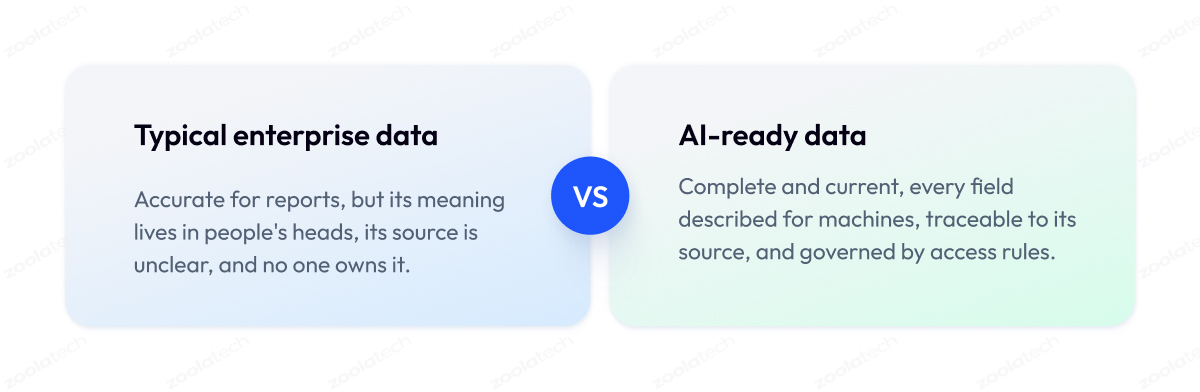
The main difference between AI-ready data and high-quality data is the audience. Quality programs make sure a human can trust the numbers, while AI-ready data also has to be understood by a machine with no human in the loop, and that requires descriptions of what the data means, where it came from, and how fresh it is, which classic quality programs never had to provide.
This is one reason AI projects can stall even in companies that have invested heavily in data quality management. Their reports are trusted, their dashboards match, and by every traditional data management metric, the warehouse looks fine.
So when the first AI model gives wrong answers, the model gets the blame. The team tunes it or switches vendors, and the cause stays untouched in the data.
The cause is context. When an analyst reads a report, they add years of knowledge to it without noticing. For example, they know two systems define an “active customer” differently, so they adjust for it in their head.
AI models are trained on the data exactly as it is stored, with none of that knowledge, so even the best AI learns from both definitions at once and treats them as the same thing. The same gap separates AI-ready data from analytics-ready data. Analytics-ready data is shaped for people who read reports, and AI-ready data has to carry its own context.
The table below shows where traditional checks stop and where AI requirements begin.
| Dimension | Traditional Data Quality Checks | What AI Additionally Requires |
| Accuracy | Values match the source system | Known errors labeled for the model to learn from or skip |
| Completeness | Required fields filled in | Examples of every situation the model will face |
| Consistency | Same format in every table | Same meaning in every system and every year |
| Timeliness | Refreshed on schedule | Refreshed as fast as the decision needs |
| Semantics | Rarely checked | Meaning of each field written down for machines |
| Lineage | Known to the data team | Every record traceable back to its source |
| Access | Role-based permissions | Rules for each AI use, personal data protected |
Data without errors is not always the goal. Gartner says AI-ready data must represent the use case, including its errors and outliers. In fraud detection, for example, the model has to learn from unusual transactions.
Clean data is still the necessary first layer, and no amount of descriptions or traceability can fix poor data quality in the source records. Trustworthy AI needs both layers, and most enterprises still have work to do on the second.
Now that the gap is visible, the next section covers what it costs when it goes unaddressed.
Why AI-Ready Data Matters
AI-ready data matters because AI projects without it risk being abandoned. In February 2025, Gartner predicted that through 2026, organizations will abandon 60% of AI projects unsupported by AI-ready data. This is a forecast, so read it as a warning about the risk for projects that start without prepared data.
The forecast came with a survey of 1,203 data management leaders, which Gartner ran in July 2024. In that survey, 63% of organizations did not have the right data management practices for AI or were unsure if they had them.
Accenture research from 2026 included a survey of executives at 2,000 companies in 15 countries and 9 industries. It found that only 7% of companies have reached the data readiness level required to scale advanced AI. Accenture calls them “data reinventors.”
Strong models are available to every company, but your data belongs only to you. That is where 2 companies using the same model start to differ.
In practice, poor data breaks AI outcomes in three ways:
- Wrong answers that look right. A generative AI assistant built on internal documents will quote an outdated policy if three versions of it sit in the knowledge base, and it will do so with full confidence.
- Quality that fades over time. A demand forecast accurate at launch gets worse a quarter later because a source system changed and nobody updated the pipeline the model depends on.
- Errors nobody can trace. When a customer complains about a wrong figure, the team has to reconstruct where it came from, because nobody recorded the path from source to AI output.
Together, these problems stall AI projects before they prove any value, so the data has to be ready first.
The next section breaks that readiness down into five attributes you can check and fix one by one.
What Makes Data AI-Ready: The Five Core Attributes
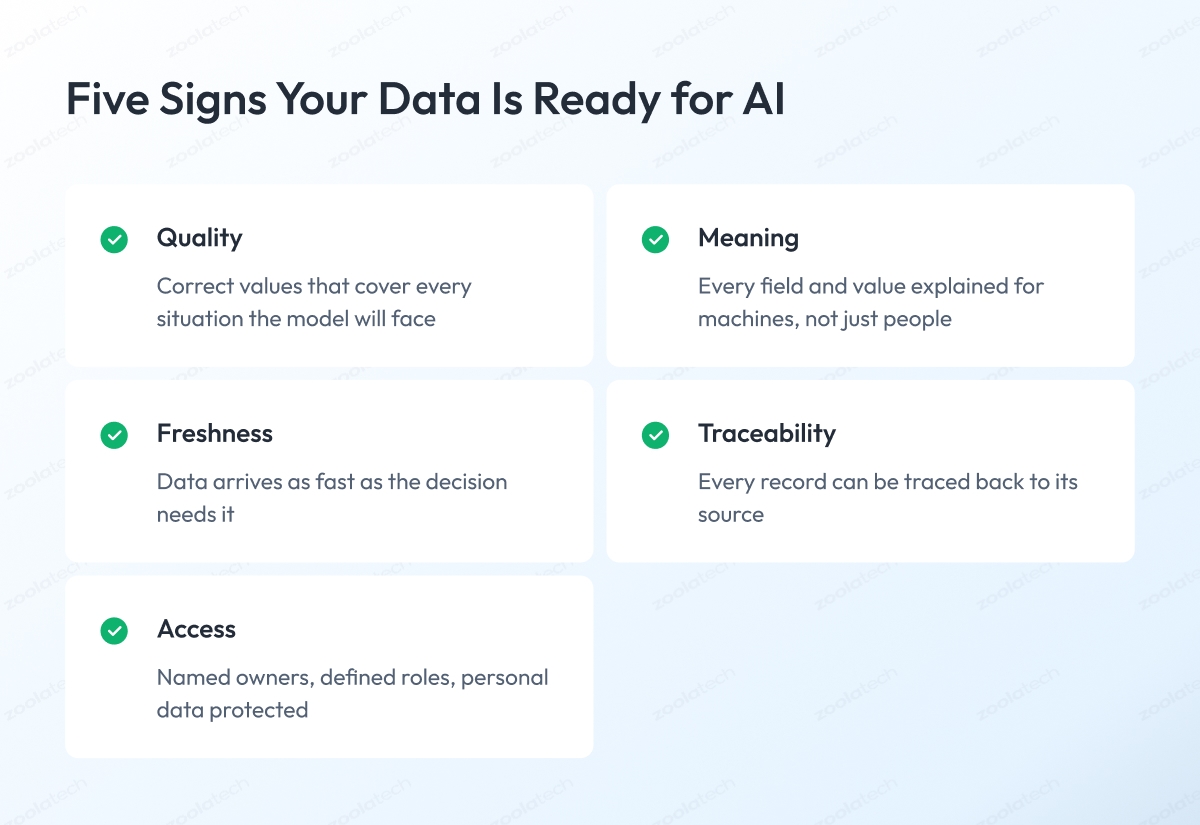
Five attributes decide what makes data AI-ready:
- Quality
- Meaning
- Freshness
- Traceability
- Access
If your data is strong on all five for the task you have in mind, it is ready, and if it is weak on any of them, that weakness will show up in the AI outputs. These same five attributes form the base of the readiness scorecard later in this article.
1. Quality
Quality means the values are correct and the data covers every situation the AI system will face once it is live. A model can only learn from what it has seen, so high-quality data with gaps is still a problem. For example, a returns prediction model trained on data that skips the holiday season will look fine all year and fail in December.
2. Meaning
This attribute answers one question about every field and every document. What does it mean?
A column called “amount” is useless to a model until someone writes down the currency and whether tax is included. The same goes for unstructured data such as contracts or support tickets, which need labels and descriptions before an AI system can use them.
This information lives in data catalogs, where data scientists and AI systems can find it. An empty catalog is a strong warning sign. A semantic layer that defines business terms such as “active customer” once for every tool is another way to hold these meanings.
For document assistants, meaning also includes which document version is current, who owns it, and what it applies to. These assistants use retrieval-augmented generation (RAG), which means they search your documents before they answer. Labels and metadata on each document decide if the assistant finds the right one, and that is the core of preparing documents for RAG.
3. Freshness
Freshness is how recent the data is and how fast it reaches the model. A monthly report is fine with yesterday’s numbers, but a fraud detection system running on yesterday’s data is simply too late.
Faster delivery takes more engineering, so match freshness to the decision. When data arrives too late, fix the data pipeline, because a faster model cannot speed up late data.
For example, in our work on near real-time analytics tracking for Zalando, the delay in analytics data dropped from 15–90 minutes to near zero. The figure measures how quickly analytics events from the website and apps arrive, showing how much a pipeline change can speed up data delivery.
4. Traceability
Traceability, or data lineage, is the record of where each piece of data came from and what happened to it on the way. Without it, fixing an AI system is guesswork. When an assistant gives a wrong answer, lineage lets you find the source document quickly instead of opening an investigation.
Data observability tools add to this by watching the data flow and warning you when a source breaks, so you find out before the model does.
5. Access
The last attribute covers who may use data and for what purpose. Robust data governance defines ownership, access rules, and data security requirements. It also separates data that can feed AI from data that cannot, such as personal information that has to be masked first.
An HR assistant that tells anyone their colleagues’ salaries is a governance failure, and no change to the model will fix it. AI-ready governed data closes this door before it opens.
All five attributes apply to every AI initiative, but their weight changes with what you are building. A dashboard and an autonomous agent need very different levels of each, and the next section covers that difference.
Requirements Depend on What You’re Building: From Dashboards to AI Agents
AI-ready data requirements depend on the type of AI you are building, because each type uses data differently and puts pressure on different attributes. A model that predicts demand needs years of history, an assistant that answers from documents needs current versions and labels, and an agent that acts on its own needs strict access rules on top of everything else.
So the first question is never whether your data is ready in general, but what exactly you plan to build with it.
Most AI applications in an enterprise fall into one of four types, and each asks something different from your data.
Dashboards and analytics. Charts and reports people use to make decisions. Data demands are lowest here because a human reads the numbers and can catch anything odd. Yesterday’s data is usually enough.
Prediction models. These are models that learn from your history to predict what happens next, such as demand for a product or the risk that a customer leaves. They need historical data that covers every season and situation, and they need field definitions that stayed stable over the years. If the meaning of “active customer” changed in 2023, the model will quietly mix the two meanings. In machine learning implementation, we recommend fixing these definitions before model work starts.
Assistants that answer from your documents. This type is often called RAG, which simply means the AI searches your documents first and builds its answer from what it finds. Such an assistant depends on things dashboards never needed, such as document structure, labels, and knowing which version of a policy is current. Feed it a folder of unsorted files, and it will answer from the wrong ones. This is the data work behind generative AI solutions such as document assistants.
AI agents. An AI agent goes one step further and acts on its own, for example by issuing a refund or updating an order. It needs everything above, plus strict access rules and a record of every action it took, because a wrong action costs more than a wrong answer.
The matrix below puts the five attributes from the previous section against these four types of work.
Zoolatech Workload Requirements Matrix
| Attribute | Dashboards | Prediction Models | Document Assistants | AI Agents |
| Quality | Helpful | Critical | Critical | Critical |
| Meaning | Helpful | Critical | Critical | Critical |
| Freshness | Optional | Helpful | Helpful | Critical |
| Traceability | Optional | Helpful | Critical | Critical |
| Access | Helpful | Helpful | Critical | Critical |
The further AI moves from showing numbers to people toward acting on its own, the higher the demands of AI workloads on your data. This also means the work pays off more than once, because data prepared for the strictest task becomes reusable data products that serve every task before it.
An AI-ready data product is a dataset with a named owner, documented meaning, agreed freshness, and access rules. Several teams and AI use cases can then reuse it.
Since the bar depends on the task, you can measure readiness against a specific goal. The next section gives you a scorecard to do exactly that.
Is Your Data AI-Ready? The Zoolatech AI-Readiness Scorecard
The honest answer to “is your data ready for AI” is a number, and here is a simple way to get it. Score your data on the five attributes you already know from this article, from 0 to 3 each, and compare the result with what your AI use case requires.
A number ends the argument where one person insists the data is fine and another insists it is a mess, and it gives you something to show leadership and measure again next quarter.
Use the scorecard below. For each attribute, read both descriptions and honestly place your data between them.
Zoolatech AI-Readiness Scorecard
| Attribute | What 0 Looks Like | What 3 Looks Like |
| Quality | Errors and gaps found by users | Checked automatically, covers all situations |
| Meaning | Fields understood by a few people | Every field described in a machine-readable catalog |
| Freshness | Data updated whenever someone remembers | Update speed matched to each decision |
| Traceability | Nobody can say where a number came from | Every record traceable to its source |
| Access | One shared login, no rules | Clear owners, roles and usage rules |
Now count the result against your task. Go back to the Workload Requirements Matrix, find your project type, and take only the attributes marked Critical for it. Add up your scores on those attributes and compare the sum with the maximum.
Here is an example. You are building a document assistant, and the matrix marks four attributes as Critical: Quality, Meaning, Traceability, and Access. The maximum on four attributes is 12 points. You scored 2, 1, 1, and 3, which gives you 7 out of 12.
Our rule of thumb is to aim for at least 70% of the maximum before the project starts, which in this example means 9 points. At 7, the data needs work first, and the two attributes that scored 1 show exactly where.
The 70% bar is our own guideline for a first project. A Critical attribute at 0 or 1 still needs work, even when the total reaches 9 points.
Two more checks sit outside the table, and both can stop a project on their own.
The first is security and personal data, meaning you know exactly which records contain personal or sensitive information and how they are masked before AI touches them.
The second is people, meaning someone owns each dataset and can answer questions about it. A data readiness assessment without an owner behind the data produces a score nobody acts on.
The next section covers the problems behind low scores and what to fix first.
Common Barriers to AI-Ready Data and What to Fix First
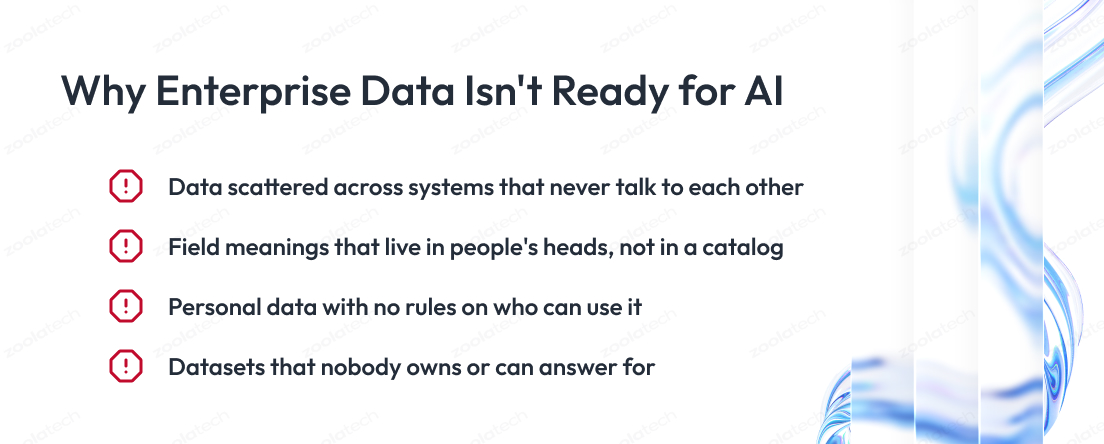
If you ran the scorecard, you likely have low scores in specific places, and they probably point to one of a few familiar problems.
The barriers to AI-ready data covered here are structural:
- Data sits in separate systems
- Nobody wrote down what the fields mean
- Personal data has no rules around it
- Datasets have no owner
None of these AI-ready data challenges is exotic, and the good news is that you do not need to fix everything, only what your first AI project runs into.
Here is how each barrier looks in practice and how to fix it.
1. Data spread across systems
Your company stores data across many systems. The customer exists in the CRM, their payments live in the billing system, and their complaints sit in the support tool. Each system knows its own part, and no system knows the whole customer, which is what people mean by data silos. An AI model built on one of them sees a third of the picture, and a model built on all three often treats one person as three different people, because the systems call them differently.
How to fix it. Connect the data sources so the data about one customer, order, or product comes together. You can store it physically in one place, or use a federated layer that gives one logical view while the data stays where it is. This is engineering work, and when some of the systems are old, it usually starts with legacy modernization before any AI enters the picture.
2. Nobody wrote down what the data means
Ask your team what the field “status = 3” means, and someone will know. The problem is that the answer lives in their head. People can pass such knowledge to each other, but an AI model reads the data directly, and for it, every unwritten definition is a guess. This is the Meaning attribute from the scorecard.
How to fix it. Write the definitions down in a data catalog, starting only with the tables your first AI project will use.
3. Personal data without rules
Customer data almost always contains personal information, such as names, addresses, or payment details. In many companies, nobody can say exactly which tables hold it and who is allowed to use it. As soon as an AI project touches that data, legal and security teams have to stop it, because they cannot approve what they cannot see.
How to fix it. Map where personal data lives, decide who can use it for what, and mask or remove it where AI doesn’t need it. This is data governance work, and doing it before the project starts keeps legal and security reviews from stopping the project midway.
4. No owner to ask
Every dataset needs a person who can answer three questions. What is inside, how often is it updated, and can it be trusted? Without that person, every question becomes an investigation, fixes stall, and data teams spend time searching instead of building.
How to fix it. Start with one named owner for each dataset your AI project depends on.
To decide what to fix first, go back to your scorecard results. Take the attributes that are Critical for your project and scored 0 or 1, and fix only those.
Once you know which gaps to close, the next question is the order of the work, and that is what the following section covers.
How to Make Your Data AI-Ready in Six Steps
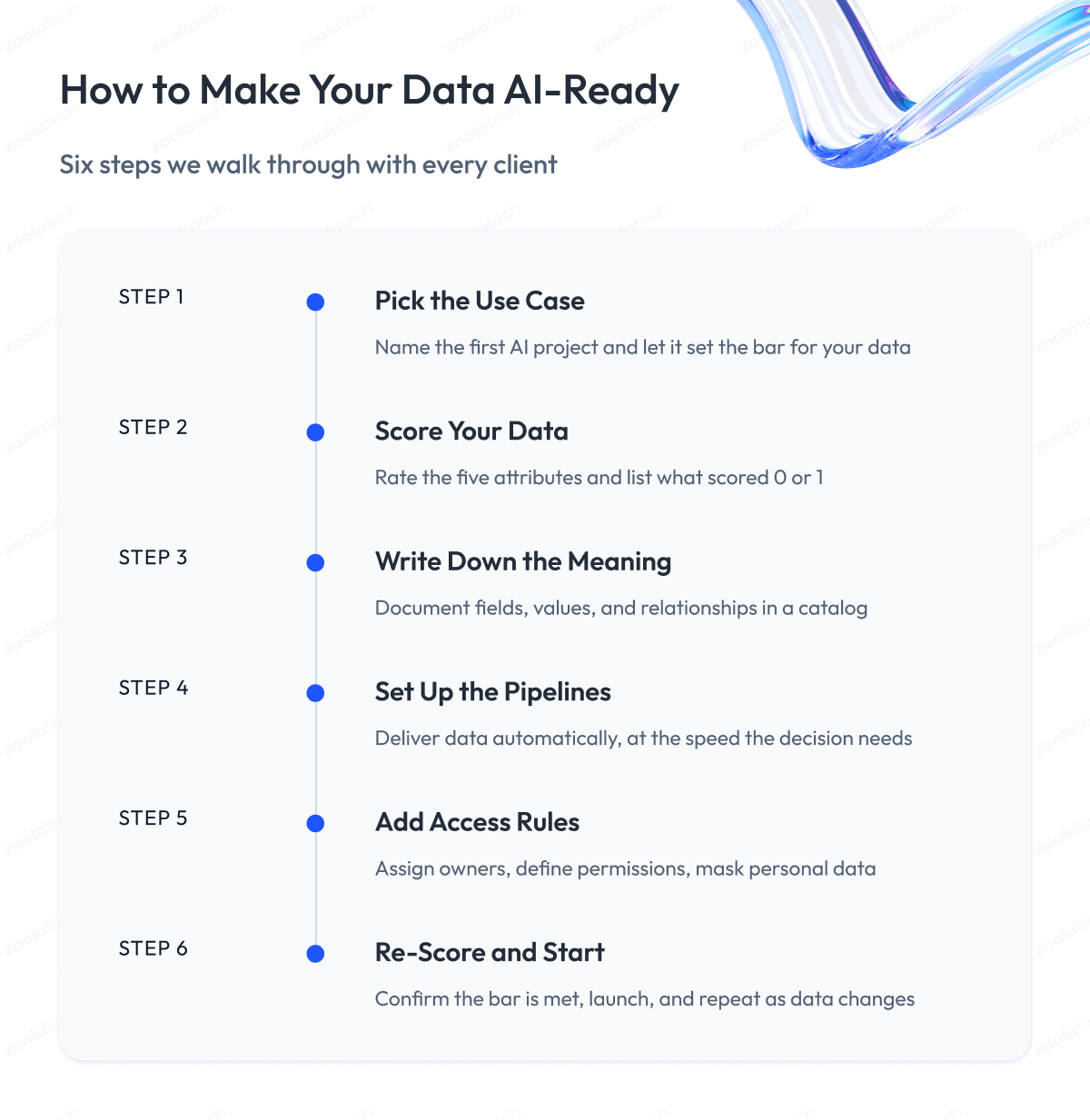
These are the six steps we recommend to make data AI-ready. For a longer version that goes workload by workload for machine learning, RAG, and AI agents, see our seven-step playbook.
Step 1 – Pick the use case first
Preparing data in general leads nowhere, so every AI-ready data strategy starts by naming the first AI project. The type of project sets the bar for your data, as the Workload Requirements Matrix showed, and it tells you which tables and sources hold the right data for it. Everything else in the process depends on this choice.
Done when: you have one named use case, know its type in the Workload Requirements Matrix, and have a list of the tables, documents, and sources it needs.
Step 2 – Score your data against it
Run the scorecard from this article on the data your use case needs. The attributes marked Critical for your project that scored 0 or 1 become your work list. The score replaces debate about how good or bad the data is.
Done when: each of the five attributes has a score from 0 to 3, and you have a written list of the Critical attributes that scored 0 or 1.
Step 3 – Write down what the data means
Document the fields, values, and relationships in the tables your project will use, and put them in a catalog. Do not skip this step, because without written meanings the model fills the gaps with guesses. The right data management practices for AI start with meaning, long before any tooling.
Done when: every field, value, and relationship your use case needs is described in the catalog, and someone can answer questions about each one.
Step 4 – Set up the pipelines and freshness
Data must reach the model automatically and at the speed the decision requires. To ensure data flows without manual exports, we build or rebuild AI-ready data pipelines, so a change in a source system raises an alert instead of silently breaking the model.
Done when: data reaches the model without manual exports, as fresh as the decision needs, and you get a warning when a source breaks.
Step 5 – Add the access rules
Assign an owner to each dataset, define who can use it and for what purpose, and mask personal data where AI doesn’t need it. Doing this before launch keeps legal and security teams on your side and saves the project from stopping at the finish line.
Done when: every dataset has an owner and written usage rules, and the use case gets no personal data it does not need.
Step 6 – Re-score and start the project
Run the scorecard again to ensure your data is ready. When the Critical attributes reach the bar, the AI project starts on solid ground, and the score becomes a habit you repeat throughout the AI lifecycle as data changes. AI-ready data is ongoing work. Each next AI project starts from data that is already described, owned, and monitored.
Done when: your scores on the Critical attributes reach the 70% bar, and the next re-score has a date in the calendar.
The steps look short on paper, but the effort depends on the size of your gaps. Getting the data ready for a first use case is an engineering project with a defined start and finish. Keeping it ready takes regular effort, and we do both as part of our AI-ready data engineering work.
The architecture is covered in the next section.
The Foundation and Architecture Behind AI-Ready Data
A shared data foundation keeps data AI-ready as sources, projects, and people change. At a high level, it has five layers. Our AI-ready data architecture guide describes a more detailed reference architecture with seven layers, with governance, lineage, and cost covered across every layer.
Here is what each layer does.
AI-Ready Data Foundation: The Five Layers
| Layer | What It Does | Simple Example |
| Storage | Brings company data together, in one place or through a federated layer | A data warehouse or lakehouse |
| Integration | Moves data in from source systems automatically | Data pipelines from CRM and billing |
| Quality | Checks data on arrival, before models see it | An alert when orders stop coming in |
| Rules | Keeps definitions, owners and usage permissions | A data catalog with field descriptions |
| Access | Delivers data to people and AI systems by their rights | An analyst sees all, a chatbot sees its part |
Two more components join the picture when you move past dashboards. A vector store keeps your documents in a form an assistant can search by meaning, and a feature store keeps ready-made inputs for prediction models so every model uses the same numbers. You add them when the use case calls for them, and the five layers stay the same.
You do not have to build all of this on day one for your data to be AI-ready. A modern data platform grows layer by layer. The key is to build AI-ready data once, so every AI project draws from this shared foundation instead of preparing its own data from scratch, because that is what makes AI pipelines repeatable and scalable AI possible.
Two examples from our data engineering work show what this foundation looks like in practice.
For Pandora, we assessed the existing data warehouse, data lake, and Synapse workloads, centralized streaming ingestion, and moved analytical workloads toward a Databricks lakehouse with Unity Catalog governance. Data availability improved from 36–72 hours to near real time, and the platform now integrates 100+ sources through a unified architecture. The work gave Pandora an enterprise data foundation ready for AI and machine learning, as the unified data platform case study describes.
We also built a real-time customer data pipeline for Zalando that processes 2.5B records per day and cut processing costs by more than 50%. The pipeline is tied to a €4.5M projected potential uplift in gross merchandise value (GMV) from targeted use cases.
A platform like this can sound like a huge undertaking, so a fair question follows. How much of it do you need before your data counts as ready? The next section answers that.
When Is Data “Ready Enough”?
Before you start data preparation, decide where the finish line is, because you can chase perfect data forever, and you don’t need to. The goal is to prepare data well enough to build a quality AI solution on top of it, and the scorecard already gives you that finish line. Our rule of thumb is at least 70% of the maximum on the Critical attributes, and any Critical attribute still at 0 or 1 stays on the fix list.
Perfectionism is genuinely harmful here. Data changes every day, new sources appear, and definitions get updated, so fully ready data is a moving target.
Waiting for perfect data can indefinitely postpone the first project. A project that ships on data that is ready enough gives you feedback and results you can use to fund the next round of fixes.
Gartner makes the same point when it says AI-ready data is never “one and done.” Readiness is ongoing data work built into everyday data practices, and shipping is part of it.
One caution before you go shopping for data platforms and AI tools. Every platform defines readiness through its own feature set, and if you accept a vendor’s checklist as your definition, readiness quietly turns into a commitment to their product. Judge your data against your use case, then let the tools earn their place.
Platforms, Services and Industry Angles
An AI-ready data platform combines the layers from the architecture section in one place, so you rent storage, integration, and quality tools instead of building each yourself.
Well-known examples of AI-ready cloud data platforms include Snowflake, Databricks, and Microsoft Fabric. They are a fast way to build the data infrastructure for AI-ready data, but no platform makes your data ready on its own.
Here is what these data platforms do. They store data from the whole company and give you the computing power to process it. They ship with connectors for popular systems, so you do not have to build each integration from scratch. They include tools for quality checks, cataloging fields, and controlling access. In short, they cover the engineering base well, but buying one does not make your data ready for AI.
The table below shows how the work divides between the platform and your team.
| What a Platform Gives You | What Stays Your Work |
| Storage and computing power | Deciding which data matters |
| Ready-made connectors to systems | Choosing and connecting your sources |
| A catalog tool for descriptions | Writing the actual meanings in |
| Access control features | Setting the rules and naming owners |
| Quality check tools | Defining what counts as an error |
A platform also does not require you to move every dataset into one place. Accenture argues that a single logical view of data that remains federated is more pragmatic than centralizing all data in one cloud environment. Your share of the work in the table stays the same in both cases.
The right column is the readiness work this article described, and it does not disappear with any purchase.
A platform holds your answers, and someone still has to produce them, either your team or a partner offering AI-ready data services who does it with you.
Industry adds its own angle.
For financial institutions, Traceability and Access carry more weight. At the start of an AI project, ask your risk, compliance, and audit teams which records, lineage, and explanations they will need for the use case. AI-ready finance data has to support those needs.
In retail, customer data needs extra preparation, because it lives across the online store, physical stores, and the loyalty program. Some use cases, such as live personalization, need it joined in near real time. Our retail analytics work covers this kind of data.
Whatever your industry and platform, the path itself stays the same, and that brings us to the end of this guide.
Final Word
Making your data AI-ready takes patience. You may need to score your data honestly, document fields nobody wrote down for years, untangle systems that never talked to each other, and have uncomfortable conversations about who owns what.
But the work carries over, because the next AI project starts from data that is already described and owned.
A model built on prepared data has fewer surprises after launch. A model built on unprepared data keeps coming back to your team as sources and definitions change.
Use this guide as your starting point. Pick one use case, run the scorecard against it this week, and let the lowest scores tell you where to begin. A single honest number is a better starting point than another round of debate about whether your data is good enough.
We help large enterprises engineer AI-ready data and move AI from pilot to production without halting what already works. If you want a team to do this work with you, tell us about your project, and we’ll suggest the next step.
Questions You May Have
What is AI-ready data in simple terms?
AI-ready data is data an AI system can use right away to produce a trustworthy result because it is accurate, current, described so a machine can interpret it, traceable to its source, and governed by access rules. Readiness depends on the use case, so data can be ready for one AI project but not another.
What is the difference between AI-ready data and high-quality data?
High-quality data is accurate and complete for people to read, while AI-ready data also carries the meaning, freshness, and lineage a machine needs to interpret it without a human filling in the context. The same gap separates AI-ready data from analytics-ready data, which is shaped for people reading reports and dashboards.
How do I know if my data is AI-ready?
Score your data from 0 to 3 on quality, meaning, freshness, traceability, and access. Then compare the total for the attributes that are Critical for your use case with our rule of thumb of at least 70% of the maximum, and treat any Critical attribute at 0 or 1 as a gap to fix.
What are the main characteristics of AI-ready data?
AI-ready data has five characteristics: correct and complete values, documented meaning for every field, freshness matched to the decision, traceability back to the source, and defined ownership and access rules. How much each one weighs depends on what you build, from dashboards, where a person catches errors, to AI agents that act on their own.
How do I get my enterprise data ready for AI?
Pick one use case, score your data against its requirements, document what the fields mean, automate the pipelines, set ownership and access rules, and re-score before the project starts. At each step, fix only the Critical attributes that scored 0 or 1, because preparing the whole company’s data first delays the project with work it does not need.
Does AI-ready data mean something different for RAG than for prediction models?
Yes, a RAG assistant depends on document structure, labels, current versions, and traceability, while a prediction model depends on long, consistent historical data, so the same dataset can be ready for one and not the other. In the Workload Requirements Matrix, Traceability and Access are Critical for document assistants and only Helpful for prediction models.
Why do AI projects fail because of data?
AI projects fail because of data when a model reads data that is incomplete, outdated, or undocumented. The model then gives confident wrong answers, gets worse as sources change, and makes errors nobody can trace. Gartner predicted in February 2025 that through 2026, organizations will abandon 60% of AI projects unsupported by AI-ready data.
Do we need a specific platform to have AI-ready data?
No, platforms such as Snowflake, Databricks, or Microsoft Fabric speed up storage and integration, but the meaning, ownership, and access rules that make data AI-ready remain your team’s work on any platform. The data also does not have to move into one place, because a single logical view over federated data is an option.
How long does it take to make data AI-ready?
The time depends on the gaps in the data your use case needs. For one well-defined use case, you fix only the Critical attributes that scored 0 or 1, so the effort comes down to the number of sources, how much of their meaning is undocumented, and if each source has an owner. Score first, and the work list becomes your estimate.
What data does an AI model need to be trained on?
An AI model needs training data that covers every situation it will face in production, including the errors and outliers the use case contains. For example, a fraud detection model has to see the unusual transactions it is meant to catch. It also needs stable field definitions over time and documented meaning for every value it learns from.
Is there an AI-ready data checklist we can start with?
Yes, the Zoolatech AI-Readiness Scorecard in this article works as an AI-ready data checklist. Rate quality, meaning, freshness, traceability, and access from 0 to 3, then start fixing the attributes that are Critical for your use case and scored 0 or 1. Also check the two points outside the table, which are personal data and dataset owners.
What does an AI-ready data architecture look like?
At a high level, an AI-ready data architecture has five layers for storage, integration, quality checks, rules, and access. Document assistants also need a vector store, and prediction models need a feature store. Our AI-ready data architecture guide describes a more detailed reference architecture with seven layers.
What makes test and evaluation data AI-ready?
AI-ready test data meets the same five attributes, with more weight on Quality and Traceability. It must represent the situations the system will face, including errors, outliers, and rare cases. We recommend keeping each test set traceable to its source and version so you can reproduce results and compare them with the next one.
What is AI-ready product data?
AI-ready product data is catalog data, such as attributes, descriptions, prices, and availability, prepared so AI search, recommendations, or shopping assistants can use it without a person filling gaps. Every attribute is defined, with its unit where one applies, values match across channels, prices and stock stay as fresh as the decision needs, and each source has an owner.