



Quick Summary
- Headless splits the storefront from the commerce engine and connects them by API, so the engine owns catalog, pricing, cart, and checkout while your team owns the experience.
- A production stack has six layers, and the API layer with its backend-for-frontend is the piece teams most often underestimate, because latency and caching decisions live there.
- Every composable stack is headless, but not every headless stack is composable, and one headless storefront on a single commerce platform is the sensible starting point for most businesses.
- Four of the five costs recur forever: you always need engineers, you build the storefront from zero, more systems mean more upkeep, and total cost relocates from licences to salaries rather than falling.
- Headless raises the performance ceiling without guaranteeing it, since a storefront shipping a 2 MB bundle and six API calls before first paint loses to a well-tuned traditional platform.
Headless commerce is an ecommerce architecture that decouples the frontend your shoppers see from the backend commerce engine that runs your catalog, cart, checkout, and pricing. The two layers communicate via APIs, so you can build any storefront on any channel on top of a single commerce backend and change one side without breaking the other.
Most explanations stop at that definition. The harder questions whether your business actually needs headless, what it costs to run once the launch buzz fades, and which platform or build approach fits.
That is why we wrote this guide. We walk through the headless architecture layer by layer, compare it with traditional and composable setups, weigh the benefits against the costs, and provide a decision framework for choosing among headless, traditional, and hybrid setups.
By the end, you will know whether headless commerce is the right move for your business, how to adopt it without a high-risk rebuild, and what to look for in a platform and an engineering partner before you commit.
What Is Headless Commerce?
The opening gave you the short answer, so here is headless commerce explained in full.
Headless commerce is an ecommerce architecture in which the storefront and the commerce engine run as two separate applications that exchange data through APIs.
The name comes from the split itself: the “head” is the storefront your customers touch, and removing it leaves a body of commerce functionality that can serve any head you attach.
An architecture qualifies as headless when four things are true:
- No built-in storefront: the platform ships commerce logic and APIs instead of page templates
- API-only contact: the frontend reads product, price, and stock data through API calls
- Independent releases: you can deploy a storefront change without redeploying the commerce engine
- Many heads, one body: web, mobile app, kiosk, and marketplace listings run on the same backend
Miss any of those, and you have a traditional platform with an API bolted on, which is a different thing with different limits.
How headless commerce works
Every interaction follows the same pattern:
- A shopper opens a product page.
- The storefront sends an API request to the commerce backend.
- The backend returns structured data.
- The frontend decides how to present it.
Add-to-cart, promotion validation, and payment authorization work the same way, with the commerce engine holding the logic and the frontend owning the user experience.
Imagine a restaurant kitchen that serves a dining room, a takeaway window, and a delivery app. The kitchen owns the recipes, the ingredients, and the quality standard. Waiters do not cook. They take an order, pass a ticket to the kitchen, receive the finished plate, and present it in the style their guests expect.
Your commerce engine is that kitchen, and every storefront is a waiter. The ticket is the API request, and the finished plate is the structured data that comes back.
The short version: headless commerce separates the frontend from back-end commerce logic and connects them with APIs. Every other decision, including which platform runs the backend and which framework builds the storefront, stays open.
Headless Commerce Architecture
The restaurant analogy explains the split. Now let us look at the parts you actually have to build, run, and pay for, because the architecture of headless commerce has more moving pieces than the two-box diagram suggests.
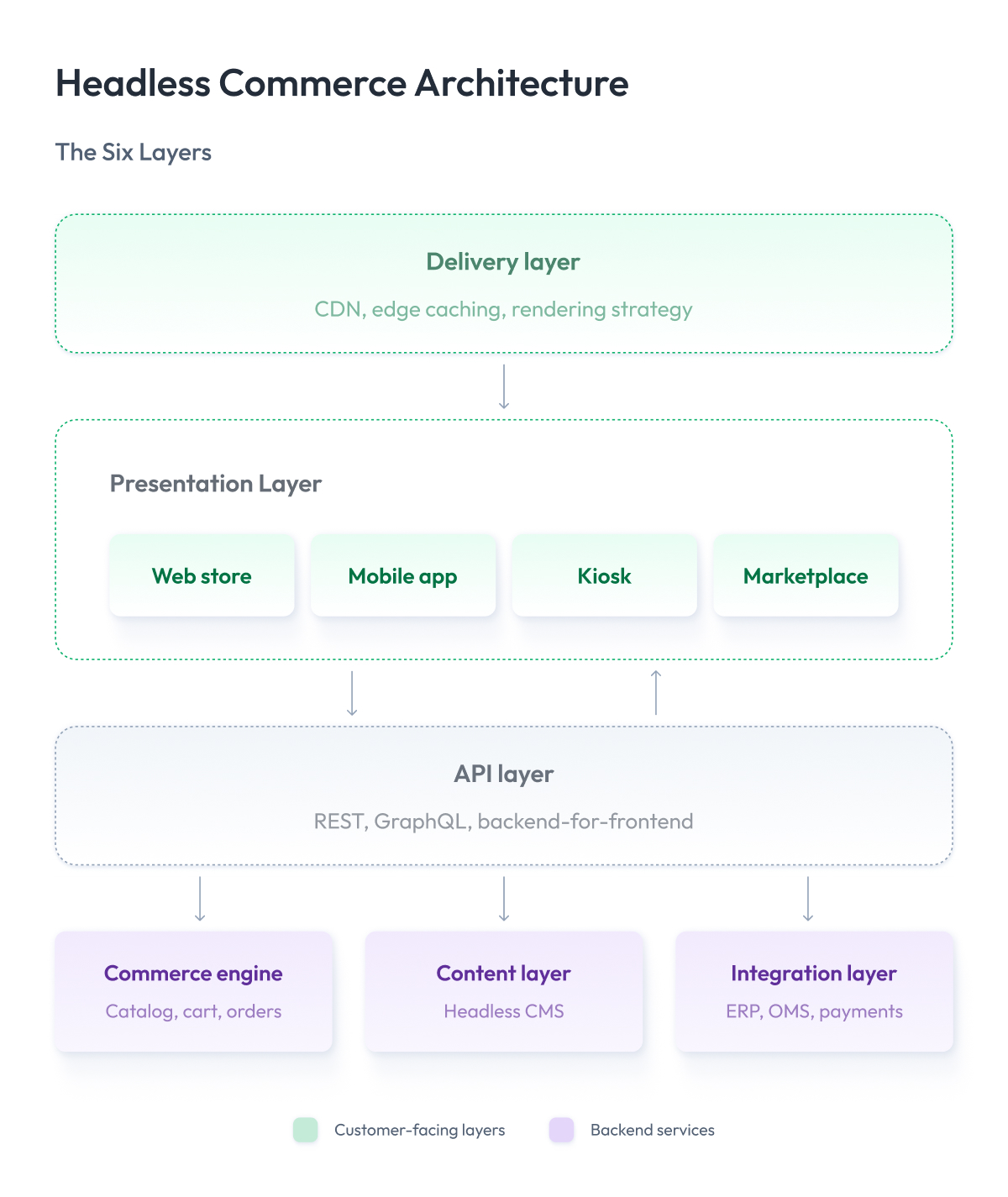
A production headless commerce tech stack usually has six layers, shown in the headless commerce architecture diagram below.
1. The presentation layer
This is the part your customer sees and clicks. It exists to display things and capture input, nothing more, which is why it can be built in whatever framework your team already knows: React, Next.js, Vue, Swift, Kotlin.
One backend can serve several of these at once, so a headless website, a mobile app, and an in-store screen are separate codebases rather than variations of one template.
2. The API layer
The headless commerce API layer is a must-have messenger that carries the storefront’s questions to the backend and brings answers back, using REST endpoints, GraphQL, or both.
Most teams add a backend-for-frontend service that bundles several application programming interfaces into one response shaped for a specific channel, so a mobile app makes one call instead of six.
Latency and caching decisions live in this layer, and it is the piece teams most often underestimate.
3. The commerce engine
Everything a shop needs in order to actually sell sits here. The backend commerce platform owns your catalog, prices, promotions, cart, checkout, and orders, and it answers questions:
- What does this cost for this customer?
- Is there stock left?
It can be SaaS, custom, or open source, and open source headless commerce engines trade the highest control for the highest maintenance load. It never renders a page.
4. The content layer
Words and pictures need a home too. A headless CMS holds editorial content, campaign pages, and localized copy, then serves them through its own API. The frontend combines content and commerce in one view, which is how a marketing team ships a campaign landing page without waiting for a platform release.
5. The delivery layer
This layer decides how fast your page appears. A CDN keeps copies of your storefront on servers around the world, so a shopper in Berlin loads it from a server in Germany instead of waiting for a response from Virginia. Because you own the frontend, you also choose when each page gets built, whether that is in advance as a ready file, fresh on every request, or cached at the edge for the next few minutes.
Those choices are where speed is won or lost. A traditional platform makes most of them for you, and a decoupled architecture of headless commerce hands them to your team, which is where most of its performance upside comes from.
6. The integration layer
Your commerce operations do not run on the storefront alone. ERP, order management, product information management, search, tax, payments, and analytics all connect through APIs and events, so a price change in one system reaches every storefront.
In enterprise builds, this layer is usually larger than the storefront itself, and it drives most of the integration and cloud architecture work in a headless program.
Notice that each layer can be replaced on its own schedule. That is the argument for using headless architecture, and it is also why the operating model needs more engineering discipline than a single platform release cycle. We cover that cost honestly in the trade-offs section below.
Headless Commerce vs Traditional (Coupled) Commerce
You now know what the six layers are. The next question is what you give up and what you gain by splitting them apart, since a traditional platform bundles those same layers into a single product and release cycle.
This section covers headless commerce vs traditional commerce on the dimensions that actually affect your budget, your team, and your launch date.
The main difference between headless commerce and traditional commerce is where the storefront comes from.
In traditional commerce, the platform provides the storefront, so you work within its templates and release it together with the backend. In headless commerce, you build the storefront yourself and connect it via APIs, so you fully control the frontend and release it separately. Everything else, including cost, team size, and launch speed, follows from that one difference.
A traditional ecommerce platform ships the storefront with the backend. Templates, theme system, checkout pages, and admin all come from one vendor in one codebase, which is why this setup is also called a coupled or monolithic platform. You install it, pick a theme, configure the catalog, and you have a working store in weeks.
That bundling is a genuine advantage right up to the point where you want something the template system was not designed to do.
| Dimension | Traditional (Coupled) Commerce | Headless Commerce |
| Frontend | Vendor templates and theme system | Custom build in any framework |
| Release model | One deploy for frontend and backend | Independent frontend and backend releases |
| Channels | Web-first, apps via plugins or add-ons | Web, app, kiosk, marketplace from one backend |
| Customization ceiling | Bounded by theme and plugin limits | Bounded by engineering capacity |
| Team required | Configurators, theme developers, agency support | Frontend, backend, and DevOps engineers |
| Time to first launch | Weeks | Months |
| Performance control | Vendor-managed rendering and caching | Full control of rendering and caching |
| Ongoing cost profile | Licenses plus plugins | Licenses plus in-house engineering |
| Upgrade risk | Theme and plugin conflicts | API version changes across services |
Two lines in that table matter more than the rest. Time to first launch favors traditional platforms by a wide margin, and the customization ceiling favors headless just as heavily. Your position between those two is most of the decision.
Traditional commerce platforms feel cheap in year one and get expensive when you fight the template system for every feature. Headless costs more upfront and pays back when multi-channel and personalization work becomes routine instead of a project.
Headless Commerce vs Composable Commerce vs MACH
Headless ecommerce is not the only term you will hear in these conversations. Vendors will also pitch you composable commerce and MACH architecture, often in the same sentence and often as if all three mean the same thing.
They do not, and the confusion has a practical cost. Teams sign contracts for a “composable” platform expecting only a frontend split, then discover they have committed to replacing their search, cart, and promotions engines with separate vendors.
Others hear “MACH” and assume it is a product they can buy, when it describes a set of principles for modern commerce technologies.
Getting these words straight is how you avoid buying a five-vendor program when you need a new storefront.The composable commerce vs headless question comes up most often, so here is what each term actually covers.
| Term | What It Is | Scope | What You Decide |
| Headless commerce | Architectural choice | Frontend separated from backend | Which storefront to build |
| Composable commerce | Strategy | Whole stack assembled from separate services | Which vendor owns each capability |
| MACH | Set of principles | Microservices, API-first, cloud-native, headless | Which standards your stack must meet |
Composable commerce is the strategy, MACH is the set of principles that strategy follows, and headless commerce is one architectural decision inside it. Every composable stack is headless, but not every headless stack is composable.
You can run a fully headless storefront on a single commerce platform that still handles catalog, cart, checkout, promotions, and orders in one product. That is headless without being composable, and for most businesses it is the sensible starting point.
If you are directly weighing the two models against each other, our comparison of composable commerce and headless goes deeper into cost and vendor management. This pillar stays focused on the headless decision, which is the one you face first.
Benefits of Headless Commerce
So why headless commerce at all, and why do companies keep investing in it?
Because a template system eventually caps what you can build, and the cap starts costing money. Once your storefront needs to look and behave in ways the platform was never designed for, or your app and website need to move at different speeds, workarounds become more expensive than a rebuild. Headless removes that ceiling by handing the frontend to your team.
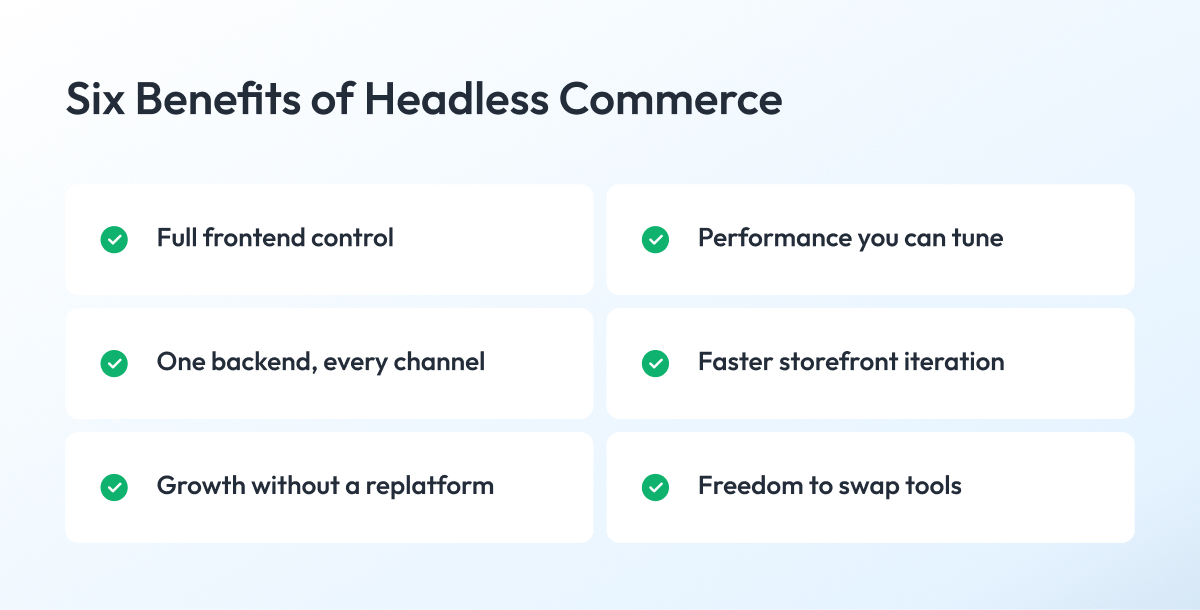
That trade shows up as six concrete payoffs, and the headless commerce examples below explain why brands like Nike, Lego, Target, Allbirds, and Victoria Beckham Beauty all run headless setups today.
1. Full control over the customer experience
The first and biggest advantage is that your design team stops asking permission.
A headless commerce solution hands you a blank frontend, so your team builds navigation, product pages, and checkout flow exactly as researched instead of bending them to fit a theme.
For brands where the shopping experience is the differentiator, this is usually the reason the conversation started.
2. Performance you can tune
You choose the rendering strategy, the caching rules, and what ships to the browser.
That control lets teams cut page weight and speed up the pages that drive revenue, and it shows up in metrics in a way theme tweaks rarely do.
Nike built its storefront as a React single-page application with a Node.js backend-for-frontend for exactly this reason, and our own work on a decoupled UI architecture followed the same path.
3. One backend for every channel
Web, mobile app, in-store kiosk, marketplace listings, and voice commerce all read from the same commerce functions.
Adding a channel means building one more frontend on top of the catalog and pricing rules you already run.
So you launch a new touchpoint in weeks instead of standing up a second commerce stack for it, and you stop chasing the bug where your app shows one price, and your website shows another.
Retailers running both a store network and an app gain the most here because a single promotion update reaches every screen a customer touches.
4. Faster iteration on the storefront
Frontend and backend release on separate schedules.
That means your marketing team ships a campaign page or a new product template without waiting for a platform release window.
Target uses this split to update its website and mobile app without coordinating one release around the other.
5. Room to grow without a replatform
Traffic spikes, new regions, and new business lines get handled by scaling individual services instead of the entire platform.
Teams that expect rapid growth in digital commerce treat this as insurance, since a future-proof headless commerce setup costs less than another migration in three years.
6. Freedom to swap specialist tools
Search, personalization, promotions, and reviews connect through APIs, so replacing one of them is a short project rather than a full rebuild.
That matters most when a single vendor is holding back conversion, and you want it gone this quarter.
Victoria Beckham Beauty runs the milder version of this, keeping Shopify for commerce while managing content in a separate CMS.
Every payoff comes from the same source, which is control over the frontend, and every one of them lands only if your team can use that control.
The next section covers the cost of earning these benefits, including cases where headless is not worth it.
The Trade-Offs and True Costs of Going Headless
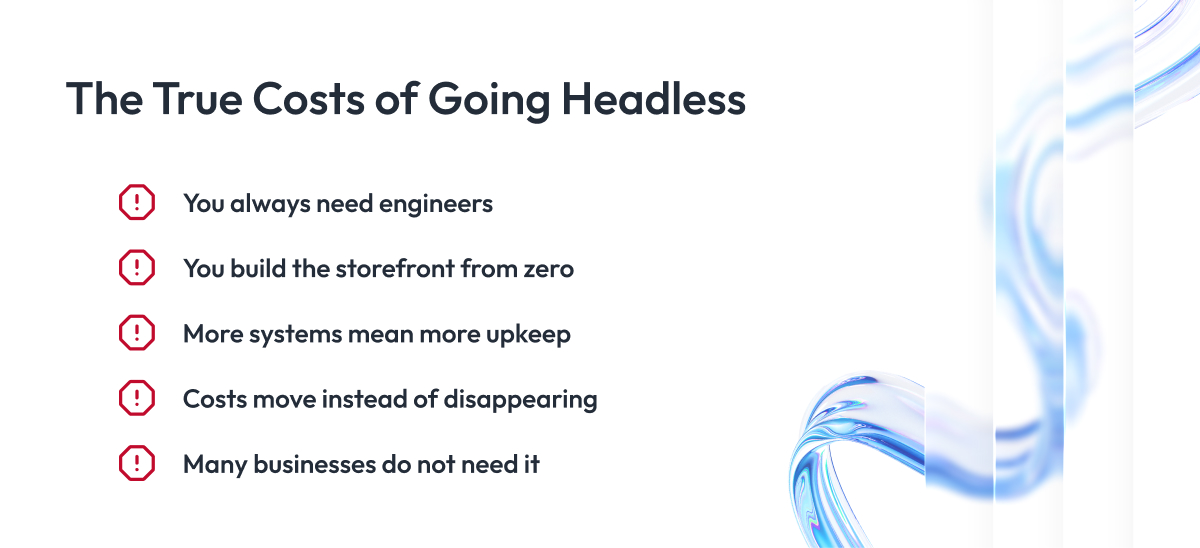
Every one of those headless commerce benefits has a price tag, and most vendor pages leave that page out of the deck.
Here are the five costs that decide whether headless pays back or quietly drains your roadmap. Read them before you commit, because four of them never go away.
1. You always need engineers
A headless storefront is a custom application, so someone has to own its framework upgrades, dependency patches, accessibility fixes, and browser regressions for as long as it runs.
Companies that budget a project and no ongoing team end up with a frontend nobody dares to touch by month eighteen.
2. You build the storefront from zero
A traditional platform gives you a working storefront on day one. Headless gives you an empty repository plus a long build list.
Your team writes the search pages, filters, cart drawer, product recommendations, checkout steps, account area, localization. Each piece carries its own design, testing, and edge cases.
That is why headless launches take months, and a templated build goes live in weeks.
3. More systems mean more upkeep
Every capability you split off becomes a connection you maintain.
Your commerce engine, CMS, search provider, and payment layer each ship API changes on their own schedules, and none of them coordinate with one another.
Enterprise teams handle this with contract testing and versioning discipline, which is engineering work that produces no visible feature for the business.
4. Costs move instead of disappearing
Headless rarely reduces total cost of ownership. It relocates it.
You trade license fees and plugin subscriptions for salaries, cloud spend, observability tooling, and a longer QA cycle across more surfaces.
For a business doing steady volume through one storefront, that swap usually lands on the wrong side of the ledger.
5. Many businesses do not need it
Single storefront, standard checkout, catalog under a few thousand SKUs, no mobile app on the roadmap, small in-house team. That profile gets almost nothing from decoupling.
A well-built site on a traditional ecommerce platform will serve those businesses faster, cheaper, and with less operational risk.
Going headless anyway buys you complexity you have to staff for and flexibility you never use.
Notice that four of these five costs are recurring instead of one-time. That is the honest summary of the headless trade, a higher ceiling in exchange for a permanently higher floor.
The next question follows naturally. If you are paying that much, do you at least get a faster site?
Does Headless Commerce Perform Better?
Sometimes. The architecture raises your performance ceiling without guaranteeing you reach it.
That answer disappoints people, so here is the reasoning behind it.
Where the speed comes from
Headless removes the constraints that slow templated sites down. You control what JavaScript ships, which pages render ahead of time, how long the edge caches them, and how many third-party scripts survive review.
Those levers matter because most slow storefronts are slow for boring reasons. Twelve marketing tags, an unoptimized hero image, a theme loading code for features the site never uses.
A headless approach lets your team fix all of that. It does not fix any of it on its own.
Why a headless site can still be slow
A React storefront that ships a 2 MB bundle, calls six APIs before first paint, and renders everything client-side will lose to a well-tuned traditional platform every time.
We have seen exactly this pattern in audits. The team decoupled the frontend, kept the same tag manager and image pipeline, and then wondered why the numbers barely moved.
Performance follows engineering discipline, and the architecture only decides how much headroom that discipline has to work with.
What this means for SEO
Search visibility depends on the same fundamentals either way, which are crawlable pages, fast loads, correct metadata, and stable URLs.
Headless gives you sharper control over all four, and it also gives you new ways to break them. Client-only rendering, missing server-side markup, and inconsistent canonical tags are common failure modes on custom storefronts.
Server-side rendering solves most of it, and our work on high-performance content delivery shows how much of the gain sits in the delivery layer.
The honest version
Headless is not automatically faster. A bad headless build is still slow, and a good traditional build is often quick enough.
At scale, the picture changes. Once you run high-traffic, large catalogs, and several channels, the control headless commerce gives you makes the difference between tuning a system and waiting on a vendor.
When to Use Headless: A Decision Framework
Most articles end the discussion at “it depends.” Here is the version that gives you an answer.
Six signals decide this, and none of them involve how modern you want to sound. Score your business against each one, then read the pattern.
| Signal | Points to Traditional | Points to Hybrid | Points to Headless |
| Channels | One web storefront | Web plus a light app | Web, app, kiosk, marketplace |
| Catalog | Under a few thousand SKUs | Large catalog, standard rules | Complex variants, region pricing |
| Experience needs | Standard shopping flow | Custom pages, standard checkout | Bespoke flow end to end |
| Engineering capacity | Agency support only | Small in-house frontend team | Dedicated frontend and DevOps teams |
| Traffic pattern | Steady, predictable volume | Seasonal peaks | High volume, global spikes |
| Storefront as differentiator | Price and range compete | Brand matters, flow works | Experience is the product |
Read your six answers together instead of averaging them.
Four or more in the left column means a traditional platform serves you better, and going headless would buy complexity you never use. Four or more on the right means the template system is already holding you back, so headless earns its cost. Anything mixed points to hybrid, which is where most enterprises land.
What hybrid actually looks like
Hybrid means you keep the platform you already run and rebuild only the pages that need design freedom.
Say you sell on Shopify. Your product pages and campaign pages get rebuilt as a headless frontend, so your team controls how they look and how fast they load. Then the shopper clicks Buy and lands on Shopify’s own checkout, which keeps working exactly as before.
You get design control where customers browse. You keep proven payment flows where money moves.
Two signals that override the rest
Engineering capacity beats every other factor. Without a team that owns the frontend permanently, headless turns into technical debt within two years, whatever the other five signals say.
The second override runs the opposite way. When your storefront is the product, meaning the experience itself drives conversion and retention, headless stops being optional and becomes the only architecture that lets you compete.
Score honestly on those two before you weigh the rest.
Are You Ready for Headless Commerce? Readiness Signals
The decision framework tells you whether headless fits your business. Readiness tells you whether it fits your business right now.
Plenty of companies score highly on the framework and still fail at launch because the organization was not set up to run a custom storefront.
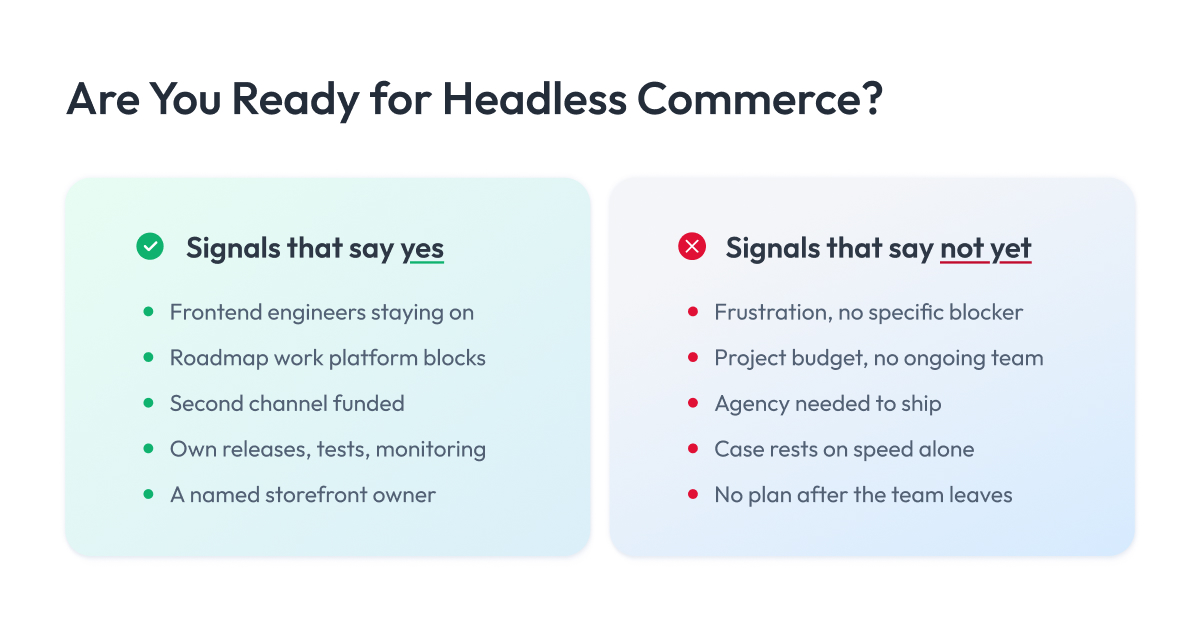
Signals that say yes:
- You have at least two frontend engineers who will stay on the storefront after launch.
- Your roadmap holds work that the current platform blocks, and you can name those items.
- A second channel is funded and scheduled.
- Your team already ships code on its own schedule with automated tests and monitoring in place.
- Someone owns the storefront as a product and has authority over its backlog.
Signals that say not yet:
- Your platform frustrates you, but you cannot point to a specific feature it blocks.
- A headless solution is budgeted as a project with an end date and no ongoing team.
- Your last three releases needed agency help to go live.
- The business case rests on speed alone, without a plan for what you would build with the extra control.
- Nobody has asked what happens to the storefront when the launch team moves on.
How to read your answers
Three or more from the first list means you are ready to plan a migration.
Three or more from the second means fix those gaps first, because headless multiplies whatever engineering habits you already have.
The good news is that most gaps close in a quarter or two. Save this article, hire the second frontend engineer, move your release process off agency dependency, then check this list again.
Headless Commerce Platforms and How to Choose One
Ranked lists are useless here, because the right headless commerce platform depends on the six signals you scored above.
Headless commerce solutions fall into three categories, so instead of picking winners, here are your headless options.
| Category | What You Get | Best Fit | Watch Out For |
| API-first commerce engines | Backend only, no storefront included | Complex catalogs, multi-region, heavy customization | Highest build cost and longest timeline |
| Headless-ready platforms | Packaged backend plus official frontend framework | Teams wanting frontend freedom without full rebuild | Vendor-hosted checkout limits some flows |
| Custom commerce backend | Everything built to your rules | Unusual business models, embedded SaaS commerce | You own every upgrade forever |
A headless platform in the middle category suits most enterprises, though they are often talked into the first one.
Is Shopify headless? What about Adobe and BigCommerce?
Short answer for all of them is yes, with one shared caveat worth understanding. Shopify headless commerce, BigCommerce headless commerce, Adobe Commerce headless, which many teams still call Magento headless commerce, and headless Salesforce Commerce Cloud all work the same way underneath.
| Platform | Headless Support | How It Works | The Caveat |
| Shopify | Yes | Storefront API plus Hydrogen and Oxygen | Checkout stays Shopify-hosted |
| Adobe Commerce | Yes | GraphQL layer, API Mesh, Edge Delivery Services | Legacy Luma themes need migration |
| BigCommerce | Yes | GraphQL Storefront API plus Catalyst on Next.js | Checkout runs as a redirect |
| Salesforce B2C | Yes | SCAPI with Composable Storefront and PWA Kit | PWA Kit locks you to React |
BigCommerce supports headless commerce the same way the others do, and the shared caveat across all four is checkout. On packaged platforms, headless means you own the browsing experience while the vendor keeps the payment step.
Most teams find that trade sensible, since checkout is the highest-risk surface to rebuild and the one where PCI scope, fraud tooling, and payment methods already work.
Six questions for choosing a headless commerce platform
- API completeness. Can you read and write everything you need, or do some operations exist only in the admin interface?
- Checkout control. Do you need custom checkout logic, or will a hosted flow serve?
- Developer experience. How fast can a new engineer ship a page? Documentation quality and framework support matter more than feature counts.
- Hosting model. Managed runtime or your own infrastructure, and what that does to your DevOps load.
- Total cost across three years. License plus engineering plus hosting plus integrations, not just the license.
- Exit cost. If this vendor disappoints in year two, what does leaving cost you?
Score candidates on those six and your shortlist of the best headless commerce platforms writes itself. If you want a second opinion on the shortlist, our team does this evaluation as part of our headless commerce services, without a platform partnership shaping the answer.
How to Migrate to Headless Incrementally
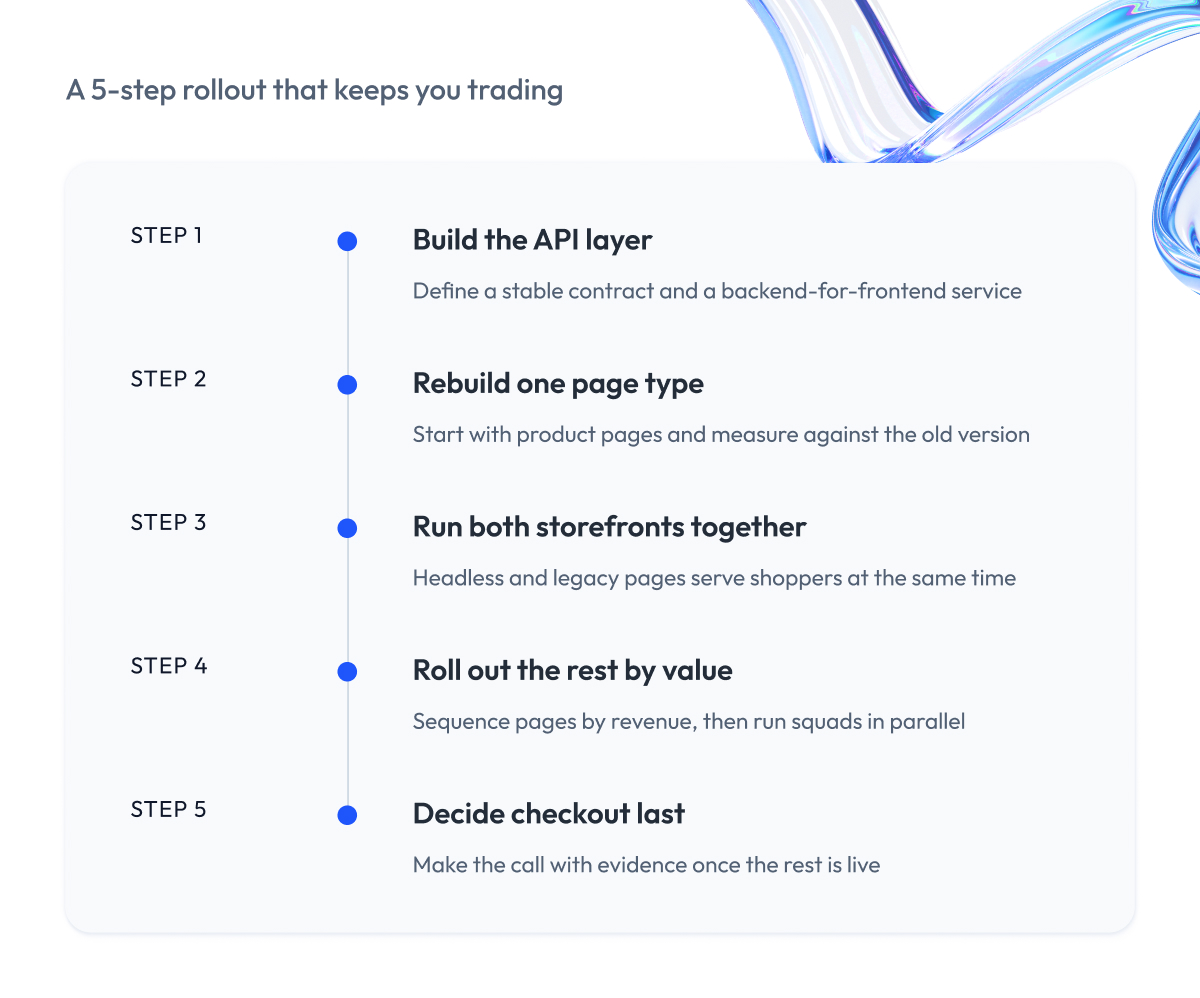
Everything above is theory until someone has to implement headless commerce. This section comes from our own delivery work, as we have moved enterprise storefronts to headless architecture for retail, marketplace, and B2B clients, and the sequence below has repeatedly worked for both sides.
1. Build the API layer
To get started with headless commerce, we audit your existing commerce data, define a stable API contract, and stand up a backend-for-frontend service that shapes responses per channel.
You get a foundation that every future storefront reads from, and a documented contract your own developers can build against without asking us.
2. Rebuild one page type
We start with product detail pages, since they carry high traffic and straightforward logic, then route a share of live traffic to the new version and measure it against the old one.
Implementing headless one page at a time gives you evidence before commitment. Load times, conversion, and error rates from your own traffic, which is what our product detail page optimization work was built to produce.
3. Run both storefronts together
We configure routing, session handling, and cart continuity so headless storefronts and legacy pages serve shoppers at the same time, and nobody notices the seam. Salesforce documents this as phased headless rollout, and every major platform supports some version of it.
You keep trading throughout. When we migrated a B2B marketplace onto Salesforce Commerce, the client processed orders every day of the transition.
4. Roll out the rest by value
We sequence category pages, search, and content pages by what they contribute to the business, then run several squads in parallel once the patterns are established.
You get compounding returns instead of a long quiet stretch, and each release stands on its own if priorities change mid-program. That parallel model is how we handled frontend modernization for Tailored Brands.
5. Decide checkout last
By this stage your headless implementation is live and we know what your team can maintain long term, so the checkout decision gets made with evidence instead of ambition.
You end up with a genuine choice. Many clients who switch to headless commerce keep hosted checkout permanently, and we tell them that is the right answer when rebuilding it would add risk without adding revenue.
Headless Commerce for Enterprise, B2B, and SaaS
Enterprise headless commerce starts where the standard build ends. A standard headless build covers catalog, cart, checkout, and content. Enterprise, B2B, and SaaS projects need all of that plus a layer most teams discover halfway through the budget.
Here is what each case adds.
| Business Type | What You Build Beyond a Standard Headless Stack |
| Multi-brand enterprise | Shared design system, per-brand pipelines, platform team |
| B2B | Contract pricing engine, punchout, approval workflows, gated catalog |
| SaaS and embedded | Entitlement sync, usage metering, no storefront at all |
Enterprise and multi-brand retail
Your shared component library becomes a product with its own roadmap, maintainers, and versioning.
Eight brand teams consuming one library means a breaking change ships eight regressions at once. Budget a platform team that owns the shared layer, publishes versions, and supports the brand teams as internal customers. Skipping this is the most common reason multi-brand headless programs slow down in year two.
Three more things get added to scope. Data residency rules if you trade across regions, translation workflows that sit outside the CMS, and a decision about whether brands share one checkout or run separate ones.
Our multi-region platform for point-of-sale payments needed all three resolved before the first storefront shipped.
B2B commerce
Headless commerce for B2C follows predictable patterns, and B2B headless commerce breaks most of them. Your pricing usually lives in the ERP, which significantly changes the architecture.
The storefront has to ask a second system for prices on every product view, for every logged-in account. That means a caching strategy per customer, and it rules out the static generation approach that makes consumer headless sites fast.
Two more B2B-specific builds. Punchout integration so buyers reach you from their own procurement systems, and approval workflows where a cart becomes a request before it becomes an order.
Then there is a search consequence teams miss. Prices behind login mean crawlers see none of them, so your product pages need public-facing content that ranks without pricing signals. We handled variations of this in the Wish B2B commerce platform and when enhancing a Salesforce B2B marketplace.
SaaS and embedded commerce
Headless commerce for SaaS starts from an unusual position. You build no storefront, which removes half the usual work while introducing a harder problem.
Entitlements have to sync instantly. A customer upgrades inside your app, and the feature unlocks before they can wonder whether it worked, which means event-driven updates between commerce and product.
Usage metering is the second build. Recording consumption accurately enough to bill on it, handling disputes, and surviving the month a customer’s usage spikes tenfold.
Final Word
Choosing an architecture for your storefront takes serious work. You compare platforms, run demos, argue internally about build versus buy, and try to forecast what your business will need three years from now with information you do not fully have.
That work pays for itself.
So be honest about the two things that decide this:
- Is your storefront genuinely differentiating you?
- Can you staff a frontend team permanently?
Everything else in this guide refines the answer those two give you. If both point to headless commerce, start with one page type and prove the numbers before you commit to the full migration.
Choosing a headless commerce development company follows the same logic. If you want a second opinion before that decision, we are happy to review your platform, channel roadmap, and team setup, and then tell you plainly whether headless fits.
Sometimes the answer we give is that it does not, and that conversation saves more money than any migration we could sell you.
Questions You May Have
What is headless commerce?
Headless commerce is an ecommerce architecture that separates the storefront from the backend commerce engine and connects the two through APIs, so each side changes on its own schedule.
What does headless commerce mean in practice?
The headless commerce meaning comes down to owning your frontend outright while a commerce platform keeps running catalog, pricing, cart, and orders behind an API.
How does headless commerce work?
Your storefront sends an API request, the commerce engine returns structured data such as price and stock, and the frontend decides how to display it.
What layers make up a headless commerce architecture?
A production setup has six: the presentation layer, API layer, commerce engine, content layer, delivery layer, and integration layer.
What is the difference between headless and traditional commerce?
Traditional platforms hand you the storefront, while headless commerce leaves you to build it and connect through APIs, which changes your cost, team size, and launch timeline.
What is the difference between headless and composable commerce?
Composable commerce is a whole-stack strategy of assembling separate specialist services, and headless commerce is one architectural decision inside it.
What are the pros and cons of headless commerce?
The advantages are frontend control, omnichannel reach, and faster iteration, while the costs are a permanent engineering team, a longer build, and more systems to maintain.
What are the benefits of headless commerce for design teams?
A headless commerce user experience gets built exactly as researched instead of adapted to a theme, which matters most when the storefront itself drives conversion.
How much of the front end do you build yourself?
All of it, because a headless commerce front end ships as your own application rather than a vendor theme.
Is headless commerce faster?
Sometimes, since headless raises your performance ceiling without guaranteeing you reach it, and a poorly built headless storefront is still slow.
How does headless commerce reduce time to market?
It shortens releases after launch rather than before it, because your frontend and backend ship on separate schedules once the initial build is done.
When should you use headless commerce?
Use it when you run several channels, need a bespoke shopping experience, and can staff a frontend team permanently, since a headless commerce strategy without ongoing engineering turns into technical debt.
What is a headless commerce platform?
It is a backend that exposes catalog, cart, and checkout through APIs without shipping a storefront, and the top headless commerce platforms differ enough that the best headless commerce platform for you depends on your channels, catalog, and engineering capacity.
Is there open source headless commerce software?
Yes, headless commerce open source projects such as Medusa, Saleor, and Vendure give you full control while moving hosting, security, and upgrade work onto your team.
Is Shopify headless?
Yes, Shopify and Shopify Plus headless commerce builds run on the Storefront API and the Hydrogen framework, though checkout stays hosted by Shopify.
Does Salesforce support headless commerce?
Yes, Salesforce headless commerce runs through SCAPI with the Composable Storefront and PWA Kit, and it supports a phased rollout alongside existing pages.
Can you use headless commerce for B2B?
Yes, and headless commerce B2B builds usually need contract pricing, punchout, and approval workflows that consumer themes cannot support.
What is an example of headless commerce?
Nike, Lego, Target, and Allbirds are widely cited examples of headless commerce, each pairing a custom frontend with a commerce backend it did not build.