






Quick Summary
- A real time data pipeline moves customer events from the systems that create them to marketing tools within seconds or minutes instead of overnight.
- Zalando’s customer data pipeline processes about 2.5B records per day, and its processing costs fell by more than 50% after the project.
- Every step adds delay. Spark’s default mode can reach delays as low as 100 milliseconds, and Braze sets 15 minutes as the default shortest interval for scheduled warehouse syncs.
- At Zalando, one consent dataset covering 4B client IDs replaced hours of manual opt-in calculations and now supports compliance reporting.
- If segments refresh daily and no message loses value within minutes, triggered or scheduled runs can cost less than a streaming cluster that runs continuously.
A real-time data pipeline is a system that moves customer data from the websites, apps, and stores where it is created to marketing tools within seconds or minutes. Each time a customer places an order or changes their marketing consent, the pipeline picks up that change and passes it on. With a nightly update, the same tools would see the change only the next day.
This speed is important for customer data because many signals lose their value within minutes. A reminder about an abandoned cart works best while the customer is still browsing. A customer who withdraws consent should stop getting messages before the next campaign.
Fast data helps marketing only when it is also correct. So a working pipeline keeps one shared record of each customer and their consent choices, checks the data before a campaign uses it, and delivers it as fast as each use case needs. Each of these parts is separate engineering work, and vendor descriptions rarely show how much of it your project needs.
That is why we wrote this guide. Such a pipeline is easiest to understand through a working example, so we use the real-time customer data pipeline at Zalando, where our team built the streaming pipelines on Apache Spark. It processes about 2.5B records per day and passes customer data to marketing tools in near real time.
We go through the five phases of that build step by step and show how much delay each layer adds. We also explain when scheduled batch runs are enough and where a customer data platform (CDP) fits.
By the end, you will know what your own pipeline needs and which speed you can promise your marketing team for each use case.
Real-Time Data Pipeline Architecture: How Zalando’s Customer Data Pipeline Was Built
A real-time data pipeline architecture for customer data can be described in five layers. It helps to see all of them before you choose any tools.
Each layer does one job and hands its result to the next:
- Event ingestion collects orders, clicks, and consent changes from websites, apps, and stores.
- Stream processing prepares events as they arrive, for example by removing duplicates and joining related records.
- Curated data products store prepared datasets, such as each customer’s current consent status.
- Monitoring checks that the data is fresh and complete before anyone uses it.
- Activation passes the prepared data to marketing tools for segments and campaigns.
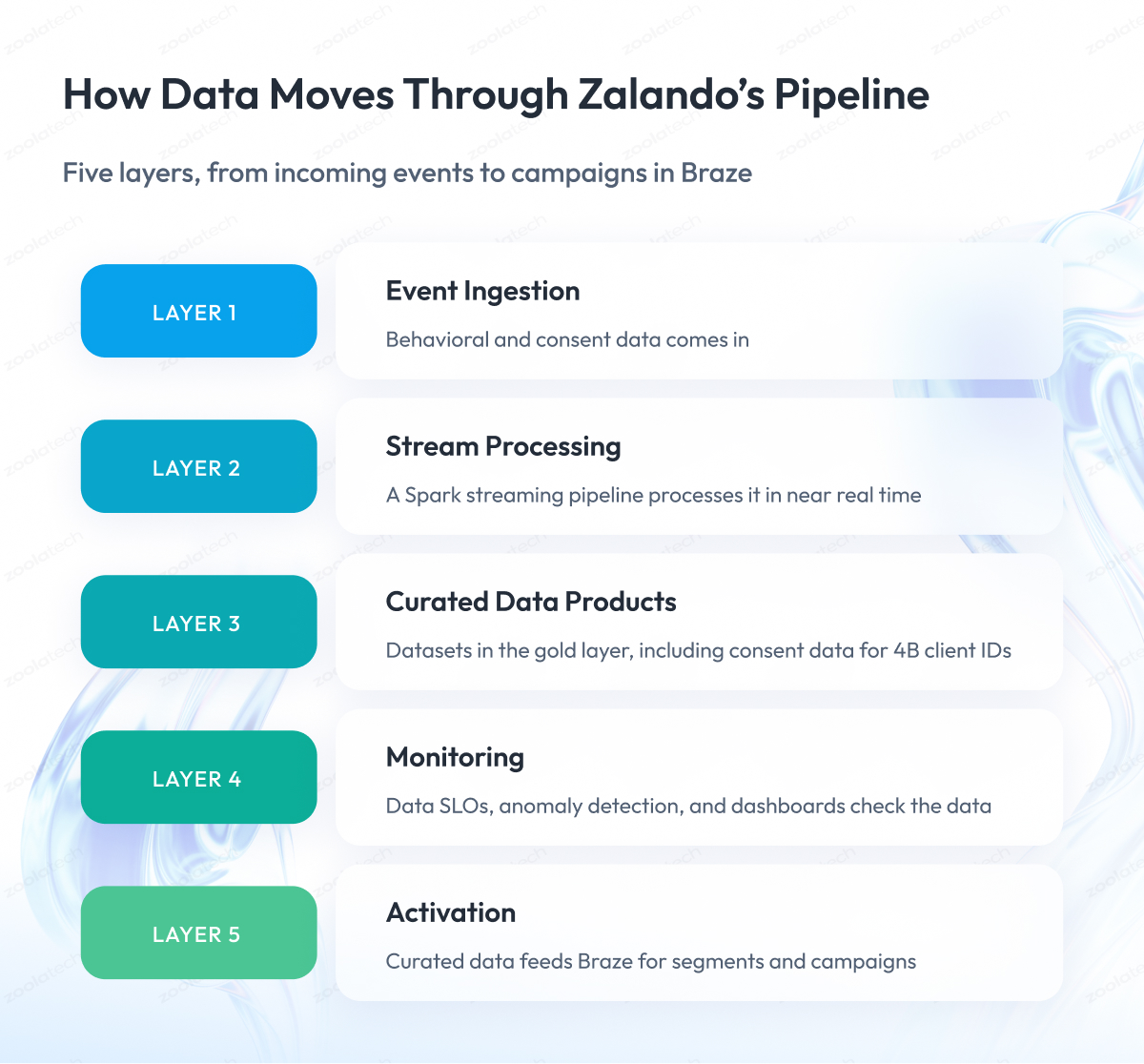
This split into five layers is our own working model, and other teams may group the same work differently. What matters for planning is the order, because each layer depends on the previous one.
Zalando’s pipeline is a useful real-time data pipeline example because each phase of its build is documented. The project started with discovery and architecture. It then covered pipeline development, data product creation, monitoring and optimization, and activation.
If you are working out how to build a real-time data pipeline for customer data, the table below gives you a plan to start from.
The first two columns show each phase and what the team did, based on Zalando’s real-time customer data pipeline case study. The last two columns are our recommendations for your build, with a simple test to confirm each phase is complete.
| Phase | What Was Done at Zalando | What to Decide in Your Build | Done When (Our Recommendation) |
| 1. Discovery and architecture | Architecture, data flows, integration points for marketing and analytics | Use cases needing fresh data, freshness targets, sources, destinations | Each use case has a freshness target, source list, owner |
| 2. Pipeline development | Spark streaming pipeline for consent and behavioral data in near real time | Processing mode, delivery guarantees, duplicates, late events | Replays give identical output, late events logged and counted |
| 3. Data product creation | Structured data products, including consent dataset covering 4B client IDs | Which curated datasets to keep and who owns each | Every tool reads consent from one shared dataset |
| 4. Monitoring and optimization | Data service level objectives (SLOs), anomaly detection, dashboards | Measures, targets, and alert owners for each data product | Each data product has an SLO and alert owner |
| 5. Activation | Outputs connected to Braze for segmentation and campaign execution | Integration path and sync interval of your activation tool | Measured delay from event to usable segment |
If you are planning a similar build, our data engineering services cover streaming ingestion and pipeline design from the first phase onward.
Below, we look more closely at ingestion, stream processing, and the curated layers that feed activation.
Event ingestion: how customer data gets into the pipeline
Event ingestion is the first step of the pipeline, where customer events travel from websites and apps to your backend systems. Every click, order, or consent change has to make this trip before the pipeline can process it.
This first step is also where delays often begin. If an event reaches your backend late, the stream processor cannot win that time back later. At Zalando, the customer data pipeline ingests behavioral and consent data.
A separate Zalando project shows how much delay can build up at this step.
Case study: faster event tracking at Zalando
- Challenge. In a separate analytics tracking project, events took up to 15 minutes on iOS and up to 90 minutes on Android to reach Zalando’s internal systems.
- What we did. The new tracker sends events directly to Zalando’s backend instead of routing them through Google’s Firebase platform.
- Result. Analytics latency fell from 15–90 minutes to near zero.
This result comes from the tracking project, and the customer data pipeline has its own figures, which we cover later. You can see the full story in our case study on near-real-time analytics tracking for Zalando. If your systems still pass data to each other through direct connections between each pair of systems, our article explains what replaces point-to-point integrations.
Stream processing: making sure each event is counted once
Stream processing is the step where the pipeline prepares events as they arrive, for example by removing duplicates and joining related records. It must count every event correctly, because a retry or restart after a failure can process the same event twice. A duplicate purchase or a lost opt-out can then reach your campaigns.
A streaming data pipeline built on Spark Structured Streaming processes data in micro-batches by default, which means small groups of events are handled one after another.
According to the Apache Spark documentation, this mode guarantees that each event affects the result exactly once, even after a failure. To keep that guarantee from start to finish, Spark needs sources that can resend the same events after a failure and sinks that write the same record twice and still produce the same result.
Spark also offers a faster option called continuous processing. It is still experimental, and after a failure, it can process the same event more than once, so your counts may be off. The latency table below shows how fast each mode is.
Curated layers and activation: how prepared data reaches marketing tools
After processing, the pipeline stores the data in steps, from raw to fully prepared. These steps are called curated layers.
In the medallion architecture described in Databricks documentation, the data passes through three layers:
- Bronze keeps the events exactly as they arrived.
- Silver keeps the same data after it passes basic checks.
- Gold keeps data combined with other data and ready to use, such as each customer’s current consent status.
Activation is the step where a marketing tool takes data from the gold layer, uses it to build customer segments, and sends campaigns. Raw events still contain duplicates and errors, so two tools that work from them can end up with different answers about the same customer. That is why we recommend connecting activation to the gold layer.
At Zalando, data from the gold layer goes directly into Braze in near real time. Braze then uses it to build segments and launch campaigns. We call this handoff customer data activation.
The most important gold layer datasets for marketing are identity and consent, and the next section explains why.
Identity and Consent: Why They Belong Inside the Pipeline
Identity and consent are two kinds of customer data that every marketing tool depends on.
Identity data tells you which records belong to the same person. One shopper may have an online account, a mobile app login, and a loyalty card, and identity data links them all to one customer.
Consent data tells you what each customer allowed you to do with their information. For example, it shows if a person agreed to receive marketing emails or asked you to stop sharing their data.
These two datasets belong inside the pipeline because every tool needs the same answer about who the customer is and what they agreed to. Without one shared dataset, the same shopper can appear as two people in your online store and your loyalty program, or an opt-out saved in one tool may never reach another.
When the pipeline keeps both datasets in one place, every tool reads the same result instead of keeping its own copy. The CDP Institute calls linking records to one person identity resolution and recording and updating consent consent management.
Case study: one consent dataset for Zalando’s marketing tools
- Challenge. Calculating consent opt-in rates took hours of manual work, which delayed marketing decisions.
- What we did. We centralized identity and consent information in the pipeline.
- Result. One consent dataset covering 4B client IDs replaced the manual calculations and now supports compliance reporting.
Fast consent updates also matter for legal reasons, and the rules differ by region:
- European Union. Under Article 7 of the General Data Protection Regulation (GDPR), a company that relies on consent must be able to prove the person agreed, and withdrawing consent must be as easy as giving it. This law applies to Zalando’s processing.
- California. The California Consumer Privacy Act (CCPA) lets residents ask a business to stop selling or sharing their personal information, including through a global privacy control setting. After such a request, the business cannot sell or share that information unless the person allows it again.
- California deadline. The CCPA regulations require the business to stop as soon as feasibly possible, and no later than 15 business days after it receives the request.
A consent dataset fed by the same pipeline helps you show consent and measure how fast an opt-out reaches each tool that sends or shares data. Use this as context for planning, and let your legal team decide which rules apply to your business.
Data SLOs: Keeping a Real-Time Pipeline Trustworthy
A data SLO is a target that says how good a dataset must be, for example, how fresh or how complete it should be at any moment. When the data misses the target, the team gets an alert and can fix the problem before anyone uses the data.
Data SLOs keep a real-time pipeline trustworthy by catching a broken feed or a partly loaded table before a campaign uses it. The risk grows with scale. At Zalando, the pipeline handles billions of records a day, so even small inconsistencies could seriously affect downstream systems and campaigns.
The idea comes from site reliability engineering (SRE). In Google’s SRE book, a service level indicator (SLI) is a carefully defined measure of some part of a service, and an SLO is the target value or range for that measure. We apply these terms to data.
At Zalando, we established data SLOs, anomaly detection, and monitoring dashboards. The case does not publish the target values, so the measures below are our recommendation for where to start.
For each data product, we recommend tracking three measures:
- Freshness shows how much time has passed since the dataset was last updated, for example, the consent dataset.
- Completeness shows what share of the expected events arrived in each hour.
- Validity shows how many records failed basic checks, such as a missing field or a wrong data type.
Each measure needs a target and an alert owner, the person who reacts when the target is missed. For a wider view of how teams watch their data, see our guide to data observability.
With these checks in place, you can see what the pipeline delivered at Zalando and how far you can trust each result.
Case Study: Zalando’s Results and What the Numbers Mean
Throughout this guide, we used parts of Zalando’s pipeline as examples. This section brings the whole case together, from the original problem to the results and what each number means.
Challenge
Before the project, Zalando’s teams relied on manual calculations and fragmented datasets. This limited how quickly they could launch marketing campaigns.
What we did
- We built streaming pipelines on Apache Spark for marketing, analytics, and compliance use cases.
- We established data SLOs, anomaly detection, and monitoring.
- We connected curated customer data directly with Braze.
- We centralized identity and consent information.
Result
After the project, the pipeline processes about 2.5B records per day. Processing costs fell by more than 50%, and marketing tools get customer data in near real time.
The table lists each result as the case record states it. The middle column shows what the number tells you, and the last column shows what it leaves out, so you know which questions to ask before you compare it with your own plans.
| Result | What It Tells You | What It Does Not Tell You |
| About 2.5B records processed per day | Daily volume the pipeline handles | Events per second, delay, or split between data types |
| More than 50% reduction in processing costs | Processing costs fell by more than half | Baseline, time period, or cost of the whole platform |
| 4B client IDs centralized over three years | Scale of identity and consent data in one place | If three years means data history or work length |
| Near-real-time customer activation | Activation happens in near real time | Measured delay from event to usable segment |
| €4.5M projected potential GMV uplift from targeted use cases | Gross merchandise value the targeted use cases could bring | Realized GMV or revenue, since GMV differs from revenue |
These results show scale and cost, and the case gives no number for delay. The next section shows how delay builds up layer by layer.
Real Time vs Batch Data Pipelines: Where Near Real Time Fits
The main difference between real time and batch data pipelines is how long data waits before processing. A batch pipeline processes data on a schedule, for example once an hour or once a night. A real time pipeline processes each event or small group of events as it arrives.
A near real time data pipeline falls in between and delivers results within seconds to minutes. Vendors use these words differently, so always ask for a number when someone calls their tool fast.
In this article, we use three working definitions:
- Real time means under a second to a few seconds.
- Near real time means seconds to minutes.
- Batch means scheduled runs, hourly or daily.
The term “real time data pipeline” in this article covers both faster levels.
For customer data, the delay that matters is the full path from the event to a segment marketing can use. Every step adds its own delay, and a scheduled sync into the activation tool can add more than the stream processor does.
The table shows the speed each vendor documents for its own tool. Read it from processing to activation and add up the steps your pipeline will use to estimate the full delay.
| Layer | Option | Speed per Documentation | Keep in Mind | Source |
| Stream processing | Spark Structured Streaming, default mode | Full delay as low as 100 milliseconds | Counts each event once if sources and sinks support it | Apache Spark documentation (4.2.0) |
| Stream processing | Spark continuous processing (experimental) | About 1 ms from start to finish | May process the same event more than once | Apache Spark documentation |
| Pipeline runs | Databricks pipelines, continuous mode | Updates every 10 seconds to a few minutes | Cluster always on, costs more, lowers processing delay | Databricks documentation |
| Pipeline runs | Databricks pipelines, triggered mode | Updates every 10 minutes, hourly, or daily | Lower cost, new data waits for the next trigger | Databricks documentation |
| Activation | Braze Cloud Data Ingestion, scheduled syncs | As often as every 5 minutes, 15 minutes by default | Default limit keeps warehouse compute costs and request volume down | Braze documentation |
| Activation | Braze Cloud Data Ingestion, syncs on request | Sync starts when your warehouse job finishes | Needs a call to the Trigger a sync endpoint | Braze documentation |
These values are lower limits or settings from each vendor’s documentation, checked on November 10, 2026. They describe each tool individually, so the full pipeline delay is the sum of its steps.
The activation rows matter most. If the stream processor finishes in under a second and Braze syncs every 15 minutes, campaigns can still wait up to 15 minutes for the data. Syncs every 5 minutes are possible, but Braze asks you to contact Braze Support or your customer success manager to set them up.
We don’t know which Braze integration Zalando used, so the table describes only the vendors’ tools. Knowing the delay at each step helps you answer the next question, which is when streaming is worth its cost.
When Is a Real Time Data Pipeline Worth It for Customer Data?
A real-time data pipeline is worth it for customer data when a customer signal loses its value within minutes, and the tool that acts on it can respond within minutes. If one of these conditions is missing, scheduled or triggered runs can do the same job for less.
The cost difference comes from compute. Streaming needs a cluster that stays on all the time, and triggered runs start only when there is work to do and then stop.
Streaming is usually worth it for these cases (our recommendation):
- Messages based on what the customer just did in the session, such as a reminder about an abandoned cart.
- Consent changes that must reach every sending tool before the next message goes out.
- Monitoring a live campaign or promotion while it is running.
Batch or triggered runs are usually enough for these cases:
- Segments that refresh daily or weekly.
- Reporting and attribution.
- Training data for models.
Before you invest in faster processing, check how your activation tool loads data. If it loads on a schedule, a faster stream processor will not change when your campaign sees the data.
If the data will feed AI models or assistants, the requirements change, and our articles on AI data pipelines and our guide to AI-ready data cover that case. For another retail example of fast data, see how real time inventory sync works across store networks.
CDP vs Data Warehouse: Where Should the Pipeline Deliver?
The CDP vs data warehouse choice decides where your marketing tools take customer data from. A data warehouse is the central database where a company keeps its data for analysis and reporting. A customer data platform (CDP) is software built around customer profiles, and the CDP Institute defines it as software that creates and maintains a persistent, unified customer record that other systems can access.
The pipeline and the CDP solve different problems. The pipeline moves and prepares customer data, and the CDP keeps a ready customer profile that other tools can use.
The CDP Institute describes three types of customer data platform architecture:
- Packaged CDPs keep their own copy of customer data.
- Composable CDPs work on data stored in your company’s warehouse.
- Hybrid CDPs combine both approaches.
Features such as identity resolution may work inside the CDP or come from other systems, for example, the data warehouse. That is why you should ask each vendor which features are built in.
Our recommendation depends on where your identity and consent data already lives:
- If these datasets are already in your warehouse, a composable approach lets marketing read them there, and you avoid keeping a second copy in sync.
- If marketing needs a packaged tool with its own profile store, plan for one more sync and measure its delay like any other step.
At Zalando, curated data from the gold layer goes directly into Braze. For the CRM side of customer data, see our article on retail CRM.
Final Word
Building a real time data pipeline for customer data takes more steps than most teams expect. For each use case, you need to decide how quickly the data must reach your marketing tools.
The pipeline also has to handle every event without losing it or counting it twice. Identity and consent must live in shared datasets, and someone must check the data and react when something breaks.
This work is worth the effort. When you build the pipeline in the right order, marketing gets fresh data it can trust, and you avoid paying for streaming where a scheduled run would do the job.
Start with your use cases. For each one, write down how fresh the data needs to be and which tool will use it. Then check how often that tool can load new data, because this often decides the delay more than the processing does.
If you are planning such a pipeline, our data engineering team is ready to discuss your use cases and suggest where to begin.
Questions You May Have
What are the main real time data pipeline tools?
A streaming data pipeline usually combines five kinds of tools. These are a message broker such as Apache Kafka, a stream processor such as Spark Structured Streaming, a warehouse for prepared tables, an activation tool, and monitoring. Zalando’s pipeline used Spark for streaming and sent curated data to Braze. Choose tools by the delay you need, your team’s skills, and cost.
Do you need Kafka for a real time data pipeline?
No, you can build a real-time data pipeline with Kafka or with other tools that collect events. If you use Kafka, plan for duplicates. By default, Kafka guarantees that each message is delivered at least once, so the steps after it should remove repeated records before the data reaches your segments.
How do you handle bad records and late events in a streaming pipeline?
Handle them separately. Send records that fail checks to a quarantine table so the stream keeps going, and make sure a repeated write does not create a duplicate. For late events, Spark uses a watermark, which sets how late an event can arrive based on the event time. Count the events that arrive after that limit so none disappear.
How do you measure the latency of a customer data pipeline?
Record the time when the event happens, when processing finishes, and when the activation tool can use the data, then track the gap at each step. Do not treat an accepted request as delivered data. Braze notes that a success code from one of its user update calls only confirms that the request was accepted, and the update may still be in progress.
What is a customer data pipeline?
A customer data pipeline is a system that collects customer events, such as orders, clicks, and consent changes. It turns them into prepared data that marketing and analytics tools can use. It usually covers collecting events, processing them, storing curated datasets, checking data quality, and sending the data to activation tools.
How do you merge duplicate customer accounts from online and physical stores?
You merge them with identity resolution, which links records such as an online account, an app login, and a loyalty card to one person. Doing this inside the pipeline is a form of customer data integration, because every tool then reads the same customer record instead of keeping its own version.
Is a CDP or a data warehouse the better foundation for customer data?
In the CDP vs data warehouse choice, the answer depends on where your identity and consent data already lives. If those datasets are in your warehouse, marketing can read them there, and you avoid keeping a second copy. If marketing needs a packaged CDP with its own profile store, plan for one more sync and measure its delay.