



Quick Summary
- To run AI on your warehouse, add four things: searchable documents, written-down field meanings, old versions of data, and a permission check on every AI request.
- AI adds four new cost lines to your data budget. The always-on document search database alone starts at $50 to $500 a month (Pinecone).
- Build in 5 steps around one AI use case. Write down what each field means first, and start permission checks early because they take the longest.
- Running AI on your data needs five roles, and only two are new: a data steward who owns field meanings and an AI engineer who runs the document pipeline.
- The investment pays off once two or more AI projects share data or customers use the AI. A single internal assistant over stable documents runs on your current stack.
Most companies never build an AI-ready data foundation from scratch. They already run a warehouse, a BI stack, and a data team, and sooner or later someone asks them to put AI on top of it.
The difficult part is what the model finds when you connect it. Your warehouse holds tables of numbers. It has no contracts, policies, or support tickets, it doesn’t explain what “status = 3” means, and it cannot stop an assistant from showing a salary report to the wrong person.
That is why we wrote this article, the next one in our series on AI-ready data.
We start with a side-by-side view of a BI platform and a data platform for AI. Then we go through the new costs, the order to build things in, and who should own the new work.
By the end of this article, you will know how to turn the platform you already run into an AI-ready data foundation with a short checklist to test it.
BI Platform vs. Data Platform for AI: What Stays and What Changes
To put AI on top of your platform, you need to know what AI will ask from it that BI never did. The simplest way to find out is to go through the platform job by job and compare.
Your platform does six jobs. It stores data, prepares it, explains it, delivers it, controls who sees it, and watches for problems. A BI platform and a data platform for AI both do all six, but they do them differently.
| Stores data | Tables with latest values only | Tables plus documents, old versions kept | Yes |
| Prepares data | One pipeline that feeds reports | Second pipeline that prepares documents for search | Yes |
| Explains data | Analysts remember what fields mean | Meanings written down where a model reads them | No |
| Delivers data | Dashboards and SQL queries | Search that finds documents by meaning | Yes |
| Controls access | Roles set per table or report | Permissions checked on every AI request | No |
| Watches for problems | Checks that data is fresh and complete | Checks that answers are still correct | Yes |
Read the third column from top to bottom, and you get the list of what an AI-ready data foundation adds: searchable documents, written-down meanings, old versions of data, and an access check on every request. Everything else you already have.
Gartner gives the same advice: build on your existing data management practices and add the AI-specific pieces one by one.
We describe each piece in detail in the 7-layer reference architecture.
Now let’s look at what it costs to prepare documents for search, run that search around the clock, keep old versions of data, and check the assistant’s answers.
AI Infrastructure Cost: Four New Lines in Your Data Budget
A BI budget has no line for any of these four, so they show up on the cloud bill a few months after the first AI project goes live.
| Cost Line | How Often | Public Price Point | What Drives It |
| Re-embedding | Every change of model or document splitting | $0.02 to $0.13 per 1M tokens | Number and size of documents |
| Vector store | Monthly | $50 to $500 plan minimum, usage on top | Documents stored, questions asked |
| Data history | Monthly, grows over time | About $23 per TB per month | Retention period, rate of change |
| Answer checks | Monthly | Model fee per test question | Number of checks, run frequency |
These are vendor list prices as of September 2026. They cover vendor charges and exclude engineering time and cloud processing, so your full AI infrastructure cost will be higher.
We use one example in all four lines. Most generative AI projects we build start with an AI assistant, a chat tool that answers employees’ questions from company documents such as contracts and policies. Engineers call this setup RAG.
Let’s go through the four lines one by one. For each, you will see why BI never needed it, how it works, and what makes the bill grow.
1. Re-embedding
A BI platform works with tables and never had to process documents. An AI assistant cannot search a contract as plain text, so it splits each document into pieces, and an embedding model turns each piece into a list of numbers. Pieces with similar meaning get similar numbers, which is how the assistant finds the right paragraph.
When someone picks a better embedding model or changes how documents are split, the old numbers no longer match the new ones.
MongoDB’s guide to switching embedding models says you have to create the embeddings again for all your documents.
Each run adds four items to the bill:
- Model fee: OpenAI lists embedding models at $0.02 to $0.13 per million tokens, and a token is about three-quarters of a word. One million two-page documents come to about 1 billion tokens, or $20 to $130.
- Processing: Every document is read and split again, which uses cloud compute.
- Double storage: Old and new embeddings are kept until the switch is done.
- Testing: Engineers check that the AI assistant’s answers did not get worse.
The model fee is the smallest of the four. The AI team makes the decision, and the data platform team does the rest.
2. Vector store
Embeddings are stored in a vector store, a database built to find the closest match to a question. When a person asks the AI assistant something, the question is turned into numbers too, and the vector store returns the closest document pieces.
A warehouse is busy when reports refresh and idle the rest of the time. A vector store runs all day, because people ask questions all day. Three things make its bill grow:
- Plan minimum: Pinecone’s production plans start at $50 and $500 a month.
- Stored documents: More pieces mean more storage and more expensive searches.
- Questions asked: Each search is billed, so the cost grows as more people use the assistant.
Most of the generative AI solutions we build include a vector store, so include this line in the first budget.
3. Data history
BI keeps only the latest value. When a customer moves, the new address replaces the old one.
AI needs the old versions. A prediction model, such as a demand forecast, has to learn from data as it looked at the time, which engineers call point-in-time correctness.
When an AI assistant gives a wrong answer, you need the documents it read that day. So the platform keeps snapshots and versions, and you pay for them in three ways:
- Unit price: Storage costs about $0.023 per GB per month on Amazon S3, or $23 per terabyte.
- Copies: Every snapshot and version is another copy of the same data.
- Retention: The longer your training snapshot retention and version history, the more you store each month.
A lakehouse architecture helps here, because it keeps old versions in that low-cost storage.
4. Answer checks
In BI, a person looks at the dashboard every day and notices when a number is off. Nobody reads every answer an AI assistant gives, so the team writes test questions with known correct answers and runs them on a schedule. Each run checks retrieval quality, which is whether the assistant found the right document.
Scores drop as documents change and models get updated, and engineers call this decline drift.
Microsoft’s RAG guidance treats monitoring in production as a standing requirement. This line has no list price, and two things set its size:
- Test questions: Each one is sent to a paid AI model.
- Run frequency: Every scheduled run sends all of them again.
You also pay for two pipelines. One feeds your reports, and a second prepares documents for AI. We cover what drives pipeline cost in a separate article.
An important detail: you can offset new AI infrastructure costs by trimming old budget lines. When we rebuilt Zalando’s real-time customer data pipeline, which handles about 2.5 billion records a day, costs fell by more than 50%.
How to Build an AI-Ready Data Foundation in 5 Steps
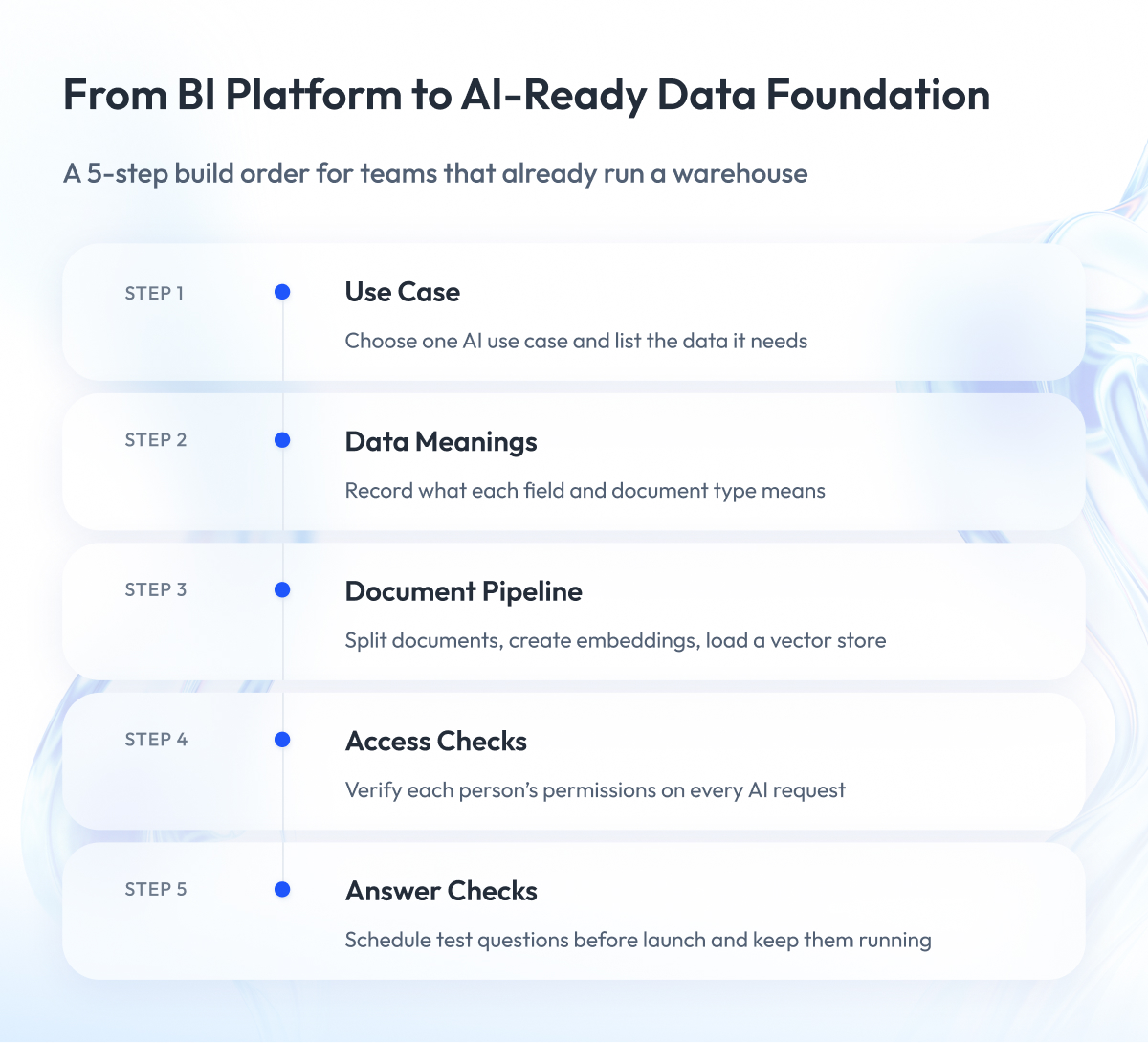
Now you know what to add and what it costs. Here is the order to build it. It differs from a BI project, where teams build storage and pipelines first and leave meanings and access rules for later.
Step 1 – Pick one AI use case
Choose one use case, such as an AI assistant for support policies, and list the tables and documents it needs.
A BI platform is usually funded as one program that runs for years. AI use cases arrive in weeks, so fund one at a time and build only what it needs.
Then score your data readiness for that use case to see the gaps.
Step 2 – Write down what the data means
Take every field and document type from your list and write down its meaning: what “status = 3” stands for, which currency “amount” is in, which version of a policy is current.
Keep the meanings in a semantic layer, one place that every dashboard, model, and AI assistant reads from. In BI, this work came last, because an analyst could always ask a colleague, and a model has nobody to ask. In our machine learning projects, fixing field definitions is usually the first task.
Step 3 – Bring the documents in
Collect the documents from your list, split them into pieces, create the embeddings, and load them into a vector store.
Documents were out of scope for BI, so this pipeline is new. Build it alongside the existing one, and leave the reporting pipeline as is. We did the same for Pandora: we added a real-time data foundation for omnichannel operations, analytics, and AI, and data that took 36 hours to arrive now arrives in milliseconds.
Step 4 – Check access on every request
Make the AI assistant check what each person may see before it reads anything, down to single rows and documents.
In BI, a role opens a table or a report once. An AI assistant reads many documents to answer one question, so the check has to run every time. This step takes the longest because it rebuilds how access works, so run it in parallel with step 2.
Step 5 – Set up answer checks and launch
Write test questions with known correct answers and schedule them before the first user logs in. Unlike BI testing, these checks keep running after launch, and they tell you when to fix documents, meanings, or the embedding model.
Launch the use case, then repeat the five steps for the next one. Each round is faster because the meanings, the vector store, and the access checks are already in place.
For a deeper version of each step, see our 7-step guide to making data AI-ready.
Every step creates work that someone has to own. Next, let’s look at who owns the written meanings, re-embedding decisions, answer checks, and AI access rules.
Data Team Structure for AI: Roles That Own the New Work
An AI-ready data foundation creates ongoing work after it is built. A BI-era data team structure, whether one central team or analysts placed in business units, was designed around reports and gives this work no owner.
In the enterprises we work with, five roles cover it:
| Data steward | Written meanings and disputes about definitions | Senior analyst from the business domain |
| AI engineer | Document pipeline, vector store, re-embedding runs | Data engineer from the platform team, retrained |
| ML engineer | Answer checks and drift alerts | ML engineer from the AI team |
| Data owner | Approvals for what AI may read and do | Business lead of the domain, with security |
| Head of Data | Re-embedding decisions and the shared budget | Current Head of Data or CDO |
Only the first two are new roles. The other three already exist, and each takes on one more duty.
Three roles to fill first
- Data steward: Most companies miss this role. The data team treats written meanings as business knowledge, the business treats them as IT work, and the semantic layer stays empty. A senior analyst from the domain fits best, because that person already explains what each field means every week.
- ML engineer: Answer quality falls between data engineering and ML, and in most companies it belongs to neither team. Assign it to one named engineer who can request fixes from both sides.
- Data owner: This role matters most for AI agents, which are AI systems that act on their own, for example by issuing a refund. Someone has to sign off on what an agent may read and do.
We describe the approval rules in detail in our article on governance controls for AI data.
What stays the same
The rest of the team keeps its current shape. For Rue Gilt Groupe, a platform with 50M+ members and 5,000+ brands, our team combined data engineering, machine learning, and MLOps to move models from experiments to production and monitor them afterward.
Our data engineering and analytics teams usually fill the AI engineer and ML engineer roles on client projects.
Not every company needs these roles today. Next, let’s look at the four signs that show it is time to start.
Four Signs You Need an AI-Ready Data Foundation Now
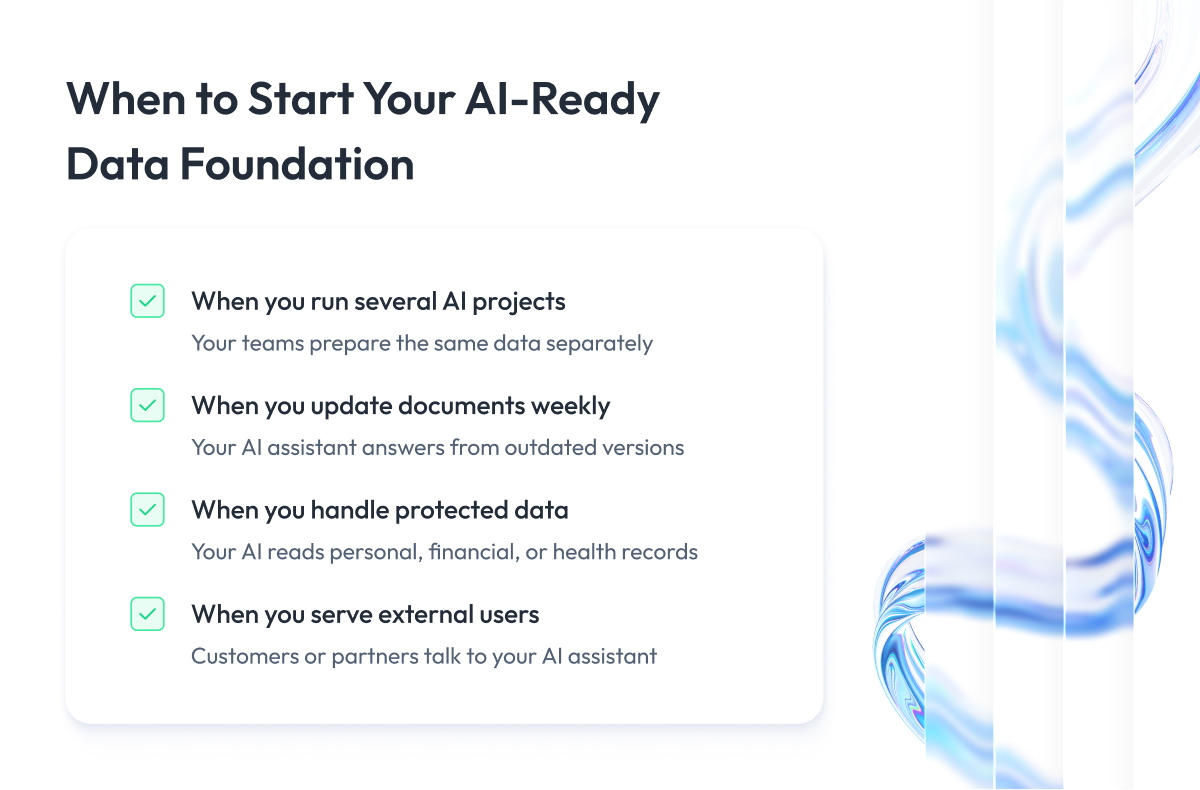
Everything above costs money and people, so start when you need to. Check these four signs against your own company.
1. You have two or more AI projects on the same data
Your support AI assistant and your sales forecast both use your customer data. Without a shared AI-ready data foundation, each project team prepares that data on its own.
You pay for the same work twice and get two different definitions of an “active customer.” One shared set of written meanings fixes this for every next project.
2. Your documents change every week
Your prices, return policy, or contracts are updated weekly. Every update makes part of your embeddings outdated, and your AI assistant keeps answering from the old version until someone refreshes them.
At this pace, you need an embedding pipeline that refreshes them automatically.
3. Your AI reads personal, financial, or health data
Your AI assistant or model works with customer records, payments, or medical files. This data is protected by law, so you must control who sees each record and keep a log of what the AI reads. The EU AI Act, for example, requires high-risk systems to keep automatic logs for their whole lifetime.
Warehouse roles cannot do this for AI, so you need an access check on every request and data history.
4. Your customers or partners use the AI
Your AI assistant answers people outside your company. Every wrong answer reaches a customer directly, and an access mistake shows one customer another person’s data.
You need answer checks and an access check on every request before launch.
One sign is enough to start.
If none of the four applies to you, your warehouse and BI stack are enough for now. One internal AI assistant over a small set of documents that rarely change works without a foundation. You embed the documents once and keep them in a small vector store.
If at least one sign applies, test your platform with the five questions below.
AI-Ready Data Foundation Checklist: 5 Questions to Test Your Platform
You can answer these five questions in one meeting with your Head of Data. Each “no” points to a part of the foundation you still have to build.
- Data history: Can you show which data your AI used for an answer it gave last month? If not, start keeping data versions and answer logs.
Access: Does your AI assistant check a person’s permissions before it reads a document? If not, add an access check on every request. - Costs: Do you know what re-embedding cost you last quarter and who approved it? If not, that cost is hidden in another team’s cloud bill.
- Ownership: Can you name the person who owns the written meanings of your data? If not, appoint a data steward.
- Reuse: Can you add a new data source once and have every AI project use it? If not, each team is building its own pipeline.
Five “yes” answers mean your platform is ready for the next AI project. Every “no” is a gap that project will pay for, in money or in delays.
If most of your answers are “yes” and your AI still gives wrong answers, look at the data itself. We explain why accurate data can still mislead AI in a separate article.
Final Word
Turning a warehouse and BI stack into an AI-ready data foundation takes effort. You have to write down what your data means, rebuild your access checks, add a document pipeline, and assign ownership to work that belongs to nobody today.
But this work pays for itself.
Every AI project you launch after the first one reuses the same written meanings, the same vector store, and the same access checks. Without the foundation, each project prepares its own data, the new costs stay hidden in cloud bills, and nobody owns the mistakes.
Start small. Pick one AI use case, run the AI-ready data foundation checklist against it, and fix the first “no” before you fund anything else.
If you want a second opinion, our AI and machine learning teams are ready to review your platform and your first AI use case, and to help you plan the budget and the roles before you start building.
Questions You May Have
What is an AI-ready data foundation?
An AI-ready data foundation is the shared database, written-down meanings, document search, data history, and access checks that every AI project in your company reads from.
How do you create an AI-ready data foundation on top of a BI platform?
You create an AI-ready data foundation in five steps: pick one AI use case, write down what the data means, bring the documents in, check access on every request, and set up answer checks before launch.
Does adding AI mean replacing our data warehouse?
No, you keep your warehouse and add four things around it: searchable documents, written-down meanings, data history, and an access check on every request.
What new costs appear when AI workloads use our data platform?
Your AI infrastructure cost grows by four lines: re-embedding your documents, running a vector store around the clock, storing data history, and running scheduled answer checks.
What is re-embedding and why does it recur?
Re-embedding means creating embeddings for all your documents again, and it recurs every time you change the embedding model or how documents are split.
Do we need a vector database if we already have a warehouse?
Yes, if your AI has to search documents by meaning, because a warehouse finds exact values and a vector database finds the closest match to a question.
What is the difference between a feature store and a vector store?
A feature store keeps prepared inputs for prediction models, and a vector store keeps embeddings that let an AI assistant search documents by meaning.
How do you measure retrieval quality?
You measure retrieval quality by running test questions with known correct answers on a schedule and checking whether the AI assistant found the right document each time.
Who should own the semantic layer?
A data steward from the business domain should own the semantic layer, while the data team keeps the tool that stores it.
Can our existing data team support AI workloads?
Yes, in most cases, your existing team can support AI workloads once you add a data steward and an AI engineer and give three existing roles one more duty each.