



Quick Summary
- Many AI agent failures in production start around the model, in tool calls that return partial data, missing or outdated context, and bad output passed to the next step.
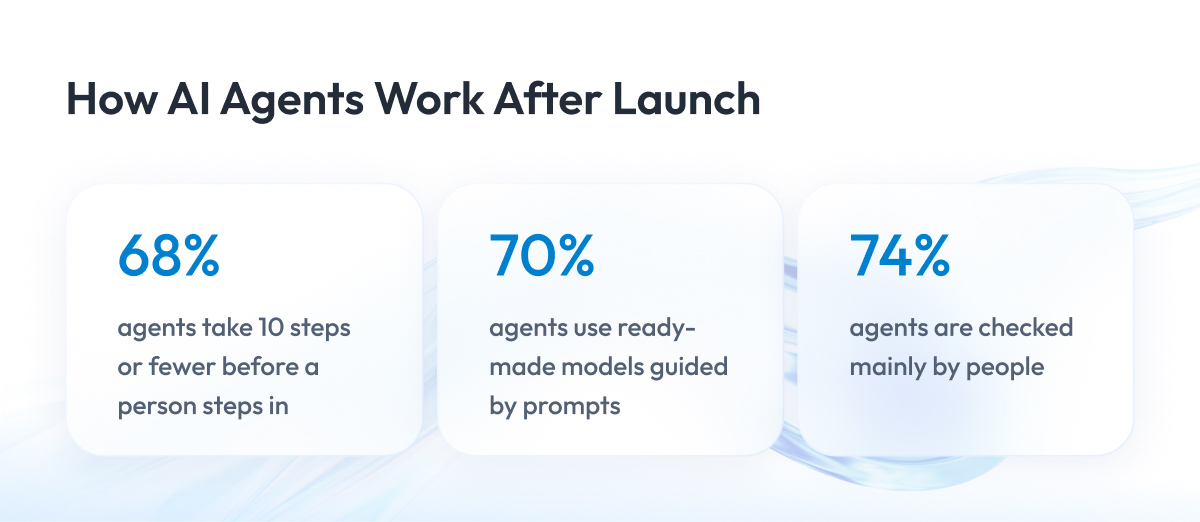
- In the Measuring Agents in Production study (June 2026 version), 68% of production agents ran 10 steps or fewer before a person stepped in.
- Effective monitoring checks whether the service is up, what each run did step by step, and whether the result reached the systems and people that depend on it.
- Recover lost work by restoring missing results for the affected period, then re-running every dependent workflow with idempotency keys so no record is written twice.
- Every AI agent in production needs a named owner who knows what it does, which systems it can access, how to check its health, and how to recover it.
Running AI agents in production means making sure they keep doing their job correctly after launch, when people and other systems depend on their results. Each run must finish its task, and if it fails, your team must notice and recover the lost work.
These results are often where someone else’s work begins. For example, an AI agent may write summaries of sales calls, and account managers use them to decide what to send each client next. If a summary is missing or wrong, the follow-up goes out late or misses the point.
Checking every result is important because AI agents often fail without stopping. The call-summary agent can keep running and show no errors while some summaries come out empty or never reach the account managers.
That is why teams with AI agents in production ask the same questions. How do we know each run did its job? What do we do when one fails? Most guides stop at launch, so these questions often go unanswered.
Our clients come to us with these questions, so we wrote this guide. It explains why agents fail, what to monitor, how to handle an incident and recover lost data, and how to take over an agent someone else built.
By the end, you will know how to spot a failing agent early and get its missing work back.
What Changes When an AI Agent Goes into Production
We often explain this stage to clients with a simple comparison. Launching an AI agent is a lot like hiring a new employee. Before the first day, you check the person’s skills and agree on the rules. After the first day, someone has to review the work and step in when something goes wrong.
An AI agent goes through the same change at launch. Once it works with live customer data and other teams build on its output, your goal shifts from making the agent work to keeping every run correct, visible to your team, and possible to recover.
Production-ready and in production describe the two sides of this change:
- Production-ready AI agents are prepared for launch. During AI agent development, the team tests them, limits what they can do, enables logging, and plans a fallback for a failed step.
- AI agents in production need support after launch. Each one needs an owner, monitoring of its results, and a way to recover lost work.
Most AI agents in production today work in small steps under close human watch. In the Measuring Agents in Production study, updated in June 2026, researchers surveyed 86 practitioners and ran 20 case studies across 26 fields. They found that:
- 68% of production agents take 10 steps or fewer before a person steps in.
- 70% use ready-made, prompt-guided models without retraining.
- 74% are evaluated mainly by people.
The same practitioners named reliability, meaning consistent correct behavior over time, as their top challenge.
Teams usually give an agent more freedom in stages. At first, the agent only suggests actions and a person carries them out. Next, it acts after a person approves each action. Finally, it works on its own and reports what it did.
Researchers at the Knight First Amendment Institute describe a similar path of five levels, where the person’s role moves from operator to observer. Many teams call this gradual path an AI agent maturity model.
Each action an agent takes on its own also adds another point where a run can fail.
Why AI Agents Fail in Production
Many AI agent failures in production start around the model. A tool or application programming interface (API) call fails or returns only part of the data. The agent works with missing or outdated information. A bad output passes to the next step, and no check confirms that the task was finished.
A team of researchers studied these problems in systems where several agents hand off work to one another.
Their MAST study reviewed 150 traces, or step-by-step records of single runs, and then applied its findings to more than 1,600 traces from seven popular frameworks. The researchers found 14 types of failure and sorted them into three groups:
- Problems in how the system is designed.
- Misalignment between agents that pass work to each other.
- Weak checks on whether the task was completed.
Workflow length makes every one of these problems worse.
The table below shows how the chance of a fully successful run drops as a workflow gets longer. Each row is the success rate of a single step, and each column is the number of steps in one run. Find the row closest to your own agent to see how often a run of your length finishes without a single failed step.
| Per-Step Success Rate | 5 Steps | 10 Steps | 20 Steps |
| 95% | 77.4% | 59.9% | 35.8% |
| 99% | 95.1% | 90.4% | 81.8% |
| 99.9% | 99.5% | 99.0% | 98.0% |
Zoolatech calculation. Full-run success equals per-step success raised to the number of steps, assuming steps fail independently.
Even at 99% per step, a 10-step run finishes without a failed step about 90% of the time. In other words, about one run in ten needs to be caught somewhere. The operational risk of AI agents in production grows with every step you add, so AI agent reliability in production depends on catching those failed steps early.
Where do those failed steps come from? You can sort them into the four causes named at the start of this section. Below, we look at each cause, how it shows up, and why it is easy to miss.
1. Tool calls and integrations that return less than expected
The first cause sits outside the agent. To finish a task, an agent calls other services, such as a customer database, a calendar, or a payment system, and those services change over time. Common problems include:
- A partner lowers its rate limit, so some calls get rejected.
- A field gets renamed, and the agent reads an empty value.
- An access permission expires, and the agent can no longer write data.
- A response arrives with a success code and only half the data.
A recent preprint shows how hard the last problem is to notice. Researchers behind SilentProbe (August 2026) tested live services from 27 vendors, all reached through a single aggregation layer. Some services stated a rule only in their written documentation and left it out of the machine-readable description that agents read.
When a call broke such a rule, the service returned no error in 44 of 61 tests. When agents ran the full task, the models noticed the problem in only 12% of cases.
The errors that do appear are mostly about limits. In its State of AI Engineering report, the monitoring vendor Datadog found that 5% of large language model (LLM) calls returned an error in February 2026, and 60% of those errors were rate limits.
Older enterprise systems need extra care here, since their limits and data formats rarely match what an agent expects. This work is a large part of our AI integration services.
2. Missing or stale context
The second cause sits in the agent’s input. An agent decides based only on the information it receives. If that information is cut short, out of date, or missing, the agent acts with full confidence on a wrong picture.
For example, a support agent may read a customer’s plan from a copy saved yesterday. The customer changed plans this morning, so the support agent promises a refund the customer no longer qualifies for.
This failure is hard to spot because every step of that run looks successful in the logs.
3. Errors that cascade down the workflow
The third cause appears when one agent’s work feeds another. In a multi-step workflow, each step’s output becomes the next step’s input, so one mistake can travel far.
For example, an order agent passes order data to an invoicing agent, which passes invoices to a reminder agent. If the order agent drops a field, the invoicing agent writes the wrong amount, and the reminder agent sends it to the customer.
The MAST study lists this kind of misalignment between agents as one of its three failure groups. The team that notices the problem usually works at the end of the chain and cannot see the step that caused it. The case study later in this guide shows how missing data at one step can interrupt the workflows that depend on it.
4. Runs that report success and leave the job undone
The fourth cause is the hardest to catch, because the agent itself says everything went well. A June 2026 preprint calls this false success and treats it as a form of silent failure. The agent reports the task as done, while the system shows otherwise.
In the test environments the author used, false success made up between 3% and 75.8% of failures, depending on the setting. These results come from lab tests, so treat them as an indicator of how widely the problem varies across setups.
A related problem appears after updates. When a team changes the model, prompt, or model provider, result quality can drop with no error at all.
Security failures form a separate group, and Microsoft’s updated failure-mode taxonomy for agentic systems describes them in detail. We cover the wider topic in our guide to enterprise application security.
Each of these four causes leaves signs you can track by monitoring what every run produced.
How to Monitor AI Agents in Production
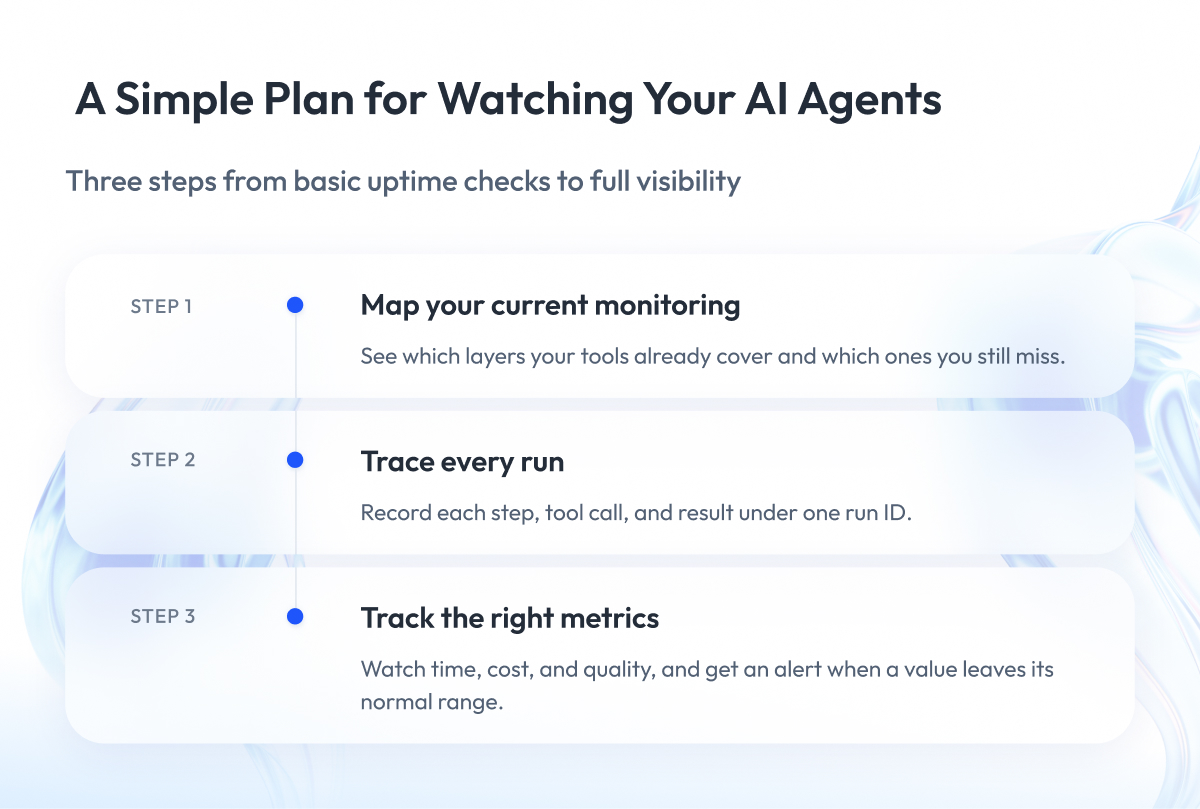
Monitoring AI agents in production covers three levels:
- The service. Is the agent up and responding?
- The run. What did each step read, call, and return, and what did it cost?
- The outcome. Did the record, summary, or update reach the systems and people that depend on it?
You can set up monitoring for these levels in three steps.
Step 1 – Compare traditional monitoring with agent observability
Start by checking what your current monitoring can see. Most teams already have infrastructure and application monitoring, often set up as part of DevOps services. These tools were built for services that either work or fail with an error. Agents add a third case, where the run finishes and the result is wrong or missing.
The table below shows which monitoring layer catches which problem. Read each row from left to right to see what a layer covers and where it goes blind. Then mark the layers your current setup includes.
| Layer | What It Catches | What It Misses |
| Infrastructure and uptime | Crashes, slow responses | Wrong or empty results |
| Application monitoring | Failed calls, error codes | Success responses with empty data |
| Agent traces | Wrong tool, loops, retries, cost spikes | Whether downstream systems received results |
| Outcome checks | Missing records, unprocessed inputs, outdated outputs | Which step caused the gap |
Traditional AI agent monitoring covers the first two layers and tells you that something is wrong. AI agent observability adds traces and outcome checks so that you can find out why. These last two layers are usually the ones missing, and observability for AI agents starts with adding them.
If your agents depend on data pipelines, add the pipelines to this map as well. We describe how to check them in our guides to monitoring an AI data pipeline and data observability.
Step 2 – Log every decision path
Once you know your gaps, add tracing. Tracing means recording every step of a run so your team can see what happened later. To set up tracing for AI agents in production, record these details for every run:
- What started the run and what input it received.
- Which model and which prompt version it used.
- Each tool call, with its arguments and whether it succeeded.
- The final output and any hand-off to a person.
- The tokens used and the run cost.
Give every run a unique run identifier (run ID) and attach it to every record the agent writes in other systems. With that link in place, you can trace any wrong record back to the run that created it. Compliance teams can also see exactly what the agent changed in a database, because you can list every change from one run, which gives them an audit trail of the agent’s actions.
Our own configurable multi-agent AI framework takes a related approach, with conversation tracking, execution monitoring, and workflow visualization that give greater visibility into AI behavior and platform operations.
If you use OpenTelemetry, the open standard that many monitoring tools follow, keep one limit in mind. As of October 2026, its descriptions for agent runs and tool calls are still at the Development stage, so field names may change.
Step 3 – Decide what to measure
Traces show what happened in one run. To see patterns across many runs, turn the trace data into AI agent observability metrics. Track two groups of signals.
Operational and cost signals:
- Time per run and per step.
- Share of tool calls that succeed, and how often the agent retries.
- Steps and tokens per task.
Quality signals:
- Scores on a fixed sample of runs, checked on a schedule.
- Share of outputs that people correct or reject.
For each metric, set a normal range based on a period of stable runs, and send an alert when a value leaves that range.
For actions with high impact, such as refunds or changes to customer records, add a review step where a person approves the action first. Count how often reviewers reject the agent’s proposals, and track that share as a quality metric.
Quality checks are the part teams most often skip. In a survey by LangChain, which sells observability tools, 89% of 1,340 respondents surveyed in November and December 2025 had some form of observability for their agents. Only 52.4% ran offline evaluations on test sets.
Traces and metrics cover the run level. The outcome level needs its own list of signals, because a run can look healthy in every trace and leave work undone.
The Zoolatech Completed-vs-Correct Watchlist: 8 Signs an AI Agent Failed Without an Error
The Zoolatech Completed-vs-Correct Watchlist is a list of eight signals that show the work of AI agents in production is missing or wrong while every service reports healthy.
These signals need their own alerts, because people tend to spot such problems before tools do. In a June 2026 study of one personal-assistant agent over eight weeks, a person reviewing the output found about 70% of the failures that never raised a usable error. Some of them went unnoticed for up to 60 days.
The table shows each signal, why uptime checks miss it, how to catch it, and who should get the alert. Use it as the starting point for AI agent failure detection in your alert plan, and drop the rows that do not fit your agents.
| Signal | What It Looks Like | Why Uptime Misses It | How to Catch It | Alert Goes To |
| Input-to-output gap | Fewer outputs than inputs, such as meetings vs. transcripts | Missing runs never started, so nothing failed | Count comparison per period against the source system | Workflow owner |
| Empty or thin output | Summaries without content, records with empty key fields | Response code still reports success | Format and minimum-content checks on outputs | Agent owner |
| Tool errors hidden by retries | Rising retries, rate-limit responses, fallbacks | Run still ends as a success | Status per tool call, alert on retry rate | Platform owner |
| Fewer results downstream | Next workflow receives less data than usual | Producing agent looks healthy | Volume check at the next workflow’s input | Owner of the next workflow |
| Growing lag | Time from source event to output keeps rising | No failure event occurs | Freshness target per workflow | Agent owner |
| Step or cost jump | More steps or tokens per task than usual | Runs still finish | Per-task step and cost baselines | Platform owner |
| Rising override rate | Reviewers correct or reject more outputs | Human corrections create no error event | Review outcomes tracked as a metric | Business owner |
| Quality drift | Lower scores after a model, prompt, or provider change | No error is raised | Scheduled evaluation on a fixed sample | Agent owner |
Every alert in the table goes to a named person:
- The agent owner is the engineer responsible for the agent.
- The platform owner runs the shared infrastructure the agents use.
- Workflow and business owners depend on the results and decide what to do when they are late or wrong.
An alert that lands in a shared channel with no owner tends to sit unread. Assign each row to someone who can act on it.
When one of these alerts fires, your team needs a set order of actions.
AI Agent Incident Management: 7 Steps from Alert to Fix
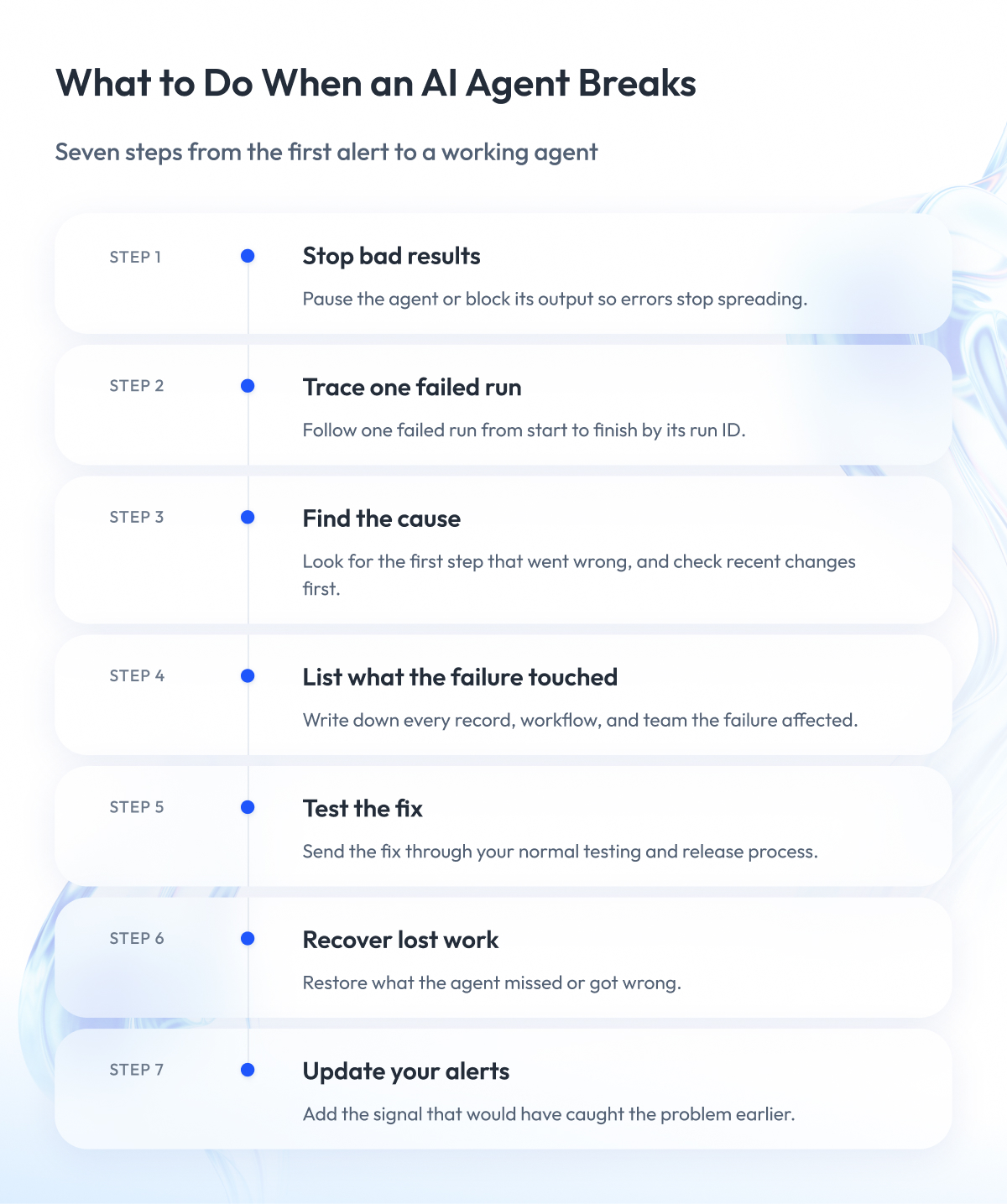
Once someone confirms that an alert from the Watchlist points to missing or wrong work, your team has an incident. AI agent incident management covers everything your team does from that moment until the agent works correctly again and the lost work is back.
Follow the steps in order. While your team investigates, the agent may keep producing bad results, so the first step limits the damage, and the search for the cause comes next.
Step 1 – Stop bad results from spreading
While you look for the cause, the agent may keep writing wrong records or skipping work. First, stop those results from reaching other systems and people. Depending on the agent, you can:
- Pause the agent.
- Move its work to a manual process.
- Block the next workflow from using the agent’s output.
Pausing the flow of bad results gives your team time to investigate calmly. If the incident looks like an attack, such as prompt injection, bring in your security team at this step.
Step 2 – Trace one failed run
Pick one run that produced a wrong or missing result. Follow it from start to finish with its run ID, which you set up in Step 2 of the monitoring section. Read what the run received, what each tool call returned, and what the agent wrote at the end.
Step 3 – Find the root cause
Root cause analysis starts at the first step where the output went wrong. Check recent changes first, because a recent change is the easiest cause to confirm or rule out:
- A new model or prompt version.
- An update to a tool or API.
- A new data format.
- Expired credentials or lower limits.
If the agent received bad input, the fault sits in the data feed. We cover debugging an AI pipeline in production in our guide to failure modes of AI data pipelines.
Step 4 – List everything the failure touched
The affected period runs from the first bad run to the moment the fix goes live. For that period, list:
- The records the agent created, changed, or skipped.
- The workflows and teams that used those records.
This list becomes your recovery plan in Step 6.
Step 5 – Test the fix before release
Send the fix through your normal testing and release process, even under time pressure. A rushed fix can trigger a second incident on top of the first. If your agents have no separate test environment yet, set one up as part of your quality assurance process.
Step 6 – Recover the lost work
Once the fix is live, restore what the agent missed or got wrong during the affected period. Use the list from Step 4 to decide what to re-process and which teams to inform.
Step 7 – Close the gap in your alerts
Write down what happened, when it started, when your team noticed, and how you fixed it. Then add the signal that would have caught the problem earlier to your Completed-vs-Correct Watchlist.
For each incident, record the time to detect and the time to restore. Averages like mean time to resolution can hide the longest incidents. A Google SRE report by Štěpán Davidovič shows that averages like mean time to recovery (MTTR) are poorly suited for decision-making or trend analysis of production incidents.
Recovery in Step 6 takes the most planning, so the next section covers it in detail.
How to Recover Lost Data and Restore Downstream Workflows
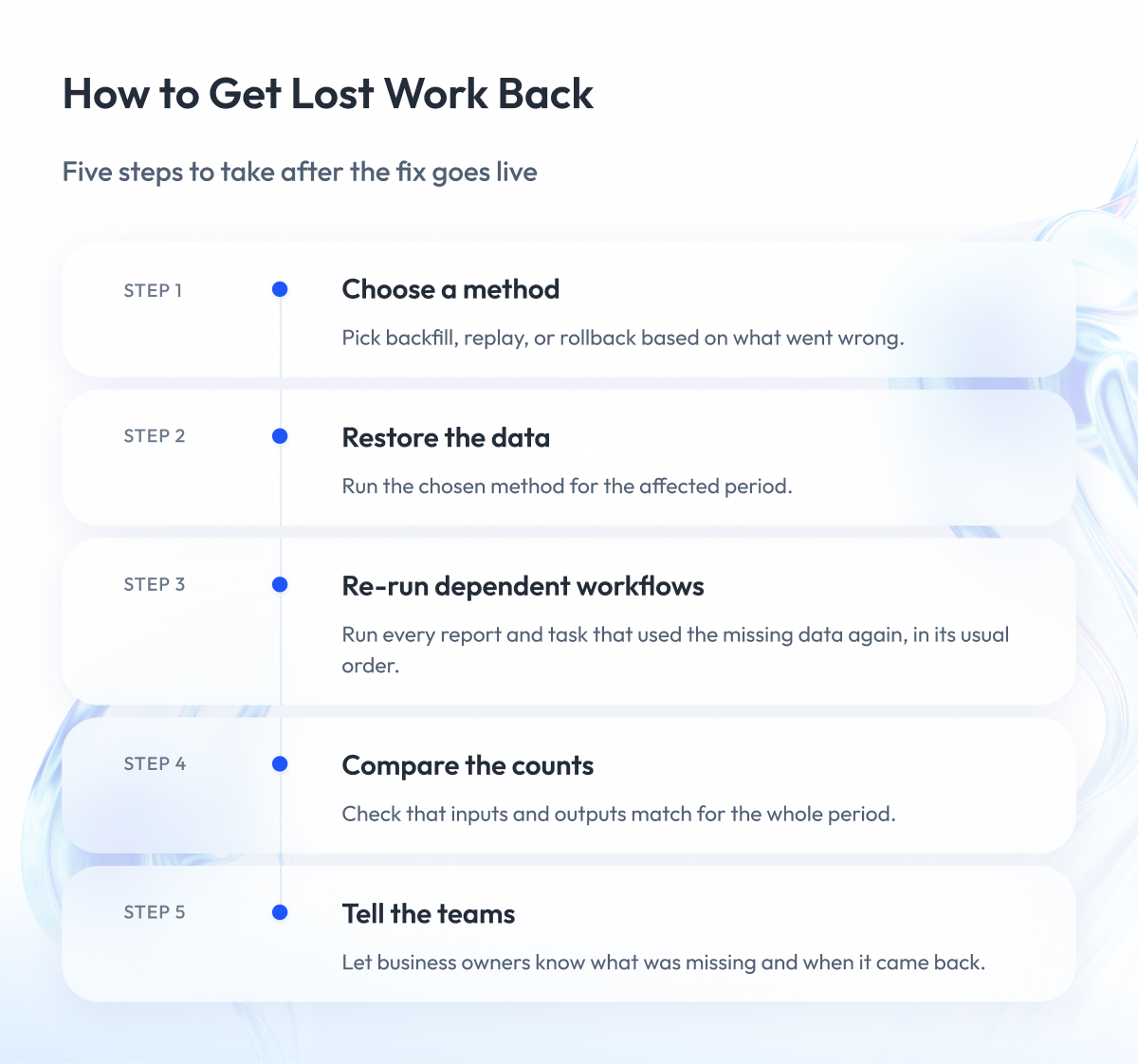
Once the fix is live, your next task is to recover the work the agent missed or got wrong during the incident, so teams that use its results have complete, correct data again.
Recovering from AI automation errors takes five steps, and you can follow them in order using the list of affected records and workflows from Step 4 of the incident process.
Step 1 – Choose the recovery method
Pick your method based on what went wrong. You will see two terms here:
- Backfill means you fetch or process the source data for a past period again.
- Replay means you re-run failed agent runs with the inputs they received the first time.
Use the table to compare backfill, replay, and rollback. Each row shows when you need the method, what you must set up before an incident, and the main risk. Treat the third column as a checklist for today, because you cannot add those things after you lose the data.
| Method | Use When | What You Need Beforehand | Main Risk |
| Backfill | Agent never processed part of the source data | Source still holds data for that period | Duplicates where periods overlap |
| Replay | Runs started and failed partway | Stored inputs and saved progress for each run | Outdated context if things changed since |
| Rollback | Agent wrote wrong data or took a wrong action | Action log with reversible operations | Mistakes people already saw need open correction |
Rollback is the hardest case. If the agent already sent a message or updated a customer record that people saw, you cannot quietly undo it. Agree on the correction with the business owner of that workflow.
Step 2 – Restore the missing data
Run your chosen method for the affected period. Before you start, check how long the source system keeps its data. If the period you need is older than that, you can no longer backfill, and you have to replay from stored inputs.
Step 3 – Re-run the next workflows in order
When you restore the agent’s output, you fix only the first link in the chain. You also need to re-run every workflow that used that output during the affected period, in its normal order. For example, if you restore missing call summaries, re-run the reports and follow-up tasks your team builds from those summaries.
To avoid duplicates, give every record an idempotency key. An idempotency key is a unique ID that lets your system recognize a repeated write and skip it instead of adding a copy. Shopify’s developer guide to idempotency shows how such keys stop network retries and job retries from running the same operation twice.
Step 4 – Compare the counts
After recovery, compare inputs and outputs for the affected period. You run the same check as the first signal in the Watchlist. If the numbers differ, you are missing some records, so go back to Step 2 for them.
Step 5 – Tell the business owners
Tell the people who rely on the data what went missing, for which period, and when you restored it. They can then decide whether to recheck the reports and decisions they made during the gap.
You can run each of these steps only if someone on your team knows the agent well enough.
Taking Ownership of AI Agents Already in Production
An AI agent without an owner becomes a risk as soon as the person who built it moves to another project. Alerts go nowhere, and when the AI agent fails, no one on the team knows how to fix it or recover lost work.
AI agent ownership solves this problem by assigning each AI agent a named engineer who knows what it does, which systems it can access, how to tell it is healthy, and how to recover it. In this section, you will see what that owner needs to know and how to hand an AI agent over without losing that knowledge.
Pair the engineering owner with a business owner, the person whose team uses the AI agent’s results. The engineer keeps the AI agent running, and the business owner decides what counts as a correct result.
What the new owner needs to receive
When an AI agent changes hands, collect these eight items before the previous owner moves on. Use the same list when an AI agent moves to a teammate or to another team.
- Purpose and business owner. What the AI agent is for and who depends on its output.
- Models and prompts. Which versions run today and where your team changes them.
- Tools, credentials, and permissions. Which systems the AI agent can read or change.
- Data sources and downstream workflows. Where its input comes from and which workflows use its output.
- Dashboards and alerts. What your team watches and who receives each alert.
- Runbook. How to pause, replay, backfill, and roll back the AI agent.
- Incident history. Past failures and the patterns behind them.
- Evaluation set. The fixed sample of runs your team uses to check quality, with the latest scores.
Review item 3 with extra care, and give the AI agent access only to what its task requires. Engineers call this rule the principle of least privilege.
In July 2025, The Register reported that Replit’s AI coding tool deleted a user’s production database and ignored instructions to freeze code. The user was Jason Lemkin, founder of SaaStr. We describe access controls for AI agents in more detail in our guide to data governance for agentic systems.
AI agents nobody owns
An AI agent can keep running long after the people who built it leave or change teams. To find them, keep an inventory of all AI agents in production with an owner field, and review it on a schedule.
If an AI agent has no owner and nobody can take it over, retire it.
Maintaining AI agents over time
To maintain AI agents in production, plan for the work the same way you plan for any other service. Each AI agent needs an owner, time on that owner’s schedule, and regular reviews of its alerts, costs, and quality scores.
The owner also takes ownership of agent observability, so the dashboards and alerts from the earlier sections stay accurate as the AI agent changes.
Sometimes nobody in-house has the time or context to take over an AI agent that someone else built.
Our engineers have joined an AI platform that was already running and taken ownership of its key AI agents, and the case study below shows how that project went.
Case Study: Recovering 82,000 Meeting Transcripts at Gusto
Gusto provides cloud-based payroll, human resources, and employee benefits software for US businesses. Our engineers supported the development and maintenance of Gusto’s AI agents, which help sales representatives during customer conversations.
This project is one of the clearest examples of AI agents in production from our work, because it involved both recovering lost data and taking over agents that were already running.
The challenge
Several AI agents, orchestration tools, and Salesforce integrations worked together on the platform, so tracing every problem took extra effort. On top of that complexity, the team faced these issues:
- Missing meeting transcripts interrupted AI workflows that depended on them, leaving sales representatives with less information.
- Limited monitoring delayed issue detection and reduced visibility into the platform.
- Ownership of critical AI agents moved between engineers, so new owners had to get up to speed quickly without interrupting service.
What we did
Our engineers joined the existing AI platform and took ownership of the key AI agents and their underlying code.
The work went through five phases:
- Discovery and knowledge transfer.
- Investigation and analysis.
- Solution implementation.
- Validation and deployment.
- Continuous optimization.
To bring back the missing transcripts, our engineer found the root cause, extended the backfill window, and restored transcript processing.
Along the way, the team also:
- Fixed integration and transcript-processing failures.
- Expanded monitoring, dashboards, and engineering metrics.
- Supported infrastructure and Salesforce improvements.
Every fix went through Gusto’s quality assurance process before moving through the established deployment environments.
Results
- 82,000 meeting transcripts recovered.
- AI workflows that had lost data are working again.
- Better platform observability and faster issue detection for engineering and business teams.
- Stronger engineering ownership of the AI systems, with knowledge transfer that kept platform support going without disrupting operations.
The tech stack included Ruby on Rails, Salesforce, Apex, Lightning Web Components, Amazon Web Services (AWS), Terraform, Gumloop, MuleSoft, Python, and the OpenAI and Anthropic APIs.
You can read the full story of our AI agent enhancement and Salesforce support for Gusto. We offer the same kind of support to other teams through our AI agent development solutions.
Final Word
Keeping AI agents in production healthy takes steady work. Your team has to set up tracing, agree on alerts, write recovery runbooks, and keep an owner on every agent after launch, often while everyone is busy building the next feature.
This work pays off the first time an agent fails. With outcome checks in place, you spot the problem early, and with a tested recovery plan and a named owner, you bring the missing work back before it affects anyone’s decisions. Without them, an AI agent can keep running and reporting success while the records, reports, and decisions that depend on it slowly go wrong.
Start with the agents your teams rely on most. Give each one an owner, add the signals from the Completed-vs-Correct Watchlist, and test your recovery steps before you need them.
If you want support along the way, Zoolatech is ready to discuss your AI agents, help you set up monitoring and recovery, and take over agents that are already running.
Questions You May Have
What is the difference between AI agent monitoring and AI agent observability?
AI agent monitoring tells you that something is wrong, and AI agent observability helps you find out why. Monitoring raises alerts on known signals, such as errors or slow responses. Observability records a trace of each run, including tool calls and the information the agent received. AI agents in production need both, plus checks on the final outcome.
Why do multi-agent systems fail even when each agent works on its own?
Multi-agent systems fail at the hand-offs, where one agent’s output becomes another agent’s input. A missing field or an incorrect value early in the chain propagates forward, and the failure shows up far from its cause. The MAST study lists misalignment between agents as one of the three main failure groups in these systems.
Why do AI automations break after the initial setup?
AI automations break after setup because the systems around them keep changing while nobody checks the results. APIs change their formats and limits, data sources move, teams update models and prompts, and the people who built the automation move on. Without outcome checks and a named owner, these changes lead to AI agent failures that go unnoticed.
How can you track what an AI agent changed in your systems?
You can track changes by giving every run a unique run ID and saving that ID with every record the agent creates or edits. With this link, you can list all changes from one run and trace any wrong record back to its source. Keep the full trace too, so you can see why the agent made each change.
What percentage of AI agent projects fail?
No reliable single failure rate exists for AI agent projects. Gartner predicts that over 40% of agentic AI projects will be canceled by the end of 2027 because of escalating costs, unclear business value, or inadequate risk controls. This number is a forecast of canceled projects, and it does not measure how often agents fail in production.
Who should own an AI agent in production?
Every AI agent in production needs a named engineer who owns its behavior and recovery, plus a business owner who owns its results. The engineer knows what the agent does, which systems it can access, how to tell that it is healthy, and how to recover it. The business owner decides what counts as a correct result.
Why do AI agents fail in production?
Many AI agent failures in production come from problems around the model. Tool and API calls return partial data, the agent works with missing or outdated information, one step passes bad output to the next, or the agent reports success while the task stays unfinished. Each extra step in a workflow makes these problems more likely.
What makes AI agents production-ready?
Production-ready AI agents go live with tests, limits on what they are allowed to do, logging for every run, and a fallback plan for failed steps. After launch, they also need an owner, monitoring of their results, and a way to recover lost work, because preparation before launch alone does not keep an agent healthy.
How do you set up tracing for AI agents in production?
To set up tracing for AI agents in production, record every step of each run under a unique run ID. Save the trigger and input, the model and prompt version, each tool call with its result, the final output, any hand-off to a person, and the tokens and cost. Attach the run ID to every record the agent writes.
What is an AI agent maturity model?
An AI agent maturity model describes how teams give an agent more freedom step by step. At first, the agent only suggests actions and a person carries them out. Next, the agent acts after a person approves each action. Finally, it works on its own and reports what it did, while the team keeps monitoring its results.